Problems? See this thread at archive.org.
If you want a small, lightweight laptop that has long battery life, get a netbook. Most laptops this size aren't going to get five+ hours when they're configured with an i5 and a really nice display.[/QUOTE]
Toshiba M645 @ Best Buy (12-Cell Battery); $799.
-
 Your right I guess its supposed to be finished in 4 more days.
-
yeah but that Toshiba has a 98 Whr battery.
if the envy had a 98 Whr one, it'd last long too.
HP kinda skimped on the internal (maybe they expect you to buy a slice) -
what's the exact acer model with the hd 5650?
-
ill be plugged in most of the time, as long as i can make it through lectures for notetaking; maye last me through a flight....ill be content
-
I can flex it a little bit, but its all in a large area, so it is no problem for the display.. Overall it feels sturdy, is easily adjustible.
On the high brightness it has great viewing angles, but on the lowest brightness it has a little purpleish hue when viewed from a low angle vertically..
There has been the question about the e2e cover.. I cant say if its glass or plastic, but thats already a good thing. It feels nice, is smooth, doesnt feel easily scratched (when tested with the fingernail) and gives a good overall impression..
Its covered with a coating that seems to repel fingerprints.. Correct me if my impression is wrong.. -
Same with me..3.5 hours is more than enough for me, if I need more battery I will just buy the slice when it isnt $200.
-
yeah. I just wanna be able to use it on the couch for a few hours or something.
..hell I'll be happy if I can use it on the couch and not sweat like I do with the asus (stupid 59 degree hdd) -
Hey..if it is possible, could you find the brand/model number of your RAM? I want to buy RAM from newegg or something that is the same RAM in the laptop already. It would be greatly appreciated =)
-
Right. High Capacity Li-Ion (98Wh, 12-cell)
Haven't heard much about the Toshiba M645, but it seems to be better buy than the Envy 14 @ $799. -
Back of the envelope: Let's say that the Envy 14 is going to get 3.5 hours for its 60 W-hrs, then that means it's getting .058 hours of on-time / watt-hour (linear, which is typically not the case for battery performance, but just go with me here
That additional six watt-hours would get you about another ~20 minutes; I'm guessing that still wouldn't be enough on-time for you. So it must be something else besides just the battery.
Maybe Acer did manage to save power consumption, but at the end of the day, the power draw is going to be similar if the components are similar (and they are- i5s and the same GPU. Kirchoffs laws still stand!). I mean, maybe they somehow tweak something, but they aren't designing their own processors or anything.
What seems more likely to me at this point is that the testing for battery lifespans has been done differently. In this thread, we're annoying the recipients of new Envy 14s to run various tests, but what they're doing can hardly be compared to the standardized tests that you see on websites like notebookcheck or whatever. If you're concerned about battery performance, I would wait for a standardized review before labeling the Envy 14 as having poor battery life. -
If you don't plan on gaming it is a nice option...the graphics card is awful on it. Geforce 310m, 5650 is 1000x better
-
hey man thanks alot for answering questions, my turn i guess ^^.
How secure are the hinges? & how does the laptop "feel" overall. if you know what i mean. (island style keyboard) -
may have o.k. specs, but the gfx aren't as good, the build quality will be sub-par, and a worse display, and a heavier weight
pros would be a longer battery life, and cheaper price.
I fell the envy14 is perfect price->performance ratio. -
Good to know; thanks. But I do have an AVADirect.com gaming desktop. Hmm. What to do?
-
What is up with people in this forum always posting cell sizes for batteries? Just post watt-hours. That's the main factor for determining battery life. Cell size might be able to tell you something about degradation over the lifespan of the battery, but it's not going to tell you anything about average on-time.
Anyway, the battery you mentioned has a much larger watt-hour capacity than the Envy 14, which I guess is the main reason it can run for longer. Oh, and it might have something to do with it being an i3 and having a smaller screen. And it's also unfair to compare it with the Envy 14, because the M645 (as configured here, anyway) does not have a comparable GPU.
So I guess you have a point: If I shop for a laptop that is completely different from the one that I actually want, I can get one with longer battery life than the Envy 14. -
alright, some of you are starting to sound like a bunch of lil spoiled brats... go get your overpriced mbp's and z's and we'll enjoy our envy's (hopefully)
-
Yes guys, please listen to the voice of wisdom.. We are using our Envys for the first times and are pretty excited about it..
We dont adhere to standard procedures because that would mean to deprive ourselfes of the fun of playing with the Envy the way we feel like..
Rigourous testing is for people that get payed for it or derive their own twisted kind of fun in doing so...
Until now we are reporting on the current readings of a still not well calibrated battery meter..
I didnt time the time on a watch or anything.
Dont judge a product by some jerks (in this case me or some of the other envy owners) first impressions.. Its good to have these impressions to be able to have an opinion on a notebook, but a professional test still has its value..
BTW, I am going to open the hatch of my Envy to show you guys.. I will be back in 10 min.. -
You mean aren't using your envy right now!
Whats wrong with you! -
I'm pretty sure he is, and that is why he will be back in 10 minutes.
-
Actually the Toshiba is an i5 and a 14" display.
-
I wouldn't consider the M11x a netbook but I can get 8hours with SSD, integrated gfx, OC cpu, brightness down, wifi on
in the US we have the 4820TG at microcenter for $799 i3 + 5650 and the 3820TG but not in states yet.Attached Files:
-
-
BTW, I am going to open the hatch of my Envy to show you guys.. I will be back in 10 min..[/QUOTE]
Hello erathostenes,
I have search through these threads and haven't seen any results of fps on any games. Do you plan on playing any games with this laptop?
Thank you for taking your time and answering any questions we have. -
I thought this might be useful:
The 5 Best Free Benchmark Programs for Windows
Found it on Digg.com a while back. -
I opened the hatch of my laptop and took a few pictures of Ram and more:
Picasa Album - Envy 14, (c) erathostenes
-
Its my pleasure to answer sensible questions..
I will be playing games on my laptop, but first I need to get it set up for work..
That has priority for now, (between playing around) as you will surely understand..
I dont own any new exciting games at the moment you guys might be interested in seeing FPS for.. Study is keeping me plenty busy.. -
I almost forgot its July 4th weekend..boy the summer rolls by fast, anyhow does this mean we have to wait until Tuesday (July 6) for production to start again. I'm assuming these PC's are made in America thats why...correct me if I'm wrong please.
-
they're built in shanghai
-
The Vaio Z-i5 manages over 5 hours despite its size and it's high-res screen. The Acer Timeline X, the m11x, the asus UL30JC, ect... Hell, the MBP does cope well too. My cheap UL30-A1 still has a bigger battery than any of those (84wh). The advertised battery life is a joke (no surprise there), and the actual battery life is as well (under 4 hours? gimme a break!). From my calculations, it should be able to provide 5 hours, slightly less than the rest (on the basis that the MBP 15 does about 6 hours on 69wh). Note I think there is room for improvement with better power management, drivers and whatnot, but I'm not holding my breath.
It can be done, but mobility was obviously not the main concern for the design (I can forgive the weight). They could have oversized the main battery in some way, but compromise the flat, even looks. They traded off mobility with designer looks. 5 hours would have been bearable, but under 4h is barely above average.
About the netbooks, I'm now seriously considering them given that laptop designs still aren't quite there yet. Meaning, medium desktop performance, all-day computing, into a sturdy slim and light package (apart from the Vaio Z with extended batteries, but it's madly expensive). I'm now curious about the 1215N, or the Acer 3820TG with HD 5650.
It's a personal thing, I'm not willing to sacrifice mobility over the rest. The Envy 14 looks real great overall except on one crucial aspect, so in the end turns out to be not what I am looking for.
Technology hey... -
wow! that ram is 3 dimm! or am i just seeing it wrong
-
no it's 2 dimms. hit the next button a few times. he has a close up shot.
the ram is a double decker or something (2 lines) -
Nope China!
-
For all of you complaining about the price, I am not sure what that is all about. The $999 base would have been possible without the radiance screen but apparently the base screen was dropped in favor of the better one. It is true that the expected base processor was the i5-430M, not the i3-370M, but the latter processor is pretty potent and a later rev than the 430M. They are pretty much comparable performance wise. I am actually happy that they decided to drop the base screen in favor of the better radiance screen. That move made sense. It looks like they are giving back the $25 so that people effectively get the i5 for the $999 base plus the $100 radiance screen.
-
Why don't you pop in an 18w processor instead of the 35w it comes with, perhaps that will meet your power needs. According the the docs on Intel's site it supports a couple of different 18w CPUs. I'm personally considering the 25w cpu which can still clock up to 2.9ghz
-
So we're all worried because the envy 14 is showing a high draw of ~15 mW.
Now what if the reason for this high draw is because erathos and friends havent yet done a clean install and deleted all of the bloatware running in the background?
Is it possible that background programs are causing the cpu to use an extra 4-5 mWh? -
Come on laptops are made to be used, we all know that if you actually push a laptop no matter that battery it will start draining . even with a 12cell battery 8 -6 whatever . no suprise all these companies lie with battery power to attract sales!
I haven't owned a laptop that has reached it's battery potential advertised .
Unless ur not doing nothing, hvae everything shut down, and are just staring at the battery counter lol than yeh u'll see the time fly up
but if that is all you care about , than hats off to you
even the 3280gt i bought yesterday so far the battery idle says one thing and what i have achieved on first charge totally OFFFFFF -
A few pages back there were some comments about the Sony Z is way over priced. If you spec out the Envy 14 with the i5 520 and SSD (never mind it's a bigger Intel 160GB, vs the Z's RAIDed 64GB x2, or the ATI 5650 vs GF 330), it is very close to the price of the Z.
I would never have bought the Z if I hadn't seen it in person at Microcenter. You really have to see it to appreciate the marvelous engineering that went into this thing. I'm still awe-struck how Sony managed to get all this power and battery life out of this thing in a 3lbs package. Yes the CPU can boost while on battery power.
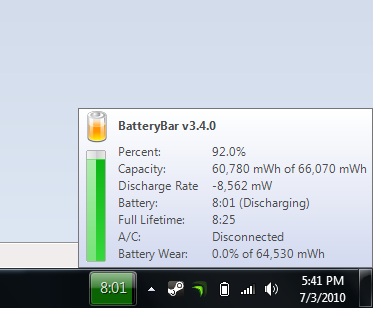
Have a look at Batterybar's estimated runtime on my Z. Yes it's bogus, still, I easily get 5.5hrs from it, a 6 cell battery!
PS the Z is made in Japan. Very surprised by that. So if anything you're paying a bit more for the higher labor cost to build this thing. The last computer I saw that was MIJ was a Toughbook from years ago.
-
The Acer 4820TG for example with max brightness setting has around 5 hours battery life when using it as a internet surfing machine (w-lan).
I don't think the user experiences will change much from the standardized testing.
It's not extremly poor but somewhat under the expectations! -
Any idea where I can get a hands-on demo of this thing before I buy. Maybe even just using the older 15 or 13 models. I wanna get an idea of build quality.
-
I like the degree the e14 screen opens up. I'm using an e15 atm and can tell you on occasion I really wish the screen opened up a little more. I'm pretty sure I'm going to pull the trigger on the e14 as my backpack laptop as it is compact yet powerful and will be great for use when traveling. Thanks erathostenes for the great pictures.
-
For your reference the running processes. I installed a few things but nothing major yet..
![[IMG]](images/storyImages/Processes1.jpg)
![[IMG]](images/storyImages/Processes2.jpg)
![[IMG]](images/storyImages/Processes3.jpg)
-
some best buys used to have models in store but I think they've phased them out. you can check best buy.com to check stock and store availability if you're in the USA
-
Ordered mine.
520m, 4gb ram, and 160gb SSD. -
BTW I just called HP to say that i had a $25 coupon that i forgot to use (which i couldn't use because i used my student discount hehe) and asked if i could still get it applied to my computer, he said he cant apply the coupon but he will just give me a $25 credit back on my card and i just keep the coupon. So here is another way to nickle and dime HP.
So far i have got $100 credited back to my card by calling for 3 different complaints and i used the student discount, so i got my $100 back from them making the starting price at $1099 and not $999. -
I played with a Z11 at the SonyStyle store a month ago and it felt cheap and not like a premium laptop. I owned a Vaio laptop some years back and that was built very nicely and had a premium feel so this surprised me.
-
I'm no expert in windows 7 processes, and I doubt this'll make much of a difference, but maybe try closing some of the programs like:
setup programs
msn toolbar
HP service, HP assistant, HP notification, HP healthcheck
Google services
Sidebar
Also try turning off bluetooth (keyboard shortcut?)
And turn off AERO interface via the control panel
Can you tell us what the mW draw off the battery is then?
Thanks again for your time!
There's also a tool under administrative tools -> reliability and performance monitor (in Vista at least) that tells you whats using the cpu and hd at any moment. I wonder if theres something funky there. -
LOL! That could mean so, so many things!
-
sorry, i tried deleting this one, but i dont know how
-
so what were your other two complains? please do share =D
-
Any thoughts about the fan noise of the Envy 14?
Thanks
*HP ENVY 14 (1XXX series) Owners Lounge, Part 1*
Discussion in 'HP' started by 2.0, Jun 21, 2010.