Problems? See this thread at archive.org.
dlleno - with Cool Sense 2.0 "ON" (which tries to cool the laptop down), I could not run Prime95 without throttling (all the way down to 800MHz). With it "OFF", I was able to get Prime95 to give decent results (steady at around 2.3 GHz). So with it again "ON", there would be no way to simultaneously run Prime95 and Furmark without throttling (which is why I tried with it "OFF" for the simultaneous test). At least that is what I was seeing. If anyone has some other ideas of things for me to try, I would gladly comply.
-
ahh, ok so it appears that in your case, Coolsense 2.0 made things worse. but it could be that your coolsense settings are responsible - your results confirm that the software has some influence over CPU speed (perhaps indirectly) in order to keep things cool, which is not surprising. However, in order to test the theory that Coolsense 2.0 helps alleviate the throttling, we should normalize to bobmitch's Coolsense settings, and evaluate the case where Coolsense is "on" but allowing maximum performance with AC power connected and the laptop is on a hard surface and undisturbed (so the accelerometer does not think you are moving it around). That is, the most "desktop-like" configuration possible.
-
I wanted to use my 1000th post here to thank everyone whom I have shared this space with over these past months. This board is full of some pretty terrific people...KJ, Crimsoned, unclewebb, Fiver5, Iwantanenvy, Apoxxx, dlleno, mcchea (we were the first to post here when we got the Envy's back in March), Spartanjet, TheAtreidesHawk, StephanC, slotti, Cam121, trucha, Peaches07, and many many more. If I have not put your name here, please don't feel offended, just so many to remember. I correspond with many of you numerous times. This has been a place of anticipation, joy, sadness with things are wrong, and especially a place to teach and learn from each other. We may not have the "perfect" systems...but let me tell you we have some of the sexiest, classiest systems on NBR. As we make our way down the road, I hope we get all the issues solved and truly enjoy these fine Envy's.
Bob -
Well, I need to follow up on my last post about throttling.
I just played Dirt 2 some more (in 3d ), and I'm still having some real issues, even WITH throttlestop 3.0 running. The weird thing is that at first it was just like the FPS dropped a bunch, but then later it would start hanging for anywhere between a fraction of a second to about 10 seconds.
I found that it was worse when I used Bobmitch's "performance" presets and got better when I used the "game" presets (with turbo disabled), but still had problems. I went ahead and turned off Coolsense 2.0 and my temps didn't really change, but it didn't drop frames or hang as much as before (so it got better, but it still wasn't perfect).
Temps were pretty low the whole time. Cpu peaked between 70-76* (but stayed much cooler than that most of the time), and Gpu peaked at 75* after 1.5 hours of play.
I'll attach my Realtemp log for part of the time I was playing. Earlier with coolsense on, it would actually throttle down to 798mhz or 997mhz. Once I turned CS off, it usually didn't drop that low, but it was still hanging and the hangs seem to match up exactly with the times when the load % drops down to single digits.
Let me know what you guys think.Attached Files:
-
-
Hi guys... my results (on ATI):
Prime95:
Core speed was between 2,350 - 2,470 and sometimes 2,900mhz+
Furmark:
FPS = Min 9, Avg 26, Max 70
Core speed throttled to 798.3mhz [fan speed slow down a little bit]
, as soon I exited from FurMark fan speed came up again and the core speed also came back to 2,400mhz in average.
...something "funny" is that the Envy started like recommending to switch the graphic card, and changing the brightness, but at the same time reminding me that I need to close the applications first.... LOL -
Visually speaking, this is a PERFECT LAPTOP, no dents, no dead pixels, no crazy heat (thanks to Sandy Bridge and my 9-cell battery
), no weird mouse pad, no gaps, no weak keyboard (it's firmer now), excellent wifi signal, excellent monitor quality, excellent construction quality in general (SO FAR). Haven't tried the Bluray player neither the DVD burner.
Regarding the throttling issue
-Is only under extreme conditions (and only with the AMD gpu)
-It might be a temporary condition or not, but I guess it's like a protection to our cpu/gpu, to ensure a long-term life for our laptop.
-Like somebody said, there might be a fix in the future... I personally don't care too much since I'm conviced that this is under extreme conditions mostly.
The only thing I found weird is the RAID 0 on my 2 640gb @ 7200rpm, it's showing like only having 1 HDD... of 1.2gb, I need time to see if I really don't like it, but I defenitely will not return this baby again, unless something really ugly happen. -
Jose, sounds like you have a winner! As to the RAID 0, that is desired for the setup of 2x640GB HDDs. It is supposed to make the performance that much faster....at least its what I've heard from others. It shows
1.2GB??
Don't you mean
1.2TB? 1TB = 1,000GB. Because its addingi up both the 640GB drives it should show 1.2TB....
KJ
-
Uuufff.. well, that's good to know. But what if I want to get one of the HDD to put it on my future NAS (tentatively a Synology DS211J)... what will happen with the RAID 0 setup?
-
Actually, in Windows 7: 1.14TB
-
Well, than you'll have to break the RAID 0, but I'd suggest see what the other, more seasoned members here have to say. Just from a layman standpoint of view, I'm not sure why you would want to disable RAID 0 and take one of the drives out on such a sweet system. The only way you'll get it faster is if you are going to upgrade the empty slot with an SSD....
Either way, see what the othes here suggest. You can't go wrong with their experience.
KJ
-
Jose...
RAID 0 stripes the two hard drives together to make one. You get 1.2 TB. Don't forget that 29GB is actually used for your recovery partition. In essence, what you get is double throughput on the drives and somewhat lower access time. People have always put down RAID 0, but to be honest...I have run 2 Western Digital Velociraptors in RAID 0 on my desktop for years with only ONE issue...and I made that happen. Don't get me wrong, but any HDD can fail at any time.
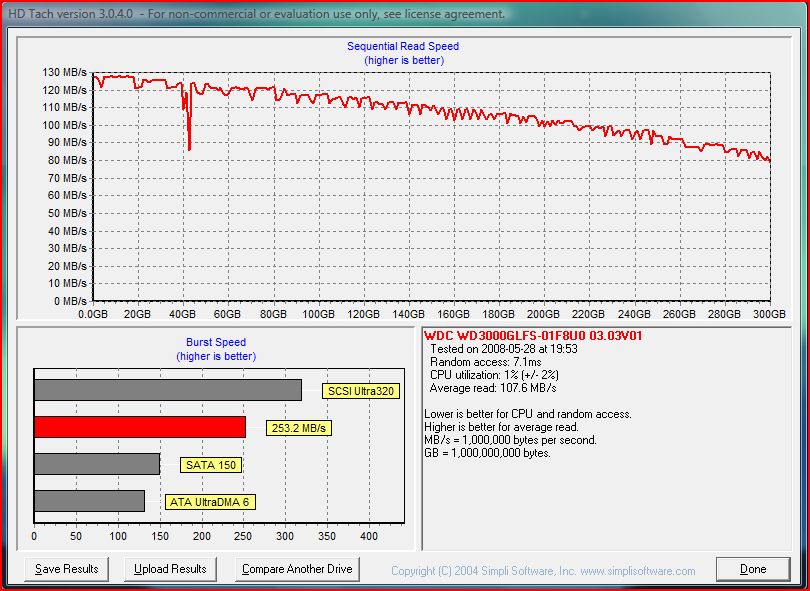
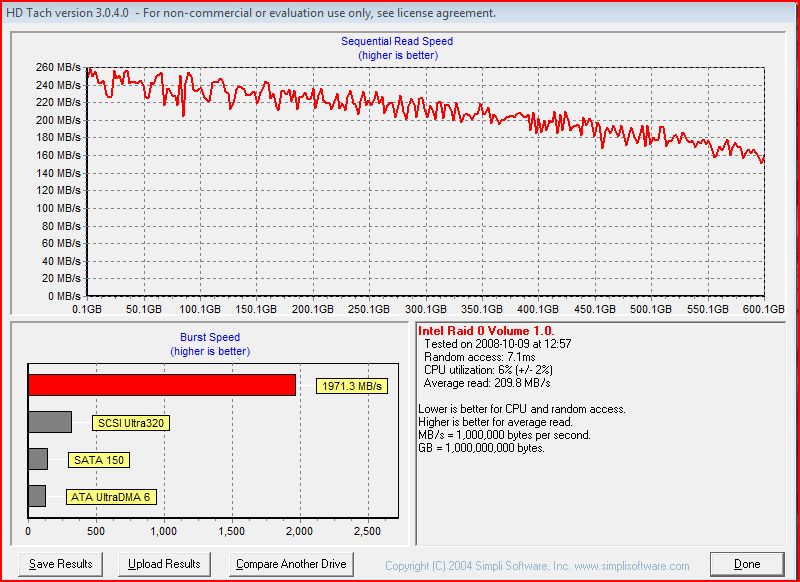
What is it you don't like about RAID??? Here are the benchmarks for a single velociraptor vs two of them in RAID 0. The speed of RAID 0 speaks for itself. Mind you...Velociraptors are 10,000 rpm desktop HDD.
These benchmarks are almost three years old, and from an earlier X38 chipset desktop motherboard from Asus. The drives are currently installed on an EVGA X58 motherboard. Your throughput may be about 10% slower due to the fact that you have dual 7200 rpm hard drives...but your performance is NOT shabby by any means.
Also...make sure to create your recovery disks...always handy...Attached Files:
-
-
For anyone thinking SSD for your machine. A new line of SSD's from OCZ...called Agility 3. It is a cheaper alternative for SATA III (6.0GB)...and looks like OCZ may have created a winner....
OCZ Agility 3 SSD review
The only drive faster is their own Vertex 3 line...
Interesting read -
After returning of my defected dv6tqe and replaced with a Envy 17 3D, I found the passmark score has dropped from 6600 to 5900, both of them used same CPU, 2630qm. In dv6tqe, I can easily stay on 2.9GHz speed but in Envy17 3D, the highest speed I can get is only 2.6Ghz and most time it stays at 800mHz, do Envy 17 3D has inferior CPU or new coolsense has something to do with it? dv6tqe also feels more snap in operation than envy 17 3D.
I am new to this forum. -
I have not played with any other Power Options as yet. My testing so far has been while on AC power and on a flat table top (so no movement to trigger the accelerometer). I will need to do some digging to see what Bobmitch's settings are (I did not see any other settings in Cool Sense though, other than on, off and auto, but maybe I missed something). I know there are additional power settings available in the HP Power Plan tool down in the taskbar. Is this the additional settings I need to tweak in order to normalize the testing?
-
Might want to catch up on your reading:
http://forum.notebookreview.com/hp-envy-hdx/575817-hp-envy-17-sb-throttling-test.html
http://forum.notebookreview.com/hp-envy-hdx/577420-envy-17-3d-sb-throttling-fix.html
http://forum.notebookreview.com/hp-envy-hdx/579857-running-throttlestop-envy-17-sb.html
A known issue
BTW...my oversight...WELCOME! You are in a good place here. Many great people and lots to learn and teach. You are in good hands! -
Try a few things. One..test your system with TS set up and Coolsense on Auto. Then test again with TS set up and Coolsense OFF. Monitor your temps and see how much of a difference you get.
-
Well, I just played for another hour, here are my settings:
Coolsense 2.0 turned to "off"
Throttle Stop 3.0 with Bobmitch's "game" presets turned on
Realtemp logging clock speeds and temps
Results:
-Temps same as before (and same as with Coolsense "on" or "auto") 76* peak for both CPU and GPU (again though, CPU usually stayed in high-60's or low-70's)
-No hangs
-A few stutters, usually lasting for 2-3 seconds, like the FPS suddenly dropped to less than 10FPS, but then jumped back up.
Here is the log:
Also, in the RealTemp log file, why does the time stamp jump around like it does? Example, you'll see in my log just a few pages down that it looks like it throttles down to 798mhz for a while, but if you look at the time stamp, those entries should actually be at the beginning when Throttlestop was being turned on. But look at the time stamps and you'll see they jump regularly and are not consecutive.
But in most of the log, there are only small dips, which match up with the Load% dropping into single digits, both of which match up to the times when the game would start dropping frames and get jumpy for a few seconds.Attached Files:
-
-
jgt_fz6 I forgot to welcome you to the forum; as you can see there are some very helpful folks here -- I just wanted to welocome you without trumping bobmitch's advice above, which is why I will re-quote it below!
and bobmitch -- back at'cha on the learnings in this forum! its been a pleasure to correspond with everyone here!
-
Your cpu looked relatively stable and fast for quite awhile. Only a few minor bumps in the road for a miniscule amount of time...then at the end...throttled to 800...what I find is that it takes a moment for TS to take control...even in my logs...during the immediate onset of running TS I see throttling...then it stops...only to return at the end of testing. Looks good, otherwise. Unclewebb can certainly have a lot more to say than I...
-
jose -- +1 on what bobmitch and KJ are saying re: RAID 0. your Envy came with two HDDs and they are "merged into one", as it were. Files are "split across both" -- imagine having a single piece of paper and passing it through a shredder. take the odd-numbered shreds and put them in one pile, and the even-numbered shreads and put them in another pile. the two piles represent your two disk drives.
the reason this is beneficial is that now you have two firehoses streaming data instead of one, and the HDD controller knows how to combine the even and odd shreds together again to re-construct the file, and to make it all invisible to you and even the operating system itself. The merged HDD pair appears as one big fast drive.
enjoy the additional performance and the space that comes from this configuration - its the best performing configuration short of an SSD. -
Ok then, you are the experts here..... thank you guys for the advise on the RAID 0 setup.
Now just waiting the fix for the throttling issue. -
Ordered on 15th got it on 19-20 and I finally got it here in India just yesterday My Envy 17 3D 2090NR. I like everything about it just got one issue even though this is my first laptop and I havent used this a lot but the left hand side of the laptop just got a little too hot, after a couple of hours is it normal with all the laptops or its just one of the problems with Envy?
-
It's not uncommon. My last laptop was the same way. On the Envy the GPU (graphics card) is located over there and warms things up a little. I've already gotten in the habit of turning the big GPU off unless I need it (so turned off when online or anything that doesn't need powerful graphics), and that makes the left side just as cool as the right side. Try turning it off and within a few minutes you'll feel the left side start to cool down (but when you restart the computer with the power plugged in, it will restart the GPU so you will have to turn it off again if you restart the computer).
-
It can very well get warm, but hot? NO!.... If it truly is hot, its a defect. To be sure, download and use RealTemp and see the actual CPU/GPU temps to confirm. (Edit: actually that will only give you internal temp, so you need to do the outside temp test with wires...continue...) I am not sure if you are confusing warm for hot, but again, run RealTemp. I've seen pics of people attaching some kind of gadget externally to measure actual outside the laptop temps, very cool, not sure what that is called...so you can see how hot it is outside and what your hand is really exposed to. Of course no one should ever have to tolerate a toaster for a laptop. Toasters are much cheaper, and make well, toast.
KJ
-
@Marcus I am not sure how to turn off the GPU fan, can you guide me with it?
@KJ Actually I am not sure if it was just hot or warm its been a couple of hours since then. Anyway can you tell me what would you actually call hot as? I mean up to what degree is it fine for it to be warm when I use RealTemp or whatever that software is called as. -
Ya, KJ is right. If it is really hot to touch, there is a problem. Make sure that you don't put the computer on a bed or other soft surface. The fans on the bottom have to breathe or it could over heat. It should always be on something hard. I have a hard board that I put the computer on when I want to use it on my lap or the bed.
About the GPU: you aren't turning the fan off, you're actually turning the GPU off. The Envy 17 comes with 2 GPUs.
One is the large, independent, graphics processor (GPU) made by ATI. It's what you use when you watch HD movies (especially 3d content), play games, run graphic programs, or do high-level photo/video editing.
The second is the Intel GPU that is built into the CPU (to over simplify). It can handle most daily computer tasks (internet, word processing, most movie playback, etc). Most cheaper computers don't even have a powerful GPU like the Envy's ATI 6850, they just have a GPU that's built into the CPU like the Envy's 2nd GPU. And the Envy's CPU is very powerful so the smaller 'built in' GPU is still going to be more powerful that any smaller computer's GPU, so it has enough power to do most things just fine (just not the big stuff).
By default, when the computer is plugged in, it will use the powerful ATI GPU that uses more power and creates more heat. When you're on battery power, it will ask if you want to switch the graphics processor. You can always make the switch yourself any time you want.
To switch manually:
-Close or at least minimize all windows, so you only see the desktop without any open programs on it.
-Then right-click on the desktop and in the menu that pops up will have two graphics options at the top.
-You can select "configure switchable graphics".
A program will open.
-At the top it will tell you if you are currently using 'power saving' or 'high performance' graphics (meaning the small Intel GPU or big ATI GPU).
-Below that, you can click on power saving or on high performance and it will switch manually. The screen will flicker off and on and it will switch.
So switch to power saving and you will see that the left side will get cooler. Just remember that every time you restart it will automatically default to the higher performance ATI GPU and you have to tell it to switch. And remember to switch to the high performance before playing games or other graphics-demanding tasks. -
Others have addressed what RAID0 is, why it is good and why you want to keep it, but I just wanted to say that if you do indeed want to pursue this, breaking the RAID array will require a complete re-install/restore of your system so definitely back up your data before going down that path.
-
I had the same BSOD issues and last night I received my replacment laptop. I had a 2070nr (non3D with a 2630qm and 2x500gb 7200rpm) and they sent me a 3D model with 2820QM and 2x640gb 7200rpm. I also noticed that the bios revision is F14 dated 5/4/2011. So far so good, i forget the exact model since im at work right now but it definitely did not have 7 Sp1 installed.
-
Marcus2137: Is it possible that you have RealTemp running in more than one account on your computer or maybe more than one instance of RealTemp is running in the same account. That might cause the log file timing issues that you were seeing if two versions were both writing data to the same file at the same time. It's also a good idea to keep the log file closed while logging data. New data might not be written to the log file correctly if it can't write the data out to the file because you have the file open in Wordpad.
For best results, open up the Task Manager and make sure only 1 instance of RealTemp is running and when done testing, exit RealTemp before opening up and viewing the log file. Also set the log file interval to 1 second so you don't miss anything. -
Wont be able to check now if its just warm or hot will do that tomorrow. I just hope that its just normal heat and nothing that to worry about.
Oh you were talking about switching from ATI to Intel GPU damn I had no clue how those GPUs worked, but you cleared my doubt thanks and thanks for the advice to use a hardboard or something. Did not know that you shouldnt always keep your laptop on a hard surface where. -
Heeey
Okay this isn't really a question about the Envy itself but I hope it's okay I'll ask it here anyway. Okay I installed a program that I uninstalled cos I couldn't get it to work, and now a file in that folder won't go away says it's open in usb 3.0 monitor (Super weird since the program had nothing to with USB at all, it was Replay music) And I checked the process what do you call it in english? Well where you see open programs and something called USB 3.0 monitor is open, is it safe to close that to delete the folder or is it something that needs to be running?
Thanks! -
So I have been installing some things, itunes steam, etc... and I have been getting rather worried. I finished installing GTA IV Just Cause 2 and Mafia II yesterday and have been messing with them since. While playing GTA I noticed a steady but small lag every few seconds so I thought it might be that I had the settings too high but after lowering everything as low as possible it still persisted. This doesnt really bother me because I know that it isnt the best game for windows but then I experienced something different. After playing mroe than 10 minutes straight (time varries but it never happens right away), regardless of the settings I would hear get significantly louder and at the same time the game becomes nearly unplayable (Incredibly low refresh rate, very choppy, slow motion) and then after 10-30 seconds it will start to come back, the fan speed will decrease, and the gameplay will return to normal. Again I figured this was just because of the game but today I found that the exact same problem (I think) happens in Just Cause 2 (Also across various levels of detail). Some background info: I am using throttlestop and I followed the guide to setting it up that was in this forum, I am not using RAID 0, I am using the extended laptop battery so ventilation is good, none of my throttlestop temps have exceeded 81 degrees C, I am plugged in while doing this, not using 3D, Coolsense isnt active in my tray. Im not sure if any of that is relavant or if Im missing anything important... Any ideas?
-
Renewing this post. Does DVD's look bad for you as well? Mine looks like bad quality in whatever program I try. And in PowerDVD10 movies in lets say DivX formats get some weird effects on them like cartoonish kinda.
I don't know what to blame the bad quality on, feels wrong to blame the screen or laptop so I'm saying it's the DVD's but still, PowerDVD says to make all movies into HD, I can't tell that it's doing that, that's for sure.
And oh ,the attached is a pic from a DivX movie in PowerDVD, bad quality in the clip itself but there looks to be some weird cartoonish looking effect ain't there?
Edit, urgh okay... I tried seeing the same movie on my TV, the DivX movie and it look almost the same, just a little better not super much. I don't know if I'm tricking myself into seeing some weird effect but I still think DVD's look bad and it's a shame on this awesome screen Guess I'll stick to watching DVD and bluray on my TV and watch 3D on here, if that's the only way to get good quality
BUT i remember on my HDX I saw the same according to jim episodes and the effect I think I'm seeing wasn't there then, might be cos it's a smaller screen so I didn't notice or whatever I don't know, but if anyone has any idea if it could be as simple as a setting or something, I would REALLY appreciate it! <3Attached Files:
-
-
Indeed, my original order is dual 5400 RPM, I get 7200 RPM Seagate momentus instead.
LM126AV
Mine have everything that you mentioned above.
Goodluck with it, cant wait to hear back what you get on the 28th.
What things that you did before the computer give you guys BSOD's? I havent got one so far, but might be because I havent use it that much yet. Coolsense 2.0 is set to Auto by default. it has minor cosmetic issues that I can live with then the previous two that I received.
PS: Does SC II is a good game to test the throttle by the FPS count?This is a CPU intensive games. -
As for my "cartoonish" thing in PowerDVD the update that was available for it totally took that away whatever it was, now it looks good, and DVD looks better, my bro says his DVD's don't look super good on his 24" FULL HD screen on his PC either, I think it's because maybe the DVD's themselves don't have as good quality and I'm used to the PS3 upscaling them to 1080 on the TV.
My bro also said I'm suffering from a bluray syndrome haha, Since I watched so many blurays lately I'm used to the awesome quality that brings so now I think everything else looks bad haha, he might be right in that ^^
So whatever the "cartoonish" stuff I thought I saw on PowerDVD is gone, it looks better after the update so I'm sure there was something a bit weird in it, but I'm glad it's gone so
EDIT, The DVD's actually looks A LOT better now I checked with another one, it's awesome actually. Don't know what the update did but it's better now then before, at least for me. -
new_vaio_F - I was never using the laptop at the time of the BSOD (it was idle). I was able to catch the actual BSOD a couple times and it appeared to occur near when the screen was blanking or switching to the screen saver. The majority of time, I would just find the laptop back at the login, and after logging in, I would get a message from windows saying something to the effect that there was an unexpected shutdown. I was able to catch something about ati****.sys being involved in the BSOD (the BSOD does not stay displayed for long, just long enough for the machine state to be saved to disk for the debug dump). It might be related to the ati graphics driver (maybe a timing window of some sort related to blanking the screen).
-
Hello readers. Bios f15 released 5/27/2011 at hp support site for LQ621av , Lm126av-2100 CTO Envy 17 3d's and both f8 3/25/2011 and f15 5/27/2011 are shown at site for XG360AV - 2000 CTO Envy 17 3d's. Details not provided at the site. Specific to windows 7 64 bit.
-
thats funny i just went to the site to update my bios and saw the f15 was up so i flashed it and got on here to see your post that its up haha
-
Ok, so you guys who just updated the BIOS, can you run the throttle test now without using Throttlestop and see if this is really the fixed BIOS we have been waiting for?
KJ
-
TITLE: HP Notebook System BIOS Update (Intel Processors)
VERSION: F.15 REV: A
DESCRIPTION:
This package provides an update to the System BIOS. The update installs on
supported notebook models using a supported Microsof Windows Operating System.
A reboot is required to complete the installation.
PURPOSE: Critical
SoftPaq NUMBER: sp53345
SUPERSEDES: sp53127
EFFECTIVE DATE: 27 May 2011
CATEGORY: BIOS
SSM SUPPORTED: YES
PRODUCT TYPE(S):
Notebooks
PRODUCT MODEL(S):
HP ENVY 17
OPERATING SYSTEM(S):
Microsoft Windows 7 Enterprise 64 Edition
Microsoft Windows 7 Home Basic 64 Edition
Microsoft Windows 7 Home Premium 64 Edition
Microsoft Windows 7 Professional 64 Edition
LANGUAGE(S):
GLOBAL
FIXES:
- Fixes an issue where the notebook operates slower than expected when running
multiple programs.
PREREQUISITES: None
HOW TO USE:
1. Download the file by clicking the "Download" or "Obtain Software" button and
saving the file to a folder on your hard drive (make a note of the folder where
the downloaded file is saved).
2. Double-click the downloaded file and follow the on-screen instructions.
Copyright (c) 2011 Hewlett-Packard Development Company, L.P. -
There is a heaven, indeed. f.15 cured my throttling. I ran furmark 1.9.0 and wprime...CPU bottomed out at 1950 MHZ. Will do more extensive testing. Can't log with TS because it will interfere...will try to log with Realtemp
***UPDATE***
To quote author Jean Shepard from "Christmas Story" Ralphie's dad tried to fix the lamp and it didn't make it. Now the paraphrase: "Bob ran wprime and furmark and duing the duration of the test, throttling was gone...dead...muerte...so Bob took it out into his back yard and buried it...I swear I could hear the gentle playing of Taps as he buried throttling"
One caviat...turbo boost doesn't work during 100% GPU and 100% CPU load at the same time. During the test and loads, the machine allowed the temps to rise, while no throttle. Once the test terminated and the load dropped...the cpu throttled down to force cooling and then ran at rated and higher. So performance is there...Thermals are a bit warm...but still within thermal tolerance
Yes my friends...throttling...a gonner! HP...thank you!Attached Files:
-
-
After chatting with HP about throttling several days ago they said a BIOS fix was incoming. I didn't think it would actually happen. This is AWESOME news!
-
I, personally, want to thank unclewebb...who supplied us with the way to prove this issue was real. His great program gave us hope and the rest was up to us and HP. Job well done everyone. Unclewebb...we are all endebted to you.
-
YUUUUUUUPIIIIIIIIIII this fix comes just a day after my baby was delivered...
-
Allright!!! Whoowowowwo~!!!
KJ
-
Jose...you are gonna love this machine! Are you glad, now, that you decided to move up from the Pavillion?
-
Very cool....and my machine arrives on Tuesday!
-
You're welcome Bobmitch. Three cheers to HP for handling this problem in a very professional manner and getting a fix out into users hands before the weekend. Dell could learn a thing or two from HP about how to handle a throttling problem.
-
Awesome news!!! Glad for all you current owners.
-
I dont know if it is just me but I am still experiencing BIG slowdowns in GTA IV periodically (the fan starts working really hard for a few seconds and then I have to stop, let everything settle, and wait a bit) this is without throttlestop but when using the program there seemed to be no change/worse episodes of it (probably just my judgement) could it be the power draw or just the bad port? Other games run smoothly now however but I dont think they tax the system as much...
*HP ENVY 17 & 17 3D (2XXX series) Owners Lounge*
Discussion in 'HP' started by 2.0, Mar 14, 2011.