Problems? See this thread at archive.org.
I don't have that program installed so can't really say.
Do you still have HWiNFO64 on your system? If so, check the "smart battery" section at the bottom of the main window list and see what is says for wear level. Mine is still at 0.0%.
You might need to calibrate the battery.
-
BTW what kinda battery life are you getting gunny5821? And do you have the 17 3D or plain old Envy 17?
-
HWINFO is reporting 0.0% wear. How does one "Calibrate" their battery? By the way, the program I was referring to is actually called, "HP Support Assistant". I than went into the "Troubleshooting" Section, selected "Power, Thermal and Mechanical", next under the "Power" tab, I selected "Battery" using the advanced settings...
-
I have the Envy 17 (non-3D, See Signature Block), which I love by the way.. I have the 9 cell battery installed. I just watched the new Transformers 3 movie, which ran for about 3 1/2 hours and had about 30% left at the end. If I'm playing one of my games, I will get about 2 1/2, since the game pushes the Envy. I carry the 6 cell as a backup when I go out and about.... Taking everything into consideration, I think I'm getting pretty great battery life, at least I'm happy with it...
-
Hey guys, I have a "Rep Power" question. I have been delving out recommendations, but I don't see peoples numbers changing. Whats up?
-
If HWiNFO says 0.0% then I wouldn't worry about it. If you don't trust that, you could install the trial version of BatteryBar and it will tell you the wear level as well (or just buy it, it's only $3).
To calibrate, boot to BIOS and then pull the AC power. Let it run until it dies, then plug the AC in and fully charge it. -
So when I do this, I just let it sit in BIOS until the Envy goes off, is that correct? This will be an overnight deal. But I'm not worrying about this, just had a question since it kinda caught my attention. But I will calibrate this coming weekend...
-
The PC actually doesn't have anything to do with the calibration process besides acting as a load and charging host. The calibration is done by the Smart Battery circuitry in the battery itself.
Booting to BIOS is just an easy way to completely drain the battery without fooling around with power settings in windows. -
You can also do safe mode as well...since no drivers, etc load...
-
Did you one back...long overdue! See if your total changed...
-
Hey Alf, thanks for the info... I don't seem to have this option, unless it buried somewhere. Where do you access the option from? Power DVD10 came on my laptop, it doesn't say whether it's Ultra or not. I have updated it with the most recent patches but can't seem to find any SBS or original settings buttons.
I am glad they bundled something to watch BluRay on the system, but I'm not overly impressed with PowerDVD. It takes quite a while to load discs and making any changes to the screen while it's running, shrinking or moving the window etc makes it stutter or stop and resume again, often doing another disc read lag first. If I have a DVD or non 3D content, I just watch it in Windows Media Player, I can specify percentages in that and after the initial loading it doesn't stutter or glitch out no matter what I do to it. I am also suspicious that Power DVD is causing my screen darkening issue. All the times i have noticed this start to happen I have had PowerDVD open previously in that session. Not saying that it's the culprit for sure, but I am suspicious.
Either way if you do have any direction on where that SBS setting might be I would certainly appreciate it!
-
Thanks for the heads up, I'll have to try that. I almost always need the internet when I'm on my laptop though and don't have a wired access at the moment. Could I test this by using another USB based Wireless card? I have a Linksys AE1000 that I could add in to test for awhile, while I disable on board wireless. I use the laptop to do graphics design for a web company and so half of my job involves uploading and switching out files. It would be great if it was something relatively easy to solve or work around like this though!
I'll also get a hardware temp monitor. I don't think that's the issue though, simply because like you said, any time I have had a computer overheat and activate it's safeties in the past it totally shut down rather than lock up. Also my system doesn't even feel hot. I can rest my hand on the palm rest without discomfort and the air it's exhausting on the side, while warm, doesn't feel that hot. Better safe than sorry though. Thanks for the advice, I'll try it out and if I can eliminate one thing or the other for certain I'll post about it again here on the forum for the benefit of others. -
That should work too. The updated drivers of the Intel 62xx cards are known to conflict with some popular wireless router chipsets. The older drivers appear to be stable but others have reported that upgrading to the Intel 6300 is a better solution at a low cost. Right now, you are trying to narrow down the source of your issues, so before you run out and buy anything, let's make sure we know where the problem lies.
I only made the overheat recommendation to ensure we aren't chasing after the wrong culprits. It's very easy to monitor so something that should be done first when picking the low hanging fruit of problem resolution. -
I'm wondering if maybe my "LACK" of wireless problems results from me using the "G" version instead of the "N" version. My wireless router is about 3 years old and it didn't come with the "N" version. Maybe that's why I'm not having any issues. Although, I rarely ever use the wireless part at home (now, although when I first got my Envy I ran it wireless for the first 2 days, but again on the "G" version), because I just connect to my Ethernet cable. However, when I'm at StarBucks, I'm wireless and never have a problem, but I don't know which version they are running..
Just some random thoughts... -
"Ravenant211", I don't know if your using anything to monitor your temps with, but two really good programs are "HWINFO" and "Core Temp" which you can use as a desktop gadget.. Here are the links:
Core Temp = Core Temp
HWINFO = HWiNFO, HWiNFO32 & HWiNFO64 - Hardware Information and Analysis Tools
Maybe it may help... Good Luck! -
I have the D-Link DIR-655 N router and have never had freeze ups or anything with it. My connection speed is 130 kbps...never get the 300 without the higher band...but I have a fast enough connection.
-
I wonder why some of us have freeze ups and others never have a problem. Strange, to say the least, but I have never had any freeze ups what so ever...
My connection speeds are 54mbs wireless and 100mbs Ethernet, I wish I could get a faster connection, but I have DSL from Verizon and the price is perfect since I got locked into a price freeze, as long as I stay with them.. The only other service in my area is the cable company and Clear Wire, but the cable and clear wire both throttle their services, where as Verizon DSL does NOT! -
In 99.9% of cases where you connect the Envy to a G router...you won't see issues.
For all of us with N routers...do some homework and we will see that Router chipset is going to determine issues, or not
My router
DLink DIR-655 Chipset is Atheros...single band...no issues...
Post what you have and the issues you are having. Also...if you have an N that has issues...go into the setup and temporarily set to G. Do your issues go away? -
It sounds more and more likely that I am having the issue with the wireless. I haven't had a lock up yet and am still testing the wireless theory, but I would be keeping in line with what others are experiencing. I use Wireless N exclusively at home, all my system are on N connections and that is where I see the lockups. If I am using my computer at work, so far anyway, I have not had an issue and they use a G connection there.
I am using a Linksys WRT160N version 3 (Don't know the chipset though) I believe this router is a dual band. My Envy is the only system I have an problems with though. I even run a PS3 and Wii into a D-Link DAP-1522 wireless bridge so I can keep everything at N speeds and those run smoothly as well. (Had to do this, if I leave the router in mixed mode for the consoles my N adapters on the PCs all run at half their max speed...)
Don't know if my router is on the bad list but if I don't see any freezes for a bit I think it will be a safe bet that it's the wireless on my system as well. I can confirm in hindsight that every time I had an issue I was connected to and using the internet for something as well as whatever else I was doing.
Oh as a side, my temps are staying around 49-53C... If I open a ton of stuff and work I get upper 50s low 60s. Definitely sounding like the wireless at this point to me!
-
I have a wireless N router...the Linksys WRT610N. Dual Band router and I've had no issues connecting to either band.
The 2.4GHz one is the b/g and the 5GHz one is the wireless N network.
Do we know what model generation HP is shipping for the Envy? Are they up to the 3000 series yet? -
WRT 160N uses Broadcom 4704 Chipset
-
WRT610N uses Broadcom 4718 for V2 of the router, 4705 for V1
-
Is that one of the chipsets known or not known to work with the Envy? I never had any connection issues or freezes with my Envy thank God.
I'm just depressed that I had to send it back (which I did earlier today). If not for the screen issue it was perfect but there was no way I could continue to ignore it when everytime I opened the damn thing it was poking out and making my laptop's lid have pucker lip syndrome or something....
Anyways I'm hoping that the next one doesn't have the same issue. -
Let us know when you get your new one.. Nothing like opening that brand new Envy. Only thing that comes close to that is an Apple product, but I think HP with the Envy surpasses even the Apple MacBook! Considering my Envy runs about 12-14 hours a day, and not a hiccup, I would say it is one heck of a Laptop!
I just wish HP would make a 17" version of the solid "Black" Envy (ex. HP Envy 14-2160se). The big down side is no full HD. I think they would have trouble keeping them in stock if they ever did do it, heck maybe the 3000 line will offer one. What do you guys think of that model??? -
I would say that if you had no issues with the first...you will not have issues with the second...simple as that.
As far as Broadcom...there are so many chips. Buffalo uses the Broadcom in their routers. Linksys used to before being taken over by Cisco, and Netgear uses them as well. Hard to pinpoint one specific chipset to avoid...but there are people on this board with issues...if they will post, we can determine at least a small sample -
Question, is "Intel Anti-Theft Technology" available to us Envy owners after purchase, or is it something that must be built into the Laptop prior to purchase?
Hey BOB, I have not seen a change to my external "Rep Power" number, but I do see a change under the "User CP" area... Wonder why they are NOT matching up? -
So I'm pretty sure it WAS the wireless issue, I used an AE1000 USB N card all day yesterday and switched over today to the older Intel driver before I started working for the AGN 6200. I needed the extra USB port lol! I worked all day with no issues both days so I'm calling that one solved for me. I really appreciate the assist on that one, I would NOT have ever guessed that one!
I am still having one weird problem that I have no idea about at this point though, and that is the flickering external monitor. It's still dimming erratically and unpredictably, but I have at least been able to narrow down when it happens.
It only happens when I'm watching video of any type that is moved to the secondary monitor (DVD, Netflix, video files from the PC etc.) Doesn't matter whether the video is full screen or reduced to various sizes. If I move the video over to my laptop primary screen, the flickering stops. If I move non video windows over to the secondary monitor it never happens. Move the video back over to the secondary monitor and is starts up again.
Any idea at all what this could be? I have been looking around but can't find anything about an external display behaving this way on any laptop or PC. The monitor in question has been used as a primary display up until about a month ago on another system with never any issues at all for over 2 years so I'm thinking it's something to do with the Envy, especially since it only happens when video content is running on the screen. At first I thought it was tied into when I moved the mouse, but its not... it just often SEEMS to make the screen brighten again when I move the mouse, but not always. It's usually only for a second or two that it dims and then it comes back to 100% thought at times it will dim for as long as 10 seconds.
Video player doesn't matter, have tried Power DVD, Windows Media Player, Silverlight in IE and flash video in Firefox, all have the same behavior. Don't think it's tied to screen dimming features in the power management either, because I adjusted the percentage to dim in advanced to dim only 10% to 90% total brightness but the screen still dims to the amount it always has (I would guess a drop of about 40% to 60% total screen brightness).
Any ideas at all? Ever heard of anything like this? The screen/system still responds and no video stuttering or lag or anything, just a very distracting random dimming... thanks again for the help so far, you guys have been great!
-
No for anti theft...go here:
Absolute Software | LoJack for Laptops: Track, Locate, and Recover Stolen Computers
Nothing built into the machine. Interesting about the rep power...maybe they stopped letting us give reps to people...wish a moderator would answer that one... -
Which port are you using? Have you tried to switch and use a different port? I'm thinking it may be a port issue..
-
Hi Gunny, I'm using the VGA port. Unfortunately the monitor I'm using (Samsung SyncMaster 2233SW) only has DVI and VGA... the Envy 17 3D I have (unless it's hidden somewhere?) seems to only have VGA, HDMI and what I believe to be a mini Display Port connection? I would be willing to buy an adapter if I could find one locally to convert DVI to HDMI but I live in a fairly rural area and I don't believe that is something anyone carries... Guess I could try Radio Shack or Staples, but I think it's a long shot around here.
I kind of suspect the port as well, seems its maybe acting like it's not getting enough juice or something to handle the video or a bad connection to the motherboard confuses the laptop with all the signal coming in? Don't know. Unless you guys happen to know where a DVI connection is hiding on an Envy 17 3D I'll see if I can get a hold of a converter somewhere and try that out and report back if I get to try it. -
You can buy an hdmi to dvi cable. Basically an hdmi male on one end and dvi male on the other. Check something like Monoprice.
-
Thanks for the heads up Metril!
I checked out that site and it looks like the cheapest option I have seen so far. Sounds like a good plan to me, especially since I don't know for sure switching cables will fix the issue. -
I bet that will resolve all of your monitor issues.. Since HDMI is pretty much the standard now, and with the low prices at Monoprice not to much overhead either. That was a Good link Metril. Please let us know how it works out...
-
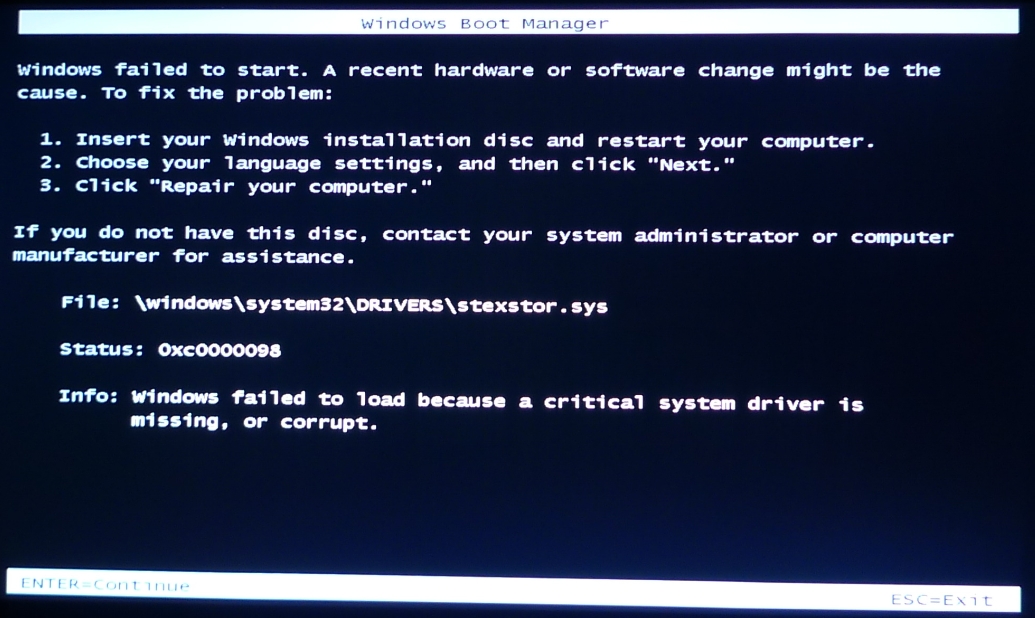
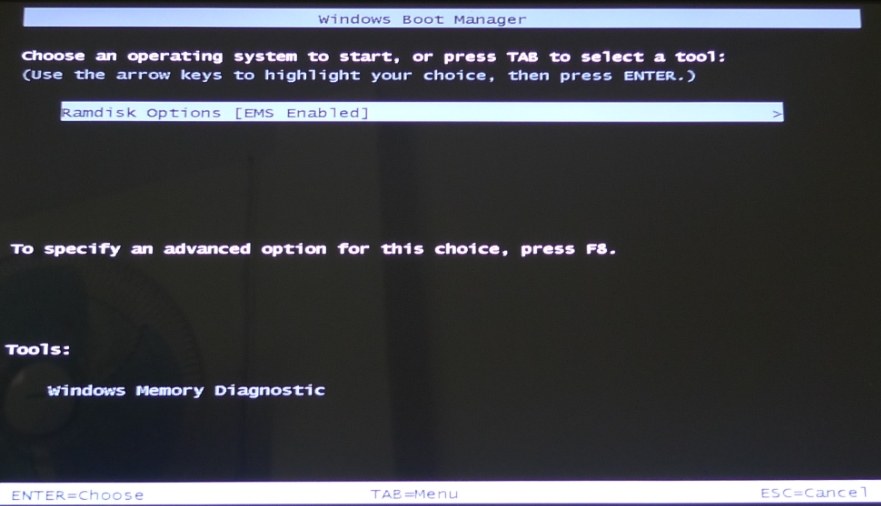
Well yesterday the HP ENVY 17 2280NR system Windows 7 recovery discs came (2 x Dual Layer DVD's) and a single Application and Driver Recovery DVD. I was able to boot off the first disc, then it asked for disc 2 then asked if I had any more discs, I put in the final Application and Driver Recovery DVD. All good, it ran for about 60 plus minutes reading all these discs then ejected them for a reboot and then nothing! The attached screen pops up with Windows fails to start. I tried it with RAID on or off.
I'd have thought system recovery discs should run and restore a system? What could be wrong or have I changed something in the BIOS or RAID settings that could cause this? All ideas very welcomed please.Attached Files:
-
-
Based on the following info, not sure what to recommend. Promise has nothing to do with the Envy
stexstor.sys
You might try using my guide to see if you need to re-write the Master boot record...
Look here:
http://forum.notebookreview.com/hp-...ay-fix-hp-envy-17-3d-pavillion-notebooks.html -
1. Have you tried option #3 on your prtscr? If you input your 1st recovery disc, you should get presented with a page/menu. On that page are various system recovery options as well as TEST functions.
2. Also, do you remember ALL of the things you changed in your BIOS? If so, please share with us. If NOT than enter the BIOS and RESET to DEFAULT, press F10 and chose to exit with SAVE. All is not lost yet, it is probably some little thing you changed that is causing the hangup and maybe it is in the BIOS, which will hopefully get straight with a reset to default.
After 1 & 2 above, if your system doesn't start, try the recovery disc's once more (You did choose the option to "RESET TO FACTORY OUT OF BOX" correct? You didn't choose any of the restore point options did you?) and see if it will come back to life for you.
If you can provide any other info, it would help. Please keep us advised..
Some Interesting Link:
1. http://www.faultwire.com/file_detail/stexstor.sys*36780.html
2. http://www.promise.com/storage/raid...m=571&sub_m=sub_m_5&rsn=4&statistic=SuperTrak
So after reading a lot of various pages, maybe your problem is still tied to that RAID issue.. -
I wonder if he was sent the wrong restore discs?
-
Yes, the Envy 17 comes with VGA, HDMI and Mini Display ports. I personally stay away from VGA when I can. I had an external monitor that only had DVI and VGA so I purchased a Mini Display-to-DVI adapter. It was meant for a MAC but it worked fine on the Envy. However I got tired of the bulkiness of DVI so I bought a HDMI-to-DVI cable (also previously suggested) and it worked fine as well. Got both items off eBay for cheap (less than $5 each). I eventually upgraded to a new external monitor and went native HDMI.
-
The thought has crossed my mind as well, especially since my reading says the file in question is mainly issued in the RAID "SERVER" environment.
palatkik - What do the Disc Labels say, exactly? Did you receive any receipt or paperwork with them, describing what you were sent? If so, please share. Confirming, you do have the Envy 17 3D, standard model, correct? Did you have it custom made in any way, if so please share...
CAM121, brings up a valid and concerning question... -
Just an FYI for everyone using Cyberlink Power DVD 10. I don't know if you have checked your software for patches, but I did yesterday and actually found one pretty significant. It changed enough that it totally uninstalled the current version I had and re-installed this version. How to check. Open Power DVD 10. In the top right corner area, you will see a small "Blue" circle with a "White" arrow pointing up. Click it. Now a window opens with 3 tabs. The 3rd tab says "Patch". Select that tab and see if you have a FREE patch pending for your software. If it is there, click it and than just follow the prompts.
This is the File Name: HP-CNB.HP_RiTA10_v2808_DVD110414-02_Normal
ALSO:
After I installed the patch, I had Power DVD 10 version 10.0.3.2815. I subsequently ran HP Support Assistant and checked to see if I had any updates pending. It provided a Power DVD upgrade as well, bringing Power DVD to my current version of 10.0.3.3222. Note however, that this release was NOT available until after I ran the patch... Just another FYI...
So check yours and good luck! -
I will let everyone know how it turns out when I get the cable! I also don't like using VGA, it was the only way I could hook up the two with what I have already though. The clarity is never as good on VGA, but other than streaming Netflix etc. to distract my A.D.D. brain while I work, the only thing I use on that side is menus for Photoshop/Illustrator and file browsers etc so it didn't seem that critical... until it started flickering anyway lol!
Gunny, did you happen to notice if that SBS "original settings" option is still there on your version of Power DVD and where it's at? I still can't find it on mine... I had already downloaded the most recent version through Power DVD but I can't get the HP update until they include it on their software page. I don't have HP assistant installed on my system at the moment. I have always had abysmal luck with automatic driver "help" software, especially vendor provided ones Since this is a laptop I need for work I avoided installing anything that could potentially hijack, crash, or glitch out my computer on the bundled software side of things.
If you still have that SBS option and can tell me where it is located I would definitely appreciate it
-
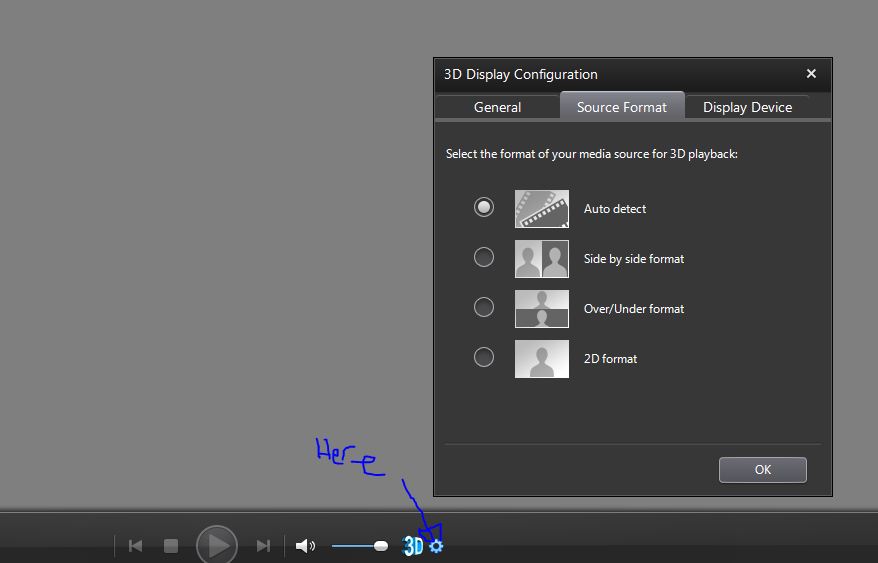
You need to change the source format under the 3D display configuration. It's in all versions that support 3D playback, so if you can't find it, look harder.
-
Unfortunately, it wasn't I who informed you of the "SBS" settings, since I don't have the 3D version. I think it was "Alf Tanner" who gave you that lead..
Regarding the "HP Support Assistant", that should have come stock on your Envy. I find it to be extremely useful and definitely worth retaining, especially the updated version.. But everyone has their own likes and dislikes.. -
Yo, here's where it is on my system
Attached Files:
-
-
Thanks guys,
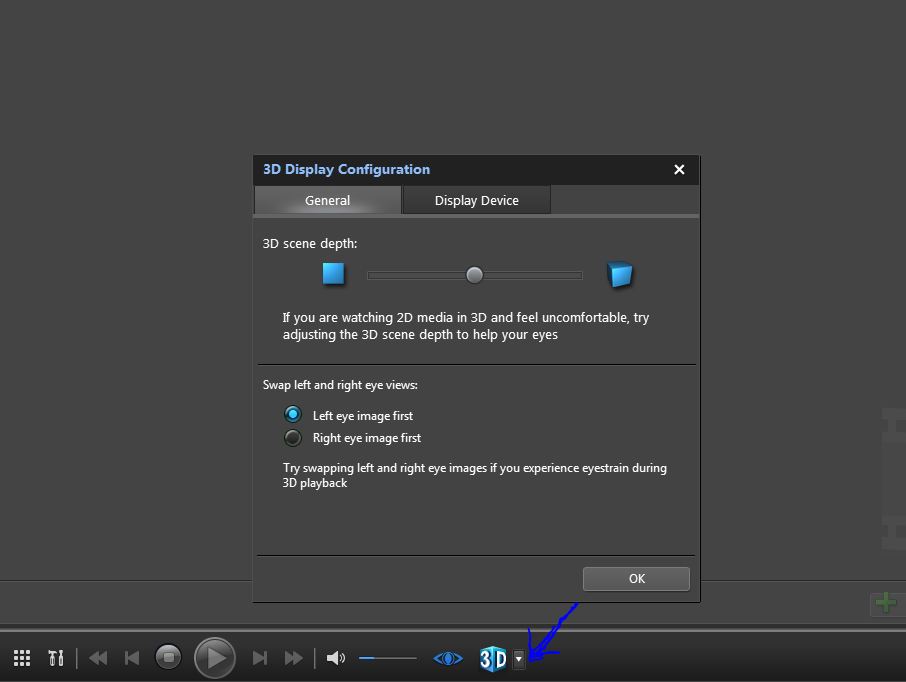
I guess I don't have the same version of PowerDVD... or my Envy is set up different... (anyone with a 3D 2290nr have this option?)
My settings button looks different, like an arrow rather than a gear and the actual settings menu appears to have that tab removed from it?! I attached a screen shot to show the difference.... wonder why?Attached Files:
-
-
Well to resolve the question about Pwer DVD 10, lets just determine which version each has. Here is how you can tell:
Open Power DVD 10. In the top right corner area, you will see a small "Blue" circle with a "White" arrow pointing up. Left Click it. When it opens, directly beneath the title POWER DVD 10, it states, "CURRENT VERSION" and than lists the number series for the version. For example, mine says; 10.0.3.3222
SO, which version are you guys using?
Hope this helps narrow down the differences....
-
I'm running 10.0.3.2815 with no option to patch further from within the software anyway.
-
That is the same version I had and there was a patch for it, see my post back a page or two for directions on how to check...
-
Thanks to Bob and Gunny for ideas. I have an ENVY17 2280NR which is 2D only.
I received 3 HP recovery discs 657677-001 & 657678-001 printed on the DVD's (which are Win7 SP1 recovery discs) in unmarked bags. Also I got Driver DVD with part# 660020-B21 on it (although the sealed bag it came in says 660019-B21). The packing list from HP says 657676-001 and 657676-001-CD1 for the Win discs (go figure?) besides 660019-B21 - so I'm not sure if I have correct discs or not?
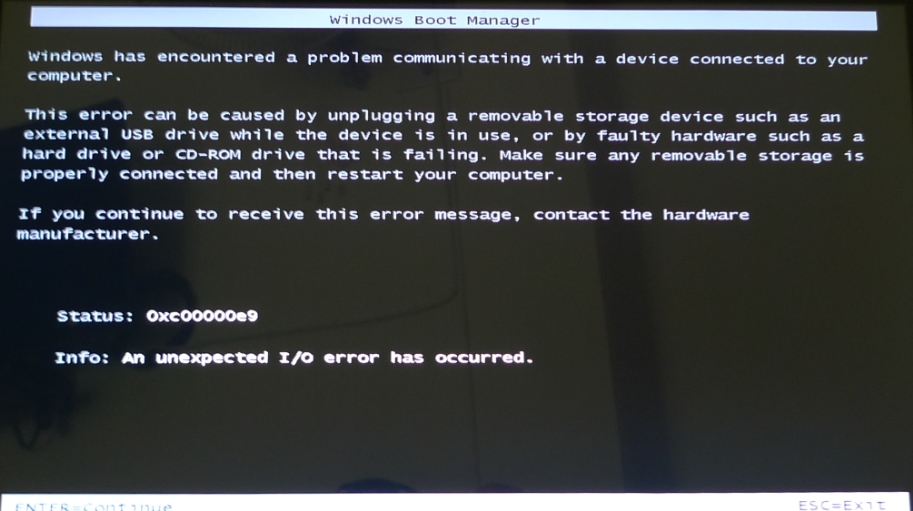
I am unable to recreate the last prtscn image I showed but now I have restarted from scratch as Gunny suggested. Pressed F9 in BIOS to reset defaults and saved with F10. I notice in this setting RAID ORUM UI is disabled in BIOS? Anyway if I enable it and look at RAID settings with Ctrl I I have no RAID discs? I tried the install discs with no RAID and then did it all again with RAID and got the same result. I suppose RAID should be on to get the as shipped from factory status?
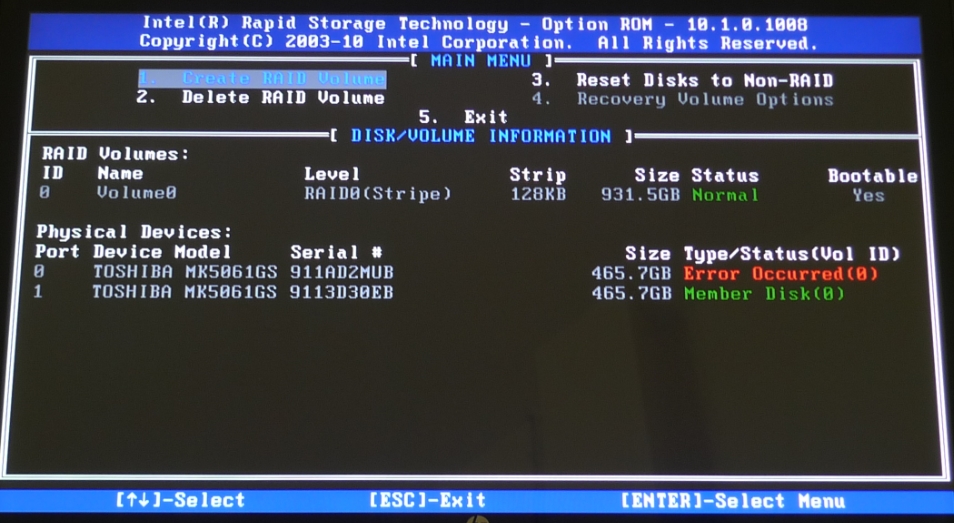
After the last disc (3 of 3) I get the following two screens and can go no further whenever it reboots. The third screen capture shows the RAID UI with an error remark. Any ideas of any this is appreciated?
I guess I will try and contact HP about it next again. It's rather difficult as I'm twelve hours in front on other side of the globe just now! I still have option to return it to Amazon within 30 days, but surely this must be easy to fix. I guess HP will just ask for laptop to be returned next after they have already sent the recovery discs? I will try and call them in office hours as the Indian call center was hopeless out of hours.Attached Files:
-
-
The third capture with the error is one I am all too familiar with. It drove me crazy for a while, until Intel released new RAID drivers. My error was always in Yellow...I am not comfortable with the RED message...it seems to be one of more than caution. With that said, even with the error message, I was able to use my machine. Intel Rapid Storage manager has an option to reset the message as well and turn both drives back to green, as long as it is not a major hardware malfunction, in which case...it will return pretty quickly. This was a few years ago, when Win 7 first came out. It could also be one of the drives is not performing correctly.The drivers have not been an issue for a while, so my suspicion is one of the drives is NOT quite right. If you can break up the array and test each drive individually...might find an answer. I have two WD Velociraptors in RAID 0 on my desktop and these errors started like this because of drivers. Later, when the error occurred again...one of the drives went out of commission and had to be replaced. I have never seen a Toshiba utility to test the drives, but there is one from HP built into the machine. Testing the drives is going to take a long time, but see if there are error codes. Those codes are the ones that technical support can identify....
*HP ENVY 17 & 17 3D (2XXX series) Owners Lounge*
Discussion in 'HP' started by 2.0, Mar 14, 2011.