Problems? See this thread at archive.org.
Hey BOB,
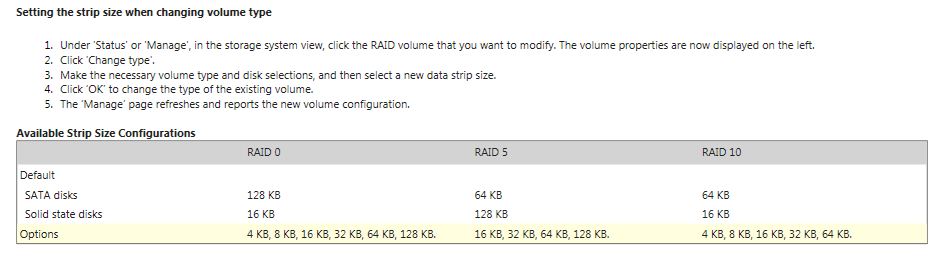
Yeah I'm referring to the "Data Strip" as indicated in the RAID Boot Menu & Software (See my Print Screen on page 669), not cluster at all. Mine is currently set at 32KB, but my old desktop was set at 128KB. I always thought larger gave you better results. What is yours currently set at?
Thoughts?
-
 CONGRATULATIONS on your 1500 posting!
-
Mine is 128kb...wonder why yours is 32. I used to run 32 and had issues with stability....but again...I ran 32 for a long time....then Intel released different drivers and that is when I changed. Actually...not sure you will get any more performance with larger strips...if it works OK...I would keep as is. If you really want to change...click on the ? near the bit size...tells you how to do it on an existing array...
-
Yeah, I don't know why it is 32KB either. Really strange, but from everything I have read on the Web, 128KB will definitely get you better performance, especially in gaming, which I do a lot of. the only pain in the butt, I do believe I will have to reformat my drives and reload everything, BUT I just read the info on the INTEL RAID Software and now I'm not certain if I will need to start from scratch. What is yoiur thoughts on it, can I just make the change and go, or will it wipe everything and create a new drive?! But I guess if I'm gonna do it, better to do it sooner than later. Since I now have a 2TB NAS drive, I can at least start to backup my important stuff to it, and since I have only been running my Envy for a couple of weeks, I don't have a lot of stuff on it, but none the less, Grrrr... Decisions, Decisions, LOL!
When you changed yours did you notice any performance gains? What type of stability problems were you having, if you can recall? Just curious...
EDIT #1: Well I just went into the INTEL RAID software and in the help files it states you can effect "Changes", but no where in the software am I being presented with anything to change, it just displays the info and no "Change" is offered. Is anyone else seeing any change options or migration options? -
Does anyone know of a GPU Gadget that will work with our Envy "Switchable" graphics chips? All of the GPU Gadgets I have tried do not pickup the ATI 6850M since it is switchable, even though I have it running as the primary gpu. I have searched, but have not been able to find any..
THOUGHTS? -
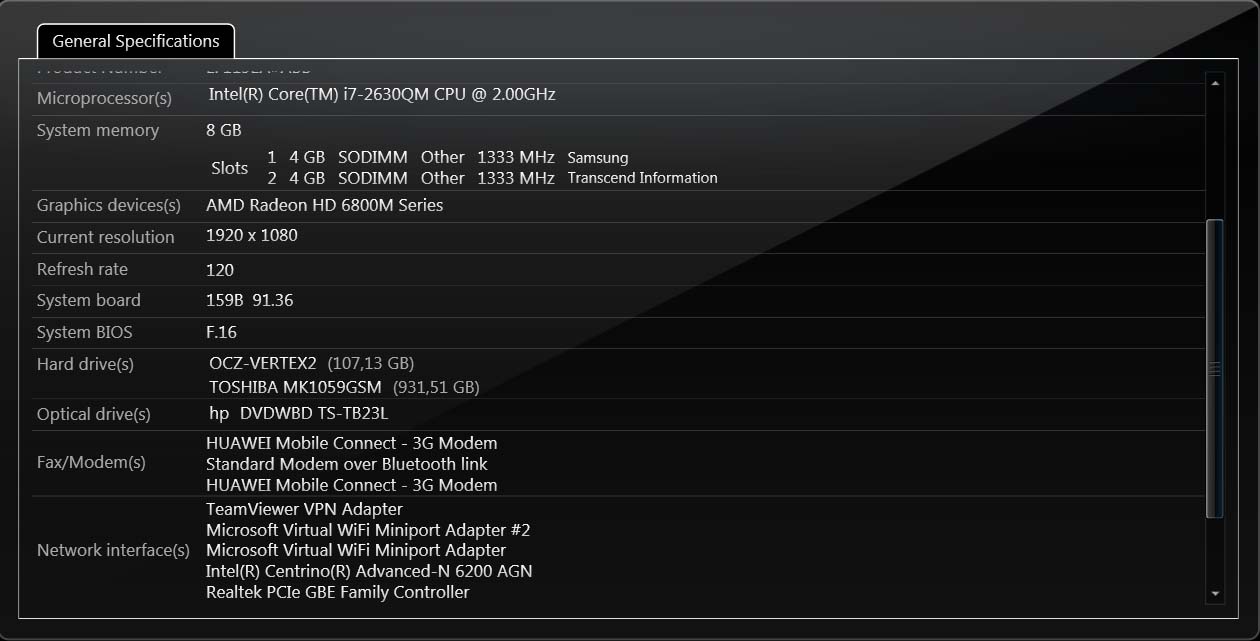
In the hardware info of the HP Support Assistant I found that i have a Hawuei connect 3g modem, but i can't find any other reference. The manual says that i must remove the battery to insert a SIM card but i can't find any port in the battery bay.
Is the modem installed in my Envy or is it an error? -
Thank you, that's what I needed to see...
-
In addition to reformatting...remember you will have to hit Ctl-I and break up the array and re-do a new one...then you can set stripe size to 128...
Just found this:Attached Files:
-
-
I have not seen a modem in this model before...interesting!
-
thank you gunny. lots to have ago with tonight !
On reflection I think you might be right that it can't be getting hot enough to cause a problem. I am an old codjer (43) so gaming just doesn't appeal much (other than having lost a month respectively to Prince of Persia and Quake (I) donkey's years ago...): in fact my usage of the graphics of this machine are really quite "slight" compared to what it can do.
That's not to say I don't value its capabilities: I've got it to make lightroom 3 and adobe premiere fly, when dealing with output from my beloved Canon 7D.
Nonetheless I've been seeing this bizare behaviour when doing light weight stuff.
In fact last night using the Intel GPU: no problems at all, for many hours, so I'm sure I've now go the problem in my sights.
I did laugh at your concluding comments about doing a restore. I have to admit it "scares the bejeezus out of me" ha ha. Isn't it going to mean all my apps/ settings/ data get wiped too ?
ha ha your comment sounded to me like someone encouraging someone to take their first bungee jump "Go on jump!" (No I haven't ever bungee jumped either!)
I'll report back and let you know what happens!
ty
J -
This is the screen I get from info:
Attached Files:
-
-
Very odd, indeed! I checked mine...no modem. On the left side of your machine is the headphone / mic jacks...USB 3.0, etc....do you have two ports like LAN???
-
I can only speak from my vast server background here but the size of the RAID stripe should have nothing to do with the stability of your OS. Also, the size of your stripe shouldn't necessarily affect ALL games the same. Basically, a smaller stripe will give you increased speeds for lots of small files at the cost of slower speeds for large files. As you increase the stripe size, you will increase the performance for larger files while decreasing that of smaller files.
Thus, if your game has a lot of small files, a smaller stripe will speed up the access and possibly the game. However, most games i've run include these large library files so a small stripe will probably slow them down. On the contrary, a lot of "cheap" games (like those from big fish games) write lots of small files to compose their game world, thus a large stripe won't help them out much.
I pretty much go with the defaults on home machines because I'm never "dedicating" my home machine to a single task so the defaults provide the best of both worlds while excelling at neither.
In my experience, changing a stripe size is a destructive process. You shouldn't need to use the Intel windows software to control your RAID array as all options should also be accessible from the BIOS interface.
Also, cluster size is not the same as stripe size. Clusters are a filesystem method of organizing bits under the control of an OS. Once the file is passed down to the hardware layer, the RAID controller doesn't care about your cluster size. Smaller clusters can waste less space but also decrease filesystem performance. Most of today's filesystems support sub-block allocation that reduces the waste of large clusters, but that too further reduces storage performance.
My advise is to use a 32KB or 64KB raid stripe with the default NTFS 4KB cluster size provided you are a normal windows user using your machine for gaming, music, web browsing, application productivity, etc. If you are mainly going to be working with large files, a 128KB stripe can help as can increasing your cluster size, though there are reports of some windows tools (like defrag) not working with a non-default cluster size.
Hope this helps... -
Never claimed that the stipe size effected my OS....Intel drivers did! They lasted on the web site for two days before getting replaced...New drivers fixed the issue
-
WOW, that is strange in deed. I have never heard of an actual modem being on an Envy and heck most laptops don't have one either. I wonder if maybe you have the hardware installed for it, but that is as far as it got and no actual modem port was ever installed. I checked mine and no such animal exists..
-
Thanks Cam121...
The games I play are all Large.. Here is the short list of what I have played and what I am playing (*=Played/#=Playing):
~~~~~~~~~~~~~~~~~~~~~~~~~~~~~~~~~~~~~~~~
* Dragon Age Origins (With all add on's)
# Dragon Age 2 (with all add on's)
* Mass Effect 2 (With all add on's)
# Dead Space 2
* The Witcher Enhanced Edition
* The Witcher 2
# The Lord of the Rings Online (Mines of Moria Expansion) (With all add on's)
* Crysis 2
* Risen
* Elder Scrolls IV - Oblivion (With all add on's)
ETC, ETC......
~~~~~~~ Waiting for Release ~~~~~~~~
Elder Scrolls V - Skyrim (11/11/11) - Releasing at Mid Night Special Event!
Dragon Age 3 (?????)
Kingdoms of Amalur: Reckoning (2/7/12)
Lord of the Rings: War in the North (11/1/11)
Mass Effect 3 (3/6/12)
Metro Last Light (12/31/11)
~~~~~~~~~~~~~~~~~~~~~~~~~~~~~~~~~~~~~~~~
Of course I also listen to music and watch movies on my Envy both on disc and off disc. I use MS Office 2007 Access pretty heavily, as I do some (on the side) DB building for some select folk, plus the other parts of the office suite as well. Add to that web surfing, email and the likes and that pretty much tells my tale. See I do NOT watch TV at all.. I do have a HUGE DVD (Purchased DVD disc's) collection (some 2500+) and have just started collecting Blu-Ray now that I have my Envy. So you see, I spend many many hours on my Envy...
Plus, what is strange is that Intel itself states the the RAID 0 should be using the 128KB Data Strip as default. Strange...
So right now I'm leaning towards changing the Data Strip to 128KB, but will have to do it from the RAID Boot Menu, since I cannot see anyway to do it from within the Intel RAID Software, even though it says it can be done. Has anyone checked to see if they can actually make changes to their RAID from within the Intel RAID software? If you can, please share how you are doing so. Since migrating doesn't mean destroying, but changing from the RAID Boot Menu does destroy..
By the way Johnnyhifi, that was why I was hinting about restoring to factory, since it was appearing that I may be doing so as well, LOL. Pain loves company, LOL.... -
Well, off I go, wish me luck, BUT before I go, let me make sure I have everything I need, since the Recovery Partition will most likely get wiped..
I have created the HP Envy Backup DVD's and I have made a copy of the SwSetup directory. Do I need anything else???? Please respond quickly as my clock countdown has begun, LOL... -
I was reading a little bit about this from a laptop perspective and one heavy gamer was looking to eek performance out of his machine. He was originally at a 64K stripe and went to a 128K stripe. After conversion, he had not gained any noticeable gaming performance but his window's boot time went from 2 second to 7 seconds (he was running Vista). My guess is that windows loads a bunch of small files on boot that got slowed down by the new stripe size.
Also, they were using Arconis to create a backup image of their HDD prior to wiping the array this way they didn't need to reinstall windows after every adjustment.
Good luck... -
Your recovery partition will be destroyed. The DVD's will restore it though (assuming a full restore). However, the HP restore program may have a problem configuring the MBR so make sure you have a copy of Bob's guide.
http://forum.notebookreview.com/hp-...ay-fix-hp-envy-17-3d-pavillion-notebooks.html -
Easy! You have a mobile stick with 3G to use the mobile network to get internet everywhere (train, cafe, uni, ...) and this Huawei is just a driver installing itself as a modem - nothing to concern about!
I use a mobile "modem" too HSDPA everywhere
-
Make a copy of Program Files (x86) Tri Def 3D
In case you have a problem, you can get the license file from that directory -
ty: core temp by the way seems to presentthe same info as "real temp" albeit also has a "gadget" for the desktop.
but what I was aksing was, is there anyway of monitoring the temperature in the GPU ? (and come to that any other critical components like the hard drive ? I seem to remember an Intel SSD has a temp sensor built in ?) -
MSI Afterburner will show you what your GPU temp is - MSI Afterburner
-
Good Morning Guys,
Well, I have finished the transfer over to 128KB and it went smooth as silk! I am about half way done with the Windows 7 Updates, but all of the others are done and all of my software is already loaded up. Additionally, 90% of all the special stuff I like to arrange is arranged. So today, I just polish it off, which will take about 2 hours and than back to enjoyment. I will say that, as much as restoring to factory is a pain, it is always a learning experience as well. By the way, when I created the RAID it came up with the 128KB as the default, so I have no idea why it was set to the 32KB like mine was, which is the lowest setting. I have SHAVED 15 seconds off my Boot Time. So I'm positive I made the right choice... Till next time! -
No need Bob, I have the Envy 17 (non-3D).....
-
Thanks as I have been looking for a program that monitors our 6850M as well. However, as good as this is, it doesn't have a "Gadget" desktop ability, or does it? As best I can see, you can pull it up to check, but it is quite large to leave on the desktop running.
On a side note: I have the Logitech G15 Gaming Keyboard (I also have the Razer Lycosa), but what makes this an even better keyboard than just for games, is the fact that it has a movable LCD panel built into the keyboard. I use that to monitor "Core Temp" and now I can also use it to monitor my GPU, because it has an option built into the settings to use it alongside the G15.
So for the time being, my Lycosa is on sabbatical, while my G15 regains the throne, LOL.... -
I decided to play with GPU overclocking today. I used the Sapphire TriXX utility.
I'm stable at 725MHz core and 1300MHz clock. That's the highest the memory slider goes and any higher with the core is unstable. Voltage is locked.
Better than the stock 575/900 anyway. Let's see if I set off a thermonuclear meltdown now.
-
Do you have the Envy 17 3D or Envy 17, if it matters? Please keep us posted, and I hope it doesn't get too toasty over there, LOL!
-
3D (HD6850)
Edited my post; 750 crashed after about 10 minutes of game play but 725 was stable for well over an hour of playing. The memory slider decided it can go up to 1900 now for some reason. I don't think I will try to push it higher than 1300 though.
edit: OK I lied. Tried pushing memory up in 100MHz increments and it crashed at 1500; 1400 was working though. -
What benefits are you getting by doing this overclocking? Isn't possible to be doing more harm than good, especially considering it's a Laptop?
-
Well, the 6850 is underclocked to begin with. It's supposed to be 775/1000 but HP has it set to 575/900. Can't even set it to it's normal 775 though because they have the max voltage locked down.
I think I'm going to stick with somewhere around 725/1200. Playing DeadIsland at max settings, the GPU temp is ~88C and the CPU temp is ~72C.
The TriXX program is simple and effective and also has a desktop widget. -
So I have an issue guys.....
The screen on my Envy. Whenever the laptop is closed (top lid is folded down to be on top of the bottom part) and I go to open it up by lifting the top lid the screen pops out.
You can see a part of the screen jutting out and it happens 100% of the time. Is this an issue I should be worried about? I mean i feel like the laptop is kinda broken and I get worried every time I open it that stuff is going inside the internals like dust, etc that shouldn't get in there... -
My fear is that sooner or later it will give and may fall off. You should call Concierge and see if this is a matter that can be handled in your home (if you have At Home) warranty...otherwise...you will end up sending to the repair depot outside of Nashville. I would not let that go on too long. The screen is probably the most expensive part of the machine...
The screen is enclosed, so yeah things like dust and dirt may get in. Once re-sealed...it could stay there permanently... -
Okay I will. If possible I'll send it back completely and just have them rebuild it and ship it back out. Cuz it sounds like and seems like the repair center doesn't know what the hell its doing half the time.....Kinda bummed about this but on the other hand the SSD I'm getting is out of stock everywhere apparently so I can afford a few weeks. Plus I'm paying for applications to med school so I gotta finish that first.
-
Take photos of everything. Document what is wrong and what is NOT! I sent in with one issue got it back with four! I have before and after photos and documentation. The tech that worked on my machine rushed it and created problems that were not there, before. Be very careful!
-
Well thank God I don't have to get it repaired. They transferred me to Resolutions and I'm getting it exchanged.
Only pitfall? The 30% off coupon I used is no longer available. SO bottom line is that I have to pay $601 for the difference and once I get it they will credit me back the $601.
Anyways I'm glad that they are replacing it. I already have the return label printed out and I'll be shipping it first thing tomorrow. -
Well I'm all finsihed with everything and back to where I was the other day, but with the 128KB Data Strip. I have noticed my games load quite a bit faster and playing the games are zipper as well. It shaved almost 15 seconds off my boot time, so it was a good move and I'm glad I did it now rather than later. With the work out this Envy has been getting up front, it is proving itself to be extremly reliable and a fantastic Envy! I always look at the first 90 days as the big ones, meaning if something is normally going to break, it will happen in the first 90 days. The next big one is the 6 month marker. If your machine is running without glitch on month 6 your pretty set to have a sweet ride for years to come. Of course there are always exceptions, but those are the rules that have always worked for me....
Yeah, I'm one happy Envy owner
-
How long have you had your Envy and at what point (time wise) did you notice the problem? Any pictures by the way???
-
I got my Envy September 21st or so and I've noticed really since Day 1 but it wasn't until a week or so ago that the gap became very noticeable. I thought at first I was just opening it up the wrong way or gripping it at the wrong part of the lid. No pictures as of now. I'll take some tomorrow when I wake up IF I get a chance too before I drop it off at FedEx
-
Sorry to disappear, I thought the forum would e-mail me when a post had been made... woops!
I ended up e-mailing TriDef and wanted to update the forum for the benefit of others about this. They had to send me a link to get the software download for the TriDef. They said they are having an issue with their detection software not being able to detect newer Envy 17 3D for some reason. They said they still do not know for sure why it's happening but they are working on it. If you've bought a new envy and the detection software on their site is failing e-mail them, they're pretty friendly!
I thought about passing altogether on the TriDef but I discovered that it's necessary to watch certain types of 3D. Power DVD works fine with several types of 3D movies from BluRay etc, but if you get any content that does 3D through split screen it won't work without running TriDef, mainly because you need an application that you can specify the 3D movie is split. Otherwise you see 2 pseudo 3D images side by side or on top of each other depending. The media player that comes with TriDef can do this but there is no settings in PowerDVD (At least the bundled version) that allow you to specify this. Just an FYI!
I did decide to give up on MediaSmart though, I can't find it on the HP download for my model and realized that they are most likely just using the PowerDVD software directly now rather than including MediaSmart... don't even remember if it was on the factory original install.Thanks for the help! -
I wanted to post a couple more questions with some new issues I'm having with my Envy 17 3D 2290nr...
First issue- I almost always use an external monitor when I am on my laptop, I use it for the extra workspace in some of my applications and I also watch Netflix etc on the second screen while I work or surf the web on the primary (sometimes vice versa). For some reason my external monitor will partially black out... a lot! I can't tell why or what is making it do this. I can usually move the mouse and it will brighten again, though sometimes the only way I can get it to return to 100% is to move the mouse onto that screen and click on the desktop to make it the focus. Sometimes it will black out for half a second and brighten again right away about every 20-30 seconds, sometimes it will go for 15-20 before it does, or some days it won't do it at all. I have no idea what could be causing this... anyone had this happen before? It doesn't seem to be the monitor, especially since I can move the mouse to correct it. Seems tied into some software somewhere...?
The second issue - I'm getting massive freezes occasionally. The whole system locks up, nothings is responsive and whatever audio was playing at the time freezes and stutters right where it was. The freeze happens so abruptly that upon reboot, Windows recognizes it was shut down improperly but there are no errors in the Windows event viewer or any other indications about what the problem could be or that anything ever happened. Any software I had open at the time basically reverts to the state it was in PRIOR to the freeze (i.e. if I have Photoshop open and it freezes, any changes I made during that session to the layout of the program, window arrangement etc are ignored. It opens as if the last time I was using it, when the freeze occurs, never happened). It happens randomly, sometimes I can go for 2-3 days and have no issues, sometimes it happens less than 30 minutes apart. It seems to happen whether I have 1 program open or several and It hasn't always been the same software when it freezes. My laptop is propped up so it will have plenty of space to vent hot air, even at that though it doesn't seem to be running hot. Anyone have this happen to them? I'm a little worried that I have a system that is a little defective at this point... Any information or advice would be greatly appreciated on how I might troubleshoot or resolve this issue. Thanks in advance! -
Appears, I spoke too soon. I had downloaded a trial version of TriDef while waiting to get the HP Envy version sorted. Removed it to install the Envy version supplied via the link from TriDef and the bundled version doesn't include the TriDef media player which allows the split screen viewing... kinda sucks, but oh well...
Just wanted to clarify -
Ravenant cant you watch SBS 3d media through powerDVD? Mine has an option to select the original content format which has the option for original SBS content.
-
Current and future ENVY 17-2XXX owners! HP has just released a recommended BIOS update for this series. The update was released a couple of days earlier than it was supposed to (11/4).
Version: F.18
ftp://ftp.hp.com/pub/softpaq/sp54501-55000/sp54881.exe
More information about this particular release can be found at these NBR threads:
- http://forum.notebookreview.com/hp-envy-hdx/595506-updated-hp-envy-hdx-bios-releases.html
- http://forum.notebookreview.com/hp-...dv7-6xxx-envy-14-2xxx-envy-17-2xxx-intel.html
Enjoy! -
A non-issue for most people I think. I don't plan on flashing F.18.
-
This could be related to the known freeze issue with the drivers on the 62xx wireless card. Check the forums as a link to the known stable drivers is posted in these threads. To verify, turn off your wireless card and revert to wired Ethernet for testing purposes. If there are no freezes, then the wireless is to blame. Other than drivers, upgrading to the 6300 for ~$30 is an option some people used.
Also, watch your temps to make sure its not an overheating issue. Use a program like OpenHardwareMonitor to keep them posted on your desktop so when your pc freezes, you can see the last recorded temps. Generally speaking, the machine should shut itself down if it's getting too hot though. -
So, is it BEST to stay current with the BIOS for your Envy, or should we be selective? I was always taught to ensure your BIOS was current, but that was the old school mentality. So what is the new school suggestion?
Thanks! -
Completely opposite here. IMO you should never flash a BIOS unless you need too.
There is always a chance of something going wrong, so why risk it if the update isn't critical. -
As always, Thanks! I'm in school again, especially since I'm now in the world of Laptops, LOL. So since I don't have the Anti-Theft program (or do I and don't know it, actually never heard of it. What is it exactly?), I will sit tight with F16...
-
I have a BATTERY question. Today when I checked by battery (Through HP Support program with advanced settings), it shows my "Charge Capacity" is only 94%. Even though I currently have a 100% present charge. Since this is a NEW system, why is the battery only showing it is capable of attaining 94%? Or am I misunderstanding this, which is highly likely.....
*HP ENVY 17 & 17 3D (2XXX series) Owners Lounge*
Discussion in 'HP' started by 2.0, Mar 14, 2011.