Problems? See this thread at archive.org.
Mine are with coolsense OFF.
-
As i understand it Coolsense works in several areas to keep temps down, does it reduce CPU performance to help temps?. If so guess i should try temps with this off - and see if FPS benefit and see where temps go. Tks
-
From what I learned long ago. Coolsense 1.1 has Performance and Coolest mode. Coolest mode pretty much disables Turbo Boost which does keep the CPU much cooler
Newer version has ON and OFF. Pretty much...OFF is performance mode and ON is Coolest...same result. When gaming...ON or COOLEST mode are fine...99% of games don't utilize turbo boost, anyway. Should have no negative impact on performance... -
A little performance, better FPS, everything runs a little smoother inside the few games I play.
-
Major update (15.1) for Intel My Wifi on the Intel download site:
http://downloadcenter.intel.com/Det...g&OSVersion=Windows 7 (64-bit)*&DownloadType=
Make sure you do a "custom install" to install the dashboard. I first did a "typical install" which deleted the old version and did not install the dashboard to allow me to actually enable a local hotspot. Also be sure Internet Connection Sharing (ICS) is enabled on the connection (wired or wireless) and directed to share with the wireless connection established for My Wifi.
New version (15.1) connects devices much faster than the old, defaults with enabled DHCP, doesn't seem to support filtering anymore, and for some reason forces some characters ("DIRECT-BW-") to preface your SSID. Also, the new dashboard GUI looks like it was designed as a high school project (kinda goofy graphics). -
I always let Windows 7 do the connecting. I updated just the drivers and connecting to my router seems almost on bootup, rather than waiting for 5-10 seconds. Never used HP connection manager, either. Windows does a good job -
I'm pretty sure Internet Connection Sharing (ICS) is not automatic. You have to enable it through Adapter Properties on the connection to the Internet you want to use. I successfully tried it both through my hard-wired 1000 BaseT (gigabit) Local Area Connection and through my Wireless Network Connection. Which ever one you want to use has to be configured to share that connection with the WiFi Wireless Network Connection which is added by My WiFi (as a "Microsoft Virtual WiFi Miniport Adapter").
Once ICS from the Internet connection to the My WiFi wireless network connection is established, connections to My WiFi are automatic (it provides a DHCP server) and seems, when the laptop is connected wirelessly, to pick a different wireless channel for My WiFi. Just remember to change the default My WiFi WAPA2 password and the SSID to something familar. -
Hello everyone. I'm new. I just got my new HP Envy 17 3D last week. Its great. But I have a question about the 3D capability. I can't seem to get the 3D Emitter to activate on any other media service, such as Youtube, except through the Cyberlink PowerDVD v10 installed. The PowerDVD 3D looks really great on the demo files that came on my Envy 17 3D (Puss in Boots trailor, and a wild life video). I can also view photos in a simulated 3D that looks okay. I'm 100% certain the 3D works; but, it only works through the PowerDVD software.
Edit: I've tried this with IE, Chrome, and Firefox. All behave identically so I presume this issue is local on my PC.
Does anyone have suggestions why Youtube doesn't work ? I'm using 720P HD quality and Interweave with both Row and Checkerboard tried with no success. The video from Youtube is sending in a 3D format (looks very odd without the glasses.) But the Glasses do not change/dim as if the 3D emitter doesn't trigger like it does from the PowerDVD software. I've been using Stereographic / Real3D glasses with NVIDIA hardware for over a decade but this is my first time to use the ATI version.
I have recently upgraded my video drivers on the built in AMD / ATI 7690M XT video card driver. Its now 8.882.2.4000 from November 28 2011. And I have all driver updates via Windows and the HP Support Assistant agent tool.
I've also tried to play Youtube 3D videos while having the PowerDVD software in the background (which forces the 3D emitter to be active). But the Youtube videos still look off and is not working for my 3D glasses.
Thanks for everyone's time.
--dbottoms -
I'm trying to install a fresh windows 7 64 in mine envy 17 2100.
After boot the cd. He ask me for a driver because does not find the HD.
Where I find the correct drivers for this install?
I donwloaded all F6 versions, inf driver chipset utility and hp ones. No one work.
He find the driver, and after click next. Think for some seconds and say no drivers again.
Mine raid is unmounted since I want just one hard drive ( and we cant disable raid in our locked bios).
Thanks in ADVANCE.
Any help? -
Best I can tell you is that Youtube won't work. You need the 3D engine of PowerDVD or even the 3D engine of TriDef. It you want to make your Youtube videos work in 3D, you are gonna have to download them. Both PowerDVD and TriDef have the drivers to activate the emitter.
I upgraded to PowerDVD 12 Ultra and now I can view all video files, DVD and Blu Ray in 3D with Cyberlink...BUT again...the files have to play through the PowerDVD player...or Tridef. You can download video files and play them back in 3D, but unfortunately what you are attempting is not possible...yet. that I am aware of
You can disable RAID in the bios...just set it to OFF! Did you break the RAID up? Ctrl-I on bootup and delete the volume. Then go into bios and under System Configuration...RAID OROM UI...set to disabled. That should allow you to install Windows to just one drive. You may still need the F6 drivers, because, by default, HP made our SATA ports RAID. You can turn off, but for performance and AHCI, you are going to need the Intel drivers.
One afternoon, just for fun...I did a clean install of Windows 7 retail version that I had for my old laptop (gone now) and it worked perfectly. Without RAID enabled in bios, Windows should see two drives. You want to install on the Drive on Port 0 -
Bobmitch
Thank you for your answer.
And no . We cant disable RAID in our bios. We can disable the RAID control MENU just and broke the RAID dirvers. But the RAID CONTROL still active . Because this we just get 70% or less of our SATA3 speed. ( a know problem in our envy series,). The complete lack of control in our chipset/bios.
Yes, I break the raid and disable in in RAID control. Then, After I disable the menu in bios.
But same after i download the F6 driver. The install ask me for driver and I inser the usb and detect the raid controller. Still not showing mine hds.
What F6 driver are you using? and i'm trying to install a windows 7 original cd 64 bits ultimate. one of first cds released.
thanks again.. -
I downloaded these:
http://downloadcenter.intel.com/Det...sion=Windows 7 (64-bit)*&DownloadType=Drivers
Basically, I had no issues installing Windows 7 Home Premium 64 bit using them. As you did...do the install. Choose custom and when asked for extra drivers...let the machine detect the F6 drivers and then chose the drive. In my system I have SSD on SATA 0 and HDD on SATA 1. Choose SSD...the go. In my bios, I have the ability to disable the RAID ROM and install on single drives. Are you able to install using the HP recovery disks? What happens if you re-enable RAID and do the install that way?
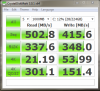
I have owned my Envy for a year now, and have never known of any issues with SATA III speed by running single drives. The Envy 17-2xxx series has the HM67 chipset and has never been reported to have SATA III issues. You can go back a year on this thread and not find any issues with SATA III speed. Here is the benchmark, when I did an install on my Samsung 830 series SSD a week and a half ago. No issues whatsoever with speed. Just make sure that once Windows is installed, you also install Intel Rapid Storage Manager. This way, you use Intel's IASTOR drivers to run in AHCI mode.Attached Files:
-
-
Thank you Bobmitch.. i'm to try now.. from your link
YES the recover bloated i can restaure PERFECT. But i WANT AFRESH INSTALL. I'm seeling this EVNY.
HP NEVER MORE..
About the SATA issues, do have.
When we go in RAID menu with xtrl+i. We disable the raid tree and umount the raid hds.
In Bios what we do is just disable this RAID menu nothing more.
Maybe because everyone use windows does not find it after all.
But we cant disable the RAID controler and turn back our controler back to AHCI for example.
Under window system you find this controler still bein a RAID controler. Just umounted.
I do have an MSI 17 I buy just after this envy because i become angry with mine ENVY. Same hardware. Same chipset. but s an MSI i have almost full control in mine HM67 chipset/UEFI Bios. In linux i Even when using EFI boot partition ( yes we have this choice but hp lock this to) I can even control mine UEFI bios from desktop.
There i can disable the RAID controle, TURN AHCI/EAHCI/IDE COMPATIBLE MODE/ and a mode that they call ADVANCE MODE.
To be honest. Doesn't matter if we have an HM67 chipset. Because HP RIP OFF all controls and advances we can use in BIOS. The chipset become just a dead height. It's a Porche engine we cant use because someone put a lock. We barely have some basic functions from this chipset enabled and the basic. VERY BASIC function from our UEFI bioses being used. so basic seems nothing.
When in RAID controler mode like our Envy under linux. I have the same speed results. When using modes like ADVANCED MODe or AHCI. Easy to show in graphs I have at last 30% more in speed wioth mine Patriot and Crussial SSD.
i'm to try your link and later i REPORT.. A good thing to pin in first page. INSTALL a FRESH WINDOWS.. -
You can blame HP for that. They think we are a bunch of children, not having the ability to take care of our machines. Guess they figure that the more they let us tweak, the more can break...then they have to fix. By having the RAID controller run even a single drive....forces you to use Intel Rapid Storage Manager, once the OS is installed. That is how you achieve ACHI...through the Intel IASTOR drivers. There used to be a way to enter the advanced bios in the first gen Envy...but they even removed that. If you can get the OS installed and get to Rapid Storage Manager...it should be better. Keep posting...we will figure this out...
Also...since you have Ultimate 64 bit...you might want to try downloading the newer .iso with Service pack 1 already installed. That may make a difference in drive recognition as well.
Download the .iso for Ultimate 64 Bit SP1 and you can burn it to a DVD with Imgburn from here:
http://www.mydigitallife.info/windo...links-ultimate-professional-and-home-premium/
http://www.imgburn.com/
Service pack 1 DVD has more drivers and more up to date ones as well. It may very well help you with your issue. When I did the clean install...it was with SP1 version of Home Premium. I just used my CD key to install and activate. You can do that as well. -
Bobmitch
Ok. the old windows 7 cd ultimate does not work in any way to install. Using the f6 drivers or any other try.
I downloaded the win 7 ultimate with SP1 and everything work fine.
Funny the Ubuntu/Kubuntu besides the hybrid cards. works better than windows out of box when installing.
Thanks.. ;-) -
Just glad we got it sorted out. Let me know if there is anything else I can help with...always here to try to lend a hand...
-
Bobmitch rocks!
He's been giving top notch advice here free of charge; he truly is an asset that HP should compensate for his efforts!
Say Bob is there any scuttlebutt yet on the next new envy models and what they might have in the way of features? -
Just Ivy Bridge. Right now...IB is supposed to launch on Monday. I am watching to see what it brings. Initial tests are showing extreme temperatures...but remember that those are with engineering samples. IB is supposed to be .22nm die, which is supposed to increase power and decrease power usage and temps. Just a wait and see for now.
-
So are you planning to step up to the new chip or do the wait n see thing?
I've been thinking of getting a second envy, heard of any good coupons? -
What will be important about Ivy Bridge. A new chipset. From what I see, it is likely that a lot of notebook vendors are going to put the chip on existing chipset motherboards. Desktop boards will require the Z77 chipset, because it contains PCIE 3.0 and built into the actual processor is USB 3.0 from Intel. If the new generation comes out on HM67 or HM65...you won't get either the updated PCIE or USB, because the processor requires the new chipset. Right now, I am quite happy with our generation Envy. My wife's desktop is about to die and I am going to give her my X58 motherboard / i7 950 and will most likely upgrade my desktop this round. The Envy's we have are on par with the 3rd generation...better chipset (HM67 does RAID), where the 3rd gen has HM65 and does not. We also have better video cards with the 6850. I don't see the next generation blowing ours away
I will keep an eye open for coupons. There were some 33% off a few weeks ago. I didn't need them, so I deleted. Will keep an eye out...if anything I will PM you. -
anyone has troubles to install any Linux Distrib parallel to Win7? Mine doesn't recognize the Raid0. it just shows ONE of the harddisks (two 640gig) and says there is no other OS on the one disk. I really like Win7, but need a Linux Distrib (wanted to give Gnome a try) for uni...
Any suggestion how I can get it onto the HD. Else the only way would be booting Linux from external HD via USB (which seems possible) and I would have to take an ext. HD every time with me. -
Thanks Bob as always your fingers are atop the pulse of the Envy line and the abilities of components in how they interact, you also keep track of the abilities of other machines out there and how they compare with the Envy lineup- Impressive to say the least!
Folks when Bob Mitch speaks it pays to listen.
I'm going to let my oldest laptop die of natural causes, a Toshiba satellite M65-S8092 before this Envy I have here takes its place and I pull the trigger on another Envy... Only reason I keep it is its on XP Professional and when it goes I have to dump about $1200 in new programs that are not compatible with the newer windows operating systems, currently I split my work on XP and MS 7 because I can... its going to cost me hard when I make the switch but I'm hoping by then the newer versions of those programs I'll need will be upgraded and the ones currently offered will be available for a fraction of their current costs... Like the old Bull said to the young Bull... "Let's walk down and screw all of them!" -
The unfortunate part of older OS. Microsoft has already done away with support for XP and now Vista. The only OS that they support is Win 7 and once they release Windows 8, the clock starts ticking on Windows 7. However, this time...I think Windows 7 may have the shelf life of XP. It is a very solid OS and Win 8 is cross platform and really doesn't offer as much to computers
-
Well...Ivy bridge desktop chips were released by Intel yesterday. You can read one of the numerous ones here:
Ivy Bridge Reviews
Seems that the ONLY advantages will be native USB 3.0 support and PCIE 3.0. Doesn't seem that the first releases of the processor are showing anything significant over our Sandy Bridge counterparts... -
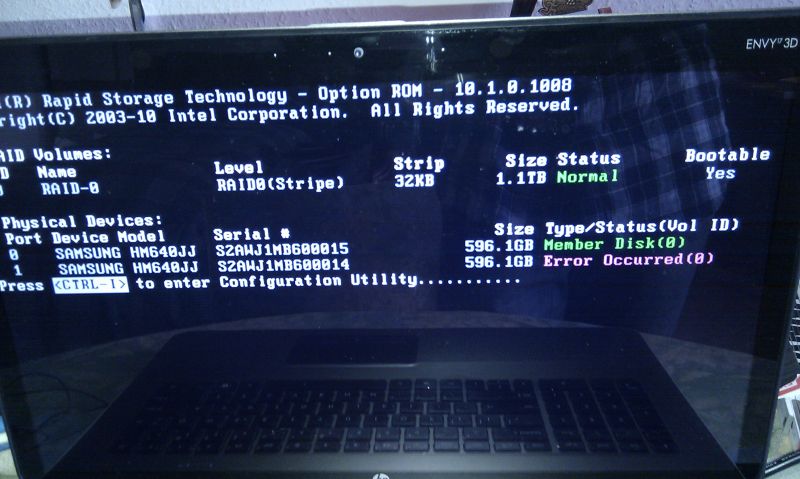
hey, I got a weird problem. I see this screen (attached), when booting. When it disappears, everything is working just fine! Do I have to worry about it? Might it be the reason, why Linux can't "see" my Raid0 and other OS?
and the most important question: how can I fix it!Attached Files:
-
-
Intel Rapid Storage Manager can fix that. You may have had a miscue that caused it...can be for a lot of reasons. Reset under the "manage" screen and both drives will show green again. I have had it happen, but only once or twice. If it continues to occur, you may have to scan your drives. But for now...make sure you have the most up to date Rapid storage manager. You can also look here:
http://forum.notebookreview.com/hp-...dv7-6xxx-envy-14-2xxx-envy-17-2xxx-intel.html
Newest one's available are 11.1.0.1006, which I am using on my Envy. Again...under "manage" you can reset and keep an eye on it...
I also notice that your stripe size is 32kb. I had a lot of issues with smaller stipe sizes. All the errors stopped when I used the default 128kb stripe. If that is the case, you are probably gonna have to break down the array...rebuild and keep stripe size default 128kb. On my desktop, I have two WD VelociRaptors in RAID 0 and used to see this alot with 64kb stripe...no more. Right now...do the Rapid Storage manager warning reset and see how often it continues to occur...if not often...don't worry about it. If it happens alot...I suggest larger stripe sizeAttached Files:
-
-
Hey guys can somebody please tell me why all of a sudden the games which i used to play (and which worked without any lag) have started lagging very badly even when im watching a movie the system lags like hell

does any body know a solution to this ?
any help would be appreciated thanks in advance -
For anyone interested, I have successfully upgraded my 2090NR from 8GB to 16GB RAM...
I used this RAM from Newegg:
Newegg.com - CORSAIR Vengeance 16GB (2 x 8G) 204-Pin DDR3 SO-DIMM DDR3 1600 (PC3 12800) Laptop Memory Model CMSX16GX3M2A1600C10 -
Thank u very much, it works now. It fixed it within seconds, but it doesn't want to change the stripe size, do I have to format it completely for that case?
-
Sounds like your bios got updated to f.1a Others have complained about the same thing. See if you can backflash to f.18. It could help
Software & Driver Downloads HP ENVY 17t-2100 CTO 3D Edition Notebook PC - HP Customer Care (United States - English)
Sounds like HP decided less heat...at a cost
I wouldn't do anything right away. Supposedly there is a setting in the RSM that you could change...Did you set the stripe size or did HP ship that way?
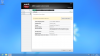
Here is a set of instructions that RSM has. I wouldn't do this without backing up my data. Not sure if I can make the change on my desktop...Only lets me re-name the arrayAttached Files:
-
-
same here, only can rename the raid0 and check for errors. I did a clean install after I got it, so i did set it to that value I think
-
No, that didn't do it! What you have to do is on bootup, hit CTRL-I and enter RAID configurator. Delete the array. You will then have two single drives. Once you do that...simply create a new array. This time...scroll down to stripe size and choose 128kb. THEN reinstall your OS. What you did was reinstall to a 32kb stripe again...which can cause issues...
Let me know how it goes... -
Thanks a lot Bob ill flash it and report back
-
OK that was what I was concerned about: If I delete the Raid, all Data will be lost and then I have to reinstall again!? Or will all data get converted to one of the drives as a whole file again?
OK that was what I was concerned about: If I delete the Raid, all Data will be lost and then I have to reinstall again!? Or will all data get converted to one of the drives as a whole file again? -
Unfortunately, the data is going to be lost. If you are not comfortable with that, leave it alone and see if the error occurs again. Worst case, do it later...Is there a lot of data? Can you back it up?
-
Hello, I'm sorry if this ha been gone over already. I've tried searching for the information I need, but there doesn't seem to be 1 consolidated place for me to get my answers.
I have an Envy 17 3D Model: 17t-2000. I just bought a 256GB Crucial m4 2.5-inch SATA 6GB/s SSD. I removed the original HDD and installed the SSD in the primary slot. (I have a caddy to place the original HDD as a second drive, but I wanted to get the SSD up and running first before I added the second drive.) I then used the recovery disks that I made to do a minimal recover on the new drive. After 5 disc swaps, it reboots and I get: "No bootable device -- insert boot disk and press any key"
I'm new to the SSD scene and I'm completely lost as to what's wrong right now. With some searching I found references to this page: Hybrid Raid Array Fix HP Envy 17 3d Pavillion Notebooks But the problem is, the file that's linked there goes to MegaUpload and they're not hosting files any more.
Any help on this matter would be really appreciated! -
Hi Envy 17 Owners,
I have a comparison question that I'm looking for help with...
I am about to buy a modified Envy 17 2070nr with the following specs (according to the seller), for $1100:
i7 2.6 Ghz - 3.2 Ghz CPU
16 Gigs Vengeance RAM
2 x 500 Gg 7200rpm HDD's in RAID 0
ATI 6850 1 Gig
My question is what kind of difference in performance can I expect to see, in terms of gaming especially, compared to my old desktop system. I would test myself but I've recently moved to Korea and left the desktop behind. Its specs are:
AMD X3 445 CPU
Gigabyte GA-M61p s3 Motherboard F7i BIOS
3 Gigs DDR2 800 RAM
ATI 5770 512 Mb Graphics
500 Gb Sata II 7200 rpm Seagate Barracuda HDD
Insight would really be appreciated! -
I was the author of the article. Let me find a new file sharing site to work with and I will re-post.
Marty...I was going to private message you the file...but you can't me PM'd -
That's strange, I couldn't even find the option to PM you. Maybe it's locked because I barely have any posts here? Well I'd truly appreciate it if you could e-mail me the file. My address is [email protected].
Thanks so much for your help! -
Sent! Good luck...let me know how you do...
-
Ok, so I followed the instructions in the PDF you sent me. It worked... kind of. It allowed Windows 7 to actually install. But after a time of installing files and such, it came up with an error. It asked me to insert my restore disk. I tried a Windows 7 install disc, but that didn't work. So I inserted Disk 1 of my recovery discs. That didn't work either. It said, "Unknown File can not be found." Then I got a message telling me to re-install Windows from the start again!
So I rebooted and used Disc 1 of my recovery discs. This time I choose to do a full recovery instead of a minimal restore. After swapping all 5 discs, it restarted. This time it didn't give me the, "No Boot Drive" error! It installed Windows and everything was fine!
I don't know exactly what the problem was this time, but I do know that the instructions on the PDF somehow in a round-a-bout way helped! So thank you very much! After I get Windows up to date, I'll install my original HDD as my secondary and hope that nothing goes wrong! -
Sounds like you are on your way! I have an SSD for OS and critical programs like Office, Photoshop and others. On my D drive is secondary programs and games. All good. I am sure you will also be fine! Glad that you are up and running. Interesting that the minimal install didn't work. I tried it once...really stripped down...then to find programs needed...There isn't a lot of bloatware on an Envy, anyways...so no loss of space on the SSD.
-
Bobmitch rocks the Envy world once again!
We are so lucky to have someone like him to so ready to help us intellectually computer challenged types out.
I learn more each time Bob helps one of us out; Thank you Bob!
Bobmitch I was hoping for some guidance and options on upgrading my stock Envy 160 SSD.
I'm looking for reliability and affordability.
I'm not stressed for time on this as I'm contemplating how big of a drive I should go for without wasting space and cash although I could easily afford to. Any advice you have on drives in the pipeline to be released in the next few months would be welcomed verses what's available now and is it worth the wait time.
I like the way you bare bones expose these decisions as non emotional feature benefit choice.
Richard -
I can tell you what I did. I replaced my Intel SSD with a Samsung 830 series, 256GB. Because you have an Intel SSD...it will work with the free software that Intel offers..."Data Migration Tool". I put my Samsung in a USB 2.0 enclosure (had a hard drive in it...took it out temporarily)...hooked it up to my USB hub. Then booted into the migration tool. Source drive was Intel SSD...destination drive was Samsung SSD. Did a manual migration where I told the software to adjust the size of the partitions...20 minutes later...took out the Intel SSD...replaced it with the Samsung and booted into it. Still running as I type this.
Samsung makes extremely reliable SSD's. I did a LOT of research. Came down the Samsung and Crucial M4. Stay away from the new Intel 520, for it uses Sandforce and Intel hasn't fixed it either. Still a lot of BSOD's. None with Crucial and none with Samsung. I will back Samsung up one more time...because latest firmware update to Crucial and now the M4 has lost some of it's speed. Here are my benchmarks with the Samsung connected to Port 0 on my Envy motherboard (SATA III port)...
When it came time for me to pony up $$$...I went Samsung
Prices are decent for the Samsung
http://www.newegg.com/Product/Product.aspx?Item=N82E16820147164
That is for the bare drive kit
http://www.amazon.com/Samsung-830-M...GQ0G/ref=sr_1_3?ie=UTF8&qid=1335654534&sr=8-3
This is for the desktop kit...I got that one, because we have our brackets inside our Envy's. Ghost is really lousy...never used it. Intel Data Migration tool, or Acronis True Image Home 2012 will do the trick for clone
I am sure that there are going to be those who disagree with me...stay away from Sandforce drives. They are still having issues with sleep, hibernation and BSOD -
Does the non-3D version of the HP Envy 17 CTO-2100 have a 1600X900 screen? I thought all HP Envy 17's have a 1080p screen?
-
They are all supposed to be 1080p. Only difference between the 3D and Non 3D model is that 17 3D refreshes at 120 HZ and non 3D at 60 HZ
-
I got an upgrade question...
I bought a pair of Seagate Momentus XT 500GB drives to replace the pair of 750GB 5400 RPM drives that came in my Envy. Newegg had an awesome deal. I got the pair of 500GB drives for what a single Momentus XT 750GB drive would have cost.
Via Windows Easy Transfer I copied everything from my old machine the Envy replaced and put everything on there that I need otherwise. That being said, I am only using 120GB. So, I won't miss the capacity I lose and would much rather have the speed.
My system came setup in a RAID0 config. I am wondering if I should duplicate that, or just install both drives in a non-RAID config for reliability's sake. Will RAID0 be that much faster? I actually would even run RAID1 for the sake of reliability as well, assuming there wouldn't be too much of a performance hit.
Any thoughts/suggestions are appreciated. -
RAID 0 throughput will give you better performance. I run two HDD's in RAID 0 on my desktop. I have run desktops that way since the original Western Digital Raptor drives. I don't have any issues with RAID 0. Just keep your stripe size at 128kb and you shouldn't have any issues
-
Cool. Thanks. I'll do RAID0 and report back my impressions afterwards.
-
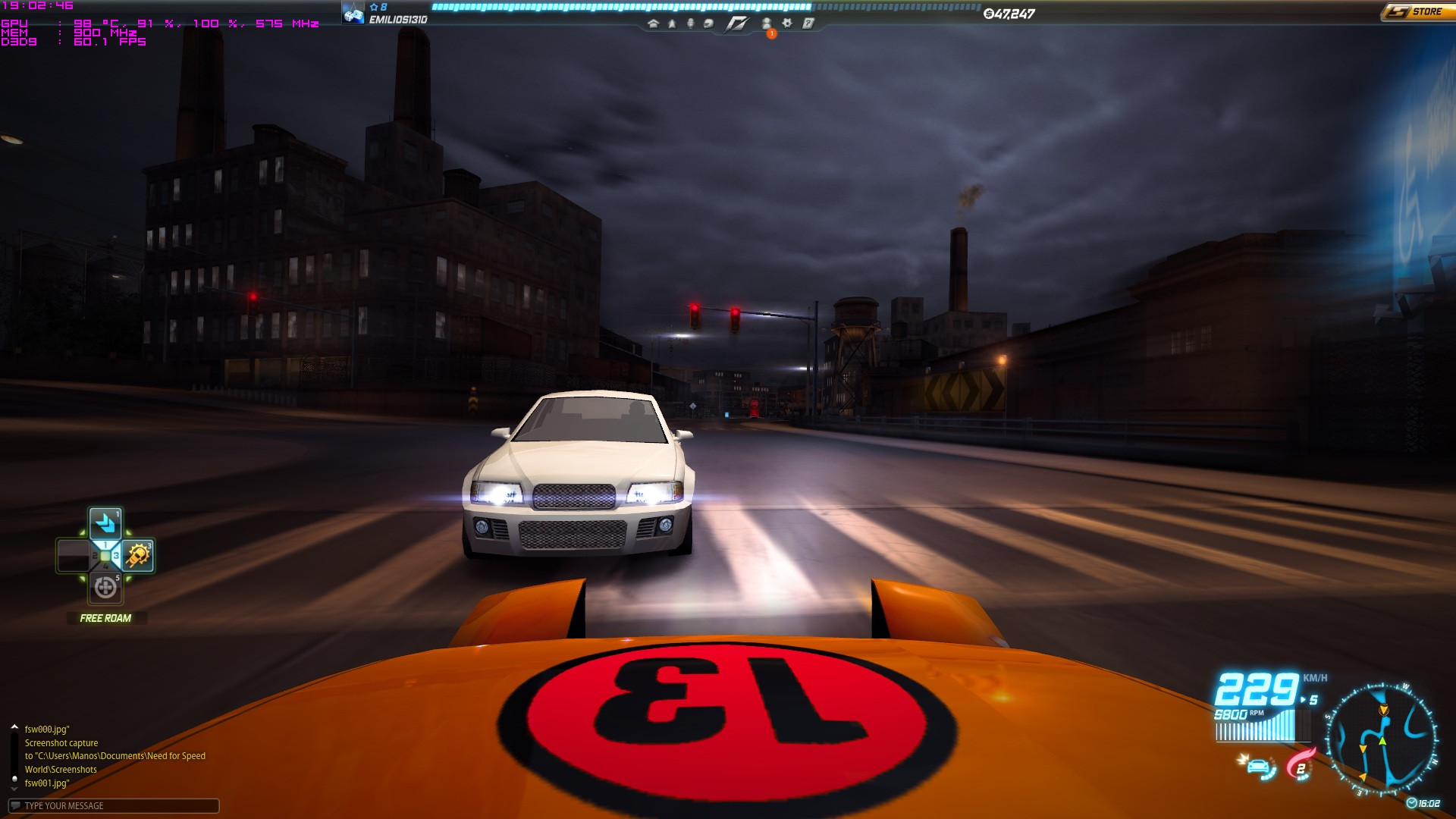
OK, so apparently they haven't fixed it quite well. My laptop started overheating again. After an automatic shutdown once again due to excessive heat, my ENVY laptop started going crazy with the temps again.
After just 3 minutes of firing up a game, temps go beyond 90C (which is not even near the supposed temp this machine was supposed to work on), best thing is as soon as you minimize/close/pause a game the machine cools down by 5-9 degrees in just 10 seconds.
Please help me make my laptop the way it was supposed to be used. After two months of patience without a laptop, after two weeks of being fixed it apparently got the same problem again. While it was "fixed" it's idle temps used to be about 45-60C (now are 60-70C) and the gaming temps would never exceed 80C (now they go over 95C)...
Am I doing something wrong? I even use a cooling pad under the fan to keep it cool but it's not going that well...
Sorry for the big despair I clearly express in this post, but I just didn't think that a 1600$ machine made by HP would have such a lowlevel cooling system...
~Cheers,
Emilios
PS: Here's a screenshot of the temps after playing 10 minutes of Need for Speed: World.
*HP ENVY 17 & 17 3D (2XXX series) Owners Lounge*
Discussion in 'HP' started by 2.0, Mar 14, 2011.