Problems? See this thread at archive.org.
Let the system totally cool down. Then blow compressed air into the vents. DO NOT blow compressed air into a hot machine...can crack the heatpipe or hurt the CPU. Only cold.
Are you using the stock HP video drivers?
-
I will need to go buy some compressed air then, and i am not sure what version i have for the video drivers

-
Also make sure that when you are gaming...NOTHING gets in the way of the intake port underneath the machine. I have the six cell battery, and unfortunately the machine is flush to my desk. I have to actually put the laptop in my lap to keep it cool. If I don't raise the machine so that the intake can take the air in without obstruction...you will see hotter temps and possible throttling.
-
I always out a book under it so the intake isnt blocked
but thank you so much so far
it is very nice that you want to help
-
Thanks Bobmitch for response. You mean the drivers on the HP product page simply don't work? Curious what version is best to use then?
HP Product Page
2011-06-03 , Version:8.820.5.1000, 209.5M
Software & Driver Downloads HP ENVY 17-2280nr Notebook PC - HP Customer Care (United States - English) -
The ones from the product page DO work. I thought you meant these:
http://forum.notebookreview.com/hp-...v7-6xxx-envy-14-2xxx-envy-17-2xxx-intel.html#
The ones on the notebookreview.com update page are not good. The ones directly from HP are fine. -
I received my refurbished HP Envy 17-2110 two days ago, there was BIOS F1B on it, does anybody know something about the changelog?
Btw. nice machine, my 6850-GPU can be overclocked to 750/1170 Mhz, the results in 3DMark06 with the stock i5 2410m and Catalyst 12.4: 14314 3DMarks
http://3dmark.com/3dm06/16682636;jsessionid=1pxhwgmje5cgn11tzil6srop6bAttached Files:
-
-
Ok, thanks Bobmitch.
-
Experiencing some general craziness lately with my rig. Went to play Mass Effect 2 demo and it overheated. I have never had it do that. Since then I have been unable to switch off the discrete graphics card and catalyst control center doesn't open. Also, my CPU is hitting at 100% when I boot for like 15 minutes. The fans are good with no blockage and I disabled some auto-start apps but it still does it. I actually had an issue a long time ago with the CPU hitting at 100% for no apparant reason. Checked task manager and nothing out of the ordinary.
I figure this has something to do with my graphics card. I'm going to try installing the update from HP but I'm a bit apprehensive since the last time i tried it made my display completely black and I had to roll-back.
Crossing my fingers... -
Make sure to use the drivers from the machine product page:
Software & Driver Downloads HP ENVY 17t-2100 CTO 3D Edition Notebook PC - HP Customer Care (United States - English)
They models are pretty much all the same, so choose the graphics one here and you should be good -
I disabled the PowerPlay feature from the Catalyst Control Center and my card does not overheat anymore. Although there is a decrease in the graphics power which has been bugging me a little.
Instead of 575MHz/900MHz my card now works at 300MHz/700MHz when I fire up a game according to MSI Afterburner.
I have tried to overclock it but the clocks are overwrited by Afterburner. What can I do to maximize performance again? I can't enable PowerPlay again because if I do, the card overheats when I play a game. -
Thanks, I installed the update from Support Assistant. So far everything is working okay. Going to try a game here in a bit.
-
I've been having some heating issues with my laptop lately. I finally decided to take a look under the hood to see if there was something I could do about it. I wrote a blog post of my findings if anyone's interested in reading it.
HP ENVY 17 3D 2nd Gen Poor Design -
Didn't you also notice that the manual says thermal pad are used on gpu whereas yours got thermal paste. I know paste is generally better but you get the point.
-
okay, will a 90 watt adapter work for these envy 17s?
-
If you intend to run only Intel graphics...maybe! If you use the AMD 6850, then make sure to get the PSU from HP and it will have to be 120 W. A lot of people use the 90 for travel only...and run the Intel graphics while plugged in. The machine really requires 120W
-
yeah, I figured that out while at micro center. With the AMD graphics enabled the lesser adapter clocked the PC down to 780mhz and without the AMD graphics enabled it cloced down to 1880mhz
-
Anyone gotten switchable graphics to work in windows 8 release preview?
-
Hi guys need a bit of advice, i might buy a envy 17 ! but i don't want the model with the overheating issues. Can somebody clear up for me if the model i have listed below has the cooling system sorted apparently its only 4 months old, kind regards Ryan
HP Envy 17-2001ea 17.3
17.3 inch HP Ultra BrightView Infinity (frameless) display with High Definition + resolution (1600 x 900)!!!
8GB RAM DDR3!!! 1000GB SATA Hard Drive (7200rpm)!!!
2.0GHz Intel Quad Core i7-2630QM Processor - 6MB L3 Cache!!!
ATI Radeon HD6850 graphic card!!! 1GB DDR5 dedicated graphic memory!!!
Beats Sound System with Subwoofer by Dr. Dre!!! Blu-Ray drive with DVD Dual Layer writer!!!
Built-in 5 in 1 Memory Card Reader!!! Island-style backlit keyboard with numeric keypad!!!
Built-in Bluetooth!!! WiFi 802.11 a/b/g/n!!!
1 x USB 3.0 and 3 x USB 2.0 ports! HDMI, Mini Display, eSATA, Gigabit Ethernet and VGA ports!!!
Built-in TrueVision HD Low-Light WebCam and Microphone!!!
QWERTY English International US keyboard layout!!!
Genuine Windows 7 Home Premium 64-bit!!! -
No issues here, I exchanged the Core i5 2410m with a Core i7 2670QM in my envy 17-2110 and no issues at all (with the Core i5 cooling system), the left palmrest is a little warmer, but the temperatures are still unter 90C with Prime95.
-
Would anyone have any instructions on how to take it apart? I have the HP 17 3D and the optical drive has died on me and i wanted to see if i could fix it myself. Any point in the right direction is appreciated....video would be nice
-
The manual is pretty easy to follow. There you go:
http://h10032.www1.hp.com/ctg/Manual/c02772484.pdf
Go to the "Removal and replacement procedures" section in the Bookmarks and you'll know the rest. All you'll ever need is probably a Phillips screw driver and that's pretty much it. I haven't taken mine apart but I have done that to my dv5 several times and I was only following its manual. Just don't use too much force, laptops components are fragile. Good luck.
For more support, this is the HP ENVY 17-2100 CTO 3D page:
http://h10025.www1.hp.com/ewfrf/wc/...link=ot_we/prodlink/en_us/5111878/loc:0&cc=us
You can find drivers and stuff. -
Ahhh... excellent! Thanks so much for this...imma try to take it apart before i buy the Drive, thanks!
-
Hi guys. Thought I'd wade thru the 778 pages of this thread before posting. (Lots of good info here.)
I have the 2100 series 2820QM 3D I purchased used on fleeBay. It replaces my 20" Acer Aspire (20 lb brick).
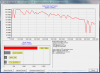
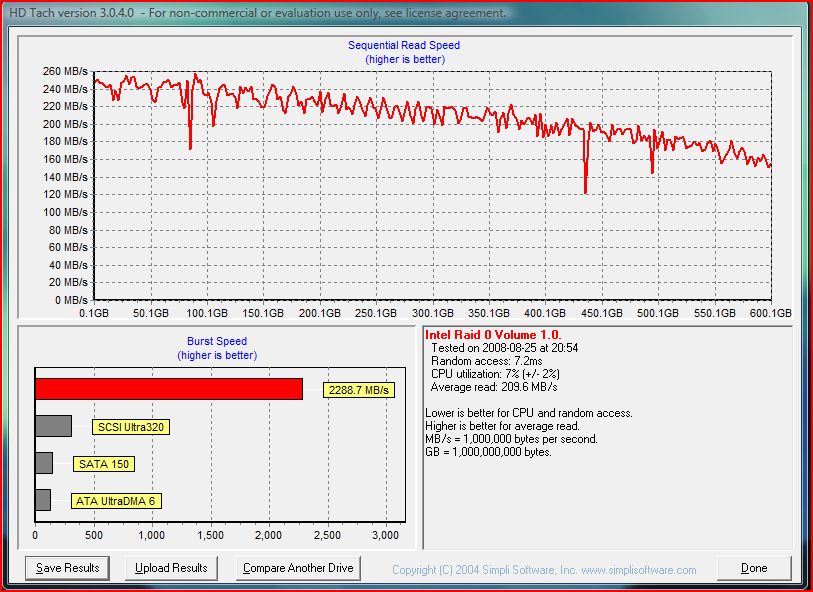
I'm running 2 Seagate Momentus XT 7200 rpm hybrid drives in Raid 0 (from my Acer), but I'm puzzled as to why my Windows performance rating is only 5.9, which I believe was also the score I had with the 1TB stock Toshiba it replaced. HD Tach's graph is similar to Bobmitch's raptors on his desktop (attached), tho his burst was much better. This was done while on battery. I have refreshed the rating several times. Maybe I'll refresh it again after updating to the latest Intel drivers, once my drive scan finishes.
Also, found the touchpad useless, despite all the available utilities. My touchpad would "click" if I pressed on the middle area, just like I had pressed one of the buttons and I had to tap repeatedly to "click" or select something if I didn't use the buttons. I even resorted to buying an external mouse until I could get this resolved. I prefer the side scroll (not 2 finger scroll) and had horrible experience with the screen scrolling up and down while typing, even with Touchpad Locker installed. Once I installed the old drivers I used on my Acer (Synaptics 14.0) with Touchpad Locker and TwoFingerScroll for Envy, it's working pretty good now.
I removed the touchpad and shimmed it with tape until the "click" disappeared, then removing one piece of tape. This helped a bit with the click (still there), but didn't help much with the sensitivity when tapping, until I used the old Synaptics driver.Attached Files:
-
-
Your RAID array gives about 80% of the speed of the Two WD VelociRaptors I have in RAID on my desktop and still get a 5.9. That reading is normal speed for mechanical drives. On my new machine, I have a Samsung 830 Series 256GB SSD for OS drive and Windows 7 index score is a 7.9 It takes full blown SSD to make a difference. I think it has more to do with access time than speed. As far as touchpad drivers...gave up on the HP version of the drivers probably the second day I owned my machine. I use the Synaptics drivers that include Scrybe for scrolling. Try them and see if you see any improvement
Drivers | Synaptics -
The previous HD Tach benchmark was with older Intel drivers and run while on battery. This one was with the latest drivers and on AC power.
Burst is higher (874.2 vs 1,688), random access much lower (14.3 vs .9), while the sequential stayed about the same. I would think most of the difference is the battery profile.Attached Files:
-
-
Here is the benchmark for two SATA II WD VelociRaptors in RAID 0. Your Momentus is pretty fast...Only real difference is the access time of the VelociRaptors and that they are 10,000 RPM
Attached Files:
-
-
Seems like my 3D emitter isn't working. I did just have to recently recover the system, but I guess it's also possible that the battery in both glasses died at the same time.
I've tried power DVD and TriDef and nothing works. I just can't get the glasses to respond. Any ideas? Thanks
Marcus -
Someone else had this issue in the past few months. Definately change the batteries in the glasses. CR2032. They are about a Dollar and a half each. You can get two for about $4.00 at Walmart.
-
Thanks Bobmitch, I'll check it out. They are old enough that it could be the cause. I'll swap them and then get back to you.
Marcus -
FYI, I had a revelation and realized I could probably use my iphone to check if the IR emitters were firing or not. I first checked it on my TV remote and just as I suspected, the Iphone doesn't block IR as well as my DSLR does.
So then I fired up some 3D media, and could clearly see the emitters on each side light up. So I'm off to get new batteries for my glasses.
So, if in doubt, use your phone's camera (don't have to take picture, just as long as the screen is on), and you will be able to see whether IR is emitting or not. -
Hi,
Was just wondering if anyone else was having overheating / switch off issues since the last BIOS Update. It happens regularly to mine whilst gaming (never did before) I went into the BIOS to see if I could see the shutdown temps, but the BIOS is very sparce in options.
2001 machine if its of any use.
Regards,
Tim -
I am but I'm using v 12.7 of ATI drivers. On the HP provided I was fine. 17 2000 CTO.
-
Good point, I've just read up, the 12.7's (which I was using, are locking up an number of machines), I'll rollback to 12.6
Thanks, no idea why I didn't consider this.
Regards,
Tim -
It was just the battery in the 3d glasses. Weird that they seemed to go out at the same time, and unfortunately that coincided with me reinstalling my system, but luckily everything is fine now.
Now if I could just get Power DVD to actually play a blu-ray 3d, things would be even better. It was fine until I upgraded to the most recent Power DVD patch, v3715 I believe. -
I had issues last night while watching a 3D movie. I turned off CoolSense and it was pretty good after that.
-
Just bought an envy 17 2110en and everything looks ok except the fact that it cannot read/play and blu ray discs.Tried both original and copies but nogo.
The drive lists as dvdwbd ts-tb23l in device manager.
Anything to share? -
you sure yours is the 2110en model, verify from under the battery coz HP ENVY 17-2110en Notebook PC Product Specifications HP ENVY 17-2110en Notebook PC - HP Customer Care (United States - English) list that it reads blu-ray but ur drive model name doesnt seem to support blu-ray im not sure tho.
-
Can you read/write dvd content?
-
Yep , it has bd drive but problem solved!
Did a clean installation and now it reads bd rom.
Probably a different bd rom driver.So the initial driver from hp was faulty.
Keep that in mind if something similar happen to you. -
Hey all!
I have just reverted my laptop back to original state and now i have a small problem. My Envy is starting to freeze occacionally on startup. I think it might be the problem with the intel wifi card or something, but i am not sure, therefore i ask here Hope u can help me
-
Try turning Coolsense off.
Did you get latest drivers from HP Support Assistant?
... or here: http://forum.notebookreview.com/hp-...xxx-series-owners-lounge-734.html#post8185053 -
where is the option to turn coolsense off?
-
That aint working, i have looked aroud and other seems to have the same problem but got it fixed by downgrading a driver, but i cant find it, any of u know the right one? or another solution?
-
The coolsense icon is in the lower right corner of your screen. Click it and choose on or off.
pmøller, if you disable wireless and plug into your router (or go without Internet), does it freeze? O/W there were updates to the Intel drivers in that link I posted.
You do NOT want to update many of these drivers via Windows Update tho. -
FYI, I fixed my Blu-ray 3d PowerDVD 10 issue by undoing the update I had preformed. I was on the newest version of Powerdvd 10, V3715, but I reloaded V3222 and enjoyed a Blu-ray 3d movie last night.
-
I reinstalled windows this morning and after installing the hp software version of CCC and the AMD driver I get a black screen upon rebooting until after I plug in hdmi out to the tv and unplug it. What did I do wrong?
-
Okay, an update...
I am able to use the previous two releases before the last HP released update and the switchable graphics work as they should.
With the latest HP update I can only restart the computer while using the built in GPU. IF I set the high performance discrete GPU as active then restart the screen is black and will only work through the hdmi out. -
Sounds like you installed a windows update... a no-no.
-
Still some issus with the bd rom.
Tried with pdvd 10 (the one that hp offers, pdvd 11 ultra and tmt5.
The bd drive identifies alla the bd disks , but when trying to playback with the above programms , not all disks play.
For example , newest bd roms don't play like star wars , terminator salvation ,spiderman 3 etc.When i say "don't play" i mean that when i press play , they load forever and never start.Sometimes the pdvd looks like it hangs and i terminate it with the task manager.This happens regardless of the 3d setting i choose (on or off).
Older bd roms play normaly like ac/dc donington , Coppolas' Dracula.
I will try in the next 3 days with other ati drivers and with hardware acceleration set to off (although i tried it once and i had the same response).
My Feeling is that the bd drive needs a new fw or drivers although i am not sure.
Any suggestions?
Has any of you tried star wars blu ray , spiderman 3 ,terminator salvation blu rays to your envy 17 2000 series and worked?
I have tested only the following ati driver ...
File name:
sp53274.exe [1/1, 209.5M]
System requirements: Supported Devices and Features
- Radeon(TM) HD 6850M
Released: 2011-06-03
Version: 8.820.5.1000
Compatibility: Microsoft Windows 7 (64-bit)
Fix/Enhancement: - Improves BD3D playback capability on new released titles.
- Fixes an error that causes a blue screen and error code 3B when running Direct 3D and powering off the display simultaneously.
*HP ENVY 17 & 17 3D (2XXX series) Owners Lounge*
Discussion in 'HP' started by 2.0, Mar 14, 2011.