Problems? See this thread at archive.org.
You must also remember...that when playing back anything in 3D, your monitor refresh rate should be 120HZ. Right click on your desktop, choose screen resolution...advanced settings...monitor. Monitor should be set to 120HZ on the 3D model. If not...set manually and try 3D again
-
Thanks for the usefull info.I didnt know this.
But I don't think it has anything to do with my case since i only tried 2d blu ray disks and some played while others failed to do so... -
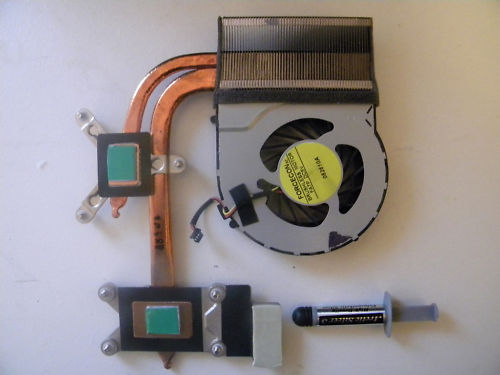
So, in the fight against heat, and watching a YouTube video on the cooling system in the Envy 17 2000 - I've placed an order for the 630790-001 (the i5 heatsink/fan) from an online merchant (about ~$50). The difference is that there are two vent locations - as opposed to the single left-hand vent on the i7 heatsink. The i5 heatsink also has a rear vent. Also appears as though the heat pipe placement is also a bit different.
I JUST did brain surgery on this the morning of the 4th to apply arctic silver. So, I get another fun hour and a half disassembly/reassembly once the new heatsink arrives. While open, I did notice a plastic piece in the back where it would open up the vent spot - so I believe the bottom casing is identical between the i5 and i7. Additionally, the service manual does not list a different part between the two. Finally, the logic board is the same between the two, so really - I can't think of a reason why this heatsink wouldn't work in the i7.
Did a bit of homework and I can't find any folks that have tried this in the past. I'm interested to hear from anybody on this forum to see if they have attempted this... and if anyone is interested in my results. -
I purposely didn't install the graphics card update for either... but maybe windows auto updating during the initial install did.

-
Where can we find the service manual?
Also, the latest bios is f1a or f1b ? -
After owning my ENVY for almost 10 months I just now realised I've never seen my processor go over 2001MHz.
Can anyone shed any light on why Turbo Boost doesn't seem to ever kick in?
Thanks
EDIT: Nevermind, should have put a little effort into finding out myself first. The windows gadget I use for CPU frequency just doesn't show it. HWINFO and Intels turbo monitor show it max at 2.7GHz. -
The plot thickens.
The service manual lists three heatsinks for the Envy 17 2000 - 2099
608650-001 - Fan/heat sink assembly for use only with Intel Core i7, 45-W processors (includes replacement thermal material)
630790-001 - Fan/heat sink assembly for use only with computer equipped with a 35W processor, includes replacement thermal material)
630791-001 - Fan/heat sink assembly for use only with computer equipped with a 45W processor, includes replacement thermal material)
The only 45W processors are Core i7s, so... why are there two part numbers? My guess is that the 608650-001 is the original-original heatsink for us folks that ordered early. Then HP realized their HS design was crap, and reissued a new part in the newer Envy's - the 630790/791 that also vents out the back.
What's the difference between the 790 and 791? Who knows. Fan speed is the only thing I can come up with. I mean, the physical die of the i5 and the i7 is the same. And the MB design is the same. So.... ???
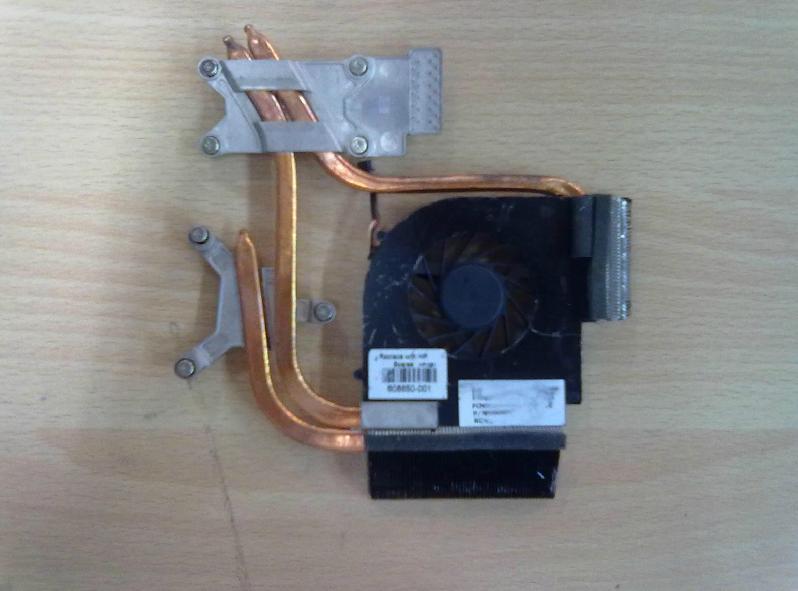
So I did some more searching online, and found a couple different pictures - see attachments 608650-001.jpg and 608650-001 ebay.jpg.
First one (without the ebay on it) - that's what my HS looks like. Unfortunately, I didn't look at the HP Spare number on the label when I opened up my Envy, but this is the physical model I have.
Second one (with the ebay) - this is what I'm TRYING to get, with the extra processor heat pipe/vent to the back. However, the ebay listing this came from has it as the 608650-001. Zoom up in the image and you can see that's what's on the label. Clearly this one and the other one can't both be the 608650-001. Nobody's got proper pictures of the different HS designs. Downside to ordering either of these off ebay is that it's literally on the slow boat from China (4 weeks).
I tried to pull up the service manuals from the 2100, 2195, and 2290, but HP links to the same service manual, rather than seperate ones. The service manual on those pages also says its for the "2000 to 2099."
The "630790-001" I ordered shows up tomorrow. I have no idea what I'll be receiving... will it be the exact same thing that's in my laptop today? Maybe. Will it be the dual pipe/vent design? Maybe. Will it be something entirely different? Maybe.
Attached Files:
-
-
You have me wishing I'd taken pictures when the lid was off my i7 to tweak the touchpad.
-
News is that they will replace the bd rom.
When i spoke to the tech guy i asked him about the second caddy (i told him that i wanted to place a second drive/ssd) and he told me that the second hdd bay is smaller and a 2.5" drive cannot be installed!He also checked that the second (official hp) drive caddy has different part number than the frst one.
Is this true? -
What smaller than 2.5" drive is he talking about? He's wrong, both bays are for 2.5" drives. He's right about the caddy been different though.
How to add a 2nd HDD or SSD to a HP Envy 17 laptop | The SSD
Add a 2nd HDD or SSD to an HP Envy 17 - YouTube
Hard Drive Caddy & Cable for HP Envy 17 -1000 and -2000 series [HP-ENVY-17] - $38.55 : NewmodeUS, Hard Drive Caddys for Notebooks
See if you can find a better deal. -
Everyone should buy the caddy, if they think they may add a second drive at some time.
-
I've got a spare HP Envy 17 caddy if anyone wants to pick it up for $25 shipped.
It's the same one from NewmodeUS. I had originally paid $40~ something for it then I sold my Envy after going through hell for support. -
I might be interested in it. I just bought a first gen DV7 for $40 that had a bad motherboard but the 640GB hdd works fine. I don't know if I really need the storage or not though, I have 179GB free on my SSD still.
BTW, I'm also having issues with certain new bluray movies not being recognized by the drive. I'm pretty sure it's a firmware issue and I'm also pretty sure there will never be an updated one available for this drive. I'm still under warranty; will they send me a new drive if I complain about it? If they do, think I'll just receive the same drive with the same firmware? -
GRAPHICS DRIVER HELP NEEDED AGAIN.
My machine is:
HP Envy 17 notebook 2101ea with the following specs:
Windows 7 64-bit S.Pack 1
Intel Core i7-2630QM CPU @ 2.00GHz (8 CPUs)
6144MB RAM
HD6850M 1GB
My driver is listed as HP. 8.820.5.1000, which I think is the HP one.
Am failry familiar with background of HP vs AMD drivers as have been through this before when I got FPS issues in BF3. Which I have again.
funny thing is that 3DMARK 11 settings are still 1850 - so I think ok.
Is there a recent stable AMD driver anyone can suggest that I install to improve things?. An idiots guide (as I feel like one) would be appreciated. Last take (April I think) I had such issues Bob kindly suggested 12.1 drivers. Not sure if they are still the best / most recent (as at that time he suggested 12.2/3 were not good). Any help greatly appreciated to get some better frames and my machine working to an acceptable level.
Thanks in advance. -
Well just PM me if you want it.
I would recommend complaining about the drive now before it's out of warranty. Tell them you know how to remove the optical drive, I suspect they should send you the drive alone. -
CPU maxing out to 100% on High-performance GPU ENVY 17 2280NR for no apparent reason? Anyone know the fix? When I look at the task manager not obvious what is using the CPU. Is this a hardware/driver issue? I think I have all the latest drivers.
Anyone with similar experience please? Thanks so much for any ideas shared. -
palatkik Alf Tanner
Ubuntu work well out of box with envy second generation.
Better than windows, if you forget the video card problem.
SOME POINTS;
In ubuntu is possible to disable the dedicated card and the computer not be so hot.
just open terminal and type;
sudo echo 'OFF' > /sys/kernel/debug/vgaswitcheroo/switch
Each inux have the own autostart, most usial is to write this in /etc/rc.local
Anoter point.
KERNEL;
inside /etc/default/grub
Use this;
GRUB_CMDLINE_LINUX_DEFAULT="acpi_backlight=vendor acpi_osi=Linux video.allow_duplicates=1 i915.i915_enable_fbc=1 i915.i915_enable_rc6=7 epb=0 radeon.pcie_gen2=1"
and upda-grub2 after.
About the sound/subwoofer;
edit the /etc/modprobe.d/alsa-base.conf and at botton write;
options snd-hda-intel model=hp-dv7-4000
and save.
done.
Will discover your standard battery will survive almost, 30 minuts more than in windows. -
I believe the same thing about the bd rom but I took it to the service center just to make sure.
More a fw issue than a faulty drive.
Tomorrow hp will return it to me with a brand new drive and I will post as soon as I can... -
The CPU maxing out to 100% and making the ENVY next ti useless without a reboot seems to only happen when I have High Power GPU ATI running. It's ok with Intel GPU. Why is this - anyone know? Started happening in the past three weeks or so. -
I asked HP tech support as I'm still under warranty and they told me to switch the ATI GPU off and only use it if I really need to! No suggestion on what the problem is. ? May I need a factory shipped software reset myself?
-
Good news regarding the issue i had with the bd rom.
Hp replaced it with a new one.The bd model now says hp bddvdrw ca30p (different model than before). -
Possibly! However...before you do that...check your machine for underlying malware or virus as well. Do you notice any abnormally high number of resources running in the background? I don't think that the ATI GPU will be causing this. There are related issues. Also...update your version of Intel Management Interface, latest is 8.0.13.1502
http://forum.notebookreview.com/hp-...dv7-6xxx-envy-14-2xxx-envy-17-2xxx-intel.html
You might want to also try uninstalling your video drivers using Driver sweeper
Phyxion.net - Driver Sweeper 3.2.0
Then reinstalling the HP version first, which can be found off the same page as the Management Engine Interface, etc.
Before I would suspect any hardware issue...I "might" do a factory reset on the software, but remember that you are going to have to put some time aside to do that... -
Wanted to update on the heatsink experiment from above. Short story is that the part I ordered was the same one that I have now ... So returning that one. I also ordered the right one off eBay for $40 shipped from China so will have feedback in a couple weeks.
-
Thanks for ideas Bob. I am malware free I am pretty sure. Two questions if I may?
1. When I check my ENVY it says I am using 7.0.0.1144 Intel Management Engine Interface and the HP Support Assistant says I am up to date. Are there risks involved using the newer version on link you sent do you think? Why wouldn't HP recommend it?
2. On the link you sent I aslo see a newer AMD chipset driver ver 8.882.2.2000 (AMD). My ENVY is still using 8.820.5.1000 (AMD) and the HP Support Assistant says I am up to date. Also the AMD web site says I am up to date. Are there risks involved using the newer version on link you sent do you think? Why wouldn't HP recommend it?
I will try both these newer drivers on another new hard disc and factory reset when I get time to see if I can get AMD working again if you and anyone one else on this forum can convince me it is better than what HP recommends. I cannot do it on the current config as all my work is on it and takes time as you say.
My ENVY is a 2280NR 2D version btw if that makes a difference. Running on Intel GPU until I sort it out. -
There should not be an issue updating your Intel Management Engine interface. I have updated mine many times and no issues. HP Support Assistant only deals with HP software, like Coolsense, etc. They are not aware of Intel updates or other updates. You are quite safe updating the versions. If you leave it up to Support Assistant for some of the drivers, then your machine will be using old, buggier, software. Example...Your Intel wireless drivers. 6200 N drivers from Intel are v15.1 dated May 2012.
http://downloadcenter.intel.com/Sea...-N+6200&ProdId=3407&LineId=1784&FamilyId=1783
The original drivers released from HP were buggy like crazy. Caused freezeups and other issues. 15.1 is pretty flawless. Don't be afraid to update drivers when you find them...they get updated for a reason. Also...the version number of your machine doesn't mean much. The 17 / 17 3D 17-1xxx or 2xxx all use the same drivers. If you leave it to what HP recommends...your machine will quickly be outdated... -
Thanks Bob, I'll give the Intel and AMD drivers a try.... HP support just told me told another factory reset and gave up.
-
So from my last post I wanted to take apart my laptop to 1) clean it up, undust, and reapply some compound and 2) check out the CD ROM since it stopped working on me.
I have to say from the info that was posted I was very successful in taking it apart and putting it back together again. Laptop is running 20-30 degrees cooler and instead of the keyboard being hot to the touch it is now just warm.
CD ROM still doesnt work, but atleast now i know how to take it apart and what the serial numbers are.
Thanks again to everyone and i did take some pics in case anyone needed to look at something....not many and maybe not good, but i got some
-
Bob, I notice you didn't reply about the AMD drivers? Is 8.882.2.2000 usable? I tried it and it caused crashes on display, a BSOD at one stage so I gave up and went back to my HP supplied 8.820.5.1000.
Is their a history of problems with this driver or just me? Sorry I haven't noticed it mentioned before on this thread...but I could have missed it. -
Actually the 8.882.2.2000 drivers caused black screen issues for many of us, and if you check the actual driver page for your product...the last posted drivers were the 8.820.5.1000. Seems that someone thinks that the 8.882.2.2000 are compatible with our machines, and they are NOT. I used the 8.820.5.1000 drivers and then installed these over them
AMD Mobility Catalyst Display Driver 12.1 for Windows Vista/7 64-bit - TechSpot Drivers
The catalyst mobility 12.1 seem to be very compatible with switchable graphics. In order for switchable graphics to work, you install OVER the HP default drivers. This way..the Intel drivers are NOT removed and the AMD are updated. Mine work fine...just note...sometimes it takes two or three installs for it to work properly. Once done...they are far better than the 8.820.2.2000 are claimed to be. -
Really appreciate the feedback Bob. Thanks. I also seemed to have the ENVY working normally again now without the CPU maxing out so thanks.
-
Glad to help.
-
Hi Bob...I can download the AMD Driver Verification Tool from the link you posted...However, the software does not install any new drivers, and I get an error message saying that these are not compatible with my notebook...can you help me get a link to get the 12.1 drivers that will install please?...thanks a ton for your help...
-
This is where I got mine...
AMD Catalyst 12.1 (8.930.0 December 5) AMD Official WHQL - Guru3D.com Forums -
Hi Bob,
A little confused, will these drivers actually allow the switchable graphics in the 3d version of the envy. -
Be prepared to do a little work here. You can maintain switchable graphics by installing these on top of the HP drivers. Do not uninstall the HP drivers...for they contain AMD / Intel grapics drivers. All you want to do is use these to replace the AMD drivers. Catalyst Control Center will maintain switchable graphics if you install them properly. Simply run the installer...and replace the older AMD with these newer ones. Once done...switchable graphics should still work.
If the install goes wrong...be prepared to uninstall all the drivers...use driver sweeper:
Phyxion.net - Driver Sweeper
Then reinstall the HP drivers from the site and try again. It took me a couple of tries...but everything works really well now.
Another thought...that helps make things work faster...when installing the 12.1 drivers...do a custom and install everything EXCEPT Catalyst Control Center. The version from HP isn't too far from the later ones...and switchable still works -
On the 3D model specifically? Everyone is saying that switchable graphics do not work.
-
The setup works for me and many others...worth a try for you...
Attached Files:
-
-
Sorry Bob, I thought I was in the 3000 series forum. Do you have any fixes for the 3rd generation envy's?
-
No problem. No pun intended...I "envy" all of you that have just AMD graphics. I realize that you take a hit on battery time...but installing new drivers should be easy...with no "switchable" graphics...only need the AMD drivers. Do you want to try the mobility 12.7's?
AMD Catalyst 12.7 (8.981.2.0 June 26) AMD Official BETA - Guru3D.com Forums -
I'll try them out tonight
-
Anyone managed to install the newly release Catalyst 12.8 without getting a BlueScreen?
-
Hi guys, owner of an Envy 2100eo here. Im thinking about buying an SSD, after reading that one of the ports is a SATA3.
The main question is, how do I change the HDD settings to AHCI mode in BIOS, havent found that one yet
-
No you do not change anything in the bios. HP set the bios settings to RAID ON and RAID OFF...pretty much it. However, both settings have AHCI inabled. Make sure to install Intel Rapid storage manager and also double check the following:
GUIDE - Enabling AHCI mode AFTER Windows 7 Installation - Guru3D.com Forums
If AHCI is already enabled...great...if not...it will show you how to do it...just make sure that RSM is installed and AHCI should be automatic.
You might also want to do some reading here:
Guide * Windows 7 Ultimate Tweaks & Utilities *
That should do it... -
Alright, but uhm, could perhaps write a small step-by-step guide?
Step 1 being installing the SSD, and upgrading the firwmare.
Step 2??
Step 3, Superfast computer
-
In your step 1, you have upgrading the firmware. Depending on what SSD you purchase, I expect the most up to date firmware available may already be on the drive. I have two Samsung 830 series 256 GB and both were up to date. As far as installation...make sure to put the SSD on the SATA III port (the one your main HDD is on now). That will give you full speed.
Step 2...I used the HP recovery disks to install everything. I have an Envy 17 3D, so I needed everything. I cleaned up from there. Also get as many software updates as possible...but mainly these:
http://forum.notebookreview.com/hp-...dv7-6xxx-envy-14-2xxx-envy-17-2xxx-intel.html
As far as the video drivers are concerned...DO NOT use the video drivers on this page. Use these to start:
Software & Driver Downloads HP ENVY 17t-2100 CTO 3D Edition Notebook PC - HP Customer Care (United States - English)
Too many of us have been burned with BSOD or Black screen with the one's from the first site.
That should pretty much do it... -
No. In all second generation 17 Envy you CANT disable the RAID and enable AHCI.
It's possible to um mount the raid. disable the RAID menu. But not enable the AHCI. Your disk controler still running in raid mode.
Your bios is locked in "RAID bus controller: Intel Corporation 82801 Mobile SATA Controller [RAID mode]".
In fact. The envy 17 second generation have one of most sh$%$@#$ bioses in market. Everything is locket. You cant use nothing from your HIGHT END BIOS/CHIPSET. the fact and advantage of you have an NM67 chipset is NULL. We just pay more for nothing.
The DSDT table is one of most crap coded ones to. tons of bugs. turn hard wame if we want to recompile the DSDT table by ourself. -
Take CARE doing ssd or hard disk upgrade when using the Envy second generation 17.
Your disk is locked like you or not in non AHCI mode and you can't or have choice of put in IDE or shared mode.
Most of SSD will not allow you do this upgrade out from windows loaded because this. and do this kind of upgrade with windows loaded is RISK.
Try to do the upgrade using another device. One that give you the bios choice for IDe/SHAREd mode or AHCI. -
HP's support of any of their lines is PITIFUL! Look how old the drivers are for 99% of their machines, including the new 3xxx line. All I can say is that the next time I purchase a portable...most likely not HP. They tinker way too much and can't even help us keep our machines up to date -
Besides the "AMD" Switch problem that soon will be working.
Linux is the best match for this HP's machines.
Linux work out of box when installing. windows no.
You have support for everything. Same 120Hz when using the integrate card.
The battery use when in linux is near 50% less than windows. Mine 2100 cto is mine truck ( I want to this machine fast to buy another). and in day by day. the machine barely become hot. If i turn the cpu to deepest power save mode. Puff. More cold.
HP and MICROSOFt sometimes are a joke.
HP never more.
*HP ENVY 17 & 17 3D (2XXX series) Owners Lounge*
Discussion in 'HP' started by 2.0, Mar 14, 2011.