 Problems? See this thread at archive.org.
Then is a clear indication that 1- your heat sink are not to this model 2- the reat sink cooper tubes already lost their alcohol inside and cant dissipate the heat any more. ( or something more problematic happening).
On this devices the FAN is not "molded"and sealed in this aperture but is floating between the low side from the notebook and upper side from the board/keybaord ( have almost a 1Cm gap. is more easy you use without the memory cover and will give you a better air intake.
If you feel that this helps ok.
-
Everything in my computer are original parts. I got thermal reboots when using really heavy applications, it used to idle (with the 6850m on) at about 65ºC when the computer was new.
My idle now is about 55ºC (6850m on). With mild processing it instantly heats up to about 75 on the under-your-left-hand chip. It peaks at over 95ºC. That really sucks.
I don't mind the processor/graphics tems anymore. I do mind not being able to touch the computer for more than 10 minutes because of that badly cooled chip.
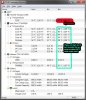
I'll test it without the memory cover to see if anything changes. However, I really think my 2090nr will suffer another little surgery. =) -
I would at least try another repaste. Maybe there was a small piece of debris mixed in the thermal compound keeping the two surfaces from fully contacting.
-
Termal pads and paste are not the point here.
Paste are to create a tinny layer to take place under the porosity of cooper and CPU surface and not create a new layer between them. Its thermodynamic. Heat transfer.
The problem the friend is describing is most probable because the cooper tubes lost their internal alcohol or ester or oil substance. -
I'm interested in trying fritz's solution, but i can't find where to buy the part I need in Switzerland. On the hp site they don't let me select Switzerland as a shipping country. Anyone knows? It's the 630791-001 thermal assembly.
-
You will need to call up HP Schweiz directly I believe. Maybe they will refer you to one of their partners that handle spare parts! Or try looking for HP hardware partners / repair partners. They usually have access to the parts store database and can order the parts ... if you dont find it on amazon etc.
-
any solution to install the driver in 14.4 2xxx envy 17 3d, With intel hd 3000 and radeon 6850M? I only can install replace 2 files for intel hd 3000 3223 and 6850m of last driver 13.9, but someone know how install correctly drivers 14.4 ?
-
Ok, a little update on my Ivy CPU + 3-pipe heatsink adventure...
First, the Ivy is a no go. No boot and the caps lock light just blinks slowly. At this point I no longer have the ambition to try playing with the BIOS.
The 3-pipe heatsink is a success though; the laptop runs noticeably cooler now. Playing CS:GO with all settings maxed these are the temps I get....
Stock frequencies: 80C Max / 77C Average
GPU 700MHz / MEM 1200MHz : 85C Max / 80C Average
If I tried gaming at those overclock frequencies before, not only would the laptop eventually shut down, but I would barely be able to keep my left hand on the palmrest/keyboard. It still gets pretty warm, but not uncomfortably hot.
The fan noise is also different. This one has a less annoying sound profile; the stock fan sounded like a jet engine on high. Definitely worth the $25 and the time it took. -
The fan noise is different because the size is smaller from the original.
-
AliExpress.com - Online Shopping for Electronics, Fashion, Home & Garden, Toys & Sports, Automobiles from China. the best place to find everything ....
-
The re-paste must have settled in, now I'm only seeing 77C MAX with those overclock settings.
Oops, nevermind.... still the same. I think Afterburner is reading the CPU temp or just displaying the wrong GPU temp. -
I love how everyone is trying to get the AMD graphics to work when all I wanted to do is turn them off lol. With the AMD graphics disabled (Thanks to this BIOS Mod), my laptop's fan is virtually silent since its not utilizing the AMD chip at all which is perfect for me since all I do is watch video, download stuff and listen to music. And to top the cake I can now use Windows 8.1 with Vanilla Intel Display drivers since I cut AMD out of the picture

-
It is definitely a good laptop even if it is just being used for movies. For me the 120Hz smoothness does it.
Yet I still won't be happy until I figure out how to sort out brightness control on AMD (manhattan cards in general) ... Even if I won't ever utilize the 6850m properly
-
Has anyone gotten the Envy to work properly on W8 yet? So with switchable graphics and all other features of W7. Or maybe with only the HD6850M workinh without the intel HD3K?
-
Now without the AMD driver no longer being an issue, I'm glad I can use this wonderful beautiful laptop with for ages to come. I've been running Windows 8.1 update 1 for a few days already and my experience could not be any better. I seriously did not want to get a new laptop because of the graphic driver limitations. I owe my gratutute for the BIOS modder and this forum. I not only get windows 8.1 with no driver issues but also my brand new Intel Wireless AC7260 adapter thanks to the whitelist removal
-
Now all we need is the F1D bios (preferably a non dump)
Does anyone have access to any repair centers that are official hp repair partners?!
Those guys usually have access to the internal BIOS versions. -
Could you please explain how you disabled the AMD card? I tried to find an option in the modded bios, but didn't have any success.
-
My 17t-2100 MOBO died last week. Looking to part out the rest of the computer. Message me if there is any parts you need and I will give you a price. I'll check a few sites and make sure I can beat their prices.
-
I've solved my gripes with the notebook's cooling. 40ºC idle now, max 70ºC.
I modded that chipset cooling that has the flat aluminium heatsink for better performance. Added one like these:
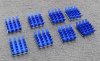
Now I can actually touch the laptop. =) Didn't need to make any more holes.
I just wish the cooler was easier to clean.
So VonCrisp, no luck with the F1D bios? -
Hauschild you wouldn't happen to have pics of how you did it etc?
I am afraid it is a dump. So it might not be good putting on other laptops since it would most likely entail my s/ns, settings etc.
HP Germany was as helpful as ever. They finally fixed my issues with the mobo but tattooed my machine wrong! I was told the BIOS would be put up online later .... fancy talk for ..... .
My suggestion is to call up an official HP repair partner to see if they have access to it. (maybe techs from a more liberal country are more open about this) HP support line doesn't have access to this BIOS. Over here you cannot really get in touch with the Techs at the repair facilities and they are the only ones that have access to this.
Which is a shame since the device is going in for a 3rd time on a remaining issue which has been noted down since my first support call. -
f_r_i_t_z, since you're a Linux guy could you please explain to me how to get the 6850m working in Linux if it's even possible?
I'm using Ubuntu 14.04 LTS 64-bit and under Display setting the OS sees 2 built-in displays. I have flashed the moded BIOS F1C you linked here before successfully and I'm using Metro: Last Light as my test game, but it just keep crashing and I think the 6850m is not taking over regardless of what powerXpress setting I use in the BIOS.
If you could provide a way of playing Linux games at full power by taking advantage of the dGPU I would really appreciated. Thanks.
EDIT: I should also point out that I'm new to Linux, I just tried Ubuntu on a separate drive and I like it so far. -
I'm planning on replacing my hard drive with an SSD and placing the old HDD into the 2nd bay. Does someone have a guide on how to do this? I have never done something like this before and because the Envy is different to most laptops in many ways, I'm looking for some kind of guide to cling to. My main issue is the OS, how do I install it on the SSD? I don't have a W7 disc. Can I activate UEFI? AHCI? So many questions, but as a noob the answers are hard to find.
EDIT: Just realized I forgot some details: I own the 17-2100ed, and I'm planning to buy this kit ( http://www.newmodeus.com/shop/?main_page=product_info&products_id=341). Would it even work? I guess so, as it says 2000, but on the other hand, it's 2100, rather than just 2000. -
Do you have the hardware for a second hard drive? -
For the kit, yes, it's OK, I bought one for my 17-2190ef.
For AHCI, yes, with the moded bios, you can activate it without any problem. The only problem that I had was with Intel Rapid storage that needed to be reinstall to work properly.
To put the system on the SSD, the best way i think is to create the HP recovery media with HP tools. I'm not sure it will work, don't know if the OEM W7 will accept the HDD replacement.
And for the UEFI part, I've read that f_r_i_t_z was doing some test with the help of donovan6000 and his modded bios, but I don't know the results. -
I don't have pics because i'm not so proud of it. It was actually just a test, I'm planning to remake it soon.
But I can explain how I did it: I remade the bends on the aluminium "heatsink" - those that the screws go into - so that it actually touched the chip. (Originally, it had an almost 1mm spacing between the chip surface and cooler surface, so HP could use one of those spongy thermal pads.) Repasted it with Arctic Silver Ceramique and used the new heatsink with it's own thermal adhesive above the original heatsink. (Yeah, I've made a sandwich, with is an horrible thing to do as far as cooling goes).
Soon I'll remake it taking out the original heatsink and just using the new one with a clip that I plan to make from steel wire. When I do it, I'll share. -
This sounds good!! Envy 17 sandwhich series. Cannot wait for those pics! I will make a DIY thread on leshcatlabs with all possible mods for the Envy 17 once we finally figure out brightness control on muxed AMD.
I will send my laptop in for repairs and beg for a copy of F1D ; ). Maybe i get lucky! -
A new mobo is like $100. Replace it and you can probably get more $$$ than trying to part it out.
-
Install the moded bios.
Change to muxless ( no mater if dynamic or powermode).
Install the latest catalyst for your xorg and kernel.
Smile a lot. -
new one from china near USA$ 90...
We are lucky our note mobo is cheap. some g42 models are 150, 200. -
Create your recovery disk .
Install the new ssd ( dont delete the old things from old hd).
Restore yourr note with your cds/dvds.
Easy.
OBS. the second bay candy ( the one at right) cant boot. They dont wire one ground pin in mobo. The Blueray bay can be used to hd using a candy. and have boot.
I'm using a 64Mb ssd m4 on the first bay and 2 640mb on second and cdrom bay.
Or you just can buy 3 ssd and put they all in linear raid or raid 0. ;-)
Hoo. The first and second bay are 6Gbs. The cd rom conector works like an Esata. then just 3gbs. -
Thanks for the reply, fritz! I will try to test that once I get back from work. However, I would really appreciate it if you could elaborate a little more on how and where to do that last step, remember I just got myself into Ubuntu. Thanks again man.
-
After flashed the new moded bios and changed to muxless mode
apt-get install fglrx fglrx-amdccle-updates ubuntu-drivers-common xvba-va-driver -
Still looking for an answer on how to disable the AMD card. Can anyone else help me?
-
Modedbios
advanced;
video configuration;
Special Features to disabled.
voila. -
Thanks! Unfortunatly I couldn't get the Intel driver to work. After uninstalling the old HP AMD+Intel drivers and cleaning with Driver Fusion, I tried several newer Intel drivers (Stock drivers from the Intel website). They install fine, but after the restart I just get a low resoultion which I can't change and no Intel configuration utility. But my device manager says the driver should work fine. I am on Windows 7 64bit by the way.
-
Interesting. Are you on HP Windows by any chance?
I have several theories to what is going wrong. -
Yes, I am on HP Windows 7 that came with the machine.
-
Use DDU in safe mode.
HP windows 7 will install standard intel drivers ( even if you switch auto install off)
Install windows standard VGA drivers ontop these through device manager.
Clean again with DDU.
Install Intel drivers from UniflL 14.4 1.1 legacy intel. Enjoy. -
Which SSD would you guys recommend? I'm looking at the 240/256gb range, and mostly the Crucial M500 vs the Samsung EVO, although other suggestions are just as welcome.
-
I've gone through a few SSDs before ending up with the Evo 500gb, I've installed 3 of them now... very happy
-
Which other ones have you tried? Is the difference noticeable?
-
I would like to add:
Wagnard has just updated DDU and it might even be able to fully remove the OEM drivers that windows re installs. If this is indeed the case (with the new DDU)
Please mention it in this forum and I will pass the message on to Wagnard. -
I started out with 3 different 64gb microcenter rebranded adata 595s I think they were. They were sandforce 1222 based.
From there I went to a vertex 3 120gb one, based of the sandforce SF-2281
After that I got a 250gb Evo 840 and it was meh
Going to the Evo 840 500GB I've been very happy with the speed increase. I've installed one in a i7-930 system using an add on sata 6 controller, one in a envy 2090nr model and one in a haswell 4770 system. All three systems showed great improvements with the Evo 840 500GB drives. The downside is that putting one of those in our model laptop really shows how lacking the stock platter drives are performance wise.
I use them with Samsungs performance settings set for OS optimization and RAPID MODE enabled in all 3 builds. That M500 is supposed to be a good drive though. I think most review sites agree though you cant beat the price/performance of the EVo 840 drive at this point. -
I think that's what I experienced this morning when using DDU to remove all the drivers multiple times over multiple restarts using your method from above to end up with just the intel drivers.
-
What about data corruptions? Because once in a while, I'll need to shutdown my laptop by holding the power button, will this corrupt my data? (The ssd might not have enough time to shut down properly)
I know the M500 has something to prevent this, like a small battery or something, but the Samsung doesn't. Is it a real issue? -
Just to get all info correct before I submit / reconfirm the "bug"
Windows 7 HP edition
DDU 12.9.2.1 (06-02-2014)
After cleaning in Safe Mode Windows still re installs HP Intel drivers.
------------------------
The only way to remove the video drivers is to overwrite/install "Windows Standard VGA" drivers ontop with through Device Manager right now.
I am not certain how HP hardcodes them into DriverStore but I will let Wagnard know. -
Whats the version of the driver that's the HP version so I can check?
-
I'm not sure, it's not been an issue for me though and I was dealing for months with the issue of the computer not waking properly from sleep so I'd shut it down by holding down the power button and nothing bad ever happened. I'll qualify that though by saying I use acronis true image and make very regular backup copies of my drives so if it did corrupt it would probably just be an annoyance that was fixed in an hour. -
As far as I recall the HP Intel drivers signatory is ATI inc (not Intel) and the driver numbers is the same as the ATI numbers because it is part of the HP hybrid driver that installs both drivers from one Inf file.
Maybe you can upload the DDU logs that the program creates. Those could help in seeing what the actual problem is. I currently have my machine in repairs else I would do this myself. -
Guys I have some fairly important news.
With 14.6 we will ALL be moving to Dynamic Switching. (Modded or Not - I would still appreciate a copy of F1D if anyone has any contacts anywhere )
AMD will be using a "trick / entry into BIOS settings that a stored in memory" (at least what we at Leshcatlabs suspect) to make our cards use dynamic.
I have recently noticed this during tests with 14.6 beta 1 / 14.6 RC1
If anyone has any experience about performance in the near future .. please don't be shy to post.
*HP ENVY 17 & 17 3D (2XXX series) Owners Lounge*
Discussion in 'HP' started by 2.0, Mar 14, 2011.


