 Problems? See this thread at archive.org.
FITC version is chipset specific, not ME version specific (from what I can tell).
The 6/7 series chipset version of FITC can be downloaded here...
FlashImageTool_6and7_series
Looks like the most difficult part will be building the ME FW with all the correct settings.
-
Double post
-
This FlashImageTool_6and7_series is the 8.1 . Just open me firmware 8 and up. We still in 7. -
me firmware is not a problem. the vltage, frequencies , etc, etc, etc are the same.
from 10 problems this is the 9.
You have another 8 before this.
First microcode, later video card firmware.. -
Sorry whilst I dont understand as much as you guys about this .. would the Intel videocard firmware reside in the BIOS?
-
No clue. Google doesn't turn up any info for Intel HDx000 firmware other than Linux related stuff.
The more I read about ME the more I think it will not be possible to update to ME8, which probably explains why no one else has done it yet.
I've read of Ivy working on some desktop systems with ME7 but with overclocking disabled, so maybe there is like a 5% chance that it will work if I just update the microcode. No harm in trying I guess; microcode update is fairly simple and I already have the Ivy CPU on the way.
At the very least after all this rambling I've done I should be able to offer the F.1C unlocked BIOS with microcode update for processors with 206A7 CPUID. Not sure if that will even provide anything of value though. -
My knowledge is fairly limited but having read this: RE: Intel Management Engine: Drivers, Firmware and Tools - 6
I believe it is possible to flash this for some boards (seems like people have done this before). Either way! Cannot wait for the results! Keep it up h8 fritz and donovan! -
It's possible to edit and instead flast insert this in bios image. The problem is.
FlashImageTool_6and7_series cant deal with me before 8.0 Our device use 7.xxx
Cant edit without this. If you find one FlashImageTool_6and7_series version 7 or 6. then I can start to play with this.
Me can be editable. Maybe, something specific for ivy can be changed in me7. But this is not the problem for now.
for now the microcode and intel video image is the problem. -
I think these are they correct tools...
TinyUpload.com - best file hosting solution, with no limits, totaly free
The problem is they are 32bit tools. I don't think they made 64bit versions of the tools back during 6/7 series. -
I have heard the same. I guess Windows 32 bit or DOS is needed for this.
-
Edited my last post with a complete 7.1.x tool package.
-
The last me image version 7 is Intel ME7 v7.1.60.1193. I have this image....
-
I think I am way to tired to really have any clue what I'm doing, but I've been playing around with both FITC 7.x and 8.x.
I've extracted the ME region from the BIOS and loaded it up in FITC 7.x. I then opened up an Envy 17-3200 BIOS in FITC 8.x and changed everything in the ME region to match that of our BIOS. Some things are extra or missing since ME8 is a little different. I then built the ME8 firmware using the Intel series 6 HM67 settings. FITC output a ME region file I can now paste back into the original BIOS file.
Technically this method you don't have to mess with flashing ME the normal way, you just flash the BIOS that contains the new ME region code.
Did I do any of that right? Haha, I doubt it. I would probably have to be nutz to try and actually flash it. -
https://drive.google.com/file/d/0B9bMDVFBKU06QXNBOVZSZEVGams/edit?usp=sharing
Run cmd in administrator mode
FWUpdLcl.exe -f me.bin
turn off computer, wait 1 minut
restart
This work. Just flashed using windows 8.1.1 64 bits.
this is not the 8 version. is the latest 7 version.
the 8 one I need to test later. but something tell me will not work, Used more in uefi bios enabled.
If you have a windows 32bits to try..
https://drive.google.com/file/d/0B9bMDVFBKU06MmhBMUpoSHlHZ3c/edit?usp=sharing -
Quick question though, even if I completely screw up the BIOS (boot block and everything), I should still be able to recover with the HP_TOOLS method, yes?
-
if you the me side no..
the other sides yes.
but it's better to do a recovery test before try anything. nuild a usb with the recovery, test and maintain this in a safe place. -
Yhis one me i post is safe to flash... Besides dont change nothing in out device..
-
Did you modify those me.bin files with the setting from our ME region code? If they are unmodified and for a different device, then I wouldn't feel comfortable flashing them.
I think I'm going to use the ME8 build I made and manually insert the code in the BIOS. When the Ivy CPU comes I will do [Force] CPU_Microcode=1 when flashing first to test the microcode and then do [Region] ME=1 to flash the ME8 code. I think this is better than using FWUpdLcl.exe to update, at least it would make me feel better to do it this way. -
Sending you in private the bios using the Intel ME v8.1.52.1496
From my knowledge you are safe do flash this. This really dont change much things under the cpu side or video side ( maybe the bios side clock, etc just).
to flash you need to use a hd without the HP_TOOL partition.
AND CREATE A USB FLASH DRIVE FOR RECOVERY or MAINTAIN ANoTHER COMUTER AT SIDE to create one.
i'm not doing a test of this now by mysef because i'm out for this week, far away from envy 17... -
Sending you in private the bios using the Intel ME v8.1.52.1496
From my knowledge you are safe do flash this. This really dont change much things under the cpu side or video side ( maybe the bios side clock, etc just).
to flash you need to use a hd without the HP_TOOL partition.
AND CREATE A USB FLASH DRIVE FOR RECOVERY or MAINTAIN ANoTHER COMUTER AT SIDE to create one.
i'm not doing a test of this now by mysef because i'm out for this week, far away from envy 17...
NO MICROCODE YET just the me.
OBS: some models of hm67 or series 6 chipsets already work well with me 8. -
"... I think I'm going to use the ME8 build I made and manually insert the code in the BIOS. When the Ivy CPU comes I will do [Force] CPU_Microcode=1 when flashing first to test the microcode and then do [Region] ME=1 to flash the ME8 code. I think this is better than using FWUpdLcl.exe to update, at least it would make me feel better to do it this way...."
No, nor one or other..
you need to mod this inside the bios and flah the bios... -
The one I sent you dont have the microcode but have the me. In a very probable teory works with the actual intel cpu.
-
Hi everybody,
1st thanks to fritz and donovan for the awesome work :thumbsup:
My Laptop gets realyy hot, the Vent is clear and i want to disable Turbo Core.
But there is no option in the modded F1C Bios
Another curios problem is, if i tilt my Laptop on 110 degrees the fan works like under 100% Load and after 10 secs it goes off with a heat problem.
But the device was not hot i think its maybe a sensor.
Regards -
Something is wrong with your hardware ..... check it...
Maybe the cooper pipes that have a chemical inside (most of time a kind of alcohol solution) is faulty.
Change you heat sink urgently
Install cool and quiet from hp to....
The worst problem in this notebook are not the cpu or card temperature but the chip set that doesn’t have nothing to dissipate the heat. -
Dark:
Looks like you might even have an old heatsink too!!! .. besides being worn out.
http://forum.notebookreview.com/att...2xxx-series-owners-lounge-608650-001-ebay.jpg
http://forum.notebookreview.com/att...7-3d-2xxx-series-owners-lounge-608650-001.jpg
These pics are part of the original post* -
Thanks for bringing that post up. I remember when I had my envy apart to repaste the CPU that there was a plastic cover over the back vent, so I definitely have the older style. I guess I'll have to try and get ahold of the 3-pipe version. Looks like the only source for them is used from China though unless you want to pay over $100 direct from HP.
EDIT: It looks like that part is for the 1000 series though. Has anyone confirmed that it does fit?
EDIT2: After a long search session on ebay I found a used one in the US for $20 shipped. I won't cry over $20 if it doesn't fit. -
there was another post my Fritz detailing on how to take a DV4 and mod it for the 6850 I believe.
You just need to make sure that the pipe isn't "used" up like Fritz mentioned.
Any news on the CPU front? I am quite curious about this endeavor.
I am thinking of compiling all the little hardware mod guides for the GPU and putting them onto the leshcatlab forums. -
I have the CPU here, but after all I've read and learned in the last few days I don't have much hope of success. I might still give it a try but now I have to wait for this new heatsink so I don't have to take the laptop apart twice.
-
Thre is 4 kinds of coolers.
this one
http://forum.notebookreview.com/att...2xxx-series-owners-lounge-608650-001-ebay.jpg
this one
http://forum.notebookreview.com/att...7-3d-2xxx-series-owners-lounge-608650-001.jpg
and other 2. the differences? The cooper from the dv7 models are more thin like this one http://forum.notebookreview.com/att...2xxx-series-owners-lounge-608650-001-ebay.jpg or robust like this one http://forum.notebookreview.com/att...7-3d-2xxx-series-owners-lounge-608650-001.jpg ( look how the cooper are more bigger).
If you buy this one http://forum.notebookreview.com/att...2xxx-series-owners-lounge-608650-001-ebay.jpg
Disassembly the http://forum.notebookreview.com/att...7-3d-2xxx-series-owners-lounge-608650-001.jpg and try to soldering upper the other heat sink.
ITs something very common to do and will be something like this. Notebook purple copper tube diy heat pipe notebook copper pipe 7mmx140mm 14 flat tube-inReplacement Keyboards from Electronics on Aliexpress.com
Shop Heat pipe notebook online Gallery - Buy Heat pipe notebook for unbeatable low prices on AliExpress.com
OBS: don’t use for long the thermal blower or the tubes blow and the internal alchool leave.
Use low Melting point solder paste. ( specialized stores will show you, is cheap).
The heat sink you will use by BASE to "TURBO" you need to use clamps to hold the cpu/gpu little mount place and the rethinks ( alumni one. Disassemble the the plastics parts first or they will melt down...
The clamps use in all pieces to not disassembly when you use the thermal blower is mandatory or will be a @#$@##$#$. -
Wooo I did it!! Dumped F1D!!!
Now there are some other questions on if it is save to distribute etc...
InsydeFlash.exe xxx.fd /g
Was the command I used in CMD to dump the file properly. Such simple task and I didn't know that I could do this.
been catching up with some reading:
http://www.win-raid.com/t372f39-Possible-to-update-ME-to-ME-on-HM.html
Is this you h8? -
Guilty as charged.
-
Thanks Guys for the Posts of the Fans
-
So after extensive reading it does seem like there have been cases where people did get it to run. I guess you have to ask yourself if it is worth the effort.
-
The effort isn't a problem, I don't mind wasting my time if that is the case. My only concern is permanently screwing the BIOS. That would cost me either $100 for a used mobo or $35 for a pre-programmed BIOS IC (soldering is not a big deal for me).
-
Guys, I've read the thread since 2012 and cheered with every step you've made regarding the unlocked F1c bios and the leshcat graphics drivers.
However I'm a little concerned about installing them since my Envy 17 2090nr (120hz panel) is currently my only computer.
Question: Is there a way to install Win8.1 and leshcat drivers and the computer work (almost) without hitches? Or are we still debugging stuff?
I'm a graphic designer and Win8 brought a lot of performance gains on the software I use most.
Cheers. -
FunkyMike here (UnifL)
I am currently sitting here with a tester drawing up test versions for the 14.4 RC1 version. This tester has a 3D model (non modded BIOS.)
My prediction: It will run as usual but with the disadvantage of not being able to change brightness (and going to sleep on AMD)
However. Last week we tested on Darkcrypts (non 3D) machine, modded BIOS "muxless fixed and dynamic mode"
This allowed him to have brightness working and switching without issues. The only hickups I noticed were during "fixed" switching. But dynamic seems to work perfectly. (maybe I can improve this)
Now:
I want to find out how 3D will work with "muxless fixed and dynamic" mode (modded BIOS). If 3D will work at all... (i couldn't test this personally because I was trying to dump F1D)
So yes currently there is and has been a way to have non modded BIOS work on 8.1 even if AMD brightness control and standby doesn't work... but the last few versions of UnifL have messed up the 6850m support. (long story)
I hope this somehow helps. I wish I could give you an estimate on the release date .. but we are getting close to finishing testing.
We have been through around 8 testers and around 6 versions now. .. It takes time getting all the 5xxx and 6xxxm cards on the right page in terms of switching and fixes.
Of course the changing brightness and AMD wakeup issue can be seen on the 5xxx series. Without the 6850m series there would be no fix for the 5xxx series in terms of switching without black screens.
PS. I really hope that at some point we can figure out FTC (featuretestcontrol) and how it allows brightness change .. maybe with Donovans help -
VonCrisp,
That's no problem. I (We) really appreciate what you are doing.
I'll wait for you test it out, thank you.
In the mean time, I'd like to share a little mod I've made to the hardware side of things:
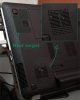
It shaved me a few degrees after changing the thermal paste. Next on the list: make this computer stop cooking my hand whenever I open anything else than notepad. -
There is no need of do it my friend.
The air intake is not done just by this opened place but from all under board and upper board.
This is something already will not solve or turn the notebook more cooler. -
fritz,
I know it gets air from elsewhere in the notebook body, but I don't think it is effective. When using the 6850m I got thermal reboots even when repasted with Arctic Ceramique.
This mod helped a lot with it.
The next step is to improve passive airflow by the other chip that has a little heatsink and that heats up A LOT. What IS that chip anyway?
I'm even wondering about changing that flat aluminium heatsing with a ridged one I have for desktop chips.
Anyway, I'm not suggesting people do it. I'm saying I did it, that's all. =) -
I have the modded BIOS running on my 3D model, but I plan to stick with the stock drivers. Well, updated to the last ATI drivers that work with switching and brightness at least.
I mainly loaded the modded BIOS so I could switch from RAID to AHCI.
The other heatsink/fan came in today. I'll probably install it in the next day or two. -
Enabling AHCI in the modded BIOS disables the default RAID on 2x750GB computers?
-
Yes, it will disable RAID. I have a SSD so RAID is pointless for me. It's also not possible to do SSD firmware updates without having AHCI enabled.
-
If there are people reading this that are interested in 14.4 WHQL on modded or unmodded BIOS please send me a PM on leshcatlabs.net forums ⢠Index page
I am looking for more Testers that are willing to test out 14.4 WHQL and report on issues. -
I'm installing W7 on my new SSD right now. What's the last AMD driver version that works with brightness control on the 3D model?
-
Brightness on AMD... hmm with a modded FTC value .. probably somewhere in the 12.xx or 13.xx series. I think the FTC database on leshcatlabs.net has a table with a previous report from a user (doggydog) that mentioned it to be working.
I wouldnt hold my breath! Original drivers are pretty much the only ones with brightness control on AMD. However if you have "muxeless fixed and dynamic" brightness control isnt an issue on new drivers.
so: non modded BIOS (muxless fixed) + latest drivers = Brightness control only on Intel
Until someone cracks FeatureTestControl to a deep level.
Sorry that it isnt better news. The manhattan cards are notoriously difficult in this regard. -
Hmm, not sure I fully understand how "muxless fixed and dynamic" works. The new "AMD Mobility Radeon" 14.4 drivers say they only work with 3rd gen Intel or newer?
EDIT: Ok, I installed 14.4 and the latest Intel HD drivers (9.17.10.3517). There seems to be some problems though. I tried switching from dynamic to fixed in CCC and got a blue screen. After reboot the screen was black, but after toggling power-saving/high-performance (using a flashlight to see) the screen came back on. Brightness control isn't working on high performance.
The "desktop management" settings are also missing from CCC. I can't change resolution or refresh rate. -
I honestly never even saw that 14.4 only supports 3rd gen or newer hahahaha. Where did you find that info? (must be a new marketing trick)
If your BIOS is on "muxless fixed and dynamic" it means that you can use both switching methods. As described in one of my previous posts. The dynamic aspect works perfectly fine. I.E. the card switches itself depending on application. (you can configure which application uses which card to switch- brightness control and standby works)
However if you try the fixed switching method in the drivers you will encounter the usual black screen bug because you are trying to use the old method. (UnifL should fix this in the upcoming 14.4 WHQL build- I havent had any testers test the fixes for this yet) This also entails the brightness control on fixed mode (which is an on going fight).
This is because our Manhattan cards are rebranded 5xxx cards and need adjustments done to the Intel driver for proper fixed switching. - These are the fixes that UnifL includes for this model.
Resolution, refresh rate and desktop management should be fixed in UnifL but I need a tester.
tl;dr: UnifL should fix the fixed switching, the menus but maybe not the brightness control on AMD Fixed switching.
By the way!!! Does 3D work on Dynamic for you? 3D movies .. 3D games? -
I think AMD Enduro is something different than PowerXpress, so that probably doesn't apply to us.
Well, I'm already in a position here to test if you have something you want me to try. -
Yup that is their normal marketing speech. (leave us alone and contact the OEM) It has been like this since our laptops came out
.
I will send you a PM since it is a test version. -
Of course. and turn your i/o faster.
*HP ENVY 17 & 17 3D (2XXX series) Owners Lounge*
Discussion in 'HP' started by 2.0, Mar 14, 2011.


