 Problems? See this thread at archive.org.
I concur with h8isgr8.
This is a nice laptop but the new HP stuff is lackluster. They have most likely given up on the high end segment and reverted back to placing thermal pads between the die and heatsink XD.
Das neue Inspiron 17 17-Zoll-HD-Notebook der 7000-Serie | Dell Deutschland
These look sort of decent but might be a down step in quality.
Has anyone considered using an Nvidia eGPU? I hear the Nvidia pass through tech through Intel is much better and more efficient than what AMD can do.
Fritz are you still around?
I was wondering how the Intel is connected to the display physically and thought you might know.
From the HP manual:
- Supports low-voltage differential signaling (LVDS)
- Emitter controller chip for LCD blanking and shutter glass modulation
- 3D display with 4-lane embedded DisplayPort (eDP) interface
I have been surfing the web trying to find out how to make 3D work via Intel only.
Since the UnifL 14.4 fixed switching mod relies on LVDS edits it would be quite clear why it doesn't work.
LVDS cannot carry the 120Hz signal to the display. Only eDP can.
However is eDP only connected to the AMD?
In this case why would Intel allow to work in 120Hz via Dynamic / Fixed switching on newer drivers. (with lvds mod and without).
So is there a Multiplexer between Intel and the screen? .. the same multiplexer that AMD attaches to and then routes to the display?
-
Our devices use eDP and not LVDS kind of cable signal. Because this we have an almost 100% compatible OSX devices ( after rovio bios mod) but we cant do the OSX work with full resolution. Inside OSX the intel driver doesn’t have support to eDP, just LVDS.
Out devices is a franquenstain. In fact we have a proprietary HP kind of muxless/MUXED device.
When using the default HP driver or the OEM windows 8.1 driver and we use the FIXED mode our device act like a MUXED device but under some proprietary hp trigger.
When use the muxless option the video hardware stay attached to intel that enable or disable just the gpu ( intel and amd) or the transparent mode ( intel always on and amd doing ofload, the way)..
Use the glass and 3d under intel is possible ( seems intel merged the 120mhz and their 3d proprietary in their drivers. but our device nor use the intel not amd 3d proprietary system. Seems another FIR serial one. Under linux we can identify and load the hardware but we cant use this.
Intel under windows and linux is well capable of deliver 120hz to our monitor. But the 3d hardware need a specific driver I dont know ...
"... Has anyone considered using an Nvidia eGPU? I hear the Nvidia pass through tech through Intel is much better and more efficient than what AMD can do. ..." Nvidia or AMd muxless offload engine are a piece of .... We are lucky to have the fixed mode under windows, because we can use the full amd hardware.
Our device doesn’t use LVDS for the main monitor is full eDP.. -
AGAIN. FROM MY PAST POSTS.
DONT USE THE 3 PIPES with this board.... its just 45w not 65w. -
I am always delighted to read your posts Fritz! .. Even if at first hard to understand!

You are right that it is most likely not propriety tech used for 3D. Intel tru3D is supported by HD 3000 however I do not know how to switch it on as I cannot find much information.
But if it is propriety tech surely something is making it work. 3D seems to act independently from any special HP software / drivers since it is possible to run a Clean Windows 8.1 with AMD 14.4 fixed switching to enable 3D movies. (for example)
The reason I mention LVDS is because of this dword from the Intel driver that enables fixed switching for us: (makes it switch properly without black screen). Even if this is some kind of legacy dword that gets transformed into eDP by the sys. It always makes me think that maybe some kind of dword might be missing to properly route Intel tru3D to the screen. Something that could possibly be taken from another laptop that supports Intel HD 3000 and 120Hz. (I haven't searched yet)
HKR,, Display1_LVDSSetTimingControlFlags,%REG_DWORD%, 0x03
Code:;0x00 - Both Panel Power Disable and Port Disable before every setmode and No PWM Control during PPS ;0x01 - Port Disable before every setmode and No PWM Control during PPS ;0x02 - Panel Power Disable before every setmode and No PWM Control during PPS ;0x03 - Do not disable anything and No PWM Control during PPS ;0x04 - Both Panel Power Disable and Port Disable before every setmode and Control PWM during PPS ;0x05 - Port Disable before every setmode and Control PWM during PPS ;0x06 - Panel Power Disable before every setmode and Control PWM during PPS ;0x07 - Do not disable anything and Control PWM during PPS
So okay. In dynamic mode = Intel > connection that is able to carry eDP >mux chip > eDP > laptop screen
________________________||
________________________\\=AMD (offload)
In fixed mode =
Intel = ===\\
__________ mux chip =eDP= laptopscreen
AMD= === //
What I have noticed is that if fixed switching is used then Windows 8.1 is able to "see" the stereoscopic screen whilst on AMD.
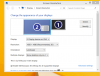
What makes AMD so different from Intel.
I thought that maybe the connection from Intel to the mux chip is inferior than AMD to the mux chip.
However with your experience maybe the proper "trigger" is missing .. or driver.
What exactly is this FIR serial device that you see under linux? -
Hmmm:
Take a look at this:
Stereoscopic 3D (Windows Drivers)
Stereoscopic 3-D rendering is only enabled on systems that have all the components that are stereoscopic 3-D-capable. These components include 3-D-capable display hardware, graphics hardware, peripherals, and software applications. The stereo design in the graphics stack is such that the particular visualization or display technology that is used is agnostic to the operating system. The display driver communicates directly to the graphics display and has knowledge about the display capabilities through the standardized Extended Display Identification Data (EDID) structure. The driver enumerates stereo capabilities only when it recognizes that such a display is connected to the system.
Maybe the proper EDID has to be forced by Intel???
We can assign a fake EDID via the driver itself. Maybe that is enough to make Windows recognize the display???????????
Edit: Nope does not seem to be the EDID .. even if it indicates if the display can do Stereo.
On second thoughts i haven't tried installing 14.4 fixed mode (amd) to see which EDID it uses when it shows Stereoscopic options in Windows Display properties.
It could indeed be different.
The vanilla EDID does not have stereo enabled on Windows 7.
Is anyone running 14.4 (or any other version that displays stereoscopic options in windows display properties) ? -
"... What I have noticed is that if fixed switching is used then Windows 8.1 is able to "see" the stereoscopic screen whilst on AMD.
View attachment 116381
What makes AMD so different from Intel.
..."
Because our device is FIXED and MUXLESS. We have a MUXED CHIP inside our deice but is a sort of HP proprietary ( Cant remeber the id of the muxed hardware) just like the muxed from apple devices. when you are running in fixed mode the HP/AMd driver just turn the AMD the main card like a muxed one.
Then the AMD enable or disable the 3d. Not intel.
Same when you are using the oem drive inside the windows 8.1 some kind of HP/AMd blob is hardcoded in driver.
"... Maybe the proper EDID has to be forced by Intel??? ..."
You can try. But it's not just enable the 3d hardware, this is linked to some kind of DRM proprietary decoder...
If someone discover the trigger that do the AMD act like a muxed main card. Will be possible everything in this hardware.. -
"... What exactly is this FIR serial device that you see under linux? ..."
the same you can find inside the moded bios, enable, disable, change the kind of InfraRed serial device... -
OBS:
LVDs specification cant suport a true 120hz bandwidth how our monitor can use.
then.. 100% we have a just a eDPx kind of connector.. -
Okay this is what I have discovered during my travels:
On fixed mode AMD can play 3D via HD3D.
Windows 8 has native support for 3D stereoscopic via the DirectX Quad Buffer API. When a screen that is capable of 3D gets detected it will switch on stereomode:
View attachment 116539
FIR normally seems to be connected via a 3pin to the graphics card (on desktop models). However this does not seem to be needed with DP which it uses to passthrough that function.
Intel HD 3000 can display 3D via the "Intel tru3D" Stereo Driver. I assume Intel also has support for DirectX Quad Buffer API.
However:
Intel does not seem to be detecting the screen properly.
This is evident through the following information:
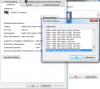
Whilst AMD shows the full range of DTDs / Modes supported:
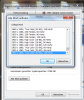
Since we have a muxed chip (with the function of acting like muxless via Intel)
It becomes evident that either Intel can not interpret EDID information properly or it is being blocked at either the mux chip or VBIOS level. (Some Laptop manufacturers block DTDs - Resolutions and Hertz for Intel)
EDID has a trigger to enable 3D as AMDs own dev publications show: (EDID_Format_To_Enable_Frame_Sequential_Stereo_3D_S.pdf - Quad-Buffer SDK - AMD)
However our EDID does not have this trigger enabled!!!!Code:1 Introduction This document describes the EDID format required to enable page-flipped stereoscopic 3D support with AMD Radeon™ 5000 and 6000 series graphics cards. When an appropriate EDID is detected, the GPU driver will enable the Quad-Buffer API used for page-flipped or frame sequential 3D systems. EDID Format To Enable Frame Sequential Stereo 3D Support In the EDID 1.x specification, under Detailed Timing ▷ Stereo Viewing Support, you can specify the type of 3D supported by the display device. The monitor vendor must fill in Byte 17 to indicate that the display is capable of supporting Stereo 3D, and also the format expected by the device. Bear in mind that AMD’s Quad-Buffer API is only applicable to frame sequential (also known as field sequential) stereo. For example, if the display device is expecting the frame/field sequential format, Byte 17 will be filled in as follows: Table 2–1 Byte 17 value if the right image is expected when the stereo sync signal=1 _ 0 1 _ _ _ 0 Table 2–2 Byte 17 value if the left image is expected when the stereo sync signal=1 _ 1 0 _ _ _ 0
EDID Manager Version: 1.0.0.14
___________________________________________________________________
Block 0 (EDID Base Block), Bytes 0 - 127, 128 BYTES OF EDID CODE:
0 1 2 3 4 5 6 7 8 9
000 | 00 FF FF FF FF FF FF 00 30 E4
010 | C4 02 00 00 00 00 00 14 01 04
020 | 95 26 15 78 02 5F 35 A4 58 56
030 | 9E 26 0F 50 54 00 00 00 01 01
040 | 01 01 01 01 01 01 01 01 01 01
050 | 01 01 01 01 02 3A 80 18 71 38
060 | 2D 40 58 2C 45 00 7E D7 10 00
070 | 00 19 31 99 80 A0 70 38 74 43
080 | 30 20 35 00 7E D7 10 00 00 19
090 | D3 9A 80 A0 70 38 FC 41 14 14
100 | 35 00 7E D7 10 00 00 19 00 00
110 | 00 FE 00 4C 50 31 37 33 57 46
120 | 32 2D 54 50 42 32 00 49
(8-9) ID Manufacture Name : LGD
(10-11) ID Product Code : 02C4
(12-15) ID Serial Number : 0
(16) Week of Manufacture : 0
(17) Year of Manufacture : 2010
(18) EDID Version Number : 1
(19) EDID Revision Number: 4
(20) Video Input Definition : Digital
DFP 1.x Compatible
(21) Maximum Horizontal Image Size: 38 cm
(22) Maximum Vertical Image Size : 21 cm
(23) Display Gamma : 2,20
(24) Power Management and Supported Feature(s):
Monochrome, Non-sRGB, Preferred Timing Mode
(25-34) Color Characteristics
Red Chromaticity : Rx = 0,642 Ry = 0,345
Green Chromaticity : Gx = 0,339 Gy = 0,620
Blue Chromaticity : Bx = 0,148 By = 0,058
Default White Point: Wx = 0,313 Wy = 0,329
(35) Established Timings I (Not Used)
(36) Established Timings II (Not Used)
(37) Manufacturer's Timings (Not Used)
(38-53) Standard Timings (Not Used)
(54-71) Detailed Descriptor #1: Preferred Detailed Timing (1920x1080 @ 60Hz)
Pixel Clock : 148,5 MHz
Horizontal Image Size : 382 mm
Vertical Image Size : 215 mm
Refresh Mode : Non-interlaced
Normal Display, No Stereo
Horizontal:
Active Time : 1920 Pixels
Blanking Time : 280 Pixels
Sync Offset : 88 Pixels
Sync Pulse Width: 44 Pixels
Border : 0 Pixels
Frequency : 67 kHz
Vertical:
Active Time : 1080 Lines
Blanking Time : 45 Lines
Sync Offset : 4 Lines
Sync Pulse Width: 5 Lines
Border : 0 Lines
Digital Separate, Horizontal Polarity (-), Vertical Polarity (-)
Modeline: "1920x1080" 148,500 1920 2008 2052 2200 1080 1084 1089 1125 -hsync -vsync
(72-89) Detailed Descriptor #2: Detailed Timing (1920x1080 @ 96Hz)
Pixel Clock : 392,17 MHz
Horizontal Image Size : 382 mm
Vertical Image Size : 215 mm
Refresh Mode : Non-interlaced
Normal Display, No Stereo
Horizontal:
Active Time : 1920 Pixels
Blanking Time : 160 Pixels
Sync Offset : 48 Pixels
Sync Pulse Width: 32 Pixels
Border : 0 Pixels
Frequency : 188 kHz
Vertical:
Active Time : 1080 Lines
Blanking Time : 884 Lines
Sync Offset : 3 Lines
Sync Pulse Width: 5 Lines
Border : 0 Lines
Digital Separate, Horizontal Polarity (-), Vertical Polarity (-)
Modeline: "1920x1080" 392,170 1920 1968 2000 2080 1080 1083 1088 1964 -hsync -vsync
(90-107) Detailed Descriptor #3: Detailed Timing (1920x1080 @ 120Hz)
Pixel Clock : 396,35 MHz
Horizontal Image Size : 382 mm
Vertical Image Size : 215 mm
Refresh Mode : Non-interlaced
Normal Display, No Stereo
Horizontal:
Active Time : 1920 Pixels
Blanking Time : 160 Pixels
Sync Offset : 20 Pixels
Sync Pulse Width: 20 Pixels
Border : 0 Pixels
Frequency : 190 kHz
Vertical:
Active Time : 1080 Lines
Blanking Time : 508 Lines
Sync Offset : 3 Lines
Sync Pulse Width: 5 Lines
Border : 0 Lines
Digital Separate, Horizontal Polarity (-), Vertical Polarity (-)
Modeline: "1920x1080" 396,350 1920 1940 1960 2080 1080 1083 1088 1588 -hsync -vsync
(108-125) Detailed Descriptor #4: ASCII String Data
ASCII String Descriptor: LP173WF2-TPB2
(126-127) Extension Flag and Checksum
Extension Block(s) : 0
Checksum Value : 73
___________________________________________________________________
System Information Summary:
Processor : Intel(R) Core(TM) i7-2630QM CPU @ 2.00GHz
Operating System : Microsoft Windows 7 Ultimate
OS Version : 6.1.7601
Service Pack : 1.0
Video Controler:
Device ID : VideoController1
Name : Intel(R) HD Graphics
Adapter Compatibility: Intel Corporation
Video Processor : Intel(R) HD Graphics Family
Video RAM : 2,06 GB (2,210,398,208 Bytes)
Availability : Running or Full Power
Driver Version : 9.17.10.3517
PNP Device ID : PCI\VEN_8086&DEV_0116&SUBSYS_159B103C&REV_09\3&11583659&0&10
Resolution : 1920x1080
Max Refresh Rate : 120 Hz
Min Refresh Rate : 60 Hz
Current Refresh Rate : 120 Hz
Current Scan Mode : None-Interlaced
Status : OK
Monitor
Manufacturer............. LG Display
Plug and Play ID......... LGD02C4
Data string.............. LP173WF2-TPB2
Serial number............ n/a
Manufacture date......... 2010, ISO week 0
Filter driver............ None
-------------------------
EDID revision............ 1.4
Input signal type........ Digital (DisplayPort)
Color bit depth.......... 6 bits per primary color
Color encoding formats... RGB 4:4:4
Screen size.............. 380 x 210 mm (17,1 in)
Power management......... Not supported
Extension blocs.......... None
-------------------------
DDC/CI................... Not supported
Color characteristics
Default color space...... Non-sRGB
Display gamma............ 2,20
Red chromaticity......... Rx 0,642 - Ry 0,345
Green chromaticity....... Gx 0,339 - Gy 0,620
Blue chromaticity........ Bx 0,148 - By 0,062
White point (default).... Wx 0,313 - Wy 0,329
Additional descriptors... None
Timing characteristics
Range limits............. Not available
GTF standard............. Not supported
Additional descriptors... None
Preferred timing......... Yes
Native/preferred timing.. 1920x1080p at 60Hz (16:9)
Modeline............... "1920x1080" 148,500 1920 2008 2052 2200 1080 1084 1089 1125 -hsync -vsync
Detailed timing #1....... 1920x1080p at 96Hz (16:9)
Modeline............... "1920x1080" 392,170 1920 1968 2000 2080 1080 1083 1088 1964 -hsync -vsync
Detailed timing #2....... 1920x1080p at 120Hz (16:9)
Modeline............... "1920x1080" 396,350 1920 1940 1960 2080 1080 1083 1088 1588 -hsync -vsync
Standard timings supported
Report information
Date generated........... 12.10.2014
Software revision........ 2.90.0.1000
Data source.............. Real-time 0x2100
Operating system......... 6.1.7601.2.Service Pack 1
Raw data
00,FF,FF,FF,FF,FF,FF,00,30,E4,C4,02,00,00,00,00,00,14,01,04,95,26,15,78,02,5F,35,A4,58,56,9E,26,
0F,50,54,00,00,00,01,01,01,01,01,01,01,01,01,01,01,01,01,01,01,01,02,3A,80,18,71,38,2D,40,58,2C,
45,00,7E,D7,10,00,00,19,31,99,80,A0,70,38,74,43,30,20,35,00,7E,D7,10,00,00,19,D3,9A,80,A0,70,38,
FC,41,14,14,35,00,7E,D7,10,00,00,19,00,00,00,FE,00,4C,50,31,37,33,57,46,32,2D,54,50,42,32,00,49
Yet somehow the AMD card / Windows through the AMD drivers "knows or sees" the 3D capabilities without this being indicated in the EDID!!!!
Why this is I do not know. Most likely through the proper EDID (which could reside at the mux chip level maybe?) or maybe the trigger is not needed on AMD since it does it through its own drivers somehow. Again : HD3D vs Quad Buffer API.
I have not tried the Windows Native Quad Buffer API in Windows 8.1 on 14.4!!!!!!!! <<<<<<<<<<<<<<<<< someone please try via stereoscopic player which gives HD3D and DirectX Quad Buffer as an option!!!!!!!
Maybe FIR can be routed to Intel. But Intel inherently only sees 60Hz. After restarting the Intel device via Device Manager it sees 120Hz which can also be used. Making me believe that maybe the mux chip or BIOS/VBIOS is responsible for locking Intel out at some level.
To my understanding Windows 8 should enable the stereo display itself if the following criteria is met:
Minimum Windows Display Driver Model (WDDM) version 1.2. EDID support.
We can try forcing the proper EDID as described in the AMD documentation for the Intel as EDID is universal.
However if resolutions and Hz are blocked for Intel we could insert a "shaved off" resolution : 1912x 1080.
OR
I go back to figuring out how to enable Fixed mode as an AMD rep has recently told me officially that after 14.4 there is no support : D
OR
People disable their Intel card via the BIOS.
Extra notes:
I never needed the modded BIOS from Donovan since I did not want to downgrade from F1D or had an extreme need to mod these myself. Therefore I never saw FIR.
The HP driver is nothing special. Only change HP made to the "hybrid" driver is changing the "Display1_LVDS" command so that back light comes back on. Lets call this "LVDS" function a software legacy instruction. And this is on the Intel side of the driver!!!!! HP AMD is pure! No mods!!!!!
Code:;0x03 - Do not disable anything and No PWM Control during PPS Do not disable anything and No Pulse Width Modulation (backlightbrightness) Control during Peripheral Pin Select.
Edit:
Even more information on a potential problem for some eDP Mac folk which could indicate that the VBIOS might need patching at boot level for Intel HD!
http://www.insanelymac.com/forum/topic/286092-guide-1st-generation-intel-hd-graphics-qeci/
Please scroll to eDP section!
-
Windows will enable the 3d mode if your monitor support true 120Hz or more.
This doesn’t mean the 3d WILL work.
Under linux to enable 120Hz under intel or amd card is just a matter of use a "xrandr" command, nothing more.
Inside windows if Intel or Amd can or not use is hard coded inside the binary or some kind of registry combination, I don’t have idea.
About the FIr. FIR is just a Infra Red device. This infra-red device in our notebook is controlled by AMD using some sort of proprietary code together the software decoder. Some trigger. When you start to use the software decoder this work. Under linux we have the FIR drive loaded but no way to use this.
The main problem is not the FIR but It's about to start the screen refresh of images.
Because this, no matter if you have the intel with support to 120hz, amd with support to 120hz, What enable this screen refresh between images and the infra red FIR emitter is the proprietary video decoder.
Under linux we have some programs that can use the 120Hz monitor and by software to do the screen image refresh under intel or amd but the FIR/infrared emitter still not work to sync the glass ( maybe using an external attached by usb works).
The question here is. MUCED OR MUXLES is a proprietary trigger from HP.The Screen refresh and fir are some kind of proprietary trigger from AMD. The best way you have to find what is this and how it's working will be use the "IDA" or "IDA PRO" to do the reverse engineering of this and with some codes later activate it under windows.
[/QUOTE]
Do you have a pre hd5000 intel card using eDP connector? Then your resolution WILL BE VESA and without acceleration. No one yet solve this problem.
The moded bios inside our device is possible to change the VBIOS resolution, there is all VESA resolution there. You can change it and will not work.
We don’t have how to disable the intel card under bios. Just AMD. -
See? we cant do nothing more.. Because nor amd or intel driver under linux enable this to use..
-
What is with the optimism?
When people said that it wasn't feasible to enable graphics switching on the newer AMD drivers that gave black screens... it was done.
When people said it wasn't feasible to crack the BIOS .. it was done.
One of the solutions is very simple in theory:
Switch to PCI Express
Keep eDP
Switch off Intel.
This is pretty much how HP handles the Envy 17 3xxx with the newest BIOS.Code:0x9EC50 Variable 0x201[1] equals 0x0 {12 07 01 02 01 00 00} 0x9EC57 Setting: Primary Display , Variable: 0x18F[1] {05 09 8F 01 01 31 02 32 02} 0x9EC60 Option: Auto, Value: 0x3 {09 09 62 01 03 00 04 F9 0C} 0x9EC69 Option: IGFX, Value: 0x0 {09 09 33 02 00 00 04 F9 0C} 0x9EC72 Option: PEG, Value: 0x1 {09 09 34 02 01 00 04 F9 0C} 0x9EC7B Option: PCI, Value: 0x2 {09 09 35 02 02 00 04 F9 0C} 0x9EC84 Option: SG, Value: 0x4 {09 09 3E 02 04 00 05 F9 0C} 0x9EC8D End of Options {10 02} 0x9EC8F End If0x9EC8F End If {18 02} 0x9EC91 Grayout If: {19 03 00} 0x9EC94 Variable 0x80[1] equals 0x2 {12 07 80 00 01 02 00} 0x9EC9B Variable 0x81[1] equals 0x1 {12 07 81 00 01 01 00} 0x9ECA2 And {15 02} 0x9ECA4 Setting: Active LFP, Variable: 0x1E1[1] {05 09 E1 01 01 97 01 98 01} 0x9ECAD Option: No LVDS, Value: 0x0 {09 09 99 01 00 00 00 00 00} 0x9ECB6 Option: Int-LVDS, Value: 0x1 {09 09 9A 01 01 00 01 00 00} 0x9ECBF Option: SDVO LVDS, Value: 0x2 {09 09 9B 01 02 00 00 00 00} 0x9ECC8 Option: eDP, Value: 0x3 {09 09 9C 01 03 00 00 00 00} 0x9ECD1 Option: None, Value: 0x4 {09 09 9D 01 04 00 00 00 00} 0x9ECDA End of Options {10 02} 0x9ECDC End If {18 02} 0x9ECDE Suppress If: {0A 03 00} 0x9ECE1 True {27 02} 0x9ECE3 Grayout If: {19 03 00} 0x9ECE6 Variable 0x80[1] equals 0x2 {12 07 80 00 01 02 00} 0x9ECED Variable 0x81[1] equals 0x1 {12 07 81 00 01 01 00} 0x9ECF4 And {15 02} 0x9ECF6 Setting: Internal Graphics Device , Variable: 0x190[1] {05 09 90 01 01 45 02 46 02} 0x9ECFF Option: Auto, Value: 0x2 {09 09 62 01 02 00 04 F9 0C} 0x9ED08 Option: Enabled, Value: 0x1 {09 09 EC 00 01 00 05 F9 0C} 0x9ED11 Option: Disabled, Value: 0x0 {09 09 EB 00 00 00 04 F9 0C} 0x9ED1A End of Options {10 02}
Depending on your Windows version it will switch off Intel and keep AMD as the primary and only card. -
Then this is a problem. nor the amd or intel are using PCIe interfaces but direct bus. Under linux you can get this better when the driver is loading.
Try to swtich off in bios the bus supposedly belongs to amd or intel and you will get a black screen and nor resenting the bios will bring it on again.
There is no option to get out from edp. The only way or is you use hdmi or vga conector.
You cant switch off the Intel the way we imagine..
The The intel HARDWARE is the only video card in our devices. The AMD is just a block of GPU and memory without the output hardware.
HP create a kind of proprietary muxed ( when we are using the fixed mode) where a trigger reroute the the edp monitor to turn the AMd like primary card ( like Apple do). and disable just the INTEL gpu, not the hardware.
You still confuse..
video cards are basically composed of 2 parts. The hardware the give the monitor output and the GPU. AMD and Intel share the GPU side but not the output side. The intel is the exclusive controler.
The monitor is another things. Doesn’t depend from video card. Under linux no matter what card you are using you can setup all frequencies from monitor to all resolutions.
Under linux you CANT switch when under fixed mode from amd to intel because the "trigger" is proprietary, the standart ones dont do it. Inside the bios we dont have nothing being specific about change the fixed cards from primary to secondary. Then its a software level trigger..
Probably coded inside amd decorder/hp -
this is only some graphics control variables. Not the routines,..
Here you have a better glimpse of how crazy our device is...
DSDT Table.
/* * Intel ACPI Component Architecture * AML Disassembler version 20100528 - Pastebin.com -
Well, I received a 2860QM in the mail today. Snagged it for $145 on ebay; they usually sell for at least $180. I'll try to get it installed in the next day or so.
-
Okay this expands my mind Fritz! Thank you very much. It is starting to make sense and more questions are being formed in my mind about how it passes through certain ports.
However:
I will move on to comparing our DSDT table to Envy 17 30xx which has a trigger to switch Intel OFF if it detects Windows 8. Surely the design of the Envy 17 30xx can not be so drastically different.
Envy 17 30xx used a rebranded 6770m (7690m XT) and HD 3000. -
Success!!! 2860QM installed without any problems.
I used Prolimatech PK-3 thermal compound this time around (was using AS5 before). Torture tested the system with the GPU overclocked at 700/1200 for 30 minutes with a room temp of ~22C. Max CPU temp reached 83C and max GPU temp reached 84C. I'm happy with that, all things considered.
Well, this thing is about as upgraded as it can get now with the 2860QM and 1600Mhz 9-9-9-24 RAM. Only thing that could make it any faster as a whole is a SSD RAID configuration, but that doesn't interest me.
So f_r_I_t_z, what kind of pessimistic remark do you have to say about this 3-pipe cooler now?
![[IMG]](images/storyImages/28v98oi.jpg) anarchist9027 likes this.
anarchist9027 likes this. -
Noice : O. Very sexy .. even if it has a dress on! ; )
I saw your benchmarks for Icestorm on leshcatlabs. Quite interesting imho. I will try to run this benchmark too to see if there was some kind of strange anomaly with the previous CPU.
This really makes me want to upgrade and try to make the laptop work with an external GPU.
Side note on matter concerning 3D Stereo.
I found out that the IR emitter gets activated by:
• An external sync signal generator that can create 3-pin signal from sources without the connector. In
this case, the GPU inserts a ‘blue-line’ signal into the video frames to communicate the sync order to
the external device. This type of device is typically used on laptops, as they do not feature the 3-pin
connector natively. This mode is also enabled by default on AMD FirePro graphics accelerators that do
support Stereo 3D, but do not have a 3-pin connector: AMD FirePro V3800, V4800, V5800, V7800 -
Thanks for the effort you're putting into researching this 3d stuff, even if it turns out to be a dead end.
This is all way above my head, but I saw something in the BIOS settings that might be of interest, or maybe it's nothing. I think you said you don't have the modded BIOS, correct? Anyway, fritz was talking about FIR and I just noticed there is a setting for that. It was on "disabled", but has a choice for "enabled" and "auto". I tried the other settings and it doesn't seem to do anything...
![[IMG]](images/storyImages/250j7n8.jpg)
-
I didn't realize there are options for: Base I/O address / Interrupt and DMA Channel. Not that I know what to do with it yet. What is interesting is that whilst I was checking my BIOS dump it also "seemed" like the FIR setting wasn't just hidden but also "off" like you mention. However I am not certain why.
Maybe FIR: when it is set to Auto + Disabled only gets used when "the GPU inserts a ‘blue-line’ signal into the video frames to communicate the sync order to
the external device" and when this "external sync signal generator" interprets these signals and passes them onto the IR transmitter via the eDP cable.
However I cannot get 3D to even "display" on Intel yet. If I can get it to display maybe this blueline signal will automatically passthrough onto the IR transmitter.
This reminds me of how our monitor EDID is not indicating that it can do Stereo3D (why I don't know) whilst AMD is still being able to do Stereo3D regardless of the EDID.
I know our EDID is correct through the following documents:
ftp://helpedia.com/pub/temp/datasheets/monitors/Panels/Panel_LG_Display_LP173WF2-TPB2_0_[DS].pdf (if you scroll to the bottom you will see the EDID that HP received when they bought the screens)
Dell has a similar document but their EDID is tiny bit different and they also use an Nvidia device.
The 3D Vision forum got infested with spambots. Hopefully Bloody can come back and shed some light on this topic. -
I still say that this is not a 65W one with a undersized cooler and the video heatpipe instead 45w is 30w.
You do something no one here can do...
Or the obvious your temperature CAS in bios is setup to slowdown the cpu when reach, 50 Celcius.. -
FIR Is a serial device. Auto = the board setup the dma, irq, i/o. disable is disable the serial device.
Its like old main boards with serial connector.
The serial/Ir is not linked to sDP specification cable. They are 2 speared devices.
Put your screen in 120Hz is one things.
divide your screen per 60Hz frequency syde by side is another thing ( can be done by software or direct hardware decoder).
Serial/FIr/InfraRed synchronisation with side by side screen is another things that can be related or done by software or direct hardware decoder).
Under linux I can use 120Hz no mater the way AMD or INTEL.
Under linux I have the Serial/FIR/IR transmitter recognized and active but no software can use this because is direct related to AMd decorder.
Under linux I can use the 60Hz side by side screen using software rendering but not hardware decoder rendering.
the 2 things is linked to AMD binary Decorder. Same if you have the decorder loaded inside windows not all software will enable this. Just the ones "certified" by amd like powerdvd and others can have full use of this.
-
Most of I write..
IS an AMd proprietary.
Quad-Buffer SDK - AMD
The screen mode when not under " Some monitors may require a special method to indicate frame polarity – please communicate with the display vendor for more information. " ( not our case, our screen is an HP proprietary)...
so. It's a CATALYST decoder proprietary enabled by DirectX or OpenGL. Forget Intel...
curious under catalyst linux we have this commands equivalents... but We cant enable this because the catalyst say not supported monitor. ( HP PROPRIETARY, then, hu?) -
Plus addendum.. Under linux the IR device can receive IR to, not just send.
Using the dv4 remote control and I can see the devices receiving the Remote control comunication. Nice... Just remap and use this like a remote control, lol.
OBS the Ir is direct linked to the AMD side from notebook. Is a serial device linked inside AMd hardware... -
Addendum 2.
Our devices doesn’t have a standard MUXED when using the fixed mode.
We dont have 2 completes and independent cards where a integrated circuit enable one and disable the other. We have one output direct linked to intel where HP by some sort of proprietary way use the "cu257c" to switch this. Because this under linux ( where everything is more easy to debug) we cant switch from INTEL to AMd when using the fixed way ( nor the default modes work). Or because this when using linux without catalist we have the 2 cards working same time but the INTEL being the primary AWAYS. -
I have it set at 90C; the original setting was 80C.
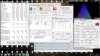
If I do long stress testing with prime95 large FFT the CPU temp reaches max 82C and the CPU frequency toggles between x27/x28 2694MHz/2794MHz. HWInfo64 shows full 45W power usage. The GPU temp (no load) is 62C, so decent thermal separation there with the heatsink.
EDIT: Ok, did an extreme test with prime95 large FFT and GPU Caps Viewer triangle of death (GPU load) running at the same time. Surprisingly the GPU only reached 74C this time, so the repaste must have settled in the last day or so. PC was still very responsive with all this running. Have a look at this mess....
-
To confirm more about the device specification someone need to find it to download or buy this schematics..
DAOSP9MB8DO | Laptop Schematic | Notebook Schematic | Laptop Circuit Diagram -
This device is a hell..
the schematics here.
http://kythuatphancung.vn/uploads/download/787ad_Quanta_SP9.pdf
We have 2 notebooks devices in one. The LVDS with a multiplexer ( the one woks using one Pericom 8B19B1 PI3LVD400 that is linked to a second one just for INTEL/MAYBE? Muxless way maybe?) and the one using the eDP using a kind of multiplex to (PS8321)... the PS8321 control our device like internal/external device ( igpu and dgpu ) We have a weird MUXED device.,.
In thesis is possible to change external to internal by 2 levels input inside the pins *SW@0/J_4 with high or low voltage.. I need to read more about this later.
I need a working board that can DIE and someone with a good electronic knowledge and a Soldering Station..
anyone? -
Let's understand why we use thermal paste or things like that. We have 2 surfaces that need transfer temperature from one to other.
Under a perfect condition the two surfaces would be super polished and a 100% contact between them with nothing between them.
This is not possible. We have irregularities in both surfaces and the pressure between them is irregular to.
So! what we do to solve this. we use some kind of polymer or another microscopic "things" and we put this between the surfaces to fill the small gap the non regular pressure or polished surface, doing this we do the the heat transfer "more efficient".
So.. When you use a termapad or lot of termalpaste between both surfaces you are in fact creating a HUGE layer of something that never can be more efficient than the 2 surfaces near each other. You need to use the tiniest amount under the 2 surfaces, just to give them the perfect contact, not a HUg amount of termapaste.
sometimes the termalspaste that is left at side of cpu nucleus being generous help. Why? because this fill the cpu borders and transfer a small fraction from heat to cooper plate to, turn the cpu nucleus surface bigger. But between cpu/cooper you need to maintain the tiniest layer possible, sometimes just the more liquid than solid... almost a transparent layer.
Hooo!! but intel put on their official CPU's and coolers a big grey termalpad. The HP do the same. They work with Project designed temperatures not real temperatures.
Its thermodynamics.
About your tempratures.. A 45w + 35w thermal generator being refrigerated by a 45w heatsink. Don’t know what kind of miracle is happening there. -
The one do all mambojambo to us....
https://drive.google.com/file/d/0B9bMDVFBKU06UmRMUmNQMURYd0E/view?usp=sharing
Well. In tesis is possible to change the default state... I need to learn more about.. When with free time. who know? AMd primary?
Dont know.. -
IN TESIS...
GET OUT THE 2 RESISTORS FROM R22 AND R23 TURN TO LOW AND USE THE EXT_DP.
https://drive.google.com/file/d/0B9bMDVFBKU06ZExWSTJKZ0QtNG8/view?usp=sharing
I'm not to test this. someone? lol -
I don't know, but it's working!
Even the original cooler with a repaste would overheat and trigger a shutdown. -
Hi, just wondering how you manaaged to the the IR transmitter to work on Linux?
Which version of Linux are you using?
I recently installed Ubuntu 14.04 based Elementary OS and I can't get the IR to come on. I have the latest AMD Catalyst (14.9) driver installed.
I have the same OS installed on my desktop which uses an NVidia card and Sony PS3 3D Display. The PS3 display has a button for manually setting controlling the IR transmitters so I can get the 3D working on the desktop under Elementary OS. Having it on Automatic mode doesn't always work even in Windows.
The HP Envy 17 3D on the other hand just has me completely confused because from everything I've looked at about active 3D it is 90% hardward and only a small part of it is software.
Thanks -
Fritz fails to mention that FIR in its natural state is disabled in the normal unmodded BIOS on the Envy.
By mentioning "related to AMD decoder" I think Fritz is talking about AMD HD3D.
There is no such thing as a direct hardware decoder exclusive to AMD which handles only 3D. The blueline connected to the IR transfers the signal for proper syncing.
Since Fritz himself mentions that everything roots through Intel regardless it should be obvious that so does the blueline signal.
Read AMD''s HD3D document that I have linked previously to obtain a better picture on how this works.
Intel is gimped on what seems to be the VBIOS level and does not output all relevant resolutions even though it can "see" the screens capabilities.
There is evidence that some manufacturers disable IntelTrue3D on the mobo.
Turning Intel into an "off" state very much like the Envy 17 3xxx 3D does it via DSTD seems to be the only way to reobtain 3D via AMD only. -
Yes, there is. AMD HD3D is exactly this.
You dont have opensourced ( besides AMD turn public the documentation still not implemented in opensource drivers) or other way to activate this wihtout be using the AMD driver.
Under linux if you install the catalys and use the manual changes by command line you can enable or disable the HD3D. the problem is under linux the catalist just work using the muxless way, not the fixed way. without the fixed way the catalyst cant find the monitor and all hardware related to 3d and this doesnt work.
We are not using a pure muxless device.
Our device have 2 variants. The 3d and not 3d. But the mobo still the same. When you use the non 3d variant your devices is wired to use a secondary contor that is LDVDS not edp, then our device act exactly like the pure amd board ( like the amd 50xx models). When we are using the 3d version we are hardware wired to edp conector and all this lvds output is there without conection and use.
We have 2 small pieces on our board. the one pure muxless lvds and the proprietary hp for edp.
the pure lvds/muxless ( the non 3d versions).
the prprietary hp have precedence under the pure amd muxless ones, he have 3 states, amd/intel/disabled( to use non 3d version).
If you want I can specify each one of them in schematics to you.
I READ.
without the proprietary AMD driver using the proprietary CATALIST you CANT activate this.
We are not using a pure muxless device. We are using a HP proprietary muxless.
Our device have 2 variants. The 3d and not 3d. But the mobo still the same. When you use the non 3d variant your devices is wired to use a secondary contor that is LDVDS not edp, then our device act exactly like the pure amd board ( like the amd 50xx models) and the proprietary HP side is disabled, Because this under linux using or not the catalist is possible to switch between both cards using the opensource or catalist driver.
When we are using the 3d version we are hardware wired to edp conector and all this lvds output is there without conection the proprietary hp switch assume.
We have 2 small pieces on our board. the one pure muxless lvds and the proprietary hp for edp.
the prprietary hp have precedence under the pure amd muxless ones, he have 3 states, amd/intel(its wired/jumped)/disabled( to use non 3d version).
If you want I can specify each one of them in schematics to you.
Yes and NO.
The VBIOS in our case is taking control from the prprietary HP edp switch. This that fuc%#$$ us not the 120 Hz.
Under linux you CAN see all resolution and USE 120Hz easily.
Install linux, any distro. go in terminal and type;
xfrandr
You will se and can use... 120Hz
It s the windows driver that fu$@#$ this under some layer.
If you have a hardware that support this, no way of DISABLe this in mobbo without disabling the suported hardware.
[/QUOTE]
Then the problem,.
The way our devices is "WIRED" or "JUMPED" he put the proprietary HP control Intel card using ENABLED state being the default.
If you disable the intel card in bios ( its possible doing some edits) you will have a brick device because the hardware will not have a output video.
There is 4 small transistors that in tesis change this default stante in our board and in "TESIS" is possible to put the AMD being the default board.
Because this work with hight or low voltages seems this is coded someplace inside our bios to. The problem is to find this to change the state. Is more easy to change the hardware to test.
The problem is "TEST"... You need a good skil and a basic equipament . -
I totally just received my 3 pipe heatsink today and holy crap, my laptop is 15°c cooler than it was before. I purchased some Gelid thermal along with it too. Best investment since my Core i7 2720qm upgrade
-
wow talk about resurrecting an old thread. congrats on your cooler Envy!anarchist9027 likes this. -
Thank You very much. You seriously cannot argue with these results!!
![[IMG]](images/storyImages/rqF3AI1.jpg)
-
Fritz:
HP Envy 17 3xxx 3D is wired via eDP.
Their new BIOS does not "disable" Intel in the way you think. It hides it.
This BIOS only triggers this if it sees Windows 8.1 enabling only AMD to be active and working. Even if it has Intel + AMD.
For the Envy 17 3xxx 3D 120Hz this works.
It is not about disabling it .. but hiding it.
Also removing CMOS restores standard settings in the BIOS.Last edited: Dec 10, 2014 -
Nice! That's about 10C less than my 3-pipe + 2860QM.
It's been almost 2 months now since I did mine and I couldn't be happier. No problems with heat even when running the GPU overclocked for extended periods of time.
I'm hoping this aging beast will give me playable FPS when GTA5 finally hits PC. -
Hmm this is really nice you guys!
I guess that Gelide compound also makes a difference?
So all it takes is the 3 pipe heat unit from the first gen Envy 17 1xxx? -
You sir are correct. It can take the 3 pipe heat sink. Gelid thermal is a much better quality thermal paste too compared to AS5. When I replaced my old heat sink, it was all crusted on. It was only on for about 8 or 9 months too. Believe it or not the only difference between a 1st gen Envy 17 and 2nd Gen Envy is the chipset and GPU so all parts are essentially the same size for the 2 generations.VonCrisp likes this.
-
Whats the latest on getting switching working natively in windows 7 and/or windows 8.1?
-
All you need is the latest Intel driver: 3517
and
AMD Omega 14.12
and the Tab fixer patch:
leshcatlabs.net forums ⢠View topic - Permanent Switching Tabs Fix for Catalyst Control Center
However I believe HDMI out on AMD does not work with this so the modded UnifL 14.12 Omega driver is needed which also includes a bunch of other fixes related to performance (ulps 0 & Directx9 performance fix) - thanks to LeeKM
Otherwise it runs smooth. Forced Dynamic mode only. -
Thank you for responding. Does wake from sleep work in either of the operating systems?
-
NP and Yes! : ) Wakeup from sleep hasn't been a problem for quite some time now. Even on UnifL 14.4 2.2/2.4 which is the last "fixed switching" driver it is not a problem if you use the Intel Legacy version.
I have made a small hack to unlock application profiles in CCC since all new drivers are on dynamic mode.
Means that MPC-HC, Flash, etc can be set to be accelerated by AMD if users feel that Intel is not enough. (I am personally fine with Intel but people have different needs)
Am currently still testing and it will find itself into the final 14.12 Omega UnifL driver. 2 confirmed users who have it working right now so I need a few more to make sure it is okay. -
YES.. The internal monitor YES.
There is 2 ways and 3 states modes for our cards work.
MUXED way, where our card is contoled by HP direct triger ( using the PS8321 internal digital switch that have 3 states ) . Our device have 2 of them. One to control the HDMI/MINI HDMI and the one that control the output cards bi switching the internal monitor directly to output card. He use to control Monitor to INTEL, AMD, PASS direct output to PI3LVD400 when our devices act like a muxless one.
MUXLESS way we have 2 states. MUXLESS DIRECT, when one card is POWER DISABLED ( both, intel or amd) and other is enabled. both cases the output is controled by the PI3LVD400 that use same output bardware from intel. Or MUXLESS dynamic that b oth cards still working 100% of time ( amd use low energy mode "what they call powerexpress"). The intel is the main card aways but internal buss ( proprietary coded) do the comunication between them just for some offload in 2d or 3d.
If your 2d or 3d ofload is not coded inside the amd/intel drivers, this doesnt work. Because this the ammount of problems when we are using this way.
The new cards work using the 3 state of muxless, aways..
IT's not a TRIGGER that activate this when we use or not.
It's like a pipe. Intel work 100% of time and have a exclusive pipe linking to AMD gpu. When the AMD or INTEL driver ( we have both cases ) have specified that the program need to use ofload, then he send the "offload"payload by this pipe to amd gpu that work this payload and send back to intel.
If you use linux you understand better how this work.
Today we have something in linux ( most to NVIDIA CARDS that work exclusive by MUXLESS dynamic way) called OFFLOAD.
you use the intel card 100% of time but when you want to use some 3d ofload inside your amd or nvidia gpu you just SPEAK using a "LD" patch to load inside the GPU card and not the intel one.
ITS CALLED "DRI_PRIME".. (maybe you understand better here https://wiki.archlinux.org/index.php/PRIME )
I nfact the opebsource is doing the same from AMd/INTEL proprietary catalyst driver buyt in a better way. We can use not just the internal GPU, if you have some USB pgu atached or dock or external card we can use all them together, better, we can use one screen inside one gpu and other outiside. I love opensource.
The bad side.
When usingv the MUXED way we dont have how to use this or AMD because of HP proprietary use of the "PS8321 internal digital switch". We just can disable the AMD gpu card or enable and using the moded bios when using muxless use the offload, never switch the AMD to primary card.
What work?
IT's about to disable...
or you turn the state on or of ( off have the energy same modes and states to, but to turn everything more easy I just write turn off).
[/QUOTE]
NO, DOES NOT.
Your device have a lot of triger states that dont belongs just to cmos. the PS8321 internal digital switch is a good example. I do a test inside my board changing the states by transistors. You can change the output/input moniutor to AMD, but just after your AMD burn out ( seems the bios do more than the PS8321 change state, some power trigers are in line to) and same after you reball the amd gpu the PS8321 cant turn back the intel one. He have a midle programable state.
Another example, I can open in bios the DISABLE INTEL CARD option. If you turn this on, same if you REMOVe the bios your board will be unusable. ( I feel this chance the programable state from PS8321 ) ...
It's not EASY how we think...
\By the way.. Happy new year.VonCrisp likes this. -
Fritz sorry for being slow to reply but I have been away for some time from this board! Happy new year to you too! : )
I have read your information 3 - 4 times now and will reread it again. I hope you do not take this the wrong way when I say that I am heavily impressed because it is simply on another scale.
However I also take into account tests that we have conducted with Kents muxed / muxless laptop: HP Pavilion dv7 6197ca, 6770m (ati2mtag_VancouverA) + HD 3000
For example this is his laptop and the BIOS is modded by Donovan.
HP Insyde F.1B SP55068
Modifications include:
Advanced and Power tabs unlocked
WIFI and Bluetooth whitelists removed
Hackintosh native power management enabled
http://www.mediafire.com/download/9i4lvtpe72klu6r/sp55068.zip
We were trying to play with Intel off state via the BIOS functions that were enabled by Donovan.
After switching Intel to Off the monitor stopped working on boot. CMOS reset fixed it.
However you have to note that maybe this laptop has an overvoltage protection?! ... looking at the case where your mobo fried because of this. Also it might be useful to add that unlike our laptops (6850m (Manhattan) + HD3000) he cannot access his AMD VBIOS. We on the other hand can.
I do not know why his configuration is different in that regard.
The reason we were playing with it was because of this laptop:
HP Envy 17 3D (3000) CTO w/ 2760QM, ATI 7690M XT (ati2mtag_Vancouver_PXAI)
The reason for looking at this laptop is because it is very similar to the 6770m
7690M is based on the same chip as the 6770M
But it is Vancouver and not VancouverA
The special thing about this laptop is that it can "Hide" Intel from Windows.
I do not know yet how it does it but consider the following:
The latest BIOS for this laptop works like this:
In its natural state it is just like our laptop. 3D with what I assume is eDP and fixed mux.
However on the latest BIOS if it detects Windows 8 it will automatically "Hide or switch off" Intel from Windows leaving only AMD.
The reason? :
A clever HP engineer saw the issues with switchable and Windows 8 + the future of AMD drivers.
If the laptop is however running Windows 7 it will enable Intel.
This is all done via the ACPI. However I cannot properly read the ACPI with RWEverything and I have never emulated an ACPI before.
Maybe this is interesting to you.
If the devices are similar in terms of hardware .. maybe some parallels can be made with our devices.Krutonium likes this. -
Can confirm what VonCrisp said, as it is I, Krutonium AKA Kenton!
*HP ENVY 17 & 17 3D (2XXX series) Owners Lounge*
Discussion in 'HP' started by 2.0, Mar 14, 2011.


