Problems? See this thread at archive.org.
So, my friend in the States who was receiving the laptop for me finally got it, and I think I have you all beat.
Get this, the Envy WON'T EVEN POWER ON. For 's sakes. He tried fully charging both the 6 and 9 cells and using them, and tried using no battery, just the power cord. Need volunteer to kill me, apply within.
-
-
Really sorry to hear this.

KJ
-
Does the PSU charge the batteries? Tell him to look on the right side of the machine....orange/red...charging...
If the PSU is working properly, then I would certainly inquire about a replacement machine. -
As a ordinary user, with my comment sense I would deduct what you just stated is HP do know about the trottling issue before the shipping Envy 17 out and/or they have no clue how to fix it. So I would guess it is a hardward problem?
-
I have the same issue as yours, I noticed that after my first recovery using the Recovery Partition in my original 5200rpm HDD. Also later when I reinstall with my recovery disc into a new 7200rpm HDD. But I do not recall seeing it when it was out of box. Only a few second, it did not bother me too much. hope this help.
-
Yet again I have some questions
1. The HP coolsense thing that comes with the laptop, let's say I play a game and of course the laptop gets hot, is it better to have the coolsense put on optimal performance or to have it on coolest?
2. The TriDef thing to play in 3D, I tried CoD Black ops since someone on here said it was awesome (Not supported) and it looked awesome until I zoomed in on the rifle cos then it went like blurry, is there anything I'd have to configure to make it look good since it's not supported itself? Hope you get my point.
3. What would you say is normal temperatures after playing for a while and for being just browsing Internet and stuff?
THANKS
-
1. Coolsense wants to be on performance level. Coolest would throttle your CPU to keep the notebook much cooler over all.
2. sorry, can't help you on this.
3. Had a long GTA San Andreas (yes I am retro freak) session yesterday. Temps went up to 80-85C for CPU and 77 for GPU. Once the game is over, it drops to below 70, after like 30 seconds below 60 for CPU. -
It appears to be a hardware problem. No it doesn't seem HP knew about the throttling before selling them.
-
Thanks for the help Yea the temps drop really fast once I close or even minimize the game so that's super
-
Hey BM,
Yup, the PSU charges up the batteries. The lights on the PSU turn on and the batteries do charge. Called it in to HP, the tech kept saying, "Ok sir, please power down the laptop..." after every hardware change (HDD removal, RAM removal) he had us do. I kept having to remind him why I was calling...and that I couldn't power down the laptop because it won't turn on in the first place!! Haha...aahhh...HP...HP... Shaking my head.
Waiting on box. -
ok last night i fall asleep only to wake up to a BSOD, that referenced the point of error to atikdmag (not sure if i spelt that right), but this is like the 5th BSOD, and it seems to happen overnight, or just after continuous use of the laptop. Any ideas people?
-
Hi everybody,
Have been superbusy with downloading, updating, personalizing, customizing, enhancing, ... and trying to keep up with this forum. Wow! its a full time job. So happy to report that everything is performing flawlessly - no freezing, black screens, etc. - thanks to the suggestions gleaned from this forum (and beginner's luck). Even accepted Windows XP applications and vintage printers without a whimper. Did have to purchase a USB to parallel printer cable. This system is super fast. Processes happen so instantly that think you have to check to see if they actually happened.
So sorry to read about the continuing throttling problems but am confident that you all will get to the bottom of it. I probably have not challenged my system enough to encounter the problem; eager to know the solution.
Hi Bob,
I downloaded and ran the Intel SSD Toolbox System Configuration Tuner which indicated that "Superfetch" was enabled and should be disabled. How did you turn it off?
Thanks. -
An interesting note, Crysis nor Call Of Duty Black Ops would cause my Envy to throttle, however Battlefield Bad Company 2 (only $6.80 through steam) revealed obvious throttling issues.
-
Control Panel->Administrative Tools->Services-> Scroll down to superfetch...double click on it...choose Disabled...then stop...apply...done!
-
What kind of issues you get when playing BFBC? I played it and first got small small "hiccups" kinda, barely noticeable but still, I just changed a little in the settings and now it works like a charm, maybe it's just the game? I don't know I'm not an expert in any way but mine helped with adjusting the settings a little bit.
And I gotta ask this again never got it answered, also about throttling, If I see my processor is working at let's say 2.60GHz trough the turbo boost gadget, then there's no throttling is there? Or have I got it on the wrong foot? -
Yeah sounds about right. That is one heavy game both CPU and GPU due to the intensive physics portions of the games like the collapsible buildings, and smoke.
-
Hey tried to watch a 3d bluray on cyberlink 10 and it runs so slow and choppy its un watchable ran cpu z and its showing just under 800mhz ran afterburner and it down clocks the gpu to 500 no matter where I have the bars clocked so maybe I need to try and use a ati bios editor to change the steps on the gpu
-
Watched a 3D Bluray movie too. It trottled about 5-10 mins, after that I could watch the whole movie with no problem.
-
I don't know if I could last that long my "add" kicks in after the second studder haha
-
Okay I did a little test just to check, I started up Battlefield Bad Company 2 again and then played for a while things went pretty fluid and then just minimized it and checked the turbo boost gadget and it showed a reading of around 2.44-2.55GHz, does it mean it's throttle free or no?
At least it wasn't stuck or anything.
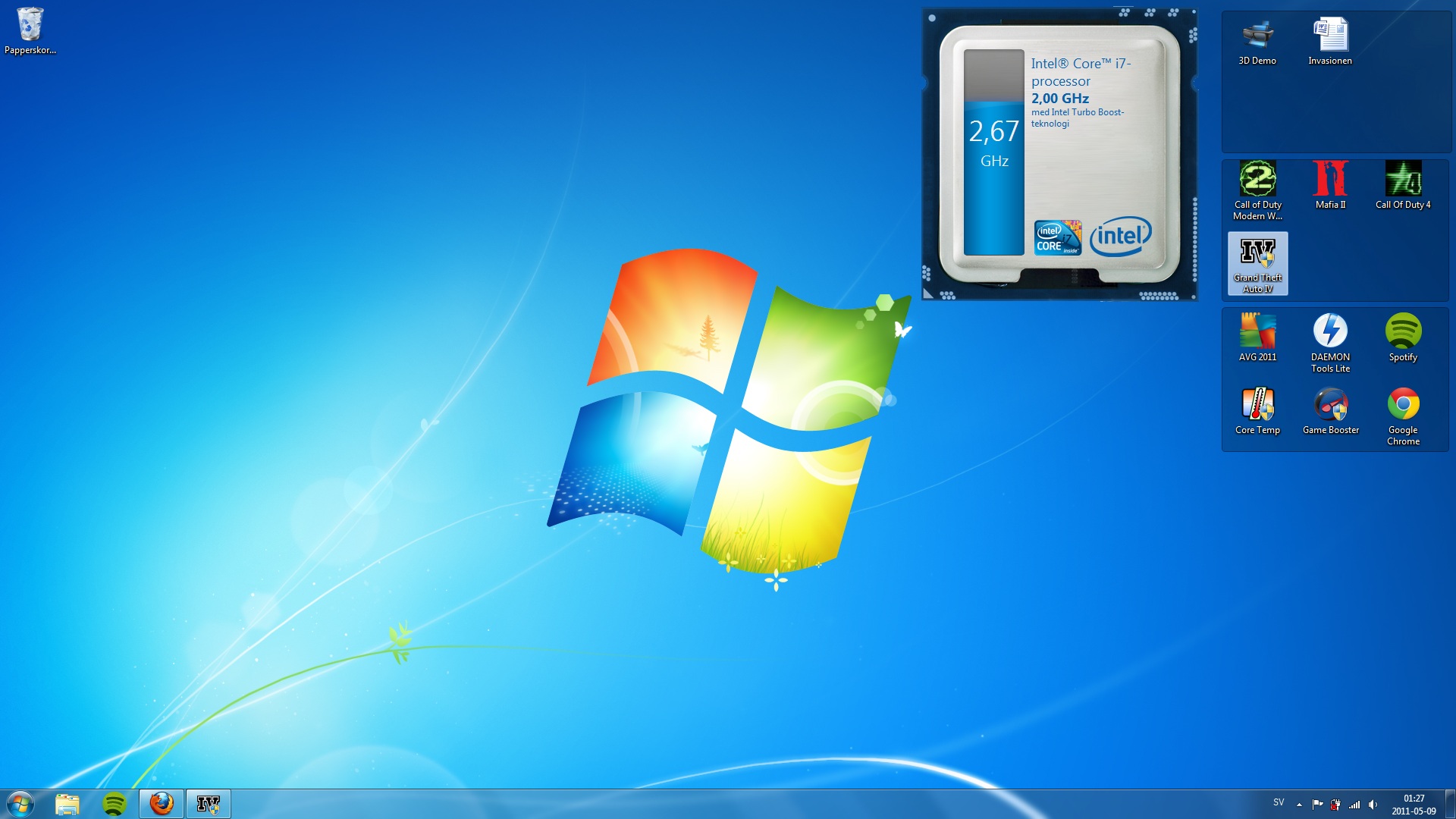
EDIT: Tried doing the same thing with GTA IV that lags for me, and the turbo boost gadget shows a reading of a pretty solid 2,67GHz, so I guess in the GTA IV case it's the game running bad not the CPU, If the TB gadget is good enough for trying this. Attaching a pic taken right after I minimized GTA IV.Attached Files:
-
-
I've probably played 15 hours of BFBC2 on this thing. It had the occasional lag spike when i first started, changed coolsense to performance mode and haven't had any problems. It is true that big explosions/smoke can cause a little bit of lag. All in all tho, great times gaming on this thing. Love it.
-
Excellent. That's the kinda news I wanted to hear....
-
Normal for the kinds of effects you were experiencing. I ran Crysis benchmarks on the 6850...did pretty well...except when it would lose frames in extreme explosion scenes, etc...That direct X 10 and 11...want the effects...pay the price...Love it!
-
GTA IV will lag on almost any system. After all this time...there are still bugs...I Wouldnt worry...
-
I do have coolsense on performance and am running BF:BC2 at 1920x1080 with medium settings, I average around 30FPS but will occasionally dip down to 12 even just walking from on checkpoint to another. Then things will go back up to 30FPS. This "throttling" repeats every few minutes.
-
How much bloatware typically comes installed on the Envy 17 3D?
-
Too much... I counted around 60+ programs total in the "programs and features" when I received my Envy. Not everything was bloatware though, but alot of it was. A clean windows install will show under 10.
-
Hi Everyone,
My Envy has freeze problem, maybe smb has this issue too,
Envy freeze sometimes without any apparently reason ,
just not answer to any keys, except shoot down,
after restarting working without any problems till next freeze.
Sometime occurs two times per day, sometime is working flawless.
I like my Envy, but this issue is inadmissible for a premium laptop. -
Thank you Bob. That was easy. Now my system configuration is optimal according to the Intel SSD System Configuration Tuner.
Now I am confused about the Intel SSD Optimizer. The following is an excerpt from the Toolbox User Guide:
"Note: If your computer uses Microsoft* Windows* 7 and the standard Microsoft AHCI driver (the default setup for normal configurations without RAID), the Intel SSD Optimizer works; however, you do not need to use the Intel SSD Optimizer because Windows 7 implements the Trim functionality natively.
If your computer uses Windows 7 and Intel Matrix Storage Manager version 8.x or Intel Rapid Storage Technology driver version 9.5 or earlier (which can be used in place of the Microsoft AHCI driver), Trim functionality is not implemented, and Intel SSD Optimizer is required to enable Trim.
Intel Rapid Storage Technology driver version 9.6 supports the Windows 7 Trim command, but for non-RAID configurations only. In these configurations, Intel SSD Optimizer is not required to enable Trim."
I am not sure how the above applies to our configuration. Would sure appreciate your enlightenment. -
aaad2007, welcome to NBR! It sounds like the problem many here experienced and fixed. It may be a problem with your 6200 having issues with your router. Either get a different router, or downgrade the drivers for the 6200. That should fix it. Post your results.
KJ
-
Not sure. I run the optimizer once a week and comes back with all good. Never worried about it. Trim works when we delete files, because of Win 7. Then by running the optimizer, I just make sure that things are cleaned out. Keeps my performance top of the scale for the drive.
-
Installed the 13.0.0.107 driver,
Hope that was the problem.
Thanks Killa Joe
-
AS-SSD
ATTO
Both popular SSD benchmark choices. -
Hi...could u pls mention the settings and resolution at which u gamed?
-
Hi Guys,
Did anybody of you try if completely turning off the fans in the Envy is possible in idle? Maybe by sofwarte (speedfan or something like that).
Best regards,
DvP -
I've noticed one thing that always occurs when I start the laptop, you know when you have typed your password to your account and the welcome screen comes on and it loads for some seconds, every time it loads on the welcome thing my screen quickly flashes black, is that something to worry about that something may be wrong? I don't remember it doing that the first time I started the laptop but then I had to press the power button twice since the first time I pressed it it almost started but died kinda, but I took out the battery the first thing I did so that may have something to do with the weird first startup, cos that haven't happened again tho.
-
Another freeze today,
only Skype was open
no idea why
Yesteraday did all diagnostic tests (F2), all PASS
-
anyone try updating the cyberlink dvd 10 to the newest version? it ef'ed up my 3d playback just like when i tried dvd 11 it looks like everything is working glasses turn on and the movie is blurry like its in 3d but looking through the glasses its still blurry. tried changing settings and still get nothing that works
-
ohhh... and I was hoping that would have solved your issue. Best to let some of the more seasoned members here suggest some other fixes.....
KJ
-
Go here and run the test:
Speedtest.net - The Global Broadband Speed Test
Does your machine freeze running this???? -
Greetings all. I just received my dv7t quad and I am really not satisfied with the screen at all (1600 x 900).
How does the screen on the Envy 17 3D (full HD) compare ? How is the "viewing angle" on this notebook ?
Also, just for comparison, can anyone tell me how it compares to the new 15inch MacBook Pro ?
Thanks all. -
Well the Envy 17 3D has a 1920x1080p screen, that's a dramatic increase in resolution compared to the 1600x900
I've seen the HP Brightview screen on a Dv7 non quad core the screen was meh, nothing great.
The Envy 17 3D definitely had better brightness, and better Image quality.
Well I've handled pretty much all Macbook Pro's except for the new SB MBP's.
They get pretty warm, screen's are a step above average but are far far from the best. They have so so to mediocre viewing angles, their brightness is okay, backlight bleeding is present, image quality is so so due to the low resolution on the 13.3" and 15" MBP's. The 17's WUXGA is a bit better then the smaller brethren but it too is not as good as the Envy 17 3D's screen.
Other then that they are pretty difficult to compare due to the vastly different markets the two laptops are meant for. -
Thanks for the quick response. Also, does the Envy 17 3D have the subwoofer ?
Thanks again
-
It sure does. Of course you will want to connect the Envy to an external speaker system of high quality, or head set to get the most out of the sound from this mean laptop.
KJ
-
Great to know. I am about to return my dv7 that I have only had for about ten days, but this screen is really killing me. It has a very specific viewing angle, and people around me usually can't see what I see. (for some, that is a good thing, but my girl and I like to watch movies on my laptop).
I will have to dish out about $460 (unless there are coupon codes floating around) to upgrade to the Envy with the same specs as my dv7t Quad Edition, but I think the FULL HD display, plus the backlit keyboard will make it worth it.
It was either the Envy 17 3D, or the 15inch MacBook Pro, but that would be a bit more money, and I am not really in the mood to learn a new OS.
Thanks again
-
Good choice, stick with PC's you won't find it greener on the other side, trust me I sell them.
-
Thanks Crimsoned and KillaJoe. Rep, to both of you +1
-
If the turbo boost gadget shows you know let's say 2,55GHz when playing games is there not throttle then?
-
Depends on the game.
-
Tested on BFBC2, runs good without lags and the tb gadget shows that it's working, someone here said it was a demanding game so I tested with that one.
*HP ENVY 17 & 17 3D (2XXX series) Owners Lounge*
Discussion in 'HP' started by 2.0, Mar 14, 2011.