Problems? See this thread at archive.org.
Two more quick questions, (one of which is a bit silly)
1- Does the notebook have switchable graphics ?
2- Does the HP logo light up ?
Thanks again everyone
-
-
YES and YES...
Logo is pretty cool, too! -
I know the logo is cool, but for some odd reason I recall someone wanted to cover it up! LOL.

KJ
-
Thanks !
-
I gotta ask, what does switchable graphics mean? Omg feel like a total newbie now ^^
EDIT: Just found a weird thing going on, suddenly the sound wont play in my headphones when they're plugged in "/ They did an hour ago and now all of a sudden they wont and on the volume control both the headphones and speakers show even if they're plugged in or not.. what the? -
Has anyone installed the HP "recommended actions": HP Bios Update UEFI and HP System Diagnostics UEFI? Any issues? Would you shed some light on these updates?
-
Switchable graphics. You have two GPU's in the Envy 17 3D. The ATI HD6850M, which is a discrete chip with 1 GB of memory on the motherboard and an Intel HD3000 series, which is incorporated into your CPU. So, when on regular power, the machine uses the ATI card for video. On battery, you will default to the Intel card, to save battery, heat, etc. With the ATI on battery...you might get 2h 15m on a 6 cell battery. With the Intel GPU, you get about 3h 20m, depending on settings. Right click on your desktop and look for the option to "Configure Switchable Graphics" You can manually switch over to the Intel chip even when on power if you want. The other day, for a matter of 10 minute, power went out in the house. A pop up appeared on the Envy, "Do you want to switch graphics to power saving GPU now? I clicked NO and shut down the machine.
As far as your headphones...reboot and make sure that everything is OK with sound. Then make sure to plug into the FRONT of the two ports and there should be sound. Also check two things. In control panel...open the BEATS applet. Click on setup and make sure on the right that the jacks are set up for rear one...mic and front one HP.
In the SOUND applet...make sure that Speakers and Headphones are your default devices. Did you plug something in HDMI that might have switched that? Also make sure that you didn't activate "Communications Headphones" -
Actually it became like that when I started Singularity (The game) and still that's weird, but I did reboot and things we're normal with sound and everything, and I did try to start the game again, same thing happened, so i quited the game and took out the headphones plugged them back in and it went back to normal, but why does it turn like that when I start that up? Still weird "/
EDIT: Somehow it's solved even in the game, in the beats thing the "use as standard communication unit" was unchecked so somehow it gone unchecked have no idea how cos now when I've checked it, it works in singularity as well
-
Something I noticed:
How come the battery life on the Envy 17 is rated at 2.25 hours, vs. the battery life on the dv7t Quad, which is rated at 5.25 hours, and they both have almost identical specs ? The big difference is the GPU, but if these times are based on the power saving GPU, then why the drastic difference ?
Thanks everyone -
First of all...that is an estimation. Most of us with the second generation Envy (Sandy Bridge) are getting 3+ hours on battery. One reason...better, brighter screen that runs 1900 x 1080, where the screen on Pavillion, depending on model...at best 1600 x 900.
-
Actually yes, you are right. I completely disregarded the fact of the screen quality. I actually got well over three hours last night with my DV7 which I thought was nice
Regardless, I'm about ready to pull the trigger and RMA my dv7t for the Envy 17
EDIT: I just realized that the quick ship models are MUCH cheaper (If built with the same specs as the one pictured below) than the CTO, AND they include an extra 9-cell battery, and bigger HDD (2 x 500gb, vs 750gb).
![[IMG]](images/storyImages/envy.jpg)
-
So i pulled the trigger on the envy 17 3d sb Got a super deal
Envy 17 3d sb
intel 2820qm
8gb ram
dual 750gb 7200rpm hdd
then got full 3 year in house protection, drops spills etc..
also got the ultimate student pack. hp printer, 320gb external hard drive, plus the 2yr one day exchange warranty for the printer...
Total cost>>>>>>>>>>>$2686.98
Total cost paid>>>>>>>>$1637.07 shipped to me in NY
Saved>>>>>>>>>>>>$1049.91
est ship date: 4/17 -
Good deal!
-
ehh how? pic?
-
mostly back end credits as hp puts it.......
sorry math was wrong...
paid $1636.23
well this is how it broke down......
I paid up fron 2127.69.. then we all know how hp likes to give the rest back after lappy ships
so upon shipment i will receive a $391.46 credit
and a $100.00 credit resulting in my $1636.23 payment..
once the credits hit my statement i can then show...... -
Wait, was this after the coupon expired? I'm really looking for a good coupon to use for an envy.
-
hey guys,
first: nice forum here. Convinced me buying an envy
second: I'm a student and 2000$ is too much for me right now
so my question @ays06 how did u manage that?? Maybe u can post it here or pm me. Would be really nice!
vinc -
vinc,
it was a combo of hp messing up an old order with a $400 off coupon and also giving me an additional %15.. they let me combine it all along with my hpa... it resulted in over a $1000 off.... I just got lucky thats all... If I wanted a second one at that price believe me HP would say no... -
My Envy 17 3D SB is going for $1550 shipped (today only) at the marketplace (or you can take a shot at my Ebay listing)
Specs:
2 years accidental protection return and pick up
i7-2820QM
6gb ddr3
1080P 3D Infinity screen
Blue ray slotload
6 cell/9 cell battery
2x640GB 7200 RPM hard drives in Raid 0
etc etc.
Here's the listing
http://cgi.ebay.com/ws/eBayISAPI.dl...31645&ssPageName=STRK:MESELX:IT#ht_522wt_1139 -
After doing the above, how do you verify that your SSD and HDD drives are in AHCI mode?
-
RE: SSD Management
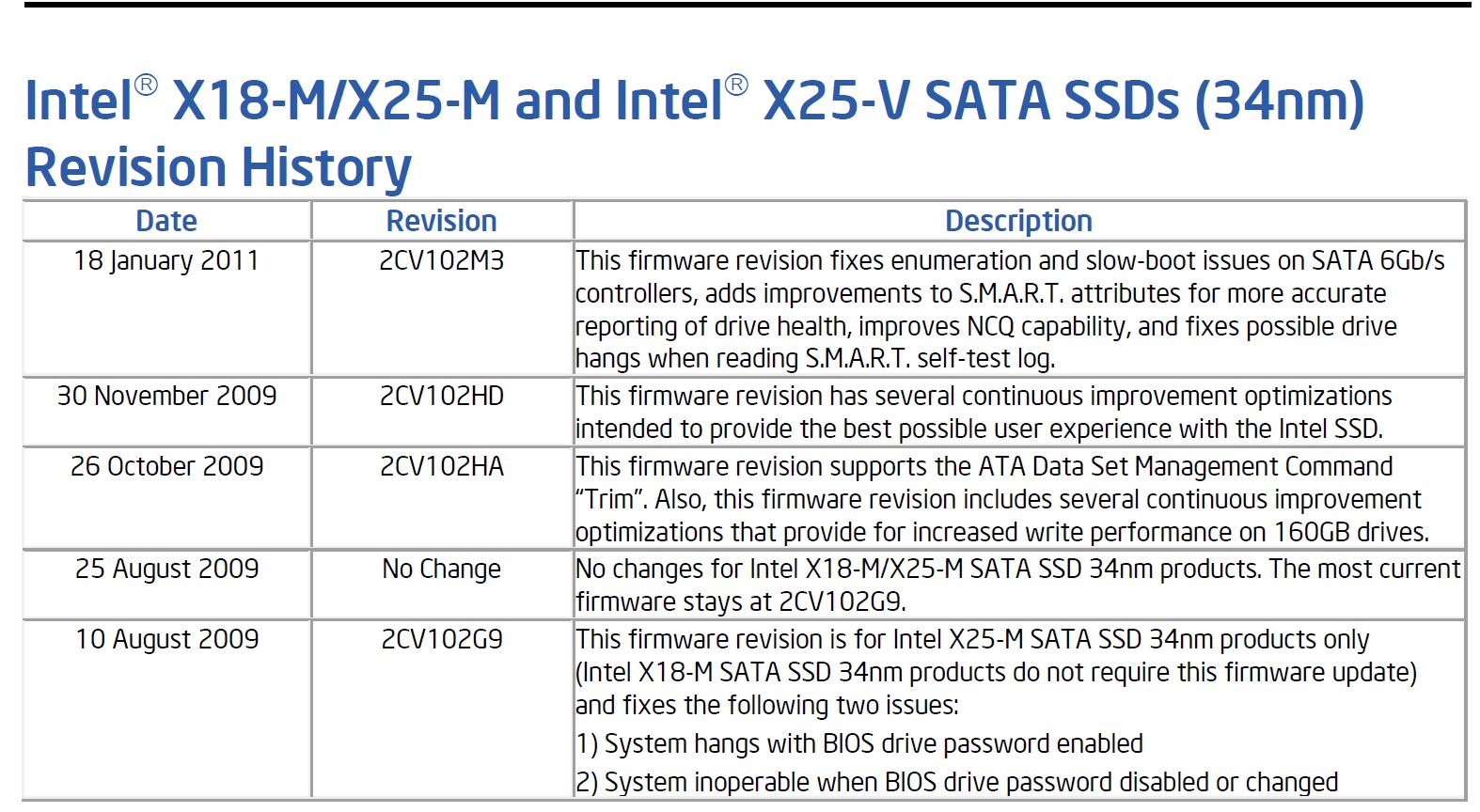
There is a caveat on the Intel SSD Toolbox/Optimizer that says that the latest firmware must be installed for the optimizer tool to function. How do you know whether you have the latest firmware? Also how do you know if the optimizer really did anything after you ran it on your SSD? Should the amount of free space increase after running it? My amount of free space remained the same. Thanks. -
Our drives shipped with the firmware that enabled TRIM and all that. I have all of my internet files and pagefile loading on drive D, so I write very little to the SSD. The only way to know is to measure how much of the drive you are using...to the bit. Then copy a large file to the drive. Delete it and run Optimizer tool. It should be what you had prior to copying the file to the drive...
I checked all the firmware revisions from Intel....and I know that the firmware on our drives was the one where it supported TRIM. We do not have the most up to date...I believe we are two behind...
I will do the test right now and see what happens...
Before copying file to SSD...52,560,052,224 bytes used
Copied a 1.22 GB file to the SSD (Nero Platinum HD Installer 10.6)
After copying file to SSD....53,881,700,352
Deleted the file...and will run Optimizer
After deleting and running Optimizer...52,567,482,368
Pretty odd! But the majority is gone...where is the 7 mb coming from??? Ran optimizer a second time and the mumber of bytes goes up!
Rebooted and here's used space now...52,559,187,968...so I have less. Mind you...I normally run optimizer once a week. Today was the first time run since last Friday. Now the bytes went down. It all seems to work OK...as long as it didn't stay where the space was after copying the Nero Installer to the HDD
I believe that I found the firmware version by running HWInfo32. For benchmarking, I used CrystalDisk Mark
CrystalDiskMark - Software - Crystal Dew World
Look through the thread after April 14 and you will see my scores...Attached Files:
-
-
Thank you for purchasing an HP configure-to-order notebook computer. We wanted to make you aware that we have encountered a complication with your order. The 8GB 1600MHz DDR3 System Memory option you had selected had been accidently displayed as a configuration option for this configurable Touch Smart desktop model. Correction has been made to our systems to address this discrepancy but this has also prevented the build of your computer from being completed.
As a result of this situation, we wanted to know if you would like to have your memory option changed to the 8GB 1333MHz DDR3 System Memory option as an alternative option. With this alternative option, you would be receiving a $20 credit, which is the difference in the assigned value between these two options, back to the credit card that was used for this purchase. -
Hi Killa Joe,
Is not just games. This problem affects the performance of the computer when running any kind of CPU intensive programs. I've been running statistical models and, when having the discrete GPU enabled (which I need in order to use my external monitor), the CPU goes down to 798MHZ for long periods of time. When I disable the GPU and run the same exact program , my laptop clocks above 3000MHZ at a constant rate. Since some of these programs last for hours, the performance deficit with the discrete GPU enabled is huge!! I could do without the discrete GPU, and not use my 27 inch monitor. But this is not acceptable. Any suggestions on desktop replacements without this problem? Thanks! -
Not sure there is one. Other brands are effected as well. Only possible solution might be something like a Pavillion with an AMD processor. Or Dell with AMD, or the like. Not sure if there are throttling issues with AMD or not...don't even know where to ask. I would call HP about and inquire
-
Okay you guys check my testing thread out I have some positive news.
Someone (I will be sure to check who to give proper credit) recommended to ues throttlestop, so far one configuration I have tried has given very good results. I am testing further before I think it's safe to recommend to people.
http://forum.notebookreview.com/hp-envy-hdx/575817-hp-envy-17-sb-throttling-test.html -
Thanks Bobmitch. I will keep following this thread (and the one started by Crimsoned), and also check on the new EliteBook mobile workstation when they come out. Also, the new Dell Precision, to see if this issue affects those laptops as well.
I love this laptop at many levels (perfect size and weight for a desktop replacement, with a great display.) But a laptop that runs at a third of its claimed speed? This seems a seriou issue .... -
I don't think that is related with Wi-Fi connection. Anyway I have installed the previous WiFi driver 13.0.0.107 to exclude this one.
The Speedtest.net is running OK (thanks Bobmitch).
Yesterday I have downloaded the Ubuntu 660Mb and it did without any problem.
I have installed an C300 SSD in the first bay and installed the Windows 7 professional over the recovered Windows 7 home (I didn't find the solution to fix the problem with rebooting after each started up).
How to find out if this issue is related with SSD? Will appreciate any help
-
Yeah...I posted about the quick shop pricing on the the Envy's on Friday. It is AMAZING how much cheaper they are.
But I noticed two issues....
The first is that the quickship models only come with a 1 year warrenty (instead of the normal 2 years).
The second is the HDD speed. On the quickship 3D model...one page listed dual 7200 rpm HDD's, while the PDF stated they were 5400 rpm. I need to figure out what is correct, and hopefully I can apply my $500 off coupon to a quickship model. -
Damn that sucks....I mean it doesn't look like they left you with any options tho.
I'd be pissed tho. And it def wasn't an "error" on their part. They clearly will have that as an option at some point in the future so why are they deny you the option?
Probably price.... -
Guess who also got that email tonight? Me...
Yeah, I thought I got in good with the 1600MHz, only to get HP's email saying that its not an option and to call them and downgrade the ram or cancel my order! Uhm, you guys know my deal is too good to cancel, so I said, sure give me the darn 1333MHz, and a big ol' $20.00 to boot!
Not that it was going to make any real differernce as we mentioned some pages back.....
My main concern was I did not want this to delay my reorder, and the rep said it should still ship on the 20th...so let's see, otherwise I'm gonna milk HP for a free laptop, lol.... J/K I wish....
KJ
-
So it was only $20 to upgrade your memory at the time?
And if you don't want the credit (and want the memory instead)? -
See, they probably realized they offered it for way too cheap. But they really don't have the 1600 available so its odd that they displayed it for a few days. Also, the $20 in credit really is not fair.
KJ
-
Anyone experiencing random reboots? I saw a post earlier in this thread, but i didn't see any solution. I have a non-3D model SB, used an Intel X25-M SSD with a clean install of 7 Ultimate. Used all HP drivers, except the wireless, i used the older one since i had the freezing issue also. The only driver i didn't get was the "HP Data Protection Sensor" that updated through Windows Update. Any help highly appreciated, other than this issue, i love this laptop!
-
Hi guys, as you can see this is my first post in the forum... although I've been following if from the beginning and I must have to say we have very talented people in here.
Ok, Let get down to business, today I just received my Second Envy 17 3D and it seems that it is going back... I had to return my first envy because it had an stuck pixel... so the first thing after receiving this replacement was to look at the screen and BOOM! at first sight I thought it was another dead pixel... but then I took a closer look at it and noticed it is dust in between the "Infinity cover/plastic" and the actual display... so my question to you guys is, Has anyone been able to successfully disassemble the screen and remove the dust in between the actual display and the Infinity thing?
I also was looking at the service manual and I could not tell if you can actually do that... seems like the Inifinity thing and the actual display are 1 piece...
What do you think guys? should I just send it back? do I have options?
Thanks
-
I would just send it back, although, it's really hard to come by an Envy that's totally free of cosmetic flaws.
-
Performance wise, I don't think you will ever notice a thing. As for the disappointment...that's another story. Hopefully you get shipped on or before on time...you have waited long enough...
-
Thought...call Customer Service and tell them that you need your screen replaced. If you have at home warranty...they can send a tech to replace your screen if that is what you want. Even without an at home warranty...Tell them that it is either a tech bringing you a new screen or a return for refund...bet you get the tech. Worth a try. Mine was a slightly raised keyboard. Overnighted me a new keyboard and a tech showed up two days later...my machine is now perfect! BTW...I do have the at home warranty...but still worth calling and asking. Call Customer Service...NOT tech support. Customer Service can make more things happen...especially if you can get them to escalate to a Case Manager
-
Still though...for $20 I would have gotten it just for peace of mind lol...
I think its definitely a case of price screw up. Unless they've got computers running HP's website and item listings I think its very shady on their part.... -
Thanks Apoxxx and Bobmitch for your quick replies, I do not have the 'at home warranty' but I'll certainly give it a try...
I did some research about infinity Display disassembly... I found some threads talking about my issue... dust in between the display and the cover (inifinity)... they sad the Glass/plastic cover is sealed to the display with some kind of glue... so fix it by myself is a no-go.
Thanks again! have a good night! -
KJ....u ordered again?????
-
Panther, I just placed my order for the Envy 17 and returned my dv7t QE.
The rep said that she has confirmed that it is a 1 year warranty, but the HDD is 7200rpm.
I guess Ill confirm when I receive mine. They gave me next day shipping at no extra cost
-
Bobmitch,
I have to correct myself! In my own real life tests (running a statistical program that takes its toll on the CPU), the speed doesn't go down once I change HP's power options from 'Recommended' to 'High performance', even when the discrete GPU is enabled. This is a big relief for me.
I've been running the same tests I did yesterday, without a loss of CPU speed now (even after half an hour, the CPU still hovers above 3000MHZ.)
Is the issue of throttling perhaps related to this option, so that simply changing the power options would solve it? I know I am being naive, and perhaps missing what throttling means (I assumed it was a loss in performance once we run our laptops with the GPU enabled.)
Thanks. -
Just to add to my previous message: I am not using my discrete GPU for anything other than connecting external monitors (haven't tried running games, etc.)
So, this is perhaps just good for me . -
A few of us have determined that the throttling doesn't happen when using the Intel GPU. Kinda makes you wonder a little, considering AMD and Intel are rivals...hmmm!
-
AMD wouldn't dare risk doing anti competitive actions against Intel specially after having received 3 billion dollars and cross shared patents just what? 1 years ago?
Besides if AMD did that would have to be a separate hardware function, which means everyone who studied the AMD graphics card would have picked up the hardware and it's function. -
Yes, this makes sense. I thought I had my discrete GPU connected, but it wasn't. But I am able to still use my monitor. That is all I needed.
-
When I unpacked my Envy I read in the quick guide that pressing fn+b would adjust the something with the beats audio and that worked fine, but pressing fn+b now does absolutely nothing "/ It showed a little icon on the screen before when pressing it, like when you turn on/off the mouse pad or change the screen brightness, now why is this gone? Someone knows?
-
hey bobmitch did you mean 130 mbps? and do you have a wireless N router you should be getting > 200 mbps. I get a max of 270 mbps...
*HP ENVY 17 & 17 3D (2XXX series) Owners Lounge*
Discussion in 'HP' started by 2.0, Mar 14, 2011.