Problems? See this thread at archive.org.
well, here is an idea. I am flying from LAX to Germany next Wednesday night. from Germany to Sweden you would not have to pay any custom fees as far as I know (EU).
now the only question, how do we get mecchas glasses from wherever he is to me by Wednesday.
just a thought.
-
daaahh stupid me, did not even think about the double frame rate. Considering this, I have to say WOW. It was playable. Guess I'll cut back on detail a bit.
-
To quote a popular Walt Disney World attraction/ride.... "Its a small world afterall..."
 Very cool, hope it works out.
KJ
-
Thanks KJ, or shall I say no thank you. Now I have that stupid melody and somg in my head and can't get it out anymore.
-
No...I still have the box the machine came shipped in put away, should I ever need it....the black box 23 x 13 x 6
-
FYI for anyone else looking at extra 3D glasses. I have not looked on Amazon or other places...but you can get them from HP for about $82.00 shipped (taxes included).
Sign in with you EPP (8% discount)
Use the standard SAVE15HP coupon for another $15 off. ($15 off items over $75)
Free shipping on items over $40
= $81.80 for my zip code. -
Update: Bios update did not help BUT I installed the original AMD driver ( http://forum.notebookreview.com/hp-...xxx-series-owners-lounge-380.html#post7452073) and no freeze so far. Envy ran the whole night - wifi active - and no problem. I will switch to AMD GPU and test again. Hopefully I can report that the problem vanished.
Edit:
Strangely I cannot install power DVD anymore. It offered me a new version (V2808) and uninstalled the older one. No I can not install any of them :-( Installation is terminated by error 0x80040707 -
Glad to hear that it is not freezing anymore!
What I meant was that I had the same problem with updating Power DVD. Some kind of strange error when it installs. I couldn't install the old one.
My next bet would be to run CCleaner in the hope that it removes the reg entry that is messing up the installation. If that doesn't work I would just pirate it!!! HAR!!! ;D ... no seriously .. HP better provide a fix hahaha!!! -
I am also glad. No freezes anymore after AMD driver install.
BTW.: I installed PowerDVD11 but it seems not to "know" that my Notebook is 3d capable. Does anybody know a solution? Side by Side 3D movies are not overlayed for 3d and just viewed side by side. -
PowerDVD is notorious for bad issues like this. I have learned that if it works at all...leave it alone. If it breaks...most likely can't be fixed. Go to Cyberlink and read their forums...PowerDVD11 is a mess. They only other way to watch movies in 3D is to download the most up to date TriDef engine. You update by overwriting the original version...don't uninstall first. Then you the TriDef media player. BTW...you will get an error trying to watch DVD in 3D...just download the sound add on and it's all good. Not as good quality as PowerDVD but plays in 3D.
-
I am thinking of buying a laptop... I just have one question how good is the HP Envy 17" 3D 2090NR and if the 3d has any problem plus should I really buy it?
-
Ok, but TriDef has to be purchased, right? No success with any PowerDVD version btw :-(
-
If you have the Envy 17 3D, TriDef is already loaded on your machine. Go to the TriDef website and download the latest version. DO NOT uninstall the version you have...just install the latest version on top of your installation and it updates you to the latest version AND gives you the TriDef Media player to boot! Once you do this...you are gonna have to download and install the AC3 sound plug in or you will get errors that DVD playback cannot be done successfully. No biggie. You don't pay for any of it!
http://www.tridef.com/download/TriDef-3D-4.5.1.html
http://tridef.com/support/dvd-decoders.html -
Okay laptop is officially sold. Seems I am leaving the Envy boat. We'll see where I go after this.
-
Wow, I was glad when you decided to keep it...now it's gone. Hope you stick around no matter what you get! You put it on the line with Throttlestop, and many of us owe you much gratitude!
-
Yeah we truly appreciate the effort, but sadly it's just a band-aid, and not a real fix. HP need to acknowledge this throttling issue and either recall laptops or fix it.
-
Apoxx...I get that...but remember...the throttling is not just an HP issue. Asus, Dell and HP are all effected. I am sure that other brands, too...but these are the top selling brands that get reported. I still believe it is an Intel thing that "supposedly" protects them...the laptop manufacturers just go with it
-
Yup it definitely is.
I recommend everyone to send emails to tech support letting them know the issue at hand. -
Well, seeing as Alienware fixed it with a biosupdate, I'm sure HP could do something as well, if they cared. But as I've said earlier, I don't care if it's Intel, HP, or anyone elses fault. I bought a 2.3Ghz CPU in a HP laptop (paid $350 extra for it too) which is supposed to run at 2.3Ghz constantly with temporary boosts to 3.4Ghz when running less threads than normal. Then it's totally unacceptable to get a CPU that runs at 797Mhz, with a few seconds at 3Ghz every once in a while.
-
I hear you! All it might take is to disable speedstep. If you run HWinfo32, it gives you all the parameters of your CPU...min 800...rated...2.3 and Turbo 3.4. However, the throttling initiates speedstep....get rid of speedstep and get rid of throttling. I had a first generation Core 2 with my Dell Inspiron E1505....rated 2.0 GHZ...but Speedstep backed it down to 800 mhz as well. Once I disabled speedstep...2.0 GHZ all the time...yeah...lost battery time when speedstep didn't kick in on battery...no big deal for me. Not sure what Alienware did...but every company needs to bend to the customer and NOT Intel..not sure that will ever happen. The question is NOT Can...but WILL they?
-
Nope they won't.
Alienware fixed it via a Biosupdate, but that's because their cooling system is far more robust.
If you see my Throttling Fix thread, you will see I was hitting 97c on CPU/ 97c on GPU.
2 nights ago, my system shut down out of the blue while playing Bad Company 2, issue=overheated.
I would recommend everyone who's going to be using both CPU/GPU at the same time send back their Envy 17's, let them feel it with their wallet at this point is what I am saying.
-
Crimsoned, as soon as I get my new Envy after the 20th, and after setup/cleanup/update I will run the stress test on her, and see how bad she throttles. I will then send an email to HP. I agree, the more emails HP gets on this issue, the greater chances for a fix.
Sorry to hear you sold your beautiful Envy afterall. No doubt you will find a great laptop eventuallly. Also, glad you'll be sticking around anyway. This place won't be the same.
KJ
-
I may be getting an 8740W at a great price from one of our forum members, so perhaps I will get a good laptop.
However who knows. -
I know that your instructions said to keep turbo boost enabled...wonder f the overheat would not have happened if you disabled turbo? -
Bobmitch, it would overheat anyways. Frequencies start at below max base, around 2.1 ghz-2.2 ghz, meaning turbo boost isn't even used.
-
Good to know. You did some thorough work!
-
Why doesn't it overheat when running prime95 at full boost? My temps were at 90c solid when running at 3Ghz prime95 for 30mins.... But as soon as we bring the HD6850 into the picture, clocks drop and temps with it.
-
Because the GPU and CPU are sharing the same heatsink.
If the processor alone is at load the cooling system is able to handle the heat dissipation. When both the GPU and CPU are at load, the cooling system fails at dissipating the heat quick enough. -
Wow, sharing heatsink? Are you serious? That's an epic fail.
-
Yup I am dead serious. It is an epic fail.
-
Lots of quotes now, been off for a day or so had to check back in the thread, bare with me
That would be cool, if he sends them to you that's how you mean right?
Huh? I don't get this
Haha yea totally awesome
I also have huge problems with my Powerdvd, stopped playing some formats it used to, tried uninstall and didn't get it to work again "/ Can't even install it anymore also get some kind of error, I thought just now before I came here to check the registry for leftovers might be a solution, can CCleaner do those kind of things? I didn't know it could clean the reg, well I'm gonna give that a try to then
-
In Switzerland is 179 Swiss Franc an extra pair, which is 200 US, I think MiRRe89 is from Sweden. wonder how much would cost there?
-
Yes I'm from Sweden May not cost much for the shipping over here but I probably get customs when I pick them out here cos it's from the states
-
My guess is you installed the PowerDVD 11 trial version (as you mentioned the activation key at 0) overwrited the Power DVD 10 OEM version. And the trial version has limitation to play certain disc or movies. I think if you do full recovery, it will work again. But I would not download the trial version anymore, either to buy the full version of PowerDVD 11 or stick with the version that HP came with it.
-
I am not sure about that, if he state on the package it is a present. You might not need to pay the custom. I recently bought a laptop cooler from a US site to ship it here in Switzerland. I payed extra for a company to ship it here but no custom fee.
-
Well it stopped working before I installed the trial And a full recovery seems to be the only fix feels like I've tried everything, and ehm I get an error about a dll that can't be found or something VerCheck something like that, tried google it but couldn't really find a good fix for it. I actually consider buying it so I can for sure see 3D movies, but haha if I buy there's no guarantee I can install it
So I guess, a full recovery is my only fix for now but I'm not in the mood of doing that for one program
Urgh problems
OH wait I can buy powerdvd 11 yes that's already installed as trial omg I'm stupid again
-
Yes yes that's true of course But my dad recently bought something from ebay shipped from USA and he got to pay customs, but a gift might be custom free
-
I honestly think that the only way to fix this is to do a recovery. Upside...no trial version...you get the OEM of PowerDVD10 Ultra which does Movies and Pictures in 3D. I have read so many horror stories at the Cyberlink forums about PowerDVD11...I wouldn't buy it right now. Deal is if you are an Envy owner...you can upgrade to 11 for $59. Fine, except 11 seems broken too.
-
Thanks for the info, I don't think I would have bought it but I just wanna get the 10 to work... A full recovery wouldn't really be the worse scenario but I hate having to reinstall all my other stuff that I have in a weeks time installed on the laptop. Well it's not super much but still. You don't know anything about the error I get? It's like Vercheck something, some info on google said it was common and could be fixed with some dll fixing program but I didn't find anything that seemed good ( Was in a little hurry when I searched but still )
-
Can you post the exact term of the error and what dll file is missing?
-
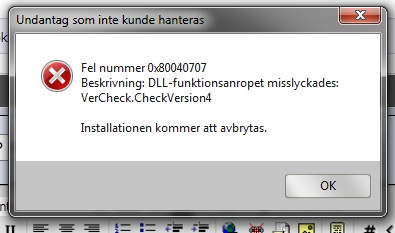
Oh yes of course, I'll post a picture too, even if it's in Swedish you'll see the dll name
Translation of the hole error:
Exception that couldn't be handled.
Wrong number 0x80040707
Description: Dll-Functioncall (? can't really say if that's correct) Failed.
Vercheck.checkversion4.
Installation will cancel.
Something like that, totally weird.Attached Files:
-
-
Anyone occasionally get a BSOD when unplugging the power adapter?
-
Did a quick search, it seems not a particular programme caused it. But something is missing in the registry. They seems to fix it by reinstalling the Windows. Think you cannot avoid a full recovery.
-
Yea I found something like that too, so I started to consider doing a full recovery tomorrow, it bothers me a bit but, it's better to do it now and get it working again rather then waiting and getting more stuff on the laptop, since all I have so far is programs, no files I need to save etc, good thing. Hope it doesn't take to long either, 6 DVDs for the recovery whispers that it probably will ^^ So saving all my game saves and stuff tomorrow and just get it done, but thanks for helping, very appreciated! ♥
-
I have observed right now when the screen is off, that some of keyboard keys are stamped on the screen, could see the square configuration. These apparently appear because the screen physically contacts with some of the keys (in the center of the keyboard).
Look at yours laptops guys! -
You gonna love me for this answer
It is a pretty normal thing, especially on larger screens. Most likely, you will be able to get those "stamps" of your screen with some cleaning alcohol (be carefull though, don't use much). Unless you really pressed hard on the lid, thise stamps are nothing else but the grease from your fimngers, that transfers from the keys to the screen. Good way of avoiding this: don't eat hamburgers while typing Ok I am kidding. Those envy keys do attract quite a bit of grease from your finger. I use the 'PET-felt) that came with the Envy when packaged. I know it is annoying to keep it and always having to put it somewhere when you open up your laptop, but it will do wonders.
-
I have not found much more on this. All I know for sure is the Intel 320 drives are not supported by the envy 17 BIOS at this time. I am happy to report that I have my 80gb x25-m in there with a fresh install and everything is running flawlessly. I would highly recommend this setup to anyone and would definitely go with the clean install. A few notes on upgrade:
- newmodeus caddy is perfect
- My battery life is more than I could ever have hopped for. I would say that 4+ hours on the 6 CELL is going to be pretty easy for me on power saver scheme.
- It still throttles however the only time I can get it to throttle is when running the intel burn test. Prime95 and renderings are no problem. Not a gamer so cannot comment on that. Hopefully HP gets that figured out.
- Be sure to grab your Adobe Premier and Photoshop serials before doing the clean install. I learned the hard way and had to restore my old drive with the recovery disks just to get them. I used balerc?? advisor to find my keys.
- I did not install any of the HP software and do not miss ANY of it. It is truly bloatware especially coolsense which I feel does more harm than good. (note: You do need to install HPOSD and HPQL. I also tossed in the accelerometer software for my second drive but not sure if it is even needed)
- There were a few programs in SwSetup that I did not know what the heck they were and didn't install them. Still haven't missed them.
- A few items had updates available for download at HP. Check there before proceeding.
- I had to download the intel wireless display drivers as they were not in SwSetup
- Used ABR Beta and it worked PERFECT. Totally awesome tool
I am totally bummed about the intel 320 not working but I guess it is not the end of the world. It would have been nice to have hardware FDE but I guess I will update to Win 7 ultimate and go with bitlocker. Really wishing I would have just bought the intel 510 as I had original planned as that one should work with the envy and it would have screamed. Paul -
Yeah, I have it on my DV6.....probably because I have a touchscreen, and those come with mirror......err....Infinity displays and that extra layer of plastic. -
The Intel graphics drivers are built into the ATI driver installer. Switchable graphics and HP provide both in one install...that's why you didn't find them.
-
I really will, slotti,
I had an HP 17" (offiece laptop) more than 2 years ago, had a few 14" and 15,4" and never the screen had marks from keyboard, even the 17".
Maybe now this is usual for "PREMIUM" laptops as HP considers the Envy line
*HP ENVY 17 & 17 3D (2XXX series) Owners Lounge*
Discussion in 'HP' started by 2.0, Mar 14, 2011.