Problems? See this thread at archive.org.
I just updated my PowerDVD 10, it is working.
-
I just tested Skype with the speaker and microphone muted, when I sign in, it stayed muted, no sound at all. But when I make a test call, the speaker (volume) got unmuted by itself, the microphone stayed muted.
-
What does the update do? Is it worth it or is it a non necessary update so to say?
-
The only thing comical is the notion that the HP is equivalent to a Sony Vaio in terms of build quality. What should I be happy about, the overheating? The throttling? Tell me what should I be happy about when getting a sweet Envy laptop. Look at this thread, I dont see much happiness. Overheating, blue screens, throttling and more. I see no compelling reason to buy this laptop, and honestly nothing about it screams quality other then its physical appearance and perhaps the display. Look at the Sony Vaio F 3D Owners thread, no talk about any of that. While I only had mine a week, Sony puts out one hell of a laptop and I was beside myself to send it back, but I couldnt stand the physical design, but overall its a quality machine.
An equally configured HP Envy 3D versus Sony Vaio F 3D is about $200 less, so yes HP is cheaper, but cheaper does not equal better in my book. Id rather pay a few hundred bucks more and not have a laptop that will burst into flames in 6 months.
As for the bloatware, why should I accept it? When dropping this much money on a computer there is no reason to have to remove a bunch of useless crap. I dont want bits and pieces of these junk programs in my registry and I shouldnt have to waste my time running deep clean software just to get rid of junk that shouldnt even be on the laptop to begin with. I would gladly pay $100 extra to have a Fresh Start option like Sony offers for free.
Basically once Sony credits me back for my Vaio F Ill buy the Envy, if Im not 110% satisfied with its going back and Ill wait until the next refresh to see if Sony has changed their style or HP has improved their quality. -
I am not sure what it has updated, but it uninstalled the previous PowerDVD 10, and install a newer version of PowerDVD 10. Size of the file is 280 MB.
-
I don't have any problem or issue with my Envy 17 3D, no overheating, no throttling, no blue screen, no cosmatic issue. A perfect sweet Envy laptop. Very happy about it. More happy to pay US 100 less, to remove the junk myself. -
Do you mean that the 3D screen is better than the Ultra brightview screen or just the normal brightview screen?
I'm asking b/c I want to get the non-3D version, but I won't if the screen is worse. -
Oh I see, well I'll keep this for now at least, really don't wanna get that hole carousel started again

-
Same here, I have no problems at all, the heat isn't even an issue, I can play for several hours and not get bugged about the heat, my HDX16 felt a lot warmer when I played on it, and it's not even as powerful as the Envy.
It's one amazing piece of machine
-
Shem113 ---
my obervations here, as a "soon to be" owner, are a little different. I've watched the saga unfold all the way from the January 2011 rumors to the SB availabiilty problems, to the rather jagged release, confusion over options, first-article inspections and quality issues etc. It hasn't been smooth, thats true.
But, pausing to recognize the outstanding efforts and contributions from crimsoned, who's experience was most unfortunate (although ending positively), I just don't have the same feeling of dispair against HP.
Whether we like it or not, the HP support process is what it is, and I'm not convinced its any worse that the competitors, for similar issues. There are horror stories for any mfg ,but I gotta tell you reading crimsoned's saga I have more, not less, confidence in HP than before. I'm glad I didn't have to go through it, but frankly it doesn't alarm me. Once a product is sold by a very large company, there's lots of formality one has to go through to get things addressed. I get that. The key is to be able to show that the product fails to perform as advertized, and to have the patience to go through the process.
I don't see problems with overheating. I see that the SB Envy strikes a clever compromize between size and heat dissipation, and delivers outstanding performance that should satisfy all but those who prefer the larger package of the alienware.
I don't see a systemic problem with throttlling -- I see some hardware issues that were resolved satisfactorilly, with some arduous effort of course, but a properly operating Envy 17 doesn't throttle.
I don't see pervasive build quality issues. I see occasional form/fit issues that can be dealt with during the first 21 days
I have been watching the blue screen thing -- so far I see only one example, so that doens't bother me. I'm less impressed by that, and more impressed that after all the torture testing by crimsoned, no blue screens!
overall, I see more happiness than un-happiness here, but I have learned that one needs to be thoroughly prepared to test and stress the machine within the first 21 days. Be very clear what you want the laptop to do, and have the capability (and the time) to verify it.
I don't have an issue with the bloatware -- just play the game, build recovery disks, and get rid of the stuff, although you make a good point about the $100 extra you would pay for a clean install. maybe HP should offer that!
So, arm yourself with the right tests and quality checks, and order away! I may be close behind you, lol if I can divine when HP will update the clickpad! -
if you order the non-3D version, be sure to get the upgraded display because that gets you the 120Hz display. But then, when you do that, you will notice that HP charges an arm and a leg plus your first born when you configure a non-3D Env17 that way. So if you're like me, its Envy 17 3D all the way, even though I consider the 3D portion itself to be a novelty that will wear off -- I just want that gorgeous display with the full 72% color gamut and 300 nit brightness!
-
Totally agreed!
-
Don't want bloatware...do a system recovery and choose basic. That will give you Windows 7 Home Premium and just drivers. It is highly advisable to make sure that you burn a copy of SWSETUP and TriDef directories before you do this...and you will be able to selectively restore anything you want. When I see the amount of bloatware on other systems...what you get on the Envy is really minimal.
As far as satisfaction...I am a month into my Envy 17 3D and I am also pretty satisfied. I do business on my machine and some light to medium gaming...and have NOT experienced slowdowns. Again...with that said...every system is gonna get lag in games due to poor coding and overzealous programmers who try to set new standards. Never a blue screen and the machine just keeps performing. I had an issue with a sloppily installed keyboard on the machine...so a tech showed up and installed a new keyboard. My machine, otherwise, is as perfect as I could expect. Dlleno...kudos! -
anyone tried using different thermal paste yet? i was going to till i saw the gpu uses a thermal pad
-
As a previous owner of the HDX 18t I agree and I'm glad to hear this. The 18t was just horrible as far as heat was concerned....
I choose to remain cautiously optimistic. -
So much for the 2070NR being a good deal....
After calling on Thursday to swap computers....I was told I needed to wait 2-3 business days for a case manager to call me back. Since that time (sometime today), the HP website has updated but the 2070 and 2090 quick ship models to 5400 rpm drives. There is no way in hell I'm going to waste money on dual 5400 rpm drives.
Uggg....freaking HP... -
Did you order one of the quick models?
-
I'll jump in on this as well, Personally i have had no problems with my envy 173D either, absolutely no over-heating (and I have been pushing it but the ambient temp has yet to exceed 85 out here, so... waiting till full summer heat to really stress test). No throttling after i changed one setting back to the default (cool sense-> performance). Honestly.. the laptop does what it is suppose to do, remains relatively cool, and works well. Heck i have the gpu oiverclocked and it still runs cool.
Perspective however -> my last laptop was an alienware before dell bought them, pretty much a curling iron is cooler than one of those old spiteful crotch-burning clevo's.
I will note i put my own x25m into mine, and swapped the wireless card with a 6300 right away. -
No, I didn't order anything at the time.
I called to set up a swap on May 12th...but was told a case manager needed to call me back (still waiting). Sometime yesterday (or Sunday night) the 2070NR website was updated to 5400rpm HDD's. I have zero interest in dual 5400's. -
Hold on a sec, I just received my 2070NR last week Friday. Do you think I have the 5400 HDD ? Can you tell me how to check for this ? I was told by two different reps before I received it, that it was definitely 7200. Also, it was in the specs sheet.
Has there been a change ?
EDIT: Ok, I see that on HP's site, the 2070NR now says
1TB Dual Hard Drive (2x500GB (5400RPM)) with HP ProtectSmart Hard Drive Protection
But when I bought mine last week, (or should I say, exchanged for my dv7t QE), it said 7200. Now I am really going to have to check when I get home :/ -
Just check the model number under Disk Drives in Device Manager, or in Intel's Raid Utility.
-
@ MyFishWagon
Get a SSD drive and take one of the 500GB HDDs out and put it into an external case. Then you will have all the speed you could need and you won't even need a drive caddy. -
Will do, as soon as I get home tonight. I am pretty sure mine came with 7200 HDD, but I will double check to confirm. Thanks !
I though about this already, since I wont have to buy the drive caddy, ribbon cable or anything. Problem is, I am such a noob with these kinds of things. I am paranoid as is, to do a clean install of Win.
-
To make you feel even better that there's no heat issue, It cools down so freaking fast, let's say I play a game for like 4 hours which I did one day haha but it went up to a max 82Celsius (179,6 Fahrenheit ) It sure as hell didn't stay on that temperature, it was steady on around 60-70celsius (140-158 Fahrenheit ) most of the time, I played CoD Black ops so it wasn't a lame old game that takes like nothing to run! And as fast as I closed the game, took like I don't know a minute? for it to get down to 50Celsius (122 Fahrenheit) So I mean, don't worry about the heat thing I don't think there's a problem
Right now I'm on my HDX16 to clean it up and do a full recovery since I've sold it, and it feels even warmer with just some browsing, than the Envy does after 4 hours of play haha, crazy
-
I would consider that down the road....but that is extra $$$ that I really wasn't planning on spending at the moment. Plus, I would worry about bricking the the thing with my limited skills.
-------------------
I had placed my call at 11:45 am cst on May 12th. I was told 2-3 business days. It is now 11:59 am cst on May 17th. No call...
I'll wait until tomorrow...and off to resolutions I go.
As of right now, the ONLY computer that HP offers which includes a Sandy Bridge i7, a backlit keyboard, and a 7200rpm HD (all of which I have on a simple DV6) is a custom Envy 17. That is a pretty big price jump. The phone call tomorrow will be fun...
-
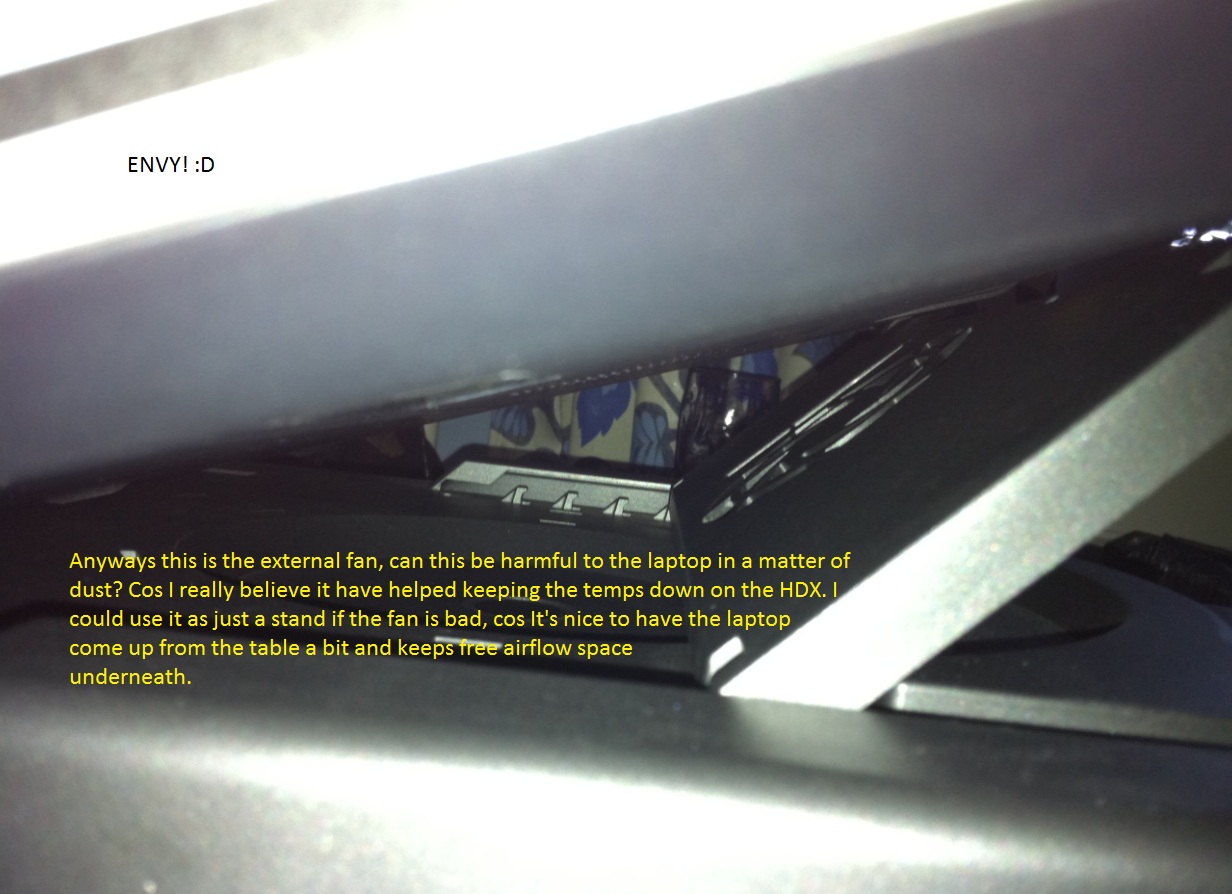
I have a question about dust, I saw on my HDX16 that the fan like next to where the air comes out, well I have pictures so I'll post that to make it easier to explain. Anyways, do you have any ways to keep the laptop fans clean? Dust is my worst enemy I seriously hate seeing that there's dust in fans etc. Anyway I use an external fan where I have my laptop on, I'll show a pic on that as well. And there gets dust in that one too of course, but I clean it often and such but is it possible that the external fan blows the dust right in my laptop on all the small holes at the bottom? I just thought of that after checking my old HDX underneath, I have been using that one without battery the hole time like 2years and it was kinda white with dust where the battery should be, maybe that's cos of the extra fan? I don't want my Envy to get dusty because of the external fan
Look at the pictures to understand and see more what I'm talking about
Attached Files:
-
-
my favorite is HWinfo32, which is a great (and free) reporting tool for other very important things too, like core temps.
-
Thx. Repped 1
-
Frequent use of a can of forced air, as described in this hp article, is a good idea esp if you live in a dusty environment. doing this often will tend to break up the worst dust and keep it from accumulating on the parts that matter, i.e. cooling fins and fan blades.
there is also a more detailed and very helpful article here for more serious cleaning efforts, which may be necessary from time to time if environmental dust is a problem.
As for an external fan introducing additional dust -- I would only suggest that this depends on the environment in which the laptop is operated. If you can imagine some fixed number of dust particles per cubic feet of air, and you stuff more cubic feet of air through the laptop, then you can expect more dust particles inside - which only means blow things out more often and consider taking her apart for more serious cleaning as well. Also -- a powerful external fan may stir up more dust from the working surface/tabletop itself, so precautions there might be fruitful.
The places on the laptop to worry the most about are all of the places from which the laptop's own fan sucks air -- the intake vents: That's where dust will enter and eventually make its way to the areas that matter, which are the fan itself and the CPU/GPU cooling fins. I guess if you are blowing dust into some obscure cranny that is NOT part of the cooling system intake, then (imho) the accumulation is relatively benign (because this dust is not naturally drawn into the main cooling system), and frequent blowing, as above, should address the cosmetic issues.
In short, I wouldn't shrink from using a cooling pad on account of dust, and I (personally) wouldn't worry about (lightweight) visible accumulations except those on the laptop's own fan and cooling fins -- just step up the preventative measures with the air can and perhaps an occasional deep clean
one more suggestion -- inspect the external fan's blades to see if dust is accumulating there, and perhaps consider adding a filter on the intake side -
Have any of you ordered the 2070-NR model from Amazon? It's $1,400.
The amazon model still has 7200 RPM HDDs, so maybe ordering from Amazon would be the better option, since it's cheaper as well.
EDIT: It doesn't say whether it has the Ultra Brightview screen or not. so maybe it's an inferior screen, which might explain the $100 deduction. -
good find! hopefully, Amazon has stocked plenty of the 7200 rpm builds. But truthfuly they are probably part of the HP supply chain and as such there may be some uncertainty there as well. Amazon might be stocking 5400 rpm models without knowing it ... :-(
-
OMG I'm so confused right now!! Was playing Modern Warfare 2 and it was kinda laggy, and I thought why? So I minimized the game and saw that it was stuck on 789MHz something, Throttling came to my mind right away, so I started up Cod: black ops instead cos I played that yesterday WITHOUT throttling at all, and note I've never encountered throttling on this laptop before. But now all of a sudden all games or I've tested well 3 get stuck on 798MHz, like what the hell? It didn't to this before on the same games, only think I've done is that Windows did some updates today and I don't know if anything there could be a prob but I doubt it, anyone has any ideas? It was perfectly free from this before, SAME GAMES... I don't get it "/
-
sounds like you need to perform the crimsoned throttling test! and best of luck if your Envy has the throttling disease -- do let us know the outcome!
-
I just rebooted after doing a recovery till yesterday to check if it was cos of the updates, guess what popped up, that I use an adapter that works but isn't powerful enough in a fast transfer, what the hell? I got this one with the laptop and have been using it since never gotten this before? And that's probably why it doesn't use all the power of the CPU it says in the pop up message that it can't use all the power... now I'm even more confused!
-
For some freakish reason all 3 of my Envies needed a few hours to one 1 day to start actually throttling. Probably takes a bit for the BIOS to collect a small data set of recorded temps/power consumption, etc then it's throttling takes place.
Who knows really. -
Check my latest post, you know anything about that?
-
Never once received such a message. So I am unsure. I don't recommend you run windows updates as is, ignore all drivers that windows tries to install leave only updates and non hardware related installs.
-
I'll do that in the future, im gonna try to plug the chord in to another what's it called well you know, I haven't been using it in the one it's plugged in now, maybe there's something wrong so it doesn't get all the power to the adapter or something, I hope it's as easy as that I really do!
-
OMG you don't know how relieved I am right now! Changed the ehm gotta check what it's called ehm socket? anyways I plugged it into another socket and first thing I see when I fire it up again is the turbo boost kicking in which it didn't do when it didn't get enough power, and no wrong adapter message just gotta check with the game but so far so good, can't believe it was the sockets fault
EDIT: SOO Happy, modern warfare 2 running, 2,51GHz steady, gosh I got scared for a bit to be honest!
Thank you both for the help tho, I always appreciate it SO much <3 -
Just checked my online banking and Ive been credited back by Sony. Called up HP just now to order my new Envy
Envy 17 3D
- Windows 7 Ultimate 64 Bit
- Intel Core i7 Processor @ 2.30 GHz (2820QM)
- 1GB Radeon HD 6850 Graphics Card
- 8GB DDR3 RAM
- 750GB 7200RPM Hard Drive
- One Six Cell and One Nine Cell LION Battery
- 17.3 HP 3D Ultra Brightview Infinity LED @ 1920 x 1080p
- Blu Ray Drive
- Webcam, WLAN Card, Backlit Keyboard
- 90 Watt AC/Auto/Air Adaptor
- Professional Top Loaded Case
Called up an ordered and asked for $150 off, the sales rep without hesitation said OK. Total came to $2,450.06 for the whole order. Said Ill have it no later than June 6th. Ill reserve any further judgment about this machine until then -
I guess you'll find out if it was worth the risk at June 6th then, good luck
-
Mine is scheduled to be here Friday the 20th. Received my 391.46 and 100.00 credit today. My final out the door $1636.23. Hopefully all turns out well. If I do not like, Dell here I come.
-
You know, we talked a while back about lack of power POSSIBLY being part of the issue with some Envys throttling and your experience makes sense.
I've discovered that the powerstrips I use in my house are not all created equal (which is a given, but I've never actually SEEN the difference until recently). I didn't discover that until I had an Ipad and extra battery for my iphone. When I would plug the extra battery into the powerstrip, it would give me a message saying something about charging was not supported. But if I plug into the wall or a different power strip, there was no problem. Then I found that if I plugged my ipad into the same powerstrip that gave my phone error messages, the ipad would only charge 50% in a day (it should charge completely in 4-5 hours normally). But if I plug it into the wall or different powerstrip, it charges in a few hours.
Also, my wife and I went to visit her family a few months ago (they live in a village-type house in an Asian country) and I had the ipad plugged straight into their wall but for some reason it took 3 days for the ipad to charge (and they use 220V outlets in that country, but it still took 3 days to charge, probably due to bad/cheap wiring).
I wonder if the power consumption of the Envy when running the CPU and GPU is close enough to the power supply's limit that a cheap powerstrip or weak/faulty outlet (that normally we have no problem with when we plug small appliances into) starts starving the power supply and computer, forcing the bios to start conserving power by sacrificing the cpu clock? -
I believe a few weeks back, Crimsoned used a bigger PSU than comes with the Envy 17 3D and the throttling was still there
-
Apoxxx what's the status with your Envy?
-
Mine is still in use while I'm about to order a Dell, then I'm either gonna sell it on Ebay, or make HP take it back.
Throttling issues are real bad, to the extent that when watching a HD movie, it runs choppy at times. -
Oh I see....sorry to hear that man. Best of luck with Dell tho.
-
Yeah I'm sorry too, really wanted this computer to work, hell, I've spent countless hours fixing stuff, but this throttling issue is just the final straw.
-
Sorry Apoxxx if I missed your post on this matter, but did you try unclewebb's Throttlestop program? I know its not a real fix, just a temp. but if you want to see if it works so at least you can enjoy your movies and games...
KJ
-
Yeah I've seen it, but I can manage with this until I get my new laptop. I don't wanna risk anything before selling it or returning it, even though it's pretty risk free.
You'll get a thorough report once I get the Dell Precision M6600
(Crossing my fingers that it has a screen that matches the Envy in quality, because if it's one thing about this computer I can't possibly complain about, it's the screen )
*HP ENVY 17 & 17 3D (2XXX series) Owners Lounge*
Discussion in 'HP' started by 2.0, Mar 14, 2011.