Problems? See this thread at archive.org.
I'm looking at the Orochi too - another consultant at my client uses a Razer, it's quite impressive. I'm worried that the Orochi might be on the small side though.
-
As a matter of routine when I recieved my Envy I reloaded the machine with a clean windows 7 install and partitioned the disk into 3 partitions.
Windows
Data
Recovery
I have a few issues and want to restore the machine to stock install.
Has anybody run the restore already? Does it contain a predefined partition layout which would wipe out my custom partitioning or can I restore the OS image to the 200GB partition I have created?
Thanks in advance -
Update…
Spoke with HP customer service…they assure me there are no delays on my Envy 15 ordered on 11/30 with a Dec. 8th build/ship date and that I should receive it within the Free Shipping period of 5-7 business days as promised. Although I have not received tracking, they advise me that shipping time does not start from the date I receive tracking info email and HP will delivery on time. So I guess what they are doing is expediting shipping faster than 5-7 ground.
Additionally, I emailed Customer Service, replied to the 11/30 email purchase confirmation email, and expressed my concern about the delay and not receiving tracking. First thing this morning there was an apology email from customer service with no explanation, but an instant $50 coupon code to use within the HP Store. So I went on an purchased a HP Gaming Mouse with VooDooDNA for Free including 2 day shipping. I’m not a serious gamer, but needed to purchase this anyway and the reviews for this mouse came highly recommended. FYI- many people who have purchased this mouse have used Razor and Logitech etc. and swear by it. It seems to be a solid device, especially for the price, which retails for under $50. -
I ordered an Envy 15 last night. I plan on reading the whole thread but would like to know the following right now. I apologize if this has been covered.
a) Is there a way to drive two external displays with this laptop? I am not talking about displaying the same image on both, but sort of an extended desktop. Also, the monitors I have are different brands and resolutions. During the build wizard I noticed HP has an accessory with a DVI output and a VGA output, but since it was via a single USB port, I was suspicious about the performance and didn't get it.
b) What's the best way to connect this machine to a DVI display. I bought the HDMI-to-VGA adapter but did not see any adapter for DVI displays.
Thanks -
Can you reload the hard drive from an external optical drive?
-
Hi there! Congratulations on your purchase!
a) Via CCC you can set the extended monitor, albeit, as I havent received mine yet (tomorrow is the day), I cannot say if it does dual monitors, but I know a single one works, my old ATI IGP can do it, so no reason why the 4830HD couldnt.
b) Something like this? http://www.newegg.com/Product/Product.aspx?Item=N82E16812189057 -
a) I am not sure about this I have not looked through the manual to find out... Also I do not recall seeing this earlier in the thread.
b) This is an easy one. you should be able to find an hdmi to DVI cable at just about any electronics store of course it will be much cheaper online. the video signal from hdmi is identical to that of DVI so there is no loss of picture quality. the only thing you will lose is your digital audio (from the hdmi jack). I have used this setup and even found a little adapter that converts the hdmi to a dvi port for use with any dvi cable.
The only other suggestion I would have is that you could use a usb to video device for a second monitor. I have used two of them and find that the drivers are not that great but I was also using the cheaper models so that may just be a brand issue.
both links below are to newegg products.
HDMI to DVI adapter, use any standard hdmi cable with your laptop
USB to HDMI external Video card
good luck. -
Just got my second delay notification from HP and they agreed to take 10% of purchase price in addition to the $50 gift certificate they previously granted me. The funny thing is that the delay notification was sent this morning stating that shipment would be delayed until TODAY. I'm hoping to get another delay notification stating my Envy won't be shipped until later this afternoon with another 10% off...
-
I use my laptop on my lap mostly every day. Does anyone have a recommendation of a good lapdesk for my Envy 15? I need room for a laser mouse as well. Levenger has a wooden classic lap desk/pillow, big enough for 15” and space for mouse and pad. Logitech makes a nice padded ergonomic lapdesk, but surface does not look big enough for mouse and may be too smooth for laser mouse. There is also Lapdesk or LapLogic as well. Any thoughts out there?
PS: I've received to date both 10% and $50 coupon.
I also have a 20% Bing Cash Back pending ($436) not holding my breath on this ever being authorized by HP. However, I've documented the promotion and have all the email confirmations from Bing, to state a case that Bing/HP need to honor the promotion and that they must at least match the program as advertised (so an additional 10% at least). We will see in 48 days. -
I have had an issue with my Aero not working on my Envy 15, and I just found out that it was the 'Stardock MyColors Notebook Desktop Themes' that weren't letting Windows 7 enable Aero. I don't know if it was a bad install or some incompatibility, but I wasn't using it anyway so problem solved.
The saying is true, simplify simplify simplify... -
Thanks. What's CCC?
Thanks for the links. This is great. -
HP Envy 15 Aero fix:
It seems that several of us (at least on other forums) are having issues with Aero becoming inactive on our Envy 15's--this cannot be fixed through the Aero troubleshooter or by changing the theme/usual fixes.
The suggested solution is uninstalling stardock.
I uninstalled Stardock and my Aero problem was instantlly fixed--I now have Aero running without problems again!!
. . . and HP tech support wanted me to do a System recovery/system restore--good grief!! -
I got my Envy 15 two days ago. I concur with most of the reviews...the screen not pushing back far enough, the poor initial trackpad and non-responsive gesters, no E2E screen. Overall, still a slick machine and very fast. It has crashed a few times already and BSOD once when viewing photos but could be just flukes. My only real issue is my SD-Card reader does not work. The OS detects that a card was put in or taken out by making a noise, but it can never read the content. When clicking on the drive in My Computer, it will simply ask me to insert the card even though it's in there. I tried with several cards, same problem. When I use a usb card reader, all the cards read fine. I've restored the entire computer back to stock and the problem persists. Anyone else experience this problem?
-
Oh, my apologies. I have been ATI all my life...so it is normal to call it that way.
CCC is the Catalyst Control Center for the ATI IGP/GPU and where you configure it. Very easy to use.
Right Click on your desktop and choose CATALYST(TM) CONTROL CENTER. Open the advanced mode.
There is a bunch of options for customization. Go to Display Manager, and there you can configure the external display. -
Dell has updated drivers for the 500gb Seagate hard drive that is installed in many of our notebooks ( http://support.dell.com/support/dow...typeid=-1&dateid=-1&formatid=-1&fileid=366463 )
This driver reportedly fixes some of the problems people have been having with clicking noises/etc with this drive ( http://forums.seagate.com/stx/board/message?board.id=ata_drives&message.id=16885 )
Can we install this Dell driver on our laptops? -
interesting, Mine is the High pitched noise really not clicking.
-
Let me know if someone uses it and it works to update the OP.
On other news, tomorrow is the day. -
Serg, if you end up not liking this machine it'll be a serious blow to this thread's morale!
-
*sigh* I should sleep now, and I am nervous/excited/worried about mine. I wont get to put my hands on it until tomorrow 20H00 GMT+1...
Whatever the outcome of this is, I will keep you informed. And the review should be up in a week or 2...as a little Christmas/New Year's gift.
Anything you might want me to test? Suggestions are welcomed, preferably via PM (the thread grows way too fast to keep up with everything here) -
i'm currenty using a logitech vx nano mouse. I like it alot, it works on all surfaces. hope this helps -
Thats very helpful and answers my question, thanks.
-
I very strongly disagree that a fresh install is pointless. Computer makers put an insane amount of crap on their machines, crap you are likely not going to get rid off fully. Yeah, maybe it makes only a negligible difference. I still don't like it.
I wish they would have a disk with a full set of drivers and nothing else. Like Apple's bootcamp, minus the constant nagging to install itunes and quicktime.
I do give you that reinstalling an OS, especially on a laptop, is not for the novice computer user. -
I agree with Aphyrax. I got my Envy two days ago and the first thing I did was reinstall win7. The college I go to gives us a copy of professional for free so I loaded it on a USB drive and did a fresh install. I proceeded to erase all the extra partitions, as I'm not too concerned about them. It's gone pretty flawlessly with the exception of two things:
1) When I first installed it and tried to use my Logitech g7, the pointer would skip around. It's never happened before and I figured I had to install drivers for it. When I installed the drivers it still skipped around. The problem corrected itself shortly after, but would happen occasionally. I found that when I limit Windows Aero, by not using an Aero theme, it went away. I think that maybe Aero conflict with something in my system. I'm going to update all system files and see if it ever happens again.
2) The light on the mute function key won't turn off regardless if mute is activated or not. I think I have to install all of the HP mediasmart software. I'll let you guys know if it works.
So far I'm pretty happy with the laptop. Yes, I have the horizontal lines, but they aren't very noticeable. I'm hoping that HP has a fix via bios update, though I doubt it's software, or recall. -
Hopefully Bing will not see the 10% discount from HP and back out on their end...Let us know how it turns out
-
Weird, my lights all work as they should after my fresh install. I have not installed any mdesiasmart software other than the software for the quicklaunch keys on the left of the keyboard. It's possible that made it work?
Is it just your mute button or does your capslock light or your wireless connection lights not work when they should too? -
The capslock and wireless light work fine. It's just the mute light, which is weird. I'm going to uninstall all of the Mediasmart software, as it didn't fix anything. I did install the quicklaunch buttons, but I'll try to reinstall it.
Edit: I think I will keep the webcam software though. I don't know how to access the webcam otherwise.
Edit2: Fixed the problem. I used the "Latest drivers: HP ENVY 15 (INTEL)" page as reference to which drivers I should download. Unfortunately, this does not list the audio drivers with the install wizard from HPs site. When I went over there and reinstalled HPs audio driver, it turned off the light.
Edit3: I installed all the system updates and reinstalled the Intel chipset driver. No skipping mouse... so far. -
Good to know. Thanks for the followup, GabeC.
-
Ok. My keyboard has started behaving erratically too (on my 2nd Envy). It will sometimes stop working, sometimes generate random key presses repeatedly, sometimes work fine. If I tap on the right side of the mousepad it may trigger this. Or pinching that area by lifting it up with one hand holding the front side.
I called HP and they won't send me a another replacement. It's a full refund (would lose 25% BCB) or sending it in for repairs (would lose time). Btw, HP can send out certain replacement parts like a new HDD, memory module, AC adapter and such, but they won't send out a new keyboard.
Since I need the laptop over the Christmas holidays I didn't like sending it in for repairs, so I opened it up to have a look.
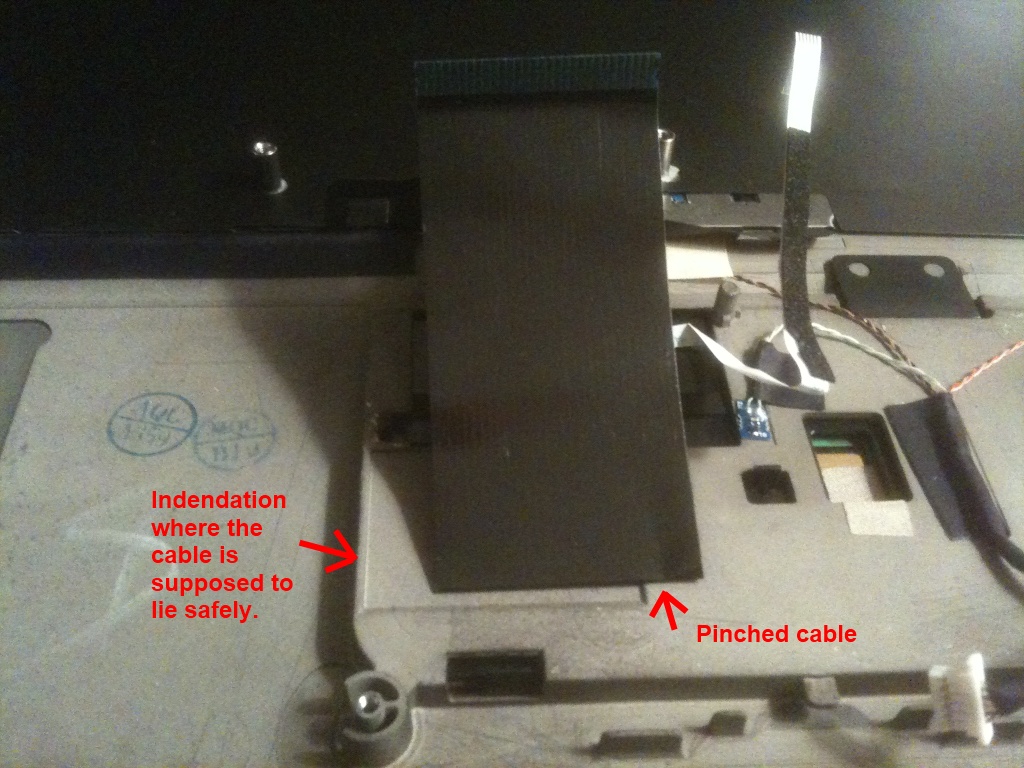
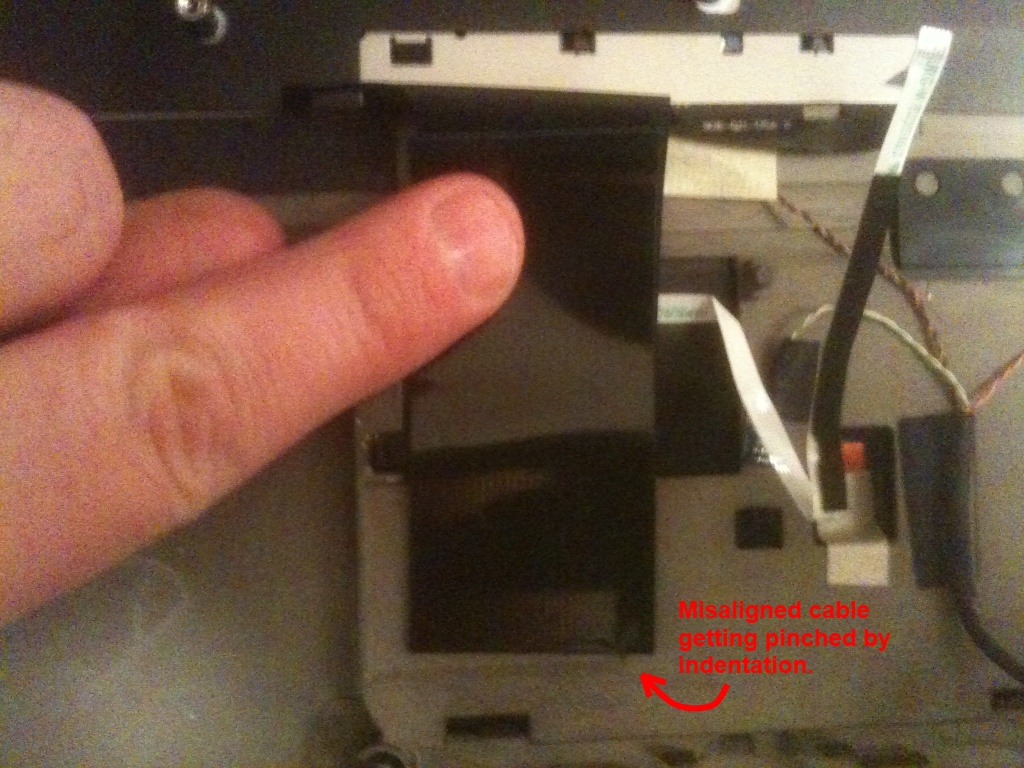
I think I see what the problem is: The keyboard cable (black ribbon) is pinched in one spot.
I also think I see why this has happened in the first place: There is an indentation in the top cover that would perfectly match the ribbon cable, but the cable isn't aligned with it and it gets pinched on the ridge of that indentation instead.
It doesn't look like it's easy to re-align the cable by myself and the cable seems a bit bad already, so I will probably need a new keyboard in the end. For now, I'm going to try using a spacer so it doesn't get pinched further. Note that this misalignment is something that won't cause a problem right away - it will deteriorate over time until the cable is broken.Attached Files:
-
-
Cheers Smedis,
i actually had the problem come up this morning, but only my "6, 7, y, u, h, j, n, and m" keys stopped working. if its a pinched cable that would make sense since a single track could have been damaged and affected that column of keys.
HP said no replacement, but can send for repair. i dropped it off at the HP service centre this morning (was close to my place) will get a update next week if it can be repaired or if parts will take a while. If its too long going to further push for replacement.
Have you tried using some insulating take or if you have kapton tape (good for high temps) to hold the cable in place?
Also
http://www.engadget.com/2009/12/10/hp-envy-15-review/
HP Envy 15 review from engadget.
Its not as biased as the gizmodo review. It raises all the concerns we have already noticed and gives prise where the Envy does deserve it.
Personally i feel its a pretty good review, would have preferred if it went into more detail, but over all its fair. -
Yeah the engadget review seems far more balanced and true to the overall experience I think a lot of us have noted so far with the envy 15. Guess that goes to show the level of difference you can see between reviews even between gadget blogs. As you said thebranded, definitely much more fair than gizmodo's review and all in all a solid review. I personally never experienced the extremely high temps at the touchpad they mentioned, but if I blocked the vents at the bottom for an extended period I could see it happening (especially when gaming).
-
I didn't want to tape the cable since it would be lying a bit diagonally and would make it difficult to lean open the top cover (part of opening it up). I used those small furniture protection pads you put under table legs, etc. They seem to be holding up pretty good so far (typing on my Envy right now).
When/if the cable finally breaks beyond my little amateur job and I have to send it in for repairs (hopefully after the Christmas holidays!), I'm going to check that the new keyboard doesn't have a misaligned cable as well. And I'm probably going to put a few of those pads in there again just in case...... They seem to make the chassi a little bit sturdier too. -
I did some more testing with the BD-ROM drive and couldn't get it to burn DVD's with Nero 9.4.26.0. It just halts at 1% and the drive buffer never gets loaded with anything. I'm not sure if this is a Nero device support problem. I tried an Asus USB DVD burner on the Envy with Nero and it had no problems. Then I tried burning with the HP drive and the pre-installed Power2Go software and it worked.
I tried plugging the HP drive to a self-powered Belkin hub connected to the Envy and the hub reported a power surge. For anyone planning to get the BD-ROM drive to use with other laptops/usb hubs, it may be a problem because of the high power draw from a single USB port. -
Good News…my Envy 15 Fed Ex tracking # was sent and my Laptop should arrive by Thursday the 18th (a little late, but keeping fingers crossed).
Also, the mouse I ordered for Free, thanks to HP $50 credit, arrived today less than 14hrs from ordering (very nice).
So from all the posts its seems that all new Envy owners should pay attention to system errors such as the following:
1) Remove unwanted blotware;
2) Ensure all system drivers are updated (500GB Seagate HHD);
3) Lines are screen or pixel issues;
4) Windows 7 OS working properly;
5) Key board functions correctly.
Anything else that I’m missing? -
^ as i do with all my machines, i thoroughly test every function before actually 'accepting' the machine. that is a good list for the envy machines but, in general, i would also do the following:
1) burn cds/dvds to make sure the burner is fine
2) play a dvd movie
3) use all the ports on the unit - connect various usb devices, esata devices if you have, vga output to tv/monitor, hdmi output to tv or monitor, audio output to headphones/speakers
4) connect to a wireless network
5) double check bluetooth works if you have it installed
6) connect to internet via ethernet cable
7) burn a lightscribe image onto dvd (in case you plan on using this feature, i sure as he11 know i dont use it )
)
8) use the speakers on the machine to ensure it's fine. make sure you dont hear any popping sounds from the speakers/subwoofer
9) use the webcam, take pictures
10) enroll fingerprints for login or for websites. just make sure it works fine.
this might be overkill to some but, when you're paying north of $1500 for a laptop, you'd better make sure everything is in perfect working order when you receive your unit. this advices is applicable to all laptops/desktops, all makes.
fwiw. -
Thanks .your list is helpful I forgot a few things additionally:
1) Check slice connects properly, locks, charges;
2) Make sure you run all back up and recovery dvds etc.
3) Again, ensure all drivers, including touch pad are working properly or programmed to your liking
-
Anyone have any luck getting HP to agree to exchange the slice battery? I've been on the phone for an hour and a half and they are telling me that the engineers are aware of the slice slipping but that there is no redesigned slice battery but that they are working on the issue.
This is extremely frustrating. -
Does anyone have an idea where the "lines in the screen" problem comes from? Hardware, software? I serious doubt it is a problem in the LCD panel... that is such old technology I don't see how it could fail the engineering and QC process. That leaves video hardware or drivers. the video chipset per se couldn't possibly have a bug like this, but there could a problem in its integration. Or the drivers and their software integration.
If it's drivers, the good news is they can be updated.
If a hardware integration issue, bad news is my opinion it will never be recalled and fixed. It seems too minor---well, I'm guessing, I haven't seen it yet. -
I was fiddling with the Envy 15 in the store, and I could see the problem with the touchpad. Because the button area is sensitive to movement, you have to be careful in pressing. I HATE HATE HATE "being careful." That is exactly contradictory to the idea of working quickly and comfortably. Why the hell don't they see the ergonomic benefit in having physical buttons? What is wrong with these idiots?
Anyway, I experimented with this configuration:
-using taps instead of left button. Personally I prefer the button, but taps at least function pretty well, there is no jiggling of the cursor
- defining lower-right tap zone as right button. So you tap and don't have to press the physical button which effectively avoids cursor jiggling
Another possibility for the right-button is to get a macro program like AutoHotKey which lets you define almost any key/click combination to be anything. So you could define alt-left-click to be a right-click. So you would alt-tap anywhere to get a right click. -
i pointed the HP service rep to their own forums (thenextbench) and had them read the forums. they finally agreed to send me a new battery. we'll see if it works. i was pretty pissed at their initial reluctance.
-
My Envy arrived yesterday. As a frame of reference, my prior premium laptop was a 3 year old Macbook Pro 17. I also have a cheap laptop, but found it lacking.
Some quick points.
- Way too much crap installed. Sigh. That custom envy theme for windows was a waste of development resources.
- Doing a fresh install of win7 ultimate went fine. One warning, don't run windows update before you install the drivers from HP. Windows update found and installed a display driver that bluescreened the machine on every boot.
- The light sensor is terribly calibrated. In my barely lit living room it notably dimmed the display, making it look very dull. I disabled adaptive lighting and the display went from meh to awesome. HP really should turn that off by default when plugged in.
- The machine does not run hot under moderate load. Less hot than the macbook. I haven't tested games yet.
- The machine is very quiet. I could hear the heating vent 25 feet away over the fans under light load.
- The dual SSDs are worth every penny. Not since the DOS days has a Microsoft OS booted this quickly. Also, quiet.
- I very much like the omission of an internal DVD drive, but that's personal preference.
- I found the track pad to work fine. However, other than the two-finger scrolling I consider all the other gestures to be pretty useless. How often do you zoom in and out of web pages on a 15.6" screen? Luckily you can turn them off. The one thing to get used to is to not rest your finger on the click portion of the pad, as doing so will produce unwanted results.
- Both my girlfriend and I consider it to be better looking than the macbook.
- However, why do you ship a premium laptop with an ugly, off-the-shelves power brick. Take a page from Apple, HP. The MBP's powr brick is gorgeous, functional (has hooks to wrap the cable) and connects magnetically. Big win for Apple here.
- No edge-to-edge glass makes it look slightly less sexy, but I am not convinced it would have been worth the extra weight and glare.
- Keyboard is nice. Could be a bit firmer, but I like it.
Overall, I am very happy with the purchase. Especially with getting the SSDs. -
Disable two-finger scrolling and enable one-finger ChiralMotion scrolling instead (though, you can have both enabled at the same time if you prefer). You won't be disappointed!
-
Just got my Envy 15 and reloaded it with a fresh copy of win 7. It runs so much better now with all of that crap off. No problems as of yet. But, is there a way to get the Envy IOS back? im assuming it was on the main partition I wiped. I was just wondering if there was a way to reinstall it?
-
What should I delete?
-
Running at 60C...I am getting mad here
-
Did you set CPU to "passive" cooling in the power options, then boot from battery...?
-
-
Ok, some guides here please?
Booted from Battery, running at 60C with CPU at 11% load, and fans on. -
91 processes!!!!!!!!!!!
This thing is loaded with bloatware! -
Off the top of my head, here's a list of extra software (besides drivers) that are pre-installed on top of Win7:
- Norton antivirus
- Stardock MyColors
- TV Tuner software (don't understand why this is installed)
- HP MediaSmart MVP software
- HP IOS control software
- HP Support Assistant
- Adobe Acrobat Reader
We should make a complete list. What you would wish to uninstall is of course a personal choice. -
Just so you know - I think I've said it before anyway:
Passive cooling in Windows 7 means that the CPU will down clock before the fans turn on.
Active cooling means the exact opposite, the fans will come on before the CPU down clocks - though if the fans can't manage to cool it down then the CPU will still end up down clocking.
That is the only difference.
Now whilst it is easier to keep something cooler rather than heating and then cooling, (it's also better for your components as it's typically the frequent hot/cold cycles that do the damage rather than a moderately high but relatively constant temperature), it does mean that you will not be getting the best performance out of your machine.
The only reason I would recommend switching to passive cooling is if you were using the notebook away from a power source. It could also be useful if you were using it only for light tasks - but then you probably wouldn't be buying a machine as powerful as this one.
*HP Envy 15 Owners Lounge! PART 1*
Discussion in 'HP' started by Serg, Oct 21, 2009.