Problems? See this thread at archive.org.
It may be a cheap way for HP to try and differentiate the E15, basically making you spend more for the i7 to get the increased space for RAM?
-
I'm not convinced... examining the pattern closely it sure has the typical melt tracks of a laser pattern. The largest square patches show five laser strokes, the next step down four strokes etc.
My guess is that the engineer in the video referred to some other step in the manufacturing process. Or perhaps checkical etching is used in combination with laser. -
I will look into the splitter issue some more. Here's a link to the ASUS Slim line USB 2.0 External Blu-ray:
http://www.newegg.com/Product/Produ...TC-Froogle-_-Blu-Ray+Drives-_-ASUS-_-27135198 -
FYI guys, both the DVD and Bluray slim-lines are really loud.
The vibrations can also cause them to move across a table. In my case, a good half foot. :/ -
I just bought an envy 15...ran into this forum decided to join...everyone seems pretty pleased so far, I'm replacing an old gateway tablet which I should've never bought in the first place.
Here are the specs on what I have coming up
Brightview Screen
i7-820qm
Radeon 5830
320gb HDD
4gb RAM
I guess thats sufficient, when it comes in I am going to check to see if its USB3.0 or not, if its not I may send it back and see if its reasonable to wait for a refresh. I want this machine to last at least 3 years and I think that might be tough with USB 2.0. I would've loved to get the SSD, but I can't justify the price, I'll wait til 1.8" 120GB SSDs drop to about $150 then i'll upgrade I bet it will be a new lease on life lol. -
does any happen to have the factory dual SSD in a raid? I am curios to what this scores in the Windows Experience.
Right now i have a OCZ Apex 120 and I only get 5.9. of course the rest of my laptop is no where near power full as the envy so that might make a difference to.
Thanks! -
if I remember correctly people were getting 5.9 with 5400 RPM 500GB drives on their envys
-
The beats IS a fingerprint magnet....but it comes with a black Beats sock to put the computer in which can be used to buff out the fingerprints

The headphones sound great too, but are just too big to wear outside for me.
If anyone can make an app that would say "BEATS" when you press B that would be hilarious! -
Hey Larry, long time no see.
I honestly suggest you to delete all that bloatware using RevoUninstaller. Check out the Out-of-the-Box Guide in the main HP Forum and use it to uninstall those "free crapware" that come with the Envy, seriously, I noticed a 50-60% less consumption, faster computer and less heat.
Let Win7 deal with the updates, it does it flawlessly most of the time. -
About USB 3.0
I just got off the phone with a salesperson from HP. She had not heard anything about that, and after spending about 10 minutes asking her supervisor and looking up extra detailed specs, said it was all 2.0 and that it probably wouldn't change soon because the salespeople are normally informed in advance of any upcoming changes in specs. She didn't believe me at all when I said it had been reported online etc.
Whoever got confirmation on the phone, what and who exactly did you ask to get that info?
I'm not ordering until it's confirmed... -
Day 1 was a pain I must admit. Flashing the BIOS, updating everything, downloading stuff, erasing bloatware...took me long. Got it at 18 hours, finished at 2 or so...I could not even go out and walk around Paris on day one...but now I cleaned it, and it runs very well, I really like my little companion. My Envy has traveled with me quite a lot since I got it, to South America, Paris, London, and it holds very well, only gripe is the PSU which is humungous...
PCMark05 gave me 5971 yesterday. Today I am running Vantage. -
Same happened to us, early adopters, when we first ordered. I think the conclusion (and general consensus here) was that they were USB 2.0 with 3.0 Amps capability. Since the manual has not yet been updated, perhaps it is the same, USB 2.0 and 3.0 Amps capable.
-
So whats up with the cnet review? is it just an envy prototype with usb3? or is a 3 amp USB 2.0 twice as fast? -
I got my machine last night, and made a set of recovery discs. Then I started un-installing programs using Windows, after updating the BIOS.
Should I do a system re-store and then use the RevoUninstaller? -
It only has more power per USB port, speed is the same. You can power an external device with one USB instead of using 2.
I prefer Revo since it cleans the registry too, and all leftovers are also deleted, so there are no traces of the deleted program. But the Windows uninstaller is good too...(Revo also has some extra tools, such as setting which processes to run on start-up, gets all your tools together, and the Hunter Mode is lovely, just drag the thing over a program and run the uninstaller. WARNING: It is very addicting. -
Hi guys, i just received my new Envy 15 last night! It actually came a day earlier than HP had estimated.
Specs: i7-720QM, 8GB ram, Dual SSD (RAID 0), ati 4830
I ordered it right before the refresh came out. One of the key things that I wanted to benchmark was the SSD performance. I paid about $500 extra for the dual SSD and expect blazing speed. I think the results are pretty good. What do you guys think?
----------------------
According to HD Tune Pro 4.01
Min Transfer rate: 375.4 MB/s
Max Transfer rate: 521.0 MB/s
Avg Transfer rate: 508.3 MB/s
Access Time: 0.2 ms
Burst Rate: 622.8 MB/S
----------------------
Overall, it is very nice. Doesn't feel cheap at all. The keyboard is firm and the screen is vivid and bright (I can't find any lines at all).
I plan on doing more benchies soon. Anyone on the fence, please feel free to ask me questions. This site has been a huge help to me and I'd welcome the chance to give something back
Attached Files:
-
-
OK. I will try Revo from now on, but stick with what I've already removed using Windows.
I hope to get my idle temps down to the mid 30s like yours. I am low/mid 40s right now.
The Dell XPS1645 I had was always around 50/53. -
Congrats on your purchase D13S3L, hope you are enjoying your Envy.
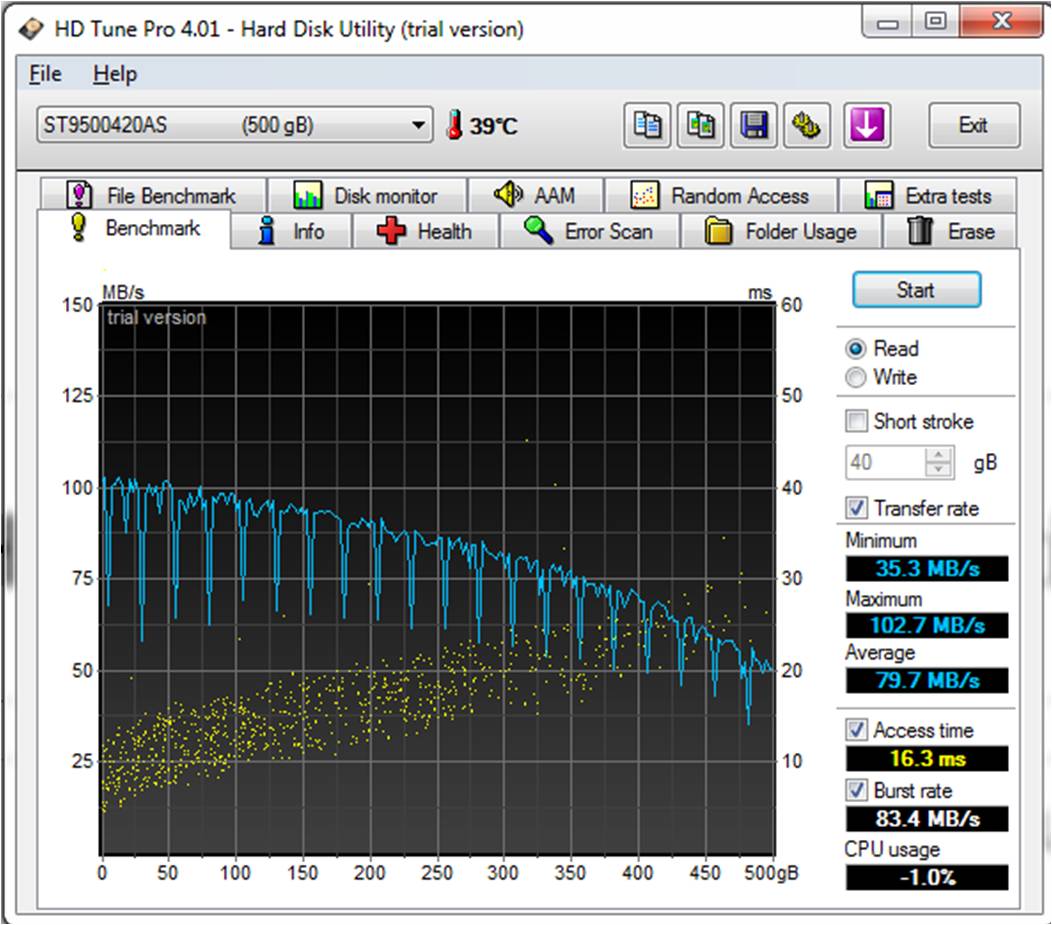
Those are good numbers, compared to what the Seagate 500GB 7200RPM does...Attached Files:
-
-
I get down to mid 30s, on start up I am at 29-30. On regular load I am at around 42-45 and core 0 is always 3-5 degrees higher. But I use my Envy on my lap all the time, so it warms up sometimes (when gaming) and keeps me warm too
(two birds in one shot? hahaha)
-
It's not just the CNET article: take a look at this:
http://www.usb.org/press/SuperSpeed_USB_Consumer_Cert_FINAL_2_.pdf
It's on usb.org, the official USB site!
And yet HP seems unaware of that.
OR: Lots of USB 2.0 motherboards in stock for the i7, so they can't say anything yet until they're all sold. AFAIK the pre-refresh motherboards can still be sold because the new graphics card is discrete (external from the motherboard).
But that's pure speculation, I wouldn't bet on it by buying an i5 today. -
thats sad my apex drive is a SSD and i only get 5.9. maybe once i move it to the envy it will increase my score. If not i may return my envy once i get it and reorder with the dual SSD's
-
can i have you check your windows experience score?
also have you seen anything indicating USB 3.0?
Thanks! -
Honestly, WEI is not the best benchmark tool ever (I would say unreliable).
I am scoring 5.9 too, and I have a 500GB 7200RPM drive only. In fact there was an article some time ago about how you could modify the WEI results as you wanted...quite polemical but got lost somewhere...the point is that HDTune shows a much better performance on the SSD compared to the HDD, but WEI doesnt seem to show this. -
It's pre-refresh (old ATI card) so it won't have USB 3.0.
-
Well I'll have 21 days to return it so I just might, my last desktop I built I did right at the end of the life cycle of usb 1.1, and single core 32 bit processors. I'm not willing to go through that crap again. In any event, one should just be able to look at the device manager and determnine if its USB 3 right? Or if anyone has a usb 3 device see if it fits? lol, the form facctor looks different enough to differentiate between 2.0 and 3.0 while still being backwards compatible, or so I'm told. Consdiering large external drives and blu-ray drives I think its getting necessary to have usb 3.
EDIT: When my laptop comes in I'll let everyone know if I have USB 3. Its the i7 core so perhaps it'll only be applicable to those with that architecture. -
Sick. Sick, sick sick. Awesome.
-
When people get their i5 models, can I suggest the following?
Use Crucial to find out the max supported on your Envy. -
I tried to call the "dedicated" Envy phone line, 1-866-408-5408 last night to see about getting a new slice battery. The laptop just slides side to side on this thing and the locks don't seem to "lock".
After 1 hour on hold, I decided to go through online chat. Turns out when you start the chat, you look for your specific laptop model, but the Envy was not listed. I just picked a laptop model so I could talk with someone about this issue.
In the end, they said they wanted me to send in the laptop and the slice. Is this typical? Has anybody got a replacement slice? Did you have to send in the laptop to get it?
Also, is the number I list above the number you are using to contact the Envy team? I finally hung up the phone at 1 hour and 48 minutes and still nobody picked up the phone. That is ridiculous for 24/7 support!
I just disconnected the chat session and figured I would try back later. I hadn't even had the laptop for 4 hours and wasn't about to send it in for the slice right now. I don't need the slice at the moment, so I will try again later. -
USB 3.0 update
Just called pre-sales at HP.
The guy did know what I was talking about (USB 3.0). What he said was:
* currently no HP laptops ship with USB 3.0
* announcements were made at CES very recently and that is how he knew about it, however he had not been given any information internally
* the first laptops to have USB 3.0 will probably be high-end business laptops, e.g. the EliteBook (I also read that online somewhere)
As for the envy, nothing. Personnally, I'll believe it when I see it. -
My 2 USB'd external drive works on one USB. I love this laptop!
-
it's amazing how many conflicting reports that we are getting about USB 3.0.
-
look back at the CNET page and you'll see:
Correction: The article incorrectly stated that Acer "was showing a raft of laptops" at CES. It was Asus, not Acer, showing laptops with USB 3.0 connectors. The article also incorrectly stated that HP is offering an Envy laptop with USB 3.0. HP was showing an Envy laptop with USB 3.0 connectors at CES and is expected to offer models with USB 3.0 at some point in the future.
http://news.cnet.com/8301-13924_3-10428132-64.html
for me it's not really a deal breaker, i have a nas that I plan on streaming from anyways. would have been nice, but really isn't necessary i guess -
Has there been any word on improving the locking mechanism of the slice battery? I'm really interested in picking one up with the notebook, but if it's as crappy as people say, then may I opt for a second 6 cell battery. It would be a pain, I know, but at least it would work.
-
Thanks for that.
I could care less about USB 3.0 so no biggie for me
-
Congrats; those look like great numbers!
I have the dual SSD config coming w/ i5 / 5830, hope I get the same type of results. Could you please confirm a couple things:
What drives came installed ? G2 or G1 version?
Was this result straight out of the box or did you 'tune' things first?
Look forward to seeing your further test results. -
Aye. I'm more interested in verifying that it has the higher-power ports. I'd love to be able to use one connector for my external hard drive and Blu-Ray drive.
-
Most modern laptops have powered ports high enough to power pretty much anything -- from external HDD's and ODD'd, etc.
I haven't come across a laptop that couldn't power a peripheral in over 4 years. -
It's just the single vs. dual USB thing. I suppose I have been using older laptops (T61 at work, an HGL30 at home), but I want to know that I can run an external hard drive without one of those USB Y-style cables
-
Again, every notebook I have owend (err, played with) over the past 4 years have all been able to power my external drives.
I can pretty much guarantee, as long as your device doesn't need some redicoulous power, that it will work just fine. -
Even my netbook can power a 2.5" external drive with just one usb
-
Has anyone else noticed that they are NOT offering the USB Bluray drive anymore with the Envy 15 as of this morning? My co-worker is looking to order one and it just isnt there anymore...
-
Talking about the usb3 ...what about the sata 6Gb.....
and........and ?
All are new specs...... -
My hard drive score is 7.9 (dual ssd raid0)
-
I'd love to see 6gb SATA in the Envy but I doubt that'll happen until the next refresh. I think this is more of a big deal than USB 3.0.
-
dang i am regretting not getting the dual ssd drives I will probably return mine and re order but hopefully they will let me use the coupon again
-
Oh that sucks... hope my shipment doesn't get delayed cause they are out of stock.. I ordered mine with the BD external..
-
So the average transfer rate on dual ssds actually exceeds the SATA II specs, right?
In that case, there is no need for SATA III. since you can just set up a RAID of two cheaper, smaller drives. I just wish it is relatively easy to set up a RAID if you ordered it with a HDD. The nice thing about SSDs though is you can just mount them with duct tape in the worst case scenario. -
Actually, SATA III will usher new SSD's and will show their true performance.
-
Yes, obiously, having native SATA III would be nice, but because we can do RAID, it isn't that big of a deal. THe most important thing for me is backwards compatibility. My I9300 essentially became useless because of the lack of availability of IDE drives right now.
Besides, I can't thing of too many things that I do on a laptop that will actually saturate SATA II. Even SATA I is good enough. The true advantage of SSDs is the low latencies, not so much the fast speeds. The speed is nice, of course, but it really isn't necessary.
I saw a USB 3 benchmark today with an external X25 and the USB 3 outperformed eSATA. In that case, is the eSATA port on the ENVY 15 redundant? The PCI card used in the benchmark was a NEC controller, which is the same one that will be in the Envy 15. I'm pretty excited about that.
I think the lack of Blu Ray drives is a good sign as well. It means that they are probably going to release a USB 3.0 model. -
well they couldn't cancel my early order, so now I have 2 HP Envys coming at the same time, the standard edition with a 1080p matte screen, and the Beats edition, with a 1366x768 glossy screen. This way I can decide which screen i like better. also see just how fingerprint-prone the beats version is. Leaning towards keeping the beats b/c then I'll look like a DJ at work.
*HP Envy 15 Owners Lounge! PART 1*
Discussion in 'HP' started by Serg, Oct 21, 2009.