Problems? See this thread at archive.org.
If they do, I'm a gettin another one for sure.
They should make a 30in one too. THAT would be freeegin awesome.
-
30 inch, hmmm.... Hard enough to find a case for our Dragons.
2.0 is the resident thread expert on all things psychically or psychotically related to future large HP notebook releases. We had a long discussion on this late in the summer when they were dropping the HDX Dragons. As we left it, I speculated that large screen notebooks would come back as a result of the increased popularity of 64 bit systems and lower RAM prices. 64 bit systems account for about 25% of new systems sold and it's growing fast as more and more people understand the mulitmedia capability that they have, and now that major software vendors (the big obstacle in the past) have finally jumped on the 64 bit bandwagon and have updated their programs for compliance. I've stated several times that Adobe started 64 bit compliance with the release of Acrobat 8 Pro. All current Adobe programs are now all 64 bit compliant. In my CS4 Master Collection, Photoshop comes as a 64 bit and 32 bit version, as does Lightroom, which is separate.
In any event, it was clear that HP didn't market the Dragon HDX's properly - if they had, they never would've been dropped. The rush to get them before they stopped production was unreal, afterward too.
2.0 was on the other side of the fence on this particular discussion, so it'll be interesting to see which way HP and the industry goes. I can realistically see a large notebook becoming a standard desktop replacement as the CPU power and RAM capability have finally reached the same level.
Which of course is the reason we got our HDX's in the first place. -
Me too though isn't it the case that you want to be one foot for every 12 inches of screen? In this case I guess we'd have to be almost 3 feet away from our notebooks? That's be kinda weird I'd think no? I'm trying to imagine what it'd look like up close and how far beyond ones peripheral it would go. Haha that would be kinda sweet.
-
Good point about the case. How much more confused would airline checkers be with a 30 inch notebook? I HOPE what your saying is very much true. MAN it would be amazing to be able to get an HDX 20 inch with a Quad core, 1GB GPU, DDR3 Ram (all of which the HDX18 now has), 2-3 hard drives, a Blu-Ray WRITER (also like the HDX18 now seems to have), faster FSB, maybe even better quality screen, better upscaling, etc that would be fanfreakintastic! If they're doing it based on what people have demanded from them over and over again on the phone/email (I emailed the CEO a while back if anyone feels lead to do so please do as well) and based on things said in comments like here (which they do monitor in general and is a good business practice) we may very well see this monster

-
Nvidia releases next official notebook driver 179.48
http://www.nvidia.com/Download/index.aspx?lang=en-us -
No, no, no. The power adapter. T'was buzzing and humming, called HP Support, and they shipped out a new one (new power adapter).
-
Get your umbrellas out - heavy dark cloud overhead - serious potential to cancel parade...
Here's the real deal future of a new large HDX:
It will be a new 18.4" model with 16:9 aspect ratio, 1080p display like the current HDX 18 now. Remember, they're multimedia platforms. (20" is out since it would actually have to be larger than the Dragon's 16:10. For proper notebook panel scaling @ 16:9 it would be 21.1" diagonal.)
It will sport Intel's new Capella platform with Westmere/Arrandale 32nm CPUs. Turbo boost and Hyper-transport using 2 cores but 4 threads (as opposed to 2 threads currently). Will also support the hexa-core (6 core) extreme processor in 2010.
It will also support Nvidia's 45nm GPU and/or ATI's 32nm GPU. Plan is to use an enthusiast level GPU rather than the current mainstream level GPU given the new lower thermal budgets these GPU's will yield.
Also will support multi-touch touchpads with optional mutli-touch display.
USB 3.0 will also to be included.
No other details at this time.
But a 20" is not even being considered. -
Oh ok my bad. Hurray for new power supplies. Hope it works better.
-
I tried it last nite. Idle temps instantly increased 6 degrees C. Didn't even bother to rev it up and re-installed the HP 179.32. Might be better results for others, all things are never equal. I like the .32 over the 179.28 as well, because of temps. All performance and colors were roughly equal for me on those two.
-
Though it sounds cool I hope you're wrong. Where'd you get the news from?
BTW the part number for the Blu-Ray burner for the HDX18 is 503489-001..which you can see in partsurfer.hp.com ..is there any way to know if it can work in the HDX20 inch? Tech support said it wasn't compatible but the reasons they gave as to why it wasn't made no sense. -
wow, i have not visited the forums in awhile. but i am glad to see that this is still active and the dragon gurus are still around
keep up the good work and information sharing
looks like we just overtook the DV5+ discussion forum in the number of posts :laugh:
:smile: :yes:
-
Same highly reliable source that was correct about HDX discontinuance before it happened and the new HDX models months before they appeared. I posted all that info last year as soon as I got it. That's all I'll say. Everyone who listened and believed HP techs and CS reps about a new HDX 20" last year were sorely disappointed. Most of what they say is grossly incorrect. Plus they are not allowed to tell you about future products because of NDAs (non-disclosure agreements). When you call up, you could be a journalist looking to leak info. So they are far less likely to tell you truthful info.
As for the blu-ray writer, likely it's not compatible because the bezel design will be different. What's more, the slots for each respective bezels, so you can interchange them, may not be in the same location. It's not that the writer won't work, it's that it's not cosmetically compatible. -
Long time no see! Hope all is well.
-
Good looking out. Can't rep ya until I get more rep allowance.
Installed and tested the 179.32. Had the 179.28 from Nvidia previously. The colors do seem a bit more vibrant. can confirm a drop of about 3 degC off the top running 3D Mark06 with the 179.32.
Not going to bother with the 179.48.
For anyone interested in the 179.32 HP/Compaq driver, it can be found here:
http://www.laptopvideo2go.com/forum/index.php?showforum=110 -
Too bad about the 18.4" news. I am really quite enamored with this 20.1" beastie which was slated for my study but has rapidly become my go to notebook at home and is currently on vacation with me atm. I can't really find a flaw with it and it runs WoW quite competently.
I realize this and my M-ALX I love and loved because of the large screens @ 1680x1050.
While 18.4" @ 1920x1080 is better than 17" @ 1920x1200, these big body benz's @ 19"+ are just perfect. -
Is there any way to adjust the hardware acceleration?
-
Are you using MAME64?
In any event, right click desktop, select Nvidia control panel.
Set to advanced settings.
Choose Manage 3D Settings. Under the global tab...
(be sure to write down what it says before adjusting the following so you can restor to it later).
Turn off anti-alias & anisotropic filtering.
Turn off force mipmaps.
Set max prerendered frames to 0.
Set Texture filtering Trilinear optimization to off.
Set Threaded optimization to off.
See how things run.
If it works, then go back to this section of the control panel but instead of global settings tab, click program settings tab. check the box that says "show only programs found on this computer." Click Add to create a profile for MAME. So everytime you run Mame, it will call up the profile that works. You can do that for the other emulator programs you use. -
Too bad, looks like everyone is abandoning the 16:10 in favor of the 16:9. I would rather have the larger real estate.
JoeNeil -
Yep, LCD manufacturers will abandon 16:10 almost completely in about 2 years except for specialty industries like medical and CAD. Business notebooks still use them. 4:3 is all but gone.
-
Thank you for your help once again, 2.0. I truly appreciate the help you've given me on this incredible computer.
The Mess emulator is running pretty good now, but unfortunately to my surprise Mame and Pinmame still aren't working correctly, but I stumbled on something that may be a clue to what this strange problem is.
When I was testing a Mame game (it is MameUI64), in about a minute it started slowing down becoming unstable. I pushed ctrl-alt-delete to bring the Windows Task Manager up, and when the blue screen came on, I heard the sound of the game running at full speed. I cancelled the task manager, and was able to continue the game working properly for about another minute before acting up again. Hitting the ctrl-alt-delete brought the sound at full speed again, and I brought up the task manager up this time. As long as I had the window up, the game played perfectly for as long as I was playing it. Closing the task manager window and starting a game again would revert to working for only a minute again. I sure hope this sheds some light as to what's going on here!!! -
Don't mention it.
One of two things I can think of:
1. Catastrophic memory leak
2. Conflict between CPU cores.
The emulators are single threaded apps. So I think if there's a way to force them to only run on one core all the time, they should work. After all, the P4 you ran them on without incident was a single core CPU.
That said, try this:
Open up the Mame program. Now go to taskmanger by right clicking on taskbar and selecting it. Hit the process tab and find the Mame emulator process. Right click that and hit affinity. Uncheck core 1. Now it will only run on core 0 of the CPU. Also, set priority to realtime.
If it works, you might have to do this every time you run it unless there's a way to create a shortcut that issues a command to set the affinity. You may not need priority set to realtime. Go back to high just to test. -
Johnny, Did you ever get an answer to this one? I haave the same issue, and I'll be buggered if I can find a response in this thread!
-
We'll that dood needs to start talking about 21 inch screens then What if I put a Dremel and ax to the Blu-Ray drive? Would it work then? Maybe use some scotch tape for extra measure? You get a more precise date? If its of a higher or equal quality to the Sager or Alienware I may get it instead..I'd also be curious to see if I can switch out the burners somehow. Though..Alienware is highly customizable..they seem to have everything, even higher specs than the Sager, but no BluRay Burner..seems like one could add that later AND have a backlighted keyboard.
-
2.0 - What temp are you seeing with 179.32? I tried the 179.48 and the temp was idling at about 66c. I also tried the 179.32 and got about 3c (62-63c) lower in temp reading than the 179.48. At what temp should I start to worry?
-
Hey bud, those temps are really high if they are IDLE temps. I max out at about 68 during 3dmark and GPU intensive games. I am sitting at 40C idle right now. Most folks will idle between about 36-44C depending on on their room environment and taking into account minor vent blockage and such.
I know you have had your machine for a while, but have you cleaned it? Take some canned air and blow out all the vents. If you are comfortable doing it, you may want to disassemble to the fans and do a major cleaning. There was a guy about a month ago that simply blew with his mouth and temps dropped 20C or so. But he was reporting his max temps, not idle temps.
Speaking of fans, are you sure they are working? Let us know how it goes. And did you pay attention to temps recently, before these two drivers? -
I am hooked up to far right (of three headphone jacks) jack on the front, and independent headphones 2 is my listed output. Sounds great. The middle one is for IH 1, and far left is for mic.
Edit: I just checked the middle jack. IH 1 works and sounds good. Make sure you choose one of the IH in the list and set it as default. It won't detect it automatically if just plugging in the jack. Same thing for mic. If plugged in to mic jack you have to select microphone in the list and set it as default. Microphone array is for the external mic. -
I'm a PinMAME *JUNKIE* since pre-ShivaSite. Designer and tweaker. On my Dragon, I HAD to enable "compatibility mode" as XP to get everything to work. "VPinball.exe" set to "XP Service Pack 2".
Everything works quite smoothly. The only issue I have is when I open a table, do whatever I'm doing to that table (editing, tweaking, playing) -- I MUST do a FILE --> CLOSE to open a new table. I just can't open another table. The other thing I seem to have an issue with is I MUST close the program COMPLETELY (after playing) to open a new table -- or I entirely lose the background sounds. Foreground sounds (bumpers, flippers, some voices, certain effects) work -- but a close and reopen fixes the sound.
Nice to see another pinball junkie!! -
Love my Dragon and it appears tp be a perfect candidate for the new esata 32GB flash drives. Opinions or thoughts please on installing a full Vista OS on one of these flash drives to use as an emergency boot. Have two drives now and imaging software but can never have eniugh backups. How would I go about installing a full working Vista OS on these thumb drives? Thanks in advance
DavyG -
I don't believe you can boot off eSATA with the HDX. I don't recall seeing that option in BIOS. I know it can boot from USB drives though.
EDIT: There is no option in BIOS to boot off eSATA.
It's possible that there is a way to do it but it would require a real mode dos driver, USB Flash drive, and Linux based bootloader like GRUB. -
Thanks 2.0 as usual, "you da man". Also went back and checked one of your older posts that stated esata was not powered on Dragon, is that true?
Thanks again, DavyG -
Yep, not powered. You'd need to use up a USB port to power it or a power adapter.
-
Thank you Hovercraft. I made a mistake when I said idling. When streaming video movies, my temp reads between 62c to 66c. I'm idling at about 44c-47c. Is this still too high? I cleanned the vents out last week and checked again this morning. To be honest, I rarely checked the temp reading before this. I recently did because of the new GPU driver. I'm using CPUID hardware monitor for the reading. Is this a good program? After some messing around, I went back to the 179.48 from 179.32 because my Blueray would not play as well as some DVD movies. With the 179.48, I have no problem with blueray and DVDs but with a cost of a slight higher temperature reading. The system runs very quite but I can feel the slight cool airflow coming out from the right vent and luke warm from the left vent.
Just did a reboot and now it's idling between 50c-51c. I'm not sure if the program is working properly.
-
Right back at you!!!
I sure wish it was just a compatability problem with my system; can't help thinking that I have something wrong with my Dragon. I'm going to try 2.0's latest suggestion (what a FANTASTIC person and asset to this forum) and try to run it with one core. Not sure if you followed my prior posts, but I would run a table and would work for about a minute, then the emulation got very choppy and unplayable, losing the ball. When the next ball came out, I can't even get it out of the shooting lane! That's how choppy it gets. I love Mame and especially VPinmame, which I live on; it kills me that I can't run them on my Dragon - did you have any problems like this? -
When I received my Dragon, PinMAME (I don't use regular MAME) was one of the very first things I put on it. I never had any of these issues that you mention. Just the sound problem -- where I have to close the program completely, then re-open. However, I seem to remember this happening on my old Inspiron 8000 (that my Dragon replaced -- what an upgrade!!).
Here is a screenshot of my video settings:
![[IMG]](images/storyImages/pinball.jpg)
As far as the slow-downs and lockups you're experiencing -- I just don't know what to tell you. I usually have a few torrents going and a total of 6 to 8 things on USB ports going as well (four of which are USB --> Serial adapters). So, I know I'm stressing my system. I'm running the 2.5GHz processor, 4gigs of RAM, and the two 200gig 7200rpm drives. I'm also REALLY hurting for drive space as well (about 8 gigs free on C, and less than 5 on D).
I'd suggest a good defrag (I use "UltimateDefrag" -- never the Microsoft one) -- but in my case, I *SHOULD* be having issues with everything I have running as well as my severe lack of space. You're using up-to-date video drivers, right? -
Hi All,
I just purchased a refurb. model HDX 9000 from one of the Ebay sellers with the following basic stats; 20.1" WUXGA, 2.5GHZ, 4GB RAM, 8800m GTS, Blu-Ray, 2x160BG @ 5400, Vista 64, F36 BIOS. I didn't want to buy a 20" laptop until this Summer but when I went to look up prices just for laughs, I found out Acer, HP and Dell stopped selling them so all I could find were the Ebay units and I'm glad I could at least get one (I really wanted a 20" unit, not 18" since I use 1280x960 for surfing but 1920x1200 for gaming).
The unit is near-perfect, the only physical fault is the bezel just above the center of the webcam is cracked, where the plastic is really narrow (I'll find a small black sticker with aggressive adhesive and cover it up), also the strain-relief on the cord exiting the power brick split and exposed the wire which I repaired).
I will be registering the unit shortly and since the unit only comes with a 90 day warranty, I have been trying to decide how many years to extend it. The 3 yr extension is ~$385, since I paid $2,025 for the unit i feel I have some leeway to protect what I hope will be an outstanding unit. Since this is the first laptop I have owned (although I have been building my own computers for years), I'm not sure what the smart move is regarding extended warranties and could really use some insight from fellow users.
I'm also curious what people would suggest I test early on to determine faulty hardware since initially I won't be using all the features the unit offers. The LCD screen is beautiful, minor light-bleed on bottom of screen when all black, no visible defects in the pixels although I haven't run any testing yet, and the few things I've done have worked without any problems (wireless connection, Blu-ray drive, USB ports, speakers playing a music CD sound great, I haven't tested the TV/remote aspects yet)
I have read the previous 500 pages and have purchased the Multi-Giant bag, Zalman notebook cooler, Logitech trackball and later on I will purchase an SSD. I haven't upgraded any drivers or the BIOS since I don't want to confuse hardware issues with an injected software issue.
Thank you for reading this far and any help you can offer, Cliff -
Congratulations on owning a classic, you,ll learn to love it the way we do (wow, that sounds dangerous, doesn't it, good thing it doesn't have a "blow up" feature). Sounds like you got all the "normal" problems. I'd personally go with the the two year accidental policy. I think it was about $263 or so. Stay away from the F40 BIOS at all costs. Welcome....David Gerard
-
50-51 seems high. CPUID is fine, but I use nVidia System Monitor that comes with nVidia tools, here: http://www.nvidia.com/object/nvidia_system_tools_6.03.html
Might not hurt for you to try it, just to compare. BTW, you can expect upper 60's with graphics intensive programs. Blu-ray might qualify, I don't know, don't have it. Try a newer game if you have it and max settings, then see what your temp is. -
HoverCraftDriver - Thanks for the link. I like that one better. My system is still hovering at 50-51c with the 179.48 driver. I'll try out MassEffect for an hour and see what it puts the temp at. Thank you.
Update: After playing Mass Effect for about an hour at max setting 1900x1200, the system's temp went as high as71c and dropped back down to 52c in about 1 minute and 15 seconds after shutting the game off. -
Hi 2.0. Do you know if maybe the fronts are interchangeable, so I could buy a regular for notebook DVD-RW / Blu-Ray / whatever and then replace its front with the HP one. I ask this because I worry if one day it stops working, then to replace it would be a mess...
On a second question, just wanted to know... how do you guys open the lid of your laptops? Because I find it quite difficult to pull it up, have to make quite some force and also there isn't an easy grip to hold on to, so every time I open it I feel like I'm doing something wrong! Can you please share your "opening method" with me? Thanks.
-
I managed to track down and snag a CTO with an Intel x9000, 2x 160 (which turned out to be Hitachi 16mb/7200rpm drives actually), 4gb 8800gts, WSXGA+ all stock HP parts. I upgraded the memory and HDs, but the 160x2 @ 16mb/7200rpm were plenty fast, so I ended up putting them back in for now till there is a compelling reason since I stream so much off my network and have my files centralized.
I went with the two year basic extended for $269.95 with a 10% discount and ordered the roller/backpack case from HP. Mine had a make date of July 08 and is covered till July 09. I'll just extend that.
The auctions say 90 days, but go look up your actual warranty period. You might find it is actually covered longer than noted.
Mine is flawless except for 1 bad pixel which is why I'm sure it was returned because outside of that, the unit is pretty much pristine and looked absolutely brand new. The 8800gts @ 1680x1050 runs WoW like a charm. I picked up a collector's edition of Fallout 3 that was being neglected @ the local BB, so I'll install that eventually. -
Thank you again for trying to prevent a grown man from crying by trying to help me get to the bottom of this problem, 2.0 - your continued words of wisdom and support are appreciated more than you know.
Unfortunately, same thing. I was sure this was going to do it. Absolutely unbelieveable. The only thing I couldn't do was set the priority to realtime - I got a message saying that I could only go to high. These programs should work without a problem, outside of setting the compatibility to XP. Could there be something wrong with my Dragon? Is a catastrophic memory leak a hardware problem? I love this machine, and it's very upsetting that I haven't been able to enjoy it. I'm really at a loss as to what to do about this, becides reaching for the tissue box...
-
I have I think the same exact one. I also have a crack above the webcam, I barely noticed it till a month or half a month at least after I bought it used (1 1/2 months used) from a guy from Canada through Craigslist. It has one stuck pixel but if I massage the screen or tap on it it goes away..I'm too lazy to use UDPixel to get rid of it but I may do that sometime..it doesn't really bug me too much. Its not a dead pixel because it does have color, it's just stuck and you can fix stuck pixels. My power chord falls out easily which is annoying so I'm planning on having a velcro somehow keep it in place or something. I love this thing and the 20 inch screen rules!
I'm likely going to extend the warranty before the manufactures one expires or if it needs it at some point due to accidental damage..likely also with the 3 year. It will be totally worth it.
I also have a little bleed but it kinda looks nice, doesn't bug me. I think they would recommend pushing your CPU and unit to the max to see if it breaks.. Maybe run crysis and a few other things? I have tested the remote features via Media Center and it rocks! Firewire DVR and TV recording!
I don't think you really need a cooler for this monster, it doesn't get really hot and from what I understand the coolers really run down the battery if not other things, but I could be wrong about that. DONT upgrade the BIOS! Several have bricked their unit doing that and from what I read in here its not worth it as it doesn't offer much if anything in difference or performance. -
Hmmm...
Shot in the dark... What audio driver is installed?
We can rule out memory leak since force of one core didn't help. Re-reading your original post makes it seem like you might be having audio-video sync problems.
If you have the 5607 sound driver installed, reinstall it. If you have another version installed, uninstall it via device manager (found under sound, video game and then IDT codec) and be sure to check "delete driver software box, reboot and install the 5607 driver. (don't worry, the 5607 works for everyone unlike the ones from DV-7 such as 5959 or 6017.)
Link for 5607 audio driver (Vista x64):
http://h10025.www1.hp.com/ewfrf/wc/...&dlc=en&cc=us&lang=en&os=2100&product=3675225
The other issue might be a corrupted video driver. You can try this; uninstall your current driver. When you reboot, does it go back to Microsoft's Standard VGA driver? If not then that can cause problems. If it goes back to an earlier Nvidia driver, you will need to clear it out by going to control panel/device manager. Under display adapter, right click Nvidia 8800M GTS and select properties. Click driver tab then uninstall. Make sure to check the box that says delete driver for this device before hitting ok. Reboot and it should install the Microsoft Standard VGA adapter driver automatically. Confirmed either with a pop up about 3 to 5 minutes after reboot or by going back to the device manager and looking under display adapter.
As a test, run MAME with the Microsoft Standard VGA adapter just to see if it's a video driver problem. It should be able to run well here. If it does, install a good Nvidia driver. I'd recommend 179.28 (or the 179.48 if you didn't save the 179.28) from Nvidia or the original HP driver that came with the system.
Give that a test. If it works, remember to always clear out the current driver to go back to Microsoft drivers for you system.
If none of this works, it might be because of some other software conflict or background process of a program you might be using. -
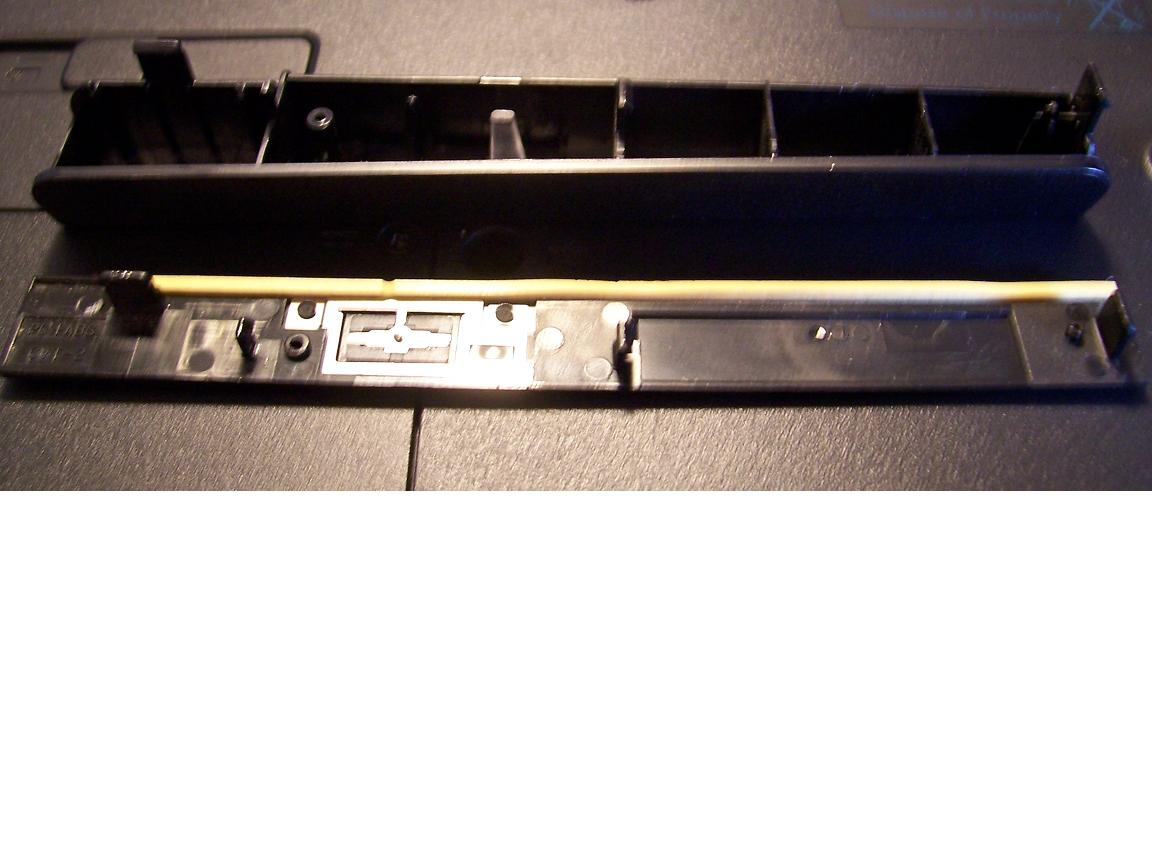
The front is connected to the drive by tab slots. As for the likelihood of interchangeablity, the answer is perhaps. Most manufacturers vary the location of the tab slots and the eject button switch. Generally, a single manufacturer will keep the tab slot locations in the same place across their line or in a given series.
The Bezel on the HDX protrudes more than a standard drive's faceplate would. About 11mm more. Which means that if you buy a third party drive, it will be recessed by about 11mm into the HDX. What's more, the will be a sloping gap from front to back of about 6mm down to 1mm.
That said, a standard notebook PATA optical drive will work in the HDX. It just might not look all that pretty if the bezel can't be exchanged because of the variation in tab slots.
But then again, there's always a dremel and superglue... -
You're right within tolerance. Though it'd be nice to see your idle temps lower. Guess that's due to the driver. You should be in the fourties unless your ambient room temp sort of high.
-
Oh... I see... So, by hoping to never encounter that, how much do you think is the estimated time the drive should work OK? The entire laptop life? I know it's quite variable to be measured, but I hardly even use the drive, maybe 1 DVD copy every two weeks, and that's it. No movies watched, no disc (frequently) read; maybe just once or twice to install an application and that's it.
At least, from your experiences and other users exp., is the unit reliable? Should it keep up for the laptop life (5? 10? years)
Thanks again!!! -
Thank you for the suggestions 2.0 - I'll give them all a try as usual. I'm glad you don't think there is a problem with my Dragon itself - the thought of trying to explain the problem to HP and the potential problems from shipping to receiving is something I wasn't looking forward to.
I was thinking about the possible software conflict or background process you mentioned. Becides the three emulators, the only other program I installed was the Avast anti-virus free edition. I had AVG on my zd7030, but decided to try this one as it had good user reviews. I recall turning it off once before to see if it made any difference, which it didn't - does it need to be uninstalled to really know? -
Hi, the doge, I live in Sydney Australia and happen to have an HDX9000 that came with the American version of tv card, if you want we just can exchange the cards, let me know....
-
You guys would be screwed in case of a repair..they require it to be sent back as it was sent to you from the factory if youre talking about an internal component.
-
Just for reference, here is a pic of the HDX optical drive bezel (top) and one from a 2 year old LG DVD RW Drive (bottom) to prove that it's tab/slot compatible with LG optical drives and that LG has kept the slot locations the same;
As for longevity, they usually last the useful life of the computer.Attached Files:
-
*HP HDX DRAGON Owners Lounge, Part 1*
Discussion in 'HP' started by J-Bytes, Sep 14, 2007.