Problems? See this thread at archive.org.
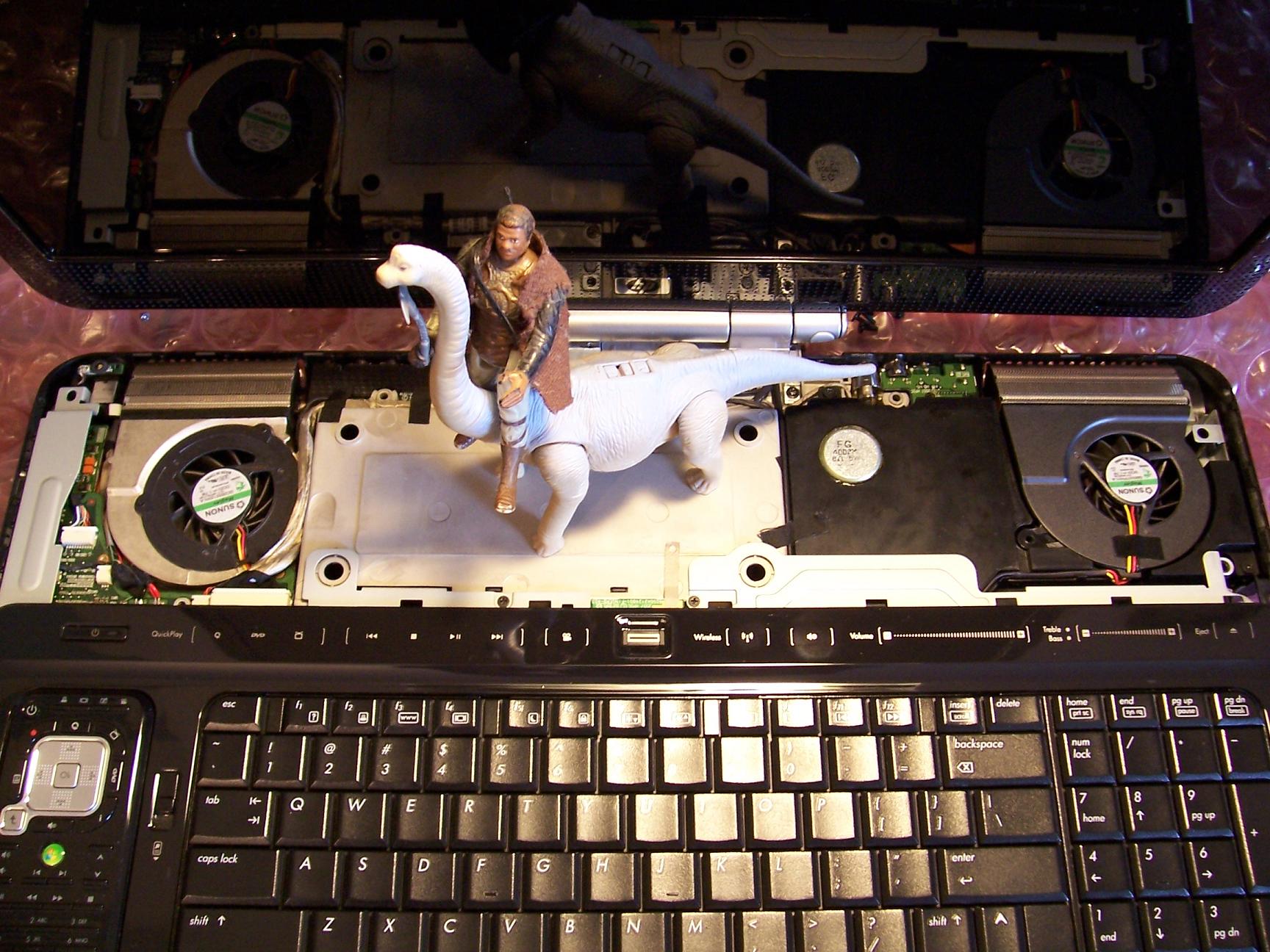
HDX Fan cleaning day:
Removed top cover to clean out vents and radiator grills. Swabbed fins with Q-Tip and alcohol.
Takes about 15 mins to get the top cover off. Hint: Once all the screws are removed, pry up top cover from the back first.
And yes, that Lando Calrissian atop an Apatosaurus.
-
Attached Files:
-
-
No, you wouldn't need to uninstall it.
-
I think like 2.0 said, you're in the right ballpark. The max temp is certainly more important to keep an eye on, and yours is fine. Which brings me to a second thought:
I have the 1680 x 1050 screen. I never really considered it before, but it probably takes a bit more horse power to light up those extra pixels in your screen. That might be the few extra degrees you are experiencing.
I have the WUXGA in my XPS Gen2, but it has a 7800GTX. Different card, different architecture, different cooling, different rig...I would see temps in the 102-104C range with newer games before I bought the HDX. And it was considered "normal". Above 80 on ours is heart attack range.
-
In case of repair I will go to the nearest laptop service (I've bought mine from newegg then it was sent to Poland, but the warranty is US only of course)
-
Nice to see at least one HDX Dragon user from Poland
-
Thanks Hovercraftdriver and 2.0 for the assistance.
-
Thanks for sending me your video settings - I had mine set exactly the same. The video driver is the Nvidia 179.28, which I upgraded from the original one I had. I'm going to try a couple more suggestions by 2.0 ( I must be getting on that poor mans nerves something awful) but I was wondering what anti-virus your using? I'm using Avert for the first time, which is the only other program I have installed becides Mame-VPinmame and maybe it's messing me up somehow. Also did you have to remap your right shift key? VPinmame didn't recognize it and had to use a different key for the right flipper.
-
Oh ok gotcha. Then in that case I hope both of you guys are from outside of the states otherwise it's quite a bit to lose...free repairs under manufacturers warranty including free shipping! Can't beat it.
-
I use Avast as well. My right flipper is set to the "? /" key, just to the left of the right-shift key. My video driver is 179.48. But, I just installed that this morning, I THINK I was using the same as you are before I did that, though.
The thing with re-mapping the key -- I've found with Oblivion as well as Fallout 3 (both Bethesda titles) -- the tilde (~) key just doesn't work to bring down the console. Even with an external keyboard. But I'm not concerned about it, since I'm no longer playing those games.
I also used the "Visual Pinball Install Pack" version 8.1_2.01. -
What driver do you use?
I've got a brand new dragon. My idle temp is 44-48. Max during 3dmark06 was 69, during cod4 - 72.
Room temp about 21.
How you've got such low idle temps?
@AlphaHeX, Szadzik
I am also from PL.
My dragon is from UK market and I've got one year HP warranty including free shipping in Poland.
But there is no extensions of warranty I could buy in PL. Only UK. -
Right now I am using the HP 179.32 found here:
Vista 64 http://www.laptopvideo2go.com/forum/index.php?showtopic=22783
Apparently though, I missed the latest HP release which is 179.44:
Vista 32 http://www.laptopvideo2go.com/forum/index.php?showtopic=22921
Vista 64 http://www.laptopvideo2go.com/forum/index.php?showtopic=22922
I am going to install this one tonight and see if it makes any difference.
The one thing that helps me is I found a plastic TV tray type table at a local store by accident. It's about two inches thick, but I positioned and marked my HDX and then cut out holes in the table that are roughly two inches in diameter larger than the fans (stole someone's idea from another thread). Anyway, air that is sucked in is relatively cool, as it isn't coming from the space between the laptop and table top. And my room temp is roughly the same as yours.
That's why I know it is time to clean also, as I was sitting about 35-36C a couple of months ago. Of course, no telling what driver I was using then. -
thanks
do you have any photos? -
PLEASE HELP
My labtop in the past 2 weeks had made 3 SQUEAKING sound, It's from the right side near the arrow key. It's a cpu problem or harddrive?
I did left it overnight few times without turning it off lately.
I only had it less than a year. It still works, but I am afraid it may die on me. -
hey all
just joined the Dragon club.
I got a refurb from Ubid and think I did really good
PROCESSOR
Intel Core 2 Duo T8300 2.4GHz
MEMORY
2048MB DDR2 @mhz (2)X1024)
HARD DRIVE
320GB (2)160 GB 5400 RPM
DISPLAY
20.1" WUXGA Brightview Display
MULTIMEDIA DRIVE
Blu-Ray DVD ROM w/ Super Multi DVD+/-R/RW DL
VIDEO GRAPHICS
ATI Mobility Radeon HD 2600 XT w/ Integrated WebCam
would have liked the higher end card but this is a WUXGA screen which is fairly rare.
I got this for $1044 shipped which I thought was a fairly smoking deal.
What upgrades have you all done. Memory and hard drive seems like the obvious ones. -
thats probably not a cpu issue, if your hearing noises. thats most likely the hdd; long shot but, the fans could make noises too, but your problem is probably the hdd. could you describe the sound a little more
-
you should have bought the new asus 15"g70
similar price, w/HD 15" 9800m gs 1GB!!! 4GB DDR3!!! bigger drive space and newer cpu with higher fsb and newer mb -
I'm pretty sure the guy wasn't soliciting for advice on what he should have bought. He's pretty excited about his new Dragon and wasn't asking for anyone to rain on his parade! Not to mention, this is the HP Dragon forum, not the Asus forum.
-
I wasnt trying to rain on his parade; i was just talking about the enticing new hardware you can get at a similar price for the sake of value. Sory if it was rude; wasnt meant to be.
-
For someone that knows what they want, what they are using it for, and what they are getting, 20.1" > 15" everyday-all day, all the other bells and whistles aside. -
I am not offended. This is for my wife anyways who just wants a bigger screen. I have a Sony FW 290 premium for my own use
has a T9800, 8gb of memory and the RGB LED screen. yummy.
I have seen other similar dragons go for $1400 to $1500 so I was pretty stoked about the deal I got.
cheers -
what are the suggested upgrades. What is the limit to upgrading the CPU on this machine?
-
Let's see - my daughter opted for the ASUS unit closest to the features we hae on the Dragon. Yep, lower priced, but she has yet to get her BD ROM working and I've since fixed all the new machine bugs in mine. I might add that when I went looking for the info to fix her system for her, it dawned on me that as bad as HP Support has become, there are a lot worse out there, and ASUS is a good example. Their online support is nothing compared to HP's resources. Granted HP's techs have gone to pot, but their online info is still pretty good. Each time I've had to work on her system I realize how much we really got with our Dragons, size not withstanding. Her ASUS is just a pain to work on, almost reminds me of my Mom's Toshibas. Too much vendor crap that doesn't give you anything.
Her BD still doesn't work and she got an extended warranty with it to boot. BTW, if you're wondering, although she chose it, her boss bought it for her for use at work and home.
One day she might actually start listening to me. Of course at 25, that's probably wishful thinking at this point. Oh well.
The moral and point of this story - you can keep your ASUS. Value is determined by many factors, not just price. HP might not be the cheapest or have the best support anymore, but they're still a lot better than some others I've seen. And the one thing most of us agree on here is that our systems have a good operational track record when stacked up against other HP notebooks and even other vendor notebooks of similar caliber. Assuming of course you don't screw yourself with driver updates, BIOS updates, firmware flashes, and other such things that make life for some of us profitable.
You get what you pay for, and I have yet to see an unhappy Dragon owner. In fact, most of us here will tell you that people who see us with it in public envy the hell out them. All others are just appliances.
OT question - does anyone here have one of the new Dodge Challengers in dark blue, or seen it? Thinking about getting one for the wife since her Avenger is costing too much to keep on the road. Drove one the other day - killer car. Haven't driven the Hemi yet though.... Next time up.
-
almost forgot, can the GPU be upgraded on this unit?
-
X9000 is the max as far as CPU. HArd to find an RTM version. Mostly ES (engineering samples) out there. You can find T9500 (2.6ghz) and T9300 (2.5ghz) also. They would all give you a decent boost (>10%) thanks to their increased cache size over what you have in there now.
Perhaps. Depends on your motherboard. If it's an HDX 9200-9400, then yes you can upgrade to the Nvidia 8800M GTS. That is if you can find one. If it's the HDX 9000-9100, then no you can't. Many of your modern games will struggle with an ATI 2600XT and WUXGA. The 2600XT is about the same spec-wise as the Nvidia 8600GT. But If you're not a gamer, no worries. -
its a 9000 so it looks like no GPU. No matter, I will likely upgrade the CPU and ram and call it a day. My wife doesnt game
thanks for the enhanced reply !!! -
2.0 would you say the x9000 is the way to go even if its an ES?
-
and sorry, one last question... for now. Whats the ram speed on this unit.
-
Depends on price. <$300, probably. What does she plan to use the unit for? She likely will be content with what's in there now.
Installing a new CPU is a big job in this unit. It requires full disassembly which takes about 4 hours from start to finish.
667mhz. It can accept 800mhz but will only run @ 667mhz. -
Wow... I didn't know that the GPU was upgradeable for some models. I have a HDX 9288, so that means I should be able to replace the ATI 2600 for a nVidia 8800? Is it too difficult? Any tutorial (threads?) about this?
And on and unrelated issue, how do you open the lid of your case when closed? I asked this before but got not answer. And since the lid doesn't have a "switch" that will open the screen (as with other laptops) or a special grabbing place, I have a little adventure every time I try to open it, because I worry that I'm using too much pressure on opening it!
Thanks -
Also, on another unrelated topic; is there any real video advantage in expanding the video memory using some of the RAM? Like taking the ATI 2600 to 512 by using 256 from RAM. Oh... and now as I write this, where do you change this setting? Is it in the catalyst driver? Because the BIOS is so capped for dummies and doesn't have any of that.
-
You would have to get a 8800m gpu first, specifically for the dragon, hard to come by. As to how, I don't know, or if the bios auto recognizes it.
As for the shared sysem ram for video, it auto allocates when required, providing it is not used by the system...priority issues and all. There is no way to allocate it by any system settings. -
MY HDX's sit on a desk all day. But, on the rare occasion that I have to flip the lid down then up, I start at the corners then raise it about 30 DEG. Then I use two fingers (thumb and index) to straddle the webcam to raise it some more just before the bottom clicks out of the arm. Then I use a palm on a corner to push it back while using the other hand to hold down the base. Once the screen clicks out of the arm, I use the bottom corners to adjust to proper angle.
Whole point; try to avoid applying pressure to the bezel above the webcam. A number of HDX owners reported that area as developing a crack.
As for the video card, Hovercraftdriver answered it well enough. There are no tutorials, only a service manual available with detailed disassembly instructions. And as Hov says, the 8800M GTS from HP is not at all easy to come by and will be expensive. MXM isn't as exciting as some like to believe since acquiring enthusiast level MXM cards is very difficult and expensive. All of which renders MXM as fairly useless standard as far as the end user is concerned. What's more, you can't upgrade the HDX with any MXM card, only with what they offered on the model since a BIOS update is needed to support the card. -
I think your price was great, for comparison, I just bought (Feb. 11) for $2,025 a refurb (with the 90 day warranty) and the only differences are;
CPU 2.5 Ghz, 4096 memory, 8800M GTS video, all the rest, screen, harddrives and Blu-ray are the same. So thats all an extra $1,000 bought.
Mine came with the cracked bezel above the webcam which people are suggesting is related to how the screen is being lifted open, so be careful there.
Since I needed(?) to game on the machine I reluctantly spent the extra dough.
The one big upgrade both our machines can take advantage of in the near future are the Solid State harddrives, SSD, right now the Intel model 80GB is popular but at $390 it's something that can wait for a better price/GB.
If your machine has the 90 day warranty consider getting some kind of warranty extension, since you've already done so well on the price. I'm still trying to decide on what kind of extension to get myself.
I'm pretty jaded when it comes to LCD screens, I own a bunch from 19", 22", 24" upto an HP 30" and I was still very impressed with this machines' screen, its a real pleasure to use for hours on end. -
Is it refur, the warranty period will be reduced?
I thought all hp comes with 1 year global warranty?
Have you check online at hp website? -
I haven't gone online yet to register but the sticker on the bottom of the laptop states it is an HP refurb with a 90 day warranty.
It would be great if there was some kinda extension -
is there a manual or guide to taking this apart for CPU replacement.
-
-
I believe you can buy an extended warranty from HP.
-
Ups about the crack...
I noticed in mine that a WAY TOO straight thin line is perfectly 90° above the web cam (and EXACTLY up in the middle of the lens). I guess that that isn't the crack you talk about, but just a regular line from construction product (because it's really too straight - too thin - too even) to be the crack...
Please, can you confirm this? Thanks. -
Okay...tried all of the above, and thanks to your help once again 2.0, things are looking better!
After reinstalling the 5607 audio driver and the 179.28 video driver, MAME seems to be running better now. The audio and video still slows down and stutters intermittently (seems to start mainly when on-screen objects change speeds) but now instead of staying that way it returns to normal within a few seconds, so the emulations are now at least playable - I'll take it! Unfortunately, Visual Pinball (my most favorite program for years) is still a disaster. I'm going to try to uninstall and reinstall the program again, and see what happens. I'm also going to delete it from the registry, if it's still there, before reinstalling. -
Nothing like that on mine!
-
I have finally found the holy grail to those looking for a backpack for the HDX. Me and a friend travelled to Sydney (from Gold Coast - 900km) for a quick break and explore the city.
I found the HDX backpack of my dreams (after fruitless searching on the internet for the Alienware backpack) at Sydney's Paddys Market in the city. There is a couple of stalls selling bags and luggage but majority do not sell this compact. Some are for hiking and downright enormous. The bag is from a Chinese manufacturer called Color-Life. Model type unknown but the tag shows #2239 so maybe that is the model number.
But here's the killer - the price. I paid AUD $220 for my SFBags shoulder bag shipped from Frisco for the HDX and not only it is killer expensive, it kills the shoulders as well. The SFBags for my P1610 is fantastic but its too large for the HDX and is contorted when you actually put the HDX load on the bag. This chinese made backpack is light, seems quite robust and have decent padding on your back and most importantly right at the bottom where the HDX meets the floor. All of this for a measly price of AUD 35.
Its waterproof, breatheable have nice soft tags on the zippers, two drink holders left and right and enough space to put accesories and that massive power brick.
My fruitless journey for a HDX backpack has ended and I am truly satisfied.Attached Files:
-
-
What the..??? You didn't bring enough back for everybody? Aren't we like family?
(Actually, I love my Alienware mALX backpack!!!) -
Costs $150:
http://www.penandfree.co.kr/english/products/duo_monitor.asp
This model (Model No: PMMA-01) transforms general monitors (including LCD and CRT) into highly-priced tablet monitor with simply placing receiver on top of monitor. It is designed to support up to 22.
(not multi-touch; single point pen touch only--on-screen of course)
Video:
http://www.youtube.com/watch?v=MquxeqpvBxg
Anyone tried this? Any cheaper (but still on-screen) alternatives? I think $150 is very expensive. -
Help with battery!!!!!!!
Since i bought my hdx 7/2008 i never had any problems with my battery. it would last round 2 hours on high performance.
Now it is just giving me 20-28 minutes on high performance when it is fully charged ... is it a software glitch .. or is it the battery life end?
and one more thing i noticed when the battery has like 15 % left and i plug the charger in .. the computer performance slows down so much that i will have to restart to be able to browse the internet(i mean to do something that doesn't need much of cpu or ram). so everytime am on battery then i plug in the charger it just slows down as if it is pentium 1 running vista so i have to restart and save my work etcc... just a pain in the a**
i thought it was a virus and downloaded AVG and ran a full system scan .. and there is nothing wrong.
Thanks in advance -
lancorp - we were in Sydney only for 2 days & only went to the market at the very last hour that we had to leave. Most of the other store owners eyes almost went out of their socket when they saw the size of the Dragon - lol.
I said I need a bag that is at least 14" wide. They thought I had a 14" screen laptop The last store I went to, the owner didn't even blink when he saw the laptop and said "you need this bag". As all bags was filled with bubble wrap to show max size, I thought it looked too thick depthwise. He said there is no other bag that fits something that big. As I tried the bag with the HDX, I was surprised it was not even a tight fit, it was more of a comfortable fit.
I just was shocked when he anounced the sticker price. I was expecting at least twice that amount or AUD 100+. -
Bad battery. It's covered under warranty so give HP a ring.
-
Anyone know if the HDX18T TV tuner driver can be used with the HDX Dragon TV Tuner? I'm still having sound and picture issues. TV tuner card was replaced but still didn't resolve the stuttering issues. The tuner system is connected to COX cable.
-
The HDX18 has the Avermedia A309 card. It's driver is specific to that and has no entries for A312 or A321 card.
-
Glad that there was a little progress.
I don't remember if I asked but what are your system specs?
*HP HDX DRAGON Owners Lounge, Part 1*
Discussion in 'HP' started by J-Bytes, Sep 14, 2007.