Problems? See this thread at archive.org.
Thanks for the rep. Also, you may want to look into getting a server in the somewhat distant future. The more media you acquire, the more space you will need for it, plus you will get better streaming from a server than from the External HDD.
My setup (now i am just bragging lol) is I have all media (movies, music, pictures, tv shows, etc) stored on Server (Separate drives for every category) and that is going to the router. I can either use the shared folders or the ReadyDLNA on the router. And with free streaming software I can watch or listen to all of it from anywhere I can receive an internet connection (except android devices, but I'm working on that
-
Sweet. I have a couple of WD Live Media Players, one is wirelessly connected with an "n" dongle. They also do YouTube etc. They have 2 USB ports, so one for the dongle and the other for an extrenal HDD. My other is wired up with megabit homeplugs, so no appreciable drop in speed there. Also run TVersity on most of the computers in the house, so there's plenty of options! Might look into a server in the future, but I haven't owned a desktop PC for such a long time.
CJ -
Nice setup you got there.
Tversity is what i use here too. Just on one computer though, as i have all the media sent there. I use my Xbox360 for streaming to the Living Room. Thinking of getting another used one on ebay for the bedroom. But if i want to see anything that bad, I have the Dragon for that, and any other room I want to watch movies in.
Don't mind me, I am just biased towards servers. Especially ones that you build yourself. No 2-HDD or 3-HDD config with little to no room for expansion. I can fit 12 HDDs into my server and I plan to try and fill every slot.
-
Dang, better get one heck of a power supply and some massive cooling.
Or better yet for the ultimate media server (Were the sky is the limit on cost) get 12 SSD's and not worry about the cooling as much!!!

 :yes:
:yes:
 and even :cry: for joy!
-
I don't have any interest 3D right now, so I'll upgrade to the latest drivers. Thanks for clarifying.
[L] -
Yea true. I wonder much and how fast the price will come down for 120GB and 250GB SSDs.
Haha riiight. We all know that's not going to happen
On another note, you think Crysis 2 is going to run ok on the HDX? -
I had the same problem sort of with my brand new DIR 855. My goal has been the same as yours using my Mediasmart EX495 and the gigabit set up. I still need to upgrade all of my cables to CAT6 though. There are particular settings that some techs give recommendations on that that will CAUSE that to happen. Mine went from gigabit to 100 mbps then to 50mbps depending on what each tech directed me to do. I finally found a tech that told me the right way to set it up, but it's particular to each router I think. I can't remember what he told me to do and it seems he forgot to send me the details on it, but I saved the settings at very least and it has been running smoothly ever since. You try resetting the router to factory defaults to see if that helps it? I would call them if that doesn't work and ask how to optimally set it up properly with the correct settings. I used to use port forwarding, Ip reservation, and virtual server but that tech told me that was not the right way to do it. That lead me to get disconnects several times per week with my previous router DIR 615. Now it hasn't disconnected since.
-
Which server do you have? Also how do you set it up with ReadyDLNA with what software? What I'm trying to do is make it where my friends can only access some particular videos for remote streaming but not all. The way it "works" with Twonky that comes with it kinda sucks in that whatever is converted and compatible EVERYONE with remote streaming access can see it. I was thinking I'm going to have to get a popcorn hour c200 for my own personal streaming and let them use Twonky but that's another whole $300! I'm planning on getting an Archos 5 Internet Tablet (500GBs) which runs android so any into on how to get that going would be great.. though My Mediasmart EX495 runs Windows Home Server 2008 I believe so I don't know if the info on that would be applicable.
-
Nice. I have the Mediasmart EX495 which can do 17TBs not counting the multiple port support via eSATA, but what I'm hoping to do is fill that up then buy maybe a TowerRAID TR8M-B with 8 bays to use to back up the Mediasmart. That way I'll have maximum capacity internal to the Mediasmart without needing to do folder duplication, and have a backup of the Mediasmart in a completely different enclosure which I can do once or twice per month as needed. I have two Hitachi 2TB 7200 Hard Drives in the mail from Neweggs 72 hour sale from the other day which I very much need because I already filled up my 1.5TBs with 1080i movies and data weeks ago. I wonder what the heck I'm going to do when I start more of a Blu Ray collection and rip Blu Rays to the server... -
Yeah I need to get a few more 2TB drives myself, as I have one that houses all my TV shows and it's got like 250GB left. Plus I am running out of room on my Cartoon Drive (yes, I went back and got all of the cartoons i watched as a child and ripped them to my server ).
I built my server, so i can control how many drives it can hold. If left to the original configuration, it could hold a maximum of 8 drives. I have since added a 4-port PCI SATA card, and I can add 2 more if necessary. The TB limit is what Windows 7 Enterprise's limit is. As for the power supply (someone mentioned it a few posts back), Right now I have 2 600W power supplies powering everything and the cooling is 6 120mm fans. It's a lot less noisier than I thought it would be, but I paid extra for the quieter fans so that helps.
Umm you are gonna need a LOT more than those two 2TB drives when you start getting more Blu-Rays to rip. Hopefully newegg is kind to us both in the near future with their HDD sales lol. -
Judging from the trailer, maybe. Probably no more than @ medium settings @ 1680x1050. You know Crytek, always pushing the envelop.
Crysis runs great on the HDX. I can max out a quite a few settings.
Crysis Warhead runs great also, but have to scale back a few settings. Some are on mainstream with the rest are on gamer.
FarCry2 runs great also. Better than Warhead.
All depends on the engine they use. The new engine is supposed to be cross-platform with scalability. Might translate into acceptable details and effects at medium settings for many. But then again, Cryteck is not unmindful of those who have SLI using the latest desktop cards who will need to feel they are getting their money's worth and for bragging rights.
So back to the original answer... maybe, with a side of nope. -
Sorry I had forgotten you asked that part. The router has it built in. I have the Netgear WNDR3700.
-
Anyone try something like the NOVINT Falcon 3D PC Game Controller?
I am really looking forward to force feedback suits like this 3RD Space Vest when 3D gaming goes legit:
http://tngames.com/
Just not sure how fantasy elemental games will work this one out---and just about everything else.
-
I upgraded to the nVidia 197.16 drivers last night and have been monitoring temps throughout the day to see if there were any changes. As promised, the results are as follows:
Low temp: 52C
Current (temp at idle): 52-54C
High temp: 63C
*ambient room temp approximately 65-70F, one active monitor via HDMI.
Conclusion: Although technically the temp at idle is slightly lower then before (54C), I don't think the change is statistically significant, and it may be attributed to outside variables such as slight fluctuations in room temperature. With that said, I see no downside to upgrading to nVidia drivers 197.16, and would recommend it.
On a separate note, I too noticed that HITACHI Deskstar HD32000 IDK/7K deal on newegg and have spent the last few hours researching the drive and comparing it to the competition. It seems that, although it did not have the best reviews at its' onset, things have gotten better over time. As the cheapest 7200RPM 2TB drive available at present, it looks like a good deal if you're in the market for some inexpensive storage. -
Man I wished I had all my VCR tapes from the 80s and 90s:/ Then again, I guess they wouldn't look as good as Blu Ray. But yea it's CRAZY how fast storage space gets filled up with HD movies. 4 port PCI SATA Card? Meaning you can add 4 more enclosure bays or 4 more hard drives? Haha yea I know.. I think my part time job will be to collect hard drives at this point.. Would be sweet if I could fill up the Mediasmart with all 2TB 64mb 7200 Hard Drives
instead of the 2TB 32mb 7200 Hard Drives, but like you said it'll depend on some future Newegg sales. -
4 more internal HDDs. I have a few that are small capacity (300-400GB). I use them because I don't need that much space for music, pics, etc. As I need more room, I'll buy bigger drives and use the smaller ones for customer storage (backups when I need to wipe a customer's PC and start over).You wouldn't believe the amount of stuff people keep on their main HDD without backing up lol.
-
Check Netflix. You would be amazed the amount of that stuff is on DVD and or Blu-Ray now.
-
Having trouble with sound when trying to use Quickplay Karaoke player. Text shows just fine. Audio will not play
-
Version 6.20F had already tried to install Win7.
This was also my idea from the start. See this post (my sp35581 no longer active)
Unfortunately, there have been errors during installation. (Missing xxx.dll, missing CD inst.Dateien etc)
uninstall before installing an older version of the HP Quick Launch Buttons existing!
Also QuickToutch (sp37799 version 1.00 C) must be uninstalled before installing 6.20F.
So I unzipped SP35581 in SWSetup.
Here I sat on the Setup.exe WinVistaServicePack2 compatibility.
During installation, it still comes to the above-mentioned errors.
Reinstall with recommended settings on Win7.
After a restart Win7 warning is about incompatibility of installed software with this version of Windows.
Action profile:: Check "This message is no longer" and "start program"
Now, does the blue Quick Start TV button.
Disadvantage of this version (6.20F):
The TV button on the remote control does not work to start QuickPlayTV.
An open QuickPlay this still works.
All FN + HP functions are not usable with 6.20F.
List:
TV remote control button "no"
FN + ESC (System Information minimizes) "no"
FN + F1 (Help) "no"
FN + F2 (Print) "no"
FN + F3 (IE) "yes"
FN + F4 (screen switching) "no"
FN + F5 (sleep mode) "yes"
FN + F6 (user lock) "no"
FN + F7/F8 (screen brightness) establish "no"
FN + F9/F10/F11/F12 roll / / print / etc "yes"
And the Computer Management - Event Viewer logs after each Windows start:
"In the application (HP Quick Launch Buttons, supplier of Hewlett-Packard), the following problems:
HP Quick Launch Buttons is incompatible with this version of Windows. For more information, contact Hewlett-Packard. "
Source: Application Experience Infrastructure
Event ID: 1
Advantage of this version (6.20F):
1st Blue TV Quick Start function key.
2nd Audible feedback of all quick launch buttons. And this without installing QuickToutch (sp37799 version 1.00 C).
This audible feedback is very pleasant and under QuickToutch not selectable. Onscreen is then not possible.
Since I never wanted this, it is perfect for me. Note: A subsequent installation of QuickToutch (sp37799 version 1.00 C)
makes this advantage to naught. Even a subsequent removal brings him not again. One would then also uninstall 6.20F
and then reinstall.
The disadvantages outweigh so much.
Down payment benefit without any drawback:
Item 1 the benefits can be, unfortunately not (yet) transferred to a new version of QLB.
Item 2 the benefits can be transferred to a new version of QLB.
This must be addressed as above described.
1st QuickToutch uninstall.
2nd Current QLB uninstall. (Restart)
3rd QLB 6.20F install as described above. (Restart)
4th QLB 6.50.15.1 (sp47591.exe) on 6.20F install. This is an update. (Restart)
5th Again to restart. Reason: It is still an unknown device in Device Manager. "Filter keys placed 01" after restart.
Now everything is ready. Unfortunately, the blue TV button as I said without function.
For this one has without QuickToutch the perfect acoustic feedback.
Also works under QuickToutch Win7 anyway not in real time. Nor is it limited to a useful audible feedback.
The whole procedure must be strictly followed. For this reason, I stopped the download of 6.20F.
Only those who are so smart enough, this version is obtained, is also smart enough for the installation.
Incorrect procedure can namely occur that the man QLB not get uninstalled.
This helps no system restore. This is very complicated and can not be translated by me.
Should I embed the buttons or filter in a version (blue button TV), so I'll let you know. -
I have NONE of the above disadvantages as my installation is an in place upgrade to Windows 7 over pre-existing HP-installed Vista SP2 that had the QLB 6.20F already installed (prior to Win7). Everything continues to work as it used to work when I first received the machine with Vista. The only issue I have is the eventlog warning, which is totally harmless and can be ignored.
-
In any event, since the grand majority (99.99%) of users do a clean install, Ricki's post is most informative.
Besides, HP removed that file from their server. Telling in that it underscores RickiB's disadvantage assessment. -
Ok, What version of QuickPlay came with Windows Vista when it was originally installed on the Dragon?
-
HP Quick Launch Buttons VERSION: 6.20 REV: F (sp35581.exe)
HP QuickPlay = 3.6.4820 Rev.A (sp38361.exe) -
Thanks for this information! I also wanted to make only an update of Vista to Win7. However, I decided to Win7 Professional. For an update was excluded.
The all keys QLB 6:20 F function on Win7 is very interesting.
Nevertheless, I would rather try a button (Blue TV Quick Start button) in a newer version of QLB run to bring. -
If it is a long time ago ...
Thank you for the discovery and your link.
Had this version installed on my Win7 installation immediately.
Only today I tested the functions and complete all works.
Thanks, Thanks, Thanks
Rep from me (whatever that is?) -
Thanks. I was asking because I have both versions. I use SP38361, and almost all of my buttons work. The only exception is the TV button. I may uninstall and go try the original one and see what it does uinder Win7 for me.
-
@RemyL75
You need to try anything. I've tried it all. See review.
I too work with all buttons. Up on TV blue.
And I have to run on Win7 QuickPlay 3.7.6310 + QLB 6.50.15.1.
Under Vista really work all the buttons. And there is also QuickPlay 3.7.6310 + QLB 6.20 F + QuickToutch (without onscreenmenü).
The latter is so I wanted to. -
What about SP38171 - QuickLaunchUpdate?? Have you tried that one??
-
This is the QLB 6:40 B2. No. I have about 15 versions of this software on my computer. There have always been problems and you seem to some.
Have you already tested this version in Win7?
I'm tired of testing at the time. Unless, in someone other than "Kindheart" run all the buttons. Even the one who must have made a clean install Win7. -
@Kindheart / Snapshots of other users also seen very much.
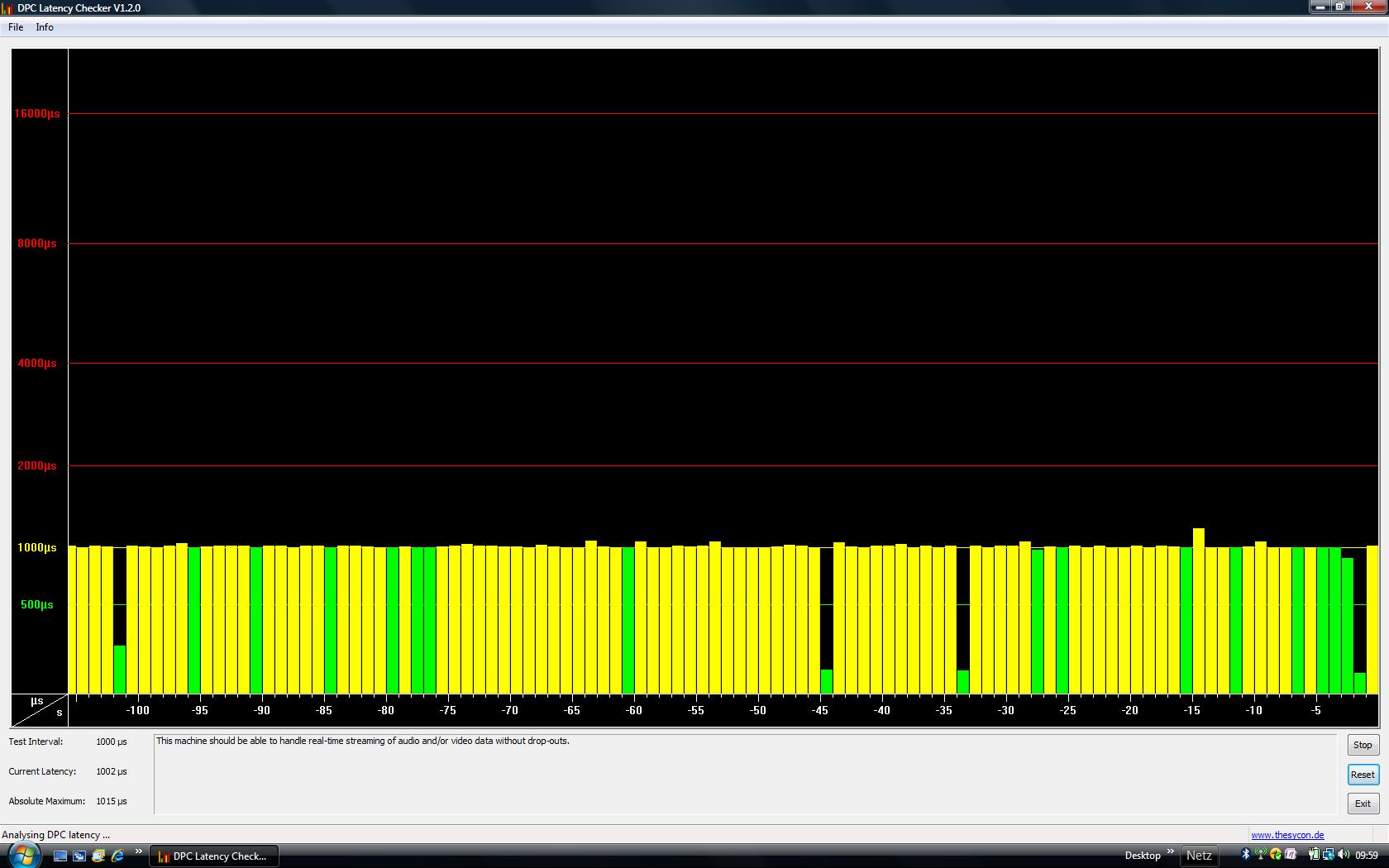
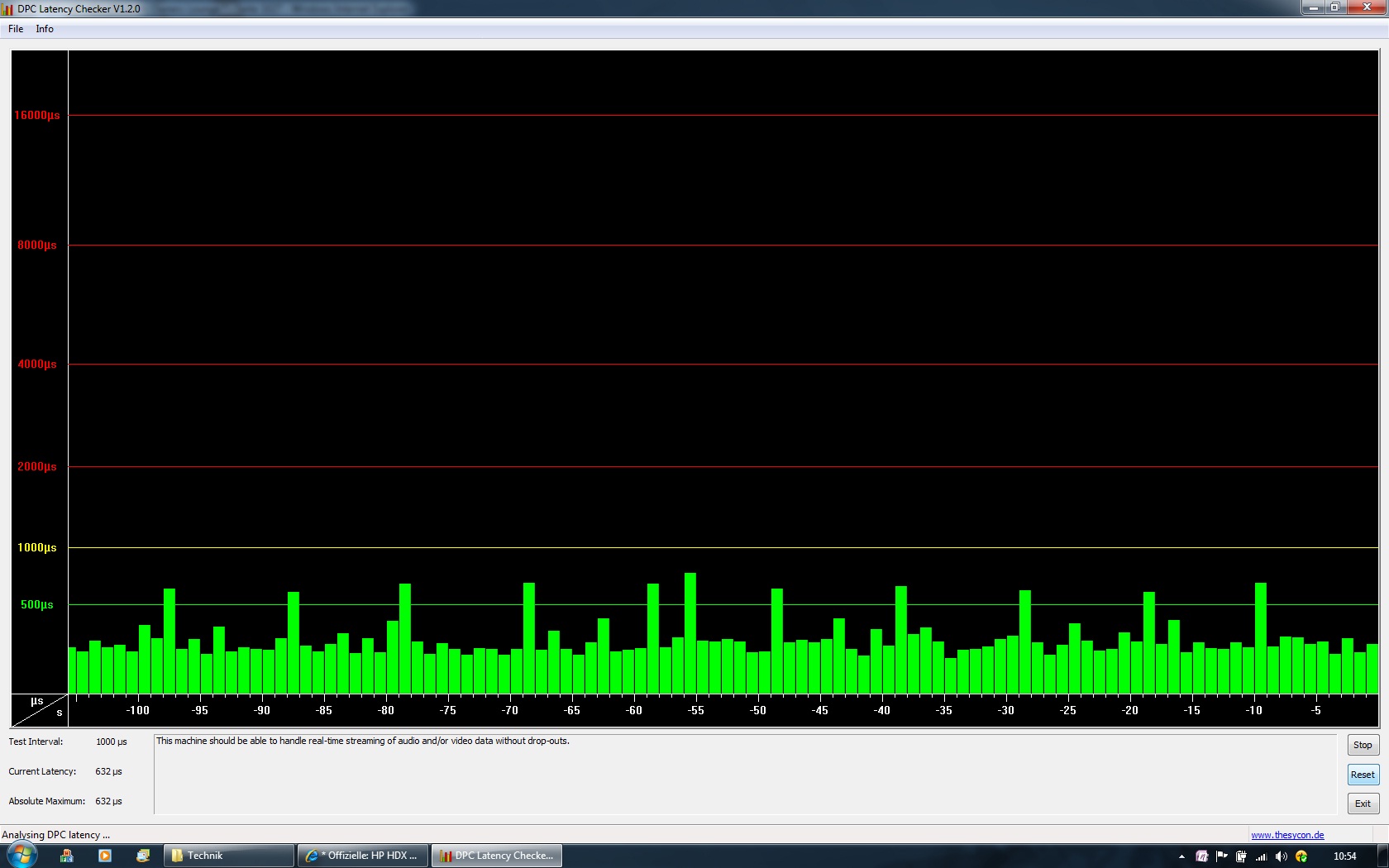
I would be interested in the latency behavior of your installation Win7.
Software: DPC Latency Checker V1.2.0
Here's a snapshot from Vista Home Premium 32bit. (All equipment and network drivers active) -->
Here's a snapshot of Win7 Professional 32bit. (All equipment and network drivers active) ---> :rolleyes2:
Between the two are worlds apart. As this is now in your update from Vista to Win7?Attached Files:
-
-
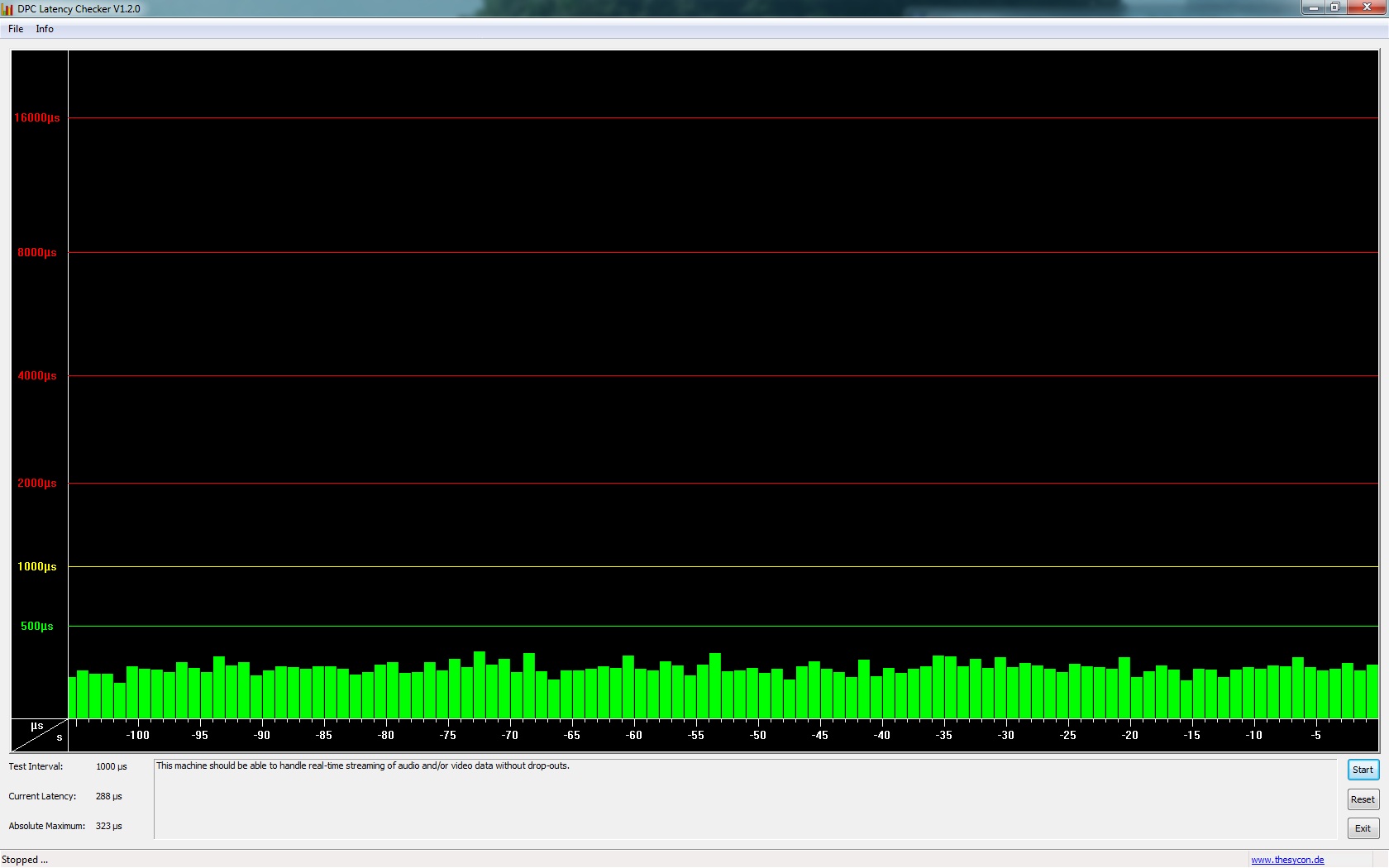
To help with a baseline here is what my Clean Win 7 x64 looks like:
Attached Files:
-
-
Thank you!
Well, you've probably disabled the network adapters in secret!?
For me, Bluetooth, WLAN and LAN is active. If this is the case with you, then these are fantastic values. -
Yes, it was removed for security reasons (potential threat via third-part exploit, confirmed by Microsoft who released an optional, new HP QLB x64 on Windows Update on 11/11/2009 that also breaks the TV button - I didn't install it). But with a good anti-virus (MSE) and conservative use of the Web/software, you should be safe.
-
Yes, my Windows 7 latency/behavior is the same as with a clean, fresh installation, believe it or not, but my HP Vista SP2 was very well kept. I am also not into the habit of installing and uninstalling software all the time, so I am always running a (very) tight ship as 2.0 would say
-
Thank you! My VistaSP2 is at least as clean as yours. Nevertheless, it has a different reason latency as you see.
Therefore, I would interested in a snapshot. The program requires no installation, yes. It is an executable exe.
In any case, you could save yourself a lot of work. (Not set up Win7)
But I am also satisfied on a TV button, I can well do without.
Edit:approximately 5cm of this key (blue button Quick TV) is the TV button on the remote control.
And this works in any operating condition.
-
As I said:
Attached Files:
-
-
This forum is a goldmine!
I hope soon we can produce specs (drivers, etc.) for the most streamlined Dragon setup again (such as the XP driver site), but this time for win7 or even open source if necessary. Or am I behind on this as well? Has a win7 HDX Dragon site gone up? -
Perfect! Thank you! Nice that even your latency in the green area. Sun HDX Dragon is twice the fun.
-
Hey Everyone, been a while since I posted. I'm pretty sure this doesnt work, but I'm trying to get my computer to have 3 displays, the laptop screen, a monitor hooked into the HDMI and a monitor hooked into the VGA. I've got the ATI video card. I tried installing new drivers and tried using the catalyst control panel as well, they all so I need to disable a display before activating the 3rd.
Is there anyway around this? -
UPDATE CONCERNING OVERCLOCKABLE BIOS.
Received a call from HP today. The lady's name was Denise. Basically it was a courtesy call just to let me know that they are still looking into the request.
Just thought I'd share so we'd all know that it's at least in limbo and not simply swept under the proverbial rug.
In another month, perhaps I can convince our beloved Elle (DV7T)... :wink: ... to give them a call to light a fire under their buttocks.
:tongue: -
I use an EVGA UV Plus+ USB video card to drive three monitors with my Dragon. (The Dragon's monitor + two external LCDs.) It works okay.
See http://www.evga.com/products/moreInfo.asp?pn=100-U2-UV16-A1&family=USB.
[L] -
so honored to be mentioned as a fiery force. i will light up their arses (and that's no bollocks...but it is buttocks), even if i don't have an extreme proccy.
-
Cool thanks for the input. I guess we'll find out for sure when it comes out, but if it's supposed to run great on the Xbox 360 (and is supposed to be virtually identical on the consoles and PC), which I believe is built on the Apple G5 processor specs, I would hope that it would run better on our specs even better.. then again you have to bring the specs down as it is so maybe with a side of nope makes sense. You think you're going to get it? -
Hmm I think I have that too in my DIR 855 since it sometimes fights with my MediaSmart and wins. -
Haha I'll bet it's a lot.
Maybe I'll just invest in a nice Blu Ray burner to back up the actual discs like I was originally going to do, but then again everything is going digital so.. I dunno. I got Playon which I haven't tried yet and have been tempted to reactivate Netflix but the "new" selection didn't seem all that hot. Yea I could do Blu Ray on just the HDX, via Blockbuster but my Blu Ray is bust-ed right now because I needed to do a repair at some point with a system restore and don't have an actual Vista disc to do it with, just the recovery. Otherwise I'd be getting more Blu Rays. -
I didn't know it even had Karaoke.. Hmm cool. -
Which one was removed? -
Wow they called back. Thanks for the update. -
The one Kindheart recommended. Have to look back a few pages. Sp35xxx something or the other.
-
Though the new engine, though scalable and multi-platform, will not mean that the game is a port. That is to say, designed for console specs, but ported over to PC like some games are. The PC version will be built from the ground up for the PC using the engine as the Console version will be built from the ground up for the console.
Considering Crytek' reputation when it comes to PC games, each successive games requires increased specs over the generation before.
I'll get the game if I find it runs well on similar to lower spec'd machines. Lowering resolution to play games is the worst. Some people don't mind it. But when you've played at native, dropping down just one resolution looks horrible. Also, lowering too many graphic details for smoother frame rates makes the game look cartoonish.
*HP HDX DRAGON Owners Lounge, Part 1*
Discussion in 'HP' started by J-Bytes, Sep 14, 2007.