Problems? See this thread at archive.org.
I'll certainly be waiting to see what this is about...
-
-
Thing is, I've done the GPU upgrade thing in the past on other computers a number of times. You know when things are going to work out. I'm not going to waste any more money on the endeavor knowing it's not going to work out in the end. But let's say someone were truly able to get it to work by some chance. Honestly, good for them. Why do I say that? Because unlike truly successful GPU upgrades, this one is not easily repeatable and will lead to people potentially ruining their equipment because of the mere "possibility." Worse still, they would be spending and losing real coin in the process. To me, it would be irresponsible to not properly warn people of the potential pitfalls of even trying.
I mean, everyone who claims to have gotten the upgrade to work never seems to be able to post proper details. Odd that.
What's more, I think those who think it can work realize in the back of their mind that it likely won't as they do not seem willing to take the risk in trying. And I don't blame them. They are being prudent.
Lastly, with the way games are heading, you'll need to match GPU and CPU. The 280M is a great card but is quickly becoming obsolete. If we could have gotten it to work last year that's one thing. But now, it's basically a yawn with maybe a Spock-like right eyebrow raise first. A ~30% boost in performance may not translate into much with games that'll come out next year and thereafter as they will be both CPU and GPU dependent for performance. The Penryns in the HDX are no slouch but pale in comparison to the i5s and i7s that are out and will be coming out later this year.
No and no. Exceptionally important details that are non-existent. -
To clarify a bit what Kris's service entails, it is a wholehearted attempt to upgrade the MXM card in one's laptop if at all possible. If a laptop is sent to him he will throw every potential match at it... if no success, no harm no foul. You just pay shipping. Not cheap if you live far from Belgium. This is why a European member of the forum would be the best candidate. In one scenario... I believe if the card works and you pay MXM-upgrade... he picks to shipping one-way
On his site are posted people's successful attempts... I don't think many HP's had been attempted. But some laptops thought un-upgradable were upgradable. Kris, himself, has a great deal of experience, it being his unique business and he probably has tricks up his sleeve that most technicians on our forum don't have since this has been his real focus.
Kris would be the last to guarantee success, since there is a certain amount of dice rolling here. Sometimes upgrades work and sometimes they don't. But I don't think we can look at zipek_dg's effort as at all discouraging, but rather somewhat promising. Rome wasn't built in a day... nor Cleveland for that matter.
In some scenarios modders changed to different thermal pads... while others have made changes to heatsinks or found more efficient fans, not something for the weekend hobbyist.
What he had offered to send me was a Clevo flashed 280M GTX and an HP flashed 3700M. So he has access to many cards. Of course the 280 would be much better if hurdles can be overcome.
MA -
Says I need IE 6 or higher, but I have IE 8.. Hmm. Wait if I install 186 and it asks in Windows Update if I want to upgrade the NVIDIA driver is that the same one? Got a direct link possibly?
Oh then yea they were for Windows 7, but yea I think they made the green stripe appear, everything else worked fine otherwise.
No I want to make sure everything works before I active it. I'm thinking of reformatting and setting it up for real since I think I have most of how to set it up down now. The only thing driver wise I had problems with was trying to get the Synaptic driver working. The only Synaptic driver I can seem to get working is the one via Windows Updates but it doesnt work as well as the one that was posted in here. The other thing is I'm noticing ghosting when trying to stream videos from my server, like when people move it's like a ghost effects for the in between frames. Don't know why it does this, but I don't think it occurred in Vista. I'm using this Windows 7 install to test and try out things so I can know how to set it up perfectly.
Hmm ok, sounds good. Looking forward to see where to get it and how you got it all working properly. Thanks! The screen brightness is bugging my eyes to where I find myself squinting part of the time. -
I second that.. -
Gotcha thanks. -
I just went through the same loop. Here are direct links:
http://forum.notebookreview.com/gaming-software-graphics-cards/477954-nvidia-geforce-197-45-notebook-drivers-released-ms-update-catalog.html#post6186316
UPDATE: you may need to direct windows to the folder for install from manager
+ -
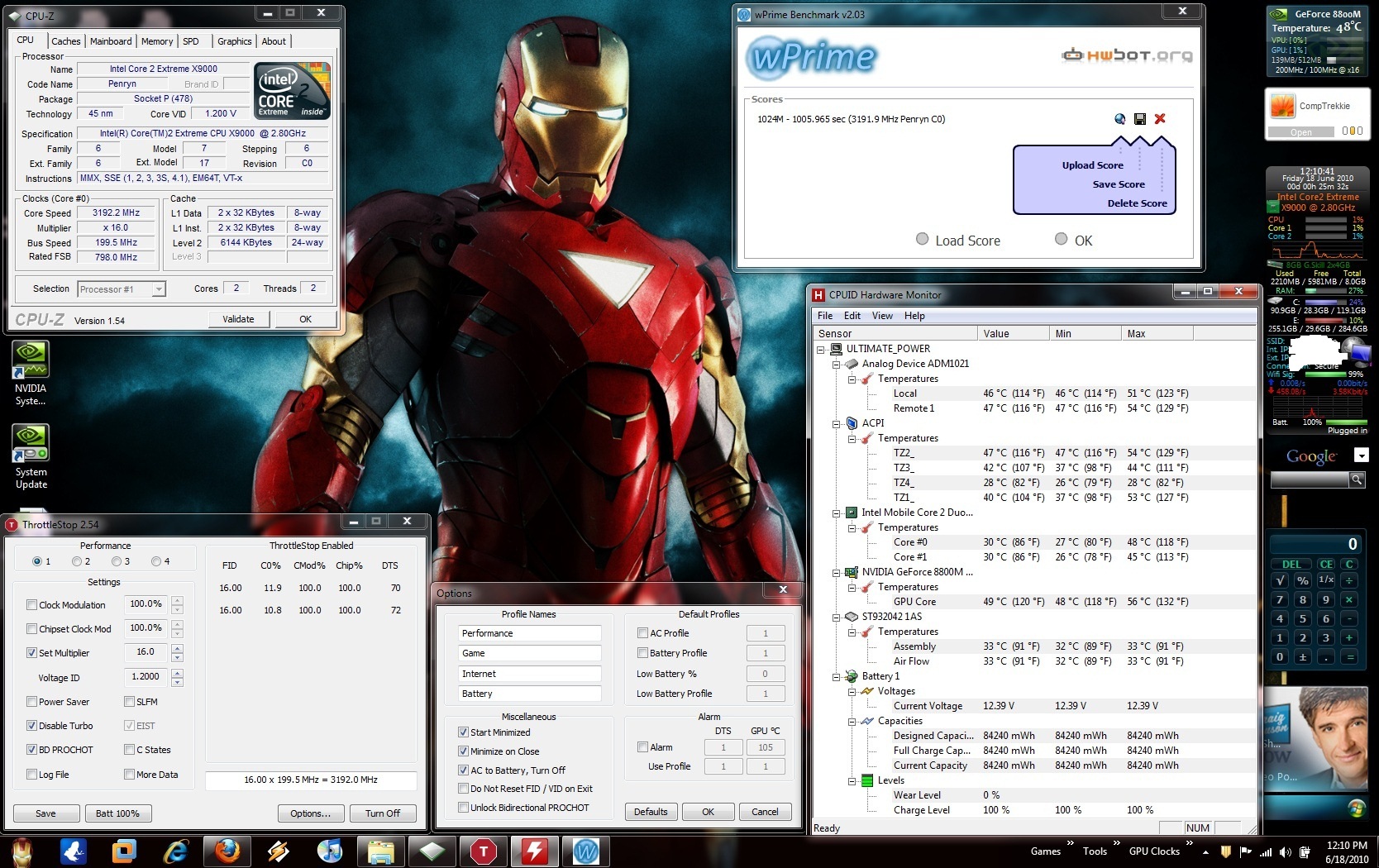
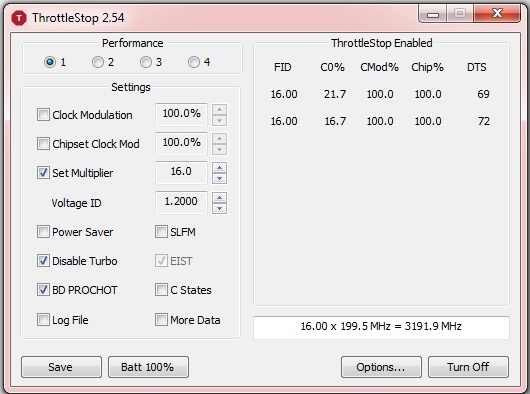
I can't help you with your first request but ThrottleStop lets owners of Extreme CPUs unlock both the multiplier (FID) and the voltage (VID). No bios support is needed. This is a feature of Intel Extreme CPUs and now there is finally some software available that lets you easily unlock and significantly overclock these CPUs.
ThrottleStop 2.54
http://www.mediafire.com/?mnznfjoy2yy
Here's a thread over in the Acer section that explains what you need to do.
http://forum.notebookreview.com/acer/489140-how-unlock-core-2-extreme-multiplier-windows.html
I haven't heard from any HP owners yet so if you have an HP laptop with an Extreme CPU, post your results. -
I read a thread earlier in the week about it working on an Inspiron 1720 with x9000. Overclocked to 3.4-3.6ghz
Who made the program? Is there an actual website? -
I'm the author of ThrottleStop in case my avatar picture didn't give it away.
I haven't done an official web page for it yet. I like overclocking and programming a lot more than web page development so I always leave that to the very end. If you click on the above download, it includes a simple html document with some basic documentation. Just hit the F1 key while ThrottleStop is running for a few more details about this program.
There have been many happy Dell users and Alienware users and Lenovo users and MSI users and Asus, etc. so I thought it was time to share it with the HP users. It should work without any issues. It's not rocket science unlocking these CPUs but it's always been undocumented by Intel. -
Well if it works out well, I'll make a sticky thread about it in the HP section. Or perhaps since it works for so many other notebooks, a sticky section in the Hardware upgrades subforum.
This has been long in the waiting.
Since some posters might be leery about d/l'ing from Mediafire or other media hosting sites that are notorious for piracy and malware, you might want to consider uploading to sourceforge: SourceForge.net: Download and Develop Open Source Software for Free -
Hmm I'm just trying some stuff with that program. I have a T8300 here in my HDX, no option to disable EIST.
So I cannot set the multiplier higher (normally 12, there an option for 13 but that doesn't work). But what I think is interesting, is that I can set the multiplier lower with that program. If I only could set it higher ...
Looks like I can influence the multiplier downwards, but not upwards. -
Great thanks! I confirm it works flawlessly with the x9000 Core2 Extreme in the Dragon. I am able to set multiplier to 16 (= 3.2 GHz) with no ill effects. Win7 WEI score for the processor increased from 6.4 to 6.6 and so did the memory score. CPU-Z correctly reads the new frequency (3192.0 MHz). Didn't change the default voltage. CPU temps remain virtually unchanged (only ~ +1 or +2 oC at max. stress).
![[IMG]](images/storyImages/capturehn.jpg)
GPU: 620 - 889 - 1550
Driver: 186.91 (Win7 x64) -
Could you run a quick wprime 32 test of before and after? Downloads | wPrime Multithreaded Benchmark
Also a 3Dmark06 before test to see the CPU Component score increase.
Looking to get a raw performance increase percentage. -
Will do. I've just repeated 3DMark06 immediately after a reboot:
![[IMG]](images/storyImages/capturecfd.jpg)
Previous 3DMark06 @2.8 GHz was about 9800-9900 (can't remember exactly as this was done >6 months ago).
However, the very demanding NVIDIA Medusa 3D stereo demo now runs much more fluently in s tereoscopic mode (noticeably smoother motion) than before the CPU overclock (the improvement is much more than the 300 gained extra points in 3DMark06 would suggest). -
You can probably take it to 3.4-3.6 Ghz if you increase the VID. Wprime will help you test stability of the overclock at those levels.
-
Frig'gin awesome!! As soon as I get home tonight i will try this out. One step in the right direction. I see kindheart got it working! Can't wait! I think I am going to have to leave early today.

-
Thank you much Cab files huh.. Hmm. Let's see how this works.
-
Whoa no way! MAN I need to get me an HDX with the X9000 in it. Or does it work with any CPU?
-
Intel extreme processors only.
-
.. Nobody has sold an HDX with the X9000 for MONTHS. Mother of biscuits..No body wants to give theirs up:/
-
You physically/manually upgraded to an X9000 right? -
I did. I managed to get and OEM off Ebay back in the day. I have details way back in this thread.
-
He bought his CTO with it I believe. Wouldn't matter if it was CTO or upgraded later though.
-
Yea I recall that you did, but I was just wondering if Kindheart did the same thing as well, unless of course I screwed up the whole quote thing.
Performance wise no, but warranty wise it would.. Bah.. Man, this is wonderful news though! -
Warranty-wise, it wouldn't really matter either. Upon discovery (very unlikely event considering how the HP script tech monkeys work) they wouldn't readily void the warranty because it could be a mistake in how they recorded the CPU for your system.
-
I can't take the waiting! lol I am rushing through my project at work right now I have a few servers to build. Should take 1-2 hours then I am heading home.
If I get it working I will be sure to post plenty of data and pics!
-
x9000 @ 3.4GHz (x17 - 1.2750V)
![[IMG]](images/storyImages/captureeb.jpg)
P.S. Win7 WEI score is now 6.7 for the CPU (and for memory). -
Awesome. I was hoping for 3.4-3.6 range.
-
Really.. hmm.. Anyone send in an HDX with manually upgraded specs and didn't have them send it back? It's just that I have a few minor things I want done, like replace the Blu Ray drive, the casing in certain places.. and would rather spend the 189 one time to get all of it done by them instead of it costing me more and having to open it up myself.. but.. hmm. if I got the X9000 and did it myself I guess I could replace the parts at the same time. -
Nope, was HP factory installed (not a CTO either but retail model).
-
Intel only lets you adjust the multiplier higher on their Extreme CPUs like one of these.
Intel® Core?2 Extreme Mobile Processor Family
The T8300 supports a feature called Intel Dynamic Acceleration (IDA). The default multiplier is 12 but it can automatically overclock and use the 13 multiplier when only a single core is active. That's why the adjuster goes that high in ThrottleStop when using a T8300.
Here's how that works. On a Core 2 mobile CPU when one core is active and the second core is in the C3/C6 sleep state, it can use the IDA multiplier which is 13. As soon as the second core wakes up to process some background activity, the maximum multiplier immediately decreases to 12. When the background task is taken care of, the second core goes back to the C3/C6 sleep state so the first core can resume using the 13 multiplier. This back and forth transitioning is happening a hundred times a second. ThrottleStop uses high performance timers within the CPU so it can very accurately determine what percentage of time that IDA mode was being used.
Here's an example of a T8100.
![[IMG]](images/storyImages/hyperexample.th.png)
This CPU has a default multiplier of 10.5 and an IDA multiplier of 11.5. If you run a benchmark like Hyper PI and you adjust it so it is only running on 1 core, then it is easy to see if IDA mode is working correctly on your laptop. You can see ThrottleStop reporting a high multiplier on the core that is doing the work (high C0%) and a low multiplier on the second core that is mostly asleep.
The 11.40 multiplier is an average multiplier during the previous one second sampling period. What that means is the CPU was able to use the IDA multiplier 90% of the time and had to drop back and use the 10.50 multiplier the other 10% of the time.
( 11.50 x 90% ) + ( 10.50 x 10% ) = 11.40
The less background activity you have running on your computer, the higher percentage of time the second core can go to sleep and the first core can use the IDA multiplier. The same thing happens on the newer Core i CPUs but Intel renamed this feature turbo boost. It works exactly the same and ThrottleStop can be used to monitor each thread on the newer hyper threaded CPUs like the Core i7-720QM mobile CPU.
If the Disable Turbo box is clear in ThrottleStop then your CPU and bios should support IDA mode. If that box is checked and you can't clear that box, then your bios has blocked this feature.
Most of the Dell laptops allow you to disable EIST (SpeedStep) in the bios. If you can do this then it is possible to trick a Core 2 CPU and lock both cores at the IDA multiplier, 100% of the time, even when both cores are fully loaded.
Then you can do this and get a little performance boost.
![[IMG]](images/storyImages/ts3m.th.png)
On a T8100, this trick gets you an approximate 9% boost in performance on a benchmark like wPrime. -
Nice ok. Double take.. wait what? It wasn't CTO, but WAS INSTALLED by HP? How'd you get that to happen? I wanted an X9000 from the beginning but could never seem to attain. So what would you say is the actual difference in how you navigate through and use your HDX with the X9000 overclocked, as in, could you post your impressions from just your observations where you see a noticeably see a difference with it being overclocked? And I take it it's stable at the higher overclock setting?
-
Only graphics-intensive programs are benefiting such as the NVIDIA Medusa 3D stereoscopic demo. All usual programs were already superfast at 2.8GHz, loading almost instantly, so 3.2/3.4 makes very little noticeable difference.
-
Thanks for that honest assessment.
-
So what percentage real-world gains are we talking here over the t9300?
-
I am home now and currently have the x9000 running at x16 = 3.2Ghz. I am running wPrime as we speak it is at 57%.
All looks stable so far. Temps are the same as before. 28-30c idle 40-48c at 100%.
I will post pics when it finishes and then I will play around and see how high I can go and still be stable and keep temps where I want them.
After that I will try some of the games that usually run my CPU at 100%. Mainly Need for speed, GTA IV, and Crysis that I can think of off the top of my head. -
If you get an X9000 that is able to get up to 3.4ghz, you will see a ~35% increase at max CPU util. ~28% at 3.2ghz which nearly all x9000's are capable of.
That's about real world @ max CPU util. Encoding and adobe products would see more or less that increase. Otherwise for things like Office, web browsing, general tasks he difference will be imperceptible. Games won't really benefit all that much (35% I mean) either consider that the 8800M is no slouch. RTS games would. Perhaps games like Assasin's Creed would see a nice little boost. -
Box cannot be cleared, so it is blocked by the BIOS. Well, going to use the program anyways to underclock my CPU when I'm not running "heavy" applications.
-
Here is my first go, there were no errors in wPrime. Next to find the safest limit. I like the options that are given in the Throttlestop program. I left the options window open
Attached Files:
-
-
Cool, thanks for the response!
-
Go comptrek, go comptrekkie go!
(Hit that 3.6ghz mark)
Btw, I you could, run the Wprime 32M tests for comparison purposes. -
Humm... Looks like I may be stuck at x16. x17 causes a BSOD. I need to bump the VID a bit, for some reason I do not have the check box to change the VID value. It is only at 1.200v.
I am I missing something. I saw that kindheart set his to 1.2750v. odd. -
You must unlock your CPU with the right mouse menu option so the FID and VID can be adjusted higher. Don't click on Save until you find some values that you are happy with. If you accidentally save some values and then change your mind, you will need to use the Reset CPU menu option to restore your CPU to its default maximum settings.
Once the CPU is unlocked using ThrottleStop, you don't even need to run ThrottleStop. Your CPU will remain unlocked until the next time you boot up and other programs including RMClock will be able to access the higher multiplier and VID.
The VID adjuster is a requested voltage. The Intel design spec means that all motherboards will give your CPU less actual voltage than what you request. The difference is typically around 0.05 volts at full load. CPU-Z and HWMonitor rarely report actual core voltage on laptops so don't be afraid to bump the VID up a notch or two. 3500 MHz seems to be a good setting with the appropriate voltage. -
Reselect 'Unlock...' (right-click). Then increase the voltage to 1.2750V.
-
Haha please do man! This is so cool
Man I'm a freakin geek..
How does one unlock the CPU in the HDX?
Question for 2.0 and anyone else: So this could help with the 280 you think? It was speculated that the voltage was an issue no? -
It's an Extreme secret that Intel didn't want anyone to know about so I have to keep quiet.
-
I already right clicked and chose "unlock max FID/VID" that allowed me to set the Multiplier but not the VID. I have attached a pic. There is not even an option to put a check net to VID and change it.
*Edit* Ok odd. As Kindheart said it just took a few times of clicking unlock and it worked. Cool back to playing!
Attached Files:
-
-
After you do the Unlock, is it not possible to increase the VID adjuster higher?
-
I edited my last post. Oddly it took a few times clicking lock then unlock and it let me now.
*EDIT*I will try and do edits instead of flooding the thread with extra post. I just do not want anyone to miss anything. I just set my VID to 1.2500 and so far x17 is stable. I am running wPrime to see how stability and temps are. so far it looks like +2c to idle and 100%.*EDIT*
*HP HDX DRAGON Owners Lounge, Part 1*
Discussion in 'HP' started by J-Bytes, Sep 14, 2007.


![[IMG]](http://img3.imageshack.us/i/hyperexample.png/)
![[IMG]](http://img707.imageshack.us/i/ts3m.png/)