Problems? See this thread at archive.org.
I only have an Extreme CPU in my desktop so I'll go start that up to see if there are any problems with this feature. It used to work OK.
-
-
Here are a couple of options that you might be interested in. To get ThrottleStop to report the core temperature instead of the DTS column just add this to the ThrottleStop.ini configuration file;
TJMax=105
To get it to report your Nvidia GPU temperatures just add this:
GPU=1 -
Nope. Different voltage regulator.

-
Thanks I will play with that.
I read the info on your site that helped me to understand all the different check marks that I was not sure on.
BTW if anyone missed my last edit so far x17 is stable @ 1.2500 VID. I am running wPrime right now. Next x18!!! :-D -
Every time ThrottleStop is started, the maximum FID and VID will be locked and you will have to manually unlock it to go higher than your previously saved settings. It was done this way as a safety measure so you don't accidentally increase the multiplier and cause a BSOD.
Once you have found a safe maximum that you are happy with then you can save that and every time ThrottleStop starts, it will automatically unlock your CPU and use those settings.
The adjustable VID works well on my desktop CPU.
![[IMG]](images/storyImages/unlock.png)
The skies the limit, almost. I think the maximum VID for mobile CPUs is 1.5000 volts.
The F1 keyboard key should bring up the documentation when ThrottleStop is running. -
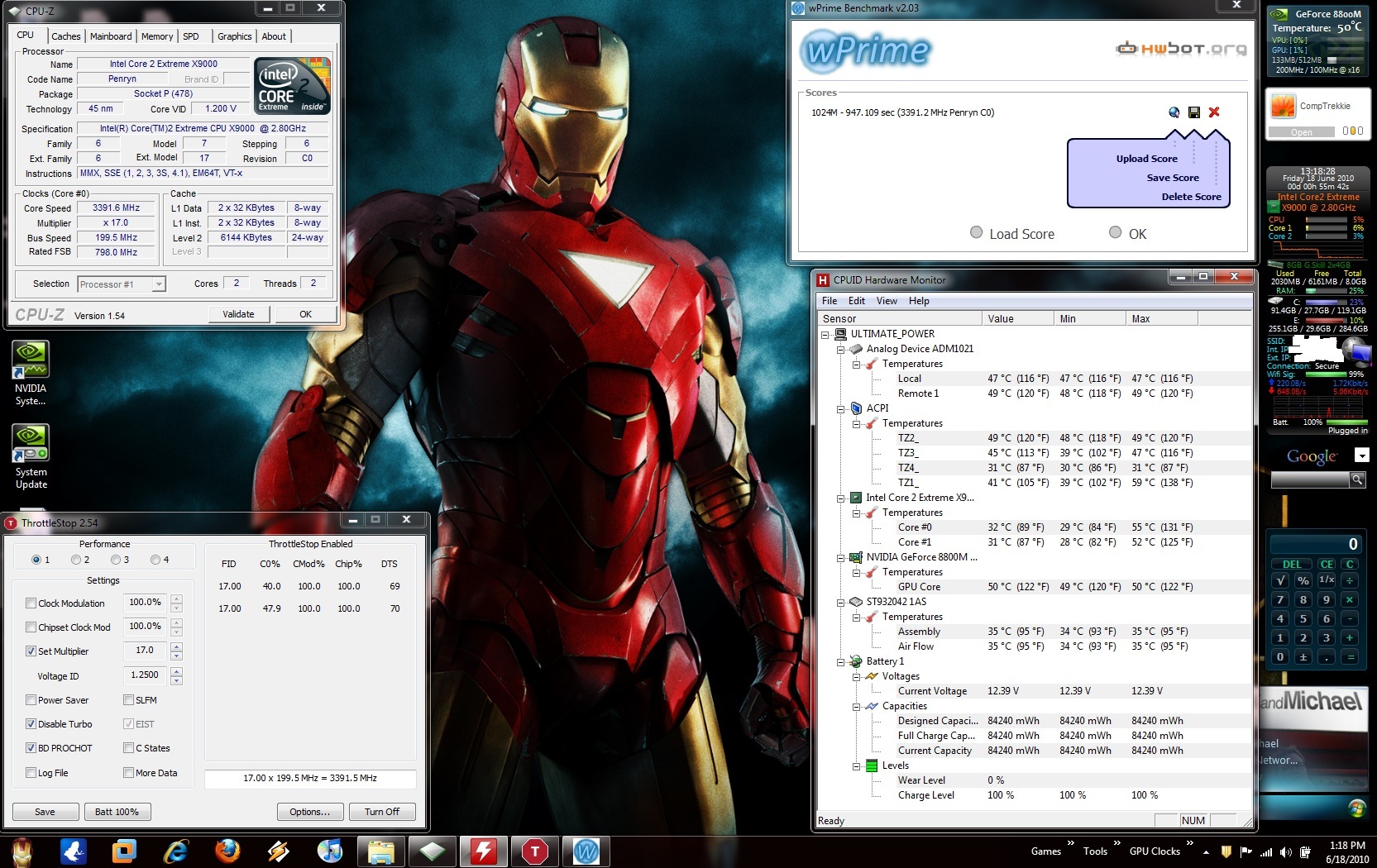
Alright x17 @ 1.2500VID = 3.4Ghz is stable. The idle temps changed by 1-2C and the 100% load temps changed by 5-6C. You can see the effect of a little voltage change. Still acceptable to me.
Next x18!!
Attached Files:
-
-
I found on the Dells that idle temperatures barely change when doing this. They spend most of their idle time in the C3/C6 state where FID / VID settings have virtually no affect.
At full load, extra voltage and MHz equals more heat for your CPU but at idle it's not that bad at all.
One thing you can do is create a Battery profile when using ThrottleStop. As soon as you pull the plug, it can automatically switch to a profile that doesn't use your overclocked settings. -
These don't seem to be working for me.. I extract the files to the NVIDIA folder, but when I double click on the setup it doesnt work.. Hmm..
-
Haha good thing we know that it can and does work Good enough for me.
-
That is definitely something I plan on doing.
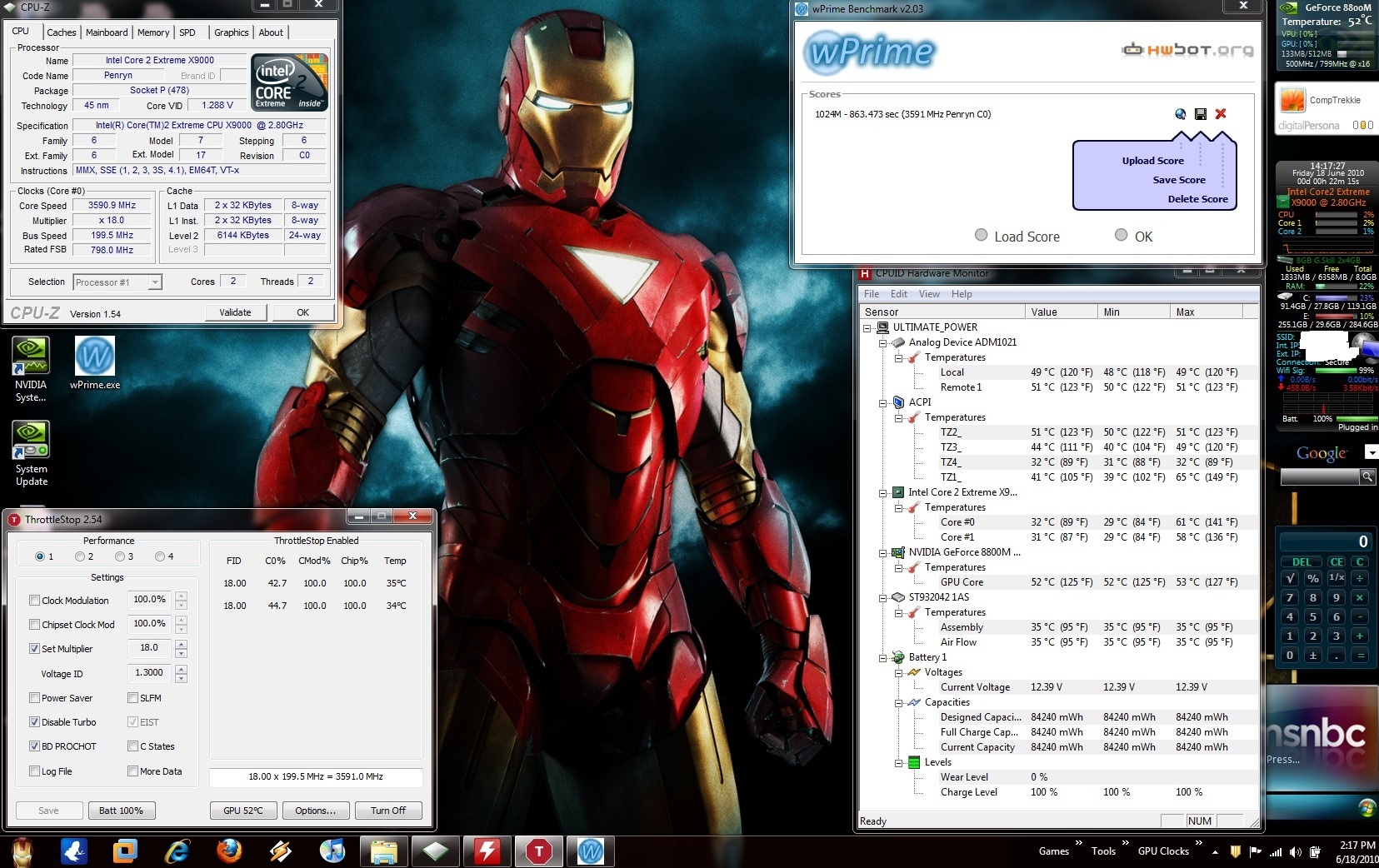
BTW x18 BSOD'd @ 1.2500 and 1.2750 had to bump to 1.2875. So far it is stable at x18 we will see the effect on temps. This is about the max I would want to go voltage wise. At least on a normal basis. 1.2500 is more where I would free comfortable to be on a daily basis. But I am still curious how far I can go and still be stable and at decent temps.
Something else I always notice is that Core #0 is faster and runs hotter than Core #1. It finishes wPrime 30sec faster as well. -
Most users need a VID setting up around 1.350 to be stable at 3600 MHz. Sounds like you've got a good CPU. 3400 MHz to 3600 MHz seems to be the practical 24/7 limit for a laptop. I've seen as high as 4333 MHz on a QX9300 but that was definitely a CPU-Z Validation suicide run with the VID setting as high as it could go.
When using ThrottleStop make sure the Minimum processor state is set to 100% in the Control Panel -> Power Options. If you like low MHz and VID at idle then you can use the Power Saver option but to be honest, that doesn't accomplish too much in terms of actual power consumption.
You can use the Windows Performance Monitor to measure Battery Power Usage and at idle, you will see what I mean. -
Yes, it is, and no noticeable effect on temps. Perfect setting.Last edited by a moderator: May 8, 2015
-
Here's some Intel specs:
![[IMG]](images/storyImages/specsz.png)
You are giving new meaning to the term Intel Dynamic Acceleration so I wouldn't be afraid to run the IDA voltage 24/7 but you'll have to let your conscience and your lap be your guide. When you consider the vdroop that Intel builds into their designs, you will need a little higher VID than the above to end up with that actual voltage. The absolute maximum voltage that Intel recommends is 1.45 volts for a Core 2 mobile CPU but that's not where anyone should be 24/7.
With this new trick, the ridiculous ebay price for an X9000 is only going to go higher.
-
I am finding that out. @1.2875 it was fine at idle but could not finish the long run of wPrime. I am currently @ 1.3000 and wPrime is at 40% we will see.
After looking around I found that 1.3000 to 1.3750 is the norm that most need to be at with a x9000 @ x18/3.6GHz. I was surprised to see most default VIDs for the laptops I looked at was 1.3000.
Also I have had my Hardware profile tweak first thing after I bought it and min CPU 100% on AC is one of them.
This is my first time OCing a Laptop CPU. I usually mess with desktops and they run 1.3 to 1.5 stock and I have pushed 1.8 in the past with no issue. The HDX stock of 1.000 to 1.2000 fooled me. It is just their way of saving power since they did not think anyone would OC the CPU.
*Edit* x18/3.6GHz @1.3000 is fully stable. Idle temps are the same, it did add 5c to 100% load though. But it is still within safe limits. I am going for the gold trying for x19. If this works then I think I will have 3 profiles. A battery profile that reverts to stock, a normal profile that runs @ either x17 or x18 depending on the next test, and a crazy mans profile @ x19!!!
Here is the customary pic for prosperity:Attached Files:
-
-
Just noticed that Windows boot time is significantly faster when you restart @ 3.4GHz! (10-15 seconds less) Can someone think how to make this run as a service on startup (to be active on cold boots). I tried Exe To Service but it didn't work with ThrottleStop, although it is working with a Puma Undervolting Utility on another machine with an AMD processor.
-
So your program is a winner then.
I would suggest that you start a new thread about it. If I start it, then only I or another mod can edit it. But if you start it you or any mod can edit it.
Anyway, once you finish the opening post, I can have it made into a sticky thread. And you can link to it in your sig. I think the best place for it would be in the Hardware Components and Aftermarket Upgrades section.
Think of it as "free" webspace.
Also, I'd suggest using Sourceforge.net as the file host. Gives it the proper credibility. You can list mediafire as a mirror.
Try to include some pictures(screenshots) in the opening post of the new thread. You can also link to the other threads that detail success.
I leave the rest to your discretion. -
I originally wasn't sure if this would work on all laptops with Extreme CPUs but so far it has been a complete success. I might get TechPowerUp to host it once I have the time to finalize a version. It finally has most of the features that were important to me but I still have a few minor things to add like a few more details in the system tray pop up message.
I wasn't sure what forum to stick it in so people would find it so I've started up threads here there and everywhere. The Acer thread was the original one.
http://forum.notebookreview.com/acer/489140-how-unlock-core-2-extreme-multiplier-windows.html
but I'll think about doing a new main one in the hardware section when I have the chance.
I don't know anything about creating a Window's service. ThrottleStop uses the third party open source WinRing0 driver to get legal access to the magic registers in the CPU so this might not be possible. I mostly use standby mode so I don't think getting this to start up a few seconds sooner will make that much of a difference.
Just think, it will give you more to look forward to when Windows finally boots up and you can get a free boost in performance.
CompTrekkie: Thanks for the pics. At full load, is ThrottleStop and CPU-Z reporting the same VID? When I saw that they were different that's when I thought that you didn't have the Minimum processor state set to 100%. You're better off setting that to 100% so ThrottleStop can be in charge without having to fight against Windows.
All Intel Core 2 CPUs are pretty much the same. Intel adjusts the FID / VID and on chip cache so they can stick them in different boxes but there isn't a lot of difference between any of them. The ones that can run reliably at low voltage usually end up in the Extreme mobile boxes. Your CPU sounds like one of the better ones so far. -
Hi 2.0,
Sorry about the delay in replying. I've been busy as all hell for a while.
HWMonitor reported the battery wear level as -2147483648 %. As soon as I pulled the AC, the computer died. It does look like this battery was DOA.
I hope it's not a problem to have HP replace it. I bought it off of HP's U.S. website, which doesn't ship to Canada (where I am), so I had it shipped to a friend instead to forwarded it to me.
Thanks.
[L] -
Alright I have completed all my testing. Here is a summary:
First thank you very much unclewebb You stepped up where HP was draggin their feet.
Ok to the numbers:
Keep in mind these are my numbers at my rooms ambient temp and my Laptops hardware/software. Results are likely to vary.
x16 - 3.2GHz is stable with no VID change and no change to Temps.
x17 - 3.4GHz is stable @ 1.2500 VID with +2c (~32c) change to Idle temps and +5c (~55c) to 100% load.
x18 - 3.6GHz is stable @ 1.3000 VID with +2c (~32c) change to idle temps and + 10c (~60c) to 100% load.
x19 - 3.8GHz is stable @ 1.3500 VID with +5c (~35c) change to idle temps and + 18c (~68c) to 100% load.
While x19 was stable I do not feel comfortable running the CPU at that VID and temps. It is nice for bragging rights but I will not have a profile for it.
I am very happy with the results and will most likely run it @ x18 most of the time with a battery profile set at default settings.
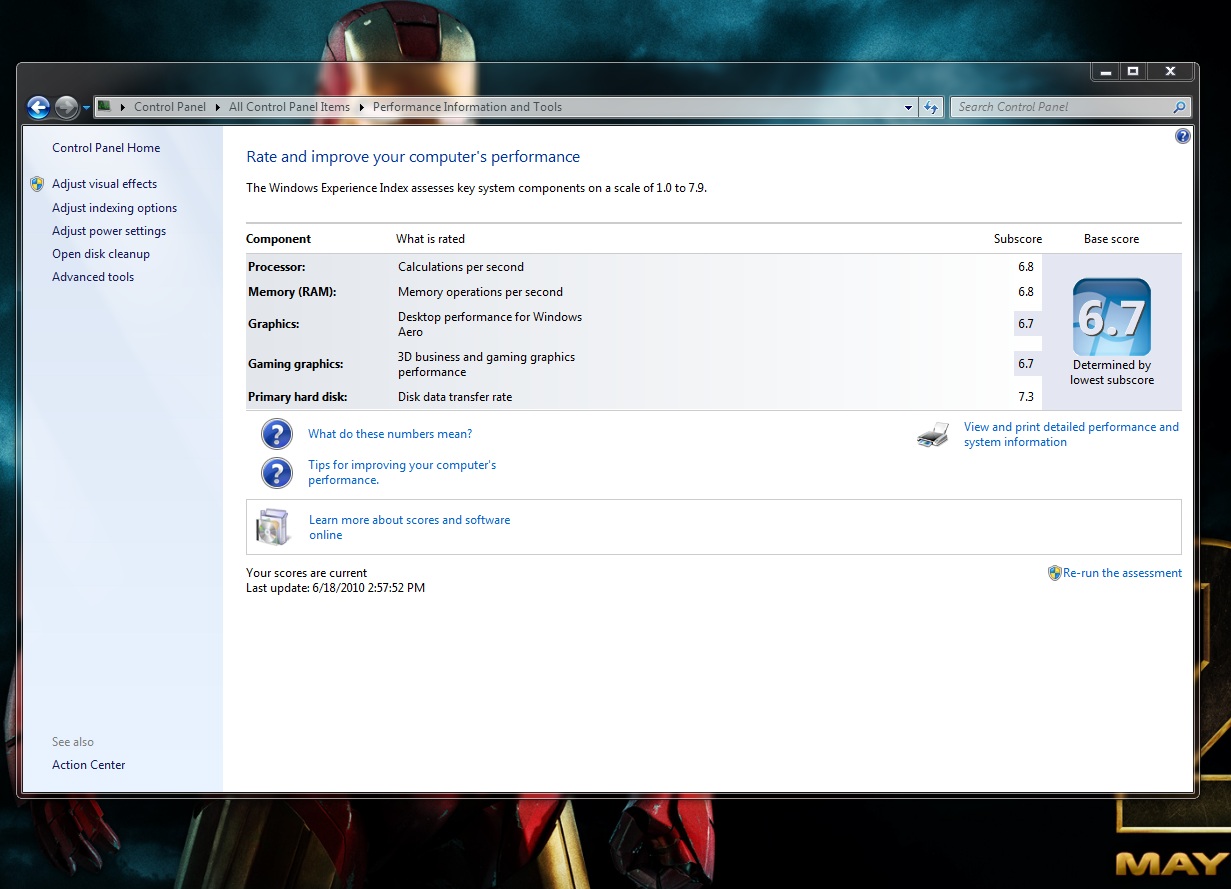
My WEI for my CPU is now 6.8! My overall WEI is 6.7 being held back by my GPU as seen in the attached pic below
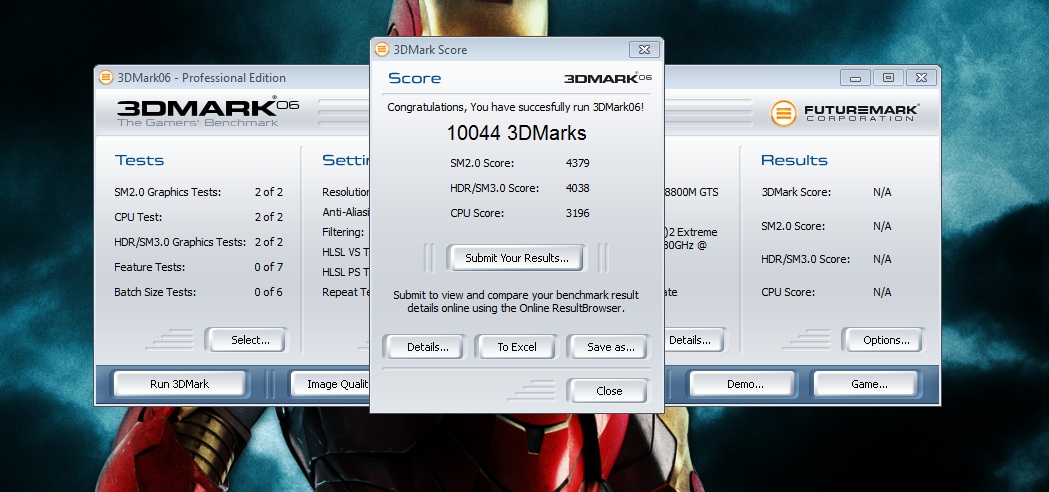
My 3DMark06 score is crazy 10044. My CPU score went from 1864 to 3169. I attached a pic of that as well.
*edit* I also notice that that none of the before mentioned games use 100% of my CPU. Each one is a bit more responsive to my inputs now and do not have the occasional jittering. No change in FPS of course. But I was still having some issues especially with Need for Speed skipping at some times and ignoring some of my inputs. This was greatly improved when I moved from the t8100 to the x9000 but now it is truly gone. Since the CPU is never used at 100% in any of my games the max I have seen it run at is 55c @ x18.Attached Files:
qxfci likes this. -
-
Very many thanks one more time! The AMD undervolting utility I mentioned uses the same WinRing0 driver (but is x64). Anyway, it wasn't to boost boot time (since on a cold boot, processor speed will be set to 3.4GHz later in Windows satartup when services start running), but to have a 'set and forget' automatic way to run it. At x17 and 1.2500 (with 'Power Saver' ticked), it runs like a dream, overclocking to 3.4GHz on demand. But even without an autorun on startup option, it remains a brilliant and well-executed piece of software and I have already pinned it to my Win7 taskbar.
-
Oddly I noticed that CPU-Z never reported the correct VID. Most of the time it just says 1.200 and once or twice it change to 1.288.
But I know ThrottleStop is changing the VID because if it were at 1.200 or anything below 1.300 at full load Windows would instantly BSOD. I figure it must be a bug in CPU-Z. I will try a few other programs I have and see what they report.
I double checked and under advanced setting in power management - Processor power management - maximum & minimum Processor state are set to 100%.
But even with this set before I used Throttlestop the CPU multiplier would still drop down from x14 to x13 occasionally like it was fighting it and the VID would change from 1.200 to 1.000. But when Thrittlestop is running it never changes.
I have stuck a short-cut in my startup folder so it starts each time I run windows. Thanks again!!
unclewebb will the "power saver" throttle the VID along with the multiplier? -
1. Tick Power Saver to achieve the same effect.
2. You cannot run a program requiring elevation from Startup. (Not sure what the behavior is if UAC is disabled, but I never disable it). -
Wow, Throttlestop!! And thanks CompTrekkie for doing the runs. That's simply amazing from the HDX's lifespan standpoint.
+ -
I have UAC disabled which allows it to run without prompting for the startup folder.
-
Go to computer>manage>device manager>display adapters>your gpu>update driver>browse my computer for driver software>chose file>next
EDIT: 197.45 is definitely the coolest-running I've had yet (even more for HDX18). Thanks Hovercraftdriver and 2.0!
+ -
I just put a post in the under volting thread to show what reducing the FID and VID does at idle on the 45nm CPUs.
http://forum.notebookreview.com/6369641-post5060.html
Basically nothing that I could measure either with software or a Kill-a-Watt meter. Power Saver does drop the FID and VID at idle but in my opinion on the 45nm CPUs, this is pointless. At idle these CPUs are designed to spend most of their time in the C3/C6 state where FID/VID adjustments don't make any difference. The original 65nm CPUs used to work differently so FID/VID at idle was more important for them and made a measurable difference.
You'll have to do some Battery Usage tests similar to what I did to see if the HP is the same as what many Dells do at idle.
CPU-Z usually gets the VID correct so I'm not sure what's happening. Another test I like to do is I run Prime95 Small FFTs and then once it stabilizes, I adjust the VID higher. If the core temperature goes up, that's a pretty good sign that the voltage has also gone up, regardless of what CPU-Z is saying. The default multiplier is fine for this sort of test so you can move the VID up and down a few notches to make sure it is working correctly. Your results at 3800 MHz already proves that it works just fine.
The C States can cause the multiplier to wander around at idle. CPU-Z was never accurate at showing this. As soon as ThrottleStop starts it disables this so the multiplier and VID should be consistent at idle. If you want it to wander all over the place then enable the C States option. It's another feature that doesn't impress me much because I can't measure any improvement in power consumption at idle whether this is checked or not.
Great to hear there are some more happy users of ThrottleStop. Very happy users.
One user put ThrottleStop in the Task Scheduler and selected the option in Triggers "At start up". This will run in the background and won't give you any access to the GUI. It might be a good option for the set it and forget it types. When minimized to the system tray, ThrottleStop is very efficient and won't consume a lot of memory or CPU cycles. If you would prefer an INI file option so it unlocks your CPU and then immediately exits, that would be easy enough to do. You don't need ThrottleStop running all the time if that's all you need it to do.
You better adjust your sig. 3.8 GHz looks a lot nicer than 2.8 GHz. -
Awesome, thanks for the feedback. So you're saying you see a difference even without it being at 100% CPU usage then? That kind of stuff, the choppiness, jittering is what I want GONE from video games and video playback/streaming.
-
It makes a difference in all the games that were having issues. Of course if what you were doing was not maxing out your CPU then it will not matter and if the GPU is the bottleneck (like in a few of my games) it will not change that either. I will have to see how fast I encode a AVI to DVD now.
Also I just did a few test runs with Throttlestop in my startup and wholly crap is it faster. When I got my SSD it changed my startup time from login to ready to use desktop from 5-8min to 8-10 sec. It is now down by at lest 5 more seconds. it is almost instant now. Beforehand I could see the CPU hit 100% in my sidebar gadget and could tell the CPU was now the bottleneck. It still is compared to my SSD but it really is almost instant now. Keep in mind I have a lot of stuff that starts at logon. Just to mention a few Steam, Symantec, Skype, Xfire, DropBox, fraps, vista switcher, EvEMon, Intel RST, and all my sidebar gadgets. there are more but you get the idea. this all now happens in ~5 seconds!!!! I had to restart a few time it was so exiting. lol -
This is at x18?
+ -
Sweet. Ok I thought you were saying that it made a difference even without it being 100% CPU usage. I've also been noticing that some of my conversions of videos I have, like Howls Moving Castle has some ghosting in movements when characters move fast.. really annoying, but most if not all others don't have this. I'm thinking it was because the cpu was overloaded or something and it messed up the conversion. I wonder how much better it will be with an X9000 overclocked... If you have any feedback about your encoding that would be great to see. You're really good about how you detail your results. Thanks much.
Lol. Wow, that's wonderful I have quite a few things running the background as well so that's definitely good news. It IS exciting! Man so basically our HDX's lifespan was kicked up a couple years or so I figure then even without an upgraded stable GPU, yet..
-
That is correct sir.
-
unclewebb, FYI SiSoftware Sandra correctly shows my voltage at 1.300V.
-
Shoot me a PM when you do post up a thread or if I can be of any assistance in the interim.
A job VERY well done!
Props!
-
CompT,
Could you run a Wprime 32 quick test @ 3.6ghz? want to be able to use it as a comparative. -
Yep, dead.
They will probably make you run a battery test before they do let you return it. You can run it now to see what error code it reports.
HP Battery Health Center
They'll ship the new one to the address on record. So it will probably have to go to your friend's addy unless you can sweet talk a rep into sending it to Canada. -
Sure thing:
Here is @ 3.6GHz
![[IMG]](images/storyImages/Wprime32x18.jpg)
Here is @ 2.8GHz
![[IMG]](images/storyImages/wPrime32x14.jpg)
-
Hmmm. It won't install on Vista 64, even when I run the setup as administrator. It reports that loading HPQNT.DLL fails.
I'll hope for that. Thanks.
[L] -
I uploaded my wPrime score. Here is a link to see where it ranks:
View Score HDX Dragon 20.1" | wPrime Multithreaded Benchmark -
Try running it in compatibility mode for win XP. Right click on the sp file, choose properties, then click on the compatibility tab.
See this website for an illustration: HP Battery Check for Windows 7 Genobz Schatz -
Thanks brother. That would be a 40% boost in perf @ 3.6ghz over 2.5ghz. As fast as an i7 720QM! -
Thanks it worked when I unpacked it with winrar to a created folder in the NVIDIA folder, and then did it running it via Administrator. Which Physxs should be used with this one if I may ask, since it apparently doesn't come with one. Looks nice so far, but I guess there's some sort of fix for the brightness somehow? -
Holy moley..! Man.. I needs me one of dem dere CPUs and/or a whole HDX with one already in it.:/ -
The performance difference really is night and day. Especially considering I started with a T8100 2.1GHz!!!
Upgrading to the x9000 is really paying off now.
-
What sort of difference do you observe with encoding/converting? -
The fix...
Brightness issue compensation fix for drivers higher than 186.91
Install, reboot. - Done.
Reboot again.
Set brightness in power plan.
Use F7/F8 to match that level. (there are 10 levels 0 - 100% with each increment being 10%)
Sleep/wake.
Use f7/f8 to adjust.
Sleep wake.
Log off or reboot.
If you need to adjust brightness later, adjust in power plan in 10% increments, then adjust to same with f7/f8. -
I missed this gem! LOL.
I should get a polite letter saying "thank you for your interest in HP" with nothing more substantive in a day or two in response to a follow up letter.
Even so, HP couldn't have outdone what unclewebb has done.
So it's all good.
-
If you do a wPrime run at 3.8 GHz, those Core i7 mobile CPUs are going to start getting worried.
View Score Intel Core i7 720QM | wPrime Multithreaded Benchmark
An old Dual Core crunching numbers and being competitive with a new Quad. No wonder Intel didn't want this overclocking secret getting out.
-
I had some time to really sit down and play some GTA IV and Need for Speed. It is amazing just how much the CPU makes a difference. I am not sure what it is about these games that they need so much CPU but even with my CPU set to 3.6GHz GTA IV will quite often max both cores out.
Before the OC my CPU would sit maxed out the whole time with GTA IV. I could not figure out why I could not get better than 22 FPS. I dropped almost all the graphic settings down and was still having issues. I just chalked it up to the 8800, it is part of the cause, but the CPU was the biggest problem. I did not learn this till I noticed how much better it was OC'd. I dropped the CPU back down to stock and noticed the CPU stayed at 100% the whole time. I had just learned to live with it with this game. Now I get 30-35 FPS will most high and a few medium. It is so much better to play now. Beforehand the windows on building would take a long time to render and all around lag and slow response made it hard to drive or fly.
It goes against the logic of the GPU graphic causing lag. My GPU is maxed most of the time as well with GTA IV. But there are times the GPU will be at 85% and the CPU at 100% Somehow they are codependent in this game.
The same is true with Need for Speed. Now it never hits above 95% CPU and usually sits around 85%. The GPU is the same. Now I never have stutter or laggy controls on even the most populated and fastest of turns.
Alright back to gaming! -
That is wickedly great!!
Sir, , did you stop at 19x because your VID is 1.2?
+ -
No at x19 it was 1.350 and was only stable for a short time. For long term it would have needed to be higher. Right now I am stable at 1.300 @ x18.
*HP HDX DRAGON Owners Lounge, Part 1*
Discussion in 'HP' started by J-Bytes, Sep 14, 2007.