Problems? See this thread at archive.org.
LOL.
So what are you running it at now and for normal tasks like web browsing, office and the like, what level do your fans normally run at?
-
-
I have kept it at 3.6GHz the last few days. That is were I plan to keep it at. I do have a profile setup for 3.8GHz to play around with sometimes, but unless I find a way to lower temps by 15-20c I will stick with 3.6GHz.
I have been keeping an eye on it the last few days and idle the temps stay at 32-34c, Browsing the web and writing/researching reports it will get up around 42-45c, and gaming it will usualy sit around 55-58c with occasional spikes to 65c.
I am not sure at what temps the fans kick into high gear because even before the upgrade I seldom ever heard the fans. My normal operation area is quite loud due to the close proximity of my server, desktop, and other two laptops and all being in the same 15'x15' room. Occasionally I will take it into another room or a friend’s house but I am usually gaming and the sound is so loud I would never know.
I will move it into one of my less noisy rooms and do some test. -
Oh yeah, I now have 3 spots under "Performance Mobile".
I did a few runs @ 4.0GHz
I fine tuned the process by closing down all background processes I could and finally reached a max score of 22.659!
I could set the multiplier to x21 and it would be stable as long as all I did was idle. lol
Well I am done stressing my CPU, definitely do not want to break it, they are to expensive now and soon will be impossible to get. -
Congratulations!
I knew with some tweaks you could capture the world's fastest dual core Performance Mobile slot.
It's always nice just to see what it can do and now we know. Thanks. -
WOW! Your right, I did not notice but the only higher scores are Quad-cores!
-
http://forum.notebookreview.com/hp-...dx-dragon-owners-lounge-1028.html#post6131973
Does anyone have the sp35581.exe (HP Quick Launch Buttons VERSION: 6.20 REV: F ) and can send me the file?
Icq 151839292
I'm happy about every help. Thanks. -
You can find it here in the softpack library: ftp://ftp.hp.com/pub/softpaq/
-
Sorry, got lost in the shuffle.
It's not difficult to swap out a CPU. For the Dragon it takes a bit of doing though since disassembly is not intuitive. Set aside 3 to 4 hours. You will have to follow the service manual: http://h10032.www1.hp.com/ctg/Manual/c01279508.pdf
Also find a tutorial on the web about applying thermal compound.
You will also need to update you BIOS to support the X9000. F39 is safest. F40 can be safe but has caused a number of bricked HDXs.
As for your GPU, since you have the older HDX you can't update it with that motherboard. You will need motherboard version: 464591-001. Then you can get the 8800M GTS card which will be a little more than twice as powerful as the ATI. Especially if you overclock it. -
Hey Dragon owners
I have a chance to pick up a BIOS bricked unit from a fool friend of mine. What would be involve in resuscitating it? Are we talking total MB replacement, or can the bios be re-flashed in some way for a non-booting unit? TIA. -
It can be done.
Here's how:
1. Download latest bios from HP and extract to a folder.
2. Extract either NV.cab or ATI.cab depending on your graphics card.
3. Open the ver.txt file and look for the string after '_ROM_' (for F.40 bios it was '68DVD').
4. Rename Rom.bin to 68DVD.BIN
5. Copy the 68DVD.BIN file to a freshly formatted (not bootable) floppy.
6. Remove battery from HDX.
7. Plug a USB floppy drive into the HDX and place the floppy with the bios file in it.
8. Hold down Win and B keys and turn on the power.
9. Release keys when floppy is accessed.
10. Sit back and wait about two minutes for your HDX to rise from the dead!
This would probably work with a CD or USB flash drive too
Otherwise, a mobo replacement will do the trick for $400+ -
Thanks, deuce. My buddy's out of town for a week or so. If I get The Dragon and get it revived, I'll post specs. I can see this place is a great resource.
Is there an easy way to search within the Lounge thread, and drill down to returning pertinent posts from the search? When I use the forum search, it just brings up the thread, and I smack myself on the forehead and say 'Duh!". I'm sure most things I'll want to ask have already been asked. -
Under the pages selection link bar, you should see "search this thread."
You can try it but sometimes it doesn't work well enough. And not for nothing, there's over 11,000 posts in this thread. And a lot of times we go off on tangents making thread searches difficult. That said, no one's going to "bite your head off" if you ask a question that has been answered a number of times. An up to date, tailor-made answer is generally better than an old impersonal one.
-
That's the one which isn't on the softpaq-ftp-server anymore...
For more Infos which softpaq this is...
http://forum.notebookreview.com/hp-...hdx-dragon-owners-lounge-846.html#post5541810
and the link to rapidshare isn't working anymore
Does anyone have the sp35581.exe (HP Quick Launch Buttons VERSION: 6.20 REV: F ) and can send me the file?
Icq 151839292
I'm happy about every help. Thanks. -
Introducing the 'Tangenticon' search nullifier or 'Importanticon' search emphasizer!
But really, it makes sense if specific posts received their own rep power so that a search would list them first. -
Damn! Mine's a 3-toed sloth compared to your numbers.. :cry:
-
A new OEM X9000 just went for $322 on ebay. If you wanna get on the wPrime leader board, that's what it will cost you. That plus one HP HDX Dragon. With a little help from ThrottleStop, you too can go after a world record for the fastest wPrime time in the Dual Core Performance Mobile category.
His 4 GHz runs are even faster. -
I don't have a clue how to use this forum so please excuse me. This question is for CompTrekkie.
I recently replaced the motherboard on my HDX Dragon and now my PC won't recognize or charge the battery. The battery icon has a red X. I've run the HP Battery Check and it won't give a reading on the battery. I purchased a new battery and that didn't help. The PC runs fine with A/C power but zilch with the battery alone. Any help would be appreciated. -
@ Millo
Unfortunately, you have your OS is not specified!
Under Vista, QLB 6:20 F2 (sp35581) no problem. (HP Quick Launch Buttons Critical Security Update (sp38166 version 1.00 A not forget!)
Under Win 7 64 bit it is difficult to install.
With me it's going great. It also requires a very specific installation.
If you do something wrong while you have a huge problem.
6.20F2 can then be very difficult to remove from the system.
Because of my bad English I can not help you then!
Advantage of the installation:
1st any quick buttons and remote control buttons work perfectly (except for Blue TV DOL)
2nd very nice acoustic feedback buttons (with no other version available)
Installation only after complete removal of all previous versions in the Device Manager QLB possible.
1.Device Manager / input devices "QLB" and "HID QLB uninstall and delete drivers!
2.Device Manager "search for new hardware"
If QLBs once again appear to run uninstall!
All this until nothing appears on the QLB.
3.Reboot
4.Device Manager to check QLB
5.SP35581 start and unpack in "swsetup" allow (cancel installation)
6.Go to Root/swsetup/sp35581/disk1/setup.exe properties file and set the compatibility mode on Vista.
7.Run "setup.exe" This may be a security warning and unkompatibilitäts warnings. These can be ignored. Program in any case install.
8.Reboot
9.HP Quick Launch Buttons Critical Security Update (sp38166 version 1.00 A) install normally.
10.QLB 6.50.16.1 install over your existing version! (This one is updated without which the function keys would not work)
11.restarted two times (after missing the first reboot still unassigned QLB buttons filter in the device manager)
12.HP Quick Touch software (version 1.00 C install sp37799) normal. (Without the bass and treble are not adjustable via quick keys)
Caution: Never "Quick Touch" in the Control Panel to start!
Here's the acoustic feedback keys lost forever! A sound selection would not exist anyway. Try it first not at all! If you do, you had to start again from punk first There is also the possibility of uninstalling difficulties.
Think very carefully beforehand whether this is all the effort worth it. Quick Play is the way, condition for the full functional range of the Quick Launch buttons.
Good luck!
Download Overview: (Download at 10 pieces limited) --->
1st HP Quick Launch Buttons sp35581 6:20 F2
2nd HP Quick Touch software version 1.00 C sp37799
3rd HP Quick Launch Buttons Critical Security Update Version 1.00 A sp38166
4th HP Quick Launch Buttons sp48159 6.50.16.1
Last Warning: Because of my poor English is a high risk of damaging their system. This is by no means worth the benefits of this installation.
If possible, they refrain from QLB 6:20 F2 and just forget my post.
Other system information soon ... -
Since this no one has described, I would like to point out a problem. It deals with the system program "chkdisk.
The HDX is after the installation of Windows 7 and all the available hardware drivers do not run "chkdisk" possible. Affected specifically is the system partition because of this so a restart is required. (Also on the Command Prompt, the problem is if the repair function is associated)
Example of visibility problem. (Not necessarily perform!)
You go to the properties of the system partition tab "Tools" and to "check" as a test and repair can not be shaped on the current system, it must be planned to restart.
After the restart, and a possible contdown 10 seconds nothing happens. The system checks, nor it boots. There remains only a hard reset (hold power button about 3 seconds)
After another reboot the same thing happened.
Do not worry, after three unsuccessful restart Windows will then load.
(A boat repair is not necessary)
After a long search I was able to identify the perpetrator of this behavior.
It is the Remote Control driver ITE 8305 CIR Driver (sp37925 version 5.0.4.2 A).
This we loaded so early that it prevents chkdisk in its execution.
Then I give this driver but do not want and would like to run anyway chkdisk as desired, I have found an acceptable way for both.
Before going to a manual chkdisk Root/Windows/System32/drivers.
There "delete" the driver file "itecir.sys. (Note: just move to the Trash or by extension ". Old bear")
Now it is possible to restart a normal chkdisk testing and repair.
Then, the file will be "itecir.sys" restored and a fresh reboot is necessary. (Otherwise, does not the Remote Control)
Chkdisk should work for someone else without this approach, I would be grateful for a response. An influence between Remote Control driver ITE 8305 CIR Driver (sp37925 version 5.0.4.2 A, and "QLB 6:20 F" I could not exclude me completely. -
First off, I have to admit I've never dismantled the Dragon beyond getting to the fans for cleaning.
I had a similar issue with my old Dell Inspiron 8000 (swapped motherboard for an 8200). When working the new motherboard in, I apparently scraped off a trace on a board for one of the battery contacts. I was able to fix it, but my god did it have me going crazy for a bit. I was FUMING mad at the guy who sold me the board -- VERY unjustly so, after I figured out that I had done it on my own.
So, just to tackle the easy stuff first -- make absolutely sure that the contacts are still in fact, in tact. Another thing that could be a problem is dirty contacts. Since the days of building XT machines, I've found that the little red eraser on a standard wooden pencil cleans contacts wonderfully well!! Just be sure to vacuum/clean up the eraser bits.
Again -- simple stuff first.
Good luck! -
Yeah I know, that's all no English. Can hardly read it myself and therefore I consider myself with new posts back too. Only if something very important to appear for you, then I also post times.
Thank you in between times to:
unclewebb, Comptrekkie, 2.0, hovercraftdriver kind heart, etc.!
The last weeks were your post a real thriller. If I once installed the X9000.
This forum is just my thing.
CompTrekkie kind heart and your tests were very informative. Thank you!
I hope you will use your CPU for Full-HD Flash (like me) and have not installed Adobe Flash Player 10.1.53.64. This is really the last. Had real difficulties the previous version (10.0.45.2 download) nor, for that is as good as disappeared from the network. For the installation of the Adobe uninstaller is still necessary. For me, running full-HD Flash without GPU support remains low at 215/110/465 quintessential liquid and the computer. With 10.1.53.64 and even at full overclock the GPU I get it back not so clean. How is it with you at 3.6 GHZ?
Although all other opinions about GPU drivers, running at me and makes the 257.21 no problems.
3DMark06 9925 points at 650/1040/1625 and T9300 Win7 Pro 64bit.
While this is no improvement on the 195, 196, and 197 drivers, but also no deterioration.
it should be noted also that the latency from 257.21 points in only Increment (on 500MHZ) and at the lowest clocking (from 275MHz to reach 200MHZ) are present. This is real progress may. If this continues I switch someday Powermizer to "on".
Ok, that was it and promised to write no more.
Apologies to everyone who annoys my scribblings! -
Thanks xanlexian. I'll give it a try with the contacts.
-
Please, anyone respond:
Would you prefer a tri-monitor laptop if it were available? This would include triangulating the monitors for 360 view.
![[IMG]](images/storyImages/triscreentoshiba.jpg)
Or rather one with a digital projector since their wattage and size have shrunk considerably? (no lcd)
![[IMG]](images/storyImages/pocket%20pro%20premium.jpg)
thanks -
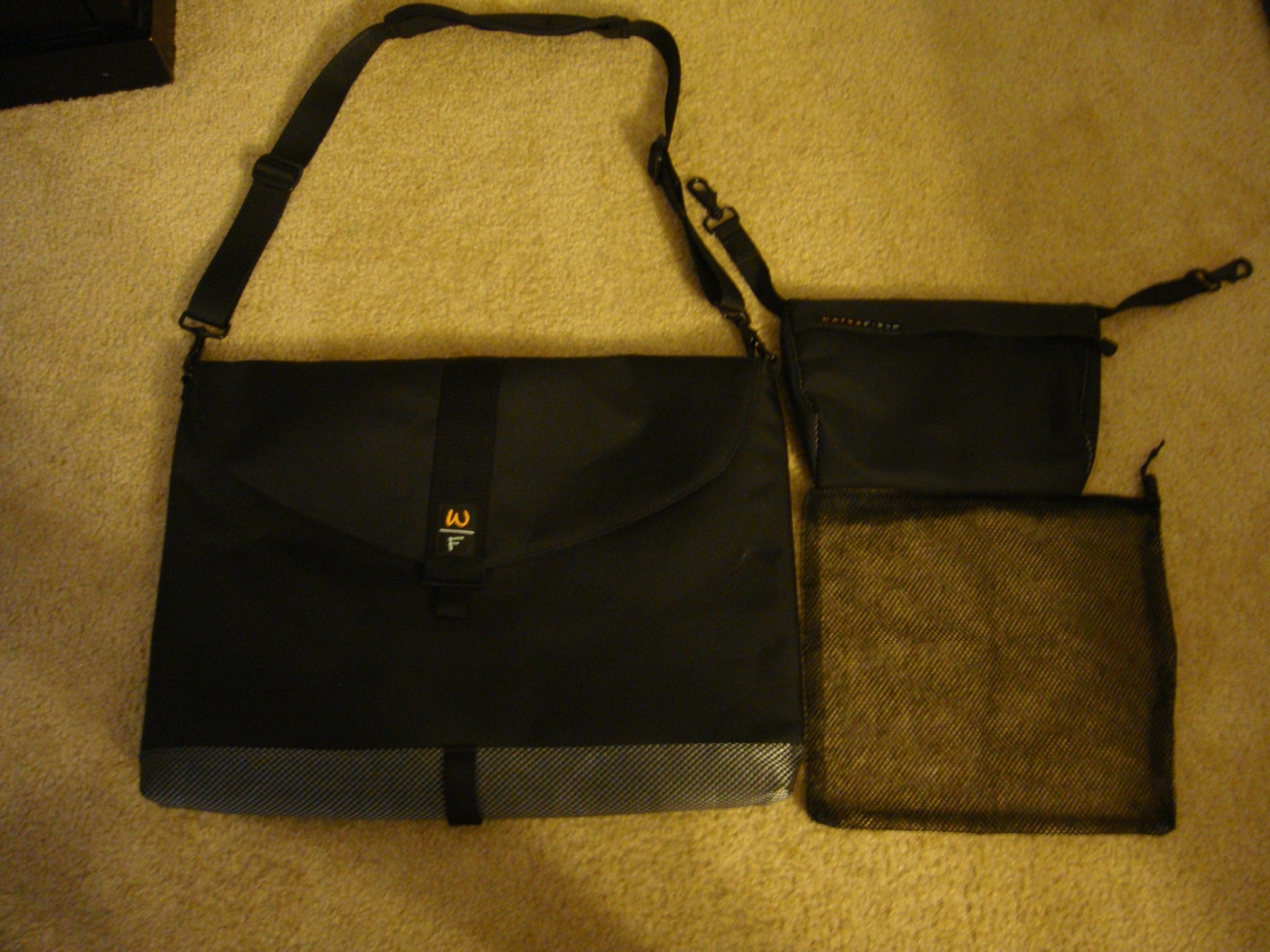
If anyone is interested I am selling my WaterField Designs notebook sleeve. It is the largest one they have and fits the HDX Dragon perfectly. I got all the add-ons as well, Flap, suspension shoulder strap, and piggyback pouch. It is in perfect condition and was originally $114. I am willing to part with it for $45 + shipping. I am heading to Las Vegas in Aug and am trying to get much cash together as possible for the trip.
I will be putting it on EBay in the next week. I figured I would check here first. Here is a pic of it.
![[IMG]](images/storyImages/DSC00652small.jpg)
I also attached a high res thumbnail.Attached Files:
-
-
-
I love that quote. It really is my life's motto. It fits all of the situations I find myself in.
-
Any idea on how fast an XQ9300 can be overclocked provided that it posts? I wonder if there's anyone who has one or is willing to get one willing to try it? -
One knowledgeable user told me that he has never seen a 1066 FSB CPU post on a motherboard with the PM965 chipset. He hasn't tried every possible motherboard out there but says in his own experience and what other users have told him is that it won't post and will just hang with a blank screen. I haven't found enough testing on a variety of laptops to prove this.
As for overclocking, a QX9300 contains two 45nm Core 2 Duo CPUs so the overclocking is similar to what has been posted here. One user told me that on a suicide run he managed to hit 4300 MHz for a CPU-Z validation but it wasn't stable enough for much else.
Here's a stable 3520 MHz out of a QX9300 at a low VID setting. Lots more room to overclock higher if you can keep it cool.
http://img809.imageshack.us/img809/617/18027.jpg -
 Looks like the Dragon will do this:
E3 2010: E3 2010 Interview: Crysis 2 -
Nice, thanks. I think 3.4-3.6 would be sufficient. I run my Dragon into the ground and wanted an X9000 in it cto from the beginning but they discontinued it right when I saved up enough, and every other deal either was a scam, the seller was not trustworthy, or I didn't have the money at the time. I'm holding out to see if anyone will try a QX9300 because I would LOVE to be able to take advantage of the multithreaded performance which from what I understand is even better in Windows 7. At 3.4-3.6 it would be fantastic.. though an X9000 at that rate isn't too shabby at all either.
-
The first user to post a screen shot of an overclocked QX9300 working in the Dragon with the PM965 chipset is going to be a hero on this forum. Never say never.
The QX9300 also lets you adjust the multiplier in steps of 0.5.
Good luck guys.
-
This is the procedure you'd want to go through for full QX9300 use (if it works):
http://forum.notebookreview.com/hardware-components-aftermarket-upgrades/393027-pll-pinmod-overclocking-methods-examples.html#post4998927 -
I don't say never unless it's impossible by definition (ie a square circle or one ended stick), which is why I don't like to down diss or dismiss possible resolutions to finite problems. I also have not seen anything definitive in terms of verification that it won't work, I just wish there were more doods in here/out there with money to burn and the ability to install it, to be able to try it.
Is all of this really necessary? Wasn't this the previous potential resolution that was suggested for how to overclock the HDX before unclewebb and hisThrottlestop came to the rescue? -
It's about allowing your computer to go from FSB 800 to 1066 and therefore allowing full use of the cpu.
Overclocking - Wikipedia, the free encyclopedia
If the hdx doesn't brick with a QX9300, then it should run slower than the x9000 @ fsb 800 not overclocked. Throttlestop is a great great tool for the hdx, but it is still limited to speeding up your cpu at your native fsb speed. 1066 is 33% faster than 800! (just based on that spec)
At a better place and practical time I'll mod the hdx----even though 2.0 pointed out evident limitation to that----because then I could try 4 GHz like FireBreather but @ 1066 fsb and with whatever other advantage the qx9300 may have over the x9000. As big as it is, the dragon is still a lappie to me (not quasi desktop) because its design is in such a sweet spot. I still have perspectives as with the 280m since apparently someone has upped their PM965 fsb, but on a different machine:
http://forum.notebookreview.com/5003880-post12.html
![[IMG]](images/storyImages/snap1t.jpg)
However, there are still better options for a new design since most importantly the dragon is not all-terrain, and there are so many other advances that would give our world's digital window an absolute necessity in maintaining civilization amongst the upheavals. We're at the pivot point, folks. I'm so glad all of you are aligned with guiding tech.
-
The other obstacle to using the QX9300 is that the copper portion of the HDX's CPU heatsink won't cover both core's heatspreaders. Only partially for both. That won't make for a good cooling solution.
-
The CPU-Z validation shows the memory running at 443.4 MHz which is the equivalent of DDR2-887. This will get you a boost in Everest memory bandwidth numbers compared to DDR2-800 but it will make virtually zero difference in real world performance. You'll have to get your wallet out if you want to find some laptop memory that can run reliably at DDR2-1066. Newegg doesn't list any rated at that speed. The other problem is that the PM965 chipset was not designed to work with memory running at that speed. You might have to do a chipset volt mod to get this setting stable.
Increasing the multiplier on an X9000 so it is running at 19 x 200 is dead simple and will get you more performance than running at 14 x 266 with fewer hassles. -
Agreed. Plus you'd have to flash the RAM to adjust the timings.
Your solution is best, of course. Without it, it would have been IMPOSSIBLE to overclock the X9000 in the HDX. Can't mod the HDX's BIOS and HP didn't and won't produce a BIOS that allows for overclocking. So many thanks again for your work. -
Ah, but there are smart people who love their machines so much that hassles are what they live for. PCs are the new automobile, non? .:rolleyes2: Some people rebuild the entire auto while others just add NOx.
-
There's nothing wrong with a few hassles if there is something to gain by doing it but in this case, not only is there nothing to gain, you could lose performance compared to multiplier overclocking.
The X9000 can only have the multiplier adjusted in steps of 1.0 so if you try to go higher, you will be at 15 x 266 ~ 4.0 GHz which is not stable for 24/7 use. If you have a golden X9000 that is stable at 4.0 GHz, the performance level will not be any different than 20 x 200 ~ 4.0 GHz.
The next step down is 14 x 266 = 3724 MHz vs 19 x 200 = 3800 MHz. If you're not stable here then it would be 13 x 266 = 3458 MHz vs 18 x 200 = 3600 MHz. Sticking with the 200 MHz bus speed gives you more options to find a stable overclock. Before multiplier overclocking existed, using the 266 MHz bus speed mod was the only option. Now on the X9000, that option has become obsolete. -
I think unclewebb is a bona fide hero on this forum!
MA -
question, the touch light things don't seem to work properly, does anybody know how to open it so I can see what's going on?
-
Hopefully this can help:
http://h10032.www1.hp.com/ctg/Manual/c01279508.pdf -
Before you attempt a disassemble, try the following:
Battery out. A/C. Hold down power button for 30 secs. Then Batt in/AC in, boot up. -
yeah tried that already doesn't do a thing
-
Was that first sentence in regards to the X9000 or the QX9300?
For sure
-
The first sentence was about the X9000 and trying to overclock it by increasing the bus speed and multiplier. I think you're better off just leaving the bus speed at 200 MHz and doing a simple overclock by increasing the multiplier as high as you like.
Now if someone gets a QX9300 working in this laptop, that's a whole 'nother story. That'd be worth a few hassles to get a couple of more cores working. If the QX9300 ever posted and booted up, it would be locked at the default 200 MHz bus speed. I'd leave that as is and then start cranking up the multiplier. -
Ok got what you're saying.
This is exactly what I was wondering. So if it does post, I guess maybe another piece of metal would have to be added or something for both cores to be able to touch the copper already there or what not? Or are there other things one may need to do? Is flashing the memory necessary in that case if it was left at 200 as well? -
Yes you would need a copper plate to distribute the heat to the heatsink's copper since it won't cover both core's heatspreaders. But now you would also need a thicker tacky thermal pad for the northbridge's heatspreader since you are raising the height with the copper plate.
And no you wouldn't need to flash the RAM's BIOS if let at standard 200. That's only necessary when you overclock the system bus with PLL mod. -
Anyone tested these in their hdx?
Newegg.com - Kingston 4GB 200-Pin DDR2 SO-DIMM Unbuffered DDR2 900(PC2 7200) System Specific Memory Model KTT800D2/4G -
Hmm ok just sounds like a little bit of a hassle then in that case if it would actually boot up.
Wouldn't they be slower because they're beyond 667 or what not?
*HP HDX DRAGON Owners Lounge, Part 1*
Discussion in 'HP' started by J-Bytes, Sep 14, 2007.