Problems? See this thread at archive.org.
I sees what chur sayins. Seems pretty good so far thanks.
So wait, now with the whole overclock phenomena which is a better investment, the X9000 or an SSD still? Man I can't imagine how crazy fast it'll be with an SSD AND X9000..
-
-
Plan on getting both.

-
It just hit me. x9100 anyone? Even with FSB 1066, can't I now wave that underclock? (potentially stepping above the x9000)
+ -
Some motherboards might not post if you stick a 1066 FSB chip in a 800 FSB board. Any guinea pigs with access to an X9100?
If this works then next test would be a QX9300. Wouldn't that be a nice upgrade at about 3.6 GHz? -
I have to recind my post:
http://forum.notebookreview.com/gateway-emachines/306877-pm965-800fsb-chipset-1066-mhz-fsb-cpu-9.html#post4480156
And, unless they could be worked up to melt-through-vent MHz due to necessary FSB downclock, I'm not sure there'd be an advantage.
Back to Throttlestop on the X9000!
+ -
That thread you posted was lots of talk and no real world testing. The thread was started before it was possible to adjust the FID/VID upward on Extreme CPUs.
It all comes down to one issue; will the HP bios post and boot up with an X9100 installed. If yes then this would be a viable option now since you could set the multiplier and total MHz to whatever you like. Some motherboard bios versions don't do anything and just hang with a blank screen when you insert a CPU that the bios doesn't recognize. Other boards are more flexible and will show it as an unsupported CPU and will boot up just fine. If it boots up, ThrottleStop would be able to control it.
Someone would need to try an X9100 or QX9300 on this board to see what happens. The advantage of the X9100 is that they come in E0 stepping which tend to overclock a little better and there are more of them to choose from on ebay. -
Update on OC stability.
I have ran Prime95 x64 Ver 25.11 & OCCT Ver. 3.1.0 on my x9000 at x18 - 3.6GHz & x19 - 3.8GHz. It took a few runs at each setting to find the VID that would allow a successful run. If it could run each for 4 hours without error I considered it stable. In the case it was not stable I would always know with the first 10 min and usually within the first min. Here are my results:
@ x18 - 3.6GHz the only way I could pass without errors is with the VID @ 1.3500. The Idle temps were ~ 34c and the max load ~ 72c.
@ x19 - 3.8GHz the only way I could pass without errors is with the VID @ 1.4500. The Idle temps were ~ 38c and the max load ~ 88+c.
3.6GHz is the safest to run at all times and passed all the tests including the OCCT LINPACK test (A test designed by Intel to reach max temp). The CPU never got above 75c during the LINPACK test. During normal gaming the temps usually sat around 58-62c.
3.8GHz is fun for bragging rights and benchmarks but not safe for prolonged use. Unless someone comes up with a better cooling solution for the HDX. (I have a few Ideas I may play around with) I was finally able to get it 100% stable with the VID @ 1.450 but the temps were dangerous and usually the test was stopped due to overheating. During normal gaming the temps were around 70-75c, the test would keep it in the high 80's low 90's and the LINPACK would bring it to 100C very fast!!
I was able to play games for a few hours @ 3.8GHz VID @ 1.3875 and 3.6GHz @ VID 1.300 before I did the stability test and never had a BSOD or noticed any issues. So it may be possible to run at these settings. But you risk data corruption and in the long run there may be BSODs or other issues. I did not play long enough to determine long term effects. Tests like Prime95 and OCCT have proven over time to be reliable stability tests. It is generally expected standard that a truly stable OC is able to pass these test.
Hope this helps future Dragon x9000 peeps.
-
Thanks for all your work and input uncleweb! Love that you see the possibilities. I was looking at that thread and agree it seemed that it stopped too prematurely. The X9100s look a bit cheaper than the X9000s. How much faster would those be and in comparison to the QX9300 and X9000? I wonder if anyone with the resources and ability is willing to try it. If it so happens that it did post, you don't think there would be a downclocking or slowing down of the performance of the CPU to meet the differences between the type of motherboards they were intended to work with vs the one we have meant for the X9000?
-
Thanks also for all your work in here Comptrekkie! Do you think it's possible the stable setting could have a different effect in a long term, as in corruption or what not?
-
x17 @ 1.2750VID = 3.4Ghz remains the best stable OC (OCCT v3.1.0 tested), as it also keeps the original 2.8GHz temps unchanged @ 3.4GHz (= same component life on the long run). The Dells do not allow you to select anything higher than 3.4GHz in their BIOS OC menu. Greed kills.
-
I always agree to possibility! And since dropping 8GB RAM, well,... I'd sure like to fit an OLCD into the dragon to possibly make it even more efficient.
If upgrade is benefit beyond cost and we can break the GPU bottleneck, it is handy that the PM965 is 13.5 W and that the HDX probably unintentionally cools ambient abodes.
+ -
3.8GHz is fun for bragging rights and benchmarks but not safe for prolonged use. Unless someone comes up with a better cooling solution for the HDX. (I have a few Ideas I may play around with) I was finally able to get it 100% stable with the VID @ 1.450 but the temps were dangerous and usually the test was stopped due to overheating. [/QUOTE]
What kind of ideas did you have for cooling? You going to copy my water balloon idea?
-
Haha that sounds like a song Adam Sandler would come up with, or even Popeye, but I guess in that case it would be "I always agrees to possibilikees". Anyways, 8GB in my HDX has been wonderful, but I'd love to see how an OLCD would work in the Dragon, and any other creative mod ideas. What would you say are the implications of the PM965 in the HDX?
-
The X9100 is designed to run at 11.5 x 266 MHz ~ 3.06 GHz. If the X9100 booted up on this board, it would likely run at 11.5 x 200 ~ 2.3 GHz so yes, it would down clock, but now we have a tool to fix that to get the lost MHz back.
15.0 x 200 MHz = 3.00 GHz
No one ever considered this before because there was no way to adjust the multiplier. Paying top dollar for an X9100 that would only run at 2.3 GHz, if it did boot up, would have been stupid. Now if this combination posted and booted up, the CPU speed limitation would be gone because you could increase the multiplier to get it running at its designed speed and overclock it to go beyond that.
If someone had an X9100, it would be interesting to test this theory but it's not worth buying one on ebay to find out. Too much of a gamble. You'd be better off paying more for an X9000 that is guaranteed to work. Getting an overclocked QX9300 working on this board would be more interesting. -
Hey guys, haven't been on for a while, hope all is well in Dragon land.
I have an older Dragon (HDX 9008 TX-T7500, 2.2) with some upgrades (7200 260 Gig HDD, 4 Gig RAM etc) and am looking to buy a second hand one for parts and cannibalization. I would like the 2.8 Gig CPU and better than 256 (ATI Radeon 2600XT) for graphics. What models should I look for or can I just buy a new chipset or sth? I am not very experienced at swapping things out, but I can probably get some help.... THoughts please. -
Oh, sorry. One more thing. How technically difficult is it to swap out the CPU? I have a friend who is pretty damn good and keen, but I don't want to kill my baby....
-
Hahahaha, I feel the same way. It seems things have really livened up around here thanks to this new development almost overnight! I'll have to look into the X9000 myself now...=)
-
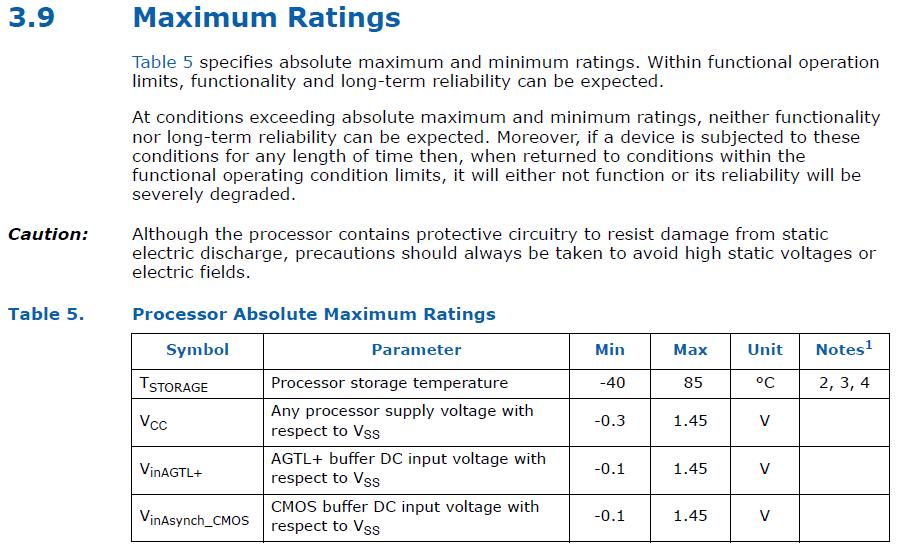
I do not believe there will be a problem with the 3.6GHz OC. It has passed all stress tests with no issues and in further search for verification I found some very useful info in the Intel® Core™2 Duo Processor and Intel® Core™2 Extreme Processor on 45-nm Process for Platforms Based on Mobile Intel® 965 Express Chipset Family Datasheet.
I attached a screen shot of section 3.9 that has some important absolute min - max ratings that if you stay within you can expect long-term functionality and reliability. According to this table the 3.6GHz OC I have falls well within the limits of this table and should have no adverse affect on the life of the CPU.
The VID is @ 1.350, max temp during stress test was 72c, and max I have seen gaming even after a 2 hour session of GTA IV and Mass Effect 2 was 65c with an average of 58c.
3.8GHz hits the max on VID @ 1.450 and at times goes over 85c while under load so I do plan to run that at this time.
As Kindheart has mentioned 3.4GHz is of course very safe @ 1.250-1.275 with almost no temp change.Attached Files:
-
-
For those in the know, is this a legit/correct X9000 and is it a decent price?
Intel® Core?2 Extreme Mobile X9000 2.8GHz 6M 1066 SLAZ3 - eBay (item 290445864959 end time Jun-26-10 11:11:53 PDT)
If the answer is yes/yes, don't anyone buy it out from underneath me
-
If the detailed description in the middle of the auction is correct then yes this is an OEM x9000. Though the subject and one other place in his auction say that the FBS is 1066 rather than 800.
It could be a typo or ignorance of what he is selling.
Here is supposedly what is being sold:
http://processorfinder.intel.com/details.aspx?sSpec=SLAZ3
If the picture is of the actual product then it is correct. -
Thanks CT. Yeah, I noticed the contradiction. I sent him a couple of questions; one about that and one asking if it was new/unused/unopened. He has a 100% rating.
Think it is a good price? -
Compared to the current market prices and increasing rarity yes.
-
CompTrekkie: The 85C temperature you quoted is a storage temperature. Intel sets TJMax at 105C for these CPUs to prevent you from running it at too hot a temperature. As long as the peak core temperature is below this number then you are running it within the Intel spec. They set this so high because they know that their CPUs can run reliably at these temperatures. If they were worried about failure they would lower this number. Intel set TJMax to a conservative 90C for the first batch of Core 2 desktop CPUs they produced but I assume based on returns, or lack of returns, they felt comfortable raising that to 100C for most desktop chips and to 105C for most mobile CPUs. The documented shut down temperature isn't until 125C to 130C, depending on the model, so I don't think you have too much to worry about. When not stress testing and just gaming, your core temperatures are very reasonable and well within the Intel spec.
Another thing to keep in mind is that when running a stress test like Prime95, when the peak core temperature is say 90C, the center of the CPU will be a good 20C cooler. Big temperature numbers scare the hell out of us but these CPUs cool down very rapidly over a very short distance.
The whole reason Intel went to on chip sensors and located them at the hottest spots on the core is because they wanted users to be able to get maximum performance from their CPUs without damaging them. That's why they set the throttling temperature so high. Intel wants their CPUs to perform at full speed and give users full performance.
Here's a good document that explains the temperature sensor placement on the Intel Core CPUs and a few other details.
http://www.sendspace.com/file/ntzfnb
It might be "too much information" for some. The PROCHOT (processor hot) signal on an X9000 isn't activated until the peak core temperature gets up to 105C. Anything less than that, Intel says your CPU is running within spec.
Here's the ebay special I'm watching:
Intel® Core?2 Extreme Mobile Processor X9000 SLAQJ NEW - eBay (item 170501413918 end time Jun-23-10 18:51:30 PDT)
This one might sell at a decent price since this user doesn't have much feedback.
One user from China was selling an ES CPU that CPU-Z was reporting in the top name box as an X9000 but the bus speed was listed as 266 MHz so it wasn't an X9000. We've all seen that CPU-Z is not 100% accurate at coming up with the name of the CPU so be careful when shopping for an ES. Some rare ES CPUs that Intel has made can be hybrid CPUs that have features of two different retail models so software that tries to determine the name is taking a wild guess and may be wrong since a comparable retail CPU was never produced.
Here are the specs for the two X9000 models; SLAQJ and SLAZ3:
Intel® Core?2 Extreme Processor X9000 (6M Cache, 2.80 GHz, 800 MHz FSB) with SPEC Code(s) SLAQJ, SLAZ3 -
I looked at that one as well, but have a history of wasting time to unsuccessfully win outright bidding wars on eBay. Also, he uses a stock media photo vice real deal. Those things tend to scare me away as well.
Having said that, I got an answer from the other guy and his is either used or opened, or both...simply answered 'no' to my two-part question. I replied asking what platform and how long it was installed. Hopefully he'll be a little more forthcoming, but I'm definitely not high on buying a used part.
Thanks for the spec info...what is the difference between M0/C0 stepping? The listing says M0, although the spec sheet you provided lists C0 for that model chip. -
Looks like SLAZ3 is the later version and includes a minor bug fix. Both X9000 CPUs are C0 Stepping so the Ebay listing is just a misprint.
Here's the info from the Intel Spec Update for the Core 2.
![[IMG]](images/storyImages/x9000.png)
AZ52 - Processor may unexpectedly assert false THERMTRIP# after receiving a warm reset.
-----------------------------------------------
The THERMTRIP# signal tells the CPU to shutdown immediately so that wouldn't be good. -
I simply like my late teens/early twenties x9000 idle temps (16-24 oC depending on ambient temps - max. 45-48 on full CPU load, not stress tests). These temps remain unchanged up to 3.4GHz. Going above 3.4GHz and VIDs higher than 1.2750, idle temps move to 25-30 and you start hearing the fan more frequently, which I don't like.
On the link you are providing it also says the recommended VID range is 1.000V-1.275V. I am sticking with the upper value of 1.275 (below which stress tests produce erors under 3.4GHz), as with it I can still enjoy a good overclock and the same old cool temps and fan behavior. -
Wow, those are nice idle temps! Which gpu driver are you using?
Seems my HDX really needs a cleanup.
+ -
He's talking CPU temps, not GPU temps. If your GPU is 20-25 degrees hotter than that (range of 36-49 given his CPU numbers) at idle, you are more than fine.
-
Yeah, I just figured he'd be using the coolest running gpu drivers since he likes his cpu to run so cool.
-
I am using 186.91 Win7 x64 from MS Update, as I need stereoscopic 3D support (anaglyph). My GPU is OC'ed. My idle GPU temps are 37-45 oC depending on ambient temps.
-
Kindheart,
Post #4 in this thread:
http://forum.notebookreview.com/gaming-software-graphics-cards/492319-3d-vision.html#post6363337
Links to this: NVIDIA DRIVERS CD v1.24 (GeForce GPU driver v197.16, NVIDIA 3D Vision driver v197.16)
Apparently it contains 197.16, but is supposedly compatible with all 19x.xx series drivers. Was wondering if you had seen it, since it seems to be what's holding you back from using newer drivers.
Sorry if you've seen it or tried it, just thought I would mention it. -
I had a look through the Intel docs and found that the T8000 and T9000 series usually fall under categories 2, 3 and 4 listed in the notes in this post.
http://forum.notebookreview.com/6379183-post10975.html
4. Vcc Core VID=1.000-1.300 [IDAT]
IDAT is Intel Dynamic Accerleration Technology which the X9000 doesn't officially use but let's face it, you guys are creating your own IDAT mode now so I think a VID of 1.3000 is still reasonable. Maybe you can create a 3.6 GHz profile for special occasions or cool days.
For comparison, the P8000 and P9000 series are usually listed as:
12. Vcc Core VID=0.900-1.300 [IDAT] -
Something that would concern me also... the fan level. When gaming, couldn't care less. But when doing ordinary computing tasks, it's not something I want to hear.
Good to know things are quiet @ up to 1,275 VID.
Though I wonder for ordinary computing tasks like web browsing, office, etc., where the CPU util stays below 50%, would 1,300 VID still remain quiet @ 3.6ghz OC? -
You can always use the Power Saver option if you want to drop the MHz and VID into the basement when the CPU is idle. That might help when running a high VID 3.6 GHz setup.
-
Good advice. Was also thinking about the X7900 but heat would likely be a concern considering the 65nm process.
Can the X7900 overclock to 3.6ghz? I've only seen examples of 3.4 with the avg OC to 3.2ghz. -
Does the flat or curved lens work better for the hdx monitor? I've narrowed down to the nvidia and the pro-ana, but can you advise for someone without glasses/contacts who normally sits @ 1+ meter away?
thanks -
I managed to get my original 65nm desktop E6400 Prime95 stable at a hair over 3600 MHz but it took over 1.50 volts and I had to drag my computer out to the garage in the middle of winter to keep it cool. Not too practical so I don't think you could do the same in a laptop. 3.2 GHz to 3.4 GHz is more realistic for daily use. I'd try an X7800 which will overclock the same and should be a little cheaper.
-
Someone did 4.2 GHz @ x9000 on another machine, so 3.8 shouldn't be just for bragging rights on the HDX as unclewebb suggested
http://forum.notebookreview.com/attachments/hardware-components-aftermarket-upgrades/51207d1276262547-how-unlock-core-2-extreme-multiplier-windows-throttlestop253-21x-1.4625v-perf1-4188.5mhz.jpg -
Hmm well now that sounds perdy sweet if it worked. Chatter is that it's a chipset issue and has never worked. What say you? About the QX9300 how high do you think that one can go in terms of overclock power?
-
Awesome stuff, thank you.
-
I thought he said that it works EXCEPT you don't get stereo sound. I STILL can't seem to get the 3D working.. I got the drivers to install correctly but couldn't seem to figure out how to actually see it in 3D.
-
The 197.xx driver you are using can't do 3D like the 186.xx you were using can. A different type of 3D (120hz) not supported by the HDX's screen.
-
Yeah, I know it says that...although it was vague, I kinda got the impression there was a work around and the only reason I posted it.
-
Yup, it is vague. Kindheart tested it out and reported back that support for anaglyph 3D stops with the 186.91.
-
My wPrime score made it on the Leaderboards of the wPrime scores list. look here: Scores | wPrime Multithreaded Benchmark
Then scroll down to "Performance Mobile". The one called "HP HDX Dragon 20.1"" is my 3.8GHz run.
Thought it was pretty cool.
-
Hmm ok. I could have sworn he said one of the 190 drivers worked but it didn't have stereo sound, though you're probably right it wasn't the 197 ones but ones that were earlier.
-
Awesome job man!
-
That IS cool!!!! Congrats! Bragging rights FTW
-
You make us proud to say we know you!
-
LOL I know, I'm the man!

*HP HDX DRAGON Owners Lounge, Part 1*
Discussion in 'HP' started by J-Bytes, Sep 14, 2007.