Problems? See this thread at archive.org.
Oh yeah, of course.
I'm just going to chalk this one up to me "possibly having a different PLL chip".
-
where is the PLL chip located again? I want to do this BUT I want to make sure I want to confirm what chip is in the laptop. Thanks
-
Did you get the tech specs for the pll from ICS as well? He'll most likely ignore it unless you do the homework on it too. Doesn't matter who does it, he just needs the pll number and the data sheet for it.
-
He pretty much knows what's on the datasheet as it's similar to the ICS9LPR501HGLF. He just needs to know all the data that the program outputs and chipset data from cpu-z. all of which I sent him.
Here's the Datasheet from IDT:
http://www.idt.com/products/getDoc.cfm?docID=18462044
Guess I'll pass this URL to him also. -
Which of these do you use to overclock the HDX?
-
OK, thought you had a favorite and figured out how to get one of these programs to work with the HDX.
-
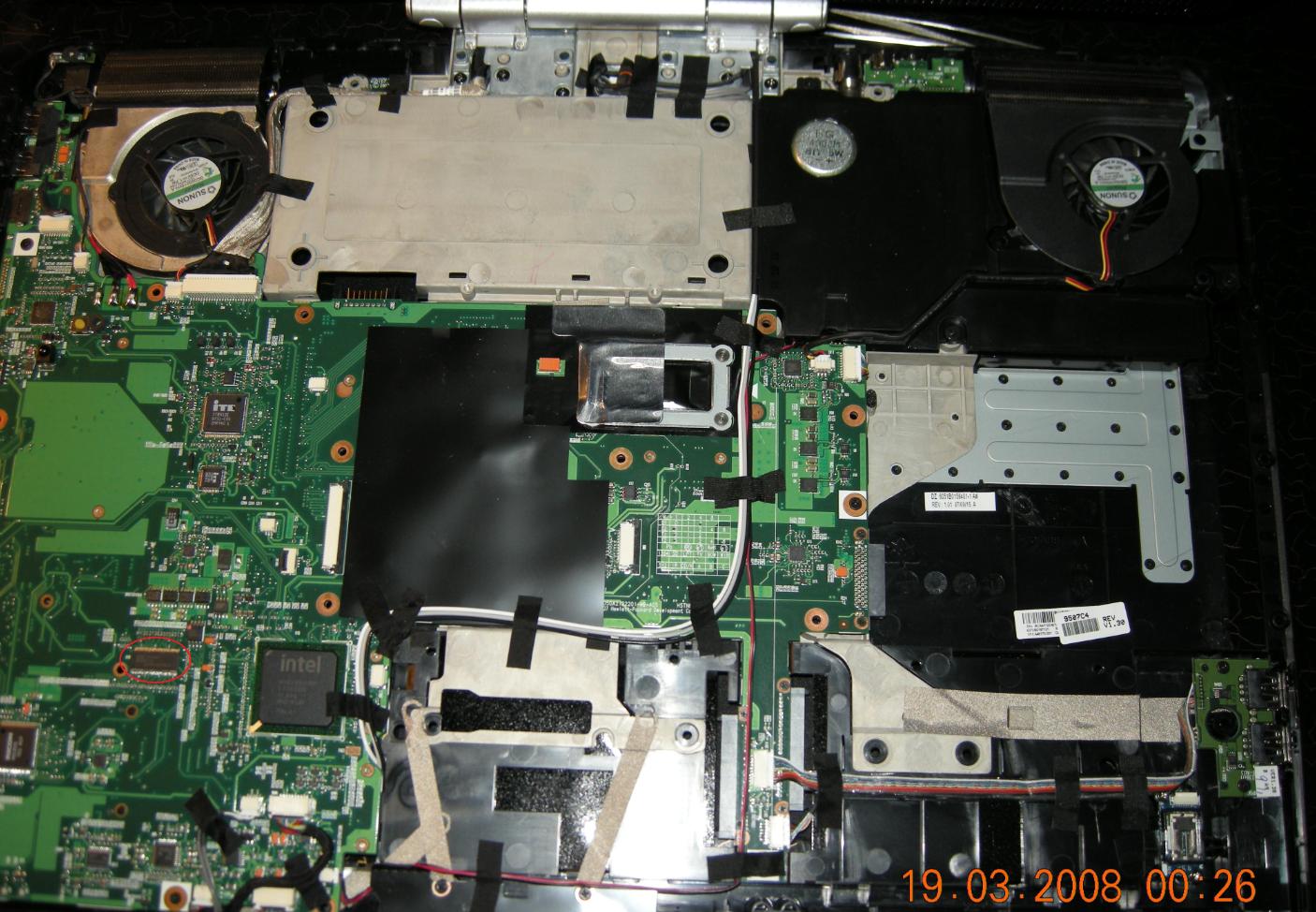
This chip is located beneath the left "ctrl" key, as shown in the attach files.
The one in the red circle is.Attached Files:
-
-
I have disassembled two HDX, 9210TX and 9304TX, both are ICS9LPRS501PGLF.
-
Heard back from Abo (SETFSB) developer and say that it can't be done on the HDX's PLL because it's "trusted mode" only. No overclockability. Says it's read only. Mind you, that's information is based in part on a T9300. But I suspect the HDX isn't overclockable in any event.
It may be possible with an X9000. Whomever's got the X9000, you can email him with the requested info. Email is a few pages back along with what the info he's looking for. -
Ok, HDX is making me mad now.... I have picked it up and have used it for like 10 minutes tops.. And the left hand wrist area is flaming hot to the touch!! Touch button screen is staying on the screen blinking... And its over all just sluggish. What is wrong with this thing?? I have nothing installed on it except anti virus and it's running slower than slow... Did I mention it's burning hot??
-
Something is wrong if its flaming hot or uncomfortably hot.
My Bertha gets warm on the left side under my palm but not anywhere near uncomfortable.
Something ain't right -
I talked to hp on live chat.. And she said it sounds like a hardware issue... It gets warm enough where it makes my palm itchy and red. I hate to ship it off so soon after recieving it
 .
.
Anything I can do to help it run cooler??? Make the fan more effective etc... I don't ever hear the fan running at all, is this unusual??
Strange thing is the heat starts above the keyboard by the quick touch buttons and extends down into the wrist area. Cause to send it in for hp repair?? -
Don't know what to tell 'ya. Seems like 2.0 is on the ball here. All I know is that SetFSB program kept locking me up hard when I'd select that specific PLL chip.
-
It's not compatible with 64 bit vista... Only 32... Thanks though I wish it would have worked!! Looked like a nice program.
-
I'm afraid that if ebo is saying that it is read only mode then no matter what program you will use it won't be working. Would be nice to have a dump from someone with X... processors.
-
my hdx 9494nr makes a slight popping noise, in and out, from the audio speakers. I looked on hp's site for this model, and there has not been an update since it came out in 2007. Anyone know about this audio popping (very slight but very annoying) and how to resolve it?
Also, are there recommended driver updates for this lappy other than outdated ones on hp site? i got the bios already. how bout better ones for the tv tuner and the audio? -
that's odd, mine has a high pitched buzz as it boots and when I plug in headphones. it doesn't really bother me now, but I thought I'd mention it.
-
Heard back from Abo (SETFSB) developer again.
I had emailed him again and asked if the PLL (ICS9LPRS501PGLF) allows for adjustments or overclocking. He confirms that it does not and what is more confirms that even with an X9000 it's not possible either.
HDX is non-overclockable.
It's still all good though.
-
thanks for the update 2.0. good to know before I tore my laptop apart haha
-
Just want to say thanks for the effort you put into this. I do love to tinker with my electronics!!
At least we now know!! Thank you again, 2.0! -
Ok, so if my pc is running kinda warm. I thought i remembered 2.0 or someone mentioning a bios update that made the fan run all the time on low?? It doesn't seem mine runs at all, so I wonder if this would be a helpful thing to do.
-
Hallo together!
First thing... great forum, great tips you gave here!
Second thing... sorry for my bad english i´m german
I buyed also a HDX 9130 with 2 x 160 GB, NVidia 8800 GTS and Lightscribe DVDR. I use it since 3 weeks and i must say its great and a very good DTR.
But i have some questions and hope you could answer it because i found anywhere other a answer...
1. How can i adjust the memory the nvidia card takes. Ok it comes with 512mb dedicated video ram, but i see in task manager that my windows vista 32bit gets low on memory. My HDX have 3gb ram. So i dont need that the gfx card takes all the ram, the 512mb is enough.
![[IMG]](images/storyImages/hdx1.jpg)
2. Which driver should i use for the gfx card. Ive heard that the drivers in the swsetup directory is not usable and i makes the experiences that video sometimes dont play smooth. But when i install a laptopvideo2go driver the gfx card fan is always running, ok its a dtr but a quieter notebook is a better notebook.
3. Can i mount any Blueray Drive into my HDX?
Thanks so far.
DJTONJAH -
ZMAN 360-
I don't have time to link my old post but I posted a pic last month that I took using my departments Thermal Imaging Camera.
It shows warm areas and I think I had some temps on it. I believe that day that I took the shot I had it on for about an hour or so before.
I think you should send it in. Might be better in the long run, no? I hate to send my stuff in for repair too because its such an inconvenience. You'll be happy in a week or two when it comes back
Aloha -
Thanks asuhoru, I'm talking with new egg right now about them possibly replacing it or giving a refund on it. If that doesn't work out then I will go with HP and have them take a look at it. Either way it will either be repaired or replaced I'm hoping. Thanks again for the good advice I appreciate it alot!!
Zach. -
Try through newegg first if you're still within your 30 days. you'll get a faster response from them then you would from HP. BUT most likely you'll have to send in every single piece of packing and accessory which may be a hassle. Good luck!
-
I talked with a rep of theirs... And she said my claim for refund was issued and that she will issue a pickup for the item. And the claims department will contact me once the refund has been issued. This was a welcome surprise.
-
wow the refunded you? they didn't just offer you an exchange? you be lucky!
the real question is, you going to get another? -
Yep they were great about it!! Not so sure about risking another one.
-
weee, my hdx was delivered from newegg today, posting this with it even.
This is one sick machine ;D -
Awesome, ain't it? -
I can't tear myself away from it. I knew it was going to be a nice machine but ****ed if everything about it doesn't just scream excellent build quality. I'm quite impressed; I've owned a couple compaq laptops before but this beats them all hands down.
-
Now that I have my new HDX, I've got rid of a lot of the the preinstalled junk that it comes with. But, I still have 56 processes running. How many is normal and what should and can I get rid of.
I'm somewhat hesitant to get rid of all the HP stuff, but if it doesn't screw up the computer, I'm game. I just don't want some stupid updater to be running in the background that I don't need, you know?
Maybe some of you veterans can help a newb like me and create a list of stuff that can go in the trash without screwing of the computer. I just want this baby to run as smoothly and efficiently as possible.
Thanks. -
Ok, so now comes the part where I ask myself... Do I really want to return this beauty for a refund because I'm paranoid that it's getting way to warm and isn't going to hold up like that for very long?? I am just so back and forth... I love the looks of it, I love the functions of it, but the heat on the wrist area just doesn't seem comfortable for long periods of time. I just don't know!! If I buy a different kind of laptop am I going to regret it later?? And can I find anything within the same price range or lower, that has alot of the same specs to it. Is there anything I can do to stress out the GPU or whatever else makes it run warm to see just how hot it will actually get under stress?? Because I haven't even done anything except surf the net, when my GPU gets up to around 50 degrees Celsius. Just seems high for not doing anything to stress it out at all.
Any suggestions?? Thank-You. -
Relax, notebook computers get hot. I don't think you'll find one that has a dedicated graphics card that doesn't get hot. As long as you're under the recommended temps (between around 40-80 c?), you should be fine. I haven't heard of anyone having any problems with their HDX's.
BTW, what is the temperature of the room you're in? As with practically any electronic device in the summer, you are going to get higher temperatures. For example, stereo equipment often get's over heated if you pump it too loud in a hot room. Just use common sense and you'll be fine.
I've been using my HDX for the last few days and I just love it. I have noticed any temp related problems. I have a compaq presario notebook that gets crazy hot on my leg - way freakin hotter than the hdx, I've had it for years with no problems.
I think people have gone a little over board with the whole heat paranoia - with the whole nvidia controversy and all. I would assume your computer is fine unless proven otherwise. Just relax and start lovin the beast, man! -
you know, nothing isn't ever perfect, but the beauty of the 1 year warranty is, you can drive the sucker as hard as you want, and they replace pretty much anything you break. personally I'd risk another one, just due to the bang for the buck.
-
Thanks. Seems as if the spot that gets warm might be right above the hdd since I can feel a vibrating once in a while there as well. My temps right now are holding steady at 42-45c on the gpu and I just fired it up. The core temps are around 35 each, and the room temp in here estimating is about 65-70 degrees. Again thanks for comments.
-
Hey man, I'm starting to consider not even sending it in.. As the temps I've posted don't seem to worry anyone that I've seen so far. Maybe I'm just not used to having my hand on something warm like this, as far as electronics go. Otherwise this machine is in mint condition and I love it!! As stated above, I haven't done anything to stress out the hardware yet and it runs 40-50c for the gpu and 35-40 core temps. It was just the heat on the left wrist area/remote dock and slightly above dock that had me a bit concerned with all the nvidia junk being said. I think I might just say heck with it and keep it, since I don't think I will get the same specs for cheaper or same price.
-
Good choice. Every time I use this baby, I can't believe that I have it. I remember when it first came out and it was like 3 grand, I thought it was so cool but way too expensive. Now, for like 1500 bucks you have a state of the art system that pretty much does everything. Sweet!
-
I agree!! The one thing I would like to find for it though, is a cooler for when I'm using it on my lap. Not the easiest task in the world finding a notebook cooler for this beauty!!
-
i don't know, I've been sitting here for the past hour with this monster on my lap and I'm just barely feeling it through my pants. I am on battery saver and just surfing the net, but temps high enough to make it uncomfortable to your palm I'd be a little concerned about. after a few hours of gaming, my palm rest is just warm, not enough to be incomfortable, maybe I just have a high tolerance for heat, or maybe my laptop came down from the heavens where i don't really have to deal with the heat. who knows. personally, if it was warm enough to be uncomfortable, I'd trade it in and get another, just to be on the safe side.
-
Simply, it is a great machine...
-
Hi everybody I am back from my vacation - 12 days away... did I miss anything important?
Hi - A while ago I read somewhere that the Zalman - ZM NC2000 - is a pretty good cooler for the HDX - It is supposed to be for a 17" lappie, but since it is the same size as the HDX someone tried it and said it worked well - If you end up getting it let us know - -
Hey welcome back!! That's great, I am most likely going to get that and give it a try!! I have been looking around but couldn't seem to find anything I thought would work for the hdx thats for the tip, and I will let you guys know for sure.
EDIT: It says the dimensions are 15-3/4 wide and 11-1/2 deep 1-3/4 high -
Good to see asuhoru. He's one of the OG owners of the HDX. Give props and respect, y'all.
-
Welcome back. Yeah, we learned that the HDX isn't overclockable. Probably for the best. But a definite engineering decision on HP's part considering that the PLL chip they used is no more expensive than the version that allows for overclocking.
-
One thing, if you run dual screens, the GPU will idle higher. But the GPU is in the normal range for single. CPU is also. Start seeing 60's on idle on GPU and 50's CPU, then that'd be a problem.
I use an external keyboard (for ergonomic sake) so I didn't notice the heat on the left palm rest area. But yeah, it's there and I can imagine it getting uncomfortable after a while. -
That's kind of low for Vista. I've done a clean install and I have 73 processes. Most of which are software I use for work that have components that run in the background. But it doesn't affect performance. My gaming FPS aare as good and in some cases better than other comparable systems. It's really not the number of processes as it is the size of the processes. -
Have had mine over a week but only now am unboxing it. Need help with getting rid of all the bloatware and other junk that I don't need. Don't know alot of technical stuff like some other members in the posts, so any help would be appreciated. Will use mostly for watching movies, gaming, and ITunes stuff. Help please!!
-
Alright, well you already know what I think: If someone is into overclocking he should try that on a 300$ desktop CPU and\or GPU - That's already enough of a waste like that - No reason to burn a 4000$ machine to gain "maybe" a couple of frames (I know I am no fun on stuff like that).
By the way can anyone give me a suggestion about an issue which have appeared lately? A game that used to run smoothly, lately has started to periodically kicking me back to the desktop while it goes minimized on the taskbar - I suspect an unwanted Vista operation to be responsible, so I checked the event viewer, which mentions no errors, but an information in at least one case: "desktop window manager unable to start because composition disabled by a running application" -
It's not particularly serious since I can just resume the game by clicking on its tab, but it bugs me that things are going on without me understanding what... Anyway I recovered a restoration point (previous to my recent AVG antivirus installation), we'll see if it keeps doing it. -
There are two main schools of thought:
My buddy 2.0 would go for an epic "format C: then buy a real Vista DVD then finally reinstall everything from the E partition". (Just stop listening when he starts suggesting to entirely dismount an then remount the HDX ... because he will get there too!)
I am mostly for "take your time and see what you don't need, after all you got more hard disk space than you'll ever need"
Personally Anyway I would start getting rid of the Norton antivirus... I just find it a bit too hungry in terms of system resources.
*HP HDX DRAGON Owners Lounge, Part 1*
Discussion in 'HP' started by J-Bytes, Sep 14, 2007.