Problems? See this thread at archive.org.
A quick question to 2.0 and users that have used the battery extensively:
I noticed I cannot get full speed from the CPU under battery power only, whatever I tried even maxing out the min/max settings under Power Options in Control Panel. Checking the BIOS (F10 during boot) reveals very minimal settings unlike conventional laptop BIOS.
As soon as AC adapter is connected, bang - full speed again. I am tempted to take the HDX on the train but performance on battery at the moment is quite sluggish.
I have confirmed the performance test slowdown using Wprime and several 3D games running significantly slower.
My HDX has just been restored to factory condition and Vista has been updated to the latest windows updates.
Specs:
* Intel X7900 2.8GHz
* 500GB dual SATA HDD
* 4GB RAM
* 512MB Nvidia 8800M GTS
* WUXGA 1920x1200 screen
Your thoughts?
-
Has anyone in this forum installed SSD HDD in their HDX? I have a 64GB SSD on my P1610 but unfortunately its not a SATA interface.
Other comments by reviewers on various tech websites claim there is no noticeable performance gain of SSD HDD under Vista as it is not optimised for Vista for some reason.
Would love to see difference in performance (if any). -
Would a T9300 work?
-
Yes, any 800FSB 65nm or 45nm core2 will work. The best you can get is an X9000.
-
I have been an hdx owner for about 2 months, and I have been trying to read this forum everyday on my down time at work for the past couple weeks to catch up (kinda hard when it grows 10-20pgs everyday). Great driver and tweak support guys.
2.0 I have a 9494nr and I got ahold of a free legal copy of vista business 32bit, and am considering switching for better performance. Any recomendations for ease of transition? Thanks -
i am very close to getting a hd. what do you guys think of this for gaming.(cod4 etc..)
HP HDX16t
# Intel(R) Core(TM)2 Duo Processor T9600 (2.80GHz)
# FREE Upgrade to 3GB DDR2 System Memory (2 Dimm) from 2GB DDR2 System Memory (2 Dimm)
# 250GB 5400RPM SATA Hard Drive with HP ProtectSmart Hard Drive Protection
# 512MB NVIDIA GeForce 9600M GT
# Intel Next-Gen Wireless-N Mini-card
# 16.0" diagonal High Definition HP Ultra BrightView Infinity Display (1920x1080p)
# Genuine Windows Vista Home Premium with Service Pack 1 (32-bit) -
I wouldn't do it. The 64 bit version is faster as it makes use of all 4GB of RAM. The 32 bit version will only see 3GB because peripherals get mapped below the 4GB barrier and use 1GB of mapping.
-
Any way or shotcut to replace CPU ? I read manual to many steps and feel may have some step we may not remove. Who had done this?
-
I just did it... It's pretty simple, make sure to follow the steps exactly. The CPU is actually one of the easiest to get to when having to remove panels.
-
what about the pae switch?
-
Havn't used ATi tool for freaking ages (used it with my 9800Pro... Lol ;D) - didn't even know you could use it with nVidia boards. But that's only for the GPU, no? What about monitoring the CPU / Board temperatures and frequencies? I've heard various people mention certain laptops choke performance for power consumption / temperature moderating reasons - would be useful to see when or whether or not this is happening.
Something else I forgot to mention in my initial post... I loaded up riva tuner, and for some reason it told me the Performance 3D clock speed was 380 something, and the memory/shader clocks seemed low too (I'm at work right now so I can't quote exact figures); now it DID say the drivers "wern't supported" (like when you try to use riva tuner after new desktop drivers are released) -- so that might just be a dodgy reading - but at any rate, thats less than the default clock figures. Anyone got any idea why? Is anyone able to use Riva Tuner in a supported way, or are none of the applicable drivers usable on 64bit Vista HDX compatable? Was kinda wondering about fan speed too - I havn't managed to find anything yet to control fan speed manually; though in honesty as of yet I havn't needed to (or at least, I havn't even been able to see temperatures so even if I should be turning the fan speeds up I wouldn't know Heh.)
Anyway, thanks for reading
-
I can't find anyone selling the Alienware mALX backpack.
Has anyone tried this one?
http://www.overstock.com/Luggage-Bags/Olympia-Cambridge-20-inch-Laptop-Backpack/3114630/product.html
It's listed on Black Knight's page 100 post as HDX compatible. Has anyone used it? does it really fit the HDX? It looks like a pretty tight fit to me. -
Ya, rivatuner will not work with the 8800M, and prolly never will. The author said this outright a month or so ago. It has to do with the way the clock generator works and not reading the steps correctly.
ATiTool will tell you current clock speed and temps. You can check max/min/ave temps anytime, and it even has that graph and uses hardly any memory.
So, get the newer driver installed, install ntune. Use ntune to overclock, and ATiTool to monitor. If you want a detailed graph, rivatuner DOES read the temps correctly, but it has issues with being open as well.
The fan speeds are not controllable as there's no need, it cools very well. The only option you have is auto or always max. -
It fits. Just keep your eye on ebay, they show up every week or so.
-
Hi, I know that I'm writing this post in wrong section. But I want to buy HDX Dragon and on ebay.com I can' find a good one. It must have 4gb ram, 640gb hdd, resolution 1920 x 1200, and TV card. If someone want to sell this laptop or know a site where i can grab one please email me at [email protected] (Sorry for my bad english
)
-
I forgot where I got that link - but I trust me enough to believe I read somewhere it fits - keep searching, you'll probably end up findin where that info comes from... (maybe somewhere in this thread or on a different thread in this same forum...?)
-
Welcome to Intel's wonderful Enhanced Speedstep! Personally, I'd rather be control of what speed my PC runs at, but apparently, I'm not the real owner---Intel is.
So, I'm not sure there is a way to throttle at full speed when you want to (although, I've had good luck using Rightmarks RMCLOCK utility to do just that)...using RMCLOCK on my HDX16t, I am able to have it run at the full 2.53Ghz all the time (battery or AC)... -
Hi all,
I have a question for you guys.
in short: Anyone here experienced a slow down in speed after updating the BIOS?
Here is the full story:
I own a HDX laptop, 9150EF to be exact. It's a model from last year. Originally it had a 2 Ghz CPU in it, but as soon as I got it, I replaced the CPU with X7900, so it runs on 2.8 Ghz now. It was much cheeper this way. I upgraded the memory as well.
Here is the deal. I'm running Vista Home at the moment (came with the computer), but I haven't upgraded to SP 1 yet. Before that I wanted to update the BIOS, because I remembered that there was a BIOS a few month ago which was to add support for SP1. After updating now to F.39, the 3dmark06 shows 2191 3DMarks, instead of 4326, which was before.
(I have the old ATI HD 2600 XT video card).
I was expecting this, because it happened about a year ago as well, when the first BIOS update came out (F.13). Back then I was testing the computer on Crysis, and after the BIOS update the system slowed down tremendously. After flashing it back to F.06, the problem went away. I didn't bother to try it since.
What do you guys think? What could be the problem?
I'm thinking flashing it back to F.06 and trying to update the Windows with that.
Thanks in advance.
PS. I'm sorry, I haven't read all the 300 pages on this forum (only about a hundred ), did try the search though, with no luck.
-
@ bigscreen:
Try icecoldgin (not the drink - eh what the hell) or lancorp. They seem to be very happy with there's. -
When you updated the BIOS, did you also reinstall the ATI driver? F.13 and up allows for powerplay - ATI's power saving feature.
Also, once updated and reinstalled, check to see that when plugged in the ATI powerplay setting is set to maximum performance. You can check by right clicking the battery icon in the tray, select more power options, then more advanced options. In the list at the bottom you will see ATI grahics power settings. -
It will be difficult to find one with 1920x1200 since this is an option for customized version. Ebay is probably the best place to search.
-
Just another bump on HP HDX Backpack Bags - unlike you lucky folks in the US, here down under we have very limited range of options to chose for our laptop bags, worse still for the monstrous HDX laptop.
I tried all luggage shops, local Fry's store equivalent, any other electronics store that sells laptop bags and it looks the only remaining option is the Mobile Edge Alienware Orion backpack. (Alienware AUS do not stock the mALX backpack for some reason)
The big question is - the specs on the Alienware website claims width of 13.2" and the HP is 13.4" wide. I understand bags do have some give as its flexible, but we don't know the basis of these measurements whether it is for a comfortable fit or stretched fit.
So the big question is - does anyone know if the HDX 20" fits in an Alienware Orion backpack?
P.S. I am avoiding the messenger style bags as they are only supported by one shoulder which will make it quite unpleasant to carry for extended periods. -
Hmmm I went ahead and installed this on my 9494nr...however when I go to adapter in display and try to click on "Properties"...nothing happens...the window just hangs...after about 5 minutes the properties finally show up??!? Any idea what is happening???
-
Did you uninstall the previous version first?
-
yes i used Drive Sweeper...seems to be ok now...I rebooted a few times and after the 3rd reboot it seems good...my 3dmark 06 score went up to 7639 with 176.22 from 7573 wih 167.73 (default drivers that came on my HDX)...still haven't tested Blu-Ray but hoping it will work since these are certified and official HP drivers...
-
The blu-ray issues are firmware related and have nothing to do with the video drivers. Hopefully we'll get an update eventually.
-
Hi all.
A new audio driver has been posted in the HP site.
File name: sp40438.exe, (1/1 , 15.31M)
Released: 2008-08-29
Version: 6.10.5607.0 B
Compatibility: Microsoft Windows Vista, Microsoft Windows Vista Ultimate (64-bit), Microsoft Windows Vista (64-bit), Microsoft Windows Vista Home Premium (64-bit), Microsoft Windows Vista Home Premium (32-bit)
System requirements: The old version of this audio driver must be uninstalled BEFORE installing the new driver provided in this SoftPaq.
Description: This package provides the driver for the IDT STAC9271 Audio in the supported notebook models and operating systems.
Enhancements: Adds support for a treble/bass audio feature -
You were spot on.
Yes, I have the latest Ati drivers and after I set it to high performance, it even boosted the 3dmark score by 100 points.
Thanks a lot, man. If you ever come to Madrid, I buy you a beer. -
Glad that worked out for you mate.
-
Speaking of new audio Drivers...
HP posted the HDX18's IDT hi-def audio driver version 6.10.6047.5A.
http://h10025.www1.hp.com/ewfrf/wc/...&dlc=en&cc=us&lang=en&os=2100&product=3769214
STWRT.inf contains the following dev codes:
%ST.DeviceDesc%=STHDA,HDAUDIO\FUNC_01&VEN_8384&DEV_7626&SUBSYS_103C30D4
%ST.DeviceDesc%=STHDA,HDAUDIO\FUNC_01&VEN_8384&DEV_7626&SUBSYS_30D4103C
%ST.DeviceDesc%=STHDA,HDAUDIO\FUNC_01&VEN_8384&DEV_7627&SUBSYS_103C30D4
%ST.DeviceDesc%=STHDA,HDAUDIO\FUNC_01&VEN_8384&DEV_7627&SUBSYS_30D4103C
%ST.DeviceDesc%=STHDA,HDAUDIO\FUNC_01&VEN_8384&DEV_7626&SUBSYS_103C30E2
In blue is the HDX's hardware ID.
Also has the IDT control Panel.
NOTE: Might not give bass with HDX 93xx or 94xx.
EDIT: TESTED - NO BASS/subwoofer use. HDX9300. BIOS F.39 - Reverting back to 5607. -
ATi Tool dosn't seem to work - I think because I'm using SP1 - it wouldn't let me use a driver that it needs, supposedly. Anyone use anything else / have any other suggestions for a good program to monitor CPU / GPU frequencies and temperatures?
To be clear :
Riva Tuner dosnt report frequencies properly
ATi Tool wont work on 64bit vista
nTune monitor crashes my machine
:/ -
I use HWmonitor.
http://www.cpuid.com/hwmonitor.php -
Yep, NTune Blue screens any time I use any of the features. I did get ATI tool to work though. You have to use version 0.27 Beta 4 and disable Vista driver signing. Here is the ATI Tool you want to use:
http://www.softpedia.com/get/Tweak/Video-Tweak/ATITool.shtml
Read the section on the bottom under Whats new to see Vista 64 Support.
Before you install it you will need to do the following to get the ATI Tool driver to install:
1. Right-click on CMD select Run as administrator (you can do this through the start menu or browse to CMD.exe)
2. When the command window opens, type or paste the following and press ENTER:
Bcdedit.exe /set nointegritychecks ON
3. Reboot and then try installing the driver.
After the install if you want to you can turn the Checks back on (I recommend it) by following the above steps and replacing the word ON with OFF. I do this to help keep the integrity of vista.
Hope this helps -
Awesome, both very helpful posts - I'll try these when I get home later
Cheers guys!
P.S (although I'm sure everyone else is probably already aware) - I've seen a noticable performance improvement after upgrading from the pre-installed (167.xx ) to the current nVidia drivers posted by HP that 2.0 wrote about a few pages back I was getting some weird tearing and jumpyness in CoD4 at maxxed details and resolution with the stock ones; the issue has vanished with the newer ones.
-
Weird, I run with no UAC mind you, but I've never had a problem with ATiTool since I've had my HDX. It came with SP1.
Deviant art has a sidebar gadget that shows the temp if you have ntune installed. -
In my opinion it does not - the general deal with 17" backpack is that you may manage to fit the HDX in them but then you cannot zip them because their top is slightly "pointed", to be more clear they are shaped like an egg instead than being square like the 19" mALX - Anyway I live in France and I got it from the USA. Overall it was about 80euro if I remember well.
-
You can use HDMonitor (CPUID.com), a program that's widely used among us for system monitoring. HDM will allow for s, bupecific control of individual fan speeds, but it requires specific technology which the HDX doesn'tl have, so HDM will only give you static information. But it's good info regardless.
You'll find that the HDX runs pretty cool compared to most other notebooks, even under CPU/GPU loads.
With clock speeds you have to be aware that any speed is dependent not only on the process, but the power profile currently in use, as well as whether or not you're on AC or DC power. All components and processes are designed to conserve power as set by the system's power settings, and running at minimum speeds is one way to accomplish that conservation.
To create a custom plan, open your power options, then click on "Create a Power Plan". Open the Advanced Settings to set individual power options for different components to further increase your options. But keep in mind that the more things that are continually running, the more load there will be on your system.
System power profiles balance between system performance and battery conservation, and the user must choose which is best for their situation. Myself and others use a custom power profile when plugged in to AC that maximizes performance since you don't have to worry about battery conservation. By stressing performance over power savings, you can get the most out of your system. -
Yeah, actually one of the first things I did was to set up power profiles so that my machine would be giving me all it could when my laptop is plugged in. It's plugged in 99% of the time - I never bought the HDX for portability; the main reason I picked it up was because I wanted a desktop strength system with a big screen for an affordable price (got my HDX for a steal!), but due to the fact I travel to tokyo frequently for extended periods of time (a few months there, a few months here, not day trips), it also needed to be portable. I could give a rats *** about using it on the move - I just needed it to be transportable, unlike an enormous ATX machine
Anywho - my power related comments were mainly referring to things like the speedstep function which I've heard people on other laptop machines have had problems with - but I think since I posted that original post I've gotten my machine fairly well tweaked and I'm confident I'm having no problems of that nature. There are some good suggestions in yours and the above posts for overclocking and system temperature / frequency monitors, so thats one gripe addressed
My two remaining questions, which I hope some of you may have experience with and don't mind sharing your knowledge, are concerning the audio drivers, and the resolution.
The audio issue is perhaps much less of a deal than the resolution problem; so I'll get it out of the way first. The sound is fantastic for a laptop - no complaints there whatsoever; my issue lies in the fact that for some reason there seems to be no control panel for the speakers whatsoever - which is a little confusing. Media center was asking me while I was setting the thing up - what speaker configuration do you have? I was somewhat amused that I had no idea how to answer. Is it two speakers and a sub? quadrophonic? 5.1? When I selected them all and tested the sounds, they all sounded a bit different - like they were coming from different places within the machine... couldn't get my head around it. So can someone clear this up for me? Is there a control panel sitting right under my nose that I just can't see, or do I need to install something to get the usual level of control over the sound system?
Now when I BOUGHT this machine, it was advertised on the UK site to be a WSXGA - so you can imagine my suprise when I was given a full HD one instead! Don't get me wrong, I have no gripes about the screen myself (some people seem to be picky...) - it's perfectly sharp, the backlight bleed is well within acceptable limitations, and I don't mind running things at non-native resolution when I have to (a little AA clears that mess up). What IS annoying is that for some reason, 1440x and 1680x arn't selectable resolutions - can I set up custom resolutions for these, or is that just the nature of the screen? It jumps from 1368x to 1600x1200 to 1920x1080 + 1920x1200 - which is a little annoying from a gaming perspective when I can't run at full native resolution - it means I have to settle for either a resolution in the wrong aspect ratio (1600x1200) or an absurdly low resolution (1368x). Anyone have an answer to this problem?
-
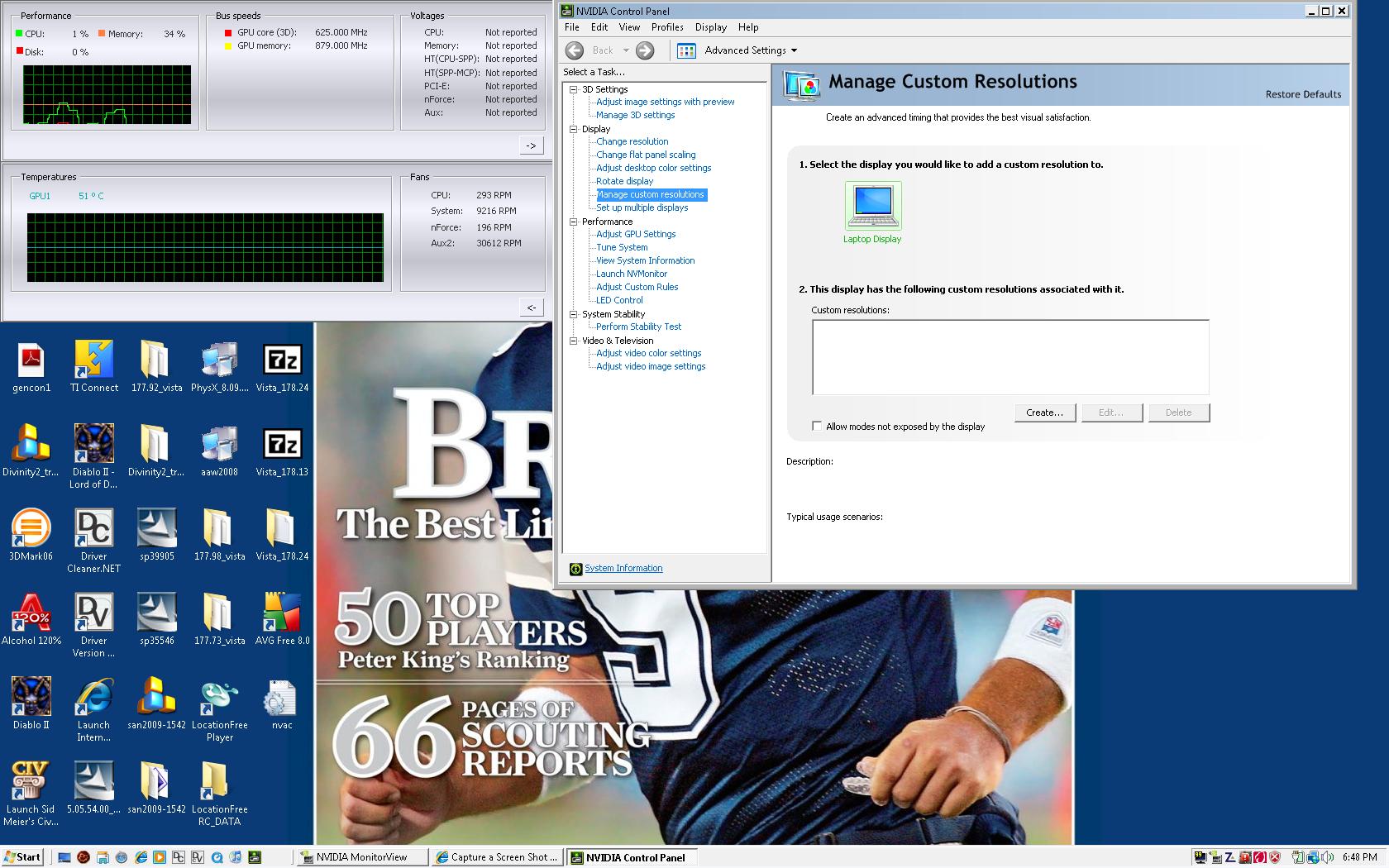
I'm amazed that ntune doesn't work for some of you, yet I dont have any suggestions to fix it other than use non-HP drivers from LV2G. I am currently using the 178.24, latest stand-alone nTune 5.05.54, and PhysX. Here is a screen shot of the custom resolution section in ntune, so if you can get the program to work, you ought to be able to customize res. I have never had any BSOD's on my machine...knock on wood.
Attached Files:
-
-
Hi.
I would like to ask a technical question; can a software program cause a crash and make it look as if it were hardware related?
My system HDX9200 ATI2600. Everyday I would experience a black, blue or white screen with lines running from top to bottom.
My settings are set to high performance, the system never gets hot, my old Acer was like a furnace compared to the Dragon, my point is: I changed my display from the ATI that comes pre-installed with the generic from Microsoft, and so far so good, no crashes, could it be pure luck or it was sofware related? I will have to wait a few days and keep my fingers crossed.... -
Can the 8800 gts be overclocked? To what extent and to what effect?
Thanks -
nTune. The specifics and benchmarks are easy to search in either this or the gateway forum.
-
Actually, you can still find HDX's still listed on a few of the overseas HP sites. You just have to look for them and find a reseller to get them from, except for the UK site which you can still buy an HDX direct online. So far I've found HDX 9200's, 9300's, & 9400's (9430 and 9401's)
HP Hong Kong
http://tinyurl.com/5hv7ur
The UK systems are the 2.1ghz 9400's. The difference there is that you can buy directly from the site itself. This system is the same unit listed on the HP Malta site.
http://tinyurl.com/6o79ww
HP Singapore is still listing HDX 9200's:
http://tinyurl.com/5qbtb3
The UAE English HP site also has this unit listed.
Believe it or not, HP Saudi Arabia is showing an HDX 9300 on their site, for the incredible price of $2717. If I had the Benjamin's, I'd get the **** thing myself for that price!
http://tinyurl.com/5lvmgm
I only checked the overseas English sites - you might have better luck if you check your own country's HP site. Just remember to look at ALL the HP Pavilion notebooks, not just the "featured" ones they're trying to push.
So they're still out there, you just have to remember that the U.S. isn't the only English HP site on the planet, and that HP US wasn't the only one selling them directly. If you really want one, you need to be creative in looking around - but they're out there. -
Wow. But how do you actually buy from a foreign site? When you click on the link it asks for people by you? You supposed to just guess a Saudi Zip Code or something?
-
Has anyone installed this on a 32bit system yet? I am having the devil of the time. It won't detect the 8800. I have found some inconsistencies in the .inf (or nvhm file in this case) between both the 64bit driver, and more importantly, the 175.97 driver. Made some adjustments but can't figure it out.
I have tried clean install of the service pack (suspect this won't work because it is not for our laptop, but really shouldn't matter) and have also tried re-installing the 175.97 and just updating driver via have disk method.
I also suspected the download or unzip was corrupted so I deleted the files and downloaded from scratch again, unpacked and started whole process over. Still no luck. I mess with different drivers pretty frequently, but have never had these issues. I can't however, navigate an .inf file that well unless some glaring deficiency jumps out at me. I am at 3 hours and counting. Guess I'll re-install the 178.13 from LTV2Go again, as I prefer it over the 175.97
Not a big deal except I HATE BEING DEFEATED!!! Any ideas?
-
Am I missing something, or is it not possible to clock your shader clocks with nTune? I only see sliders for core and memory frequencies... or is the shader clock just tied to the core?
I tried using ATi tool, it's reporting the frequencies incorrectly the same way Riva Tuner does - and I can't actually set the clock frequencies to anything other than stock anyway, it just dosn't "stick" for some reason.
By the way, does anyone know how to get rid of that little box that pops up when you use the volume slider? Since upgrading my nvidia drivers, it seems to lag me the **** out whenever I change the volume now, which is pretty annoying >_< -
The hdx is rather amazing in this regard. And many other regards too.
I was browsing on the couch a bit last night. I used my girlfriends brand new dv5 for a while. Its got a 15.4" screen and a T5800 processor. The darn thing is hot to have on your lap. My zd7000 ran hot too. At least the dv5 is quiet. My fan on my zd7000 howled all the time.
After a while on the couch I switched to my hdx. It runs way cooler. And it sits way better on my lap. Yeah, the dv5 is lighter, but its too small to sit nicely and I don't like the small keyboard and the lack of a number pad.
My hdx9494 is the best laptop I've ever used or seen. Period. -
disable HP Quick Touch On Screen Display.
Type Msconfig in start search box, click startup tab and scroll down. Uncheck it.Then click boot tab and check "make all boot settings permanent." -
Well I've had a try at searching this forum, the gateway forum and a few others to boot, but I've not had much luck researching an 8800m gts overclock. Has anyone experimented much with overclocking this gpu?
I wonder what the new driver and overclocking might achieve together.
Thanks -
Finally getting around to reconfiguring my Vista Media Center to use S-Video, audio and the IR blaster. Was hoping everything would go smoothly, but instead I find myself up at 1:30am trying to get this setup working. Don't know what I'm missing.
Here's my setup:
Pioneer cable box model number BD-V3510HD - connected to HDX20 w/ S-Video and RCA to mini-jack input
Logitech Harmony 659 - programmed to replace my cable box remote
The crux of the problem, I believe, is the IR blaster. Device manager indicates no issues with the ITECIR. Set up is smooth detecting audio and video, but when I get to the point where I try to configure VMC for the remote or set up changing channels w/o the remote, things go weird.
- If I allow VMC to automatically identify my cable box remote by holding down "0", VMC recognizes a signal coming in, but it does not recognize the remote. The setup advances giving me the option of trying again or to set up the remote manually.
- If I try to set up the remote manually by holding down "1", "2", etc, the IR doesn't recognize that I'm pressing any buttons on the remote
- If I try to set up VMC without the cable box remote and just use the keypad, none of my channel changes register regardless of the remote control code VMC gives me to try
Has anyone else had a similar issue?
*HP HDX DRAGON Owners Lounge, Part 1*
Discussion in 'HP' started by J-Bytes, Sep 14, 2007.