Problems? See this thread at archive.org.
I run mine 600/1650/950 now, using 177.92 and nTune. Drivers aren't going to have much of an effect on overclocking, it's all in what the chip can do without artifacting.
What else would you like to know?
-
-
I have Intel(R) Wireless WiFi Link 4965AGN and a wireless 802.11N router. Why does it state 54Mbps for my data rates? I thought it would be higher. Can anyone explain? Security is on WPA2 with AES. Thank you
-
How much faster does your overclocked 8800m gts run compared to the non-overclocked chip? Can you compare frame rates in a game like Crysis?
I realize that the gts has less shaders than the gtx, but does overclocking close the gap in a general way performance-wise?
Lastly, at the settings that you've chosen does the card run appreciably hotter, and does overclocking to such a degree decrease the longevity of the card?
Thanks -
How did you clock the shader? My nTune only shows me sliders for core and memory

-
I did some testing using custom drivers from Laptopvideo2go, 178.24, link here: http://laptopvideo2go.com/forum/index.php?showtopic=21250
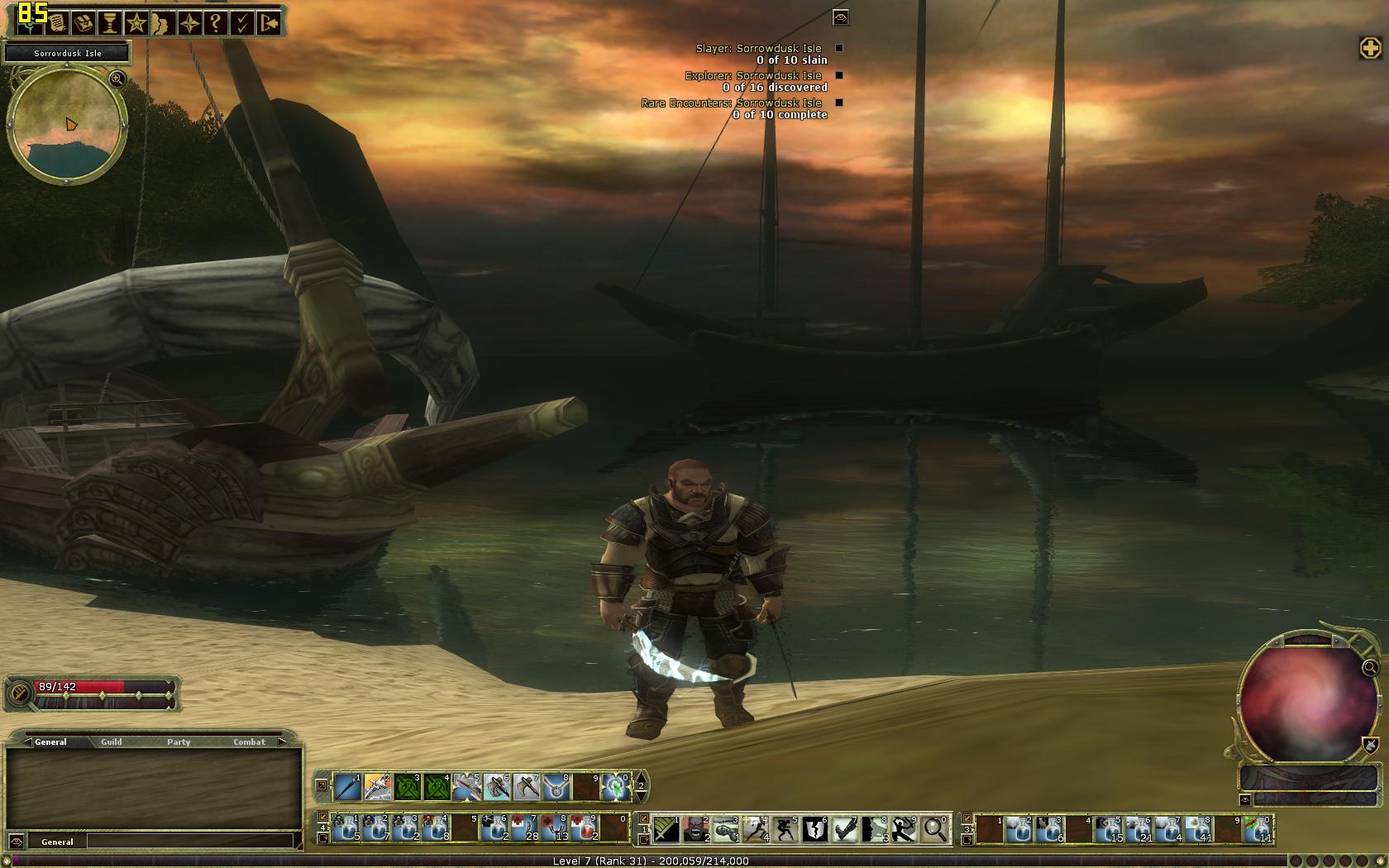
I don't have Crysis, and the only game loaded is my regular, DDO, using their Hi Res client, all settings to max and native 1680 x 1050 resolution. I got about a 15% increase from 73 to 85 FPS, stock to overclocked, 625/925.
Screenshots are attached.
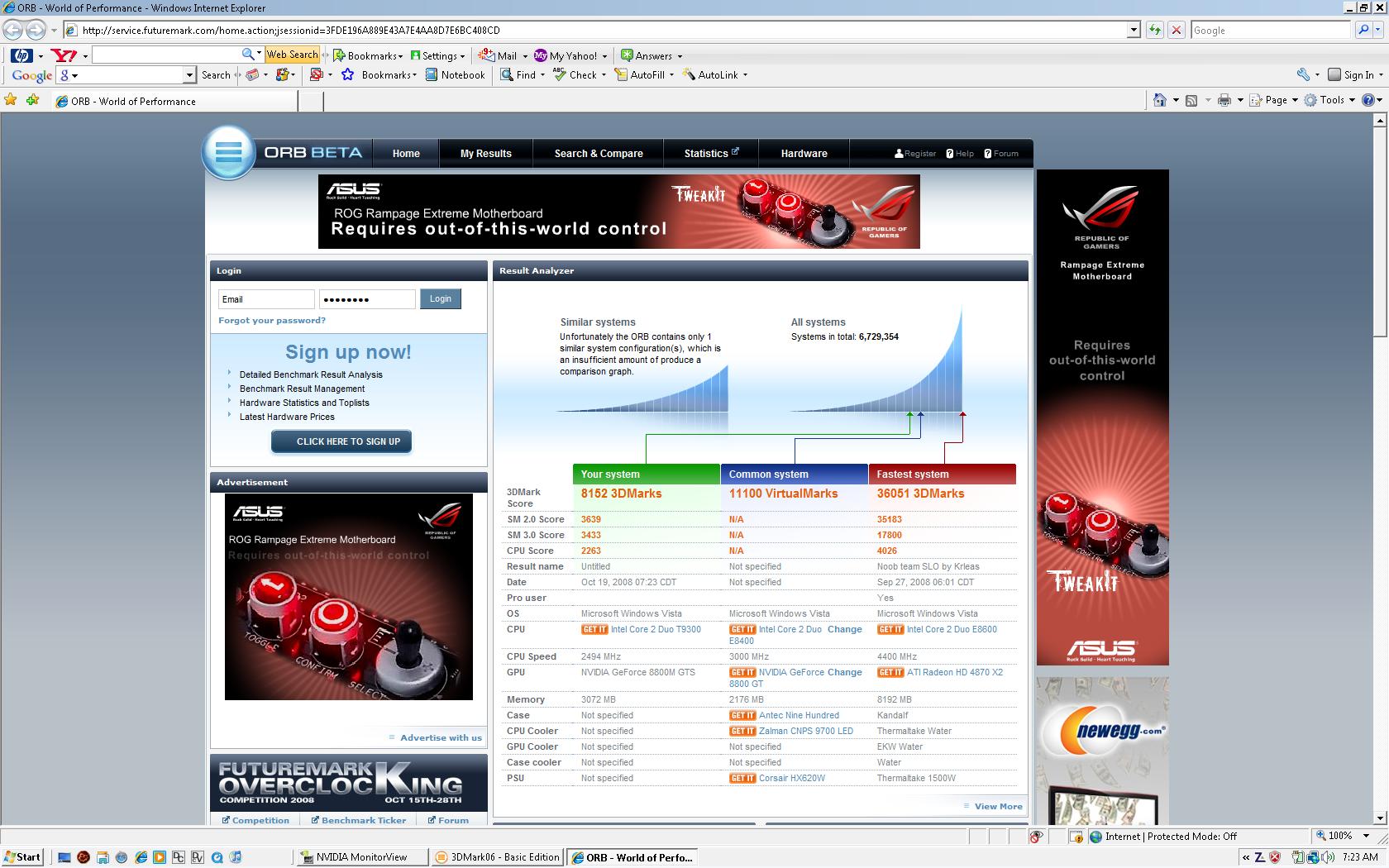
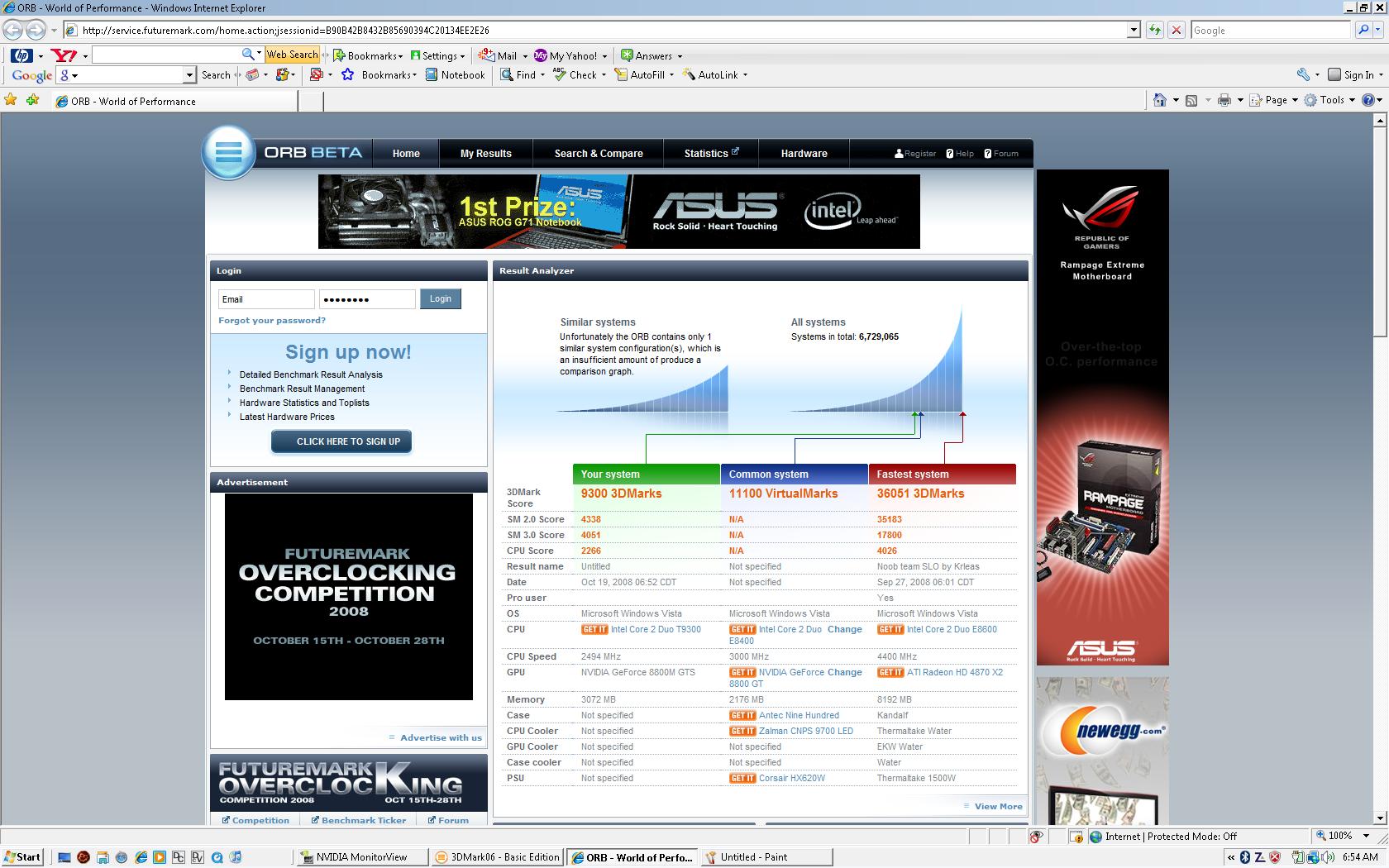
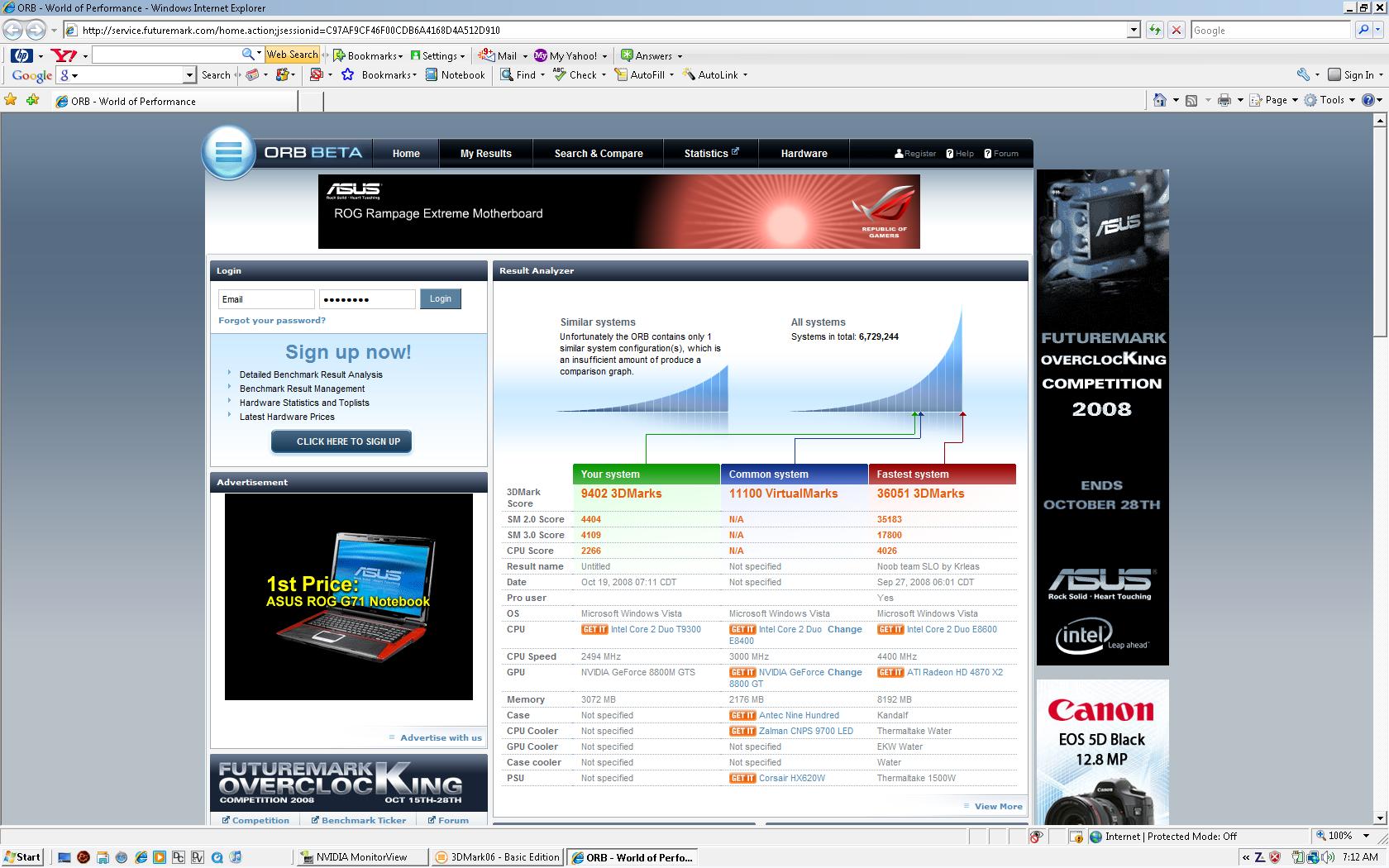
I also ran 3dMark06 (free version), using my stock settings, 600/950 (JohnnyFlash's settings minus shaders cause I don't use riva tuner), and 625/925 (my normal overclock). Screenshots are also attached. Scores:
Stock: 8152
600/950: 9300
625/925: 9402
So stock to max is about 15% as well, give or take. No math genius here.
Temps during 3dMark only differed about 2 degrees when loaded: 64C stock, 66C overclocked, using nVidia monitor in control panel/nTune. I'm sitting at about 43C at idle.
625/925 is very stable for me; several hours using ATI tool with no artifacts, but haven't checked it with these drivers.
Hope this was helpful.
**UPDATE**
Here is an update: Ran a test using 650/1650/925, adjusting shaders using the new Ntune utility...pushing my limits of comfort as temps rose to 72C. Score was duh, duh, duhhhh....9556. Screenshot below. Ran ATI tool first and no artifacts for 1 1/2 hours, but the temp still bothers me a little. It only got to 68C during artifact test, which is unusual. Usually 3dMark test runs cooler than ATI....
*edit- the game screens look like crap and are only to reflect FPS. The game truly looks amazing on the HDX...wish I had the WUXGA screen for it.Attached Files:
-
-
When you say the game screens look like crap, you're not saying that the overclock settings introduce artifacting, but rather that the reproductions of the screens that you posted look like crap...right?
Being a novice about this, is it only rivatuner that gives you control over shaders?
So it appears there are no downsides to overclocking to a reasonable level, that the temp. rise is not significant, and that as a result there is likely to be no impact on longevity. Looks like Crysis should be able to run well in WUXGA. -
The newest nTune supports it.
-
Rivatuner doesn't support the 8800M.
You need to test your overclock. First run ATiTool and test for maybe 20 min. Do each setting one at a time, then once you have have the numbers, test them all together. After that's done, I run 3DMark06 canyon flight on a loop, max resolution 2 hours. If it doesn't artifact or lock up, you're good. -
Wouldn't a better driver plus OC both impact graphic performance?
-
LOL, yeah I mean the .jpg's are crap.
As for Crysis in WUXGA, you mean full 1920 x 1200? I highly doubt it. Takes a pretty mean desktop system to run decently high at medium resolutions from what I have read. There is a lot of benchmarking, overclocking, and performance discussion in this thread. It is the 8800m GTS, but it is in a Gateway:
http://forum.notebookreview.com/showthread.php?t=217805 -
This should be stickied or added to BlackKnight's page 100 post. Yes, it's that good and that relevant.
-
I second that. And thanks to JohnnyFlash for his input.
I hope that BlackKnight's page 100 will remain in perpetuity. -
Remembering that I'm a novice in this area, has anyone tried
625/1650/925? -
Thanks, says a lot coming from you.
Seriously, just trying to help some folks out.
@ MobileArtist...better driver and OCing does indeed mean better performance. But don't just go overclocking willy-nilly. Each person's GPU handles tweaking differently, even though they are supposedly the same. What is good for one persons may do yours harm. So like JohnnyFlash said, you need to artifact test for every step you take. I would say start 50-75 clicks below mine to start to be safe and work up from there....like 575/850 or so. 625/925 might be good for me and not you. JF's might work best for you, or some other numbers. Just take it slow and have patience, you'll need it. -
Appreciate that. I'm several steps away from trying any of this. I'm just exploring the possibilities.
I understand stopping before artifacting. But if one observes these precautions does prudent overclocking have no downside in terms of longevity of the gpu? -
I don't think so, within limits. I've still got a Dell XPS Gen2 going strong with a 7800 GTX that is about 4 years old(originally had a 6800 ultra in it). I've had it apart about 50 times for cleaning, which I think was key. We worry about cooling...that thing ran at about 105C sometimes. Usually trying to run Oblivion or NWN2 as high and fast as I could. Stressed it a lot, but it keeps on ticking.
-
Would I need to clean the gpu?! Nuts!
-
Just the GPU's fan and between its radiator fins. Periodically.
-
This takes disassembly. then I'm not handy in this way.
-
The UK site allows you to buy direct online like any E-Commerce portal. The others you need to click on the "Find a HP Retailer" link. What that means is that you have to find a distributor that will deal with that particular HP operation for you, and the link helps get you started.
Rather than search, you'll probably have better luck if you call the HP Customer Sales # for that site, and ask them how you can obtain the HDX in question. It's not a stretch either to try and call HP US and tell them what you're trying to buy, since they may be able to get it for you as well. In any event, it's an automatic "NO" if you don't ask them. Remember that all of the sites listed are English language sites - they have to have English-speaking reps to deal with any questions concerning hardware being offered for sale online. -
here is the link that someone may try or test , frank tom peter://ftp.hp.com/pub/softpaq
"I can't post this link directly" -
Here's one: Any try using the card reader for ready boost yet?
I'm thinking of buying a high speed 8GB SD card and using it. -
Can anyone reccommend an easy to use camcorder/movie editing software? SONY Vegas Movie Studio Platinum 9 Pro Pack any good?
-
You'd prolly have better luck in the software forum.
-
Thanks Johnnyflash. I'll try that route.
-
I've tried it when I had a DV9700T and it only offered a minimal boost, nothing to write home about but pretty ok.
-
Sweet thanks CyberVisions.
-
Wow, I thought the effect on overclocking wouldn't do anything much different because of the limitations in the BIOS/Chip? If I may ask what specs do you have on your HDX?
-
What limitations would that be? It's the GPU, not CPU which is being overclocked. All Nvidia GPU's can be overclocked going back to the Geforce2Go days.
-
Anyone get their IR blaster working with their cable box?
Didn't get any replies to my previous post here, and I still haven't figured it out.
Suggestions? -
2.0 got the first part for ya.
My specs are:
2.5 Ghz CPU
3 MB ram
Vista home premium 32bit
320 gb HD
WSXGA screen
No BluRay (one MAJOR reason I don't mind using laptopvideo2go drivers, although several pages back, I identified a potential work-around for those that have BluRay drive) -
Coolbeans. So you think with a 7200 RPM hard drive and an overclocked GPU on a 2.5 GHZ processor would meet or surpass a standard 2.8 GHZ in terms of performance?
-
Thanks. I'm trying to seal the deal on one with similar specs except its 4GBs of RAM, Vista Ultimate 64bit, 2x 7200 drives= 320gb, WUXGA and BlueRay. There are so many things going on in the thread its hard to figure out which set up one should follow in terms of which drivers to use and what not.
-
More generally than not, for gaming, CPU doesn't factor into the equation once you break 2 GHZ. So a 2.8ghz will get a better 3Dmark06 score, but it won't do any better in real gaming than a 2.1, 2.5, 2.6ghz chip. 3Dmark 06 has a CPU test that it factors into the final score. But the SM2.0 and SM3.0 will be the same for all since the GPU is the same.
For RTS games, some CPU muscle may help with really intense scenes against many AI enemies. But those instances will be very rare.
No matter what though, a 2.5ghz gives the best price to performance ratio unless you're doing something CPU critical and CPU intensive that needs the maximum CPU performance. Meaning the extra 10% of a 2.8ghz over a 2.5ghz would make or break what's you're doing. -
That setup is perfect. Nothing else is needed. There will be no buyer's remorse unless you spend way more than you should.
-
God I love this machine.
Just putting that out there. Lol.
Even with my quite basic setup - this thing is just superb - amazing value for money from the UK HP site, too - with a 15% off coupon and free delivery.
I had to return *two* XPS M1710 refurbs in a row that I thought would be fantastic value for money, and waste 2 months of my time dithering around with customer services... but it was totally worth the faffing around to finally end up with this thing for just a few hundred more; not just a significant upgrade in performance against the XPS, but by comparision a brand new product as opposed to refurb'd, loads of extra "would-like-to-have-but-not-pay-extra-for" features such as bluetooth, blueray, the larger screen, fingerprint scanner, full sized keyboard, media remote and other nifty bits and pieces - and on top of all that, a decent warranty too!
... that's pretty much all I have to say. This is an "I'm chuffed with my box and have nothing valuable to contribute" post I've finally got this thing tweaked in all the right ways; and I don't have a single complaint about the machine as the whole - it's even allowed me to warm up to, and accept Vista; something I never imagined possible
Just fantastic. Lol
-
Curious...
Does anyone use Readyboost with their HDX? I've got a 4gig flash stick which vista is offering to utilise with readyboost, and I've got 3gig of RAM - is it worth using it?
Sorry for the double post - this post didn't really seem relevant to my previous one so I figured what the hell...
-
Unfortunately, Readyboost is useless with systems that have more than 2GB RAM.
-
Thank you thank you thank you!!!!! Updated Quickplay, fixed everything. This forum ROCKS!!
-
I'm not sure if it was CV but, who was the one on here who had a contact at HP tech? I need to know if you can help me. I've been waiting for HP to "overnight" me a fed-ex box that was supposed to arrive on Oct 6. It didn't arrive so I called again on Oct 9. HP told me that the delay in my receiving the box was due to Hurricane Ike affecting their electricity in their tech building and that I would receive it Oct 10 or Oct 13 at the latest. It's now Oct 20, & I'm still stuck waiting for a box for my "new" non-working HDX. Anyone that has called & had to deal with HP "customer service" knows how much help they are. I'm always transferred to 4 different departments and this is all during a nightmarish over an hour hold. I'm still getting their same response of "as soon as we can". This is getting kind of ridiculous & I'm starting to feel that I'll be losing 2 months of "warranty time" by the time I actually receive it in working condition. I need to know if anyone has a contact over there who could cut through the red tape bs & is willing to help me out. I'm not naive enough to think that a big company like HP didn't get their electrical problems fixed very quickly. How much backlog could a couple of days make? A couple of days I'm guessing. Frustrated to say the least. Thanks in advance guys.
-
Hey guys have an update on over clocking and NTune. I found a version that all features work. No BSOD. The performance monitor works; you can adjust the core, mem, and the shader clock! It also has OC profiles that you can set per program. A very awesome all-around program. The system info has a lot more info than the previous version. I was using just the nTune download and most options crashed my system. This whole suite is stable and gives you more options. Here is the link:
http://www.nvidia.com/object/nvidia_system_tools_6.02.html
Make sure if you already have nTune installed that you uninstall it first or the new version will not install. -
I don't know what happen after I replace cpu to x9000. When I turn on it show CLCAPSVC.EXE stop working and I lost tv , no tv tuner in quick play. Any help please. Did I forget to connect something?
-
I made the rather foolish mistake of installing this system tools thing OVER nTune... and now for some reason, it won't let me uninstall either nTune OR system tools - and I'm still getting the BSODs from the nVidia control panel (don't think it installed properly).
Anyone know a way of weeding it out manually? :/ -
Ah, i hate these aussie prices... Look at this
'
http://laptop.com.au/product_info.php/cPath/1_26/products_id/67
3100$?
grumble -
Ok but what do you mean by make or break? In what sense?
-
That sense of make or break is beyond the scope of this thread to be honest. 2.8ghz over a 2.5ghz will only shave off a second or three off real world usage.
Take Wprime for example. A CPU intensive test that requires 100% CPU ultilization. The difference in test times is ~2.5 seconds - 3 seconds. Or 10%.
What would you be doing that requires that a few seconds be shaved off a CPU intensive task? What software do you run that is that CPU intensive? -
I had the same problem were nTune would not uninstall before I tried to install the sys tools. Run the original nTune *.exe that you used to install it. If you run it when nTune is already installed the default action is to uninstall.
This should fix it for you. Wish you luck. -
Cheers, I'll try this when I get home Guess I'll have to download it again though... lol :/
-
Using the current driver from driverheaven.net has some nice improvements, but did not help with screen snow and flashing when playing DVDs. I forgot to mention that I use the HDX to decode the surround sound while playing a DVD movie. I connect the analogue outputs from the HDX to my home entertainment amps. I have found that if I change the speaker configuration to stereo (from 5.1) the screen flashes are gone and the snow is reduced, but not gone. My assumption is that the Quickplay and 5.1 surround decoding can not coexist. WMC with 5.1 decoding works great, just no Blue-ray support.
2.0, when you said it works with the 8800 were you also decoding 5.1? -
With and without.
ATI has had DVD issues with the RV6xx series. Newer drivers fix that. If you're using Vista x86 (32bit), you might want to peruse the following website:
http://www.driverheaven.net/modtool.php
*HP HDX DRAGON Owners Lounge, Part 1*
Discussion in 'HP' started by J-Bytes, Sep 14, 2007.