Problems? See this thread at archive.org.
I do not own any HP HDX right now. So this'll be asking for your folks opinions.
I'm going to get a new laptop for college and the HP HDX 18t seems like the ideal one except for the mid-range graphics card. On the other hand there's the Toshiba Qosimo X305, it has the dual 9800 GTSs but it so ugly and seems like it's built to a lower standard... My main question is what will the limits be with the 9600 GT in the HDX 18t? I'd elect to get a pretty peppy processor, 2.4 GHz Core 2 Duo or more.
Also I was wondering, it can do 8GB DDR3 RAM correct?
Thanks
-
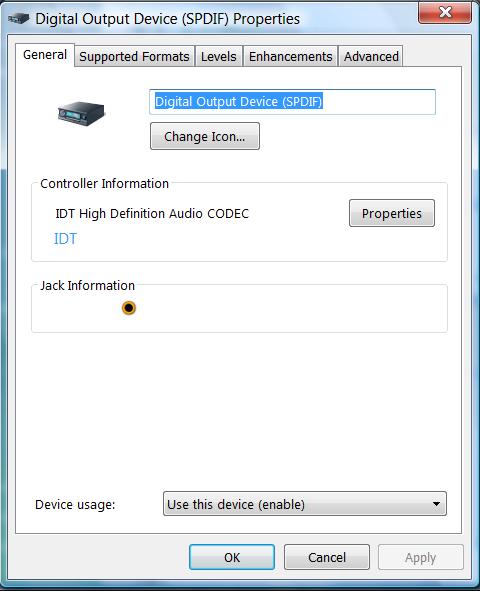
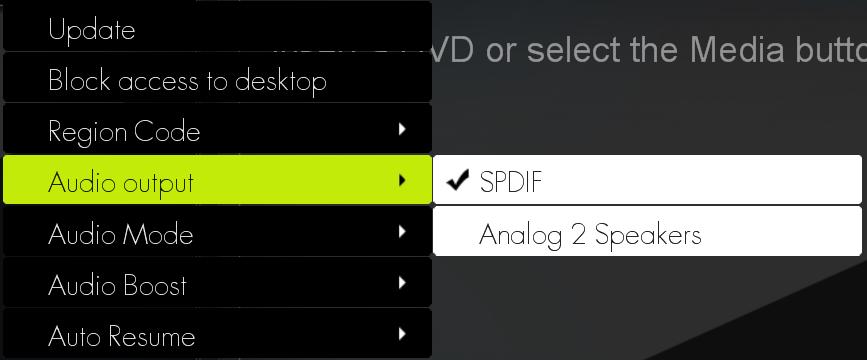
Sorry, I didn't have my HDX when I post the message. I misread and thought that you mean the Control panel sound setting (see attached).
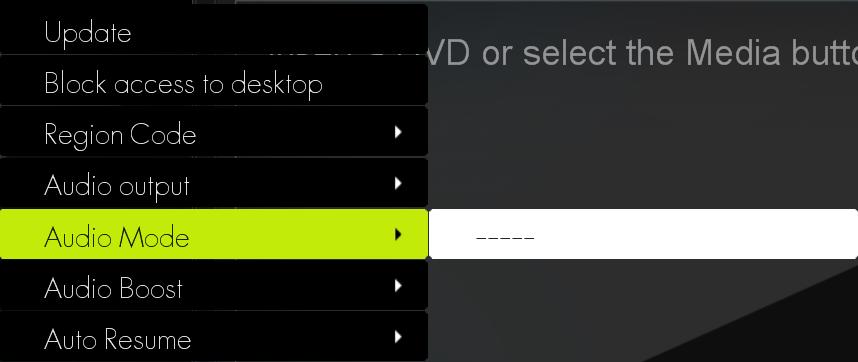
The QP audio mode doesn't show a Doby Digital option but with this "-----" (see attached).
Am I still missing something?Attached Files:
-
-
What is model number on the HP quickdock that you got? Looking to do the same myself. Would appreciate the info.
-
Ok, finally got a chance to check that stuff out, here's what I have:
vdphost.exe process is not showing up for fingerprintreader
The Product is a HP Pavilion HDX9200
Serial # CNU8090RXL
Part Number GW473Av
Windows Vista Home Premium, 32
That is all that the stickers under the system say, aside form the Windows key.
System is set to automatically download all updates, and currently has all the latest driver versions from the HP website.
As far as the Maintenance folder and Problem Reports, there's nothing showing up in there.
The system is in a cool and controlled environmet, running off the AC adapter, at all times.
Theatre button works fine, turns lights on and off, the issue with them going away at times and/or flickering, comes and goes without having pressed anything.
As far as the audio problem, this manifests itself with both hard and soft media.
Updates:
All of them, I was on vacation in the US recently, and managed to connect the system to the internet, needless to say it was downloading updates every day
for the first couple of days, I left the US on the 26th, and had all OS updates until then.
Any further help will be greatly appreciated. -
Hmmm, that's odd. I'm not sure what to tell you... I don't have any Bluray movies, nor do I have a 5/7.1 system at the moment, so I can't give you an informed answer. I'll probably be getting a BD movie soon, so I'll let you know how it goes then. Do you have a disk in the drive already? I have a feeling that the options available might change depending on a few variables... Try using a) DVD, b) DD, and c) nothing in the drive and let me know if there are any alterations to the menu. Sorry I can't be of more assistance.
-
No, you have been a big help to pinpoint where the problem lies. Now, someone may give it a try and see if he/she will experience the same issue.
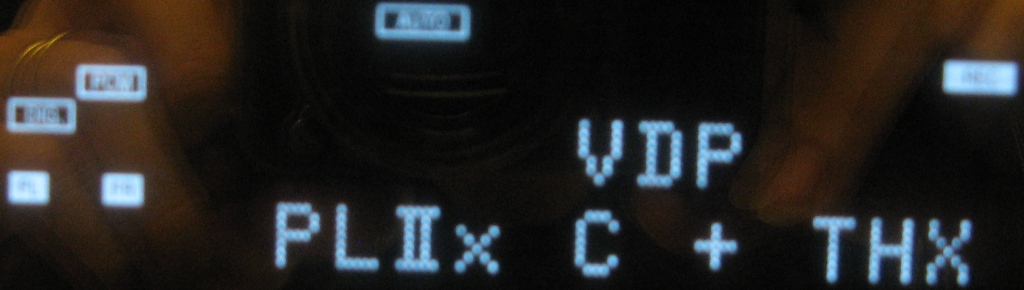
a) DVD, the "Audio mode" is still showed the same thing i.e. blank or "----". However, the receiver decode the sound properly and shows 5.1 speakers , DD, DTS, etc depending on the DVDs movie that I put in (see attached).
b) I don't know what do you mean by DD?
c) Nothing. The Audio mode is the same as "a" above.
The problem occurs only when I insert a BluRay in where the Receiver shows only 2 speakers and PLC (see attached). If I use WinDVD 9 and AnyDVD the receiver will show like "a" above.
I apologize for the fuzzy pictures. I am not a good photographer.Attached Files:
-
-
bron5 - if you are so afraid the Dragon will play up from your current settings -try using Norton Ghost.
I set up my dragon on a 60GB primary partition on the 1st HDD - with Vista X64 installed with all my software (Office 03, Acrobat 9, Nero 8, Photoshop CS2 and some other small apps) the disk usage was ~25GB (2GB Virtual memory swap file permanently on the HDD, no Hibernation swap file).
Using a Boot CD, boot to DOS prompt and get Norton to squeeze it all up to just under 12GB and dumping the Ghost Image file to the 2nd HDD. It takes just under 30mins to do a full restore in case I did something silly with Windows
If you set up your Dragon just to the way you like it, you can save tremendous amount of headache with an image restore like Norton Ghost. If you are anxious on future driver updates, etc. You can ghost a fresh installation of Vista then add future version of Office, Adobe, IE8, video drivers and so on. I have used this method on all my 5 PCs and 2 laptops without any issues for many years. -
hey my friend found a hp hdx laptop but there is a password required
does anyone know how to bypass that?
or does anyone know where I can download the recovery discs?
please reply back if anyone has the information I am lookin for
thanks -
Did anyone else see that and rofl?
Your friend "found" one, and there's a password required? Did he "FIND" it lying next to a guy with strange red liquid seeping out of his gut, lying on the floor, after he inserted some sharp metal into him?
(God I'm going to feel guilty about putting the smiley face at the end of that if you say "Yes, yes he did.") -
I am trying to purchase a silicone keyboard protector for the HDX, mainly because I found the HDX keys tend to get slippery faster than any keyboard I have at home and the other reason is I tend to find silicone keys are easier to type with plus it helps to protect the lettering from fading.
Due to the uniqueness of the laptop size, there are really no accessories for it anywhere. However I managed to spot a silicone keyboard skin for a HP DV9000. Looking at the review pics, the keys look very similar - same number of keys and identical layout with the number pad. But - looking at the service manuals, the part numbers are different so there is a chance its not the same size:
* HP HDX Keyboard #448159-001
* HP DV9000 #441541-001
Any thoughts? -
well i finally took a walk down the plank and bought an HDX Dragon after looking at the HP hdx16 & 18t versions for a month and am really digging this beast.. although it is rather huge and spacious.. but she sure is purty! lol
is anyone using any sort of screen protector? or would it take away from the beauty of the display?
is it true HP has extinguished the fire beathing HDX 20.1 Dragon?
great to be here in the HDX lounge no doubt!
that would be sweet to have some available accessories.. and a silicone keyboard cover would indeed be worthy of having! -
Unfortunately, it's hard enough to find the most basic of accessories like replacement batteries / plugs, or a laptop bag - the more specialised kind just... don't really exist.
There may well be some generic accessories that may fit with the HDX - or perhaps even some designed for another laptop; but as far as ones made specifically for the HDX, you'll be hard pressed to find anything - or at least I have been
-
I am currently waiting for my messenger style bag from SFBags.com - at USD 139 its not cheap but based on my experience with a smaller sized bag for my other laptop, its tough as nails plus its made locally in Frisco so you're supporting local jobs
The only other backpack alternative is Timbuk2 custom Lex backpack. It starts at USD 150 + shipping and has no padding inside. Its too bad they discontinued the maLX square backpack.....
-
TechAir Makes a nice sleeve for a very good price in UK:
www techair co uk/store/productdetails.asp?ProductId=214 -
Does anyone have a picture or can provide details of chips (manufacturer,model) used on Avermedia A312 HDTV card which many of us have inside their HDX laptops?
-
Yay! Looks like an awesome thread.
I just orded an HP HDX 16t for $849 + tax (free ship).
the P8400 is on it (2.26ghz), otherwise I didn't upgrade anything else, so its 720P and no blu-ray, no tv tuner, all of which i dont foresee using (well 1080P would be nice but 720P is awesome as well).
Anyway, I'm wondering if anyone has upgraded the RAM in the 16T. Mine hasn't come in yet but it'll have 3 GB. I wonder if you can upgrade to DDR3 ?? -
Does anyone have a full list of the HDX-9000 part numbers? Up until about 2 weeks ago Newegg still had them for sale (the Core2Duo @ 2.1GHz, w/the BluRay, 1080p display, and the 8800GTS) for $1500 and now its gone. I'm looking for a similar one somewhere else but all I can find is the HDX9010NR's with the XT2600 GPU and it's not what I want.
-
That's it for the HDX9000. They've been discontinued.
9494NR and 9010NR are the only retail model numbers.
Best bet is eBay or Craigslist if you're looking for an HDX9000 w/ 8800MGTS. -
Here's a pic: (best that I could come up with)
![[IMG]](images/storyImages/A312%20%281%29_nEO_IMG.jpg)
-
Take the watch battery (RTC) out for five mins.
See the HDX manual for instructions on page 74 -
http://h10032.www1.hp.com/ctg/Manual/c01279508.pdf -
If the picture posted by 2.0 doesn't do you I will try and scan the one I took out of my HDX for you. Just let me know.
-
Page 100 lists a couple of drivers.
I'm using 180.43 with Physx installed over 175.97.
In any event, you can adjust colors using the following website:
http://www.lagom.nl/lcd-test/contrast.php -
Did that card work out for you and the game box?
-
How does one FIND a HP HDX laptop?
Very suspicious.
If I lost my HDX, I'd report it to the authorities etc. If I found one, I'd turn it in to the authorities and not f*ck with someones stuff. -
There appear to be a few models of the Dragon available on an Amazon storefront. Two of them have the 8800gts.
http://www.amazon.com/s/ref=nb_ss_?url=me=A1U9HDFCZO1A84&field-keywords=hdx+pavilion&x=0&y=0
Cheers -
maybe you need to chop the finger off the corpse sitting in your freezer and roll it on the fingerprint reader, should work
at worse you cut off 10 fingers, not like the corpse will complain though -
well since I aint u, then I obviously wouldnt do that now would I? cuz I aint a complete dumbass
-
ummm you also have heard of Lo-Jack for laptops right?
-
Wohey!
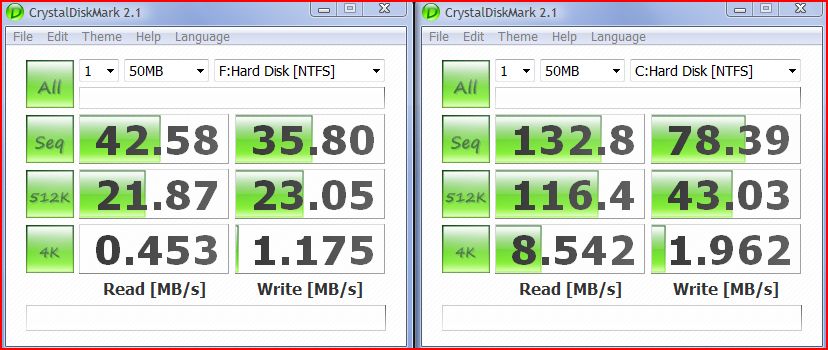
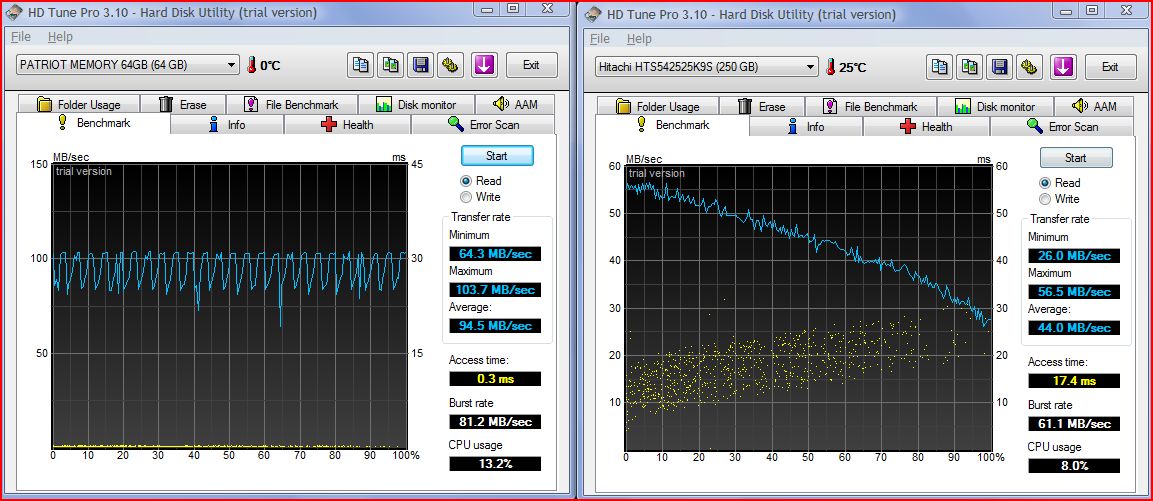
Looks like Santa came a little early this year! The first Dragon HDD benchmark between standard 5,400rpm and a Patriot 64GB V2 Warp SSD. Sure its an MLC card but it aint my money!
Will play with it for a while then post feedback.Attached Files:
-
-
Run an HD Tune Benchmark if you get the chance. It's the review standard around here and would work great as a comparison.
It's free.
http://www.hdtune.com/ -
I took advantage of low prices and a rebate a couple weeks back and got the same Patriot 64GB and a Patriot 32GB for $150 and $89, respectively.
I have the 32GB in my HP 2133 Mini-note, but haven't used the 64GB yet.
I like those speeds...I assume the the SSD is the faster benchmarked drive?
-
Thanks 2.0, I've made myself not enough clear I need detailed picture of components used on that card. Is it a chance that you will do another shot for me but this time with zoom ?
-
Please do
-
Here you go - benchy with HDTune v3.01. Can only do read test as write test require no partition. Very surprising the standard hdd gets slower and slower the longer you read from it
Lancorp - yes, the faster bench is the SSD drive.
I haven't had much time testing games as yet, but just like my SLC SSD equipped P1610 - Office 2003 loads almost instantly, Vista loads tremendously faster - about 2x faster.
All the "heavier" Adobe programs load almost instantly (except Photoshop CS2 which is only a little faster).Attached Files:
-
-
Thanks for the link. It just makes me sick I didn't jump on the one @ Newegg when I had the chance. I coulda swung the $1500 for the same thing Amazon wants $2500 for had it not been reequired to spend $400 on the wife's birthday .
-
Impressive numbers!
BTW, have you noticed the common MLC write stutter with this drive? -
thanks for the blu ray help 2.0, works perfectly
-
So far - no stutter, but as you can see from the benchmark, they do occur once in a while. Will post back once once I get a better feel for the drive.
-
I was out of town and away from 'net access and haven't had a chance to review all responses yet, so if someone's already covered it and you've got it working, then disregard it.
There are a few other settings to check to get proper output of your system. Remember that a redirected signal is a redirect of the configuration setup of your sound and speaker settings.
Open up your Sound options again from your Control Panel.
Highlight the Speakers and Redirected Headphones icon, then click on the Configure button at the lower left of the window. Select 7.1 or 5.1 Surround (depending on what you want)then Next to select the speakers in your configuration, then Next again to select full-range l/r and Surround speakers, then Finish to save the configuration.
Double-click the Digital Output Device icon or highlight it and then click on Properties. When the Properties window is open, then check that the following settings are enabled:
1. Under the Supported Formats tab - DTS, Dolby 5.1, and WMA Pro Audio, and both frequency sample rates.
2. Under the Enhancements tab - Check to see if Virtual Surround is enabled or not - it could affect your output audio.
Don't forget about your external display's settings as well, (assuming you're running your output from notebook-external-receiver) , as most HDTV's have individual DTS/Dolby/Surround output settings, accessible from the menu options. -
If you're looking for model or system specific parts' lists, that's easy. If you're looking for different HDX's, I posted a list of international sites a few posts back that still have the HDX's for sale in different configurations. The HP UK site is your best option, as you can still order HDX's directly from the site online.
Which one specifically are you looking for, a specific list, or a particular HDX model? -
I was looking for a list of what cfgs equated to what model #'s. I knew about the 9010nr's and the 9494, but I saw your sig had a 9310tx, and I was wondering if there was a master list somewhere.
-
Thought I would toss out a update re: BIOS dead/replacement 18T system from HP.
The unit shipped today from Shanghai, according to FedEx IDP rep, unit should clear customs on the 12th (its the 12th there now so...) and with two day shipping should get here by Friday.
Then the fun of re-installing all my apps and updates....fortunately, have a full nightly backup of all my "My Documents" and Outlook data. -
The HP numbering system is like this:
Base System Model # - HDX 9000 Series CTO Notebook
Series Model #'s - HDX 9200, 9300, 9400
Model Configuration # - 9301, 9494
If you go to the HP Support Site and input your Model # only, you will get a list of URL links to all systems in your model series starting with
the first active model configuration from your model's base series number.
For example, the HDX 9300 series has 40 different configuration models, starting with 9301:
HP Pavilion HDX9301TX Notebook PC
HP Pavilion HDX9302TX Notebook PC
HP Pavilion HDX9303TX Notebook PC
HP Pavilion HDX9304TX Notebook PC
HP Pavilion HDX9305TX Notebook PC
HP Pavilion HDX9306TX Notebook PC
HP Pavilion HDX9307TX Notebook PC
HP Pavilion HDX9308TX Notebook PC
HP Pavilion HDX9309TX Notebook PC
HP Pavilion HDX9310EA Notebook PC
bla bla bla, up to the HP Pavilion HDX9399SX Notebook PC.
Clicking on the URL will take you to the system's individual configuration support page. While they all look similar, there are small differences on some
pages - you just have to look.
However, if you're looking to get your own system's support data, then instead of the Model #, enter your system's HP Product Number (e.g., KR835AV#ABA for the 9301) in the initial field onthe HP Support site page and it will take you directly to your system model configuration page. -
Your help is greatly appreciated.
Please see my response above in bold blue.
I think the issue may lye in the Quickplay "Audio mode". As suggested by brentadent's posting page 405, post #4046. I need to select Dolby Digital or DTS under Quickplay "Audio Mode". Unfortunately, it is blank (it shows as "----"). I wonder if I am alone in this case or everyone else experience similar problem. -
Another quick detail.
As I stated before, the sticker on the back of my system reads "Pavilion HDX9200" under part number.
I was going through the purchase confirmation emails from HP from some 9 months ago, and in there, they listed the computer as a HDX CTO, with the part number "GW473AV", which pops up in the HP website as HDX9000 CTO" -
THIS FORUM IS FOR HP DRAGON OWNERS (20.1 IN SCREEN). THERE ARE FORUM FOR THE 16 AND 18 IN HDXs. WE CAN HELP YOU 16 AND 18 IN OWNERS BUT YOU HAVE ONGOING SUPPORT IN THE OTHER FORUMS, WE ARE SUPPORTING A DISCONTINUEED MODEL THAT THE REST OF YOU WILL NEVER GET TO APPRECIATE. lONG LIVE THE DRAGON !!!!Last edited by a moderator: May 8, 2015 -
I wish the moderators would change the thread name to "HDX20" or HDX Dragon" Owners Lounge!!!
It's not HDX18t/HDX16t owners fault...most don't even know a Dragon exists, and after all, their 18's and 16's are HDX's! -
No, no, no, no, NO - You're getting things confused!!!
Your DTS will depend on how you have your system setup - if it's going from the HDX via HDMI directly to the Receiver, you should be getting DTS if it's set in your Sound Options. However, if it's going to the HDTV first, unless your HDTV processes Dolby and/or DTS, you likely won't see it on your Receiver as any signal going into the external display that goes out again is going out as a signal processed from the HDTV's audio processor, and in whatever audio format its designed to output unless it has pass-through capability.
To try and illustrate what I'm trying to get across - think about a standard DVD or BD player. All of them have different types of Video and Audio outputs, but the Video goes to the display, and if you're using a Theater System, the Audio output goes to the Receiver. One unit, two outputs.
With the HDX, you're outputting Hi-Definition Video and Audio on one cable - unless you're splitting the Audio and Video and sending it to both HD units (Audio and Video) , just sending a combined signal to the HDTV won't get you a Hi-Definition audio signal output unless it's designed to process an incoming HD audio signal and pass it through. A normal setup would have the Video signal coming from the player, and the Audio going to the Surround system as I described above.
The other option is if you have a Theater System and not just an Audio Receiver, as most Theater units process HDMI A/V input signals back out to both HDTV's and the Audio Processor of the Theater unit.
QUICKPLAY SETTINGS
The reason your Audio Mode is blank is because you've set your QP Audio Output to SPDIF, and you're not using a SPDIF jack, you're using an HDMI cable. Depending on the Receiver configuration you want it should be set to either 5.1 or 7.1. When you set it to those, your Audio Mode will automatically set itself to TrueTheater Surround.
The QuickPlay setting is for DVD output - it has nothing to do with actual hardware settings. That's what your Sound Options are for. Just because the Sound Option setting might say SPDIF for the Digital output DOES NOT MEAN that you're using a SPDIF out jack -you're using an HDMI cable. In this case, SPDIF just happens to be the old label for the Digital Output prior to HDMI, and since you're settings in your Sound Options are for Surround output and not actually SPDIF, there's no setting for it because it's not being used.
When you setup the Audio settings on a regular DVD or BD, you set it up according to how your hardware is configured - you don't use it to set up your hardware. Same thing here - the QuickPlay audio settings are for DVD configurations to match your hardware setup, not to setup your hardware.
The Sound Options/Digital out set the HDX's hardware and signal output to the HDMI cable. The QuickPlay (DVD) settings are for the hardware configuration either hooked up directly to the HDX, or for hardware at the end of an HDMI or other cable linked to an external Theater or Surround system.
Change your QP settings to whichever Surround option you want, then do the same on your external display or Receiver. Remember, depending on how your hardware is setup, you may not ever get DTS or Dolby to your Receiver. -
I just finished testing out the newest audio drivers:
6087 - Newest, buggy as hell. Crashes games and doesn't play well with any recording software.
6064 - Works fairly well, but still crashes a few games (SupCom).
The official 5607 are still the best to use. -
FYI, for anyone looking to purchase an HDX with 8800GTS video, seems somehow, HP Refurbished HDX's are showing up. Ebay has 3 different sellers selling factory refurbished, sealed HDX's with 90 day HP warranty for pretty cheap (one was as low as $1229 after $200 live.com cashback, and was with a 8800GTS and dual drives!!!).
I wonder where they get the refurbs? I checked HP's outlet, and didn't see them there yet.
*HP HDX DRAGON Owners Lounge, Part 1*
Discussion in 'HP' started by J-Bytes, Sep 14, 2007.