Problems? See this thread at archive.org.
does anyone know if it would be possible to retrofit the backlit keyboard? do you just remove the current one and place the new one in?
-
Thanks for the info. It looks like HP's own SSD option uses the 160GB Intel (not too many SSDs that size, but I don't know for sure)...but it adds like $550 to the price. I can get a 80GB from NewEgg for like $330 and I don't need 160 for the OS and apps.
I may do a clean install anyway, because as I understand it, you have to do an unattended install if you want the Users directory to be on a different drive (can't change it after the install). Since I keep most of my data in my home directory, I want the Users dir on the data drive. So I think I am stuck with a clean install.
Are the drivers not available online? Do I really need to pull them off the drive before I begin the swap? No driver CD or anything? -
Yea I'm sure your right.
-
I did ask HP Home a few days ago if someone could send in their HDX to have the backlit keyboard placed in, he said yes but its going to cost you a pretty penny. You might try to ask HP if you can buy a replacement backlit keyboard, is that what you were thinking?
-
I've done some checking and unless you have the recovery partition still on your drive you wont be able to make recovery disks. I checked the HP website solution center for some answers, however it looks as though you will have to order them unless of course you can find a torrent file and download them. I hope this is what you were asking, or did you just need to be pointed to where the backup manager is loacted on your c drive?
-
It is impossible?

-
Do you still have the drive letter that holds the recovery partition? Or maybe the better question is did you reformat the C: drive and erase it? Okay do this, click on start then right click on Computer, then select Manage, then in the middle window under "name" then double click storage, then double click disk management. You will see your C: drive there and under that your ROM Drive DVD D: if you see another drive marked E: then that should be your recovery partition drive. Let me know if its there and I'll help you find the recovery partition manager. If its not there then yes, you will have to order the disks.
-
Hey... HDX18 HAS ACCELEROMETER.
So, is there any software where i could see if it works fine? I know that exists the "HP Protectsmart's 3D" that uses the accelerometer, but i think is not possible to see it working. -
UNDERD0G, I have install new system (vista ultimate 64) but recovery partition did not touch.
It was primary two disks - C(System) and D (recovery)
I have divided a disk C: (system) into two partitions (it was 290 Gb, i make 100+190 Gb)
and now I have 3 disks
disk C: (system) 100 Gb
disk D: (work) 190 Gb
disk E: (Recovery) (`10Gb)
disk F: BD ROM
But i don't know - how to make backup disks?
I want to kill Recovery partition drive, but before to make copy of it contents on DVD. And one more question: is it possible in the future to make installation of system from these disks? (i mean disks that i make from Recovery partition)
Thanks for your help. -
UNDERD0G, I have install new system (vista ultimate 64) but recovery partition did not touch.
It was primary two disks - C(System) and D (recovery)
I have divided a disk C: (system) into two partitions (it was 290 Gb, i make 100+190 Gb)
and now I have 3 disks
disk C: (system) 100 Gb
disk D: (work) 190 Gb
disk E: (Recovery) (`10Gb)
disk F: BD ROM
But i don't know - how to make backup disks?
I want to kill Recovery partition drive, but before to make copy of it contents on DVD. And one more question: is it possible in the future to make installation of system from these disks? (i mean disks that i make from Recovery partition)
Thanks for your help. -
UNDERD0G, I have install new system (vista ultimate 64) but recovery partition did not touch.
It was primary two disks - C(System) and D (recovery)
I have divided a disk C: (system) into two partitions (it was 290 Gb, i make 100+190 Gb)
and now I have 3 disks
disk C: (system) 100 Gb
disk D: (work) 190 Gb
disk E: (Recovery) (`10Gb)
disk F: BD ROM
But i don't know - how to make backup disks?
I want to kill Recovery partition drive, but before to make copy of it contents on DVD. And one more question: is it possible in the future to make installation of system from these disks? (i mean disks that i make from Recovery partition)
Thanks for your help. -
UNDERD0G, I have install new system (vista ultimate 64) but recovery partition did not touch.
It was primary two disks - C(System) and D (recovery)
I have divided a disk C: (system) into two partitions (it was 290 Gb, i make 100+190 Gb)
and now I have 3 disks
disk C: (system) 100 Gb
disk D: (work) 190 Gb
disk E: (Recovery) (`10Gb)
disk F: BD ROM
But i don't know - how to make backup disks?
I want to kill Recovery partition drive, but before to make copy of it contents on DVD. And one more question: is it possible in the future to make installation of system from these disks? (i mean disks that i make from Recovery partition)
Thanks for your help. -
You'll need a blank CD-R or blank DVD-R.
To begin, click Start, then All Programs. If you have an HP Pavilion click Hewlett-Packard and then HP PC Recovery CD Creator. If not, try clicking PC Help & Tools, then HP CD Recovery CD-DVD Creator to start the program.
You will see a welcome screen. Click the Continue button on each screen to start the disc creator. You will see how many disks are necessary to create the HP recovery disks. Label them, so you do not get confused after each burn.
The disk will burn, verify data, then eject each CD when complete. When the process is complete, you should have a working set of HP restore disks.
You will not be able to create another set, so if you lose or damage these disks, you'll need to contact HP for a replacement. -
You'll need a blank CD-R or blank DVD-R.
To begin, click Start, then All Programs. If you have an HP Pavilion click Hewlett-Packard and then HP PC Recovery CD Creator. If not, try clicking PC Help & Tools, then HP CD Recovery CD-DVD Creator to start the program.
You will see a welcome screen. Click the Continue button on each screen to start the disc creator. You will see how many disks are necessary to create the HP recovery disks. Label them, so you do not get confused after each burn.
The disk will burn, verify data, then eject each CD when complete. When the process is complete, you should have a working set of HP restore disks.
You will not be able to create another set, so if you lose or damage these disks, you'll need to contact HP for a replacement. -
The drivers should be available online. If you copy the SWSETUP directory on the C: drive to another drive first, you will have them. That is the easiest way.
-
Having not seen an Asus in person, I would guess a big difference would be build quality. The HP HDX18t is built very sturdy and has a good fit and finish.
-
Just got my HP... Love it...
I had a Dell 17 that I returned and got this instead and boy am I glad I did.. Comparing this to the Dell is like comparing a Yugo to a Ferrari.... -
the main trouble is that i don't have in my HDX18 such programs like HP Recovery Creator or HP Backup and Recovery Manager, because i install vista ultimate 64. And i don't know where i can to download this programs. Even on hp.com i can't find them.
-
Can't overclock the processor on most laptops including this one. Even if you get an Intel extreme chip. They BIOS is locked. You can only do it one of two ways - have a custom BIOS written for you $$$ or do it manually (don't even know how they do this - sauder, screw driver, wires...?)
-
SLEEP MODE - Do you guys put your laptop to sleep overnight or turn it off completely?
-
6% cashback from fatwallet.com on hp.com purchases until April 3.
http://www.fatwallet.com/cash-back-coupons/HP-Home-Store
Hey, every little bit counts!
-
should a system equipped with
T9600 2.8 ghz
Nvidia 512 9600 m gt overclocked
4gb ram
Vista Ultimate x64
be able to run Adobe Premier Pro CS4? It lags to the point of being unusable for me -
I turn it off completely, I only put it to sleep if I am going out for a few hours or something to that effect.
-
It should.
# 2GHz or faster processor for DV; 3.4GHz for HDV; dual 2.8GHz for HD*
# Microsoft® Windows® XP with Service Pack 2 (Service Pack 3 recommended) or Windows Vista® Home Premium, Business, Ultimate, or Enterprise with Service Pack 1 (certified for 32-bit Windows XP and 32-bit and 64-bit Windows Vista)
# 2GB of RAM
# 10GB of available hard-disk space for installation; additional free space required during installation (cannot install on flash-based storage devices)
# 1,280x900 display with OpenGL 2.0compatible graphics card
# Dedicated 7200 RPM hard drive for DV and HDV editing; striped disk array storage (RAID 0) for HD; SCSI disk subsystem preferred
----------------
Listening to: Guns N' Roses - November Rain
via FoxyTunes -
I don't even turn mine off at night. I leave it runnign 24x7 except when i need to take it with me somewhere, and even then i use hibernate.
-
CS4 cannot be installed on an SSD? Or do you mean a removable flash drive? I have seen test systems of Photoshop on an SSD. That makes no sense. Please clarify as I am about to buy a system and put an SSD in...need Photoshop everyday.
-
Can you tell me how long after it was shipped it took be delivered to you?
Thank You
-
Yes you can install on SSD, just not other types of flash-based media such as Compact Flash.
http://blogs.adobe.com/jnack/2008/11/cs4_solidstate.html
-
Has anyone found a bigger battery that works for the HDX 18t? I know the HDX 16 you can get a 12 cell for it, I am shocked that a 12 cell wasn't offered with the HDX 18t.
Yes yes yes, I know this laptop isn't meant to be ran on battery, but there are some situations, when I take it into a meeting that I would like to get 30-40 more minutes out of battery use.
Anyone have suggestions? -
Hey all, I thought I'd post HP's latest coupon offer:
Extra $250 Off Customized Pavilion Notebooks 1099+ or HP HDX Notebooks $1099+ • w/ Coupon NB6513 • (excludes HP Mini, HP G60, HP G70, HP Special Edition dv4t, HP Pavilion dv7t & Compaq Notebooks - exp after 2600 uses, limit 1) exp 3/25/09
Also, I was wondering if someone could help me with this question:
When My HDX arrives if there is a problem with it, after you get an RMA, do you have to wait as long as the first time you ordred the Notebook, or do they speed the process along if there was an issue with your first?
Also, if you do have to do an return, can you change something on the notebook like RAM or CPU, or do they just issue a refund and you have to start all over? Thanks all. -
CyberBeach,
Did you have to make any adjustments to the sound settings (volume, etc.)? How far away from the machine are you able to clearly hear dialogue, etc? In my case the volume is such that, more than 3-4 ft away, I have to strain my ears to clearly hear when the characters on the screen speak in a low voice, especially in a movie, etc. even with volume set to max. I use HPmediasmart for watching movies, etc.
Thx -
No 12 Cells as far as I know, probably because the HDX would melt if there was any more heat added to the system. Anyway you should get at least an hour half out of the notebook, unless youre playing games while pretending to pay attention in your "meetings".
I heard that HP was supposed to be releasing their "new technology" batteries soon. I dont remember if they were supposed to give you longer lasting batteries in the sense that you were looking for also, but I do know they are supposed to last for like 5 years worth of charges. Could be something worth looking into for you in case they do last longer between charges also. -
The scheduled build date was: March 18th
The shipped date was: March 16th
The delivery date (Greenville Texas was: March 19th
I think they run on the Captain Kirk/Scotty time...
Scotty always told Kirk it would take twice as long as he knew it would take that way Kirk was always happy.... -
So, does that mean you have your notebook now? Or are you still waiting? When I bought mine I had to get help with my coupon code so I called in and the sales Rep. told me one week to build and one week to ship. So far its going to take three weeks total by the time I get mine, and their was nothing special about my config. I cant understand why its taking three weeks...
-
If something is wrong with it, you will have to wait as long as you did the first time. They will request a "expedited date build" but its up to the factory if they can do it. Its not a guarantee.
Any return and exchange requires a whole new build and if you utilized a 30% off coupon and it is currently expired, you won't be able to change anything if you want your 2nd HDX to utilize the 30% expired coupon you used on your first.
If your looking to return your current notebook that you bought and use a better coupon to save money, you could just call them telling them about the coupon and most likely they will credit you what you could save to avoid a return. Otherwise just return the one you have and order another one on the site with the coupon if they wont do it.
Hope this helps? -
Got it in my hands on the 19th
-
Thanks, incase anyone was wondering I found out you need to set the scratch disk to the other drive (assuming you have dual HDs)
-
jm1425,
Thanks a lot. This answered everything I needed to know!
-
Hey thanks a million jm1425! I called HP and they said since my order was taking a bit longer to ship than usual, they are giving me the $50.00 difference on my order! How cool is HP? I dont know ANY retailer that credits their customers back after a new coupon is released, AND after the purchase has already been made. Thats makes a total of $450.00 off my order! Thanks HP!
I will list the HP Coupon offer here again.
Hey all, I thought I'd post HP's latest coupon offer:
Extra $250 Off Customized Pavilion Notebooks 1099+ or HP HDX Notebooks $1099+ • w/ Coupon NB6513 • (excludes HP Mini, HP G60, HP G70, HP Special Edition dv4t, HP Pavilion dv7t & Compaq Notebooks - exp after 2600 uses, limit 1) exp 3/25/ -
Some people say its less stress on the system components if you leave it on all the time. Also it seems electronics tend to blow during the power on cycle. I've known people who've left their comps/laps on for very long stretches. Personally I'm not sure which option is best for longevity. -
Yeah, this is why i got one of those 4-year accidental damage warentee plans for it. It really is a good deal for longevity cause of the replacement option down the road.
-
Vista 64 Ultimate boots painfully slowly with external hard drive (western digital Mybook 1TB) plugged in thru usb. Anyone else have this issue with external drives and their hdx18's?
-
No problem here.
-
Yes, I agree w/ this.
My grandpa, who is an electronics genius, always told me that electronics would last forever if they were always left on.
I don't take forever literally in this case of course.
One must also take into consideration heat and stuff like that when talking about laptops. -
Why not use the eSata Port, or is it just an USB connection drive, and if so I'm pretty sure you can convert that with the right adapter end.
-
This is SO TRUE. When I first got into computers in 1996 I had a friend who knew everything about PC hardware, and he always left his computers on or in hibernation and told me the same thing. Its in the turning them off/on that causes them to breakdown faster and fail. Computers are a different animal, their not like TV's or Microwaves, they just need their sleep!
-
Goodmorning folks,
Doing a search for my brand new laptop I found this magnificent forum as well thread.
I was really surprised how some people around the globe thrilled for the "monster" as I did !!!!
My first day in the forum and I feel obliged to say a BIG thank you to the people sharing their knowledge with us. My special thanks to Valen741 for his tips on the GPU.
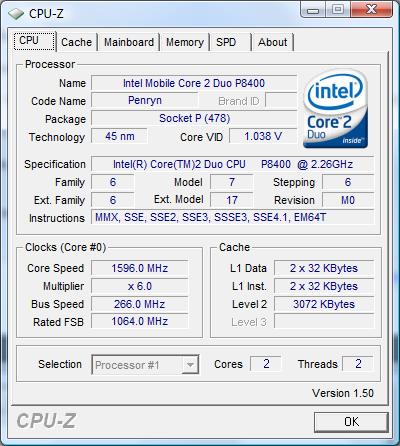
Unfortunately in Europe the best someone can get is my version, 2.26Ghz, what a pitty
I have a question, how can I control my CPU speed to gain at all time the max out of it ??????
Anyway KEEP UP the good work !!!!!
My very best greetings from the capital of Macedonia, THESSALONIKI in northern Greece.Attached Files:
-
-
FYI - Hibernation is the same as turning it off. It just takes what is in memory and stores it on the hard drive, then reads that information back into memory when you turn the computer on again. While it is in hibernation mode, no power is used at all.
-
Select the High Performance power plan under Power Options in Control Panel.
-
The one thing I dont like about the HDX18T is the power jack. Mine fits very loosely and seems very fragile. My last laptop (Toshiba) felt the same way and failed multiple times both in warranty and out of warranty and was the final demise of the laptop (couldn't fix it again). I am thinking of trying to strain relief the cable somehow. Does anyone know where I can get a male and female connector. I could then build a short extension cable which I attach to the laptop someway that way the flexing would be on the cable not the laptop connector. Thoughts?
*HP HDX18 Owners Lounge*
Discussion in 'HP' started by HDX18, Sep 16, 2008.


![[SMAN]](images/avatars/[SMAN])