 Problems? See this thread at archive.org.
If you are interested in the Spectre 13T you should really go back and actually spend some time reading through this thread. Many have generously contributed their time by writing out detailed answers to many questions such as yours (and much more). Your questions have already been answered by others in this thread.
-
-
I have read quite a few pages. But it seems very unreliable since first of most buy the fhd version, which is not available in my country. Also there have been a lot of returns - too numerous to count.
With regard to the display, some say it's a Sharp IGZO panel, others say it's an LG IPS panel, some say it's actually a TN panel. Hence I would like a final confirmation. From what I can gather the battery should be 8 to 9 hours - at least with fhd panel. Haven't found anything about form factor yet.
Fan and heat has been a bit ymmv from what I can gather.
Lots of high pitched noise - fixable by rma. But I would like to know are the characteristics of it when idle and load with a non-defect fan. And of course the quantity of fans. Heat - not read much about that.
Merely writing all this to say I haven't just been lazy and expecting answers on a silver platter. Would just like confirmation from someone who has a working machine - not about how a soon-to-be-RMA'ed machine behaves. -
I can look tonight (at work now), is there an easy way to check that? Under device manager? Quality wise I think it's great, I played some hd movie trailers from youtube and they looked amazing, played around some in lightroom and photos all looked good...brightness seems pretty even, colors are very accurate, etc.
fan noise is non-existent under casual use. There might be a very tiny whine, but I can only hear it if the room is completely silent. I don't know how many fans there are. Bottom of the laptop got warm but not uncomfortable, but again that was under light use. I haven't had a chance to stress it yet. No idea on battery life...it only arrived Monday was at 50% on arrival, took about an hour? to get to full charge. Last night I used it for about an hour on battery and it was down to 87%, but that's not a scientific test.
-
Thanks. I believe device manager would reveal the manufacturer. I actually don't know of a reliable way of determining panel type. Maybe someone else can describe the process.
Nice to hear about the fan behavior. Would like to get your thoughts on the load fan volume when you get the chance.
Edit: just discovered this link on how to determine panel type. http://mediachance.com/pbrush/monitor.html
Don't know how accurate it is -
Cases/sleeves, which ones fit the Spectre the best? I can't seem to find any that I like, been looking at the one for the XPS 13, Mac Air and anything else for 13.3 but many seem that they will be too large for the Spectre.
-
Okay, so I just ran HWinfo to get some information. The QHD screen is an "LG Philips [Unknown Model: LGD0000]", no serial number provided. It's definitely not TN; I can angle the screen as far as possible without any noticeable issues. If I can see text, I can read it, and white stays white.
Also, for the curious: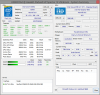
-
Just a heads up that this was all discussed a few pages back in this thread....right down to the posting of the LGD0000 model number LOL.Dpat09 likes this.
-
Strange that HD 4600 is listed. It should say 4400, although the difference is minor performance wise. No surprise with the SanDisk SSD. It's usually either SanDisk or Samsung. Please do try stressing the system a bit and tell me how the fan sounds.
Yeah, I agree that if it's LG, then it's probably an IPS panel. If it was TN, they would probably go for a Chinese manufacturer - although that's pure speculation.
I read that both wifi card and SSD are ngff sized. So even if I wanted to replace any of it, I would be hard pressed to find ngff hardware where I live.
It seems like the configuration you have is the exact configuration I'm looking at - which is also the only one that is available to me. So all your results will be applicable to me
-
I have these two items. You can use one or the other (or both if you really want some strong protection).
Amazon.com: Case Logic LAPS-113 13.3-Inch Laptop / MacBook Air / MacBook Pro Retina Display Sleeve (Black): Computers & Accessories
Amazon.com: Case Logic VNA214 14.1-Inch Laptop Attache (Black): Computers & Accessories
![[IMG]](images/storyImages/c85d5fe3-991f-4c5c-81fb-4ea63c577588_zpsbccec3c7.jpg)
![[IMG]](images/storyImages/CaseLogic2_zps63fb0334.jpg)
-
Anybody create a recovery disk using a USB stick? How long did it take? I am trying to create one using a 16GB USB flash drive. It has been going for 24 hours with no end in sight. The little wheel thing just keeps spinning and spinning. There's no indication of how much progress has been made. The write light on the USB drive flashes like it is being accessed.It doesn't seem likely that it should take this long since the partition is less than 14GB.
-
Somethings not right. It took maybe 20 minutes on mine?
-
Thanks. Yeah, I figured there was a problem of some sort.
-
Okay, so I just ran Prime95 for 45 minutes. CPU did ramp all the way up (on AC power) but it occasionally cycled down to 2ghz, so I'm not sure I was running it correctly. cpu temp hit a max of 83f. fan noise came up pretty quickly, but it stayed at very acceptable levels the entire time. You could hear that it was running, but it was just white noise, a low level hum, not a high pitched whine or anything annoying. My android phone decibel app says 60db when held right up against the fan slot...never calibrated it however, so I have no idea how accurate that is.
-
How does the Spectre fit in that sleeve? Does the zipper hit the laptop when opening and closing? Does it slide around at all in the sleeve?
Thanks for the info and help. -
For anyone interested in what's inside this machine, check out the Maintenance and Service Guide which can be found on this page Manuals for HP Spectre 13-3018ca Ultrabook | HP® Support
Detailed specs, replacement part numbers and trivia (found this nugget: fn key + esc brings up a System Info bubble; click the 'Advanced' button for a shortcut to the HW/SW environment). -
I returned my Spectre 13 but my new one has just shipped and I should have it next Tuesday.
If I remember correctly it fit snugly and I don't remember the zipper hitting the laptop.
I can check it again next week. -
I purchased the 13T-3000 in December with an FHD screen. Decided I was somewhat unsatisfied with the Win 8 scaling options and returned it for the QHD screen. My experience is highly consistent with what you wrote, and I'm currently debating returning the QHD and going back to FHD. FHD was plenty bright. I have an ipad mini retina, and the brightness was just one or two notches down from the ipad mini's max brightness. The QHD screen is significantly dimmer, with a max brightness comparable to 3-4 notches down from max ipad mini brightness.
What's more, it has a noticeably blue tint compared to the FHD. Now, the blue tint can be corrected in the monitor calibration, but unfortunately the best way I found to do that was to take the green and blue down a notch in the color balance...lowering the brightness another partial step. All of that said, I've showed the QHD screen to coworkers next to a sunny window to get their impression, and all said they thought it was 'about normal brightness' and wouldn't have noticed that it was a little dim if it hadn't pointed out. As for my original motivation to swap laptops, the QHD screen definitely IS better for various scalings in win 8 (all look sharp, compared to the FHD which at some settings looked a little fuzzy/weird and required a lot of playing around with 'don't scale' options in program properties on win 8)....so I'm just deciding how much brightness matters to me. I'll say that even indoors, I always use the QHD at either max or one notch down from max if there are any room lights on. Natural window light? Always on max brightness to use comfortably.lovelaptops likes this. -
Has anyone (who has previously uninstalled it) tried re-installing the Collaborative Processor Power Controls software from HP's site? I just did with interesting results
I had uninstalled CPPC on the 25th after observing event ID 54's pointing to firmware issues and the much discussed clock throttling. My machine has been running great ever since, compared to the somewhat shaky state (driver-wise) in which it was delivered (received on 1/16/14 with F.13 BIOS from the factory). In addition to the problem with the CPPC driver (as evidenced by the event ID 54's logged on every restart and frequency locking issues), my machine would on occasion throw a BSOD on resume from hibernate, pointing to the Synaptics device driver. Uninstalling this device driver eliminated the bluescreens, but that obviously wasn't a fix.
When I updated the Synaptics driver from HP's site, I began to get an error on restart complaining about btmshellex.dll ( part of the Intel Bluetooth driver, which was puzzling-- Bluetooth and touchpad should be totally unrelated). As I mentioned in a previous post, trying to update the Bluetooth and ProSet wireless drivers from Intel's website was problematic-- but after several attempts, including updating the display drivers to the newer versions from Intel's website, I eventually got them to install properly--- and coincidentally, all problems with Synaptics BSOD's and btmshellex.dll errors vanished.
I suspect problems in the way the updates were being applied-- either from the way the device drivers were packaged in the factory image, or issues with 8.1's update process. Anyway, after running for almost a week with no issues (but still no CPPC driver) I began to wonder what would happen if I re-installed the CPPC driver from HP's website. I finally tried it-- and based on a few hours of operation and several reboots (on AC as well as battery), no Event ID 54's have been logged (no more 'check with manufacturer for a firmware update' nags in the log) and I haven't yet observed any CPU frequency locking with any of the power plans.
Maybe not all machines were subject to this issue due to the way the software images were built and what accessories included-- mine shipped with Win 8.1 Professional with Intel's AC wireless adapter. At any rate, it may be too early to declare victory, but so far so good. I'll update if I see any reversion to the previous bad behavior.lovelaptops and Dpat09 like this. -
I don't think you did anything wrong. This thread speaks volumes about cpu throttling. Nice to hear about the fan noise. Android apps of that sort are generally highly inaccurate, so I'll take that measurement with a grain of salt ;-) now if you really only measured 83f and not 83c under load, it must be that throttling keeping the temperatures in check otherwise it seems awfully low.
You mentioned that you had high pitched noise that was only audible in a silent room and perhaps even when the fan is off. That means the source isn't the fan but somewhere else. This could be coil whine, but I have an idea.
A lot of people - with a wide variety of laptops (regardless of make and model) - have had issues with noise coming from the keyboard backlight. Strange, but a lot of people "fixed" the noise by adjusting the backlight. Usually by turning it off completely but try adjusting it up and down if possible and see if the noise changes or even disappears. If it does, you've located the source ;-)
Edit: Can anyone take a picture of the power brick/cord, preferably with an item along side it for a frame of reference? Want to know how clunky it is. -
Just thought of something. Is it possible there are multiple places to turn off auto light adjustment? The earlier Samsung ATiV 9 had, countem, 3 different places the auto brightness needed to be toggled of to fully rid the screen light nanny. Where have people gone to turn off auto brightness settings?
-
Has anyone seen this?
Computer memory upgrades for HP - Compaq Spectre 13t-3000 Laptop/Notebook from Crucial.com
it lists it as the spectre 13t-3000, but under the spectre xt stuff... -
I got a notification of a CPPC update yesterday. I installed and enabled it. Everything seems to be working properly.
Regards, Jim -
Oh...it might have been 83 Celsius, I'll look again tonight and see. I honestly wasn't paying attention to that As for the whine, I'll check, but I've been leaving the backlight off for the most part. Is there a way to disable the backlight in bios so it doesn't get any power?
someone earlier in this thread did an unboxing post, you can see the power adapter at hp spectre 13t3000 unboxing - Imgur. I'd say it's slightly thicker than a deck of cards. -
I would take anything listed on a third-party site like that with a grain of salt. The hardware maintenance manual lists the SSD as an m.2 SSD in one place and an mSATA SSD in a couple other places. I don't know if anyone has taken their system apart yet to check.
-
Thanks for the link. it seems like it isn't an enormous power brick, but not the smallest either. Guess I can live with that ;-) there was some bios pictures in that link you gave me and it doesn't seem like there is an option to disable the backlight. However it should be enough to disable it via hotkey to remove the whine if it was the cause. Otherwise you might be able to disable it via device manager, but I doubt it and maybe it won't make a difference. At least you're not bothered by it
I probably would be - I have sensitive ears - but it seems not all are affected by it, so perhaps I will be lucky.
-
I know, I was just saying crucial will more than likely make a few in the m2 format.
-
Don't forget Fn+A! So glad and thankful for the person that found that.
Mine is says "International shipment release - Import
CHONGQING CN" So hopefully it will get here by money next week or sunday. Although its estimated for tuesday -
Mine is the same status. :thumbsup:
Mine is 2 day shipping but still won't be here until Tuesday.
Dpat09 likes this. -
Same here even with my 2 day shipping. I called HP and they said the delay is due to weather. Next Tuesday it isDpat09 likes this.
-
Jim - I did not receive any update so I went to HP and checked the current version available for CPPC. It is 10/18/13 version 1.0.0.1013
Nothing new is offered.
Can you check your date/version number of what you now have installed? I sure would like to see an HP update fix rather than do the uninstall work around previously discussed for the intermittent throttle issue.
ThanksDpat09 likes this. -
It's also much lighter than it looks like it should be.
-
Is this your second one or first one? This is my second try.
-
Yes, this is the 2nd one (max config w/Win8Pro). No problems with the machine other than the large screen defect in the upper left hand corner. There was an inch and a half round area on the QHD screen that was a completely different brightness level than the rest of the screen. I saw it as soon as I booted it up for the first time. Very pronounced and noticeable. Not sure how it made it out of the factory that way. What was the issue with your 1st system?
-
Everything was great except it had the smallest tiniest leak, super small like no one can tell. Except of the left side of the screen there was a few lines of dead/stuck pixels going down the screen. I've had that problem on a old dell, but I knew it gets worse no matter what. Which is why was so sad when i had to get a replacement.
Mine is maxed out W/out Win8Pro. but again, great deal for $1,220. If you can live with tiny quirks. -
same kind of non - fan whine can be from webcam mikes and laptop speakers. Somehow mikes remain on and while not recording they send a relatively quiet - but definitely annoying! - high pitched whine. There was an old HP Envy notorious for this and people had all sorts of theories
until someone come up with this solution. Seen it come up on several other non- HP models.. Best test: mute Your speakers and see if it goes away. If it does then go into Control Panel, Sound,g Recording and make sure mikes are turned off. No guarantees but well worth a try. Good luck, Jeff
Sent from my GT-N5110 using Tapatalk -
I definitely envy the prices you pay.
256 GB SSD, 8 GB RAM, QHD, AC Wi-Fi, core i5 configuration... for the cheap price of $2000
-
Okay, so cpu temp was 83° C under load
certainly makes more sense. also, the whine has gone away. Not sure if it's something I did like the backlight, or maybe the fan or other parts just needed a little running time to settle in. Either way, the laptop is now completely silent under casual use.
-
Yeah that makes more sense
glad to hear the whine went away.
-
I just calibrated the display with a Spyder4Pro. Says it's 99% of sRGB, graph below. Gamma is 2.3(0.05).
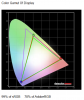 Dpat09 likes this.
 -
Hi All,
I really need to get Windows 7 64 installed on my Spectre 13T-3004 - has anyone had any success in doing this?
I would really appreciate any help and tips/walk through on how to do it (if possible)
Many Tks
Frosty -
Got my 256gb, 8gb Ram, HD screen Spectre 13 on Monday, one day earlier than expected. Everything is working well. No screen bleed, no headphone static or bad noise of any kind .No problems at all with scaling of pages and text on Chrome or EE. It boots up faster than I can put my password in. The screen is awesome. The keyboard lights are adequate and I'll probably rarely use them. The fan does not go on much, and when it does it has the slightly annoying high pitched hum that everyone is talking about but it really does not seem to be much of a big deal. I had some adjustment (and still do) to Windows 8 which seems to be designed to confuse and confound. I almost returned the computer because I hated Windows 8 so much, but I am now getting used to it and see some redeeming qualities in it. I can surely see why many people are ordering new computers with Windows 7 installed. Overall for about $500 less than a comparably equipped MacBook Pro, it seems that this is an incredible deal for a very high quality machine.
-
I wanted to post an update on how things are going with my system. I've removed the CPPC driver sometime ago and continue to have zero issues with the system and the throttling issues are completely absent. Nothing new to report about that. The audio port on this system does certainly have more static than the average system, its not a random static but more of a constant hiss. On the in-ear headphones I was initially using, this was a very noticeable hiss that I was very unhappy with. On these same earphones I noticed that turning up the volume above 36-40% was way too loud and anything above 50% seemed like it would cause actual hearing loss, I'm not exaggerating either. These earphones are seriously loud on this machine and I noticed I have tended to keep the volume fairly low. Basically it seems that the audio output is just very loud/strong.
Since then I have tried a few of the other in-ear headphones I had and noticed that the hiss is more or less inaudible or very slight and I am generally pretty happy with things. I would basically describe this hiss/static issue as being attributed to a very strong signal from the audio jack and very sensitive headphones (like the first pair I used on this system) may have hissing issues. However, it seems that most headphones (especially larger ones with higher impedance) should be ok. I'm absolutely no audio expert so take what I have to say with a grain of salt.
I am using a pair of fairly inexpensive in-ear headphones at the moment and have minimal hiss. -
When you mention "HD screen" you are referring to the 1920 x 1080 screen correct? Chrome doesn't work well with the QHD screen on my machine and several others. I can get the browser itself to scale properly but the rendering of pages is poor. Text looks great on Firefox and IE but jagged on Chrome. Has anyone else found a solution to this? I even downloaded the Dev channel in the hopes that the HiDPI setting would work but it only breaks Chrome and requires a reinstall. I'm using Firefox Nightly only because it is the best balance between performance, rendering, and plugins (IE looks and works great but LastPass requires a separate toolbar...any attempt to choose the command toolbar option only results in loss of use of LastPass the next time you start IE). If anyone with the QHD screen has figured out how to get Chrome to look great please share.
-
Can someone point me towards a link to download the Intel WiDi software and drivers? I can't find them on Intel's site and I believe someone mentioned earlier that they had confirmed that our processors w/ 4400 graphics works.
-
Nice calibration results
With regard to widi, it should work as the requirement is generally a Intel wireless card and as far as I know, the wifi card is the Intel wireless 7260 -
This is the work around I used to use : right click chrome shortcut. Go to compatibility.Turn off scaling (don't remember the exact word). Then everything will be tiny. Now turn on chrome HiDPI.
That's it. The only problem I had was I couldn't seem to be able to drag the windows around easily some dumb reason. Btw text rendering should be okay now. Images won't look amazing though.
I can't currently check those settings out because I'm waiting for mine to get delivered. -
FHD or QHD?
-
When I had my first Spectre 13, I connected some high quality full size headphones to the audio out and I also had to turn the volume way down as it was really loud. With the sound turned down (still pretty loud though) I had absolutely no hissing and wonderful sound from the high end head phones. :thumbsup:
-
His display is the QHD version.
-
Strange, my driver is dated 6/30/2013 and the version is 1.0.0.1013. Supplied by Intel. I don't know what is going on. I think I used something from HP to check for updates and and this is what I got. I checked for dynamic throttling and it was OK. BUT, it has been hit or miss in the past, so I will continue to watch for a "stuck" CPU frequency.
Regards, Jim
Edit: By the way, I bought a Yoga 11S at Best Buy about a week ago. This is the version with the i5-4210Y processor. It has the same 6/30/2013 CPPC driver. I have not noticed any "stuck" CPU frequency on this PC.
HP Spectre 13T-3000
Discussion in 'HP' started by theboswell, Oct 19, 2013.


![[IMG]](http://s987.photobucket.com/user/RLW_CG10/media/Misc%20photos/c85d5fe3-991f-4c5c-81fb-4ea63c577588_zpsbccec3c7.jpg.html)
![[IMG]](http://s987.photobucket.com/user/RLW_CG10/media/Misc%20photos/CaseLogic2_zps63fb0334.jpg.html)


