Problems? See this thread at archive.org.
Task Manager > Performance
Jim
-
You must have an i-7?
Jim -
Yep, that's the one.
-
I am thinking about purchasing a refurbished Spectre 13T-3000 on e-bay and having trouble on deciding on what model to get
I am for sure going with 8GB Ram and 128GB SSD, and maybe in the future upgrade the SSD to 256GB SSD.
I am stuck on which display to go for, The standard one or the QHD model? I have read that both displays have the same color gamut about 97% of sRGB but since I will mostly live in desktop mode and I don't have the greatest eye vision even with windows scaling I am nervous about QHD display.
Can anyone comment on the QHD display? I also noticed that I see 2 different models of the 1080P version
One says:
HP Spectra 13T-3000 (E5J34AAR - Y6GS) Windows 8.1 - 64 Bit
The other one:
HP Spectra 13T-3000 (E5J34AAR - Y5ZZ) Windows 8.1 Pro - 64 Bit
The only difference I see is one comes with Windows 8.1 Pro and the other is home edition, yet they are both the same price?
Is the first one listed a "newer version" or did hp never changer the hardware?
Thanks
Steven -
This laptop is no longer sold by HP. Who knows how much longer they will provide support? Why don't you look for something with a longer life?
Jim -
Jim, I realize it has been discontinued from HP, though the specs of the Spectre 13 are just what I am looking for and the price is $800.00
I want an Ultrabook, 13" display with at least 95% RGB, 8GB ram, and a SSD which if I want I can upgrade myself. Sure I would like a new ASUS but they are much more money for basically the same spec machine, higher res display, which for now I want to stay away from.
I can't find anything else out there, maybe the DELL XPS 13, which looks ok to, though no built in card reader, I also like the ThinkPad Yoga, yet the screen is only 75% sRGB. same with the Acer S7. Samsung to expensive.... Got any other Ultrabooks to look at? -
Asus has a new Zenbook that should be out soon. The UX303LA. Price point for entry models look about what you want.
Good luck, Jim -
I'm a little torn responding to this: Jim is a good forum buddy of mine, but I do disagree with him on this one

I owned a Spectre 13T-3000 loaded to the gills (including QHD screen) and I adored it. I sold it for reasons completely unrelated to its performance, and have missed it ever since. I have been lucky enough to be able to use a colleague's Samsung Ativ Book 9 Plus - top configuration - for the past month and it too is a wonderful piece of work and clearly among the best Ultrabooks produced in terms of quality. It also costs $1,799 for the same configuration for which I paid $1,099 (though, see comments at end about hunting for bargains) for the Spectre and the Samsung is a little nicer in some respects, not quite as appealing in a couple others. It is in no way worth $800 more than the Spectre with the same configuration.
I also find Kuau's reasons for preferring the Spectre to any of the alternatives Jim has suggested quite logical. Asus makes some fine products in terms of aesthetic appeal and specifications but they have a very spotty record for poor quality control and unresponsive customer support and after my own experiences with zenbooks past and things I read in owners' forums, I would be hard pressed to recommend one to a friend. Overall, I agree with Kuau that the Spectre, Samsung9+, XPS13, Acer S7 and Lenovo Yoga - and I would through in the Toshiba Kirabook - are rough equivalents with virtually identical hardware and roughly comparable build quality (though the Samsung and Spectre are, IMO, built better by a noticeable margin than the others), so price and specific characteristics - like color gamut - seem to be pretty much the best criteria to use to make a purchase decision.
Jim is right that a computer no longer manufactured by a company (though I thought HP was still supplying the retail channel, just not selling direct; I may be wrong about that) will not likely be supported as well as a current model, but I have had plenty of experiences that turn that expectation upside down; eg, I've received excellent support for an older discontinued HP model, the Envy 14 Spectre while I have too many examples than I want to remember and describe with very poor support of current and popular models by Lenovo, Sony and Dell. The good news is, if you get a 30 day return window, and read owner comments in NBR of the reliability over months, you can suss out whether you received a good unit and if so most high end notebooks hold up quite well these days. Having owned many HPs over the years, I can say that on average their support is a good bit better than, well, average, but when they are bad, they are really bad - but that applies to all and hanging up and getting another rep and/or a supervisor often takes care of the matter.
Kuau, you seem to know what you want and I think Jim would agree from the one he owned that the Spectre is a pretty find piece of kit, aside from its production status. I would warn you of one area that gave me some problems: the keyboard. Like all Ultrabooks, it is quite shallow, but worse than most is the very hard, unyielding stop you hit when you bottom out. It definitely gave me carpal tunnel symptoms sooner than most other keyboards if I wasn't careful to type with a light touch. The only other aspect of the keyboard that some don't like is that that backlighting is only effective when the ambient light is very dark. Even in a dim room you will see the key letters better with the backlight off than on, because the keys are silver and the backlighting is dim so it has the effect of silver on silver unless the room is very dark. That said, when it is too light to make use of the backlighting, the reflection of the screen onto the silver colored keys make it very easy to see the key masking as black contrasting with the silver, so there was never a condition when I couldn't see to type. As for screens, I just adored the QHD and had absolutely no difficulties with scaling using W8.1. It's a preference issue and 1080p certainly requires less adjusting, but if you went onto YouTube and pulled up some 4k content and viewed it on the Spectre's QHD screen, you might realize that this would be a feature you might enjoy over the coming 2 years, when far more content will be produced or upscaled to the higher resolution that many notebooks and all tablets and phones use now. I did not find the battery life significantly diminished, but I do believe the brightness was probably around 40 nits less.
As for others, the Dell XPS 13, I think it has a far better keyboard but besides lacking the SD card it presently has a problem known as "coil whine," which causes an annoying, mostly audible noise from the keyboard, particularly when the backlight is on. A replacement mobo is "on the way," but Dell has been saying this for 6 months and it will require sending your unit into Dell and that may be as unsavory a prospect to you as it is to me. The Samsung is marvelous, especially the screen, but I don't think it has the ultra wide color gamut you seek. One thing you should consider: every one of the premium UB models we're discussing are available for around $800-$900 if you shop around and avail yourself of the many discounts available. Even the Samsung S9+ has been available as an open box with a full warranty for as low as $873 and the S7 is $849 if you, or anyone you know, is a student or teacher, from the Microsoft Store. So if you are not in immediate need, you probably don't need to let the price of the Spectre be your main criterion, which I don't sense that it is. As for the Spectre model numbers, I have no idea what those designations mean, but I can tell you that with HP models the 4 digit number at the end (eg, 3000 in the 13T-3000) is what determines different models, refreshes, countries, etc.
Good luck. Sorry Jim, you know how detailed I like to get when I'm on a roll.
-
Hi Jeff, good to hear from you. How are you doing on your quest? Well what can I say after your post?! Yeah, I agree with most everything you said. I loved my Spectre 13t and was really upset with myself for setting a place holder price too low. But, right after it sold at a ridiculously high price, HP pulled the plug on it and I felt better about selling it. And worse, HP appears to have pulled the plug on the entire Spectre line. I have had excellent experience with Asus laptops, but I know some of their stuff is iffy. You have to go with their premium line, the Zenbook being the most prominent example. I tried the Zenbook UX301LA earlier this year and ended up returning it because of mediocre battery life and way too much screen flex for my sensibilities. The new UX303LA has an all aluminum design, so flex is no longer an issue. I will watch and wait on a trial of the 303 since at the current time, I really love my Lenovo Yoga 2 13 inch. It has everything my Spectre had plus the 360 Deg folding screen.
Good luck, Jim -
Hi Jim. Glad you're loving your Yoga. I must say, there are plenty of times I wish I could employ stand/tent mode.
As for Asus, I hate to say that my worst personal experience with their notebooks was with top of line Zenbooks, particularly the UX31A, a model still being sold today with both Haswell and IB procesors with that phenomenally bright (400+nit), 95% sRGB screen, great keyboard and build quality equal to that of the Spectre 13T, MBA and Samsung AB9+. I think these days the reliability out of the box is far better than for all of 2013 and even some of 2014 when, if you check any retailer's owner reviews you'll find the model gets about 3*** - comprised primarily of 5***** and 1/2** reviews because defect-free it was/is a gem but 50% of the buyers got lemons 2-4 times before giving up!! I'm not familiar with the 303 yet, but if it is a US incarnation of this model it does indeed sound like the holy grail of Ultrabooks: perfect build, fabulous screen (FHD, matte!), standard Haswell cpu/igp + nVidia Maxwell 840 d-gpu and user-expandable/replaceable RAM (4GB with open slot to max of 12GB) 256GB SSD, user replaceable, all for about 1,000 euros! (Note: the link above is to the notebookcheck.net review of the model, UX32LN) It is a shame that the UX301LA turned out to be a disappointment because it looked so good on paper - and in person! - but Asus has execution problems with their ultraportable designs. You can now buy the UX301LA for as little as $1,400 (B&H Photo, others) which is truly good value for its content, but I'm not sure I wouldn't prefer the Samsung or your Yoga.
I do want to emphasize my candid, well tested evaluation of QHD and QHD+ resolution in notebooks (ideally at least 15", but even ok at 13.3"): with Windows 8.1 and a little extra work on scaling settings for certain apps - mostly old ones - it soon becomes entirely transparent and even FHD content looks sharper while the increasing amount of 3k/4k content looks so gorgeous I just play some when I want to get out of a bad mood! Google seems to be enjoying frustrating users by sabotaging Chrome to look bad in one way or another unless you hitch on to the latest developer hi-dpi version, but I am a lifetime FF devotee and Google can't continue the ruse for much longer. On this Samsung 9+ (3200x1800) I'm "borrowing" (its owner and I both know I'm keeping it, we just haven't negotiated terms; fortunately we work together sometimes so I can probably pay for it in "trade"
) I get 6-9
honest hours on a full battery, depending on the stuff that makes battery life higher or lower, but the 9 hrs is with wifi and bluetooth always on, 20+ browser windows and 2-4 apps open and screen at about 125 nit and some video streaming. On the Spectre with QHD I did get about an hour less than those with the FHD were reporting, and I'm pretty sure it was not as bright, but I don't consider those reasons to miss out on the "Phenom" that max. resolution represents.
Keep in touch. It's getting lonelier and lonelier in laptop forums - no new product, and they're not "tablets," whatever those are. Speaking of which, what's your phone of record these days? I can't think of anything exciting other than a Galaxy Note 3 (likely pickup as soon as N4 comes out and lowers price of N3!) or an iPhone (yes, it's me, saying "iPhone" without disdain!) with a 5" + screen which I hear is not what's coming out in Sepember. I am very jealous of my wife's 5s because, compared to my Samsung S4 it's so wonderful to hold in your hand and so fast to do, well, everything and it definitely takes the best pictures and videos (except maybe Lumia), no matter what the spec sheet says.
Sorry I went way off topic ^ above ^ - seemed relevant to me at the time, lol. Best, Jeff
-
The Samsung 3200x1600 has been reported to use the same screen as the Yoga 2 Pro which has a long thread about ugly yellow color. The only "fix" is a power management change which causes decreased battery life. I personally wouldn't touch a 3200x1600 resolution screen. The other issue with Samsung is that they are doing what Sony is doing, ending US sales.
Asking me about cell phones is like asking an atheist about god. I have one that I use very little. It is one of those "clam shell" versions. It is an LG Revere model. The good thing about it is battery life. It goes for a week between battery charges.
Regards, Jim -
Are you sure you're not in "the media?" Can't imagine a better hatchet job/half truth about the screen. Don't know what Lenovo has done about the yellowgate issue but Samsung did a firmware update months agi and it's a non-issue, zero negative battery impact (though Samsung has a "reduced" color setting (among 5 others) that washes out all color to an extent (still better than 90% of others!) and seems to reduce wattage by around 1,000 maH at full brightness which translates to about 10%.
Screen is gorgeous (though color gamut is only "good" at around 75% sRGB - can 95% be seen by eye?), power efficiency is best in class (non-Mac) and build quality tops all, though Spectre 13T and MBA are in league) and, of course Samsung is (reputed to be) exiting notebook business: I'm seriously considering buying one. My track record is flawless: I search and test, fund the best stuff and great price, buy it, love it, tell everyone to get one..... and it gets discontinued!!!
The AB9+ I'm using was purchased "open box" (full mfrs wtty) for.... $1,025!! Actually, price was $1,175 and vendor took off $150 because battery was showing 5% capacity shortfall (he ran BIOS-based calibration cycle and its been 100% ever since. So we're talking same config as yours for about same price, but market price for my config remains $1,699! I'm going to buy itn only question is whether to keep and enjoy it or sell for $400 profit to make up for equal loss from sale of borked Spectre.
As for phones, I'm right where you are in spirit, but I keep getting sucked in by the hype and thinking "this one has to be good!" and they never are, lol! At least Samsung Note 3 has great note taking and would link seamlessly to my possibly new AB9+ notebook and my existing Note 8 tablet.
Have a great day Jim! Best always, Jeff -
Good luck with your AB9+ Jeff!
Regards, Jim -
In my experience till today, what I see in the laptop market I dont like so much, still I think the Spectre is the best one, the only thing I dont like so much at least in my sample is the Wifi speed in 5Ghz (real throughput not more than 130mps @866Mps)
About the screen, if I had to choose one I will go for sure for the FHD, this screen after calibration gets more and less 95% sRGB and the difference is really noticeable specially when you watch violets and reds compared to other laptops...
I try to never buy screens even for desktop below 95% sRGB, I'm do special emphasis in color rendition when I buy this stuff, for example with my cellphones I never buy amoled phones for example.
With QHD you will get more and less the same gamut, less brightness and you will need a little more power to manage that screen but something I dont like about QHD or more even for my desktop is with QHD you will get the crap scaling in all the stuff, for example in movies, for that I prefer native 1080p as the top resolution, for games QHD and more is excelent but laptops could not manage that resolution for games
I dont understand people here in Mexico buying 4K televisions that the image quality is much worse than the full HD... is my point of view.
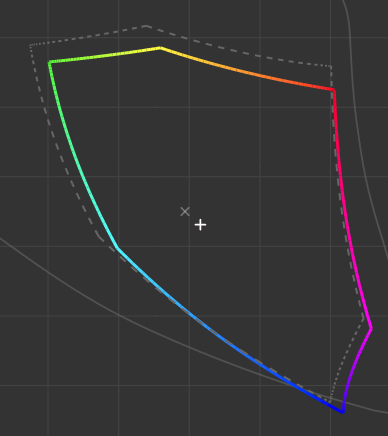
In the attachment is the color gamut of my laptop FHD after calibration if you want to check.Attached Files:
-
-
Anybody selling a spectre 13, with I7 and FHD screen?
-
Jim, and everyone else thanks for your input on the HP Spectre 13.
Jim, so you know have a yoga 2 13? I just saw one at Best Buy, I noticed its a little heavier then the HP and was not sure about overall build
Qualify. What is your opinion on the yoga 2 13?
Steven -
I think the Yoga 2 13 is every bit as good as the Spectre. Build quality is excellent. Wifi at my house is as good as the Spectre. I notice some people have had fan noise issues, but mine is whisper quiet. The only time I hear the fan is if I put my ear near the hinge area. I get a little over 7 hrs battery life on Balanced Power Plan, which is about an hour less than the Spectre. Overall, I am very pleased with the Yoga 2 13.
Good luck, Jim -
Thanks Jim,
I just went back down to Best Buy to look at it again. Indeed very nice, yet they just had a price increase over the weekend from 899 to 949... I think I will wait for them to go on sale.
Steven -
Bummer!
Jim -
Yeah I know...
I am thinking about a refurbished Yoga 2 13 with 8GB ram and 256GB SSD, I5-4200 U and b,g,n wireless for $819 shipped.
The one they have at Best Buy now is a little newer model, I5-4210U processor 8GB ram and 128GB SSD and ac wireless that is now $949.
I can get 10% off with my coupon but then I have 7.5% sales tax. So about $100.00 more for the Best Buy unit. Not sure its worth the extra money. Smaller SSD, slightly faster CPU, and newer ac wireless which my current router does not even support.
Decisions decisions -
The refurbished one you describe is exactly the same as mine. I have never heard of the new model with the i5-4210u CPU. Where do you see the i5-4210u spec at Best Buy? As far as I know, the AC wifi card has no advantages unless you have an AC router and then only if you do a lot of huge file transfers within your home network. Just about any N wifi card and router will give faster data transfer than your ISP can move to or from the internet.
Good luck, Jim -
Jim,
http://www.bestbuy.com/site/lenovo-yoga-2-2-in-1-13-3-touch-screen-laptop-intel-core-i5-8gb-memory-128gb-solid-state-drive-black/6071000.p;jsessionid=E5FA8F036C5AB405193C35D00A8C021D.bbolsp-app02-120?id=1219184622013&skuId=6071000&st=yoga 2 13&cp=1&lp=1
Scroll down and you will see the specs...
Steven -
Yeah, I see. Strange, it doesn't appear on the Lenovo site. I guess it is another Best Buy special.
Jim -
hi all,
i read through a lot of posts in this thread and i must say, this is very informative. Thank you all for such an informative feedback on different aspects of this Spectre 13t laptop. I am looking at buying one and need a small clarification. I see that there is some inclination from some learned members here on buying the FHD version vs the QHD version. That is the only thing I'm now confused about. I'll be getting the 8GB ram with 128GB SSD version and then upgrade the SSD with 512GB capacity (any brand recommendations?). The only reason I couldn't decide between FHD and QHD is because there are some comments about some applications not working properly (?) and some Windows 8.1 calibration issue (?) and the 2 hours less battery life. I am an engineer working for an IT company as a network support engineer so my main work is to run some virtual machines (Win Server and Linux) and also some serial terminal apps and Wireshark, etc. I am not sure if all these apps that I regularly use are optimized for QHD display. Is this even something I need to be worried about? Can I simply lower the resolution of QHD and make it FHD? Can someone here please help me so I could go ahead and place the order? -
Since no one has replied, I will try to give you an answer. First, I have used the FHD model. I am stunned by the clarity and detail of the display. That said, other people on this board claim that QHD is fantastic. The main problem that has been reported is scaling, many applications have text so small that it is un-readable with QHD. And trying to scale doesn't work properly on many applications. Yes, you can set the resolution to 1920x1080 but then why would you get the QHD to begin.
For the use you intend, I would go with 1080p. I am sure someone else is going to disagree.
Good luck, Jimmalikons likes this. -
If you do upgrade the SSD be aware that the M.2 connector on this laptop only supports the SATA protocol so be sure not to buy a PCIe M.2 drive. The M.2 standard is for the socket, not the transfer protocol and both SATA and PCIe are possible. I installed a Crucial M500 480 GB SSD, but now the M550 drives are available. The laptop only supports the 2280 M.2 drives which are 80 mm in length.
Will you copy your file system from the original SSD to the new one or try to do a fresh installation? If the former, then you will need an external drive to hold the original SSD's image or an M.2 to USB adapter to do the transfer directly.malikons likes this. -
Thanks Jim, I was hoping you'd reply to my question.
It is good to know that I can always drop to 1080p and it'll work on the same resolution as FHD display. So, in case I have an application that doesn't work well with QHD, I know how to make it work fine. Now, your question is very valid, then whats the point of buying QHD? I don't know, it look like a superior display and if the applications I use do support this display then I can always move back to QHD resolution. Buying 1080p display won't give me this flexibility.
Few other factors pushing me to buy QHD:
1. The price difference between the 2 displays is only $82
2. QHD is future proof with better picture viewing experience
3. Better resale value (if i ever sell it)
4. HP might not make another QHD laptop (at least for a while)
5. Flexibility of moving between QHD and FHD resolutions
Some factors pulling me toward FHD:
1. More than enough for my needs
2. More mature technology and might have a longer display life (?)
3. Better overall laptop battery life (+2 hours)
4. Surely compatible with all the applications I use
5. Would work well with my external monitor which is 1080p
6. My current MacBook Pro's display is 1280 x 800, so FHD and QHD would look the same to me anyway
Any thoughts? I'm still confused and I have to order today :S -
Thanks for the pointers. I'll not copy the SSD. I am planning to create HP restore USB once I get the laptop and then use that to do a fresh install on the new SSD. You foresee any problem with that?
I see (on Amazon) that Crucial M500 480 GB SSD is very economical and based on my budget, might suit me better.
M500 480 GB SSD M.2 = $265
M550 512 GB SSD M.2 = $329
Do you think this $64 price difference is worth it? Any noticeable difference between using the two? -
I can't think of anything that would tip your decision either way based on your list of pros and cons. Just flip a coin. Either model will be fine.
Good luck, Jim -
Fair enough. I flipped the coin and has placed the order of QHD model. Really excited ! Now I just need to get Crucial M550 mSATA 512 GB M.2 drive. That'll make this super cool laptop even more awesome.
Having said that, I find it a little strange HP does not offer any model with pre-configured 512 GB SSD drive. I hope it'd have been cheaper but that doesn't seem to be the case. Reason being, the price difference between 128GB Spectre 13t and 256GB model is around $150, which I think is way too much. That's the price of an aftermarket 256GB mSATA M.2 drive alone.
Anyway, I'll post back once I receive my laptop and be able to play with it a bit.
Have a great weekend. -
assuming i have a lemon but im getting so god dam annoyed at my audio. whether i use headphones or not, there is ALWAYS static when im trying to enjoy a youtube video/netflix or anything with sound. its like it cant go more than a minute without making a bit of static noise or almost "lagging" the audio which kinda drags it for a second or two and makes another annoying sound. idk if im under warranty, i doubt it. i bought in january. i would LOVE this laptop if my audio wasn't so aggravating. i dont think its a Beats issue because it happens even with headphones plugged in. im assuming this has to be hardware and a problem specific to my unit if i am literally hearing quick static-type noises when trying to watch video. anyone else have this problem?
-
I am curious about where you ordered the Spectre since it is not available from HP in the USA.
Regards, Jim -
I ordered through eBay reseller (colocomputers) selling refurbished spectre 13t. They are HP refurbished in sealed boxes. I hope they are like Apple refurbished laptops. I'll know soon.
-
This company has been around for a long time and they are very reputable. They are a source to turn to when a particular model is not sold in your country. Their reputation is that they can get you anything, but charge a large premium for doing so, but this regards new in box product. Perhaps the refurbs are priced at market because there are so many for sale.
By the way, I owned a QHD Spectre for 3 month and never had a scaling problem. I expect those few apps that haven't been updated will be very soon. I also expect there will be more and more QHD and QHD+ content available as so many laptops have been sold at that resolution. I agree with your rationale: you can get all the attributes of the FHD screen but have the current and future capability to view higher res. content. (When you get your machine, go to YouTube and find some 4k videos and watch them - you'll know you made the right decision.
Battery life difference is negligible - 1 hr tops, depending on what you're doing. If it's low density content (like NBR) there is no difference in wattage drawn.
Good luck.malikons likes this. -
Feeling much better about my purchase. Thanks !
-
Sorry for the late reply, but here goes. My post about replacing my SSD is #1909 and in it you will see that I used a variety of tools: Clonezilla, the HP Recovery Assistant, and MiniTool Partition Wizard. I found that the Recovery Partition was placed awkwardly just after the C: partition and was in the way of expand that partition. I tried to move the Recovery partition, but couldn't so I used these tools to delete it, expand C: and then recreate the Recovery partition. I'm sure there must be an easier way. Hopefully your method of using the Recovery Disk will workout better. Good Luck.malikons likes this.
-
Hey. I just ran into this issue too. HP even sent me a new USB recovery drive and it still didn't work. They were very helpful though and the people on the phone were really nice and willing to help.
The work around ended up being the date in the BIOS. Change it to some time in 2013. Like 8/22/2013. Then run the recovery again. It should go all the way through and load into a new start screen BUT NOT ASK anything about creating a log in and signing in. During this "pre" period, don't touch the computer. Let it continue to run and it'll restart again and then it'll go through the usual prompt of setting up wireless, picking the time zone, choosing a username and sign in into your MS account etc. Then you should be good. -
There seems to be a 24 hours sale at woot.com for Spectre 13t
HP 13.3" Intel Core i5 Touch Ultrabook
Just in case anyone is interested. It's a low end model with FHD display, 4GB Ram, 128GB SSD and Core i5 processor. But still, the price is pretty amazing.
Enjoy! -
Hello, I will disagree with you about QHD, QHD is not future proof because this laptops last no more than 2 or 3 years and something important, QHD scaling problem is not only related to applications, the scaling problem is related with movies if you see them on the laptop or if you watch videos on youtube, any resolution above 1080 is useless because of the scaling algorithms using to upscale the images, and playing games in this laptop is totally useless because it does not have to power to handle the current demanding games.
I wont buy a QHD screen on a laptop for the moment, I will ever recommend FHD because is in all senses a better option.malikons likes this. -
I guess it is pretty much given that this is not a gaming laptop and the games I play would even work on a celeron machine
. As for QHD screen, I understand your logic but I think as long as it is possible to drop it down to FHD resolution, it is going to be fine. I can tune the resolution as per the need.
I've already ordered one with QHD display and it is going to arrive around 20th Aug. I live in Amsterdam (Netherlands) and I got it shipped to my cousin who lives in LA and planning to come visit us around 20th Aug. He'll carry the laptop along and I can't wait to just hold it.
I appreciate you taking time responding to my post. Cheers! -
SOLD OUT so fast.lol
-
I moved into a new house and don't have a ruler handy. Can someone post what the correct tip size (e.g. inner and outer diameter in mm) is for a replacement AC adapter. Thanks.
-
The price was indeed very good and had I not ordered my spectre 13t 1 week ago, i could think about getting this one. The deal breaker for me was 4GB ram, since there is no way to upgrade that.
Anyway, the sold out tag on woot is a little misleading. It seems like 24 hours had passed and that is how long the sale was supposed to last.
I am wondering how many of these refurbished units HP actually has? To me it looks like HP is selling more of these units as refurbished than what they sold as brand-new. Wondering if these are reworked units, for some hardware fault reason. Of course I'm just speculating because I'm curious. -
How much was it going for by chance? I am in the market for one and wanted to be around $600-$650 but never seem to find any at that price. Am I being to aggressive in my price ceiling?
-
Woot was selling for $565 excl shipment. I think your budget is enough and can get you something reasonable but you'll have to keep an eye on such offers more attentively.
If I find any other deal for HP Spectre 13t, I'll post back in this forum.
Good luck! -
Thanks I would appreciate it! I will keep hunting in the meantime.
-
Would anyone be able to tell me the major differences between the 13-3010dx model and the 13t-3000 model that I seem to only find reviews for online? If they are somewhere in this post then a page number would be fantastic!
-
13-3010dx has 4g ram i5-4200u and 128gb. The 13t-3000 was the customizable model from hp.com, so it could have specs of up too i7-4500u 256gb SSD, and 8gb,.
malikons likes this. -
Has anyone ever purchased from CowBoom? It seems as they are affiliated with Best Buy but I don't know what their "Refurbished" products are like. They are selling the 13-3010dx for $479.9, which is very tempting but I am worried about what the condition is as this one was graded at a "6", which is the lowest score and means that there are some fine scratches or minor scuffs. Does that mean superficial or could the screen be scratched?
Sorry for so many posts today but I have been researching for a while and just when I finally settle on something I like I miss out on a good deal. Thanks to everyone who has helped thus far! -
For those that have owned this ultrabook for a little while now, how are your batteries aging. I'm a little concerned. I've had mine for about 6 months now, and the average time between required charges has dropped from 8+ hours to around 4.5...under normal use (e.g. web browsing). I have processor, graphics (45% brightness), and wifi power saving enable and they don't seem to make much difference. I don't "see" anything in task manager that would indicate anything being a power hog. Running a battery check under HP Support Assistant says the battery is ok and only lost 5% of design capacity. Thoughts? Also, out of curiosity, is there a company that someone can recommend that will be able to do a battery swap when the capacity is so low that it is worth changing? I know these batteries are non-user replaceable, but I'm assuming someone does it as Apple has stores that do it for Macs.
HP Spectre 13T-3000
Discussion in 'HP' started by theboswell, Oct 19, 2013.