 Problems? See this thread at archive.org.
Transcend vs Crucial 512GB SSD upgrade. Any feedback on the pros and cons of these two products. Most people seem to be using the Crucial product, but I see what I think is a comparable product from Transcend for $273 which is $47 cheaper than the Crucial.
Crucial M550 512GB SATA M.2 Type 2280 Internal Solid State Drive CT512M550SSD4 $319.99
Transcend 512 GB SATA III 6Gb/s MTS800 80 mm M.2 SSD Solid State Drive TS12GMTS800. $273.25
Edited: Just noticed there is also one by ADATA for $254 (ADATA USA Premier Pro SP900 512GB M.2 2280 Solid State Drive 0.85-Inch ASP900NS38-512GM-C).
Any feedback would be appreciated. Really want to solve my storage space woes on my wonderful Spectre soon.
-
I chose the Crucial M500 (the M550 wasn't available at the time) because it has extra capacitors to help deal with sudden power loss (all pending writes will be completed). Also, there were fewer choices when I bought mine.
-
Anyone know if you can upgrade the wireless to AC by yourself?
-
Now you've got me seriously worried. I thought all 13t come with AC WiFi. If that is not the case then I need to check if mine has it. Hmmm.. I just checked the specs and it seems like it has AC and WiDi. I'm hoping to receive it by next week and then I'll know for sure.
-
Yes, the WiFi module can be replaced and no, not all of the WiFi modules used in the different versions of the HP 13 Spectre have AC capability. At the top of page 32 of the Maintenance and Service Guide from HP is a table of the 3 different WiFi modules used:
On the same page is the removal procedure which is easy:
Component Spare Part Number Intel Dual Band Wireless-AC 7260 802.11 AC 2x2 WiFi + BT 4.0 Combo Adapter 710663-001 Intel Wireless 7260BN 802.11 bgn 2x2 WiFi + BT 4.0 Combo Adapter 735532-001 Intel Dual Band Wireless-N 7260AN 802.11a/b/g/n 2×2 WiFi + BT 4.0 Combo 717381-005
Preparation:
- Turn off the computer. If you are unsure whether the computer is off or in Hibernation, turn the computer on, and then shut it down through the operating system.
- Disconnect the power from the computer by unplugging the power cord from the computer.
- Disconnect all external devices from the computer.
- Remove the bottom cover (see Bottom cover on page 29).
- Disconnect the battery
- Disconnect the WLAN antenna cables (1) from the terminals on the WLAN module.
- Remove the Phillips PM2.0×3.0 screw (2) that secures the WLAN module to the base enclosure.
- Remove the WLAN module (3) by pulling the module away from the slot.
-
No, they don't. There was an offer at a store near me that offered the Spectre fully upgraded bar the AC wifi module, which is why I was wondering whether I should take the drop and try to upgrade it.
-
Thanks! This is exactly what I needed. Now I just need to find the module and upgrade my laptop. Im guessing this is going to void my warranty though...
-
Actually HP is generally pretty good with allowing upgrades, without voiding the warranty, granted you didn't damage anything while installing. They just wont cover your new card, and the laptop has to be in original configuration. So keep your old wireless card.
-
Any idea how much is the new Wifi AC module.....
Also I have two years accidental cover from HP ...So if I screw up in changing wifi module do I still have the cover??? -
A search on Amazon for Part Number 710663-001 shows a price of $67.
-
What is the average battery life people on this forum are now seeing? I posted earlier that I'm now only seeing 4.5 - 5 hours mainly using for web browsing and e-mail. Thoughts? The battery passes both the Windows HP Support Assistant and boot battery checks. I'm just surprised that the battery life has dropped from ~7 hours when I bought it last January to what it is getting now. Battery stats only indicate a 5% loss in maximum capacity.
-
I've had a maxed out unit for about 3 months now. Having checked the battery log (in hp support assistant i believe), I noticed my average battery life since OS install was only 4.5 hrs! The longest battery life on record was ~ 6.5. I run 100% luminosity by day and around 50% by night. That said I tend to use the pc 2x as much during the day. I usually plug in over night and unplug in the morning and let the battery fully drain before plugging back in.
Upon reading your question and checking ave battery life I also realized my cpu was stuck at 1.7Ghz. I believe I was unplugged at the time. Back when i got the unit (May 2014) I was concerned about cpu performance after reading posts on this forum. I uninstalled Intel CPPC software which presumably posed argument with the HP Bios, disabled cool sense to avoid unnecessary fan ramp, and installed ThrottleStop software (set multiplier to 30, box unchecked, saved and closed) with a modified ini file to enable cpu turbo boost while on battery. I assumed it would start automatically with the ini file modification but since the cpu was stuck at 1.7G I realized I was wrong.
I found a post that said to create a Scheduled Task in Windows to start ThrottleStop at each reboot. To have it automatically shut down, I modified the software config ini file script line ExitTime to equal 5 (seconds) to allow it enough time to take effect. It now works and i have full CPU speed range (0.77-2.8 Ghz) while on battery. *Also worthy of mention: if I restart my pc through onscreen charm settings while on battery Turboboost is not available. I must restart via the hardware button. If i wake the unit from sleep by opening the lid it retains turbo boost availability while on battery providing it wasnt 'restarted' via charms. - Obviously a HP Bios or firmware problem exists but this is a good work around if you want cpu performance to match requirements both on and off battery.
I disclose all this b/c I believe my battery ave life span would have been influenced by being stuck at 1.7Ghz - more than double the now current cpu speed of 0.77Ghz with the battery option set to power saver. I've run geek bench tests on cpu performance while running Power Saver, HP recommended and High Performance. Needless to say battery settings make a difference upon CPU clock speeds which translates into differences in power consumption. I believe I've enabled my PC to make full us of CPU range and hope to get back to battery life in excess of 6.5 hours again. -I hope this was useful. Ill update this post after i get a week or so worth of battery stats.
btw: any idea how to get a brighter screen? I read somewhere that the Intel graphics driver promotes a brighter screen than HP....
Cheers -
Dats expensive ....I remember upgrade was hardly for $20 !!!!
-
I searched agdain for "Intel 7260NG" and found AC wireless and Bluetooth cards on Amazon that ranged in price from $34 to $65. It is important to note that this card has to be the new NGFF 2230 format that has only 1 retaining screw, not 2.
-
Thanks...and I'll be interested to see what your real-world test shows. I'm not sure if my CPU has been getting locked or not, but I did just disable CPPC again from Windows Power Manager so I'll see what that does. I've also been using/trying the new Chrome and Nightly 64-bit builds and I read somewhere that because they are beta/developer builds that there is additional CPU/Memory overhead built in because of testing purposes. I'm not sure when those are active or not, but I wonder how much that has contributed to battery life as well. Anyways, I'll keep messing with my machine as well and post additional results. As you can see by my signature I also bought the loaded machine, although I've always run my screen at 40 - 50% night or day.
-
I am looking for a Spectre 13 i7 256SSD FHD. Can anyone tell me where I can buy one?
Seems that HP is not offering this one atm. -
On eBay you'll find colocomputers selling quite a few (if not all) different configurations of this laptop but these are HP refurbished units, but brand new in sealed HP boxes. I ordered mine from them and hoping to receive it this week. Only then I can give you more details on the refurbished nature of this unit, in case you are interested.
From what I learned from more experienced fellows on this forum, this company is quite respectable and deliver quality service and products.
Other than that, and some other online stores selling some selected configurations, I couldn't find it anywhere. I didn't want to buy a used one so never tried to find it either.
Good luck. -
Yep...messed around yesterday and noticed that my CPU was locked at ~1.7 GHz (either 1.65, 1.68, or 1.77). I restarted, opened the BIOS, saved and exit, and it appeared to have unlocked it again. Now it fluctuates between 0.77 up to 1.7. Still throttled but at this point I'd rather have battery life than Turbo when unplugged. Not sure what causes it to lock. Enabling or disabling CPPC doesn't seem to do anything. LIke you I uninstalled Coolsense a long time ago. I also downloaded and tried to install the new Intel XTU but it keeps crashing when trying to open.
If anyone else has found a solution to prevent the CPU from locking up under battery power, and improves battery life, please share. This is an issue that was brought up some time ago as well (mainly because people were upset that the processor was being throttled under battery power and not allow to engage Turbo Boost). -
I seem to have forgotten my Bios password. This worries me as I never know when I might need to access the Bios screens. I also don't think I created the USB recovery key (my bad).
An HP technician told me (off the record) that it was pretty easy to open the laptop (which I've done to replace the SSD), remove the main battery, and then remove a CMOS battery on the motherboard which would then clear the bios password.
Has anyone done this? Is it truly that simple? Do you have photos of the process and the motherboard?
Are there any downsides to clearing the password this way?
Are there other solutions to reset the password or to recover it? -
I don't think you'll be able to clear the password by just removing the CMOS battery. If you enter wrong password too many times (perhaps 3), it should give you a code and you should be able to get a one time password from HP support, to enter your bios and change the forgotten password. If it doesn't work let me know and I'll try to help you further. Good luck!
-
Thanks for the prompt response. It doesn't give me a code after 3 times, but rather tells me insert the USB Recovery Key. The only USB Recovery I have is to reload operating system, not to recover bios password. What other options are there?
-
Hmm. OK. I don't know any other option but let me check with someone I know who works in HP support. He might know some way of clearing the password. I'll reply you back tomorrow.
Since you are posting in this thread, I assume you have HP Spectre 13t. Let me know if its a different laptop. -
A beautiful HP Spectre 13T-3000, with a recently upgraded 512gb SSD!!
-
Nice

I just bought a Crucial M500 M.2 480GB and now just patiently waiting for my Spectre 13t to arrive (expected this Thursday). I actually bought this drive because there was a one day sale here in Netherlands and they were selling it for 170 ($230), so I took it. Now I am thinking if I should return this and rather get Crucial M550 512GB? I don't mind the capacity difference but wondering if there is any noticeable performance difference between the 2. On paper they are pretty much the same with M500 having 100mbps less write speed. What do you think? M550 512GB costs around 250 which is around $330. Is it worth paying $100 extra for 32 extra GB and 100mbps extra write speed?
I'll get back to you on this bios password issue tomorrow. -
I had my Spectre 13 disassembled a couple of months ago and took quite a few photos. I do not see the CMOS battery in any of the photos of either side of the motherboard.
Maybe there isn't a separate battery? The Maintenance and Service Guide only mentions the main battery which is easy to disconnect once the bottom panel is removed.. -
I really don't have the expertise to know the real differences between the M500 and M550. I installed the M550, cloned the drive using Macrium Reflect Free Edition, and presto my capacity issue solved. The M550 is also faster than the SanDisk it replaced (and I have before and after benchmarks to prove it). I paid $319 on NewEgg for the M550 and it arrived in like 24 hours. But I agree that $100 for 32 gb and a little speed seems like a lot.
BTW, the default settings on Macrium Reflect resulted in the extra capacity storage being unallocated so I went to standard windows 8.1 disk management and initialized the space as a new volume (it wouldn't expand C: because the space was not contiguous. I was fine with this config, but someone else may just want a huge C: drive. I'm not sure how to do that as the "D:" recovery drive gets in the way. -
I am also planning to run the benchmark tests to see if my M500 would be faster than factory supplied Sandisk. I'm really curious to compare the performance.
I searched through the internet to find out if somebody has specifically compared M500 M.2 480GB with M550 M.2 512GB, but couldn't find anything too interesting. Since I'll have M500 and you have M550, perhaps we can share the benchmark report and see the real difference. How does that sound? I'm no benchmarking expert so I'm not even sure if its a valid way of comparing the performance. I'll wait for some expert to comment on this.
I have no plan to clone the drive, that's why I've bought my new ssd even before my laptop has arrived. First thing I'm going to do is to make recovery usb, restore it on my M500 and then start using the laptop. Of course , after I'm done with the benchmarking fun.
-
I have found a Spectre 13-3000ed, 256SSD, i7, 2560x1440.
Are there any problems with this Ultrabook?
Because the Dell XPS have real coil whine issues, and therefore I was looking for a Spectre. -
I think this thread will give you a fairly good idea of any possible problems with this laptop. Other than blindly falling in love with it, I don't seem to remember anything else
Have fun!
BTW from where have you found this? Price? -
I ran into the same issue after cloning my old 128 GB SSD onto a Crucial M500 480 GB SSD. I described what I did in my earlier post, and have copied some of that here:
I ran into an issue with the Recovery partition. It was between my C: partition and the rest of the SSD. I wanted to keep the Recovery partition (only 16GB), but I couldn't figure out how to move it. I couldn't then get GParted to boot from a USB flash drive in order to move the partition. I tried MiniTool Partition Wizard (free Home Edition, recommended on HP forums), but it could not move the Recovery partition either. Finally, I used the HP Support Assistant (>Storage, Backup, and Recovery > Recovery > HP Recovery to delete the Recovery partition (16 GB in size). This left a partition named "OEM PARTITION". Afterwards I used MiniTool Partition Wizard to create a 16GB partition at the end of the SSD and then expanded C: to use up all the free space. Later, I used Clonezilla to rewrite the RECOVERY partition to the new 16GB partition, but I do not know yet if it is usable. -
Be aware that an earlier post described problems using a Recovery Disk. According to that post HP provided the following workaround:
The work around ended up being the date in the BIOS. Change it to some time in 2013. Like 8/22/2013. Then run the recovery again. It should go all the way through and load into a new start screen BUT NOT ASK anything about creating a log in and signing in. During this "pre" period, don't touch the computer. Let it continue to run and it'll restart again and then it'll go through the usual prompt of setting up wireless, picking the time zone, choosing a username and sign in into your MS account etc. Then you should be good.malikons likes this. -
In Netherlands and it's €1.098,00 without VAT.
Directly from HP. -
Nice! I see 2 models on HP.nl and other than slightly different windows version, I can't find any other difference between the 2 and there is some 300 price difference. Any clue?
BTW, I'm from NL as well
-
Well, I had a option to buy from a friend and so not to pay the VAT. But now she is not helping me out anymore....
With VAT it's 1.325,00 abd that's to much. -
Does anyone have a standalone file of the F.14 BIOS install? I reverted back to F.13 to troubleshoot my CPU locking issues and battery life and that didn't seem to fix it. When I went back into Support Assistant to reinstall F.14, it was showing no longer available. Anyone know why they pulled it?
-
Here are my benchmarks: (Sandisk 128gb first followed by Crucial M550 512gb)
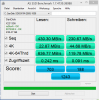
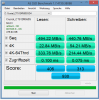
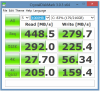
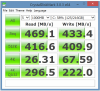
Sorry these are blurry. Don't know how to fix that. If you want clear images, send me PM and I'll email.malikons likes this. -
Thank you! I'll post back benchmark with Crucial M500 480 and then see how they compare with M550 512GB. Thanks again for sharing your benchmark results!
-
That's not good. I hope you find a good deal. I noticed there is someone selling a brand-new unit on marktplaats for €800. It is a low spec unit (Core i5, 4GB, 128GB, FHD), but might fit your budget well.
-
If you were going to use this process to replace the battery, how long do you think it would take?
-
To remove the battery would take 10 minutes so long as you have the right screwdrivers: 8 Torx T5 screws for the bottom cover, and Phillips #1 (or was it #0?) for the 8 screws that secure the battery. These procedures are clearly described with illustrations on pages 29 and 46 of the Maintenance and Service Guide.
If you search for "HP Spectre 13" "Maintenance and Service Guide" in Google you will find the HP webpage with this laptop's user guides:
Manuals for HP Spectre 13t-3000 CTO Ultrabook | HP® Support
On this webpage is the Maintenance and Service Guide: direct link: http://h10032.www1.hp.com/ctg/Manual/c04055643.pdf
BTW, this guide contains a list of the major components (pages 17 to 22) and if I enter the part numbers into Amazon I find almost everything. It might be a good idea to pick up a replacement CPU fan or battery, while they are available, if you plan to keep the laptop for a long time. -
Awesome. Thanks. It actually doesn't look that difficult. Obviously not as easy as simply unplugging and plugging in a new external battery but I had heard when this laptop came out that it would be very difficult.
-
Be careful when removing the bottom panel. It is held on by clips as well as the Torx screws. Here are my instructions that I posted many posts ago:
After you remove the 8 Torx screws the bottom cover is held in place by plastic clips along the back and front edges. The front is hard to grab so I grabbed the back edge, on either side of the display hinge (near the corners) and pulled/squeezed towards the front of the laptop. I felt and heard the two clips (one on each side of the hinge release. The back edge of the bottom cover popped up a bit and I was able to carefully lift it. After that I carefully held the back edge and tried to pull the over away from the front edge of the laptop. This released the 4 clips along the front edge. That's it. When I reassembled the case I did everything in the opposite order and pressed down (gently) over each of the clips and felt/heard them click back into place. Then I screwed in the 8 Torx screws.
Good Luck.malikons likes this. -
Were you able to find out anything?
-
I asked my contact in HP but haven't heard anything back till now. Let me nudge him tomorrow.
On the other hand, my spectre 13t came in today and I am seriously disappointed. Currently working with the seller (colocomputers) to sort out the issues. I bought this from eBay store and it is a HP refurbished unit that came in in factory sealed box from HP.
For those curious, here are the issues:
- the bottom lid was not properly seated and the laptop was open from the top left corner of the back lid. I pressed that open corner gently and it went in, but revealed more issues since the back lid is now wavy because the screws were tightened without properly seating the lid which curved the whole bottom panel badly.
- I ordered QHD version and it came with FHD display. Updated the drivers and ran HP support assistant app and they all confirm it can have maximum of FHD resolution.
- the specs clearly state Wireless AC but the network card in this model only supports N.
- there is a dead pixel on the display. I am running a stuck pixel fixer app to see if it is dead or stuck pixel. Will let the app run for a few hours and check back.
- all the screws in the bottom lid are badly scratched and it does not seem like someone professional carried out the repair work. Really pathetic job !
So, this is what you get when you order an HP factory refurbished unit. I'm very disappointed and contacted the seller for a refund. Seller is very cooperative and understanding till now. Seller has checked the serial number and confirmed that this unit was supposed to carry QHD display and Wireless AC network card. I guess the HP tech who couldn't close the lid properly and also damaged all the screws also put in the wrong parts!!!
I really wanted this laptop but seems like refurbished unit is not an option anymore.
Anyway, I just hope the return and refund go smooth and I could start hunting for this laptop again, perhaps a brand new unit this time. -
Bought this beautiful laptop in eBay. Someone sold it after owning it for few months. Warranty valid till 02/2016. Specs: i7-4500U, 8GB, 256GB SSD, 2560X1440 Display, Wireless AC, Windows 8.1. Aside from a very slight wear on the touchpad, the Laptop was LIKE-NEW. Bought it for $800 (no tax, free shipping). I think this is a GREAT deal for this laptop. I was following this thread for a long time and was planning to pull the plug months ago for $1300 from hpshopping.com. But, didn't buy it at that time. Later, when I decided to buy, the product was already discontinued here in the US. Man, i am glad i didn't buy at $1300
, coz I got a much much cheaper deal for a few months old hardly-used laptop.
As far as the laptop, its a dynamite. Very elegant looking and great performance for daily use. I was a little apprehensive of the performance after reading some initial reviews on this laptop. However, my laptop is super fast from day 1. I didn't do any kind of tuning (not needed). Boots up in 7-8 secs and shuts down in 5-6 secs. Everything is snappy for an average computer user. I don't run VMware or any Pro softwares (I dont need to as I have a work laptop AND i dont have Win 8.1 Pro either).
From what i see in this forum, looks like this PC is still available in Europe. Good for the folks who live there. Its a bummer HP pulled the plug off in the US. When i asked the Customer rep, he said HP is planning for a new replacement product, but I doubt if it came to fruition already - probably not I guess
I owned a HP DV-4T since 2009 (When Win 7 debuted). I did a few upgrades in the 5 years (09 to 14) I owned (Upgraded to 128GB SSD and 8GB RAM in 2011; Replaced battery in 2013). I only had good experience with HP DV-4T. It was absolutely snappy till the date I owned and I gave my laptop away to my nephew. He can learn stuff and abuse it for a while before he buys a new one.
HP Spectre 13t-3000 is a GREAT PC. I hope HP will come up with a better model than this Spectre 13t, which is probably one of the closest competitor to that shiny, classy macbook (of course, I am and will be a Windows user for life and will never go to Mac, but its needless to say that Apple makes the best looking laptop with incredible hardware. Mac Vs PC is whole another ball game when it comes to Operating system.
Thanks for the notebookreview forum community. I learnt a great deal about this laptop and still check from time to time just to read of various User's experience with this beautiful, classy laptop. -
Wow, what amazing contrasts between the prior two posts! Malikons, I am as sorry for you as I am happy for mgm1452. Malikons: whether you let Colocomputers have a shot to make good (exact a pledge that you can return a second one for full refund for any reason, just if you don't feel like it's soundly built/rebuilt) or take a refund and start over, I will tell you that, from years if experience with them, HP generally sends only excellent refurbs - like mgm's - and if you're not entirely turned off both Hp's refurb qc, you might want to buy a refurb directly from HP's outlet store, where you'll get the same or better pricing and they will (unless policies have dramatically changed) replace any unsatisfactory unit until you are completely satisfied and will always give a full refund if that's what you end up wanting - again. Also, note that HP particularly, but some othets as well, routinely take $100-$150 off the second unit if the first is found to be defective in any way. If you're not offered this - from anyone, including Colocomputers, ask for one and politely remind them that HP and others would do so, and you're inclined to just take a refund if s little "incentive" is not available.
Otherwise, know that refurbs of, literally every premium U-Book can be found in new or refurb condition for $800 - $900 and the Samsung Ativ 9+, Lenovo Yoga, Acer S7, Dell XPS-13, various Asus Zenbooks and a few others I'm missing are all great choices with varied pros and cons. Just make sure the seller is reputable and provides easy refunds (best bet:Microsoft Store) and odds are that the next unit you order will be fine (though all will need driver/sftwe tweaks) though if your luck is bad, it might take one more replacement. Bear in mind: refurbs are more likely to be defect-free (notwithstanding your clearly botched unit) than new units because the former have been tested by "real people" whereas new units off the line have not. I have purchased perhaps a dozen refurbs of various brands and only once was the product anything but defect-free and cosmetically new-looking. Buying laptops has been a game of chance for many years now, so it helps to know going in that it might take some patience til you get a keeper, but experiences like yours, from HP or any other vendor's refurbs - is the exception, not the rule.
Hope it helps to hear this.
Best, Jeffmalikons likes this. -
Hi Jeff,
Appreciate your detailed response. The only difference between my unit and mgm1452's (which might also explain our different experiences) is that mgm bought the laptop from a consumer who bought this unit brand-new and sold it on ebay after using it for a few months, that wasn't a refurbished unit. Whereas mine is a refurbished unit comping straight from HP in a sealed box. I'm glad to hear that my experience is an exception and not many people have the same experience with HP's refurb laptops. I don't know about HP selling these consumer laptops directly on their online store and after reading your response I searched the internet again but found no hits. I see HP selling only business products directly but that doesn't include Spectre series.
I am in touch with the seller (colocomputer) and trying to resolve this matter. Colocomputer is willing to give me full refund and also offered $100 partial refund if I decide to keep this laptop. I bought this laptop with QHD and Wireless AC after quite a bit of research, as also shared in my earlier posts in this forum before I placed the order. I have already bought a new Linksys WRT1900AC router just to give my Spectre 13t a nice welcome but it turned out it doesn't have AC wireless in it. What a bummer! Also, the clear marks of hardware abuse by HP tech really turned me off. I have serious doubts on the professionalism of the HP tech whoever worked on this particular laptop and I am sure this laptop somehow managed to skip QC process, if there is one.
I am not giving up on this laptop as I absolutely love it! I am a bit skeptical about buying another HP refurb unit though but I'll see what I can find on the internet. I live in the Netherlands and that complicates things a bit. This laptop is available brand-new in my country but it'll cost me an arm and a leg with whopping €1500 price tag. My cousin lives in the US and he was coming over to see us and that motivated me to grab this deal from colocomputer. Direct shipment from US to NL would put an additional $250 custom duty. Now, if I ask the seller to send me a replacement unit, I won't have anyone to carry this along.
Anyway, I think I've put myself into difficult position here. Colocomputer is quite cooperative and understanding till now. My current plan is to return this unit for a full refund and then search locally for another unit. Perhaps I get lucky as mgm1452 and able to find a slightly used / like brand-new unit from someone. -
Malikons,
I heartily endorse your decision, given that HP does not seem to be selling refurbs directly in your market. I think you're right - the tech who worked on your particular unit did a hack job, and I would not keep it for nearly any price (though every product can be s great deal at the right price, $100 off the price you paid is not in the ballpark for such s botched piece of work. One idea before you return it: since this was an HP refurb in a sealed box, you might call HP cust svce in The Netherlands and explain and see if they will exchange it, just as if you had purchased it directly from them (see my previous post for how they normally deal with customers unhappy with a refurb sold direct from their depot). It may be that since you can document that you bought it sealed by them via colocomputers they will treat you as an HP customer, whereas they would not if you had purchased the HP tefurb, used, from a private or commercial seller. (FWIW, Colo. should certainly have the right to get it replaced by HP if they purchased it for resale direct from HP.) The problem with the approach I'm suggesting to you is that you will no longer have a refund option, but if HP will commit to replacing the unit until you get one that is reasonably satisfactory to you, I'm inclined to think you will get there with the first or second replacement. Still, sometimes it feels best to get your money back in the bank and to get a do-over on the whole decision and approach. Again, the Spectre 13 is very solidly built and very attractive compared to its competition, but it's far from perfect (I did not care for the short stroke snd very hard "landing" of the keyboard keys, the beloe average keyboard back lighting or the fact that the beautiful "truffle brown" exterior finish was fairly vulnerable to scratches, which revealed bare metal underneath) so if you can find another brand's premium Ultrabook at a comparable price, you can do very well, though any replacement will come with its own pros and cons. Also, after owning two QHD 13" UBs I can tell you that such high dpi screens at that size do come eith their own baggage. If you think you will keep this purchase for three years or more I think a QHD or QHD+ screen is worth the occasional inconvenience of having to manually change the resolution or scaling with a minority but still significant number of apps at this time. But if you're thinking more like 1-2 yrs, or 3 at the outside, you may be best advised to go with an FHD screen this time and move up on the next cycle. You'll also gain an average 30-45 mins battery runtime if you're comparison is with the same computer at the two different native resolutions. I wouldn't mske the decision based on battery life, but it is a counterbalancing attribute of the FHD vs. FHD+ screens.
I'm sorry I can't be of much help to you in locating good deals, as I don't have any knowledge of the EU market, except that they tend to overcharge you there!
Good luck and keep us posted.
Jeff -
That sounds horrible and doesn't bode well for HP Service. I hope you find a new unit. I really like mine. I just wish I remembered my bios password. I "guess" a couple each day and keep trying, but so far, nothing works.
BTW....I did buy a SupportPack with my product that features 3-years Accidental Damage coverage with 3-day on-site response. I spend hours last week with HP Support trying to get them to reset my bios. They did say that the "Accidental Damage" provision would cover a bios password reset, but they insisted that they were unable to do this on-site and that I would have to mail my system to them for repair. I don't want to mail my system to them and your experience with the refurbished unit really gets me worried about their repair capabilities. They said that most likely they would need to swap the motherboard to clear the password.
The next day, I got a call from an escalation manager (the call center must have escalated it for me as they knew I was mad and said I would be writing Meg with my comments about their selling me on-site service and then telling me they couldn't do on-site service for my problem. This guy talked a lot and tried to find a solution. He even told me that the repair center was in Fremont California which is about 35 miles from my house. So I said that I would drive my unit there and watch them repair it. He actually called someone and then told me that "due to security issues, walk-in repairs were not allowed". Then he told me that it was easy to pull my CMOS battery on the motherboard and that would clear the password. Of course, I thought, if it is so easy, why can't their technician do it on-site. But I'm not at all sure there is a CMOS battery on this device.
Regardless, let me know if you hear any options from your contact on how to reset a bios password. My rant today was more complaining about HP Support which is a huge blemish on this otherwise wonderful product. -
Hi Robert,
I think you have taken the right decision of not sending your laptop to HP support for this issue. I just heard another horror story from my colleague where he sent his HP laptop to HP support for a non working wireless card and received his unit back after 2 weeks only to find out that not just the wireless is still broken, the keyboard and speakers are also not working and the tech replaced the display. HP was kind enough to buy back the laptop and give a generous $200 discount on future hp laptop purchase, to make up for (yet another) bad repair work by their technician.
I sent a friendly reminder email to my contact in HP for you BIOS password issue and got an out of office reply , which explains why he hasn't responded to my query till now. He'll be back next week and I'm sure reply back to my email soon after.
It is still good to know that hp involved an escalation manager for your issue and serious about solving it. I do agree, with the support contract you have, they should come over to fix this.
Anyway, I'm fighting my battle here but the good part is the seller (colocomputer) has given me decent options to resolve this matter. I'm going to send my unit back and get a refund, only to start finding the same laptop again.
I'll keep this thread posted and you do the same. As soon as I hear back on you password issue, I'll let you know.
All the best!
HP Spectre 13T-3000
Discussion in 'HP' started by theboswell, Oct 19, 2013.


