 Problems? See this thread at archive.org.
U5400 will get about 1200 passmark points, K625 gets 942 if Passmark's information is correct.
The problem is there are many errors in Passmark's database.
-
Cool with the money saved from not upgrading to the i3 processor Ill be able to get the backlit keyboard. Thanks for the help
-
Mine going to be delivered tomorrow ... can't wait!
-
I hope this is true, I'd like to upgrade my dm3t to a backlit keyboard also. If anyone opts for this, please post and tell us how it is!
-
Patiently waiting for a confirmation on that also.
-
They are both Arrandale architecture chips, with exactly the same specs, frequency, etc U5400 is under the Pentium line and has its turbo boost disabled and cache size artificially limited to 1K, where as i3 has turbo boost enabled and has 3k cache. They should perform very similarly. -
The i3 330um does not have turbo boost, it does have hyper threading.
Both u5400 and 330um have 3MB cache. -
The backlit keyboard is $25- and it's worth ten times what the i3 processor is.
-- -
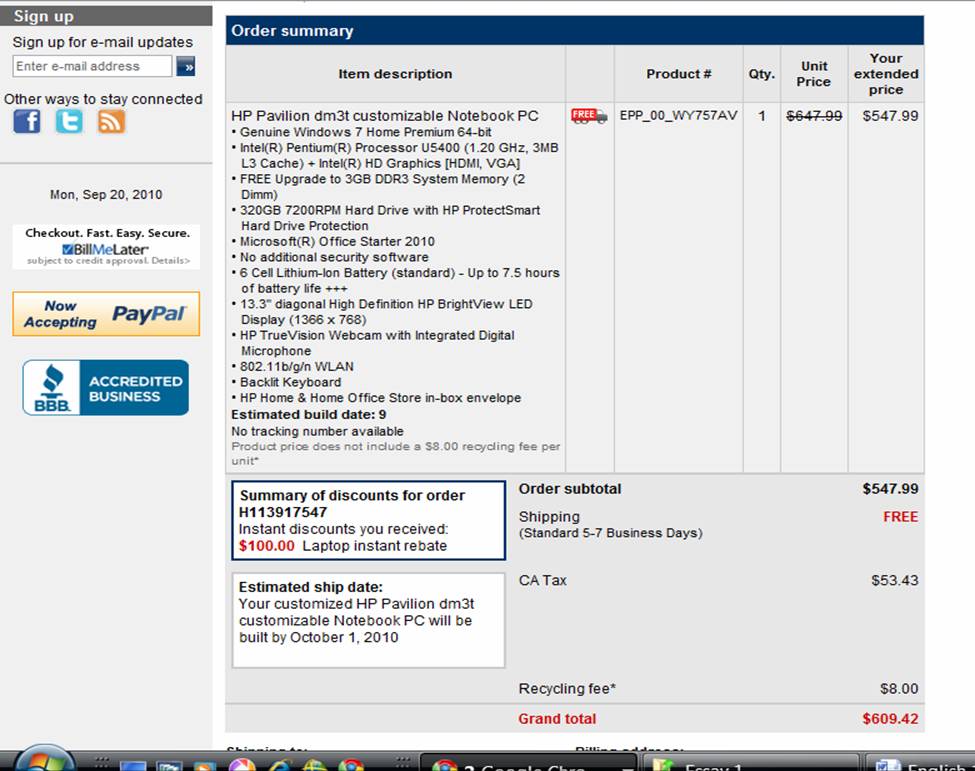
Well I pulled the trigger and settled for the U5400 processor with the backlit keyboard. I figure that I will be primarily using this for school and the 680 price kind of shocked me. So with my student discount it ended up 609 shipped. Now I have to wait 2 weeks it to show up...
Attached Files:
-
-
Can someone explain to me the value of a backlit keyboard?
-
It just looks soooooooooo cool.

Plus, it helps you see the keys in a dark setting. -
The Pentium U5400 is an Arrendale, like the i3. It has the same design and L3 cache. The only differences are the features that Intel disabled (such as hyperthreading and VT).
-
The backlit keyboard does good when you're in bed and the rooms dark. Countless number of times have I taken out my phone and used the screen to see the keys.
@Wanderermy Can we PLEASE get some pictures? Those press videos and pictures don't do us any justice. -
I'll post it on Friday, right now I'm too busy doing homework and I don't think I have time to take quality pictures.
-
Does it mean I use a computer too much if I know where the keys are in the dark without a backlight!?
-
If you find out how to turn on the keyboard could you take some pictures and post them? Unfortunately, since the backlit keyboard is an option, it will never be available to view at any brick and mortar store.
Do you ever see phones with keyboards that are not backlit? The first push button phones like 40 years ago -or whenever they came out- had backlit keypads. Why would it be necessary to backlight twelve keys, but not one hundred keys?
BTW, I'm typing this on a Logitech Illuminated keyboard, which I immediately purchased upon unboxing my HP desktop.
-- -
-
I ordered the replacement backlit keyboard listed for the DM3-1000 direct from HP last week. It should arrive Fri 9-24. I'll find out if its really backlit and post here.
I also ordered a replacement kbd for the DM3-3000 which is known to be backlit. If the DM3-1000 kbd isn't backlit then, I'll see if the DM3-3000 model fits in the DM3-1000. That part is backordered and not yet shipped.
As one poster notes, it will be interesting to see if the DM3-1000 can support a backlit kbd. I've noticed that HP isn't distributing kbd drivers. So, that makes me hopeful that drivers won't be an issue. The OEM kbd has some LEDs on it so, it appears to get power from the ZIF plug. -
I wonder why there aren't any lights around the spacebar...
-
No. I'm a touch-typist as well. I guess it's mostly for the aesthetics.
-
Appreciate it.
The backlit keyboard on the dm3-3000 looks nice and useful. -
I don't think the dm3-3000 kb would fit the dm3-1000. The dm3-3000 layout is a little bit different. Also the plate is different.
-
I'm wondering how durable the power button on my DM3 -1039 is. It seems that having to catch the little tab with a fingernail is not good, and it seems like a flimsy connection. Is it possible to start up another way, like by opening the lid?
Also, I asked before but got no responses, is it recommended to make recovery discs, and if so, what is the best way to do it without an optical drive?
Thanks. -
If you are mainly using this computer for word processing and surfing, you will not notice much of a difference. Just understand that the current version of the DM3 limits you to these options because the current DM3t version only offers integrated Intel graphics with no possibility switching to discrete graphics cards.
-
People have complained about the track pad, but in my opinion, it was just a driver issue. I updated my drivers when I bought mine, and to me it works as well as any other notebook I have owned.
-
I'd do a clean install asap. No need for recovery discs, there isn't anything valuable there.
I wrote this guide for Intel based DM3, for AMD it's a bit different.
http://forum.notebookreview.com/hp-...7-clean-install-guide-hp-dm3-intel-based.html
PS. the power button never gave me any problems.
@ tanbo, check the reviews in my signature for battery life. They were done on my DM3. -
In the clean install guide, how do you download the Windows 7 iso for free?
-
By clicking the download link
-
How is battery life?
-
Have you thought about the U35JC? Its the closest laptop to the original Dm3t that I've seen. ASUS U35JC-A1 - XOTIC PC
-
That U35JC looks amazing, I want one.
But for the base price of $819, I couldve got 2 of these DM3s that I'm currently using. -
What about ASUS UL30?
-
Hi, newbie here. Ordered a new dm3t with Core i3-330UM and waiting for it to be delivered.
Is it possible to do a clean Windows 7 install in the main partition and leave the recovery partition alone, but have it still be functional if needed? -
Sure you can leave the recovery partition. When you choose 'custom setup' you can delete the primary partition and then select it to install windows.
-
Quick reply - thanks! That's what I'll do.
-
Asus doesn't make backlit keyboards for anything but those huge, heavy gaming rigs
Thanks for posting the pics of the backlit keyboard. Looks good.
For the giz guy wondering about the space-bar not being lit, it's not on my Logitech either. It's the long black space between the lit keys on the bottom row. Easy to find for even me, a non-touch, two finger pecking typist.
-- -
Oh. I thought that all backlit-keyboards have the spacebar also lit.
-
well i really wanted to like this laptop, but i just got it today and am not thrilled. for starters, those trackpad rumors are right... there's something not right with it. something about the surface really does make my fingers skip and not glide as smoothly as they do on my dell or my wife's macbook pro. i especially notice this when scrolling up. from an onscreen driver/software perspective, the responsiveness seems sluggish. two-finger scrolling is not nearly as slick as the macbook, quite often i find that my first attempt to scroll with both fingers is not recognized. when it does work, it doesn't scroll smoothly but jumps in small increments... again, just not as slick. lastly, to click you have to press down surprisingly hard on trackpad. when trying to select a block of text by holding the click and dragging, my finger had to exert much more force to keep the button depressed than on my other laptops.
i do like the design and the soft-touch surface, but i'm also a little bit disappointed with the construction quality. there is a noticeable crookedness in how the battery snaps into place on mine... nothing awful, but i wish it sat a bit more flush.
the computer also seems generally slower than i had anticipated, considering i sprung for the i3, ssd, and 4 gb ram... perhaps the intel video is the culprit, but i was expecting it to be snappier all around.
keyboards fine, screen looks nice... but i think i'm going to return it. the trackpad is such an integral part of a laptop, it's too bad HP hasn't spent more time refining theirs. -
Yea I agree with you about the track pads. As for your laptop not being snappy perhaps a clean install could boost the little performance a ULV does provide?
-
Hi. Newbie here. On ebay, HP Pavilion Dm3-1044nr is listed for $399 buy it now. Is this a good deal? I just need something to surf the web and do word processing.
-
Try fresh install, mine pretty snappy.
-
Can you post the specs? Or a link to which one your looking at
-
Yes it's a good deal. They're open box though.
-
Hey guys, what battery life do you get from these newborn Coolsense DM3s? Thought of ordering one but need at least 6.5-7 hours of web browsing
-
I have the SP9300/NvidiaG105, 4Gb RAM and it flies! I don't know about the i3UM chips - they don't look very powerful. One things for sure; removing the HP "Crap-ware" that comes preinstalled makes a big difference. You don't have to do a clean install but, count on a few hours of uninstalling, msiconfig, and general systems admin work. A clean install could be faster.
Don't know about the trackpads - have you updated the drivers and tuned the TP response with control panel? My DM3-1000 has the old TP and, after updating bios & drivers it works fine. I've used the new style tps on the DV6 and think its great.
If I was buying a new DM3, I'd probably wait for the i5 chips that are listed in the service manual.
Good luck. -
That part can be easily fixed. By default, it's set to scroll three lines at a time. going into the touchpad settings and changing it to one line fixes that "issue" for the most part.
-
When I did the clean install in the main partition, I left the recovery partition alone (D:\), as well as a small FAT "HP_Tools" partition at the very end.
However, after the clean install, hitting F11 no longer works to boot into the recovery partition. I'm guessing the clean install replaced the boot manager (BCD?) from the factory. Also, I cannot find the HP software on their website to re-install to enable creating recovery discs.
I did find out that by going into disk management and marking the recovery partition active, I can boot into it. But this wouldn't be very useful if my primary Windows partition is already corrupt.
Can someone point to me where I can re-install recovery manager, and re-enable the original boot manager? -
Hey guys. Just recently purchased an HP portable simplesave (320gb). Looking for an ssd to install in my dm3t.
Any prospects? I'd like numerous suggestions ranging from high performance high ends to competitively priced lower end ssds. 60gb-80gb.
(Would I be able to squeeze my OS and primary applications on to a 30gb or 40gb ssd?) -
yeah I bet you would be able to.... Check out Tiny Windows 7...
It's basically Windows 7 completely stripped down made by a third party. It isn't officially supported but as long as you have a valid license it isn't illegal. -
By the way, does anyone know where I can find the old model HP DM3t with the nVidia 105M graphics card with either the SU7300 or SU4100 (not the SP9300)?
I love the DM3 so much that I think I might throw $200 to upgrade from the one I have to one of those because I need 5 hours of battery... I have been checking ebay and craigslist and none of the intel ones have the nvidia 105m.
Just to be sure I'm doing the right thing, what is the battery life on the SU7300 + 105M combo? Did this ever have switchable graphics?
I heard that the SP9300 + nvidia 105m combo provides about 5 hours max when you have the 4500MHD on, is that right?
*HP dm3 (1XXX series) Owners Lounge*
Discussion in 'HP' started by ubercool, Oct 22, 2009.




![[IMG]](http://s186.photobucket.com/albums/x233/Wanderermy/?action=view¤t=IMG_0329.jpg)
![[IMG]](http://s186.photobucket.com/albums/x233/Wanderermy/?action=view¤t=IMG_0330.jpg)


