Problems? See this thread at archive.org.
Yes, you can upgrade the processor.
-
hi i just bought the dv5t :
Intel Core 2 Duo T9400 CPU (2.53GHz)
512MB NVIDIA GeForce 9600M GT
4GB DDR2 Memory (2 dimms)
250GB SATA Hard Drive
15.4" diagonal WSXGA+ High-Definition HP BrightView
Widescreen Display (1680 x 1050)
WiFi Link 5100AGN and Bluetooth(TM)
Built-in 2.0MP Webcam, Fingerprint reader, HDM
8X DVD+/-RW Burner with Double Layer Support
6-ell Lithium-Ion battery, Intel(R)
Microsoft Windows Vista Home Premium Edition w/ Service Pack 1 (64 bit)
i bought it for 1250$
1. can someone tell me what is HP Home & Home Office Store in-box envelope?
2. where i can get drivers for xp? -
1.- Envelope is a small box with all the documentation, nothing special...
2.- HP Doesn't give support for XP Drivers, maybe just for the HP Quick Launch Buttons or so. If you want XP drivers then you'd have to look yourself...
In each laptop-part manufacturer's site look for the lastest windows xp drivers or for some old versions. Or even for other products that have a driver that MIGHT be compatible with yours (wouldnt work perfect in all sittuations)... bottomline, its a pain in the *** -
I had ordered my laptop on Monday. Seems that it was shipped from China today..is that normal?
Sure they are manufactured or rather assembled in China (what isn't) but still ... -
So, I've been reading this thread for about two weeks and I read/skimmed the first 50 pages or so and decided to buy this laptop. I used the 30% off coupon and bought a wireless mouse at the same time, so I got all of the below for $1101 (with tax):
HP Pavilion Entertainment dv5t customizable Notebook PC
* Onyx
* Genuine Windows Vista Home Premium with Service Pack 1 (32-bit)
* Intel(R) Core(TM)2 Duo Processor P8400 (2.26 GHz)
* 15.4" diagonal WSXGA+ High-Definition HP BrightView Widescreen Display (1680 x 1050)
* 4GB DDR2 System Memory (2 Dimm)
* 256MB NVIDIA GeForce 9200M GS
* FREE Upgrade to 320GB 5400RPM SATA Hard Drive with HP ProtectSmart Hard Drive Protection
* Webcam + Fingerprint Reader
* HP Color Matching Keyboard
* Intel Next-Gen Wireless-N Mini-card
* Integrated 56K Modem
* SuperMulti 8X DVD+/-R/RW with Double Layer Support
* No TV Tuner w/remote control
* 12 Cell Lithium Ion Battery
* Microsoft(R) Works 9.0
* System Recovery DVD with Genuine Windows Vista Home Premium (32-bit)
* HP Home & Home Office Store in-box envelope
Now, I know 32bit and 4Gb make no sense, but eventually, I'll be using 64-bit with Windows 7 and Linux, so I decided to get it now.
However, I have a question about heat. What I've read about excess heat is with the 9600, but I just want to make sure...should I worry about heat with a 9200? -
If you read the Sticky thread at the front of this forum, you'll see how to install Windows XP on the DV5. There are links to the needed drivers in the post.
-
LoL.. you can post pics if you want, but we all pretty much know what the DV5 looks like..

-
I hate to disagree with you, but Virtual PC will work on Vista 64 bit Home Premium edition. I had it working on my system with no problems. You will get a notice that it won't install for that version, but you just bypass it.
-
After reading this article: http://blog.tmcnet.com/blog/tom-keating/apple/wow-a-quick-boot-pc----about-time.asp
I was wondering if it was possible, that HP has a quick boot feature? Asus has splashtop but does HP offer something similar? -
It works with Vista Home Premium, it's just the MS doesn't support it if there's a problem.
I vLite'd the crap out of my 64 bit Vista, so I may have taken too much off. Doesn't matter, I'll be reinstalling soon anyway. -
Ordered mine a week back. Have not got the tracking number yet.
Following are the specs.
HP Pavilion dv5t Entertainment Notebook
- Onyx
- Genuine Windows Vista Home Premium with Service Pack 1 (32-bit)
- Intel(R) Core(TM)2 Duo Processor T9400 (2.53 GHz)
- 15.4" diagonal WXGA High-Definition HP BrightView Infinity Display (1280 x
800)
- FREE Upgrade to 3GB DDR2 System Memory (2 Dimm) from 2GB DDR2 System
Memory (2 Dimm)
- 512MB NVIDIA GeForce 9600M GT
- FREE Upgrade to 320GB 5400RPM SATA Hard Drive with HP ProtectSmart Hard
Drive Protection
- [For BrightView Infinity Display] Webcam Only
- HP Color Matching Keyboard
- Intel Next-Gen Wireless-N Mini-card
- No Modem
- SuperMulti 8X DVD+/-R/RW with Double Layer Support
- No TV Tuner w/remote control
- High Capacity 6 Cell Lithium Ion Battery
- Microsoft(R) Works 9.0
- HP Home & Home Office Store in-box envelope
Final price including tax and shipping is: $1145.21
Eagerly awaiting my new notebook
-
Here's mine:
The usual stuff, plus:
Windows Vista Home Premium with Service Pack 1 (32-bit)
Intel(R) Core(TM)2 Duo Processor P7350 (2.0GHz)
15.4" diagonal WSXGA+ High-Definition HP BrightView Widescreen Display (1680 x 1050)
3GB DDR2 System Memory (2 Dimm)
512MB NVIDIA GeForce 9600M GT
320GB 5400RPM SATA Hard Drive with HP ProtectSmart Hard Drive Protection
Webcam Only
Intel Next-Gen Wireless-N Mini-card with Bluetooth
Blu-Ray ROM with SuperMulti DVD+/-R/RW Double Layer
High Capacity 6 Cell Lithium Ion Battery
Microsoft(R) Works 9.0
Total (after 30% coupon): $1,021.29 w/ no tax (shipping to OR, which has no sales tax) -
Just took the plunged and ordered mine from Costco
- Intel(R) Core(TM)2 Duo Processor P7350 (2.0GHz)
- FREE Upgrade to 3GB DDR2 System Memory (2 Dimm) from 2GB DDR2 System Memory (2 Dimm)
- FREE Upgrade to 320GB 5400RPM SATA Hard Drive with HP ProtectSmart Hard Drive Protection
- Intel(R) Graphics Media Accelerator 4500MHD
- Intel Next-Gen Wireless-N Mini-card with Bluetooth
- 15.4" diagonal WSXGA+ High-Definition HP BrightView Infinity Display (1680 x 1050)
- Genuine Windows Vista Home Premium with Service Pack 1 (64-bit)
- 12 Cell Lithium Ion Battery
- Onyx
- SuperMulti 8X DVD+/-R/RW with Double Layer Support
- [For BrightView Infinity Display] Webcam Only
- No TV Tuner w/remote control
- 2 Year Warranty Through Costco
-
Hi folks.
I expect to buy this computer. But I have some questions.
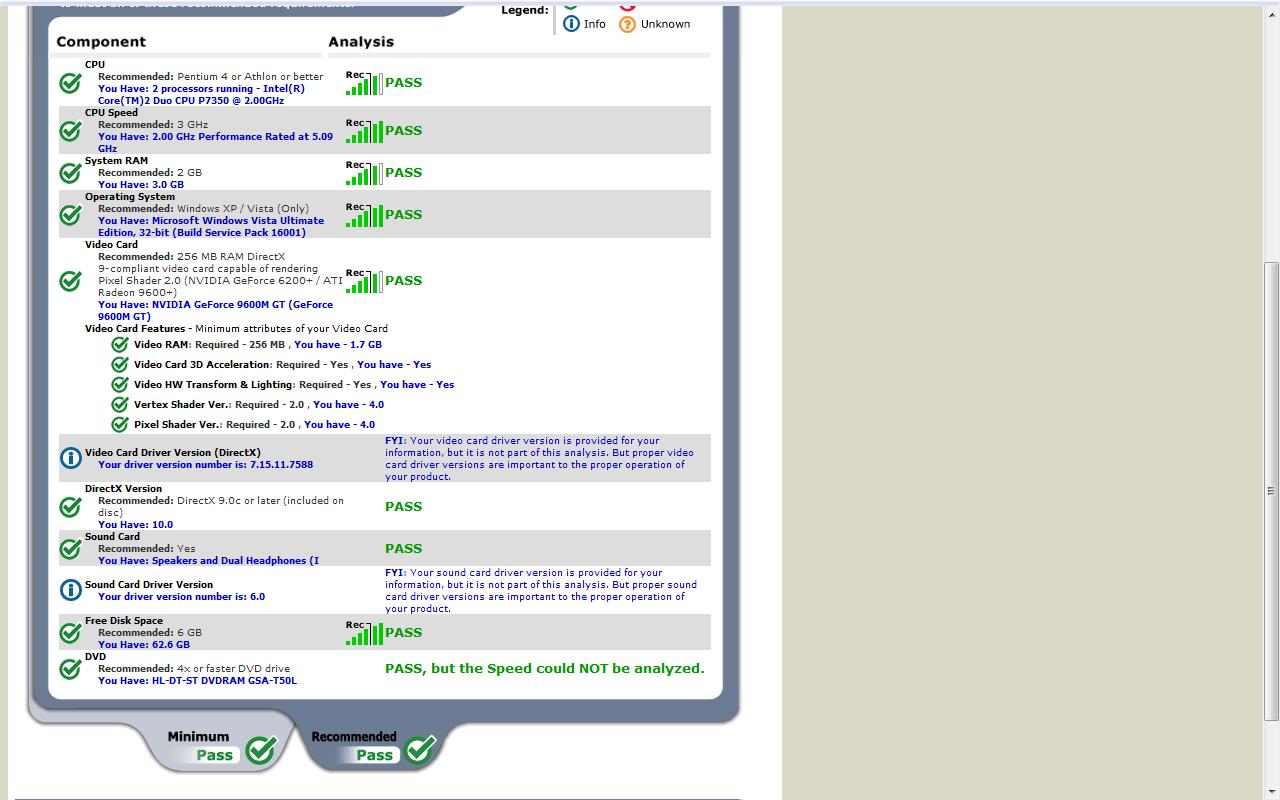
1. I like Silent Hunter III and IV. Does anyone know if this machine can run this game? There is a website: www dot systemrequirementslab dot com/referrer/ubi_srl?registration_option_id=4368
That will show this, if someone who has this machine would run it.
2. For people who have had the machine for more than 3 months, how do you like it so far? Are you happy with your purchase or would you choose something else now or choose different options?
3. How do images look when a resolution of 1280X 800 is used instead of 1689X1059?
4. How bright is the screen? -- Typical? Brighter or dimmer than average?
5. How is the touchpad? Does the gloss make it harder to use?
6. Which do you prefer, bronze or silver?
Thats about it for now. I might have more questions later. -
1. See attachement
2. Can't really answer because I haven't had it for so long but I am really satisfied so far.
3. Well they look... bigger. I don't exactly uderstand your question. If you mean how images look on an LCD screen if you don't use the native resolution, the answer is: not too good and out of focus.
4. It's dimmer than average I would say.
5. I like it, my friend who has the same model doesn't. Depends... you should try it out in a store somewhere.
6. Silver. But my opinion is irrelevant.Attached Files:
-
-
YES!!! I finally got it and i couldn't be happier.
I was getting a little worried at first after hearing about the issues with the infinity display and the quickplay buttons, but i haven't had a problem with either.
I would definitely recommend this computer to anyone who wants a multimedia or gaming notebook.
The display is amazing. It's the best display i have seen on a notebook. And i still haven't had a problem yet with the quickplay button although it might show up later, so im keeping my fingers crossed. -
Dumah,
Thanks for running the test for me. I am happy with those results!!
Yes, you correctly understood my question about using the screen in 1280X800 when that is non-native. What you have told me is that if I choose a lower resolution for better performance on games, I will not have a very good image. Darn! Now I have to choose between those two resolutions.
I want the higher resolution to get more real estate for spreadsheets. Maybe its not necessary though. But if I do not get that higher resolution, I am tempted to get the Asus X83VM sold as Best Buy.
I am disappointed to hear that the screen is dimmer than average. I did not expect that. Do you have the infinity version? What is the resolution of your screen?
Thanks also for your opinion on the silver. I appreciate it.
Thanks again for everything, and I would ask anyone else with insights to add their comments. -
Has anyone used this machine to drive an HDTV through the HDMI port? What were the results?
Thank you! -
Hi all you folks (like Chas the moderator) who have had your machines for two to three months.
Now that you have had some time for the newness to wear off, what do you believe are the things you especially like or dislike about the machine? If you had to do it over again, are there any options you got that you do not find helpful and are there any that you now really wish you got?
Thanks in advance! -
Hi again
Sorry to be a bother!
I suspect that in benchmarks, the higher resolution screen might lose something like 6% on 3dMark06 but perhaps 20% in fps on many harder games -- putting those games at under 30fps on medium settings. But if you had the lower res screen it would get above 30fps.
My question is for any gamers out there who have either screen: How do you feel about the performance of your setup?
(As an aside, I actually do not plan to do a lot of gaming, but I want to have the capability in those rare times when I have some time!) -
First of all, there is an edit function, double posting I think is against the rules here, much more triple posting, next time it would probably be wise to just edit your first post.
For your first question, if I understand this right you want HDTV to HDMI on the laptop? I believe that the HDMI on the laptop is meant for output only, but maybe someone can correct me on that as I don't have the laptop yet, but I think I already have read through this thread that HDMI was output only. And if you're asking HDMI to HDTV, I believe some people already tried it, (I recall someone was waiting to get their new LCD TV to give it a try), and they said it worked pretty nicely.
For your third question, I believe what's nice about the 1680x1050 screen is if you want FPS in your game you can always lower the resolution, I believe this has been said multiple times, probably could have searched for that. People will probably say it depends more on the graphics chip you configure way more than the resolution that the screen natively supports. Again probably someone can correct me on that. So either way, if you have the higher res you can always go down to get the better frame rate. -
My reasons for choosing 1280x800 instead of 1650x1050 even though you get more screen real estate with the latter.
1. I prefer larger fonts. Changing the dpi from 96 to 120 increases the size of text, but the text formatting breaks many websites. My eyes hurt whilst reading smaller sized text.
2. It consumes lesser resources to render 1024000 pixels than 1732500 pixels. That's a difference of 1.7x. So you will get much better fps with 1280x800. The level of detail may suffer with the smaller resolution though.
3. DPI of the LCD panel is 98 for 1280x800 resolution with 15.4 inch diagonal size, which is much close to 96 dpi used by the Windows OS. You will get better looking fonts.
Can anyone tell me if my machine will run Need for Speed Undercover with medium to high setting? -
does anyone know about how long it takes to build and ship this laptop?
i ordered mine on 11/11 and they said it would be built by 11/19. i chose the free shipping (supposedly 5-7 days)...anyone know how accurate that is? -
Ooops! Sorry. I thought it would be easier if I separated the topics I was asking about.
Hmmm. Thanks! I did not see that. I searched for TV, but maybe I need to search for HDTV.
Thanks. I know that you can drop down to a lower resolution. In fact I saw someone (perhaps Chaz) say something to the effect that he played games throttled back to 1440 X something. I am trying to decide if I want the higher resolution or the lower resolution and seeking to hear from other people about how they like their systems.
Thanks for your replies. -
Thanks. That is useful information.
-
does anyone knows where to buy an DV5t with screen resolution of 1600x1050 in canada?
-
Think someone mentioned how their shipping went, how it was shipped like 4 days before the actual estimated shipping date. Then someone commented that they usually ship it 2 days before the estimated ship date, and the estimated ship date was almost the same day you got your laptop. But with the holidays coming up I'm not so keen on that staying true.
-
the shipping takes 2-3 days, even if you choose the 5-7 free shipping. i've had one notebook ship on the date specified and one ship 9 days earlier than was expected.
personally, i chose the higher resolution, you can always knock it down if you don't like it, but you can't' raise it if you don't. -
my dv5t configuration, im still waiting to get it (estimated ship date 11/19):
HP Pavilion Entertainment dv5t customizable Notebook PC
* Onyx
* Genuine Windows Vista Home Premium with Service Pack 1 (32-bit)
* Intel(R) Core(TM)2 Duo Processor P8400 (2.26 GHz)
* 15.4" diagonal WSXGA+ High-Definition HP BrightView Widescreen Display (1680 x 1050)
* FREE Upgrade to 3GB DDR2 System Memory (2 Dimm) from 2GB DDR2 System Memory (2 Dimm)
* 256MB NVIDIA GeForce 9200M GS
* FREE Upgrade to 320GB 5400RPM SATA Hard Drive with HP ProtectSmart Hard Drive Protection
* Webcam + Fingerprint Reader
* HP Color Matching Keyboard
* Intel Next-Gen Wireless-N Mini-card with Bluetooth
* No Modem
* SuperMulti 8X DVD+/-R/RW with Double Layer Support
* No TV Tuner w/remote control
* High Capacity 6 Cell Lithium Ion Battery
* Microsoft(R) Works 9.0
* HP Home & Home Office Store in-box envelope
I got the nvidia 9200m because i heard the 9600m was one of the causes of overheating. Is the 9200m still good? i currently have a 8500gt on my desktop and its not that bad, so what is the difference between the 9200m and 9600m in terms of quality and performance? and the fact that the 9600m is $100 more.
I will be playing some of the latest games so it should be able to handle games like Fallout 3, Far Cry 2, UT3, Crysis, etc.....
also i recently have heard that the dell studio 15 is similar to the hp dv5t...
i personally do not like dell (my desktop is a dell and it sucks) and i have heard from many people that hp has great quality and solid products
so does anyone know the difference in quality, performance and looks? -
just FYI... if you're going to play Crysis, you will have to have it set on the LOW settings on everything. It will play at that setting, and doesn't look too bad, but it won't be like it was meant to be. still a fun game though.
-
really? i read somewhere here that Crysis should be able to run at medium/high settings with the nvidia 9200m. I was just verifying if it was true or not.
has anyone else who owns this laptop tried to run Crysis?
how was the quality?
how was the performance?
at what resolution? -
1280x800 resolution, medium settings with a 9600M GT. Runs at 30 avg fps.
-
I can understand the physical DPI of a LCD Panel, but the number(96) in windows DPI setting doesn't make any sense to me. Can any one explain that?
-
Ok, Thanks for your help folks. I ordered my system:
HP Pavilion Entertainment dv5t customizable Notebook PC
* Onyx
* Genuine Windows Vista Home Premium with Service Pack 1 (64-bit)
* Intel(R) Core(TM)2 Duo Processor P8400 (2.26 GHz)
* 15.4" diagonal WXGA High-Definition HP BrightView Widescreen Display (1280 x 800)
* 1GB DDR2 System Memory (2 Dimm) (Change to 4GB Ram)
* 512MB NVIDIA GeForce 9600M GT
* 160GB 5400RPM SATA Hard Drive with HP ProtectSmart Hard Drive Protection (change to 320GB @7200RPM )
* Webcam Only
* HP Color Matching Keyboard
* Intel Next-Gen Wireless-N Mini-card with Bluetooth
* Integrated 56K Modem
* LightScribe SuperMulti 8X DVD+/-RW with Double Layer Support
* No TV Tuner w/remote control
* High Capacity 6 Cell Lithium Ion Battery
Current price is $863.79 (I also got the three year accidental death and dismemberment plan because I am rough on my machines)
Current prices is $864. I will upgrade the memory to 4 gig myself for about $70. Probably swap out the hard drive for a 320 gig 7200 RPM unit for about $100. This would bring the total cost of my system to $1034. And I do not think that there's more power for the price anywhere else.
Thanks to everyone for the help. -
I finally ordered my system taking advantage of the 30% discount coupon:
DV5T:
Onyx
Genuine Windows Vista Home Premium with Service Pack 1 (32-bit)
Intel(R) Core(TM)2 Duo Processor P8600 (2.4 GHz)
15.4" diagonal WSXGA+ High-Definition HP BrightView Widescreen Display (1680 x 1050)
FREE Upgrade to 3GB DDR2 System Memory (2 Dimm) from 2GB DDR2 System Memory (2 Dimm)
512MB NVIDIA GeForce 9600M GT
FREE Upgrade to 320GB 5400RPM SATA Hard Drive with HP ProtectSmart Hard Drive Protection
Webcam Only
HP Color Matching Keyboard
Intel Next-Gen Wireless-N Mini-card with Bluetooth
Integrated 56K Modem
SuperMulti 8X DVD+/-R/RW with Double Layer Support
No TV Tuner w/remote control
High Capacity 6 Cell Lithium Ion Battery
I'll be joining the HP family soon
-
Members,
Well I didnt order my notebook. Purchased it from the MCX here on base. I am pretty stoked! Spec's are as follows:
HP dv5-1183cl Bronze
Intel Core 2 Duo P7350 2.0GHz
15.4" WXGA HD BrightView Widescreen
320 GB HD 5400RPM
4096MB DDR2 SDRAM 2DIMM
Intel WIFI 5100
Blu Ray W/ DVD+-R/RW
6 Cell Batt
HP QuickPlay
HP Remote Control
5 in 1 Digital Media Reader
nVidia GeForce 9600GT W/ 512MB DDR2 dedicated
Vista Home Premium 64 Bit W/ SP1
Web Cam
Cost $1199.99 (exactly)
This is my second HP laptop, first one (dv6324us) has a wireless card that doesnt work. I posted a thread about it but it wont let me post it here due to my post count.
I purchased a second one due to the time it would take to mail in and get it repaired and get it back. The new HP is still sitting in the box unopened (Yes it takes discipline for that) and the old one is in my room. I want to do the clean install on the old one as a tester before doing it on the new one.
-mojo -
You're nuts! Ive been waiting for my lappie for weeks and im counting the days!
Hehe just kiddin, you're not nuts, but WOW!
-
Undress,
Well, actaully its two days now. Its still in the box.
Question while i am at it. What do i have to do to get an extended warranty since there wasnt an option at the store as would at a best buy or something similar?
-mojo -
wow....i ordered mine a week from tomorrow and still haven't gotten my tracking number yet!!
-
Well, I ordered mine on Nov 10 and it was shipped from Shanghai China on Thursday. Its was stuck in Alaska over the weekend awaiting clearance apparently. Was just released and will be delivered on 19th.
YAAAY!! -
Your original laptop could quite probably have a defective video card which results in various burn outs on the board. If it's an asus cpu you get a 1 year warantee extension. If it's intel..just the 1 year.
-
Check the review and benchmark links in my signature, they should thoroughly answer your questions.
-
I had ordered mine on Nov 11.
Still haven't got the tracking number yet.
-
welp.. my replacement is coming tomorrow. i can't wait
X-ing fingers that it is in working booting condition..
now, don't let me worry you new comers.. I'm sure it was just a glitch on my first one.. And this one will be fine.
-
how did you get this price? -
Mine got shipped today. Just got the tracking number.
Should arrive this Friday.
-
i ordered mine on the 11th too but i still didnt get my tracking number...
and i saw a few pages back some guy ordered his on the 10th and will recieve it tomorrow!
WHY is this taking so long!??!? -
Did they tell you a shipment date? They generally ship the notebook a day earlier than the mentioned date.
-
yea they said it would be built and shipped by the 19th...
I always thought they shipped it out a lot earlier than they say they will...
i guess not! -
They actually delivered mine today. Having ordered it on 10th, the build date for me was 18th.
Hopefully they didn't screw something up in the process of getting it out fast!!
*HP dv5t (1XXX series) Owners Lounge*
Discussion in 'HP' started by Badious, Jul 22, 2008.