Problems? See this thread at archive.org.
Well, I just checked the Costco site where I ordered mine and no 9600M either.
Mine is supposed to come Tuesday and I'm worried on if I like the max res display or should have gone for the lower one. Either way, if I have any issues, I wonder if I can return it and get another one since no more 9600M.
I will NOT get the HDX16T and just find some option with Dell or another company.
The HDX16T was made for gawd knows who because I don't care for an infinity only display since I like to work outside sometimes and you CANNOT see with that (not even if you tried to fake it).
Also, no P8600 although the P8400 is about the same, why not offer it?
Add to it that you have to pick a res that is better suited for watching movies than gaming or producitivity software...
...AND you get that wonderful 10-key keyboard that no one uses.
So sure, just my preferences but hope mine works out or time ot find a new vendor option
[unless this is really only a stock issue as I can't see why they would cripple a laptop - unless the HDX16T sales are pathetic and there is political pressure to do so]
P.S. Unless they do a horrid job of checkpointing their web copy, if you look under the specs of the DV5T still, it still shows 512MB NVIDIA GeForce 9600M GT as an option, so maybe it really is a stock issue. Who knows, as most people on this forum know MUCH more than the tier 1 reps at HP and even half the tier 2 reps.
-
It is currently in transit, so yeah, it should show being in Alaska by tomorrow (err, later today as it is 3:44 am here on the east coast)
-
Thanks for your response, Cathiw.
I sorted the issue out....it was something to do with my power settings. The power plan should be on 'high performance' to ensure that the blue ray plays correctly and I had not checked that till I read about it on a blue-ray forum.
Though I'm still a little concerned about what was written on that link, for the time being, I'm glad I chose the blue-ray option-
Cheers -
anyone know if you are able to turn the hp logo light at the back of the lid off?
-
To my knowledge, no.
That sound about right to me.
For all those worried about the 9600M not being available, it might give you comfort to know that a few days after the dv5t was released in July, they stopped offering the 9600M-GT:
http://forum.notebookreview.com/showthread.php?t=277211&page=18
They brought it back a few days later. So, if you want the 9600M and are thinking about getting another notebook, I urge you to wait a bit longer. -
Maybe, if it is refreshed with some newer processors like they did with the dv5z. On the other hand, the dv6t's existence looks like some overlap in the Intel department.....
-
Chaz' recommended course of action with patience is probably the best way to go. I did just call and speak to yet another HP sales person who said the DV5T is being replaced with the DV6T as R4000 hypothesized. Of course, that should be taken with a grain of salt.
-
Anyone who recently ordered the DV5 with the 9600 GT when it was $50, you can get a $10 credit if you call them up, just make sure you tell them to look under the bronze color option.
I also tried calling and see if they could credit me the difference between my $300 off ($150 instant+ $150 coupon) and the 30% off coupon and they wouldn't do it. They kept saying to return the order once I have it and reorder. All for a $10 or so difference -
HP may be getting smarter. In the newsletter I got yesterday were some deals and an exclaimer that said " Not valid retroactively on previously purchased items".
Its the first time I ever noticed that. Of course I never looked for it before, either...... -
I'm confused. Would it be the price I actually paid (before tax) plus $300, and then 30% off that? Or would it be the price before tax plus the 150 coupon? I want to figure out how much of a difference to see if its worth the bother. Plus, you may not be able to get what you want when you reorder the way they change things around.
Why did you get $10 off? Because the 9600 is cheaper in the bronze model? I got that card. This stuff can drive you crazy.
If you have to pay for return shipping, that would come off the extra dollars right? -
hi guys, i hav a question, i wonder if ppl customed build their dv5t and then returned it after receiving it, what happens to the return unit, since not everyone's build is the same, do they break apart the returned unit and use the piece to build another unit.
i already hav a dv5t, since i see ppl returning to hp, i wonder about this question -
They are usually resold on the outlet site, after being "mildly" refurbished with new OS image and ident stickers........
-
Hey one quick question, I hope some of you who have experienced this could help me.
When I first bought the dv5t, it connected to my HDTV via HDMI great. automatic transition. (Oct. 08)
These days, connecting the HDMI into my laptop (TV being on and set to HDMI), I hear the "device connected" sound byte but no image swap. Screen stays on the laptop and Fn+F4 doesn't swap it either. Going into Display Properties I can successfully extend desktop to the TV, but obviously audio doesn't go over.
Restarting the machine solves this usually, but this was never an issue before. Something wrong I'm doing elsewhere?
Thanks a lot guys -
Yes, it is crazy. That is why I will not bother with looking into saving another $10.
If you are like me, you got a nice notebook at a nice price. -
Hey $10 is a lot of money to me. Every little bit counts. =)
My laptop was in Int'l shipment release but has since "departed". Do FedEx operation continue on Sunday? Like flying it out to my state? I live right outside Atlanta so I bet they have a lot of FedEx planes coming and going, so hopefully this will come Monday. -
Hi,
I just bought a dv5t but after starting it up, it makes a noticably constant and loud rattling noise. It sounds as like the fan bearings are gone.
Is this normal?? -
Triode, I'm guessing you know the answer to your own question
"Rattling" noises are not usually listed under Pros for reviews or feature specs
-
How often do those 30% coupons come around?
-
I am all for saving money. And I agree, $10 is $10 and worth a simple phone call. But, I think that the difference with the coupon is about $60 for me, BUT that is with the bronze instead of black, because I can't get the same config. in black now. I guess you need to balance the effort/time with the payoff and make the decision. If I didn't have to send it back that would be great. I'm not sure that I'd ship back, reorder, and go throught the whole process again for 60. Maybe, but probably not.
-
All the time. Look under the "Notebook and Tech Bargains" thread.
http://forum.notebookreview.com/forumdisplay.php?f=12 -
Hi!
I was looking at the bronze dv5t in the store today. There was a really intense light exactly above it, and in some angles the letters on the keys weren't very visible..
So I want to ask those of you who has the dv5t in bronze, did you notice that? is that a problem?
Thanks! -
can i ask something
i did a clean vista install to get rid of all the bloatware
but there's one thing that bothers me a lot
for example after i startup my pc it will take some minutes for the wireless and network to load , u cant access them in the notifications tray on the bottom right untill a notification thattells you they are "on" pop up , and that will take some time after startup
same thing if i want to open a program like "msconfig" or" system recovery" i will have to wait for a minute or 2 to give me that "allow" thing
isn't that too long ????
i have a core 2 duo d*a*m it
-
also, are there any other known issues with this computer? (like things you discovered from personal use)
Thanks again
-
Yes, in some angles, it is a little difficult to see the white lettering on the keys. However, it should not be too much of a problem if you know the keyboard layout. But, that should no deter you from going for the bronze coloured one. You can always change the lighting setup if it becomes a problem
Cheers -
i'm a touch typist myself, and it doesn't really bother me, but it can glare a bit. you just have to get used to where all the keys are.
-
Here is my due diligence search on the volume quick touch problem.
I helped my sis choose this laptop: dv5t-1007ca. It seemed like such a great deal for a montevina platform with eSATA, HDMI, etc. However, she has the crazy volume quick touch control problem. It likes to keep the volume OSD on-screen as if someone were sliding their fingers up and down the controls. It doesn't happen all the time but enough to be worrisome. Is getting new quicktouch drivers a working solution or is there more to it?
Also, her LCD panel has one bright (stuck) pixel. It's a blue pixel that stays on. I'm not sure what the HP warranty is on this and how she can go about getting it fixed through warranty since i've never personally owned an HP laptop. -
Take a look at this:
http://www.withinwindows.com/2008/1...ktouch-on-screen-display-software-is-garbage/
If your problem is the erratic-ness of the actual tocuh controls then theres not much that can be done about that unfortunatly. For the OSD though there is a program called 3RVX which has a much nicer OSD as an alternative to QuickTouch.
-
I used to have this problem and so far its been fine for the last couple of months. I've heard the cause is that the control is supersensitive and even a bit of dust or grime is enough to set the volume slider off. Also what has worked for me so far is when the button goes haywire just tap the wireless button. this seems to get rid of the volume displaying on your screen
-
I have been looking at the Dv5t for a while now, and I think I want to get it with the following specs. With the academic discount, I can get this for $598. Do you all think it is worth it, or should I upgrade anything? The only thing I plan to use it for is Jasc Paint Shop Pro 8, Music, school work, and The Sims 3 ( The Sims 3 Minimum Hardware Requirements)
*Pentium(R) Dual-Core Mobile Processor T3200 (2.0 GHz)
*15.4" diagonal WXGA High-Definition HP BrightView Widescreen Display (1280 x 800)
*FREE Upgrade to 2GB DDR2 System Memory (2 Dimm)
*FREE Upgrade to 250GB 5400RPM SATA Hard Drive with HP ProtectSmart Hard Drive Protection
Webcam Only
*Wireless-G Card
*LightScribe SuperMulti 8X DVD+/-RW with Double Layer Support
Should I upgrade anything? -
Yes... I have a dv5t in bronze. I don't have too much trouble picking up the keys in any kind of bright light while sitting at a desk. While the laptop is on my lap and I look at it from a reclined position, bright light can slightly degrade the ability to see the keys but it is still manageable. The real trouble for me is the same position while using the laptop in a darkened room. The brightness of the screen reflects down on the keys and if your eyeline is approximately at a 45 degree angle the keys are unreadable. Since I find myself frequently in this position I must now consider a usb light.
I have not experienced the onyx variety firsthand but iimagine there is more contrast between that color and the lettering.
Two things I wish were on this laptop are the thinklight and trackpoint that I really appreciate on my company provided thinkpad. -
Does the onyx HPdv5t have an all-black keyboard and interior or is it chrome color?
-
It has a chrome interior/keyboard
-
I'm disappointed. FEDEX delivered my laptop today but did not leave it, or even a door tag to let me know they were here. I checked on line and saw a "delivery exception". I had left a note, dated, signed, authorizing them to leave the package, with all the information I could think of. They didn't. I called and they said it is at the driver's discretion whether to leave it. Why he did not leave a door tag, they do not know. I was only gone a few hours, of course that is the way it goes.
So we hope for tomorrow. I will be gone again, but the rep. says she will put it in the notes that he should leave it and I should leave a note again.
Oh well, I'll hope for best for tomorrow. -
This laptop is AWESOME!
It came about two hours ago. Only a two minor issues. The front left corner doesn't sit flush against the table so it wobbles a little bit. Not really a big problem. When I put the remote in the slot, it gets stuck. The blank piece that was in there goes in and out fine. When the remote is in, I press on it and it very slowly slides out just enough where I grip it and pull it out
I don't really want to return this laptop for those issues, especially since they don't have the 9600 in stock anymore. Honestly they are not even that big a deal. Maybe call HP and tell them? Would they just credit me money to shut me up? lol
Anyway, I am glad I went with the 1280 x 800. This size is just perfect for me. And all I have to say about the bloatware is WOW... There is A LOT!!! Time to "decrapify". The touch button on bottom work flawlessly so far, and I love the way the touch pad feels. The fan is nice and quiet and it hasn't run too hot so far, although I am still downloading from steam and have yet to plat TF2 so I'll report back on that. Also, Vista is really nice, big upgrade over my Windows 98 laptop.
Oh also, this came with a Hitachi 250GB HDD, rather than the Fujitsu 250GB that most have been getting. So yay for HDD temp sensing! -
I am also happy to say that I received my dvt5 in this morning as well.
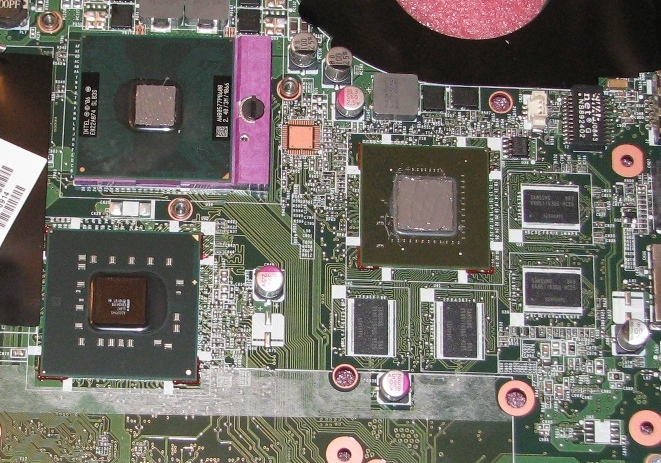
On a side note I am also happy to mention that HP switched to thermal grease for the GPU on the 9600m. I remember seeing earlier in this thread a picture of the heatsink with a Thermal Pad for the GPU.
Since I was also planning on a CPU update I went ahead and disassembled it this morning and applied some Arctic Silver 5 to both the CPU and GPU.
I ran 3dmark06 once so far and my GPU temps did not go over 60C (this is with an Antec cooler).Attached Files:
-
-
Rozwell, RoGuE1230,
Congratulations! I hope I am as happy as you are with your laptops. I am so anxious to get mine. Maybe I'll get the Hitachi 250GB HDD also since they were assembled around the same time.
How do you plan to "decrapify"? Just add/remove or a clean install? I am not technical enough to attempt the clean install, I would be too nervous.
Enjoy your laptops, keep us posted.
-
My plan is to install Windows XP until Windows 7 is released (not the beta).
If you are not up to performing a clean install then you can use the add/remove program files to unistall what you don't want or use the program PC Decrapifier v2.0.0.
http://www.pcdecrapifier.com/ -
hehe this looks like a good day for hp, since I bought my dv5t today too
and I'm writing from it right now
I went for the bronze one after all since I remember the keyboard layout I figured it won't be a problem. the keys don't reflect in my room, and I'll see how they look in the university tomorrow..
I have to say that after reading a few posts here (and a few reviews) I expected a lot of disturbing bloatwere to be installed, and indid alot of stuff are installed, but it doesn't slow down the computer. Does anyone have a list of stuff I can definitly uninstall?
One more question: how do I turn the bluetooth off?
it only gives me an option to turn it off with LAN
Thanks! -
What CPU are you planning to swap it with?
Great job on the Arctic Silver by the way!
-
Just the P8600. I was able to get one cheaper than what HP offered.
-
Did most of you peel off Intel/NVidia/Windows stickers near your right hand on the keyboard area? I have like 5 different ones there and I HATE them, but before I do, since I just got the laptop today...
...I wanted to make sure they don't leave a horrid residue behind.
My husband just got his Dell back after having the case replaced and it is so nice and clean with no stickers! -
Way to save some money!
I thought you might put something beastly in there at like 2.8 or 3.0 Ghz!
Once mine goes out of warranty, or my processor gets really outdated I will consider swapping it -- but no complaints here with the P8600. -
I have removed these in the past. Most of the time for me they came right up with little residue. I then would use the same sticker to "tap" up the remaining residue. If needed you can always use a little heat to loosen up the glue before you remove the sticker.
I would not recommend trying to wipe off any residue as this smears the glue everywhere. -
Open HP Wireless Assistant -> Properties -> tick Independent controls
now u have the option to turn off bluetooth
-
Yeah I also removed the stickers.. just make sure you do it in the first month or so, otherwise you'll end up with spots where the laptop hasn't faded in the sun.
It wasn't too much of a problem as above, I did end up using a bit of rubbing alcohol to clean it up in the end though.
-
BTW, I saw some people asking earlier in the thread about what resolution to go with.
I went with the higher res (1680x1050) and right now...I regret it :/
I had no where to go check it out since the local stores only carried 1280x800 but my eyes are strained already after just 2 hours (and I don't wear glasses).
I tried switching to 120 DPI instead of 96 through Vista, but 1) you have to reboot each time to go back and forth and 2) it seems not work properly.
For example, some things look fine, then I go to CNN.com and the text is really small and increasing it in the browser does nothing (since this is somewhat dependent on the CSS, etc that CNN uses).
I would consider returning this and getting the 1280x800 but right now it seems no more 9600M offered, so if I do return this, time to consider another manufacturer.
Ugh.
BTW, using stock build (not did a clean build yet), I ran 3DMark06 Basic edition v1.1 and only got a 4044 score.
I guess it could be worse.
Max temp of 9600M during 1 run is 71C
Max temp of P8600 during 1 run is 67C/62C
Max temp of HD is 52C (Hitachi 7200RPM 250G)
I have 4 gig, Vista 64 bit, etc. Expected a bit better performance but given the temps, I'm ok for now until a clean install.
But the resolution is probably the kiss of death for me unfortunately. I thought "Hey, I can always increase sizes, I can never make the res go higher if I choose the lower one" but it seems trying to get a uniform increase in DPI/fonts is very, very hit and miss.
Bittersweet day 1 of the DV5T, especially since re-ordering might not be an option.
Thanks for info on the stickers, will hold off peeling them for a bit I guess. -
That is what I had been afraid of. I figured going with the mainstream size would be better than risking go to too high a resolution. I am really glad I did. This size is perfect for me. Right now I am trying to figure out how I can transfer a file off of my desktop. I have a couple large movies, and I tried moving through my home network and it said it would take like 5 hours... I have been trying to set up an ad-hoc connection between the two computers but i can't quite figure how to do it correctly.
-
I would upgrade to the t5800 processor (at least) and I don't know which GPU you picked but the 9200 if you don't plan to game much and the 9600m GT if you plan on gaming a bit.
-
BTW, since I screwed up in picking the resolution and will be returning the laptop, for those wondering on why the 9600M is not a current option on the DV5T - well, you can give up now if waiting.
I had two reps tonight confirm to me, including a manager - that it will no longer be offered as an option, ever. It has nothing to do with inventory.
They would not tell me why (though every rumor has it that sales of other laptops like the HDX series have been awful so they are trying to push people that way).
I was basically told I can return mine but I cannot get another with it - ever.
I won't touch an HDX16 since it's larger than I want AND has that infinity display which for me is a dealbreaker since I like to sit outside a lot (live in SoCal) at Starbucks, etc. and use a laptop. Those displays look nice inside in darker settings but are virtually unusable outdoors.
Once I send this back, I'm going to monitor the reviews of the XPS Studio laptops from Dell and pray they add a better video card, otherwise not sure what I'll do for a Montevino option from a large mfger.
Kaka! -
Just got my laptop, trying to get on the internet now!
*HP dv5t (1XXX series) Owners Lounge*
Discussion in 'HP' started by Badious, Jul 22, 2008.