Problems? See this thread at archive.org.
According to CPU-z, AMD and the internal pics posted by SMAN (thanks a ton) the HP has the 780G and it is a part of the PUMA platform
-
thanks, and good luck to all of us!
-
oh sorry about my last post, it got pushed out of position - it should have been a couple of posts ahead of yours in reference to the people posting here for information about their dv5t laptops
-
So how likely do you guys think it is that hybrid crossfire will eventually be possible on the dv5z? Because I bought one without the 3450 but I have like 1 or 2 days left before my return deadline and I would return it if the chances are good that crossfire will be enabled. Should I go ahead and return it?
-
At this point, I'd say the chances are good with the recent new from HP. With any luck we'll hear something in the next 24 hours. But overall it's really up to you if you want to return on the chance that it is.
-
Lenovo IdeaPad U330's HD 3450 runs on DDR3 with 500/700 clockspeed. My CQ40's HD 3450 runs on DDR2 500/500. What is dv5z's HD 3450's RAM type and clock speed?
-
DDR2 500/500
-
Do u guys get problems with the volume control panel? It seems like it gets stuck sometimes and just going up and down when I try to change volume. I read somewhere that I should uninstall the Quicktouch software and install Microsoft media keyboard drivers which I did, but it's still doing it though not as often. Especially when I use Media Player Classic.
-
AAAHHH!!!
Just bought a dv5-1008ca and am really dissapointed.
The laptop is doing really strange things:
-Can't close IE7
-Can't open Bitlord when its in the system tray
-Can't open Firefox after its been closed once
-Randomly locks up or slows down
-Laptop won't turn off. Just stays on the "Logging Off" screen for an hour
I honestly don't know what to do with this thing. The only thing I downloaded on it was Limewire, Bitlord, and Firefox.
Any help is greatly appreciated!! -
Try doing a clean install.
-
lol
I hate to laugh at your pain, but you just answered yourself.
Ummm...LIMEWIRE...yea...chances are (if you have downloaded anything using limewire) you probably have a virus already...in any case this is not an issue with your machine, go buy any brand and download using LIMEWIRE...you will get a virus! this has nothing to do with your machine so please dont pin the blame on it...neither HP nor Microsoft have any control over what you click on, what you download and what kind of S/W mess you get yourself into...
like ppl have suggested, do a clean install of Vista and this time, dont use LIMEWIRE, use common sense and a good A/V like NOD32 ESS -
Alright....My cam is seriously pissing me off...
It like doesnt even work unless I just want to take pictures.
Doesnt work on the Aim chat boards, wont turn on or anything, mic works though.
Works on aim once, but now i tried 3 times, it shuts down aim.
Seriosuly pissing me off.
Anyone got any solutions? -
Hi guys!!
I was looking at HP home and Home office Store, and I found a great refresh on our DV5/7z series; Now HP offers ZM-84, 8GB RAM, and one 512MB ATi... But appears to be the same HD3450.
As I posted before, HP Declined my order, I was trying to process the order again, but after this refresh I'm thinking on try again from zero; Do you think 512MB ATi is a better choice or I must be stay on 256MB?
Thanks a lot Friends! I hope get my notebook soon and HybridCrossfireX to all of us!
I wait your posts LOL
-
Well 512mb is useless on a 64bit graphic card stick with the 256mb one its not worth the extra $100 it is just another of HP marketing tactics
-
hehe... I think so... but I dream is a mistake of HP... and the 512 MB card is a HD3650
Just a hope
And... I don't Understand... All Mobility Radeon HD3450 I see are 256MB, why HP offers 512MB? why no HD3650?!! :S -
I signed up for an account on these forums just to say this:
Mantikos, you are my hero.
Seriously, if your attempt to get through to R&D actually works, I am way beyond impressed! I can't even get the answer to two plus two from HP.
Also: I read awhile back, someone said that the cards were upgradable. IE, fully discrete upgradable, or upgradable by HP? Are we talking 4850? -
Thank you Xodarap...I hope for all our sakes, that this thing works out...
-
Well i have some news, but not something you may or may not like. If you remember my first post, i recived the dv5z as a warentee replacement for my dv6000z. Welp, now HP wants to take my dv5z back. Aparently, the HP SmartProtect for the hard drive is not saying i have a compatable hard drive. After sending me a new hard drive, it still says it's no good. So the engineers want my laptop back so they can go over the circuit board and see if there a design flaw.
Needless to say, to compensate me for having to go through this twice, they are sending me a brand new dv7z, with all the fixins:
- 2.1ghz Turion X2 Ultra
- 512 ATI 3450
- 1680x1050 screen
- 4gb ram
- vista ultimate
- webcam + fingerprint reader
- 160gb hd (with a 2nd bay to add another drive and raid them together)
- 8 cell battery (no 12 cell for these things yet )
- wireless N + bluetooth
So i don't think i will be posting in this thread much, but keep me updated on the crossfire as it should apply to the dv7z aswell. All in all, this hasn't been so bad for a $1200 investment 2 years ago.
BTW, the 12 Cell batteries are now available to order direct from china during the initial purchase process. -
@[SMAN]
when i had my previous dv5z, it had toshiba's 320GB HDD, but it said that it's not smartprotect enabled. as the HDD lacked the feature. so i believe this problem is with everyone. i got that replaced with another dv5z due to heat issues. we got official holidays here (due to our eid festival) i'll be getting the new dv5z (same model) in 2 days and i expect the same smartprotect feature lacking. -
Yeah that's what i figured, but the specs say the HD is suposed to have it, and when i checked the model number on WDs site, it says there is a protection feature in it. So my guess is that the HP software is not reading it.
-
no one like to answer my question?
-
and mine please
-
HANG ON
I HAD THE SAME ISSUE!!
THE ISSUE IS WITH AN UPDATE ISSUED BY HP VIA WINDOWS UPDATE THAT DISABLES IT, JUST UNINSTALL THAT UPDATE PM ME IF YOU NEED DETAILS -
lol why do i gotta pm you, just post it here...
-
@Mantikos
yeah dude, go ahead, post it. -
lol
alrighty then...
2 ways of doing this...
THE EASY WAY:
1. Backup your data and reimage your dv5z
2. When you first log in using the new installation of Vista start Windows Update
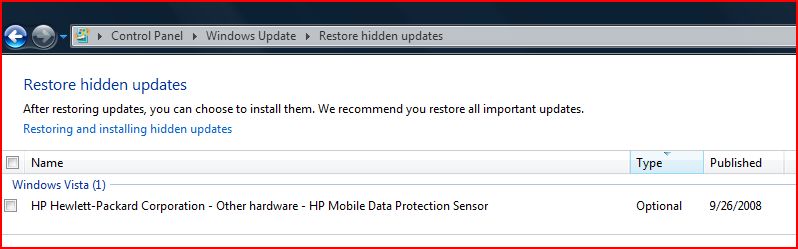
3. To the bottom of the list in Windows Update you will see an HP driver HP Data Protection Driver, first uncheck it so Windows Update wont install it, and then right click and hide it so Windows Update will not include that in its future updates.
the other way ofcourse is to fnd and uninstall the driver from the installed update list and then uninstall the S/W for Mobile Data Protection, reboot and then reinstall the Mobile Data Protection software from support.hp.com
I had the same issue, and I ended up doing the first thing...and it works wonderfully!
I have included a screen shot fo the Update in my disabled updates list...hope it helps you locate the crappy drivers HP pushes out!Attached Files:
-
-
lol, betwen the HYBRID CROSSFIRE R&D team crap and this...I dont see anyone adding any rep points to poor ol me!
-
Lol don't complain, i didn't get any for those pictures...
-
There you go...I just added 1...you deserve it!
hope my walkthrough fixes your problem though!
Gotta love HP for not testing thier updates -
Yeah see that doesn't seem to want to work. i'm not about to re-image it, but i removed the drivers and the software (2 seperate things). when i go to reinstall the software, there are no drivers included, so the only option i have now is the ones off windows update that don't work. Needless to say my case manager forwarded this info off to the engineers that want to study my laptop, so i'm sure a fix will come eventualy. untill then, i just make regular backups, but a new computer should be here in 2 weeks and this time i will make sure i copy those drivers over first.
-
Actually, what you need to do if you DONT want to reimage it is...
uninstall the software
reboot
delete HDD driver from device manager, refresh till it rediscovers....reboot
goto support.hp.com download the software and it WILL work...
but, if I were you (and I actually was you a few weeks ago) I would have gotten the free upgrade first and then made sure windows update didnt install that super duper stupid update from HP!
also, its strange, but I already agve u a rep point for the pics, but its not showing uner your profile!? -
See i did exactly that, but the software wouldn't install the drivers. the only place it sees them is windows update.
-
hmm, very very strange...cause it worked for me...yea, in that case, just wait for the new one...and disable that particular update.
-
Anyone get the ATI Catalyst Control Suite 8.9 for their HD3450?
Reason I'm asking first is because it says it has the display driver for the integrated graphics.
Just wanna get it clarified before I download and install. -
Regular catalyst control center doesn't work for laptops. you have you use the patch from mobility modder.net
I'm not going to elaborate on this process, use google. -
I am not sure what you mean, I am using CATALYST CONTROL CENTER 8.9 on my dv5z, without any mods...just download and install
-
Mine only worked with the 8.8 from HPs site, the 8.9 wouldn't update the video card drivers... it might be running the newer CCC, but the video card drivers would still be from the 8.8
-
hmm, must go and investigate after work
-
can someone help me with my webcam?
-
whats going on with your webcam?
-
The 8.9 from AMD/ATI's site installed perfectly fine for me.
-
Yeah, I just installed the 8.9 package and it actually said my display driver was already up to date. Guess it came from the factory with the newest.
-
Begging for rep is against the forum rules.
-
Actually, I don't think the ones that came with the factory are the latest. When I got mine, the driver version was 8.4somethingsomehting.0.0. The 8.9 package said that I already have the latest. I was pretty sure I didn't because of the driver dates, so I followed the install guide somewhere in the forum where you'd just have to extract the files from the package and manually update. Alas, the driver version became 8.530.0.0. Aside from that, I also did a clean install and just installing the 8.9 without any previous drivers worked.
-
Umm, could you please bold out the part where I am BEGGING
it was a statement of opinion, and I am sorry if it offended you/anyone -
can you pls elaborate on how you updated/replaced the drivers? as in where did you copy the extracted drivers to?
-
I asked before, and maybe no one knows the answer, but someone said that the discrete graphics on the dv5z is upgradable. What exactly does this mean? Does it mean I can send it in to HP for an upgrade, or does it mean I can grab the nicest mobile ATI card available and pop it in myself?
Another somewhat similar question.... I've had (terminal) difficulties previously attempting to replace a HDD in a friends HP desktop because of proprietary HP restrictions (Mobo wouldn't accept any HDD but the original). Is it possible to replace the HDD in my dv5z? I want to upgrade to one of the newer 2.5" solid state drives, but I don't know what that would require regarding the OEM vista, etc... -
I didn't copy them anywhere. You know when you run the 8.9 package, it extracts the files to C:\ATI\blahblah.. Well basically I hit the 'Update Drivers' button in Device Manager\the video card then did Search Manually -> Have Disk -> Browsed to the ATI folder
Here's what I did:
1. When I initially got my dv5z, I decided to update drivers. So I downloaded the 8.9 package (for Mobile/Integrated) from AMD/ATI's site.
http://ati.amd.com/support/driver.html -> Vista [insert your edition] -> Integrated/Motherboard -> Radeon HD 3200
2. Ran the package (it extracted files to C:\ATI), and the setup ran. Setup told me I already had the latest drivers, but I wasn't convinced.
3. Went to Personalize -> Display Settings -> Advanced Settings -> Properties under Adapter tab -> Update Driver under Driver tab -> Browse my computer from driver software -> C:\ATI\SUPPORT\8-9_vista32_dd_ccc_wdm_enu_68905\Packages\Drivers\Display\LH_INF -> Selected ATI Radeon HD 3200 Graphics
4. Driver Version went from 8.476.0.0 to 8.530.0.0. No problems encountered after.
---------------------------------------------------------------------
5. Some time later, decided to do a clean vista install. Since I didn't have any drivers installed yet, I just ran the 8.9 package and it installed completely.
Anyway, I just followed a guide if you didn't understand my steps. This one has pictures (it's the tx2500z, but should be the same)
http://forum.tabletpcreview.com/showthread.php?t=19112&page=2
Also there's a general guide somewhere in NBR (dummy guides/gaming i think)
-Marc -
Thanks, I got it...I actually did the Mobility Mod thing and worked like a charm! infact enabled some extra stuff on CCC for me
-
Unfortunately, the discrete graphics cannot be upgraded since it is integrated into the motherboard itself. So, any upgrade will involve replacing the motherboard and the only other discrete GPU you can upgrade to is the 512MB version HD3450, nothing else. Its not worth the money nor the time. HP wont do any upgrades from my experience.
*HP dv5z (1XXX series) Owners Lounge* **PUMA Goodness**
Discussion in 'HP' started by MightyJD, Jul 7, 2008.


![[SMAN]](images/avatars/[SMAN])