Problems? See this thread at archive.org.
Where is the virtualization option in the bios? I can't find it...
-
Yeah, DV6 QE got here a day early..haha early. Anyway, I know some of you guys have already done a clean install and remember reading bits and pieces throughout the thread (been here since the beginning), but would somebody summarize trouble spots with drivers or anything that conflicts with reloading drivers (read something about multitouch maybe having issues). I'm planning a fresh install with an Intel 250GB 510 SSD, and some HyperX 1600 8GB. Would appreciate all the advice I can get, and plan on putting up some vid and pics (before/after,etc).
Hoping to see what the i7-2820 can do
-
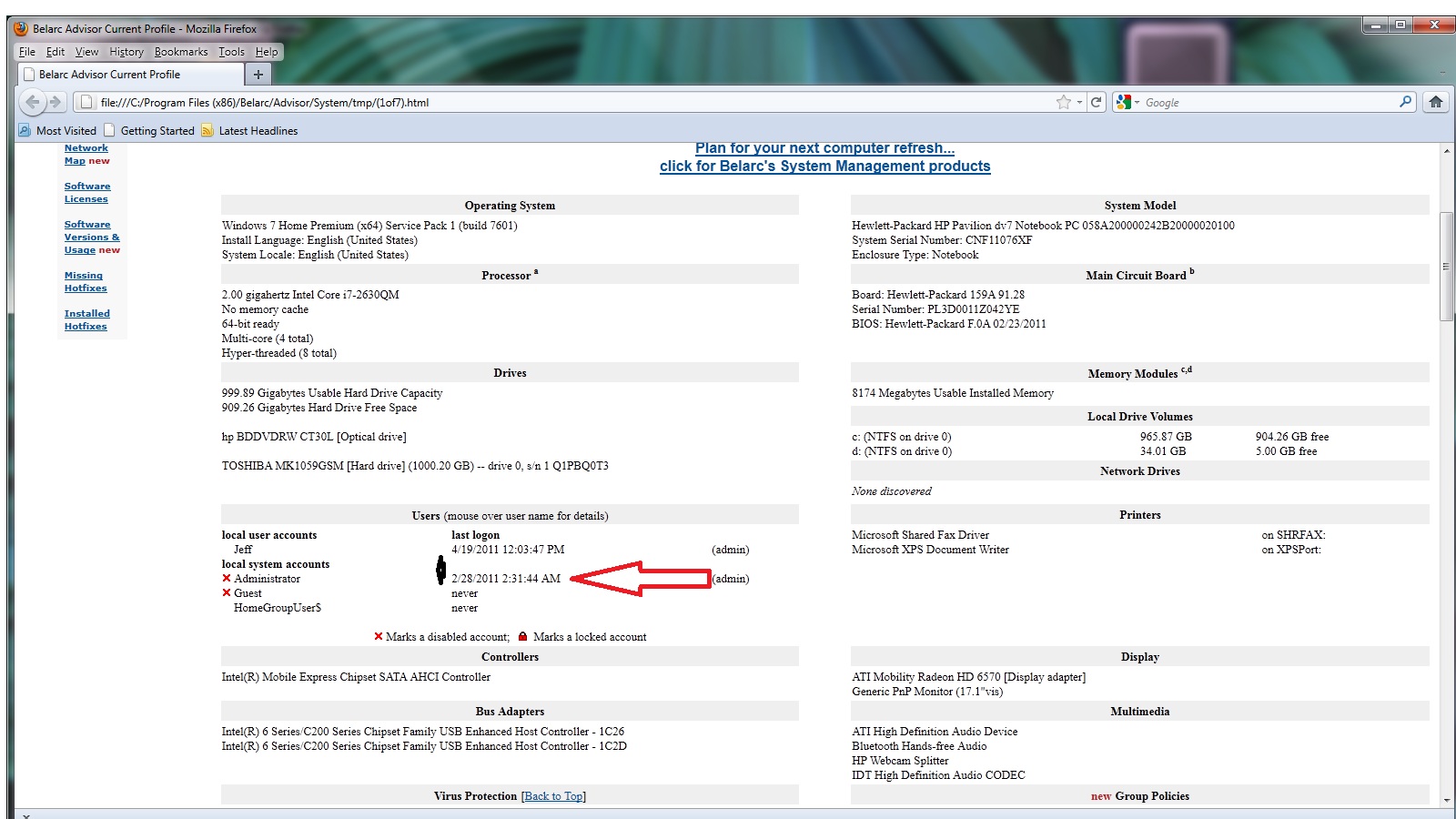
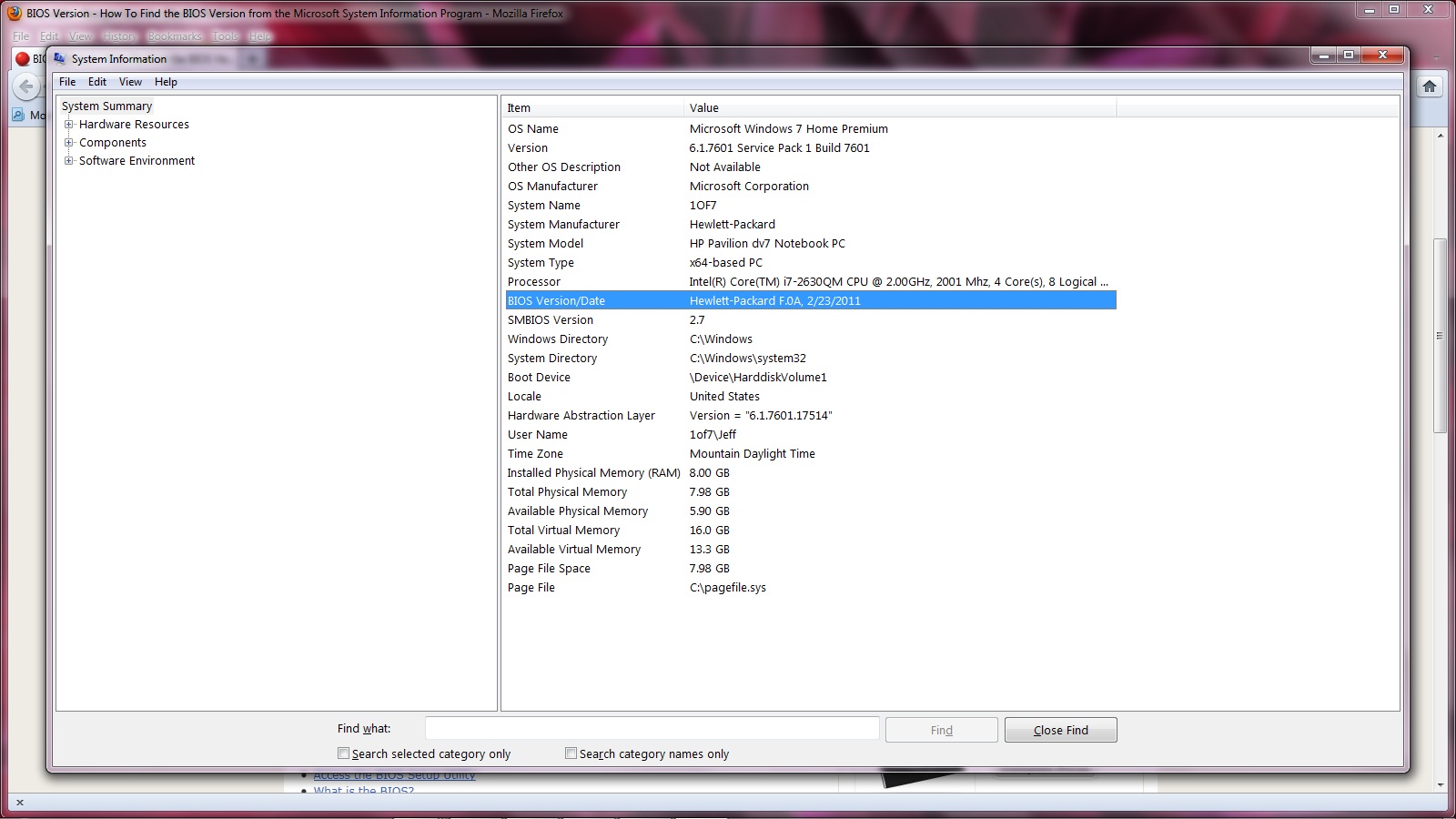
can you run belarc advisor and tell me the bios date and version and the first administer dates or just post a screen shot?
I suspect these models are sb b-2 steppings with a custom bios as my bios updater says cannot read bios -
+1 anyone?
-
As I'm still waiting on my DV7t, I can't tell you about the bios setting, but you might check out the program Securable at GRC|SecurAble: Determine Processor Security Features|. It will verify the presence of hardware virutalization.
-
I have used that.. it says that it is capable, which I already knew... but this BIOS sucks and you can't do **** in it. I guess I'm used to working with business laptops at work, and I know HP disables these features so that people don't mess with them and break their lappy, but come on what about us experienced users. And I don't want to risk modding the hard drive or anything else.
-
Platter only (i.e. non hybrid/SSD) hard drives are major bottlenecks in any modern system. Mechanical hard drives are slow relative to everything else in the system, period. So, any increase in hard drive performance is going to be noticeable, as it's the weakest link.
How much battery life are you saving going with a 5400 vs a 7200 rpm drive under normal use? Depends on the models, but probably not very much.
There is nothing like a quality SSD to make a box "feel" fast. I have an i7 920 on my desktop (Hackintosh) overclocked from 2.66 to 3.8GHz, and while the overclock is helpful the SSD is what made it go from "feels really fast" to "seriously?!"
I just bought a dv6tqe for my fiance with the 7200 rpm option, and it honestly pains me greatly to not have an SSD (for now) in it, as the Sandy Bridge i7's and associated chipset are extremely capable.
In fact with how long it's going to take to ship I'm pretty I won't be able to keep myself from looking for deals on 128GB SSDs.
So to sum it up, im my opinion if you're throwing down for a quad core i7 and a pretty solid discrete graphics solution in the Radeon 6770, I feel that any 5400 rpm drive is going to bring the system down.
Best options are any quality SSD, Seagate Momentus XT hybrid, 7200RPM WD Scorpio Black, most any 7200 RPM drive, in that order.
In addition to my desktop, I put a crucial SSD in my Core 2 Duo MacBook (2007 Santa Rosa) a few months back and cannot understate the enormous impact it had on overall performance. It feels like twice the machine now. -
I cant find a way to post a screen shot but vt is available in my bios
-
What tab is it under? You have a 6000 model?
-
who has bios f.0A on a dv7 qe ?
-
still not sure what model but my bios is f.0A and vt is under system configuration f10 at splash screen
-
My DV6 Quickship delivers tomorrow, exactly two days after cancelling the custom unit. The only bummer for me is that I don't get bluetooth. I'm going to have to use a dongle and take up a USB port all the time. Wish I knew about the priority queue that one of the other guys got on.
-
:[ hmph. Well I'm coming from a 2.0ghz mac with 2gb ddr2 ram and 120gb hd so I am sure this will still be quite the upgrade and amazingly fast compared to what I am used too! :]
-
Definitely, and it's an easy upgrade down the road if you ever choose to do it. Always nice to have an upgrade option that will give you a significant boost should you choose to at some point.
Getting rid of the bloatware is probably as big a performance boost as anything else, never ceases to amaze me. -
here is my screen shot do I have a defective chipset or not?
Attached Files:
-
-
If you've been part of the group that has been recently recieving their laptops, you should be fine. Ripwind has a full teardown that confirms that regardless of what the software says, the chip is B3
-
I Checked Just Now And My Laptop Just Shipped!
Wow Hp Omgggggggggggggggg
I got an email that said it would get delayed to 5/2. What the hell????
Order Date: March 31st
Estimated Ship Date: April 15th
First Delay: May 2nd
ACTUAL Ship Date: April 22nd
![[IMG]](images/storyImages/unledcw.png)
-
You don't need to post the same thing in multiple threads.
-
I thought about saying the same thing but he is just excited. I suppose if he was a repeat repeat offender then i might have had less patience.
I remember saying the same thing once before. The kid bragged that he got his answer faster. He was right, but also totally oblivious to how inconsiderate he was being. -
BIOS
System Configuration (4 tab)
Virtualization Technology
Enabled
F10 - Save and Exit -
The new dv6t quad edition has Bluetooth 2.1 or Bluetooth 3.0?
-
Does anyone know any cheap 128gb SSD's? any good deal links are appreciated. Also, If I took my 750GB 5400RPM HDD out of my DV6 Could I use that as an external HD or is it not good to take internal parts and use them externaly?
-
Newegg.com - Crucial RealSSD C300 CTFDDAC128MAG-1G1 2.5" 128GB SATA III MLC Internal Solid State Drive (SSD)
Just got the email this morning. $199 for for 350/140 speeds. I personally stick with intel ssd's but crucial would be my second choice. -
You can use any internal drive externally - just purchase a case with a USB connection. Works like a charm.
-
I'm doing the same with a dv7 and vertex 3. I'm definitely curious if the HyperX will work. I figured worst case scenario I overpaid a little for 8gb.
-
Here is a third party website with information regarding turning your DVD drive bay into a second HD bay using a caddy.
Optical Bay Hard Drive Caddy (OBHD-SATA12-SATA-BU) Univ, 12.7mm [OBHD-SATA12-SATA-BU] - $44.75 : NewmodeUS, Hard Drive Caddys for Notebooks. I am not saying this one will work specifically, but if they don't have one now they probably will. -
since the 802.11 and bluetooth are separate modules, I would expect only 2.1. I am pretty sure 3.0 is implemented on top of (utilizing) the 802.11 hardware
-
Haha sorry i'm just so happy i don't have to deal with HP anymore after this thing ships. It's more relieved than excited tbh.
-
Can anybody verify this? The bluetooth driver says Broadcom 2070 driver and 2070 seems to be Bluetooth 3.0 ----> Broadcom.com - BCM2070 - Single-Chip Bluetooth 3.0 HCI Solution
-
Check out this link... Intel® Chipset Design Issue May Affect Certain HP Desktop and Notebook PCs - HP Customer Care (United States - English)
According to that link if the fourth through the sixth digits of your serial number are "108" or higher then you have the new B3 step chipset. -
Here is a Kingston 128GB SSD for $165. Buy.com - Kingston 128GB SSDNow V100 Series 2.5" SATA II Internal Solid State Drive
250MB/s read and 230MB/s write speeds. Deal ends April 24. -
maybe, but the sticker on the bottom (of the dv7tqe anyway) says QDS-BRCM1043 ... where are you seeing "The bluetooth driver says Broadcom 2070 driver "???
Maybe YOU are right ... I found what YOU saw ... and it certainly SAYS 2070 -
In driver download section. I dont have the laptop as yet. Was just curious about the bluetooth.
-
Thanks for all the information on the SSD's and the external HDD everyone.
-
This is a good fit (and nice price) for these laptops. I just ordered one..
Great read performance thanks to the SATA 6Gbit/s, and acceptable write performance. Not the fastest SSD available anymore but a good value. -
Question is, are we even SATA 6.0 compatible? Or are we only SATA 3.0 still.
-
Kinda crazy, but this was on the Fry's site last night for $699 with a "limit 1" tag, now it is back up to $849. Whoever bought at that time made a killing. But it is the older unit. I wonder if it is the B3 chipset.
http://www.frys.com/product/6544803 -
I am reporting what the Battery Compartment Sticker says (qds-brcm1043), BUT the driver that is loaded certainly reports (qds-brcm2070)... but that is the extent of the insight I can provide... sorry
-
Both the dv6t and dv7t use sata III 6.0Gbps for the hard drives. I think the dv7t uses sata 6.0Gbps in the second bay, but I'm not sure. What i'm wondering is if the dv6t uses the second sata III for the optical drive. Does the dv6t even have 2 sata III ports?
-
I never worry to much about the fastest write speeds as I try to limit writes as much as possible on the ssd.
A good thing to do is move all your write intensive folders off the ssd to save the life of the ssd.
For instance w/ linux I create a tmpfs on the ram for /tmp and for /var/log/* also do to the read speed of the drives you can tern off journaling as doing full fsck will not take anywhere near as long as a mechanical drive. Just food for though.
Windows you wou might want to move /tmp and /cookies location (Sorry not a windows guy so not sure what directories are very write intensive only a unix/linux guy)
-
Don't quote me on this, but I believe the dv6 only has ONE sata III port, (HDD) and ONE Sata II port, (optical drive).
The dv7 on the other hand, has TWO Sata III ports, and ONE Sata II port.
I don't know much about this. This info is from what I believe I have read through these forums. So again, don't quote me on this..
-
Im pretty sure they both have 2, but the dv6t only utilizes one sata 3 for hdd and uses a sata2 for the optical(i forgot how to find out under device manage...any help?)
-
Ahh..gotcha
-
Thats a terrible deal considering what we go for the price
first its a dv6- 4052nr
Operating System: Genuine Windows® 7 Home Premium 64-bit
Processor: 2nd generation Intel® Core i7-2630QM Processor 2.00GHz with Turbo Boost Technology up to 2.90 GHz
Graphics: Intel® HD Graphics 3000 with up to 1696MB total graphics memory
Memory: 4GB DDR3 System Memory, Max supported = 8GB
Storage Drive: 500GB (5400RPM) Hard Drive (SATA) with HP ProtectSmart Hard Drive Protection
Optical Drive: LightScribe SuperMulti 8X DVD±R/RW with Double Layer Support
Display: 15.6 diagonal High-Definition HP BrightView LED Display (1366 x 768)
Sound: Dolby Advanced Audio with Altec Lansing speakers
Webcam: HP TrueVision HD Webcam with integrated digital microphone
Security: HP SimplePass with integrated fingerprint reader
and im pretty sure thats a b2 chipset.... even 700+tax....way to much 4gb ram, only integrated graphics,500(5400), altec(2speakers),...terrible keyboard and mouse, dont even thing about it.....another $50 we are getting twice the computer -
the chipset SUPPORTS 2 sata III / 4 sata II ports. The optical and USB3.0 ports occupy 3 of the 4 sata II. Port 0 should be the other sata III port... whether its accessible on the dv6t is unknown (to me).
Something ELSE interesting... my dv7t came with the Blue Ray Drive Player upgrade. They wanted $15 for the Lightscribe upgrade... that I declined. The 6000 comes with a MORE stripped down version of Cyberlink's Media Suite than the 4000 was being shipped with. Well I bought the entire suite for $89 ... [ Cyberlink Media Suite 9 - 12 Multimedia Software at One Affordable Price ] ... I found a full download version for the same $89 however ... Low and behold, the Blue Ray optical drive NOW reports it has Lightscribe functionality... I have NO discs to test it however, but I fully expect it will now work. -
One way that might work is to get PCWizard It's a fantastic tool that might show that particlualr info. Worth a shot. I'd try it on my work machine but I'm getting ready to head out.
-
I thought usb3's did not use a sata port, open your intel rapid storage software port 0 sata3 is used for the hdd, and port five is sata2, thats all thats used accordind to that....and port 0,1 are the sata 3 ports
-
the device manager reports Ports 1-4 attached. (Single hd drive dv7t) The Ivy chipset will have true native usb 3.0 support. Since USB 3.0 wasn't supported on the 4000/5000 SB quad series, only one of the sata II were being used ... Port 2, I [Know... now]
-
2 optical, esata.....
-
This is from my OLD SB dv6tqe-4000 that I returned...
Attached Files:
-
*HP dv6t & dv7t Select Edition / Quad Edition (6XXX series) Owners Lounge*
Discussion in 'HP' started by radukr, Mar 14, 2011.