 Problems? See this thread at archive.org.
Right click empty space on desktop..."screen resolution"..."make text and other items larger or smaller"... on the left panel choose "adjust cleartype text".
-
-
Yes, you have to be sitting down in front of the machine ... NOT that big of an expectation for a laptop, I believe. The screen is fine ... much more vivid than my dv6426us. There is NOTHING as annoying as the previous generation's trackpad in my opinoion ... THAT was something that you could reasonably complain aboiut ...
-
The screen on this is your standard consumer laptop screen, which means its completely atrocious in comparison to a good one. Thats what you get with a 1k laptop in this price range though.
-
I cover this a little. I'm wishing for the old chassis with the new keyboard and mouse.
http://forum.notebookreview.com/hp-pavilion-notebooks/562249-hp-dv6t-dv7t-select-edition-quad-edition-6xxx-series-owners-lounge-349.html#post7408702 -
Not to mention, your palm constantly moving the mouse around as you typed.
-
Thanks, repped +1
That's something else I wanted to bring up. I can't seem to adjust, or get the two finger scroll to work. It seems I have to try it a few times before the touchpad recognizes that im using two fingers. Its really frustrating me. Is there anything I can do for this ?
Again, hate to whine, but aside from this, I'm loving my new notebook
Thanks everyone -
Somewhere buried in this thread about a 100 pages ago, someone mentioned that they noticed a dramatic improvement using the synaptics drivers from synaptic instead of the HP drivers. Might be worth a shot.
-
I totally agree with you. I never commented on it. Most laptops are designed to be viewed by a single user. They do allow moderate viewing angles to share with another, but not like an external monitor or tv. HP screens are exceptionally clear, despite of its non-1080 resolution. Just for comparison, if you really think about it, watching a movie on a 1600x900 17" screen is better clearer than watch on a 1080p 52" screen. Don't get me wrong. I prefer watching a movie on the entire wall of my living room.
-
Ahh yes I remember this. How can I switch drivers to use Synaptics ?
Thanks ! -
On intels site you can check for driver updates and for me it says that I have the HM65 chipset, B3. Though I havent tried any other software, maybe I got another updated BIOS version because I live in Sweden.
Intel® Driver Update UtilityLast edited by a moderator: May 8, 2015 -
2 Finger Scroll:
1) Make sure you put your fingers down inside the active part of the trackpad. In the trackpad settings, you can adjust the size of the trackpad that is active.
2) You have to wait a brief period of time after putting your two fingers down.
3) I also noticed that a small gap between my two fingers seems to work better.
...at least that's my experience. Maybe your trackpad settings are different / work differently. Does leave something to be desired when I've used multitouch on a macbook -
I think it's probably This but not sure as I haven't picked up my machine yet. They warn that you may lose functionality since the OEMS will customize it.
-
The only loss I noticed was that the double tap top left corner to disable trackpad wont work anymore.
-
I believe THESE are the key .... w/ (3) imperative
try as much as 1-1.5 inches or so (between finger contact points)
It is interesting that once scroll mode has been established the spacing between the two finger is irrelevant. It must have to do with the software just recognizing two fingers have contacted the pad. Actually once in scroll mode, ONE finger will do nicely.. or alternate to walk up the entire page -
Guys, thank you all for the quick responses. Will try all these things as soon as I get home. The trackpad was really frustrating me last night :/
-
I've been getting by with just a few millimeters. As long as my two fingers aren't touching each other, it seems to work for me.
-
maybe it is a function of (the difference in) length of the two fingers and the resulting time difference when each finger actually contacts the pad... As I said, once in scroll mode, one finger (at a time) works just fine. If I try using my pointer finger and ring finger (why would I ever DO THIS!?!) it works every time... Of course they are about 1.5 inches apart, AND closer to the same length... hmmm??
-
So do the new dv7 have b3 or b2?does any one know?
-
Nope! Touchpads work (AFIK) by sensing the discharge of an array of condensers made by human skin when moving/staying near them... like touch screens.. if you notice, if you wear gloves, touchpad won't work, because the non conductive material won't permit the moving of electrical charge...
Using two fingers touching together makes the two spots discharge at the same time, that is, there's a "conductive path" shorter than expected, near the phalanges and not near the palm of the hand (FYI, we ARE conductive), and so the driving chip interprets this as a single touching point... try with two fingers touching each other but with some plastic in between (I think a credit card will be fine), you'll notice that you can now scroll (in theory... )
)
-
ONE FINGER scrolling is much EASIER than TWO Finger mode if you enable chiralMotion Scrolling!
Go to Synaptics Properties, settings, scroll, one finger and select chiralMotion -
using gloves does work. in fact even placing stuff on the computer screws with the touchpad - it's pressure based. and 2 finger scrolling is definitely defined by the distance between the two fingers.
and humans are not THAT conductive - i think our resistance is somewhere in the 1E6 ohms, compared to something like 1E-8 ish ohms for a meter of metal wire (over billions of billions folds difference) -
Could anyone please let me know if this gap on my DV7T is normal???
![[IMG]](images/storyImages/img2208o.jpg)
![[IMG]](images/storyImages/img2206o.jpg)
-
I got a small gap on my dv7 in the same location as yours, maybe not as big but it's still there.
-
I don't have mine yet but that looks fugged up
-
the gap on mine is very easy to see if looking straight down.
Does your dv7 get hot while you're surfing web or running some light apps? -
Hey guys,
Just received my dv6tqe. Super sleek, love the switchable graphics. I have only played with it for an hour, but it runs super cool, especially on intel graphics. The old dv6tqe was hotter and louder. Keyboard compared to old dv6tqe is much better. i'll definitely use the numpad at one point, also hated the application buttons on the left side. always messed up when hitting ctrl / shift / tab, now it's good.
Beats audio sounds good, can go really loud, i like that
-
Question to the owners: do you know the external dimension of the box and the gross weight? Just thinking something about international shipment...
EDIT: Sorry, I mean for the dv6 model!
Thanks. -
HP recalled all the computers that were built with the B2 chips as soon as Intel disclosed the defect and initiated the recall, months ago.
No one has provided any evidence that major companies which already initiated expensive recalls of these chips are now stuffing those same chips into computers.
Therefore, I refuse to waste any time thinking about utterly senseless ideas such as that, until somebody can prove it has actually happened at least once. -
My DV6 has that same gap. I thought it was because I disassembled it, but I think the gap was there before. I don't think mine is as pronounced as yours.
I had 2 models arrive at my house and they were both different sizes. One was a quick ship and it came in a larger box with an HP specific box inside. The CTO models come in smaller boxes with no other box inside. (Sorry I don't have the dimensions of the CTO model box. -
I have done a fresh install of Windows and am repartitioning the harddrive. I have a couple questions, though.
Is the "restore" and "HP-Tools" partitions essential for operation, or can I merge them into other partitions?
There is an unseen 200 mb "system" partition that is first on the HD but didn't have the actual OS on it. What is it's purpose?
If it has been posted here before, I apologize. No matter what search term I put in, I never receive any results doing a thread search. -
Forum search has been borked as long as I've been here.
Use Google, with these terms included:
site:notebookreview.com 6xxx loungeLast edited by a moderator: May 8, 2015 -
I did a clean install as well. The restore partition can safely be deleted, but you might only want to delete it after you make your HP Recovery Disk Set. I made my set, but I never end up using them since I always do clean installs...so I'm not sure why I bother anymore. I kept the HP-Tools partition, has some diagnostics tools, etc which might be useful. The system partition is installed by Win7, supposedly it's used for the bitlocker feature in Win7 Ultimate. If you install windows into an unformatted partition, it will automatically create that system partition. If you format a partition prior to installing Win7, it will not create the system partition. Also, I use ABR backup to backup/restore the Win7 OEM key and activation. This allows you to install as often as you like, without the need to call msft for activation.
-
The 'system' partition also contains the boot folder and bootmgr file which is required to boot Win7. When the separate 'system' is not created during the install, they are added to the larger OS partitition we are used to seeing. Check out Multibooters, Vista Dual and Multibooting - Windows Seven for a pretty good explanation of this and related subjects.
-
Same here I have a small gap in the same place but it is not has bad as the one in the picture here -
Does anyone else think the keyboard feels cheap?! I have a Dell laptop as well and the keyboard on that feels a lot better. Also on the mouse pad I feel two little bumps as I use my finger to navigate, anyone else have the same issue? Beside this I think the laptop is nice. I just got it today so will have to play with it some more to see what my final verdict is on this laptop that everyone waited months for lol
-
I'm not sure what the dv6 4000 felt like but I can tell you that it feels like the older model of dv7 I think it is the 4000. It feels like a metal sheet not a plate
-
Just got the laptop yesterday. Was going well until the HD Truevision webcam stopped working in low light! Did a system restore and nothing seems to work. Webcam is useless at the moment. The Cyberlink settings do not work. Any suggestions?
-
Today, I added a new 4GB (Make - Zion) RAM to my dv6. The pre-installed RAM was one 4GB SODIMM (Make - Samsung). My initial Windows Experience Index was 7.4 for RAM. Now, it increased to 7.7. I checked in CPU-Z and it showed Dual Channel under Memory. I also order a Seagate Momentus XT Hybrid HDD (500 GB) to replace the Hitachi 500 GB 5400 rpm pre-installed HDD. Now, the pre-installed HDD is a bottleneck to my otherwise very powerful system.
My WEI screenshot :
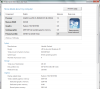
Now, somebody please answer my earlier queries -----
-
I like the keyboard, granted it isn't the best. As far as the trackpad goes...The first day I had it, it was bumpy, but after a few hours of use it stopped being bumpy. Now it is nice and smooth. There may be some coating that needs to be worn off first
-
AgentDebbie S.
I do see here that you have ordered this beautiful HP Pavilion dv6t Quad Edition customizable Notebook PC.
12:25:48 AM AgentDebbie S.
This is such a beautiful computer.
12:25:58 AM AgentDebbie S.
I am sure, you would love this one.
Man oh man.... lol -
lol but beautiful indeed.
-
A small question here regarding gaming on the dv6tqe. Now I understand that the 6770M comes with 1 GB of dedicated GDDR5 memory and also it can make use of shared memory (RAM) if it needs to. Is it possible that the 1 GB of dedicated memory isn't enough for a game and it has to make use of shared memory? I read somewhere on this forum that games like the GTA 4 expansion packs demand more than 1 GB of dedicated memory under high settings.
So isn't it better to have RAM in excess of 4 GB to be on the safer side? -
Admin for me, thanks 7, repped!
-
so yesterday my left speaker suddenly died while I was playing Battlefield 2
sounded a bit like it was buzzing before it died but i thought it was the game. volume was at about 3/4.
my dv6tse isn't even a yr old yet warranty? not sure if it's even worth sending it out to have fixed and being without a laptop for weeks -
Same experience here, just uninstall sound driver.
And download driver from HP site, not realtek. -
Does this work with Win7 x64?
-
Are you sure you weren't talking to a car salesperson?
-
You posted way too much at once for anyone to want to tackle (i'm procrastinating)...
1) I want to install Windows XP Mode and Windows Virtual PC. For that, I run the Microsoft HAL Detection Tool and it reported that Hardware Assissted Virtualization is not enabled in my notebook and directed to enable in BIOS. Then, I opened BIOS(F.06) but could not find any option for enabling Virtualization. I checked Intel's Website and verified that the Core i7-2630qm processor does support Hardware Assissted Virtualization (VT-x). So, how can I enable Virtualization in my notebook ?
It seems to be a mixed bag. Most people have the option in their BIOS, but a few don't. Check to see if there is a BIOS update. But there's no really reason that you shouldn't have Virtualization Support (ie: The hardware supports it).
2) Have anyone tried using the HP Recovery Manager to restore the system ? I created the backup DVDs from the Recovery Manager. When I run it, I saw there is one option on Reseting to Factory state and there is another option of Minimized System Recovery which stated that it would clean install Windows with only the Drivers and Required Softwares (devoid of the Bloatware or Trial Softwares and Games). Can somebody please clarify that the minimized system recovery could be as good as clean installing from a Windows 7 DVD ? Also, will it format the C drive only and re-install windows keeping the other partitions untouched or re-format the whole hard disk and re-build all the partions (including HP_TOOLS and Recovery partition) and re-install windows ?
When messing with OSes / Partitions, always back up your data and assume that it will be wiped. I'm pretty sure if you use HP's recovery software, it does a full wipe, ie: Resetting everything back to factory settings. I haven't heard anyone make the argument that anything is better than doing a clean install of Windows (either from a Windows DVD or using whatever tools people have been suggesting). The argument has been made that people aren't technically competent enough or that it's not worth their time.
3) In switchable graphics, I changed to Power-Saving GPU (Intel HD 3000). But after restarting Windows, I saw that the GPU switched automatically to High-Performance GPU. Is there any way to make the Intel GPU as default and I will switch to Dedicated Radeon 6770M GPU only when I am playing Games ?
Is the account that you are using an admin? Besides the first two days, I've left mine on Intel HD 3000, and I reboot nightly (I'm gone for 12+ hours at a time, not because I think Windows 7 needs a daily reboot). It's always stayed on Intel HD 3000. Have you replicated the problem? It could be because there was a ATI driver update that came out sometime this past week.
4) I am using my notebook on a table always connected to AC Power. Will leaving the battery in the notebook while always using AC Power degrade the battery capacity over time ? Is it advisable to remove the battery from the notebook and store it to prolong its life ? I want the battery to remain healthy so that I can get its full performance when I will need to travel with my notebook at some later time.
Google "Battery University." I"m not sure if the laptop will run without the battery in (some require that switch). Also you'd be taking the chance that you lose your current work if you have a power interruption (I've heard that hardware can be damaged and / or your harddrive could corrupt the data...but not sure how true that is). Even if you do everything right for the battery, I'm pretty sure that after a little more than a year, your battery will have degraded performance. My recollection from Battery U is to charge to 100%, let it drain to around 40 to 60%, then charge again, repeat.
5) ALso, I tried using HP SimplePass 2011 with Firefox 4 and it is not working (but is working in IE 9 and FF 3.6.x). I also saw in another discussion about using Fingerfox(SE) extension in Firefox 4. I also tried that and it also doesn't seem to work. Is there any other Fingerprint Software alternative which can be used in Firefox 4 ?
No idea. Fingerprint software is pretty proprietary, not much open source, and hardware specific. So it's hard to find decent free software out there. Have you tried setting a master password in firefox 4, and seeing if that works?
6) In HP Commercial Notebooks, HP provides a software for Face Recognition through Webcam. But, in the Pavilion series notebooks, HP doesnot provide any such Face Recognition Software. So, can that commercial notebook's face recognition software be used in pavilion dv6 ? Or, are there any good 3rd party face recogntion software that I can use in my dv6 ?
What do you want facial recognition for? To log in? I imagine the answer to this is pretty similar to what I said in question 5. No one out there is making software for such a small set of users. I think your best bet is to just use the fingerprint reader. -
Most newer games will utilized the shared memory. If that's not enough, it will use any unused system memory. If that's not enough, it will use hard drive space for memory. So yes, the more memory you have, the less resources a game will request.
-
Dv7-6000 max temps of CPU & GPU in full 3D?? (crysis, 2, etc)
Thanks
*HP dv6t & dv7t Select Edition / Quad Edition (6XXX series) Owners Lounge*
Discussion in 'HP' started by radukr, Mar 14, 2011.


