Problems? See this thread at archive.org.
stock battery is 44Whr around 1:30-2:00 hr
High capacity is 56Whr around 2:00-2:30 hr
12 cell battery is 96Whr around 4-4:45 hr, it raises the laptop and adds a pound to the weight.
what i did is i got the stock one and got the 12 cells from ebay for $65- bing cashback.
-
-
buy a second notebook or netbook just for your mobile needs.
For main PC, you can buy either desktop or powerful notebook. -
Thanks i think buying the 12 cell as an extra would be a good idea then....
Does this notebook run games well with the i7 and nvidia 230m? and will it continue to do well in the future? Im investing for a while here lol
thanks -
I lost another 6% battery capacity last night

EDIT : my battery is not charging , the battery charging light is flashing , I ran the hp battery check util, it says my battery is not in warranty , strange i have only had the notebook a month.
EDIT2 : I let the notebook run on the battery for a while and then plugged the charger in and it is charging now, the temperature overnight here is 6c or lower could this be causing my battery problems.?
![[IMG]](images/storyImages/batteryfail.jpg)
-
did you check your warranty? HP should also cover the battery. call HP to complain.
-
Anyone has got the Rivatuner working? tried some GPU driver version with no luck.
-
I second your observation.
It looks like version 195.81 have a problem with the power management. Under battery it downclock the shader clock severely. I switched to the driver from HP and it improved the performance under battery.
@awan2009
Couldn't get RivaTuner to work -
Well, you mean 195.81 downclocks the shader when laptop is not plugged? I always plug in the power.
-
Hello,
Not sure if I should post this here but anyways...
In Windows 7 :
Create a new Folder on your desktop and rename it to this:
AllControl.{ED7BA470-8E54-465E-825C-99712043E01C}
Then double click on it and you have a easy way to access all the control panels in windows 7.
Cheers.. -
So what 12 cell battery would you get off of ebay?I see there is a few different ones.Thanks
-
Hi. has anyone ever tried installing a HP HDX16T backlit* keyboard onto the HP DV6T Quad*. or how can i make the dv6t backlit? examplehttp://img5.imageshack.us/img5/4012/img0495r.jpg
-
i woud like to know if the hdx16t has the keyboard with the backlight* built-onto the keyboard like a combine separate piece from the laptop itself or the light is inside the laptop. basically keyboard+light or laptop+light
-
This has been discussed in this thread, hell I even showed great interest up untill the point I discoved installing a new keyboard voids the HP warranty.
That picture posted really is something I would like though.
They sell the keyboards on eBay so im thinking its keyboard+light. -
Is there any way I could disable Hyper-threading on the dv6t quad . I came across some discussion from desktop users of the core I7 ,which mentioned a good drop in temperature with HT disabled .And I see a point in that. Also I should be quite happy with 4 physical CPU's since I dont do lot of video encoding or stuff like that .I am more concerned about the heat at this point in time .Is there an options in the BIOS ??
-
No BIOS support for enabling/disabling the HT support o the dv6t quad.
The BIOS HP has provided is severely crippled and lacks some basic tweaking facilities ..Probably one of the silliest BIOS's I have ever seen. How can you design an enthusiasts laptop with half the BIOS crippled.. ?? HP are you listening..??? -
couldn't agree more.
I use notebook cooling pad and thermaltake fan to overcome my laptop's heat problem. better than nothing. -
I have a question about cleaning this laptop. I have the black, glossy one which smudges easily. I have the small dark cloth it came with and a blue microfiber cloth that I bought with the Monster - Ultimate Performance TV Cleaning Kit. This cloth was recommended for cleaning LCD screens.
When I attempted to remove some smudges with the blue cloth and fluid that came with the kit from the black glossy portions near the screen, it left a slight swirl that is noticeable when light reflects on it, similar to what often happens when you buff a car.
Perhaps this was due to dirt on the cloth or the cloth should only be used for the screen, but I don't know. Can anybody shed any info about properly cleaning the laptop and removing swirls or scratches? It seems the gloss scratches easily, as I see other marks on it after a week of carrying it around in my bag.
Thanks. -
Regarding the scratches, I used a professional cleaning kit, and I got swirls too - very light, and you have to look at a certain way. It seems the glossy finish scratches very easily - just cosmetic though - I did not notice any scratches on my screen, and that is all you should be concerned about.
-
Welcome to the owners community Patrick74.
And yes, the glossy substance does scratch too quick, the black edges of my screen are showing soft scratch spots.. a shame, but not too noticable...yet.
Im clueless when it comes how to properly clean a laptop, I do remember there being an explicit thread about it somewhere on this site.. search it!
O, and use anti-static cloths.. if they exist. -
http://img188.imageshack.us/img188/7764/dsc01012e.jpg
http://laptopparts.vivotechnology.n...l/SSProfiles/13000207/images/29/KB-HP-069.JPG
http://aapls.com/index.php?main_page=popup_image&pID=3718
I AM IN PROCESS OF ADDING BACKLIT KEYBOARD TO DV6T. I WANTED TO KNOW IF THE RED CIRCLE IN PICTURE IS WHERE THE LED WIRE GOES BECASUE AS YOU CAN SEE THE SILVER BACKLIT* KEYBOARD HAS 2 WIRES AND BLACK (dv6T) HAS ONE. IM THINKING THE EMPTY SLOT IS THE BACKLIT SLOT, BUT IDK. ANY IDEAS?
HERES HDX
http://media.photobucket.com/image/hp backlit keyboard/infamousflav/p1010700j.jpg -
The connector says BL KB, i think it is backlight keyboard power
-
I just did the research and it appears this product: Meguiar's Mirror Glaze Clear Plastic Cleaner will remove the scratches. http://www.meguiarsdirect.com/detail/MEG+M1708
Meguiar's also has other products for deeper scratches. I will report the results when I receive this. -
ahhh. i have to say you are a very smart man. thanks. i am going to order a keyboard. will post the first ever hp dv6t backlit keyboard.
-
ahhh. i have to say you are a very smart man. thanks. i am going to order a keyboard. will post the first ever hp dv6t backlit keyboard.
-
You people with the BL keyboards are awesome!!
Please keep us posted and tell us how to do it ourselves.
Also, which ones did you buy? From eBay? link wanted tyLast edited by a moderator: May 8, 2015 -
I am pleased to report that the Meguiars product I used worked very well. I highly recommend it. Meguiars told me Plastx may be better because it is a cleaner and polish in one, but the Mirror Glaze stuff is great.
-
On another subject, I really hate the battery life. It seems we only have 3 choices, and the 12 cell apparently sticks out and makes the laptop sit on an angle. Are there any other batteries, such as 9 cells that will work with this laptop? I have the standard 6 cell battery this came with and even when it just sits at Power Saver mode, I am not satisfied with it.
-
Has anyone lost their ability to use the gestures on the touch pad? I am no longer able to do 2 finger scrolls or pinches to zoom in and out.
-
Was able to activate momentum and chiral scroll only.
-
I was able to do the 2 finger scroll and the pinch function, but I just noticed recently that I am unable to now.
I even tried system restoring to the day I got this laptop. Still nothing.
How were you able to activate it? -
i used this synaptics driver.
did you perform a windows update? if yes check the history for the updated synaptics driver.
Please let us know if you recall how to enable it -
I've performed some windows updates but it doesn't seem like the synaptics were involved in any of that.
I am still working on it. i am just puzzled as to why I lost it.
The link you posted is for acer, would that still be compatible with our dv6ts? -
Yes, it is compatible. It will enable chiral scrolling and momentum mouse movement.
-
Could you elaborate on that? What does it do? And is it handy?
And that pinching part? How do I put that in practice.. what does it do? -
Here is an explanation of both of them, they are the last two.
Pinching is not supported by the driver.
There is another driver called scrybe, it has many gestures but as the 2 finger touch are not supported, you have to press alt+shift to get a square where you draw what you want and it interpret it like "w" for word. It is not fully functional though as some of them will be recognized but without an action. -
Just curious,can you enable AHCI in the bios on this notebook or do you have to do it by regedit?
http://www.ocztechnologyforum.com/forum/showpost.php?p=474785&postcount=46 -
hey guys i currently have a dv6t quad with the old nvidia gt 230m video card. Can i send this one back for the new one with a 320m video card. I've owned this computer for only a couple of months.
-
Don't get upset, the GT3xx is the same as GT2xx. Actually GT230 should be better than GT320 as per the ranking in http://www.notebookcheck.net/NVIDIA-GeForce-GT-230M.17646.0.html
Also, you can overclock the GPU to be better than GT330 using Nvidia system tools. I reached a 700/1540 and 948 for the memory.
With all this said, there isn't a huge difference between the whole series from GT230 to GT330 that you have to pay money to get. -
up how do we over clock? and thanks for saving me some uneeded white hairs
-
I posted a guide here
-
would it be wise to set everything to max?
-
no,
Keep memory clock at max, increase the graphics clock by a 50, Keep the ratio between Processor clock and Graphics clock at 2.2 and use FurMark to check stability and temperature. -
what about underclocking to get the temps down and maybe longer battery life
-
yes, you can underclock the GPU to the lowest settings. it decreases the gpu temperature by 2-4c. Nvidia driver V195.81 does this automatically.
-
So whats your take on the Nvidia driver V195.81.I have heard some people say they were having problems with the new drivers
so how far to you take the gpu numbers down too? -
v195.81 has a problem when working on battery, it locks the clock to the lowest values but works great on charger. I am testing other versions and will report which version is ok.
you can underclock to the lowest values without any problems.
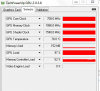
If anyone is interested in using rivatuner PM me, it has the advantage of overclocking the memory to 1066. The attached picture shows the clocks while running Furmark on stability test and extereme benching.Attached Files:
-
-
Bought myself a new dv6t Quad edition yesterday after reading on these forums for the past week. I went with the dv6t to keep my current carrying back, and I like the size of the screen. If I need to do work on a larger screen I can hook it up to a tv. Thanks for helping me decide. On a occassion I like to do video encodes, art work, design, etc...
HP Pavilion dv6t Entertainment Quad Edit
• Genuine Windows 7 Home Premium 64-bit
• Intel(R) Core(TM) i7-820QM Processor (1.73GHz, 8MB L2 Cache,1333MHz FSB)w/Turbo Boost up to 3.06 GHz
• $100 OFF! 6GB DDR3 System Memory (2 Dimm)
• FREE Upgrade to 320GB 7200RPM SATA Hard Drive with HP ProtectSmart Hard Drive Protection
• 1GB Nvidia GeForce GT 320M - For i7 Processors
• 15.6" diagonal High Definition LED HP Brightview Widescreen Display (1366x768)
• LightScribe SuperMulti 8X DVD+/-RW with Double Layer Support
• Webcam Only
• Intel Wireless-N Card with Bluetooth
• No TV Tuner w/remote control
• HP Color Matching Keyboard
• 12 Cell Lithium Ion Battery
Total: $1394.01
Not including tax, it's about $100 more than the laptop I'm on now.
Currently I'm on a:
C2Duo 2.2 T7500 2.2GHz
120GBHDD(now 320GB 7200RPM)
Nvidia 8400mGS
2GB Ram (now 4GB)
Webcam
Super Multi Drive
Windows 7 Ultimate
12cell Battery -
I tried several versions of the GPU drivers, found them downclock under battery.
The stock driver uses the default clocks all the time and don't get benefit from a technology called PowerMizer which dynamically adjust the clock into one of three levels: low 2D to save battery and heat, low 3D for medium 3D loads, and Performance 3D for power 3D loads.
I posted a thread here to enable the PowerMizer. In addition, i added a part to use RivaTuner to set the clocks to whatever values for each of the three states. -
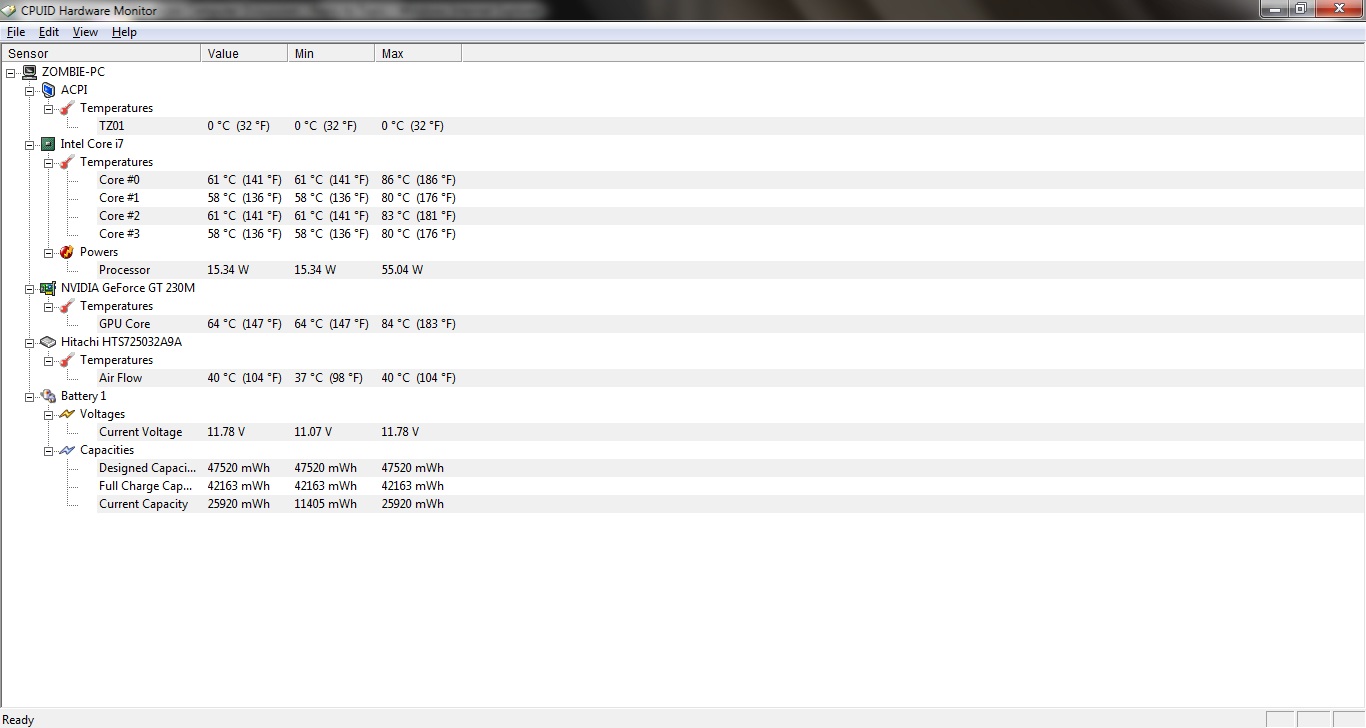
My laptop gets pretty hot on normal operation. for reference i have attached the temps readings.
IS there anyone experiencing similar problem? Any solution or pointers?Attached Files:
-
-
The current values are OK, the maximum values indicate that you were using some programs that are a bit intensive. What programs were you running? Were you installing software or windows upgrade in the background?
Did you use High performance power plan? it runs the CPU at max and hence generates more heat.
Charging the battery generates more heat from the current capacity row, the battery was charging.
Try upgrading the GPU like i mentioned in the above post, this will decrease the GPU temperature.
*HP dv6t Quad Edition (2XXX series) Owners Lounge*
Discussion in 'HP' started by ksiss, Oct 19, 2009.


)