Problems? See this thread at archive.org.
I need some serious help here. I've been trying to setup double finger tap for right click all day for this touchpad and cannot for the life of me find it. The default drivers were version 15.1.6.64 which is the same version that HP has on their site. I went directly to the Synaptics site and downloaded their latest drivers which are version 15.2.7.0 and installed them. The new driver from Synaptics has a lot more options but niether of these drivers gives me the hot zone option under device settings. All I want to do is enable right click on the touchpad with a double finger tap.
Please help me!
Thanks
-
-
A clean install WOULD be better. But does HP provide a clean copy of Windows 7?
-
no, but you can just download it from microsoft and use the cdkey on the back of your laptop.
-
Here is what I am seeing. I'm back to driver version 15.1.6.64.
-
I did not know that! Awesome.
-
i'm on the same boat. it arrived Newark yesterday at 2am. It left the Newark facility yesterday at 7pm and it arrived at the destination sort facility at 2pm today. looks like the driver got tired of the snow, left the truck in the middle of the road and went home. i should of gotten the laptop today.
i would like to know if the switchable graphics are coming to this laptop or not. Did anyone call customer service about this? if you did, what did they tell you? -
it's under palmcheck enhanced-acm, then select starting zone or whatever (for your zone of touching to exclude out the button areas)
as for 2 finger taps for right click, it's not included in synaptic drivers. you need other programs such as reil's touchpad app or 2-finger-scroll from google codes to use it. -
Ok just got mine a day early...
One BIG issue right off the bat is the touchpad mouse buttons....
Their crazy crazy stiff !!
Just to click the whole chassis will flex.......
To hold down a button your almost get a finger cramp
The mouse buttons need to be about 1/10 as stiff at they are now....just nuts!
What the hell HP?
===============
Also VT is turned off in the BIOS ...If your planning on running Window 7 "XP Mode" you may want to turn that on -
Yup, that's my problem too. My advise is to forget about the buttons all together and just tap on the touchpad. Also, use the right click button on the keyboard. If I can't overcome the stiff buttons this beast of a laptop will have a one way ticket back to HP, which I really hope doesn't happen.
-
I deffinatly will let you know the temps, and ill run 3dmark6 and vantage to see how it scores
-
Topic: Install fresh copy of Windows 7, and activate using your HP provided OEM key...
Has anyone actually tried this to verify? I read somewhere that you need to make a custom ISO Windows 7 image that identifies as and OEM instead of retail version, in order for you OEM key to work. Not sure if this is still the case... -
Here are some useful links:
Clean Install Windows 7 - How To Perform a Clean Installation of Windows 7 - Part 1 of 3
How to do a MINIMAL Recovery Image Install (alternative to clean install that gets rid of bloatware): http://forum.notebookreview.com/hp-envy-hdx/502434-official-hp-envy-14-beats-owners-lounge-part-deux-273.html#post6590288
Hope this helps! -
Thanks for the response. I found this procedure as well, which deals with creating your Windows 7 Universal ISO, and how to activate without calling Microsoft........Enjoy!
Download ISO File, Create DVD & Activate Windows 7 Legally | MrinTech -
Hi all,
The post is a bit long. Please bear with me till the end.
I have ordered two systems. One when there was a $350 coupon and another when there was a $500 Coupon. The difference between both is that the order with $500 coupon has a Blue Ray Drive and a Backlit Keyboard. Apart from that, following is the common config. for both systems:
###################################################
Genuine Windows 7 Home Premium 64-bit
2nd generation Intel(R) Core(TM) i7-2630QM (2 GHz, 6MB L3 Cache) with Turbo Boost up to 2.9 GHz
1GB ATI Mobility Radeon(TM) HD 6570 graphics [HDMI, VGA]
8GB DDR3 System Memory (2 Dimm)
1TB 5400RPM Hard Drive with HP ProtectSmart Hard Drive Protection
No Additional Office Software
No additional security software
High Capacity 6-Cell Lithium-Ion Battery (standard) - Up to 6.75 hours of battery life +++
15.6" diagonal High Definition HP BrightView LED Display (1366x768)
No TouchScreen (includes HP TrueVision Webcam)
Intel 802.11b/g/n WLAN and Bluetooth(R)
####################################################
Now to the issue I'm facing. The Windows Experience Index for the system with Blue Ray drive is quite low especially the processor part. Following are the WEI scores for both systems:
-------------------------------------------------------------
System with Blue Ray:
Processor : 4.6
Memory(RAM): 7.2
Graphics : 6.5
Gaming Graphics : 6.5
Primary Hard Disk : 5.9
---------------------------------------------------------------
System Without Blue ray:
Processor : 7.2
Memory(RAM): 7.6
Graphics : 6.9
Gaming Graphics : 6.9
Primary Hard Disk : 5.9
--------------------------------------------------------------
As you can see the WEI score is quite low for the system with Blue Ray drive. I have performed a 3DMark11 test run on both systems and the difference was about 400 points!!.
I chatted with a Technical representative and she says that since there is a Blue ray Drive and Backlit Keyboard, the performance is affected as they need more graphics, power, etc.. even when they are not being used. Obviously I said she is wrong about that but she kept insisting that thats the reason. I would appreciate if any of you guys with a Blue Ray drive configured system can post their WEI scores as well as 3DMark11 scores.
Thanks a lot for reading till the end!!
PS: I have already arranged for an exchange of the system with Blue Ray drive. I hope I wont face the same issue again. -
What are everyone's temps with the 6570?
My first laptop which lacked the 6570 idled in the low to mid 40's. This one, with the 6570 idles about 10 degrees warmer. (Note that these are CPU temperatures.) I guess that could certainly be chalked up to just having a hotter overall case due to the ATI chip, but can anyone else download and install coretemp and let me know what their hottest core idles at?
Thanks,
Joe -
blue ray drive should not affect your processor performance. you can test it out be literally taking out the blueray drive and turning on the computer, its just a few screws to take out.
-
Something is wrong. I would guess maybe a wrong chipset driver? My dv6t QE scores 7.5 on Proc. and 7.6 on RAM. 6.9 on GPU stuff.
The HP rep doesn't know was she is talking about.
Make sure to do ALL the windows updates. If that doesn't work, I would do another clean install. Then let Windows install all your drivers automatically. Then go to the HP site and download the drivers that are left. -
Teotuf @ turned2black,Thanks for replying !!
Yes I said to the rep that I can disable the drive and backlit and still my WEI would be the same but she would not agree that there is a problem. And I ran the windows update till it said that there are no more updates. I have updated my chipset as well. Btw can anyone point me to the driver page for this system. I'm using the following driver page.
Software & Driver Downloads HP Pavilion dv6t-4000 CTO Entertainment Notebook PC - HP Customer Care (United States - English)
Let me know if I'm using the correct driver page.
Thanks!! -
That's the download and drivers page I have been using. Can you make recovery discs, then uninstall all the bloatware? It's not ideal, but it will certainly be better than your current situation.
-
My god, do they just pick these people up off the street? -_- Crap like that is exactly why I'm advising against HP for now on.
-
Tech support for anything is just terrible now. Lenovo's is now terrible and my friends have told me that Apple's is getting worse and worse.
-
I'm on my sixth attempt asking when the switchable graphics support is coming. In each case update, I directly ask: "When will HP support switchable graphics on the dv6tqe with the ATI 6570?" I've received 5 responses, but none that answer the question asked...
-
I removed all the bloatware in the first hour of opening the box, then ran windows update and checked for any driver updates on driver page.. only after that I ran any benchmark tests.. there seems to be some serious problem with the system I received.. anyway I'm exchanging it for another system.. so no worries.
-
Usually (with most consumer products) if it doesn't come with something like switchable graphics feature right out of the box, it probably never will.
I would be surprised if HP were to add BIOS support for this, after they released the product to the public.
If they do, it would be like a huge upgrade in some kind of a way, I doubt they will, lets hope I am proven wrong. -
I just checked and my CPU score is 4.2 as well. What the heck? Any idea why it would be so low and how I can fix it??
What is the most recent driver version for this CPU? Right now I have 6.1.7600.16385 with a date of 6/21/2006??? -
I just took delivery of a dv6t qe with the following specs:
• Genuine Windows 7 Home Premium 64-bit
• 2nd generation Intel(R) Core(TM) i7-2630QM (2 GHz, 6MB L3 Cache) with Turbo Boost up to 2.9 GHz
• 1GB ATI Mobility Radeon(TM) HD 6570 graphics [HDMI, VGA]
• 8GB DDR3 System Memory (2 Dimm)
• Intel SSD with 160G
• No Additional Office Software
• No additional security software
• High Capacity 9-Cell Lithium-Ion Battery
• 15.6" diagonal High Definition HP BrightView LED Display (1366x768)
• TouchScreen (includes HP TrueVision Webcam)
• Blue-ray reader/writer
• Intel 802.11b/g/n WLAN and Bluetooth(R)
I ran the WEI with the following results:
Processor: 7.4
Memory: 7.6
Graphics: 6.9
Gaming graphics: 6.9
Primary HDD: 7.7
These are pretty much the scores I expected to get. 4.6 on the processor seems to be quite low. Unless something is really wrong this processor should get a relatively high scores. Hey, I get close to 4.5 on my old dual-core laptop.
My driver is the same as yours 6.1.7600.16385 with a date of 6/21/2006. -
What is the driver version and date on your processor?
-
My driver is the same as yours 6.1.7600.16385 with a date of 6/21/2006
-
For anyone wondering, the WEI rating of the 2820 processor at factory settings is 7.5.
SSD makes a big difference! My 7200RPM drive has a 5.9 rating. -
I re-ran WEI and got the processor score up to 7.4. Any ideas why it wouldn't be 7.5??
-
Good.. You got from 4.2 from 7.4.. I reran the WEI many times and it still stayed at the same depressing 4.6
-
One decimal point is within the margin or error. I wouldn't worry about that much got the same score on the processor as you. All kinds of minor things could cause it to vary within a decimal point or two. At least it's not 4.X as it was before.
-
My 2720 is 7.5
Could be the difference in the maximum turbo, or L3 or somesuch.
Aside from benchmarks you'll probably never notice the difference. -
Mine fluctuates between 7.4 and 7.5. Just seems random, really. My RAM also fluctuates .1. I run WEI because it seems to be a good indicator of the performance of my SSD. After leaving my SSD idle for the night it jumps up to 7.7. After a week or so, it will start dropping. If it drops below 7.4, I know it's time to leave the laptop on the log-in screen overnight to let it do its GC thing.
-
After a week with this laptop, I'm leaning more and more towards returning it. I love the performance of the processor, but the display is just too low res for my needs (and the panel is of sub-par quality, too). My frustration with the trackpad is also a small but substantial factor in this decision. Maybe I should return this and try to hold out for a few months after which Sandy Bridge will be more widely available.
-
Unfortunatley I'm leaning in the same direction. It may not be long for the Sandybridge to be available in more machines. I saw a Toshiba laptop at Best Buy today with a i7-2630 in it.
-
I agree with you 100%. This thing is SOOOO powerful, but the two most important parts of a laptop are the screen and the touch pad, both areas where this machine falls short.
-
Honestly, this notebook is great for the price range....the resolution is just what the pushers are pushin right now, a 1080p screen would be great but this this screen is just fine, and if you need more.....hook up an ext display......the trackpad is actually awesome once you learn to configure it........there really is no need to use the hard to push buttons....plus it's large, and the feel is great. This is just after two days of use for me.
-
Different strokes for different folks I guess. I bought a 17" laptop with 1920x1200 resolution in 2006 and loved using it (it was stolen during a burglary a few months ago). This is an awfully big step down from what I'm used to. I always thought the 17" was too bulky but I've discovered that, for most mainstream brands, it's a necessity if you want a high res screen. Bit of a bummer.
-
I'm going to a 14" Lenovo. The graphics card is not as powerful and no blu-ray, but the keyboard and mouse are awesome. And the 1366 X 768 resolution is more acceptable in a 14" laptop.
-
turned2black.. please do give your review of Y460p in comparison to HP dv6t Quad edn..
-
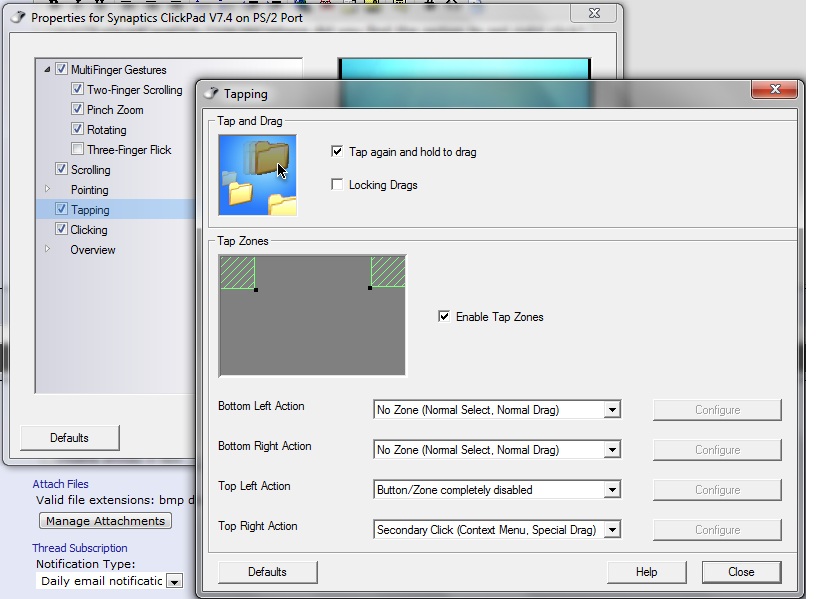
Installed the 15.2.7 Synaptics Touchpad drivers...they are great as you can customize a "Right Click" as being just a tap in the desired zone on the touchpad. No need to use use the stiff click buttons at all.
-
I'm curious, what do some of you think about the new Dell Studios XPS 16 in comparison to the HP dv6t QE? The laptop has Full HD (1080p) and is now offered with 1st generation i7-processors. It looks pretty good too. I finally get my HP dv6t on Tuesday. If I don't like it after a week, I'm going to consider the Dell laptop (which is currently only being sold by calling Dell). Prices seem to be slightly higher than a comparable HP dv6t QE.
-
Hi.
How do you partition this thing 'properly'?
I just bought this model and am screwed now.
The notebook comes with 4 Partition:
01) System Reserved (about 200mb)
02) OS (Windows 7) (Almost 1000GB)
03) Recovery Partition (About 23 GB)
04) Hp Tools (about 100mb)
What I did:
1. - Control Panel -> Administrative Tools -> Computer Management -> Disk Management
2. I use the "Shrink" command on C: drive (OS partition)
3. C: drive got shrank to around 500GB, leaving another 500GB free
4. I try to create new partition on that 500GB free space.
5. Warning message popup telling me that the disk is gonna be convert to "dynamic disk"
6. I agree and click ok.
7. Now everything works fine. But I can't use the recovery partition anymore ! I'll be doomed if something happen to my Notebook in the future because there's no way no recover it!!
8. Tried pressing F11 at boot. It said that the system cannot recover because the disk is now 'dynamic'.
9. It also said that the only way out is to use the recovery DVDs, which I didn't create yet!
10. But that may be ok, I'll hunt down HP support in my country for the recovery discs.
OK here's the real question:
Assuming I manage to get the recovery DVDs from HP. Then again I'll want to create a Data partition. How do you guys do it? I mean, without screwing up the recovery partition.
Thanks in advance! -
If you do get a hold of the recovery dvds, there's no point of the recovery partition.
-
I've heard that the XPS machines will be offered with the sandybridge processor in February so it shouldn't be long. If you look over in the XPS forums there is much speculation that it could be as early as next week as Dell is running a weekend clearance sale on some of the XPS laptops and some of them no longer have i3 or i5 as an option.
I wish I could see an XPS in person. To me it looks like a very big and bulky machine. I believe it weighs a whole pound more than the DV6 most likely because it has those big speakers plus subwoofer. Which for me is a waste because I could care less about listening music on my laptop. I hate to have something that is heavier than it needs to be because of something that I'm not going to use. I guess I will have to decide if it's worth living with the extra weight to have normal mouse buttons, a normal keyboard and 1080p screen. Of course, I doubt I'll get an XPS with the same specs I have now plus 1080p for $999, which is what I paid for the DV6. -
That's true. But still wanna know how you guys partition this baby.
It's like hp is saying "dont create any more partition or else the recovery partition is doomed. And if you didn't create the recovery discs beforehand, your device can't recover anymore."
Isn't it weird? -
Can you please check which version of Touchsmart is pre-installed on your Laptop? ( Any Screenshots of the Touchsmart screen would be helpful )
Anyone planning to review the Touchscreen with new Touchsmart on this DV6tqe? ( Youtube maybe? ) -
Where did you find the option to set right click? I installed those drivers and could not find it.
Thanks -
Here is a screenshot...
Attached Files:
-
*HP dv6t Quad Edition (4XXX series) Owners Lounge*
Discussion in 'HP' started by vinodkk1, Jan 3, 2011.