Problems? See this thread at archive.org.
Differences in chips:
A6 = 6520G integrated GPU (400MHz, 320 pipes)
A8 = 6620G integrated GPU (444MHz, 400 pipes)
M = 1333MHz max speed RAM, 35W CPU
MX = 1600MHz max speed RAM, 45W CPU
Typically the MX's OC more with a higher voltage ceiling. If you plan on gaming with the IGP at all, then an A8 MX is the way to go and add your own 1600MHz RAM. In any case, the price premium for an A8 MX CPU over an A6 M is small (like $50-70) that I think it's a worthy upgrade.
-
a DV6t is like the same as a DV6z though?
-
I want to play around with the overclocking
 .
.
-
I bought Mass Effect and Mass Effect 2 for $4.99 each on amazon digital download sale, added them to my Origin account.. Since Mass Effect 3 is coming out, figured Id see what the craze is about in the franchise.
I still need to finish Dead Space 1 and 2 -
I hate activation, but man, Mass Effect is awesome. The first one I thought had a much better story and gameplay. Second one was more straight forward, and felt less science-fiction-y, and I don't like that they basically added ammo. It's still a REALLY great game though, just not as good by comparison IMO (though plenty of people like it better I'm sure).
I did love the...I don't know what they're called, but where you trigger a renegade/paragon action during a conversation, where it's not JUST handled through dialog in the second one, which felt like a natural addition to the first game. -
Got a backlog of games i need to finish.. deus ex human revolution, bf3 single player, fear3 (when I bought it on sale when i got my laptop) deadspace 1 +2. skyrim (but i dont think it will ever finish since mods come out) now Mass Effect 1 +2 .a few PS3 games, Final Fantasy XIII, Demon Souls, Red Dead Redemption, and I still want Uncharted 3 and Final Fantasy XIII-2 .
-
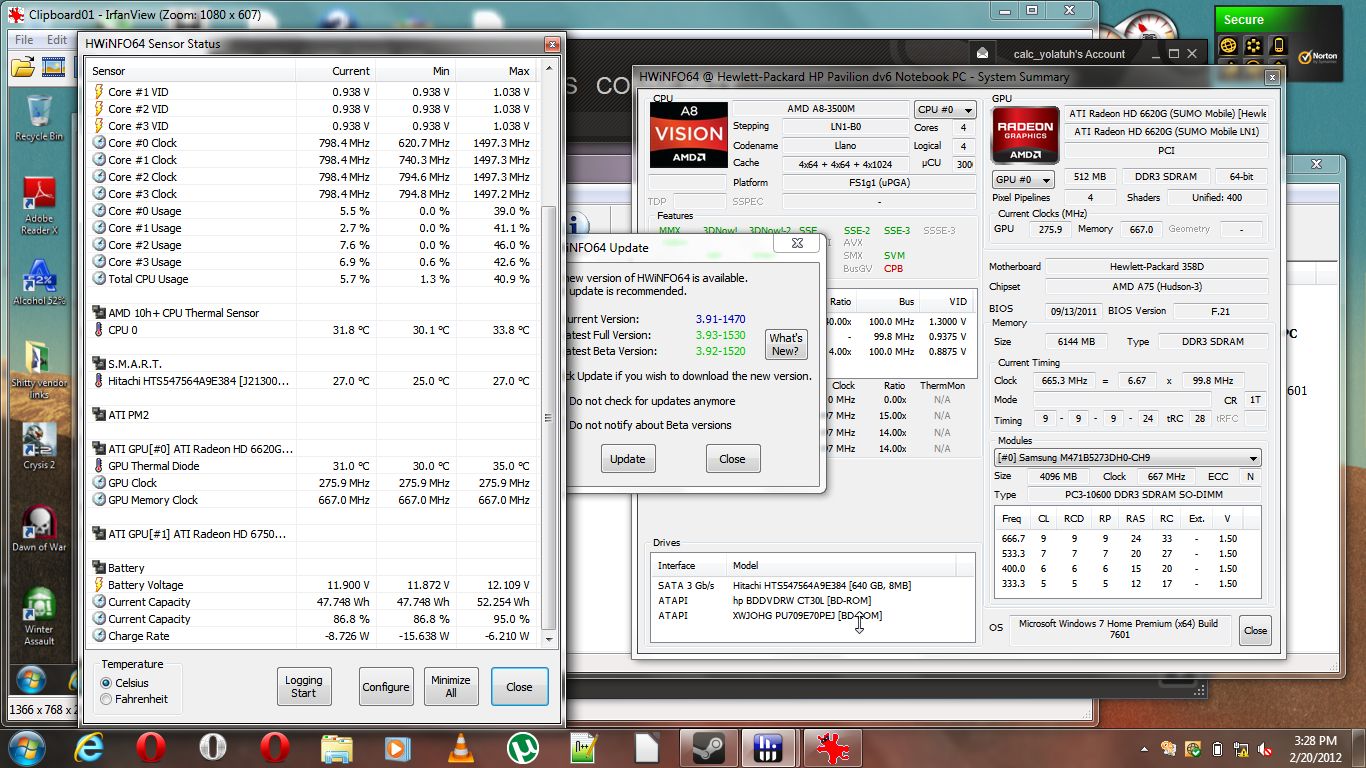
The proof is in the screencap. A8-3500M with stock clocks and voltages. The -8.x (up to -10.x) was typical, -6.2 was when the screen turned off for a minute. Now I really want to buy a few low voltage parts. Could break past -7 and approach -6 probably, maybe get close to -4 with the screen off.
My consumption went down further since last check, and for a strange reason: I decided to load up Crysis 2 and finish it, but my framerates were choppy. I crosschecked with Far Cry 2's "long" flyby benchmark, and sure enough I had severe stuttering. So I go into CCC and....PowerPlay was disabled! Probably since I went back to 11.11c after experiencing 12.1 issues.
I reenabled PowerPlay, and everything is great again. Framerates are up, stuttering is gone in Crysis 2 and Far Cry 2, and my idle power dropped by nearly a full watt!
I also noticed that Dirt 3 truly uses all four cores of the CPU. It actually makes hard allocations to specific cores, so the builtin Turbo is working better for it.Attached Files:
-
-
GRID also makes full use of 4 cores but it's a dx9 game...
-
just popped up, just doesnt have a 6750
Wireless Daily Deal, 1 Sale A Day -
Lol, kevhynh, I'll trade you my E6220 for your E6420 or M4500.
-
That's actually still a great buy. A comparable one priced at HP.com is $609.99, and only rebate at that price is $25 off, so $584.99, over $100 savings, and likely no sales tax through that deal.
--------------
On another note, see the Intel HD 4000 desktop iGPU that is going to be in the Ivy Bridge notebooks:
http://forum.notebookreview.com/har...074-hd-4000-vs-hd-3000-ivy-bridge-tested.html
A bit disappointing, considering performance is only slightly better (10-15%) than the current mobile Llano 6620G. -
Idunno, as I said in that thread Desktop 3570K looks slower. A couple numbers are out of character with the rest, and "Far Cry 2 benchmark" is useless without more info. If they indicated flyby, it's much slower. If they indicated combat demo it's maybe faster. If they combined the scores I'd like to know WHICH scores and HOW.
Just a distraction before someone puts up real benchmark numbers. -
Does anyone have a recovery disc or can someone make a recovery disc for a dv6-6135DX and either send it to me or email me the disc image? HP wants 16.10 for a recovery disc and my warranty expires before it will be here. They have been giving me the runaround saying its my operating system causing horizontal colored lines in my screen but I replaced the hard drive and no longer have the restore partitions so I have no way to prove them wrong. BTW I replaced the hard drive because last time I got it back from them for a repair it was dead and I didnt want to go through HP anymore, it was the third time it came back broken in one way or another.
-
The time I spent on tuning the dv6z now come down to around 2-3% of my computer using time, and I guess we pretty much squeeze everything out of this thing.
the only thing I look forward to is driver that give x-fire the performance it shown in benching (30% iirc). -
Silentsnow: How consistently do you have the problem, and could you describe the lines with more detail please.
-
It happens after the computer has been on for about 20 minutes. Its not bad, just a few random ones from the center of the screen up. If I reboot the computer it goes away but eventually comes back. Kinda hard to see but I made a short video here (photobucket lowered the quality a LOT)...
VID_20120221_184022.mp4 video by silentsnow31802 - Photobucket
EDIT: All of a sudden getting a lot of blue screening when trying to view that link I posted. Maybe my issues are software related? -
Could also be a problem with electrical interference in the monitor panel. It's popped up for a few users but typically rare, and usually goes away if the screen turns off and back on again. A number of system functions do not respond very well to waking up from sleep, hard to tell what is software and what is chipset related.
-
Those lines are quite common among us... but with certain drivers only, about 11.8+ drivers removed that issue. I did have them waaaaay back when my laptop first came.
-
I'm still on the stock drivers from HP so ill try updating them. Thanks for the help. HP has been much less than helpful since I bought the laptop. They're good at making things worse :-(
Sent from my Nexus S using Tapatalk -
Huh...I can't tell from the video, but could that be related to the horizontal flickering lines I sometimes see on my Acer with a C50 CPU? At first I was worried the GPU portion was going bad...maybe that is it, but I've had zero crashes, and Folding @ Home runs fine on both the CPU and GPU with no issues (save that it's too slow to finish a GPU work unit) so I'm wondering if it's drivers...
It DOES seem less frequent since one of the driver releases a month or two back....I think. -
I was really worried it was the GPU since my old HP laptop had a failing gpu and would get lines like that and eventually freeze up. I updated the video drivers to AMD 12.2 preview and I havent noticed any more horizontal lines but im now getting a lot of freezing and blue screens. Last time it happened, when the computer rebooted windows said the video card driver failed for one reason or another. Ill see about downgrading to an older driver version.
-
AMD's Piledriver chips will use a resonant clock mesh
Researchers claim significant power improvements
By Lawrence Latif
Tue Feb 21 2012, 16:55 inShare.0
CHIP DESIGNER AMD will use a resonant clock mesh in its upcoming Piledriver core processors.
AMD's Piledriver core will become the successor to its Bulldozer core that appeared in the last quarter of 2011. Although public details about Piledriver are scant, Cyclos has announced that AMD licensed its resonant clock mesh technology in order to reduce the chip's clock distribution power.
Cyclos didn't give out many details on what a Piledriver core - or module as AMD prefers to call it - is going to be, other than saying it is "4+ GHz" and that it is fabbed on a 32nm process node. As for the integration time, AMD's Samuel Naffziger said, "We were able to seamlessly integrate the Cyclos IP into our existing clock mesh design process so there was no risk to our development schedule."
Cyclos claims its resonant clock mesh implementation can bring significant power savings. The firm, which has investment from ARM and Siemens, had designs that were until now largely verified on paper, with AMD becoming its first major licensee, and other chip designers might now follow.
Marios Papaefthymiou, founder and president of Cyclos was bullish about his firm's research, which is now set to be transferred into production silicon. "Now that the Cyclos technology is validated, we're looking forward to expand into SoC designs via the design automation tools that are in development at Cyclos. We believe resonant clock mesh design will be a key enabler for GHz+ embedded processor IP blocks in next generation SoCs that also require ultra-low power consumption," said Papaefthymiou.
AMD is expected to launch chips with Piledriver cores later this year as the firm tries to build on its Llano desktop and Bulldozer server processors. AMD has previously told analysts and hacks that it expects somewhere in the region of a 10 to 15 per cent performance gain over the previous year's silicon. -
If you are in xfire configuration, anything above 12.1a gives BSODs, try the 12.1 preview drivers for a mor smooth xfire experience, or if you prefer to disable it try the 12.1a.
-
in 3 years I'm gonna buy another laptop, and I'm pretty sure that I'm gonna be able to finally play any ps2/wii emulator at those speeds......
-
I think what is most interesting is a combination of:
1. This change means less power consumed, and thusly less heat.
2. You can clock it higher at stock.
3. Trinity's clocks were already announced to be considerably higher than Llano's before this announcment.
So...if AMD can beat Intel's price, equal CPU performance, and surpass video performance, then AMD would have a winner on all fronts. (I disagree with "purists" when it comes to comparison. You can't compare one company's fastest process against another; it makes more sense to compare processors at their price points. I mean, how many people do you actually know that spring for the top-of-the-line Intel processor?)
Also notice that AMD actually licensed the resonance improvement; they didn't adopt the technology and wait to get sued later. (Hear that Nvidia?) Additionally, notice that the improvement doesn't delay release.
AMD has really stepped up their "smart game" all the way around. They've targeted the consumer market and is going green at the same time. Resonance is a very smart and green move. Your CPU only needs additional power when the "ringing" capacitive/inductive signal amplitude decays toward threshold, since the frequency never changes.
I wish I'd thought of that! Kudos to Cyclos! -
Honestly the new mobile approach of AMD may be big win, they know they rule in sever processors but not in desktop, fusion gave them campaign to be back on track on mobile. What AMD did bullseye was that computing is CPU + GPU, not CPU alone, future looks bright, at least on paper, for AMD.
-
So when can I get my hand on a laptop with this?
-
LOL! You really want to touch it, don't you?
Actually, they're saying that it is going on Piledriver cores, which is prior to Kaveri's Steamroller cores (which are supposed to be 10% above Piledriver, which is 10% better than Bulldozer, so right there, software optimization completely aside, that's a 21% improvment, WITHOUT considering Cyclos tech).
If the Windows 8 promise of software optimization comes true, then that's another modest 10%, which would make a total of over 33% improvment on the Kaveri APU's CPU.
Add the increased clock, and a faster embedded GPU, and...well...so much is unknown that only God probably would know what the Kaveri's going to bring to the table.
Bear in mind, that Kaveri's GPU/CPU parallel processing is supposed to be even greater/better than Trinity, which is supposed to better than Llano's. And Kaveri's GCN graphic core is also supposed to provide a CPU boost too.
Getting back on track, however, Trinity should be sporting the Cyclos' improvement, since they're specfically stating "Piledriver," and it makes sense that it would show up on the notebook since that's the low-power prime target.
Also, obviously, since we're going to see substantially greater clock rates with Trinity and Kaveri (slated even before the Cyclos tech, apparently), CPU and GPU rate will increase. While it looks like clocking doesn't produce a linear yield in power, geez...a 60% or greater clock boost is still going to make quite a difference.
So, it appears that Trinity's boast of 50% isn't unrealistic at all, and even probable if Cyclos is involved, and combined with the numbers above.
But...I'm putting my money on Kaveri, because this is where all these improvments, along with faster RAM (1866 minimum?) will really come together and shine: better graphic cores, better cpu cores, GCN, Cyclos' resonance tech, probable 28nm die, etc.
So, when Kaveri comes out, my Llano/Sabine will end up relegated to HTPC status for sure. I'll just put the $1000 I'd spend on a new Trinity laptop into AMD stock instead. -
What I think is that having a GPU on the same die as the processor will probably supply what bulldozer lacks, bulldozer has a shared FPU amongs two integer units, the fpu is well know to do floating operations, something that the GPUs have been doing for ages and really well, so, together the integer units plus the shared FPU plus the GPU helping the shared FPU... pure win, again, at least on paper.
-
Hello, not sure if this is the right thread but i wonted to know if this is a good buy for $600 brand new. And if there is anything i need to know about the model like tweaks and upgrades or so.
Currently reading the the thread to get as much information as i can.
these are the specs and the model number is Quad core dv7-6165us
http://h10010.www1.hp.com/wwpc/ca/e...329744-64354-64354-5082216-5128853.html?dnr=1 -
Thank you! I started to get regular BSOD's about 2 minutes after loading windows. I had a really hard time uninstalling the old drivers. Finally got 12.1 preview installed and so far no problems at all!
-
In a nutshell:
-Very good laptop for the price
-can overclock CPU (most of us can reach 2.4 witouth any special mod)
-can overclock discrete GPU (here varies quite a bit, standard is above 700 with people reaching 800, memory can also be overclocked)
-that laptop has a nice screen but it's 17", I prefer them big but that's my personal preference, also, I selected that very same laptop for a friend of mine, so far he is happy.
-integrated GPU is quite good too for low graphics task... but I've heard that can play battlefield around 30FPS... which is a lot.
If you buy it, follow HWingNut guide to fine tune it. -
As a recommendation, for better xfire performance install all the CAPS ranging from 11.9 up to 11.12, they really improve the performance of it.
-
try this one, i have it installed, no problems so far.
CCAP (Custom Catalyst Application Profiles) - Guru3D.com Forums -
A 6165us for $600USD?! That's a great deal! $50 more than my refurbished 6135dx, with bigger screen and bigger battery and a subwoofer! Only thing it loses compared to mine is the bluray drive.
Amazing deal. -
Add in the fact you don't need a cable to switch to 1080p , another $50.
-
Thanks. will looking into HwingNut's guide.
-
how would you switch to 1080p
-
http://forum.notebookreview.com/hp-pavilion-notebooks/610177-hp-dv6t-display-replacement.html
For dv7t , you will order a 17", I not sure what is the price but 15.6" is 69.99 I believe?. -
HP Pavilion dv7-6165us LW460UA Notebook PC - AMD Quad-Core A8-3500M 1.5GHz, 6GB DDR3, 640GB HDD, DVDRW, 17.3" Display, Windows 7 Home Premium 64-bit
HP Pavilion dv7-6165us LW460UA Notebook PC - AMD Quad-Core A8-3500M 1.5GHz, 6GB DDR3, 640GB HDD, DVDRW, 17.3 Display, Windows 7 Home Premium 64-bit at TigerDirect.com
List Price: $799.99
Instant Savings: - $100.00
Price: $699.99
Less Rebate: - $50.00
--------------------------------------------------------------------------------
Final Price: $649.99 -
dv7-6165us Notebook Refurbish
Refurbed dv7-6165us
$554.39 Shipped -
...and here:
Refurbed dv7-6165us
Hewlett Packard Hp LW460UAR#ABA - Pavilion Dv7-6165us Lw460uar Notebook Lw460uaraba :
$551 -
I don't see CAPs info in the definitive guide. Could it be added?
-
there is a part in the xfire section, although the only thing you have to do it's to install'em all. (11.9 to 12.3)
-
dv7-6165 Screen Upgrade Update
When I was looking at the service manual, I noticed that it stated that the FHD screen was for the dv7 Intel version only.
I inquired at laptopscreen.com, and this was a little frustrating, but this is what I learned. There are two versions of the dv7 (duh) and only the upgradeable version has the connector at the bottom left of the screen, as you look at it from the back. That's all they knew. (They also said that, in order to upgrade, a new cable was needed, but I told them that there was only one cable listed in parts manual, unlike the manual for the dv6, which lists two.)
It was hard for me to get them to understand that I wouldn't purchase it first in order to find out, but when you see what the service manual states, this would lead me to believe that either the AMD model isn't upgradeable, OR either the newer or older dv7 model isn't upgradeable. There was no way to tell which. So far.
So, I decided to check the cable number on PartSurfer and Google, and there's a replacement part for the replacement part. Having cross-ref'ed quite a few times, I can't see a definitive answer for the cable itself.
So...I decided to check all the models @ HP.com, customizeable and quick-ship, and they do not offer an AMD-based dv7 anything, so it's impossible to see if a 1080p is a legit upgrade on a later model AMD dv7.
So, just about the only way to find out is to take one apart and look at the back of the screen.
Unless I missed something on my quest...which IS possible, so anyone have any other information, before one or more of us goes out there and finds that we hit a dead end?
Update: I will keep updating this message as I find things out.
Update: According to:
http://forum.notebookreview.com/hp-...modding-dv6t-dv7t-quad-edition-2011-a-52.html
It looks like the same cable for both screens. Now to find out if the AMD is upgradeable...but it looks like it might be. (I have a feeling one of you already knows the answer for sure, so if you know the Laptopscreen pn for this upgrade, please feel free to post it and make me look like an idiot. I don't mind.)
Update: Cable verified the same. Consequently, if the screen is a "go," no cable needed. -
Once again I realize that I cannot search for anything in this forum as any attempt never finds anything. Off to manually search...
Edit: Vect's post doesn't say where the CAPs come from. AMD? Is there a link that can be added? -
Good point, I can add CAP links. I did that earlier, will have to find.
edit: here's through 11.12 CAP 3: http://forum.notebookreview.com/hp-...xxx-series-owners-lounge-516.html#post8291090
11.12 CAP 3 (revised earlier link doesn't offer it): http://forums.guru3d.com/showthread.php?t=357455
12.1 CAP 1: http://benchmark3d.com/catalyst-application-profiles-12-1-cap-1
12.1 CAP 2: http://www.techpowerup.com/160236/AMD-Intros-Catalyst-Application-Profiles-12.1-CAP-2.html
12.1 CAP 3: http://sites.amd.com/us/game/downloads/Pages/crossfirex-app-profiles.aspx
The latest is shown at the 12.1 CAP 3 site above, but will change when new cap is released. Can't find another link atm.
edit edit: Ok, so far looks like you can use this:
http://www2.ati.com/drivers/hotfix/catalyst_application_profiles/amd_catalyst_ XX. XX_cap X.exe
and obviously replace XX.XX with Catalyst version, and capX with CAP version.
Here they all are direct from AMD:
11.9 CAP 1: http://www2.ati.com/drivers/hotfix/catalyst_application_profiles/amd_catalyst_11.9_cap1.exe
11.9 CAP 2: Does not exist on AMD/ATI Servers ? Use the one at Rage 3D instead.
11.9 CAP 3: http://www2.ati.com/drivers/hotfix/catalyst_application_profiles/amd_catalyst_11.9_cap3.exe
11.9 CAP 4: http://www2.ati.com/drivers/hotfix/catalyst_application_profiles/amd_catalyst_11.9_cap4.exe
11.10 ---> There are no 11.10 CAPs
11.11 CAP 1: http://www2.ati.com/drivers/hotfix/catalyst_application_profiles/amd_catalyst_11.11_cap1.exe
11.11 CAP 2: http://www2.ati.com/drivers/hotfix/catalyst_application_profiles/amd_catalyst_11.11_cap2.exe
11.11 CAP 3: http://www2.ati.com/drivers/hotfix/catalyst_application_profiles/amd_catalyst_11.11_cap3.exe
11.12 CAP 1: http://www2.ati.com/drivers/hotfix/catalyst_application_profiles/amd_catalyst_11.12_cap1.exe
11.12 CAP 2: http://www2.ati.com/drivers/hotfix/catalyst_application_profiles/amd_catalyst_11.12_cap2.exe
11.12 CAP 3: http://www2.ati.com/drivers/hotfix/catalyst_application_profiles/amd_catalyst_11.12_cap3.exe
12.1 CAP 1: http://www2.ati.com/drivers/hotfix/catalyst_application_profiles/amd_catalyst_12.1_cap1.exe
12.1 CAP 2: http://www2.ati.com/drivers/hotfix/catalyst_application_profiles/amd_catalyst_12.1_cap2.exe
12.1 CAP 3: http://www2.ati.com/drivers/hotfix/catalyst_application_profiles/amd_catalyst_12.1_cap3.exe
I just added it to the guide too.
-
You have a 17.3" screen that is stock 1600 x 900,
such resolution requires dual-channel LVDS,
so no, you will not need to change the cable.
The best screen I can recommend for this computer is LP173WF1(TL)(B3),
it's a Matte 1080p panel by LG.
Search it on Laptop Screen com. (Not allowed to post links to company sites, sorry)
LaptopScreen item number "882944" (.com/882944)
Regards,
Ellis
P.S. PM me for questions, rather than going to front line support. -
Ellis,
You rock.
I'm sure you'll understand that before purchasing either the laptop or screen, a person would want to definitively KNOW they were ablse to accomplish the goal.
Unfortunately, I did SO much research and found the people who purported to be expert didn't know, didn't get back to me, and even HP posted the wrong service manual.
Most screen suppliers can't crossreference the numbers online, and pretty much most of them don't have the latest HP numbers even listed, whether model# or part #. VERY frustrating!
So...I just said all that so you would know the gravity of "THANK YOU!" when I say "THANK YOU!"
(My first-born is in the mail.) -
Tis my pleasure.
Do send me a PM in case you have any problems.
Also, just so you know, we have a YouTube video promotion,
where we'll refund $50 from your purchase price, if you tape your installation and post it publicly on YouTube for everyone's benefit (guidelines apply).
PM me for more info.
Ellis
*HP dv6z AMD Llano (6XXX series) Owners Lounge*
Discussion in 'HP' started by scy1192, Jun 22, 2011.