Problems? See this thread at archive.org.
thinkpad + trinity + thunderbolt eGPU ! I miss the stick.
-
For the person with 2.9GHz overclock, did you set Coolsense to Performance? Or to Coolest? If set to Coolest it will try to keep temps at/below a certain point. It can even underclock cores to achieve this.
All thermal and performance testing should be done at Performance setting. -
It's already built and on the circuit.
 Compal built it to AMD's spec and they've been shopping it for months now. do a search for amd trinity laptop compal and it will bring up the pictures. Very nice unit and compares very favorably with the acer.
seer
Hell, here you go:
http://tech2.in.com/tags/amd-trinity-notebook-release-date
as you can see, amd/compal is pretty serious about going after that 'ultrabook' segment, and for quite a bit less money.
This is a sub 15" box, (i thought it was a 13 when I saw it, but the reviewer here thinks its a 14). It weighs next to nothing, and scope out the "goodies" they've installed. Oh, and man was it fast, quiet, and cool. One of the best Compal's I've ever seen. -
Yumm! With 7000 series GPU along with the igp! As long as it's a quad core and not a dual core though.
-
Got a hand on a calibrator, but the 768p monitor is way too crappy that cant even get calibrated correctly ~~
edit: Finally got a profile, but with color shifts lol -
That skinny thing looks pretty good. You say it had both iGPU and dGPU? That would be big news at the indicated size and weight.
-
I seem to find the reason why I wasnt getting anything, in CCC 6500k actually measured 7100kish ~~
-
Newegg:
G.SKILL 8GB (2 x 4GB) 204-Pin DDR3 SO-DIMM DDR3 1600 (PC3 12800) Laptop Memory
Your Price: $34.99With Promo Code EMCNGHH26 -
Any of you guys bought a tablet? specifically an android tablet? Been screwing around with an Archos g9, and son of a gun
The thing is usable
I can see now why MS shifted the win8 paradigm towards a touchscreen interface. Between Gestures and vocal commands, the archos has drastically reduced any need to type. I'm going to have to keep a closer look on these things, especially now that Google is coming out with their self branded 7 inch model for around 200 US.
seer
beginning to look like a good trin lappie and a 7-8 inch tab is going to pretty much cover 90 percent of what anyone might want to do. Add in your cell phone and you got everything covered except extreme gaming
-
Joining the Llano team.
Hopefully I'll get a good chip so I can OC decently without crashing.
-
Yeah, they said that about Kate Moss, too, but look how THAT worked out...
-
Has anyone else had a problem using batterycare on this laptop. I installed mine and the temp only shows for cpu but hdd still shows ---. im not sure if i have a battery problem or its a software problem.
Thanks -
Seer, I have a transformer prime coming in tomorrow, I'll let you know how it is. I'm pretty excited for it. I love my DV6z but I too wanted something for on the go light weight, and almost waited for the nexus tab you're referring to but couldn't wait any longer.
-
Seer: I've got one of these Kyocera Echo | Dual-touchscreen Android Smartphone | Kyocera Echo Android phone It could be better but works well in its current form. (3G only, TFT screens, Li-ion battery) Two 800x480 panels, Simultask, Tablet Mode. It plays 720 High profile very well, runs remote desktops very well, battery lasts 1-3 days and a spare is included with 2-way charger. Using Opera Mobile, I can have dozens of desktop-mode tabs loaded, and full Youtube/Facebook etc worked fine last time I used them. Using Opera Mini I have had over 100 tabs open without any "page cleared, please reload" messages. It's totally indestructible in my experience. If they put as much work into a 2nd-gen product I'll almost definitely be getting it.
clarkkent: I never said that about Kate Moss...what I'm saying is, would be interesting if they cracked the cooling issue with a second heatsink. I don't know about a *fast* part but the concept appeals to me. Flex would need to be solved with better materials of course.
bobapjok: HwInfo64 reports HDD temp. -
I don't think it's about the chip as much as it is about the cooling module (heatsink / fan assembly) and thermal paste. I haven't heard of anyone that had troubles beyond temperatures getting too high. Heck, I even capped out my voltage at 3.1 GHz and < 80C. I'm sure I could push more if I wanted to but I can't add any more voltage.
-
I was asked to update CCC to 12.2 from 12.1 preview and now it went bust and shows no AMD driver is installed, I can't open VECC anymore.
Long story short, I haven't turned on my computer for a while and today when it's on it asked me to update, I've already updated to 12.2 on my desktops so I didn't think that's gonna be a problem. Installation seemed to have gone through without much trouble, however upon restart it errors out saying there is no driver installed. So I first attempted system restore, without any change so I undid the restore. Used the 12.2 package uninstalled everything, which I'm not sure whether it succeeded because Windows froze during shutdown. After hard reset all the VECC stuff seems to be gone because on desktop when I right click I no longer see the option, so I proceeded to install everything, but it now froze half way through the driver install.
So what should I do to ensure the entire AMD driver package is uninstalled? I'd like to get it clean so I can start from scratch (using HP driver to install USB3.0 driver, etc) I try to avoid reinstalling windows, any help would be greatly appreciated. -
That Asus looks awesome but twice what the g9 cost me AND,
was fooling around on the xda board,,, well, turns out my g9 can b easily rooted, and over clocked...from 1ghz to 1.5
w a simple kernel swap
soooo. I go to register on the board and see this "noob video" lol. After I finish laughing my off, I figure u guys will get a chuckle so here's the URL. We should have this as first post in your dv6 thread Wing
lol
xda-developers - Forum Rules
Go thou and laugh likewise
Seer -
Hey guys, I recently did the Manual Switchable graphics trick, but I am encountering some major bugs, and I am wondering if this is affecting everyone or just me:
Quick Background: I am running 12.1a preview Catalyst drivers, with Musho Bios.
Once I have Select the Switchable Graphics Method : Based on Power Source, a few bugs occur:
1) I cannot properly restart my computer. After "Shutting Down" the screen goes black but the computer does not turn off. Have to hold power button to shut down completely.
2) When using the High Performance GPU, I cannot change brightness with the function buttons. However once I have switched to Power Saving GPU, the function buttons work.
3) When using High Performance GPU, the P-State never falls below state 4, even in power saver. However if you switch to power saving GPU, all p-states can be accessed.
4) Relating to 1). After restarting , the "based on power source" graphics mode is set, and the GPU is STUCK on "High Performance GPU" and refuses to toggle to the Power Saving GPU, until I toggle graphics switching modes. However during this stuck state the system does restart.
Does anyone else have these problems? -
K53TA ppls recently got their bios mod'd and they all experience the same thing. On daily basic ,I stick with dynamic unless I run stuff that only work on fixed.
By the way, in the cannot shut down scenario, doing sleep will do the same thing. After restart, dynamic or fixed "should" run pretty smooth.
One more question: Do you have CnQ off? If so, can your dv6 wake up properly from sleep? (Actually 2 question there xD) -
I tried with CnQ disabled in BIOS, and then trying to manually set a custom CnQ in fusion tweaker. If the "custom" p-state while in high performance was restricted to states 5-7, it would ignore this and lock on state 1. Not really a big deal as I can fix it by hard switching to power saving gpu to hit 800mhz.
Ill just have to learn to live with it. The only one that really irks me is the shutdown/sleep/restart thing, but w/e. -
it is a bug with fusion tweaker, it doesnt go below p4 for some reason.
k10stat works fine.
Do yours get frozen(mouse/keyboard don't work, but the OS seem to be running) after wake up from sleep with CnQ disabled? -
Hey guys, skimmed through the forum and I think this is the lappy for me. I'd like some advice on the specs of the one I'ved ordered. Mostly gonna be doing light schoolwork/word processing, I do enjoy gaming quite a bit.
Specs:
AMD Quad-Core A6-3430MX
1GB AMD Radeon(TM) HD 7690M GDDR5
6 gb DDR3 RAM
640gb 5400 RPM HD
15.6" High Def LED HP Brightview (1366x768)
Got the discrete graphics so I can run old/MMO games pretty high and some of the current titles if I set eye candy to a minimum. Now, I know that the matte full HD screen upgrade is a pretty popular upgrade, but shelling out an extra 150$ is a bit much for my budget. I've seen 1336x768 screens before and they seem alright. Color accuracy isn't too important for me, not going to be doing any art related work on it. What do you guys think? Should it suit my needs fine? -
I could not order from hp.com because they do not take non-us issued credit cards.
I eneded up buying the Lenovo y470p for ~$850 (i7-2670qm, 8GB RAM, 750HD).
I really wanted the 1080 matte screen and I have a preference for AMD CPUs, but I had no choice. -
people shouldn't get their hopes up about Trinity cpu performance.
expect only graphics boost.
in the leaked trinity benchmarks from a few days ago, you can see crappy IPC, where a 3.8ghz trinity hardly surpasses a 2.9ghz llano.
and the 3.8ghz trinity barely beats a 3.1ghz Athlon II x4 645.
http://news.mydrivers.com/1/221/221835.htm
compare cpu scores at http://www.guru3d.com/article/core-i5-2500k-and-core-i7-2600k-review/16 -
I take SEVERE issue with mydrivers' version of things. Particularly the single-threaded floating point numbers don't make sense to me. Prime95 would have been a much better comparator, 1/2/4 scaling is what I wanted to see. The 5800K probably isn't even the fastest A10, but who knows...still waiting on real numbers that give a broader comparison.
Graphics numbers are where I expected for A10, though DX11 results vs Llano would have been better for me. 4% fewer cores running 33% faster, cranked the '06 benchmark that much higher? Must be amazing improvements in GPU core design, also possibly more ROPs?
Someone please post if they find a better source, preferably testing the new AES support and showing numbers for power consumption.
Pretty sure we knew awhile ago that Piledriver would resemble Bulldozer much like Llano resembles Phenom II. (Loss of L3, addition of graphics) But Trinity vs Llano needs performance/watt and the impact of new accelerators to get a proper idea. -
Haha, that video is great. XDA is awesome have been using them for years. But the Asus transformer prime is amazing. Even more than what I expected. I would recommend to anyone looking for a tablet. Unfortunately I set it next to the bed last night after using it and my girlfriend stepped on it this morning breaking the screen. Going through the RMA process and will most likely cost me a few bills. Sucks
-
Hey guys, I installed the 12.2 Catalyst drivers. BIG mistake. It's hard to believe that it buggers this system so bad, you think it would block install or something.
Anyway, I got it uninstalled, and got back on 12.1a, but now my system locks up on shutdown or when I switch power source whenever I have any kind of overclock going on. Is this a coincidence that is started happening when I installed 12.2, or is something lingering in the system from 12.2 that's causing the problem? I really don't want to have to wipe over, especially over doing an update that CCC popped up and told me to install! -
uninstall drivers via app, than device manager, than run Atiman uninstaller in safemode. (you have to go msconfig and set to safe mode to boot there) New version Uninstaller by Atiman
that program will wipe all traces of amd video drivers.
My backlist of games grows, just bought deus ex hr and dlc on steam, bought portal2 a few days ago. still need to finish up dead space 1+2, mass effect 1+2 and Fear3. This laptop runs them all on high like a champ. Though those games are not the most graphics intense games (deadspace and masseffect are older).
My final conclusion is you don't need to deal with camiloml's bios and the fixed mode ordeal, too much trouble imo. Musho's bios with video overclock has been rock solid for me with 12.1a drivers and dual graphics disabled. -
Can I get a little feedback for my build or is this thread only for people who already have a dv6z?
-
Pretty much your laptop is gonna fly with those specs, the 7690 is a rebagged 6750 as far as I know and it will pretty much run current titles with a lot of eye candy (except, perhaps battlefield 3, that's a really demanding game but still it plays pretty much fine with nice fps)
Just overclock your CPU at nice speeds wi k53stat (2.2 can be pretty much reachable for anyone) and try to overclock also your GPU by means of using MSI Afterburner -
Hello@ all.
I'm using my DV6z now over a half year and running him @ 2.2Ghz, Musho's 770/880, catalyst 12.1.
I used lately more and more an external monitor, and sometimes after 2h+ of gaming my mouse cursor dissapears. The cursor appears at the external monitor, but not on my laptop screen.
I get him back:
- with a reboot
- turning mouse trail on, minimal length (still annoying -.-)
- unplug the external monitor (most games crashes)
My temperature is kinda normal @65°C and no high cpu/gpu usages get reached ~20-30%.
So i wanted to ask if someone have the same issue, or am i the only one, didnt read about this problem in this thread. -
Not sure what you mean, Do you extend your desktop and use the external as main ?
-
Yes, i extend my desktop and use the external monitor as secundary screen. The notebook screen is still the main screen, where i run the game.
The cursor diappears just on the notebook screen, but on the external he is still visible... confusing. -
prolurker: Ah sorry, I meant to respond earlier but the mydrivers link kinda made me forget. Two big questions, 1) How much does that build cost, because coupons make a huge difference and 2) How soon do you need a new system? As other respondent stated, these laptops fly pretty far. 7690M should be like 6750M or 6770M with faster memory. (I think 6770M equivalent) Power usage and overclocking potential on dGPU should be better than most of us with the 6750M. One BIG thing, if you want an overclocked BIOS you should contact Musho. Because a BIOS for overclocked 6750M is probably not a good idea.
I am constantly amazed by all the games that run so well. Even stuff like Assassin's Creed 2, Mafia 2 etc look and run great. Witcher 2 v2.1 patched, the game is great so far. Only possible complaint, sometimes the 5400RPM drive makes the game pause for a sec when sprinting into a new area. Bumping to 7200RPM with order, or adding SSD later will make open-world games better.
zars: You are running a game in windowed mode on your main screen? And switching to other tasks on external screen? Try doing it the other way, I bet it probably still happens. This is probably a driver issue with the game trying to hide/reskin the mouse every time it gains focus. I suppose if you play something like Eve Online you'll need internet to distract yourself from all the fun and excitement. :/ I have not played games like that and fullscreen games never caused this problem. -
Hey I picked up a refurbished DV6-6135dx awhile back when they were $530 on newegg. I'm pretty happy with it. The 3500m overclocks AND underclocks pretty well. A bit of tweaking with K10 stat and some stability testing, got P0 at 2.6 Ghz at 1.625v stable. It can do a bit better, I had 2.8 Ghz at 1.225v I think, but I'm actually running into video bottlenecks more than processor anyway.
I want to try overclocking the video, but from what I read this requires a flashed mobo and/or video card. I wanted to take camolil's unlocked BIOS for a spin... but I'm really paranoid about bricking this thing.
Are there any recovery means if I brick my mobo? I mean besides RMA or replacement.
***
Also, FYI, Catalyst 12.2 is not friendly with this laptop. I see a few others have run into issues as well. 12.2 (according to the installer, in the CCC it reports itself as 12.3) atikmpag.sys will BSOD randomly for me. Upgraded from 12.1, in which I had minor artifacting in Firefox, and from that I used 11.11 which was perfectly stable IMO. Uninstalled via the normal windows installation menu, this brought up ATI installation manager, express uninstalled everything, reboot, install 12.1a, reboot... and it works great! 12.1a, no more BSOD, and no artifacting - yet.
edit: ha, nearly doubled my FPS in metro 2033 going from 12.2 to 12.1a. AMD. Yeah, avoid 12.2 like the plague. -
Thanks, but i tried to run the game in full screen and windowed mode, and it happens while i'm gaming (just on notebookscreen). I play LoL (league of legends), and the cursor disappears from 1second to another, without tabing between screens... -.- thats really annoying for a game like this one.
Well this issue isnt appearing constantly, but therefore its more suprisingly
You can OC your gpu through a bios update from Musho, or per software using afterburner.
HTWingNut wrote a great guide for all tweaking issues. Just read and succeed =)
http://forum.notebookreview.com/hp-...-dv6z-llano-overclock-optimization-guide.html -
You can OC just using software check HT sig.
-
I encountered those problems as well.
1) That occurs randomly sometimes it does not happen for a week then it will happen a few time as day.
2)I can only use brightness options too with igpu. If you go to power options you can manually drag the slider to adjust brightness with dgpu. Its a bit annoying but I always use the igpu on batter and thus have no real need to change brightness when plugged in and in high performance.
3) i dont have this problem i use k10stat
4) I noticed that this occurs when I have a game or other 3d intense application running as soon as I close out of it I can switch again.
Hope that helps -
7690m is 6750m
7690m XT is 6770m
Stupid I know, but that's what they decided to do. -
Any 1 jump(possible suicide) on 12.4 beta?
-
Thanks for replyin Calc, seems like this'll handle most games i'll throw at it. I didn't qualify for any special 10-30% coupons, got a simple 25$ off. The price for the whole thing was about 666$ -25$=641 with coupon (this includes a wireless mouse for about 20$ i think). Seems like a pretty good deal. I do enjoy open world enviroment games but I hear that higher rpm drives make a bit more noise, and I surely won't notice too much of a jitter in games. Also, still want to hear about anyone's experience on the 1336x768 stock screens. Are they really atrocious or are they decent? Not really caring about color accuracy so much as good screen clarity, really obvious screen pixels, and eye strain.
-
I am plenty happy with my screen. And yeah, if you qualified for a coupon it would probably have cost you closer to $800 depending on the deal. There was a crazy $450 fire-sale temp coupon but I don't know anyone who ordered with it during the brief valid period.
1366x768 seems to offer a decent visibility, tolerable color contrast. Left-right angles are pretty good, which nicely complements the pair of headphone plugs. Up-down contrast is not so good, but fine from 1.5 feet away. Screen folds almost flat so can be easily used while standing, backlight is powerful as hell. Gloss vs matte depends entirely on your work environment. -
Hm...got BF3 up. Must definitely agree the MP needs totally different settings from single player. More to the point, CPU over 2GHz is a good place to start. My 720p-class panel is okay with the Auto prefs for gfx, but 2.0+ core speed is a definite must. Thanks for the compensation trick on renderer, btw.
-
Yeah BF3 MP really chugs sometime. I run all settings low, and set resolution to 720p. CPU locked at 2.8GHz. Temps get pretty toasty though (80.5 Celsius), so I might drop down to 2.6. Im getting anywhere from 30-105 fps.
If you are running at 1366X768 try lowering to 720p. It made my picture have a lot less "jaggies".
Also you can try this program to create a more optimized config file. Should gain a few FPS BF3 Config Utility - techPowerUp! Forums -
Considering whether I should use an app like DXtory too.....sometimes hard to tell what lag is purely local and what is related to uneven network updates.
-
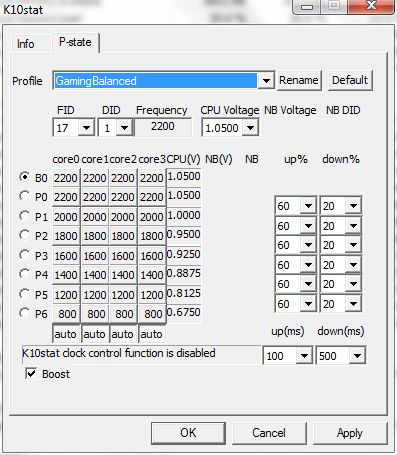
Verified my clocks after setting up BF3. Went from 2.3 to 2.2 GHz....saved 5-6 C. Disabled Crossfire AFTER vetting my temps. Now have 45% OC with 1% voltage hike and stable 4-5 C over stock, next is 33% OC with 35% voltage DROP and equal temps to stock. I am stable on 0.6750 @ 800MHz, will post full FID/DID if it survives at least two hours BF3 multiplayer...
-
ow please calc.. i really want to see those numbers
-
Fine, posting screen shot now. But be warned, every chip is different and I have not fully verified my new more-aggressive voltages just yet.
...I should maybe pay attention to the 2.1 GHz mark, but 2.0 will probably be my fastest setting for profiles that use efficiency. That huge difference in voltage is amazing! Below 2.0 the voltages continue to drop but temperature benefits are much less (because the fan keeps going down).
By way of trying to judge from thermal rise and rate of increase, 2.2 should be my best speed without repasting. Not sure if the GPU is contributing more heat or my heatsink is getting dirty, but 2.3+ GHz was too hot in BF3. Maybe I'll finally take it apart fully and repaste/check heatsink. There's a chance I can keep it stable ~2.5 GHz without a cooler if I repaste, that temptation is beginning to eat at my patience.Attached Files:
-
-
Sure enough....a few more minutes and I had a hang. BF3 is tougher (buggier?) than P95/Kombustor double burn. Surprising, though. I tested each lower state by heating up the cores before switching down to it. Then I tested the full set with a couple heavy videos that eat the CPU alive.
Counter to intuition, one of my voltages is not stable *when the chip isn't hot enough*. Time to do some tests with normal room-temperature conditions. Which means I still don't get to spend much time on the multiplayer. For science!! -
Not sure why BF3 chugs. Running 1080p Settings low, some medium, using the CSDXDeferred whatever setting I rarely ever go below 30fps. For very short stints it drops to 24-25, but pops right back up to 30-35 (if not higher) regularly. Another thing I noticed is using DXTory you can cap the FPS, and it seems to smooth things out quite a bit. Set it at like 32 or 33FPS and you should see it smooth out substantially.
*HP dv6z AMD Llano (6XXX series) Owners Lounge*
Discussion in 'HP' started by scy1192, Jun 22, 2011.