Problems? See this thread at archive.org.
I'm going to do a full fresh installation and document it so that I can post drivers and process. But my goal is to rid of all HP stuff if I can help it.
-
Do full snapshots of devices in device manager first, and then, as you're installing, uncheck the auto-update option for Windows! (Don't let it get to your drivers before you do!)
I'm going to write up a quick, easy guide for installing from USB for all those who only have the recovery disk, but no Windows disk. (Almost everything I've seen on the web makes it more difficult than it needs to be...even the 'easy' ones.) -
Looking forward to your write-up. I'm going to just sit on mine till I have a full day off work to be able to do the new reinstall. I've been doing it at work, and it gets frustrating not having my full resources I have available at home.
-
Got that one handled. Can actually go into the audit mode and disable anything I need to before Windows starts it. I always disable auto-update though. I want to know what's getting installed!
-
let me know how that goes, im thinking about a full reformat to get back that full 640gb hard drive and thinking to get better performance or at least correct my gpu switching problem
I am thinking about making a cooler... I have 2 options with fans I have laying around.. 1 dynex (bestbuy brand) 120mm 12v fan... when i tested it on a usb wire, 5v at .1 amp, is that ok? Thing is a noise beast when its on 12v, so at 5v it seems fine and pushes plenty of air. I think i cna position it right in the central area of teh laptop underneath the gpu/cpu area.
Other option is 2 80mm thermaltake 12v led fans, that I would consider wiring up to an old ac adapter. I dont remember the cfm on them..
I kinda like the surface area of the 120mm fan more. -
hey guys, me again. I'm starting to get this weird problem, and its bugging the hell out of me. I've installed GTA IV and Modern Warfare 2 (kinda random, but whatever) from steam, and until now they've run fine, but today they've both started randomly stuttering throughout the game. I'll have a nice framerate, they'll freeze for a sec, and then be back to normal. They go through this constantly. I've got both set to use the 6750M, and crossfire is enabled. I only mention these games because they are the only ones doing it. I've searched the internet far and wide, but I seem to be alone for both games. I thought that it could be some issue with my GPU, so I turned to you. Any ideas as to what the problem might be? Total shots-in-the-dark are fine, its all I've got. Thanks!
edit: OK, got it working. I enabled compatibility mode on both. XP SP3 for Modern warfare, and windows 7 for GTA (for some reason, this works. No idea why, but I'm not complaining) I say this only to help those desperate future googlers with the same problem haha -
I do have a slight issue with the screen that I am wondering if anyone had a similar problem before.
I only noticed it when I try to maximize battery life by turning stuff down.
I've noticed in Power Saver mode in the lower screen brightness sometimes the brightness will flicker between what looks like two settings. The problem goes away on higher screen brightness and in Balance or High Performance Mode.
Is the flickering just due to the power saving features or should I try to get it replaced under warrenty? (Which I don't want to really do.)
Thanks for all your help. -
That is called "Vari Bright" and is part of AMD PowerPlay. Go into your Catalyst (or Vision) Control Center under Power/PowerPlay, and disable varibright. I noticed this in the past and someone pointed that out to me too. Looks like the screen is failing.
-
Hey guys, I just gotmy DV6-6108us recently from Office Depot ( Here) and basically I will be doing some tinkering with it to see if I can get anything awesome out of it.
So far, have used K10Stat to overclock my APU to 2.4GHz at 1.275v and have it idle at 700MHz at .7v and it works great. While playing under video games, temperature never rises over 85*C and doesn't hit 90*C while under full load from stress testing (Temperature from CoreTemp).
Will post pics of anything I modify, am having some ideas in mind. -
You're quite high in voltages, I have an A6-3410mx, this perhaps may lead you to improve yours:
freq FID DID V
3000 29 1 1.3000
2900 13 0 1.2500
2800 26 1 1.2125
2600 23 1 1.1500
2400 20 1 1.0875
2300 30 2 1.0375
2200 28 2 1
1800 20 2 0.9625
1600 16 2 0.9125
1400 26 3 0.8625
1300 23 3 0.8125
1200 20 3 0.7625
800 16 4 0.6750 -
Is that just teh vari-bright feature, that can be disabled in the Vision Engine CC, or is that something like i've posted here:
Oh, and external site just pointed out that amd refreshed the site i linked to a few days ago.
AMD Radeon? HD 7500M and HD 7600M Series Graphics
They said it's for sure now, that the 7000m cards below 7700m are all just a rebranding with VLIW5 design and 40nm process. So no improvements so far over our 6750m cards... -
I haven't had much time to stress test it per se, but I will definitely take a look at applying your numbers

My goal with the temp is to not go above 90 - 95*C with full load on all four cores. And World of Warcraft is my stress tester
Also, the TDP should be lower and use less heat (even if I OC) if I just use lower voltages, right?
I also purchased a neat little caddy for the laptop ( HERE) which is pretty darn cheap for being able to use two HDDs at once (I'm planning on putting in a Agility III 90GB SSD once I get paid next week)
Overall, I'm pretty ecstatic for being able to tinker with this machine as much as I have for only owning it about a week
-
Right. Which is why I will probably be skipping Trinity, because GCN isn't slated until the generation after.
(Don't get me wrong; I'd love to be able to get my hands on a Trinity laptop...but it's just an unjustifiable expense at this point.) -
Holy Crap! 2900MHz P0? Damn! What are your temps with Prime95 Large FFT + Kombustor?
Edit: Nevermind, I see 89C max 30 mins Prime95 in your sig. -
Maybe his laptop cooler's an iceberg?
-
Actually is less, when the 4th fan speed activates it goes down around 84°
But in games rarely goes over 82... -
Not exactly an iceberg... but a VNF100 does the job and does it well
-
From my experience I can tell you that the A6 series heat themselves a lot for some reason... If you repaste it you can reach easily 2400 MHz with no heat problems, anything above that requires mod.
A8s on the other side are very cool, at 2.6 with stock cooling, no mod and no repasting can reach around 86 degrees. -
I beg to differ. My A8-3510MX stock was pushing 90C+ at 2.4GHz which is what led me to my cooling mod. I found the A6 to actually run cooler, and the non-MX version too. The K53TA with A6-3400m that I had overclocked faster and cooler than my DV6z (stock cooling) with A8-3510Mx.
-
Quite weird and interesting... according to Dreamonic they run by far cooler, you can see how he has actually a 3GHz P0, if I do that my temps go above 90° and I don't like that... but seriously, it was a dv7 with an A8-3500 that was able to easily get 2.6 with nicer temps... I'm confused then O_O
-
Ya I understand, I tried the recommended voltages and clock speeds and ended up bsoding on a failed cpu timing sequence. Oh well, at least 2.6GHz is awesome
-
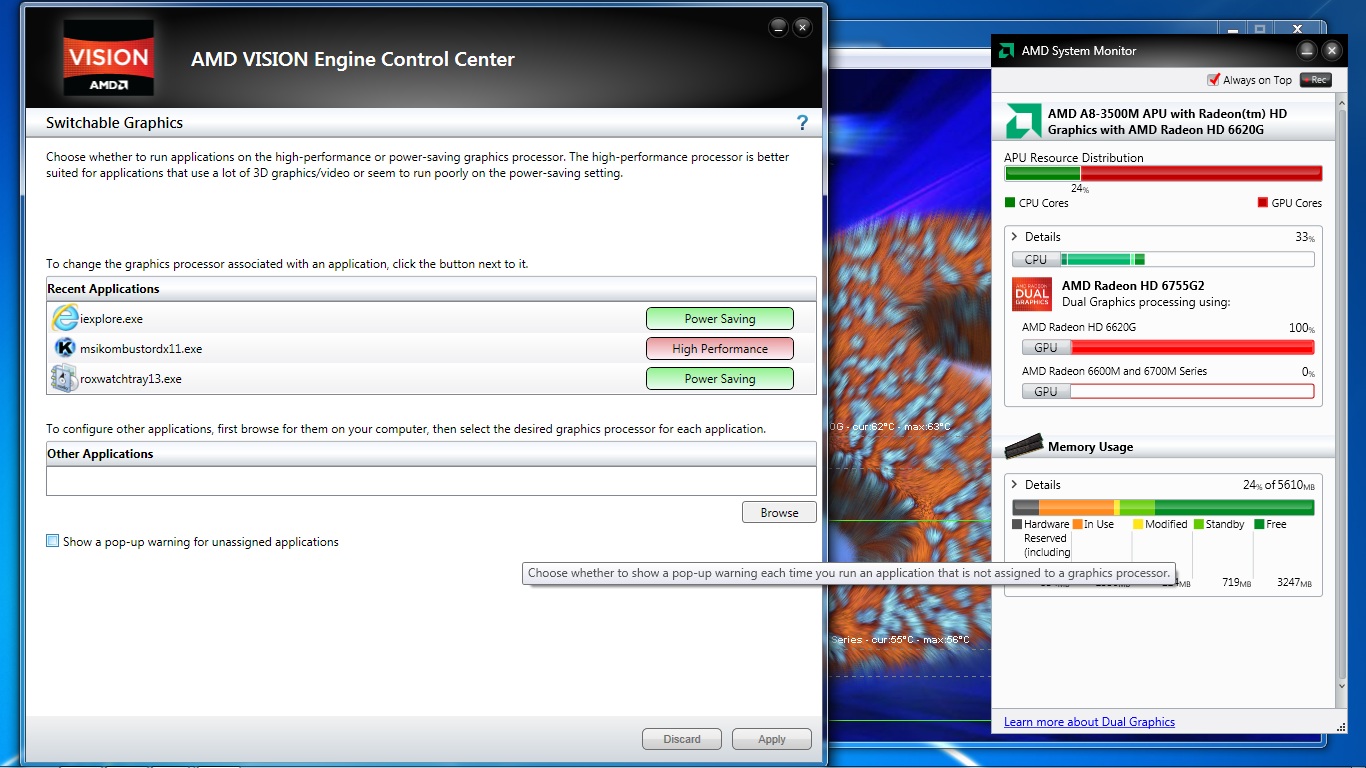
OK, got HT's linked HP driver installed, 12.1a installed. Kombuster running in DX11 mode, set to High Performance. Still, no matter what I do, I can't seem to get Kombuster to use the 6750. Still, when at default clocks, AMD system manager dhows 6755g2. But when I apply ANY change in Afterburner, system monitor splits the dual graphics to the 6620 and 6750. Either way, ONLY the 6620 gets stressed.
HT, can you tell me what you mean when you say stress the 6750? Running a game or something will do? Alt-Tab out, or what? Thanks! Getting ready to pull my hair out with this thing! -
Shouldn't you be able to assign Kombuster to the 6750 using Switchable Graphics under the Power tab in the Control Center, making sure Crossfire (Dual Graphics) is off?
-
73c max on gaming - 2.3ghz @ 1.1125v, on a8-3500m. No mod, no cooling fan, just propped up using a $4 cooler from amazon. Just saying.
-
What are you using to monitor usage? hwinfo64?
-
I'm telling you goresnet, stop using Afterburner for a second, uncheck the "apply at startup" box and then restart (so it goes back to stock clocks - and yes, restart is required because I know what is happening.) Then run Kombuster again with "High Performance" under your switchable graphics panel. Then watch load using system monitor or Kombuster itself.
Yes, the splitting is normal. When you apply new clocks, system monitor will show them separate instead of together. Have you disabled ULPS goresnet? I just had this happen to me recently and forgot about doing that. If you don't disable ULPS, and you go and apply clocks in Afterburner, it'll break the connection between your 6750m. It won't switch on again until you restart with no Afterburner settings. If you plan on using Afterburner. ULPS must be disabled.
But if you've done all of this and still nothing.. more troubleshooting will be underway
I can help you via TeamViewer if needed. -
My first DV6z ran hot, that's why I returned it. The replacement ran a little cooler but not by much. I even replaced the cooling assembly (fan with the GPU and CPU heatsink attached) since I hacked up the original one, and it actually ran a bit cooler yet at stock.
If I use my laptop cooler now (Notepal U2), I can run P0 @ 2.7GHz in BF3 and keep temps < 85C. Without cooler I have a K10stat profile with P0 @ 2.4GHz and that keeps temps < 85C (I also have modded BIOS so fans kick in sooner). I could probably go to 2.5GHz if I needed to but that extra 100MHz won't make much difference for the increase in heat. I still have yet to put my stick on heatsinks on the CPU and GPU yet with the replacement cooling assembly which made a significant difference with the other one I had. Just waiting on my sandpaper to sand off the paint, and also finding/taking the time to actually do it. -
Has no one attempted doing the fan speed mod yet?
*NOTE*
Room Temperature plays a huge role in all of this. Fans don't do anything if the air they are moving is already moderately warm from room temperature which mixed with the heat your processor is making = higher idle temps = higher peaks -
I'm really glad you write-up the mods you do. It goes a long way and records are nice to look back on later. Almost need to have a bigger signature with links to guides.
-
With the BIOS here: [Unlocked, sp54724] HP Dv6-6135dx [amd]
I am able to get the fan to start up earlier, but it still doesn't go full speed until system reaches 90C. Otherwise what fan mod are you talking about?
Thanks. I used to have a signature with links, etc but there were too many. I recommended that NBR add a section for users to post their personal links to articles that they or someone else may have written that was helpful. But they poo-poo'd the idea. -
It's here http://forum.notebookreview.com/hp-...-amd-llano-6xxx-series-owners-lounge-454.html
And the quote part from me:With ours, it may be blue (or yellow.) Old dv6's worked this way. -
Too bad you didn't have your own blog for this sort of thing and link that in your signature.
-
Oh yes, I remember that crazy mod.
I thought I was silly for cutting holes underneath my laptop and sticking heatsinks on it! I wanted mine portable though, with that it's hard to just pick it up and run with it. But if it's pretty much stationary, excellent idea! I actually have that exact same cooler on an old HD 4650 desktop GPU.
I guess I'm not willing to be the first to try. lol. Maybe I'll go to Radio Shack and pick up a switch or find something on the webz and one day when I feel crazy, I'll go ahead and do it. So basically (theoretically) it will run as normal with the switch in one direction, and go full speed with it switched?
I considered it. But that would be too much work.
-
I plan on doing it, once I gather the parts needed.
That is correct. The problem with allowing it to get that hot is part of the problem of keeping it down. I forget the number but on a spectrum (in laptops) heat will hold in the plastic chassis longer than it being below a certain number.
So keeping it down sooner would be priority.
It is a lot of work. But there is a demand for it. Almost need a user's handbook to the Llano's guidebook type of thing out there. -
Let me tell you, but you probably already know, It's nowhere near silly, it's curiosity at its best
(BTW, the part that actually makes contact with the GPU in the VNF100 fits perfectly between the gap in the plastic of the laptop and the copper pipes, so you can leave it inside and screw it from the outside with no problem whatsoever.) -
Got a question Vect,
Is the mounting piece attached onto what is already there? Did you have to tap and die anything? Where did it mount onto -holding it in place?
*EDIT*
Thanks for clearing that up. Haha -
lol, yeah, actually this is my second mod, the first one used a more robust and heavy heatsink but it was very inefficient because even with my best efforts it wouldn't make good contact.
Now I mention this because if I had begun first with the zalman heatsink I wouldn't have needed to do a big hole, just enough to let the heat pipes sit into place and two holes to screw the mecano thing.
One thing about this heatsink is that is extremely light, so you can leave it hanging as I shown without worries, still, I was extremely impressed when the part that makes contact with the pipes seemed to be *made* to be put in there.
I'm noticing here that another guy modded an a6-3400 almost in the same way as you did (minus the copper things) and he also reached 3.0 GHz...
Which lets me thinking, the heatsink that I just put perhaps it's dissipating a lot of heat, but if I open a hole just below the fan, perhaps it will cool even more. -
I was glancing at laptop coolers at Best Buy the other night:
Know I've asked before, but there was one that looked nicely compact and was USB powered. Are there any particular brands I should avoid or look at? -
Tried that, no dice.
I'm using AMD System Monitor
OK, reset to stock speeds. Ran HT's disable ulps app. Rebooted. Opened system monitor. Ran DX11 Kombuster from start menu. It is set to High Performance. I don't know what TeamViewer is! But seriously, thanks to everyone for working with me.Attached Files:
-
-
You sure in your CCC, dual graphics is enabled?
I noticed at times it can glitch out when you click apply. So you'd have to disable, apply. Then enable, apply one more time.
![[IMG]](images/storyImages/CFX.jpg)
-
Yes. I tried disabling it the one time like ClarkKent suggested, but it's back on otherwise.
OK OK OK... I think I got it. I was launching kombuster dx11 from the start menu. Using Gpu Burn In. But... It was defaulted to GL2 in the 3D api box under that button. I changed that to D3D11, and it uses the 6750!! Yippee for me! Now I feel dumb. Everyones been saying use DX10 or 11, and here I am, understanding that wrong. -
Experience, now you know what to be aware of.
I never used Kombuster until recently either, I did the same thing but KNOWING it was GL (since my D3 mods never worked on the dGPU) I knew GL wouldn't run it. OpenGL games or 3D Rendering software will only use the 6620g, there is no fix to make the 6750m work with OpenGL. Which sucks... So keep it in mind if you download a game or something and wondering why the !@#!$! fps.
Good stuff man. -
check out the *latest*( bout six hours ago,) demo of trinity...wait for the surprise
AMD Demos Next Generation Trinity Fusion APU For Notebooks, CES 2012 - YouTube
seer -
Thanks again for everyones patience. I'm currently running Prime95 Large FFT + Kombuster with 6750 set at 750 core / 950 mem. About 45 minutes in. Temps at 88 CPU/iGPU and 82 dGPU.
-
Those are good limiting temps for the cpu, what's your frequency?
-
An E series APU? that's not supposed to be the lowest line of the next APUs? Oh my... what would it be then with the A series APUs, to bad that I got this laptop for at least 3 years
-
That was a good presentation.
-
Sounds about right. Dual Graphics usually raises the temps by quite a bit.
-
/giggle/
I just giggled like a little school girl. No word on laptop availability yet though? I can't quite bite the bullet yet, but guess I better start saving my pennies. My DV6z is ok, but I was expecting to get something significantly better come summer 2012.
Yeah, I know. I always wanted a full fan on demand. Should help keep temps down. Because even now, I can run 2.7GHz, system goes to 90C but now system fan goes into full and then system goes back down to like 83-85C. As soon as fan drops speed, it climbs right back up to 90-91C.
Working on a "how-to" overclock and general FAQ at the moment. Man it's taking me a long time. Hope it will be helpful after all the time put in.
*HP dv6z AMD Llano (6XXX series) Owners Lounge*
Discussion in 'HP' started by scy1192, Jun 22, 2011.