Problems? See this thread at archive.org.
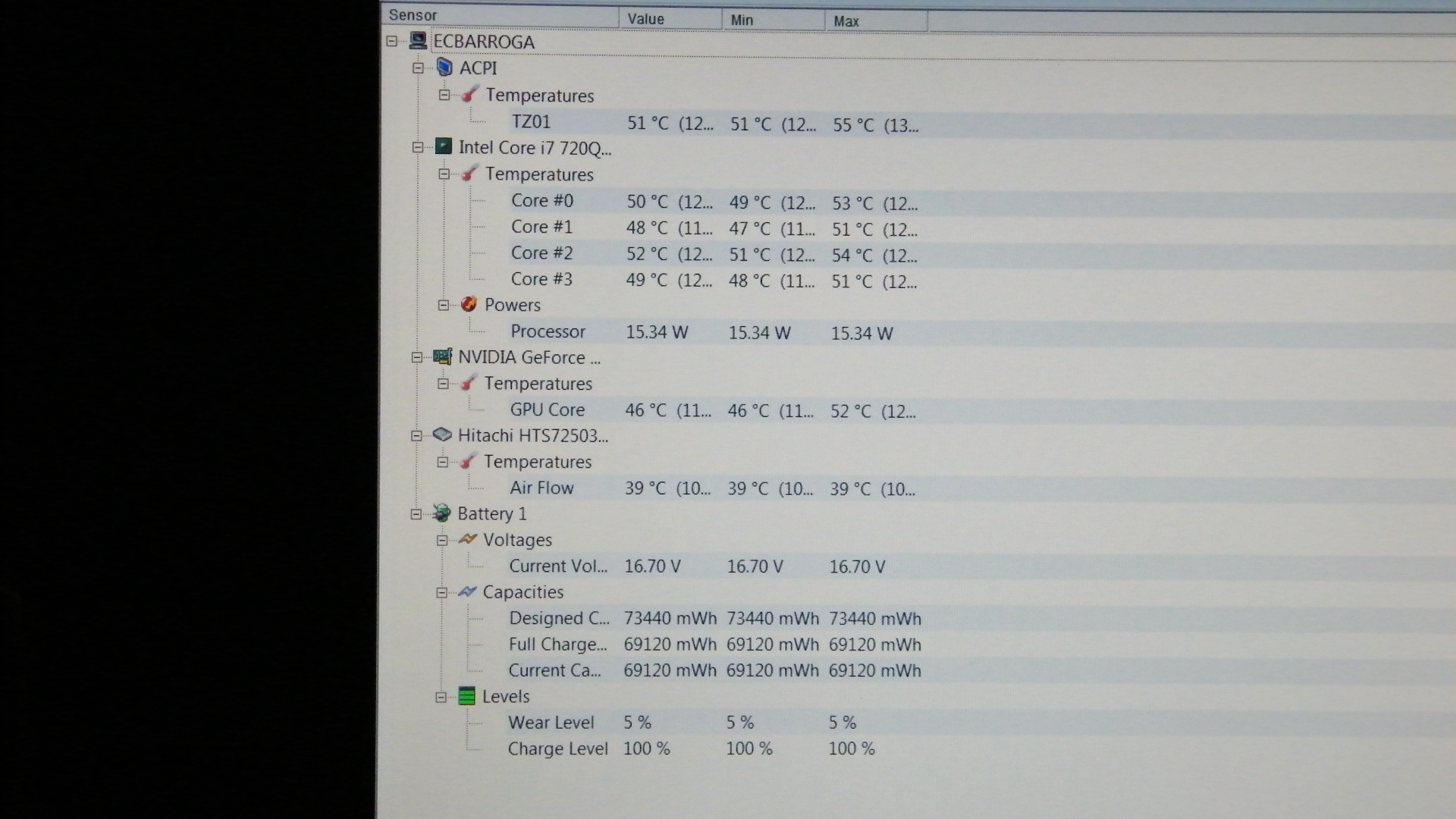
Yes, that is cold for the GPU. Mine is idling atm at 55C and the CPU is 61C. However, it ranges from the high 50's to low 60's normally, occasionally spiking up when something is going on like opening/running certain programs, defraging, running a scan, etc. Of course, 3D games sends both the CPU and GPU way up, usually to the high 70's/low 80's for the CPU. A bit less for the GPU.
But this generation of i7 CPU's do tend to run a bit hot, imo, although I guess there is some normal variability from one i7 CPU to the next, (or other relevant system components) as no two electronic parts are really identical in every respect. So everything else of a non hardware nature being equal, I would still expect to see some variability in idle temps from machine to machine.
I was using an i5 based laptop for a while and was very impressed with how cool its CPU ran. Usually was in the 40's and low 50's iirc. And it was still quite snappy in performance.
Edit: By the time I finished this message, my GPU had dropped to 51C and my CPU is at 60C. I've got several gadget monitors running all the time in the sidebar and lots of security apps (Comodo firewall, Eset AV, Malwarebytes, Peerblock, Windows Defender, Keyscrambler, etc.,) always running in the background (although not actively scanning).
-
I think your temps are on the high side of normal at near idle. Mine run around 55-57C then.
Are you elevating the Dv8? I always do that and find my temps never go above 65-70C which is within mfr specs. While I don't run any stress tests, etc., I do video editing and benchmark tests which load my cpu a bit.
Hope it helps a bit.
Regards,
- - Phil -
I don't think it's normal for your cpu to idle at such high temps. I've done some video encoding allbeit with windows dvd maker which causes all cores to be running and my temps were 67 - 73/74. I was using a laptop cooler but even without the cooler, at idle my processor temps are in the 50's, and in the mid - high 40's with the cooler.
To get to the fan/heatsink, u'd have to remove the mobo. the maintenance and service manual for the dv8 is on HP's site so u cld dwnld it but since you r under warranty you cld also make use of that fact and snd it back to hp. -
OK, Peter. It was that comparison that I was curious about. Thanks, anyway.
Regards,
- - Phil -
thanks a lot for your replies.
I DO ELEVATE, in fact, i am using hp notebook stand the back of the laptop is completely about 20 cm above the ground level... and the ambient temps. are very good.
i think CPu temp is high too.
i may open it up my self and change the thermal compound, sometimes these stuff don't sit well on the cpu in factory and the gunk etc.
i will clean those up and hopefully it will go lower.
i don't understand why you guys gpu is higher temsp. -
In comparison to some of the temp posted, my DV8T seems very cool.
I use a homemade cooler with the airflow blowing into the bottom of the laptopAttached Files:
-
-
Glad you're keeping it up ...

I find my GPU never goes above 60C but I tend to watch the CPU temps mostly. I hope improved uniformity of application of heat transfer cream will help if it weren't done properly at the factory.
Regards,
- - Phil -
I just tip mine up off the surface about 1/2 inch and mine is cool like yours most of the time. No question that when you load it up for all 4 cores to run, mine will rise a few degrees C and yours will not.
Regards,
- - Phil -
Well guys-
If you remember- I originally ordered the DV8 from CostCo. A week later a sale come thru HP and I ordered a second one from them, and would return the CostCo one back when it arrived. Well- after getting to play with the CostCo model, I gotta say I just wasn't impressed whatsoever.
The quality of this model felt really cheap and plasticy It was a gorgeous setup, no question- but with all the problems I've had with HP that last few years, I began to see why. In the mean time, my old HP bit the dust- and that thing had a TON of problems as well. I've just always had problems with HP as soon as they fall out of warranty- and then them putting a timeline on a major recall on my old machine (which, I found out just weeks after the deadline) really bothered me.
The thing with this DV8 that really pushed me over the edge- the keyboard and especially the keypad. As I typed, the entire thing pushed down and moved. There was no stability under the keypad whatsoever- which made me think it was cheaply made and wouldn't last.
So- I bought me a Sony Vaio. To be honest, I really didn't need all that the DV8 offered- as cool as it sounded, it just wasn't NEEDED. I let go of the SSD and the 8gb ram, and downsized to the Vaio, cutting my cost in half. I'll be refusing my HP order when they deliver it- hopefully getting my refund SOON.
I've just had it with HP and their crap quality. I take very good care of my laptops- they hardly ever travel, and when they do they're very protected. 4 laptops from HP and nothing but problems to where I have to replace it every 2 years. That's just not good enough for a $1-2k purchase.
I just wanted to see if anyone else experienced the soft keyboard issues as I did? -
Mine has a slight bit of flex over the numeric keypad. Doesn't bother me. Aside from the plastic material the shell is made out of (especially over the back of the display), mine seems quite solid. We have two other HP Pavilion laptops that are several years old (came loaded with XP) and that have been in almost continuous operation since purchase. Never had a single problem with either of them, although they haven't traveled much and have spent most of their life used at home.
Sure the case on the Pavilions is not as solid as my IBM and Lenovo Thinkpads, some of which have internal magnesium roll cages they are built around. (And don't get me started on the problems I've had with my T61p that cost over $2k including accessories. Suffice to say, I won't be purchasing any more Lenovos.) But the only real problem I've had with the three HP laptops we've had is a hard drive on my DV8 that needed to be replaced twice (under warranty both times). If my DV8 lasts half as long as the other two Pavilion laptops we have in this house, I'll be very satisfied.
I just don't need to spend an extra ~$1,000 or so to get a more durable and structurally rigid case, along with lower performance specs, especially for a laptop that is going to spend 99% of its life sitting in one spot on my desk, plugged into AC. -
This is probably moot given your decision, but in case other prospective buyers are reading:
Overall, the DV8 keyboard is quite solid, except under the numeric keypad, which is just over the optical drive and was always universally known to have flex. There are ways to support this one area where the base of the keyboard has some travel until it hits something firm to hold it. Being largely under the numeric pad it has never bothered me, but it can be fixed - by the user or by HP. If you had a great deal of flex all over your keyboard, you had a manufacturing/assembly defect and it needs to be replaced/repaired. In this case, I would go with repair, because a good technician (or owner) can do a better job of hand reinforcing the areas just under the keyboard. I have even at times had the mfr use thin rubberized material to fill a gap.
I had owned an HP DV7t quad and it had quite a bit of flex and I was given "permission" and advice on repairing it myself, and I eliminated 100% of the flex, in about an hour.
Sorry you couldn't get comfortable with the DV8. Many of tend to be "fanboys" on this thread, but only because we've had this computer for going on a year and it just performs and performs (ignore my next post!
) and has so many great features for the price.
I can't quite imagine how you got a DTR SONY (I assume the F-series) for 1/2 the price, though I guess if you downgraded from a Core i7 Quad to a Core i5-450 cpu, nVidia 310, 500gb HDD from an SSD/HDD combo, from 8GB to 4GB memory and to a non-FHD screen, then I can see how you could go from just over $2K to a little over $1K. By doing that - and losing out on the phenomenal screen and audio quality, many of the connectivity and expandability options of the DV8, you have IMO left the true DTR category and gotten a (probably very capable) slightly oversized (16.4" vs. 15.6") form factor from the Apple MBP 15 and HP DV6, which, IMHO, I think is a far better computer than the SONY I think you purchased.
Actually, if anyone has been following the late summer crop of 14.5"-17" notebooks out from all the major manufacturers there are some stunning values in the $799-1,099 price range. Check out the latest Toshibas, Lenovos, Samsungs, HPs and Acers, most with: Core i5, solid mid-range, switchable GPUs (eg, ATI 5650, nVidia 330), often with blu ray players , some with back lit keyboards, often 1600 X 900 (for the 17"ers), very decent audio, a few with Intel's wireless 720p video transmission (WIDI), that I think a whole new class of what I dub "sub-DTR" products (most of them way between 5.5-7.5 lbs), at price points unimaginable a year ago. For my money, I would probably choose these over the chunky, heavy, noisy de-contented Sony F-Series (which may not be what eyal8r got) as well as some of the 2009-10 crop of products....is what I think
-
Had this problem before.
1. Uninstall the IDT Audio software.
2. Go in the SwSetup folder on the root of your hard drive.
3. Open up the Drivers folder in the SwSetup.
4. Open up the Audio folder in the Drivers folder.
5. Reinstall the IDT Audio software. -
I would suggest first uninstalling the IDT audio software and then re-installing the latest version of it which can be found here.
-
Welcome back, Jeff. Haven't seen you here in the last week.
I agree with everything you said (rare for me) and even the recommendations for alternatives.
Ever get your tablet PC sorted out?
Regards,
- - Phil -
Hi
Just wondering if there is a Services Media Library available for the DV8? Thanks! -
I'm assuming you mean a maintenance/service guide?
http://h10032.www1.hp.com/ctg/Manual/c01910942.pdf -
ok.. I need some help....
I'm wanting to upgrade my wireless router...
Just how fast can my onboard wireless adapter go?
I'm running the "Intel(R) Centrino(R) Advanced-N 6200 AGN
"
Based in its description and even when I go into device manager it shows and describes it as being "N" technology.
It will run a/b/g too of course but I'm wondering about N since its faster.
It does appear to have N mode but in limited options..
It will run at 2.4 band "20mhz only" , or 5.2 "auto"
yet when I scroll to the bottom the properties available "to wireless mode" it only shows a, b, or G in its options?
Can someone help me with this?
And maybe even recommend a router that works well with it in N mode if possible? -
I think it's just because you don't have an 'n' router so it doesn't list it. If you had one enabled it would be listed in the properties...I could be reading your question wrong....
This is the one I use:
WNDR37AV
It is kind of expensive I guess, but it works very well. It really excels when you throw tons of stuff at it simultaneously (i.e. xbox360, streaming hd video, uploading from flip camera, uploading photos, etc.). It handles everything great. But don't be fooled, your router is going to be limited by whatever type of high-speed internet connection you have. In other words, unless you are only looking at 'n' for excess 'range' then there is no point of upgrading to 'n' if your bandwidth doesn't meet the criteria.... -
Certainly that's how I'd read it. Mine doesn't show N otherwise.
This is the one I use: WET610N
Costs less than $100 at Best Buy; about $92 at WalMart.
Regards,
- - Phil -
Thank you for the link. What I was referring to, at least it was available for the HDX Dragon and the DV7, was a video with sound explaining, for example the disassembly of various parts for replacement or cleaning.
-
Thanks guys for the router advice...... Seems reviews are against Belkin and even a tad weak on Linksys... strongest on Netgear.
I may try the Netgear N600 RangeMax.. seems to have good ratings.....
I may order the one Phil recommended too.. would be nice to find it local.....
There is something to be said for breaking away from the "draft" side of "N" technology......
As I read struggles folks have with dropping signals etc.. that could be due to the protocols not being set in stone and when using the older draft technology there is less compatibility.
I've only found one review on it so far and it was a bad one.... at Least Phil got it working well.
I do like the spec of the netgear WNDR37av "
680 MHz powerful MIPS 32-Bit processor
Memory: 8 MB Flash and 64 MB RAM"
Do you happen to know what the "AV" designation means at the end of the WNDR37?... seems there are both models... Best I can get is "audio, Video"
Not sure yet..... still processing it all. -
Yeah the 'AV' is just a series they have that is geared for exactly what you assumed: Audio/Video/Gaming. Here is the landing page for the AV series and all that it entails:
NETGEAR AV Series Landing Page
But I do know the WND37AV has newer firmware which allows for:
WNDR3700 v1 == N300 == firmware LOCKED to 300Mbps == 2 concurrent maximum spatial streams
WNDR37AV v1 == N600 == firmware UNLOCKED to 600Mbps == 4 concurrent maximum spatial streams
But, AFAIK, they are the exact same routers. Maybe the firmware is the only difference. I'm not sure. You may even be able to buy the 3700 and flash the 37AV firmware onto it...But like I was saying in my previous post, it's all moot if you don't have the broadband to support it imo... -
I was aware of what you were asking for. I was just assuming you realized that HP discontinued access to the service. You can still get to the old site via this link:
HP Customer Self Repair Services Media Library - Media Selection
But as you can see, the entire pavilion, dv, and hdx series is no longer available...
Here is the new link if you're interested:
Partner Services Media Library
Notice this part:
Important! Use of the Partner Services Media Library by individuals who are not authorized under partner programs is prohibited.
So yep, now you have to be a partner and have signed up and received a username and password. Bummer....
I can tell you one does exist. Maybe you can stumble across it if you search on google hard enough
-
Thank you for all the info, my friend!
-
I wasn't looking for a top-of-line unit, Alan. I chose on basis of standards compliance and price. I also figure that Cisco will offer firmware updates to address issues if significant ones arise. The Netgear unit was twice the price - you usually get more by paying more. How much do you want to spend?
Regards,
- - Phil -
First of all I wanted to thank everyone's input regarding my inquiry into what would be recommended for setup for my brand new dv8t. One of the deciding factors in purchasing the laptop was this fourm and the almost zealous devotion and abundant wisdom by those who practice here in the church of dv8.
I heeded the recommendations including the decrapifer and loading the driver's from Justin's page. So far, the first week has been awesome as I break-in the battery and configure a new input into my audio receiver so the sound can match the incredible resolution.
Now, if I may indulge the fourm's tremendous wisdom, I have two newbiesque questions
a) What precautions do you take/recommend in order to decrease the tremendous amount of heat generated by the dv8? I completely understand that with great performance comes great heat but has the fourm come across a preferred cooling system in order to reduce the long term risk of the heat to the system?
b) What bag, sleeve, tank, etc do you use/recommend in order to transport your dv8? Obviously this "desktop replacement" isn't 'ment for hauling from class to class but has the fourm come across a preferred bag which would stylishly allow me to take it elsewhere for others to witness its greatness?
as always, any input or comment would be greatly appreciated and thanks for everything. Take care! -
All of us are happy to help you. Glad your Dv8 is satisfying so far. Enjoy!
I recently bought one after some recommendations here. I bought the 18' Targus laptop carrying case and found it fits my Dv8t just fine. It has lightweight and rugged nylon construction and has room in it for the 'brick and cables. Handle is solid and shoulder strap is long enough for anyone to use. Took it on a car trip a week ago to D.C. area and it protected my Dv8 throughout the 5 day trip down and back. Padding and Dome Protection insured nothing damaged my Dv8.
Here's where I ordered it (currently 20% off):
Targus 18" Blacktop Deluxe Laptop Case w/ Dome Protection | HP® Official Store
Regards,
- - Phil -
Well there just was a somewhat detailed discussion of bags for the DV8 in the past week so I would look back and try to find that for a start.
Others seem to prefer a more briefcase style bag. I prefer a more backpack style. Targus makes one rather large backpack for a 17 inch laptop (available on Amazon and Ebags.com) that according to some reviewers will fit the DV8 and that is probably what I will eventually be getting. It's a larger version of their "Matrix" backpack which I already have. The "Matrix" holds a ton of stuff but is just an inch or two too short to fit around the top of the DV8. The bigger version should be fine. Otherwise, the briefcase styles that were recommended earlier in this thread sound nice and are good values on sale.
Some people, myself included, use laptop coolers. I use a Zalman NC2000 (purchased from Amazon, also available at Newegg.com). It's fairly deluxe and quiet. There are probably cheaper solutions that cool just as well or better but are noisier. Some people feel they are completely unnecessary.
In any case, elevating the laptop so the vents on the lower rear left and near the lower left rear side have plenty of clearance for airflow, is helpful. In a pinch, you can just stack up a few quarters under each of the little "feet" the laptop rests on, to gain some more room for air flow. -
Has anyone gotten a backlit keyboard from a HDX18 working in their DV8? I searched this thread and didn't find anything recent about it.
-
As far as I know it's not possible because the DV8 system board doesn't have the right connector for the keyboard to hook up to for powering the keyboard. At least that is what I recall reading people who were attempting to make it work saying about it.
-
Yeah, i wasn't able to get it to work off the connector on the mobo. I did get mine lit up, however. I posted what i did here:, if anyone wants to take a look at it.
dv8t Backlit Keyboard Mod (HDXer's Please Help) - Upgrades & Mods - HPHDX.net
One question, unrelated to the keyboard. How can HP tell if you've opened up your laptop? I didn't notice any stickers or anything that need to be removed to disassemble it. Reason im asking is because my fan died last night, system overheared, and shut itself off. Hoping that HP won't notice that i've opened the computer. -
I don't think they can tell as long as you didn't scratch anything up, strip any screws, spill anything inside or apply some thermal paste, etc.
-
Btw, what's the procedure on an in warranty return for service. Does HP send you a box with shipping pre paid for sending the laptop in for service? Or does the customer have to pay for shipping? Also, are there local authorized repair shops that can do warranty work on these machines instead of sending it back to HP?
Finally, perhaps you could talk them into just sending you a replacement fan, if you can convince them you know how to replace it yourself? Although I doubt it, but might be worth a try.
On second thought, if the fan isn't very expensive, I'd be tempted to just buy one rather than be without the laptop for a week or more, unless you can get the job done under warranty at a local shop that could probably work with you and get it done in a few hours once the part has arrived at their shop. -
They will send you a box (empty) with packing materials in it and a new shipping label. you fill out a sheet, put the new label on, pack up the comp, and bring it to a UPS (might be USPS, dont remember) shipping center to drop it off. They pay shipping. Last time i did this it was for a broken hinge ($30) on my dv9500 and they charged me over 300 bucks to fix it. would have taken me 45 minutes to do, but i didnt know how at the time.
I'll chat with HP tonight and see what they say about the problem and if i can get it fixed somewhere locally. I checked on ebay for the fan but nobody has one. Anyone have a manual with the part number for the fan? like in a PDF? parts are so hard to find on hp's website...
Also, im tempted to re-open the computer and test the fan to see if it is what's broken (i sure hope thats all it is). Will these fans run off of just like 5v dc? I know the connector has a third wire, but i assume this is just for speed sensing or something of the sort? -
They said there was only a 7-9 day repair period and 2-3 day shipping each way, so i'm just sending it to them. Hope they cannot tell i opened it.
Correction on quoted material: i believe UPS is going to pick up the laptop at my house. basically no effort on my part. -
Sounds eminently doable IMO. From the thread no one has identified the connector to put onto the mobo? Others have reported that the Fn-space key combo turns the power to the keyboard on and off on the Dv8 mobo in the same locations where the connector would be located? Seems like a promising set of developments to get us all a way to retrofit our Dv8 with backlit keyboard! Good work!
I'm going to get the pieces together and get started on it!
Regards,
- - Phil -
Great. I'll be very interested in following how you make out with it. A back lit keyboard would make the DV8 almost perfect (certainly a lot closer to perfect).
-
Not so, Peter, according to the thread Doglaptop referenced, others have reported that the Fn-space key combo turns the power to the keyboard on and off on the Dv8 mobo in the same locations where the connector would be located. Seems like a promising set of developments to get us all a way to retrofit our Dv8 with backlit keyboard! I'm going to give it a try after the parts come in!
Regards,
- - Phil -
Yes, the parts are on order and I'm hoping to make it work next week. Apparently the person who tested the traces on the Dv8 mobo determined that there are 4 pins and the outer pair are 5V+ and the inner pair are common (if I recall correctly).
Converting it to the backlit keyboard certainly would correct a major irritation (for me, at least) and shortcoming of the Dv8 machine!
Regards,
- - Phil -
Thanks Phil. I am still have only occasional opportunities to spend time on NBR, due to certain preoccupying circumstances about which I think you know a bit.
Good news: bought the house and sold the land!
Agree with everything? Have you been drinking excessively, lol!
Tablet is pretty much sorted out. I am returning it, but for an upgrade - at a lower price, as they have begun discounting the CTOs so much that they are now cheaper than the "Smart Buy" pre-configs. Now getting one with a Core i5-540, 160 GB SSD, 6GB ram for $1,600. Not cheap, but for the power and excellent build, plus very solid tablet/touch/pen performance, a great deal. Demoed a SONY Z series for a few weeks and was quite disappointed. Performance and screen (due to discrete grpahics, 1600 X900 resolution and SSD) were certainly better than the Elitebook 2740, but build quality was not good at all and ergonomics were sub-par, at least for my hands and fingers. Also, I learned that there is such thing as too light and thin - perhaps not for women, but for notebook computers!
Jeff -
I'm assuming you mean the chassis fan. The part # is 514290-001 it is $58.90 and in stock.
The Processor heatsink and fan assembly is part # 597824-001 it is $63.65 and in stock.
And it is actually simple to search for parts on HP's site. Perhaps you're using the wrong approach? Any case, navigate to:
HP Parts Store - HP Computer Parts - HP Printer Parts - Compaq Parts
Put in dv8t as the Product number or name and search. You can then filter by keyword or category. Pretty good stuff.
I'll quote myself from a post back in May that contains lots of random part #'s as it probably needs to be refreshed on the forum:
And if anyone wants the service manual I have it saved here:
http://wikisend.com/download/444846/HP DV8T Service Manual.pdf
-
Interesting. Great find and development there. I too would love to have a backlit keyboard. I'll have to dig into the topic Doglaptop referenced.
That's awesome! Can't wait to see what you come up with Phil. Good luck! I think I may dive head first into this as well...
-
I hope your focus on those "preoccupying circumstances" is satsifying and productive since I'm sure it's not easy.
Yup. If I imbibe excessively, only Pepsi-One, Jeff. LOL!
I have a friend seriously interested in a tablet PC ... thence my interest is peaked by your upgrade. I may be acquiring one on their behalf and I'm sure you didn't settle for less than exactly what you wanted. I'm really glad you're getting the SSD in it! Please let us know how you think the new one works for you after you receive it and put it through its paces a bit.
Regards,
- - Phil -
@woods- thanks for the info. If hp finds me out of warranty i will definately buy the fan myself and put it in.
As far as the backlight goes....
I'm c-wise12 on hphdx.net. I got mine to work, but NOT using the connector on the motherboard. I don't know how that guy got his to work touching the connector to the contacts, but i tried it with three different bios's and got zero current there even after pressing fn space. Other computers may be different from mine, but i wouldn't count on that working. Read my post on that thread on hphdx.net, it has a part number for a verified working conenctor on digikey.com.
Yes, the outter pins are 5v and inner ones are ground. However, you only need to attach one of the two outter pins to get the keyboard to light. I tried both and it didn't make it any brighter. Also both inner ground pins go to the same trace on the ribbon cable, so it's not essential to connect both of them either. -
Feel free to PM me as we both progress on this to exchange ideas or discuss issues. If it works out easily (it's rare but sometimes it does), I post some description and photos if I figure out how to post them here.
Regards
- - Phil -
Thanks for the info on the connector, too. Even if the Fn-space keys don't control the power, it is still a good place to pick up power for the backlite. I shall order some today.
Regards,
- - Phil -
Just out of curiosity, I checked to see what the price HP wants for the big 256 GB SSD plus mounting hardware is. Appears it's $559. That's almost half the price of my entire DV8!
-
That's funny - I got mine from them for less than $350. I guess their supplier (Samsung) raised the price to them because of the falling dollar exchange rate. I also found vendors selling it for $1200 at the time I ordered mine from HP so prospective buyers should check around for lower prices!
FWIW, I only WISH the SSD had cost half of what I paid for my Dv8t-1100...
Regards,
- - Phil -
I did not get any power from the mobo there. I wired the connector to the USB cable that goes over to the port by the power input. Hopefully other people's computers are different from mine, however. That guy who got power there bought his in December or so, i didn't buy mine till february.
-
I understand that some things may have changed since December production. I bought mine in early December AND never updated from the original BIOS so maybe I'll be lucky.
If mine has no power at the mobo contacts, I may use the USB power for mine like you did. Can you disable the USB port in your BIOS to cause power to be removed from that USB port to turn the backliteing off and on?
Regards,
- - Phil
*HP dv8 Owners Lounge*
Discussion in 'HP' started by rageman, Oct 19, 2009.