Problems? See this thread at archive.org.
I notice you have a 2TB NVMe Drive in there... which one? Any issues running that?
-
Where did you get the battery replacement?
-
Looks like the addlink s70... I have the 1tb and I have got no issues at all.
-
As Dii Morales confirmed, it is the addlink S70, no issue so far. You shouldn't have any issues with whatever brand of 2TB drive, the addlink is not the cheapest, but it's a good middleground of performance, you can look at https://www.reddit.com/r/NewMaxx/ for more guidance on which one to get.
This is the battery I bought: https://www.b2c-laptop-batteries.com/laptop-battery-lenovo-8039.html
Dunno if it's the best option, but it was cheap with free shipping, got here in about two weeks from China, so I can't really complain. YMMV
While I've yet to actually do an endurance test, battery life still isn't what I'd call respectable, especially if you don't undervolt, but it's definitely acceptable now, but I have the same opinion of any laptop that doesn't get over 3 hours without any tweaks (barring desktop replacements where the battery is more of a UPS than anything lol)
The few times I've unplugged, windows will generally report 2.5 hours of battery, but I haven't tried gaming or turning on all the power savings to see how far I can take it.Last edited: Jul 21, 2019Rhylin likes this. -
I mean, even gaming laptops that are praised for great battery life with the same components (like say Razer blade or MSI stealth) only have slightly larger batteries, so it's definitely respectable
-
My point is that none of the gaming laptops have what I would call respectable battery life since it seems that on average you'll get around 3-5 hours unless you start tweaking (Undervolting, lowering refresh rate, ensuring nothing is using the GPU), and even with tweaks you get maybe 5-6 hours at most.
Meanwhile you look at any casual laptop and it seems like 6 hours is the minimum, with some models hitting 15-20.
Granted, the laptops are after different goals, you don't buy a BMW because you want the most gas mileage, but even so, in this day and age respectable to me means that I can go all day without having to plug in, and gaming laptops are still pretty far from that, if I accidentally forget my charger I'm ****ed (especially since proprietary connector), thus why to me it's only acceptable.Last edited: Jul 22, 2019 -
I should have been more clear, it has respectable battery life relative to the competition.
Like it will get outlasted by weaker consumer laptops, but the battery life is gonna be better than many laptops that also have the same specs -
Personally, I still don't understand why people need 6+ hours of battery life. I can't see spending half of my waking hours away from an outlet.
vegetaeater likes this. -
Thing is, if you get at most 10 hours with tweaks, then you can reasonable expect to get like 5-6 hours without having to deal with lowering screen brightness and trying to minimizing power usage.
If you get at most 6 hours, then you can expect 3ish without having to worry about it.
I do programming, a lot of which is on site, so being able to go away from an outlet for more than a couple hours at a time would be a great boon, but even outside of that, I have a lot of personal situations where having a longer battery life would be useful.
And so far I'm not really impressed with the battery swap, I've been trying to maximize battery this last couple days and even still windows won't give me more than 2 hours, not sure if maybe I got a poor quality battery. I'm on hybrid mode, keyboard backlight off, brightness at about 50%, windows set to battery saving, turbo disabled, speedstep enabled.
Something I find suspect is that the original battery is 11.55V whereas the 17 battery is 15.36V, which shouldn't matter in theory, just need to adjust amperage to match, but maybe some power is being wasted by poor design?
But I also just noticed that my undervolt has disappeared, so I will try applying it again and see how much that helps. -
That part wouldn't matter at all, no. It's just the natural voltage increase that comes with adding another cell to the battery.
Based on what you're saying, that's plenty possible. Or, you just didn't calibrate it for the new battery properly. It's generally recommended to discharge your laptop to 0% before installing a new bigger battery so it can calibrate.
Yeah that could affect things substantially. -
Use HWInfo or something similar to make sure your charge controller or battery is actually reaching 15V. It may be possible the 15" model tops out at 11-12V (for whatever reason), which may be why the battery was never offered as an option.
-
Given that it's literally the same motherboard, I really doubt that. Plus the screenshot from earlier shows it at way higher than 12v.
-
The voltage itself is definitely at 15, as reported by vantage and verified in hwinfo.
Reapplied the undervolt and also disabled the windows game bar as I was noticing some unusually high gpu usage on the iGPU, and so far that seems to be helping, windows says 2.5 hours left at 64%.jeremyshaw likes this. -
Windows' estimates are partially based on previous battery's capacity and a few sensors. That isn't exactly accurate. I'd just measure from 100% to dead yourself and see how long it takes.
-
Do you have a source for that? Because as far as I know, windows will just measure the rate at which the battery's reported voltage and mAh drop.
The capacity is also provided from the batteries and is what tells windows that it's at 100% but the actual drain rate is just a load calculation, I don't think it takes into account the previous battery's capacity, at least not with the prevalence of so called smart batteries.
There'd be no reason to keep an old capacity value if it's reported as having changed.
As for the battery itself, between undervolting and disabling the game bar, I'm getting much better battery, I'd say average of probably around 3 hours, as opposed to the 1.5-2 hours of the smaller battery.
If I tweaked the refresh rate, disabled wireless stuff, tweaked some other things I could probably get close to the 5 hours this laptop is actually rated for lol. -
What exactly are you trying to do on battery?
-
Programming automation systems, low to middle CPU usage for the most part with occasional 1-5 minute bursts while compiling, browsing web pages for device configuration and google stuff, no GPU usage.
Basically same CPU usage pattern as an average person doing daily stuff.
Occasionally I'll use it for a DnD character sheet while playing.
Gaming I'll generally only do while plugged in, or maybe for like an hour or less while I'm out and about.
Considering another review was able to get just over 2 hours on the original battery with a web browsing loop, combined with my experience and all the other posts that's pretty far off from Lenovo's "Up to 5 hr (FHD/144Hz local video play@150nit)"
It also makes me wonder how much power the Killer wireless NIC is taking if supposedly video playback uses less power than web browsing, at least going by Lenovo's rating. -
Zoney, if I'm completely honest I think your unit might just be defective. There's gotta be some weird power draw from one of the components that's absolutely choking your battery life. If a reinstall doesn't fix it, I'd get it RMA'd.
-
Hmm, I'll look into it,I'll try running windows off a fresh SSD to see if it makes a difference.
I've been having issues with the touchpad left click button so I might have to RMA it anyway. -
Also, while the windows power profiles are wonky, make sure it's not running in High Performance mode. That mode will force the CPU to run at max clocks, even when nothing is happening. I thought MSFT removed the option in 1903, but it managed to appear on mine (in the classic Control Panel, which should have no relation to the other Power/Performance slider in the battery trayicon) after adjusting a number of power settings. I didn't notice until later, when I was trying to figure out where my battery life had suddenly gone.
-
I only have two power profiles, one of which is one I made, I've also been keeping an eye on clocks in Throttlestop and using a profile in there to disable turbo when on battery.
The only thing besides hardware I can think of is explorer has been crashing a lot for me lately, it's possible that it has some issue, or that a program I use causes an issue with it, which will be determined once I get an SSD wiped and loaded with a new install of windows. -
Add me to the list of a 17 owner. Mine should be delivered by Saturday hopefully. I went for the 2070 and 9 Series Intel chip - 81UJ0000US . Anything I need to know or do just as soon as I get it in ? Other than repasting of course lol. And yes I still have my p870tm1-g-9900k-2080. I needed something alot lighter for work lol
-
Repaste isn't needed on this laptop, look into undervolt Ing. If you want standard fn+Q functionalities then don't update the bios past 1.08kfxsti likes this.
-
I am very interested in Y740-17ICH display impressions (9th gen CPU).
Looking to buy one, but so far found just one report for it (9th gen CPU use different 17 inch panel).Last edited: Jul 25, 2019 -
I just go to open my 9750H model today. I played around a bit, and then installed an Inland Premium SSD from MicroCenter. The internet is totally abuzz with insanely great reviews for these drives, but as soon as I plugged it in, my system stopped rebooting.
The system would should down just fine, but when I would try to reboot (from BIOS or from Windows), the screen goes black and the keyboard continues the Corsair Defaul "rolling-rainbow" effect.
Swapped back to the original NVMe drive, and change-o presto, its fine. Returning the drive tonight, and already ordered a 1TB Addlink s70. -
Do you have the 17 inch version?
-
No, I have the 15” with 2070.
-
Anyone knows what those are? (audiowear/csr gaia)
Those are in lenovo y740-15 8750H/2070mq.
Thanks!Attached Files:
Last edited: Jul 26, 2019 -
-
Well Jarrod's thermal review is incredibly disappointing.
Did he get a lemon (with awful thermal paste), or is it really a problem with the new BIOS? -
What SSD does your 9th gen Y740 has?
-
Well, it seems like temperatures depend heavily on ambient/room temperature. With now 26*C in my room, I get similar results, although the CPU Temperatures of 94/95*C is just a short maximum, as the fans take a while to kick in. Average CPU Temperature is around 88/89*C when playing BF V (on my unit with the 2080 max-q).
Especially since the fans cant go any faster, rising ambient temperatures mean rising component temperatures.
I also encountered GPU throttling in this warm environment, but I dont want to repaste the laptop just yet. I would prefer to wait until it gets colder in germany, and compare the temperatures then (maybe september/october) to my initial results so we can see, how well the thermal paste lasts.
Overall, "you get what you pay for" seems to be true here again - prices on the y740 are fair compared to many laptops from competitors.
The RTX 2060 / 1660TI seem to be the best value right now - especially the latter really offers great performance for the price. -
That is my room temperature during the summer, can you please tell me what are the max-CPU and max-GPU temps you are getting? You have 9750H with 2080 MAQ-Q? Also do you have 15 inch or 17 inch?
Thanks. -
No I have the 8750H, but here a Screenshot of GPU-Z and HW Monitor during a 25min BF V Rush.
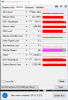
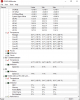
This was done with 28*C room temperature though.
The CPU average temperature is okay, but I dont really like seeing the GPU Temperature so high... -
Mine has a Samsung 512 nvme
-
This is interesting as all the previous youtube reviews and user reviews all said the y740 had amazing cooling (likely due to the paste that Lenovo uses). So I wonder why this is an issue now.
-
Y740 9750h with 2060 is using higher TDP 90w 2060 instead of 80w (like the 8750h version) which results in much higher temps.
-
From what I've seen, people with thermal issues have i7-8750H and bios 1.09 combo. Am I wrong? People with i7-9750h (at least on reddit) claim that their thermals are still good... Am I missing something?
I've ordered 17 inch model... Any issues I should be aware of? Thanks. -
I have the 9750h version 15-inch with RTX 2060, Anything I can do to help add to the discussion? I have been playing "Rust" on my laptop and every time I play the game the fans come on not super loud but noticeable after I exit the fans gradually slow down then I think they are super low or off because i can't hear them after.
Wanted to add I'm not on the latest firmware as I read the posts here first.Last edited: Jul 29, 2019 -
I haven't had any thermal issues on 1.09, only difference is I can't force the fans to stay at max but that's not a big deal for me 95% of the time.
That said, I'm also undervolting which helps considerably (probably a 10-15 degree difference), I usually don't see max temps above mid 70s unless I'm running benchmarks or something.
Unless you mean the 9750 and 1.09 combo is bad, and 8750 is still good, in which case, can't help you there
-
Important SKU Information
Since there's a fair bit of confusion on this, here's a post with all the info on the refresh vs old 8750h units.
9750h units (IRH/IRHg)
- Latest BIOS is v1.06 (as of writing)
- Current BIOS yields best thermal performance
- RTX 2060 is 90W variant (15% better than 1660ti)
- 2060 unit is about 10-12% faster than the 8750h equivelant
- Processor limits at 50W due to RTX 2060 pulling 90W. Could push to 55 in less GPU intensive titles, or power limiting GPU back down to 80w.
- Latest bios is v1.09 (as of writing)
- Current bios results in poor thermal performance
- Last known good bios is v1.08
- RTX 2060 is 80W variant (within margin of error of 1660ti (2-3%), same wattage)
- Processor limits at 55W with a little bit of room for more.
Kalen likes this. -
I ended taking mine apart as I had some high CPU temps vs the Gpu. The blue paste on the 9750h might have been pretty good had they unfolded the thermal pads inspots. Causing the Heatsink not to sit properly lol. I re-padded the entire thing with new Arctic pads and cut to appropriate sizes (some were half the size of what was needed to be efficient). Topped it off with some TG Kryonaut and have had no temps issues in Warframe-- 68-70 max on a spike with the CPU and with a curve set on the 2070maxq at 950mv it's highest so far has been 66c. Please note this is Warframe. I haven't had a chance to cram BFV on to it yet lol.
-
Wellp... Not used to having a software decide when updates happen.. cough Vantage.. Cough ... For some reason I am now on 1.09... my fan ramp is gone :-( lol
-
What about fan noise..is noise higher in the 9th gen version? Also is the rtx 2070 version also of higher wattage than normal?
-
Can't compare... but 9th gen 17 inch is surprisingly quiet for a gaming laptop.
I had 4KG G752Vs a few years ago for a few days, and I remember that during 3d mark tests, the fans sounded like jet engines and would also result much higher temps.
This one is barely audible during benchmarks and stress test.
I haven't tried running any games yet, though...
I don't have titles that push the hardware too far though (Witcher and 3 kingdoms are the most heavy ones I think...).
Will do Aida64 and some other benches later.Last edited: Jul 30, 2019 -
Thanks..what panel do you have on the 9th gen 17" (hwinfo says)? Is it the G-sync one? (i understand there are different versions for g-sync and without).
-
The LG one that everyone is talking about (don't remember the exact number, and not near the laptop it right now). Mine should have Gsync (it was in the tech specs and appeared in Nvidia settings). How can I check for sure?
-
Checking for sure...your model should have a technical model number (listed from the site you got it) , like so:
81UG000BRM (this one has the non-gync panel). -
Forgot to ask you about the display..what are your general impressions? Is the 500:1 contrast ratio noticeable? A variation of this panel is in the insanely expensive Area 51m laptop...so i expected more..
-
Are you sure the 2060 with 8750h only pulls 80w?
My 2070 mq with 8750h pulls 80w as normal. But if I put max fan on with the legion software it pulls 90w.
This doesn’t happen with a clean install without the software mind you. It’s just 80w.
Also what happened to the guy that had two models. One with 9750 the other 8750 that was going to do benchmarks comparisons.
With those with the 9750. What scores do you achieve on timespy with max fan?
Sent from my iPhone using Tapatalk -
The fan noise is gonna be about the same. The 2070 MQ's wattage is 90w, which is a bit unusual as they're usually 80w but you can get that performance in both the 8750h and 9750h variant.
I'm fairly certain it only pulls 80. I haven't seen any proof saying it.pulls over that, since everything I've seen is like 80w.
Now, the 2070 variant always is a 90w max when you have game mode on or whatever. That's just how the y740 is.
So, the 9750h 2060 units will run as hot as the 8750h 2070 units were, like in OwnOrDisown's video.
Lenovo Legion Y740 17" 15"
Discussion in 'Lenovo' started by victorgm, Jan 30, 2019.