Problems? See this thread at archive.org.
Thanks for confirm! have you got 8gb or less? or more? and do you hace a clue of the latency's?
thanks in advance
-
-
Are there any significant differences between Matsua and OptiArc DVD drives? My 2 W510FHDs shipped with those 2 brands. I am just curious if this is a common practice.
-
yes 8gb . 4x 2GB PC3-8500 DDR3 1066MHz ram.
sorry if i ask stupid, i would like to check the memory latency for you, but how do i do it? should i use the windows memory diagnostic in win7?
so when i posted 'no problems at all', keep in mind that there could be problems that i dont know about. but everything seem to run smoothly -
HI
you need to download this small prog and run it it will show you your current-live speed of your processor and will show you what RAM you have in your PC CPUID - System & hardware benchmark, monitoring, reporting
for now I see that those on 1066mhz have no issues while I had no issues for a week before all this was happening so I now rounded up
the (1333) (4 dimm slots) (hynnix) allways had problems with the hynnix
and mostly they die of heat and 1333 is "hot" when i used to repair laptops hynnix was 100% of the pulls for replacement I just dont get why Kingston went with it? probably they gave em those chips for free.
Kingston guys offered me replacement and refund whichever.
I have asked them to replace it for Elpida based sticks , they said they may not have em in stock, so wi'll see how it goes. -
@tyrell_corp: I'm surprised you are posting this info (CAS is totally irrelevant) and confusion about the RAM problem since you were involved in this discussion on this very thread about issues to watch for when using 4x RAM modules ( http://forum.notebookreview.com/lenovo-ibm/453245-lenovo-w510-owners-thread-92.html#post5958538)
The only thing I'm surprised about here is that if you're using 4 modules the laptop should automatically switch to 1066MHz, even if they are 1333MHz modules. That's something Lenovo should fix in the BIOS. Otherwise, if there's an option in the BIOS to switch the RAM to 1066MHz (only if you are using 4 RAM modules), that's what you need to do to stop this freezing problem. -
I also have all four DIMMs populated without issue, though my memory configuration is probably a little odd. I have a pair of 4G 1066 (CL7) DIMMs and a pair of 2G 1333 (CL9) DIMMs.
All 12G is recognized and working without any issue. Though I'm assuming it's all running at 1066.
I also have an FHD display in mine. After waiting for months for Lenovo to bring the display back I bought a CTO W510 with the HD screen, then bought a new LCD from ebay. It's the same LCD Lenovo uses, works fine, and cost $150 compared to Lenovo's $225 (priced back in January when I originally ordered my FHD W510 that was later cancelled). -
I'am Surprised as-well, but as someone said the thread is huge! and I have limited capacity in my brains I suppose
thanks for pointing out it explains it in instant the mix of 2 modules 1066 and 1333 also blows fuses but 2x1333 doesent so all is clear now
it cant handle 2x2 at 1333 thanks again I suppose only way out is going with 1066 at 2x2
but hynnix is bad im not dropping charges against it.
EDIT: the Hyperex i've got has issues not only in w510 but in other brands I should have read reviews and believed em when I was doing the trigger happy thing. also me thinks its hard clocked at 1333.
its states that this speed can be achieved in any system even without XMP -
dude you done the right thing! I was talking about this earlier somewhere in this thread and even provided the model number of LCD!
glad someone shares the idea resulted in success!
but you need knowledge to make it all work.
BTW can you tell me what brands of ram you are using (that work together well) I dont wanna be
be over curious but any chance what chips on them sticks?>
its not a hard thing to replace LCD on IBM laptop. ( make sure you wear a anti static wrist thingy)
-
I think it was mentioned a while back, but there may have been an update since then. What is the most current video drivers that work with the 880M and where can I download them (if not on Nvidia's site). Also, on an FHD display, the top resolution is 1920 x 1080. What is the next lower resolution option that shows up on your displays? Is it 1600 x 900?
-
Hi if you uninstall completely the pre-installed video drivers, and you own W7,and have internet connection it will download a newer ver of the driver (hopfully) as windows update.
thats what I did and it seems stable. other source is Nvedia site
its pretty straight forward there too. -
Yes, it is 1600x900.
-
So I was supposed to receive my W510 with FHD on Tuesday, but something happened over the weekend and FedEx's estimated delivery time changed to Wednesday. Anyway it finally arrived on Wednesday and while I'm still in the process of migrating all my stuff from the old Dell Inspiron 9300 notebook I have a few things to say that had me worried as I read through every page of this thread.
The FHD display is really bright that I've had to knock it down to 12 indoors. The display is gorgeous however and am glad I went with the FHD display.
The brick used to power the notebook is smaller than what people have described it as. It is nowhere near the size of a Ghostbusters trap, as that would be about the height of two stone bricks. The AC adapter while larger than my old Dell Inspiron 9300 was, it's not that much bigger.
Creating the System Rescue discs could have been a little clearer... while people have mentioned it requires one CD and two DVDs, I wasn't exactly sure what they referred to when they asked simply for a disc so I ended up with three DVDs to be safe.
Not sure what else to report other than these... I'm overall quite happy with this purchase, despite the $1700 price tag considering I ordered it middle of last week and less than a week later I'm migrating data to this new notebook! -
When I set my screen brightness to less than maximum in the power managment tools (I've tried both Lenovo's and the generic Windows one) it stays for the duration of the session (AC adapter). When I restart the computer the brightness resets to maximum again. Does anyone know what the bug might be? The other settings seem to stay the same, although I set the screen to turn off after a specified amount of time and it isn't doing that either.
-
@mikeynavy1 What BIOS are you using? I seem to recall this was an issue fixed around 1.12 timeframe.
-
How did you order FHD last week?
-
It is 1.17. I'm going to install 1.19 later today.
That didn't fix it. Anyone have any other ideas? -
I ordered it pre-configured from Laptop Authority. Pretty friendly service and fast shipping!
-
Anyone burned the Windows 7 Recovery DVDs? I know have 3 DVDs (one could be a CD I know) and now could I delete BOTH hidden/system partitions from Lenovo? I wonder because on the first CD there is only a winre.wim film the other 2 DVDs contain the Lenovo preload it seems. I just want to be sure that those DVDs are enough.
-
what you mean BOTH thers 100mb the OS partition and the about 9gb restore one.
when you have burned the recovery DVD's you cant burn them again
since it doesn't allow you to burn twice.
so its only logical to get read of it by deleting it I think.
you cant delete the pre C: 100mb partition you need it for the system troubleshooting.
if you have big enough backup drive runn the "full backup" and back it all up together with the partition.
thats just in case if youll ever lose of scratch your DVD's that are essentially same backup.
I did fresh download of retail and reinstalled from scratch to be sure its all tip top.
OREV has a great sticky of how to port the activation in Vista which works for W7 too. -
Well I have 2 visible partitions:
C:\ where Windows is installed
Q:\ the Lenovo Bloatware partition
and a hidden partition "system_drv". I am just curious because the first CD is only ~250MB which seems to be rather small and the there is only one file. The mentioned winre.wim which doesn't look like a bootable CD or anything similar. Or do Thinkpads have so special service routines built in to run such files? I am used to complete recovery CDs where I can boot from and modifiy with tools to add service packs and stuff. -
WIM files are Windows image files that are much like an ISO. Win RE is the Window Recovery Environment, which is the MS version of a bootable rescue CD that they use too boot the system from CD. After the programs in the winre image are loaded, they use the data from the other 2 DVDs to restore the original partitions, Windows installation, lenovo software, etc... If you really want to know more about this, read up on the Windows automatic installation kit (Windows AIK).
Dell is the only one that I'm aware of in recent history that provides separate Windows install discs and then separate software CDs. Everyone else provides these monolithic restore images that's an all-or-nothing restore. -
Thanks both of you. I just wasn't sure because I got 32Bit recovery media - but those are 2 DVDs. I was just curious but now I made a backup of everything and probably will follow your guide to get a clean W7 installation.
-
I figured it out, for those that are interested. You can't use any of the pre-made power profiles. You have to use "Custom" and set everything individually. It is staying at the brightness I want right now.
Also, is there an advantage or disadvantage to enabling the Virtualization Technology options in the BIOS under CPU? -
Just to be clear, the recovery discs does not backup any data or programs that you installed on your computer after you received it. They are only good to restore the system to when you opened the box.
VT is useful if you are doing any virtualization, like vmware, virtualbox, etc... However, it's disabled by default because theoretically a virus could use it to hide itself. There's not much danger of this, but it is there, so it's good to have it off unless you need to virtualize. -
Is it SAFE to defragment the Q: drive?
-
why would you want to defrag it? thers nothing to defrag...
answer is safe to defrag anything. -
Does anyone know if the processor on the W510 is plug in ... or soldered in?
Just thinking of the future. Mine is still in transit.
Nevermind... I found the info in Tyrell's link. Thanks bud! -
Hi, everyone.
I have to say I'm sorry I don't think I will have time to finish the whole thread.
I am pretty upset that I got a non mutitouch HD+ unit with just 1600X900 Resolution.
I got my unit a couple days ago for $1884, I am wondering should I return this unit and get the FHD one. It is kind of a false advistizing they have about optional mutitouch screen.....I don't even have a choice. I thought the HD+ option is the touch screen one.
What should I do?
I am an Industrial Designer, I believe the added pixels will help because I will most probably running Alias, Illustrator and photoshop all together. Do you think a mutitouch screen is going to make a differences? How much will it set me back (I mean prices)?
Thank you guys -
Have a question on memory configuration of the W510 systems being sold on eBay (Newthinkpads & BMM89 are the eBay sellers I'm looking at).
For anyone who's purchased a W510 from these two, does the system have 2 4GB chips or 4 2GB chips? The sellers seem to have no clue on this. Thanks -
The reality is that intel changes their socket on ever new generation of CPU, so you won't be doing any *real* upgrading. You might be able to go up 1 or 2 steps from whatever CPU you have now, but only within the same generation. In 2-3 yrs from now, it will hardly seem worth it and you'll probably just get a whole new system.
-
Oh of course... I just want to be able to plug in the i7-920qm to extend the useable life of the machine by a year or so.
I was able to swap processors on my old Dell Inspiron and was able to get 3 years of use out of it. In fact, the only reason I need to upgrade from the Dell is the limitations of the Intel graphics card... not the system speed. -
I am receiving my w510 in a few hours. I am very excited. This machine should easily meet my needs for the next many years to come. By the way, I heard that it is possible to upgrade the gpu by using the pci slot in the docking station. Has anyone tried that? And if so, what gpu upgrade have you made?
Kasper -
I believe that is not the case, and if it there would be a very few number of options however I would be very interested in a lower power usage alternative for those days when I don't need the raw power
hope you enjoy your new machine
its amazing! -
just a small bit of problem, I have noticed that when i move something
across the desktop it gives a bit of a lag.
I reinstalled the video driver and it helped a bit but continued to be a bit choppy still, so i done the drastic thing and done the full re image of the drive with original backup discs, that helped quite a bit but i can see its not as smooth as it was.
suspicions as follows: have updated to 1.9 bios secondly it ran hot and i had bad ram in it for a while.
I heard that N vidia chips don't tolerate the errors as well as other chips on the market. ( I am one of those who suffered from "glued" 8600m's)
I have installed latest driver and that didnt do much.
other facts video out of sync sometimes and players load by bits.
can someone please double click on their AMT (intel management and security status icon) and say that it loads not instantly so it could put me at rest that its not the GPU playing up. -
Anyone with info on this, please respond. Thanks for your help.
-
Does Lenovo use white list for the kind of optical drive you can use on W510 too? Can one just buy any blu-ray player and install on it?
-
Has anyone found a cheaper place to pick up a spare 9-cell primary (not slice) battery?
-
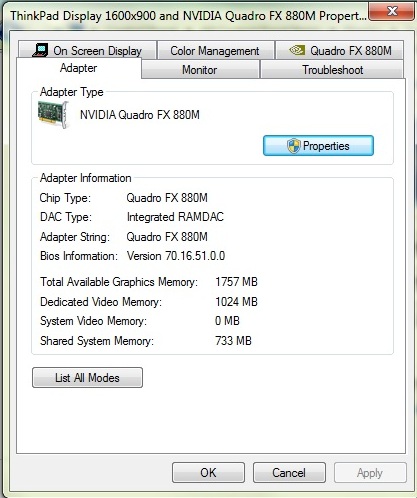
Hi my BIOS is 1.9 and I would appreciate very much if someone would look up what is their VIDEO BIOS ver. if they have
Previous BIOS to this one. information is located @(right click desctop)> Personolize>display>adjust resolution>advanced settings>adapter. mine is 70.16.5f.0.a
Has anyone benched their SSD drives yet would be nice to know the results mine is playing up showing 170 read when it should be atleast 230 thought may be some controller limitation again , anyone? -
Usually it is always the cheapest way unless the user explicitely chose the more expensive option. In this case 2 x 4GB is $350 more expensive than 4 x 2GB in Lenovo's online shop.
So I would assume 4 x 2GB. -
I've had my W510 (FHD w/multitouch) for a month or so now and I'm pretty impressed, but haven't used it as much as I wanted since I'm primarily a Linux user and ordered it with the 6250 WLAN/WiMax card. WARNING - If you want to have wireless with Linux DON'T order this card. Intel hasn't released the microcode for it and probably wont until at least 3rd quarter. However, if you did make the mistake, for about $140 you can get a brand new 6300 card from IBM parts in a day. I just installed it and it works great.
I have most things working, but I haven't found anything on the touchscreen. Does anyone have the touchscreen working with Linux? I've looked at the minimal stuff google has turned up for Linux touchscreens but nothing seems to fit/help. Any hints from someone that has this working?
I would like to add that I got the multi-touch out of curiosity, but the little I have played with it under windows I think it will be a great thing to have and was surprised how useful it was under windows. -
(right click desctop)> Personolize>display>adjust resolution>advanced settings>adapter. mine is 70.16.51.0.0
With bios 1.15 -
Thank you!
-
a question about RAID
Did anybody actually set up RAID in W510 ?
I noticed, that internal controller is SATA 300, while hdd adapter (43N3412 Hard Drive Bay Adaptor) is only SATA 150. Does it matter for RAID?
andy -
@aklosak
Check out this thread on Lenovo Forums:
W510 & RAID 0,1 - lenovo community
Net-net is that if you didn't specify you wanted RAID when you ordered, it's not going to be possible. You will have to have the system board replaced. Also, you will permanently loose the use of your DVD bay, meaning you'll need an external one if you ever require such media. -
thanks for the link
well, if that will be RAID 1 (Mirroring), I think I can unplug one disk, connect DVD, install the appl, disconnect DVD and plug the disc again. I only need RAID for safety. But I totally agree with you, that with RAID 0 (Stripe) you lose DVD bay forever
anyway, thanks for the info
andy -
ok i have done,....
updates fresh installs to try to remedy this http://forums.nvidia.com/index.php?showtopic=163489
was happy finding that I'm not alone lol though im trlly sorry for the other guy.
my ram was an issue, my ssd isnt up to speed, my grafix is choppy,my laptop has been to repairs already regarding screen problems and pink tint,.. so I think its obvious its the board that is PLAYING UP and Lenovo wasted allot of my time!
EDIT: some may find solution in this http://forums.lenovo.com/t5/T400-T5...lutter-when-in-power-saving-modes/td-p/216852 (not my case) -
I know this is frustrating but hopefully, you'll get it replaced and fixed.
-
Hi,
Today I received my W510 FHD and my first impression is rather good.
For those of you wondering.
eSATA works in 3GB/s mode
UltraBay III also works in 3Gb/s mode
I also installed 8GB of Crucial Memory (1333) and there are no issues so far, they are working just fine along with the preinstalled 4GB memory. -
Mine is the same, and the older BIOS as well.
Attached Files:
-
-
@ aiki and zorkmta, thanks
There seems there is discripancy in my situation where there is diffrent bios ver displayed in both the W7 info box and using the Nvidia info linc (located at the bottom left corner of the Nvidia ctrl panel)
Looks like they updated the BIOS and video BIOS along the way (im the one who took the bite with thinkvantage updates)
and here is some of the manifistations , mind that if you go into Maximum performance it drastically reduces such effects but flash based pages may just freez intermitently I realy hope they got ways to adress this issue without me sending it or them sending for it.
again thanks for pining it , BSOD I had may have been related to this.
![[IMG]](images/storyImages/Untitled.jpg)
Lenovo W510 Owner's Thread
Discussion in 'Lenovo' started by ZoinksS2k, Jan 22, 2010.