Problems? See this thread at archive.org.
hey owners can you comment on real life situations battery life? thanks
-
-
About 3.5 hrs with a 9-cell battery with 10/15 brightness while browsing the web.
Look here for a full review
-
Just curious, what BIOS update method do people most use? I've used the bootable CD because I've heard and seen problems with using Windows BIOS update utilities. My brother bricked an ASUS motherboard using their activity. The update utilities are more convenient though. Just curious if anyone has any problems using Lenovo's, or if they are doing it by CD.
-
I was going to do it via a bootable CD, however when the ThinkVangtage Tools told me there was a BIOS update I went ahead and let it do its thing. Didn't have any problems for me.
-
my w510 7gb ddr3
Attached Files:
-
-
Just a warning for people. I saw that there was BIOS 1.20 listed on Lenovo's website and attempted to install. The only option was the update utility...no bootable CD option yet (it links to 1.19). I ran the update utility, it successfully updated, and when I restarted my computer to complete the BIOS still showed my 8GB of memory installed, and Windows did too...except that I only had 3GB usable. I tried a bunch of things to no avail. I just reverted back to 1.19 via CD and the 8GB is back and usable again...which is good. Is it a glitch in the BIOS? Was there some setting I was supposed to try? Has anyone else installed 1.20 and had any problems?
-
I haven't tried it yet, but you can get the bootable CD version here:
http://download.lenovo.com/ibmdl/pub/pc/pccbbs/mobiles/6nuj15uc.iso
I just changed the URL for the old one from 14 to 15 and it downloaded fine for me. 6nuj15uc.txt will give you the release notes for that. -
Cool...got it...although I'll wait until after a final exam tomorrow (I need my laptop) before trying. It doesn't like it fixes any issues that concern me. If anyone installs via CD or utility, with 8+GB of RAM, please post if you had any issues after.
-
You rock dude heres why,
![[IMG]](images/storyImages/Untitledl.jpg)
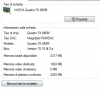
W510 BIOS 1.20 and the BIOS of quadro FX880 now.
ah and wow theres WAY less lag everywhere not sure about the 8Gb accesability issue as I am waiting for Kingston to send me replacement ram (non hynix) Which they kindly agreed to do
so their support is as great as ever.
SSD reads less thank it should but writes as it should strange... -
Any more info on FHD availability? I honestly feel like I should just wait for the next model update at this point. Lenovo is still saying "end of the month" which is the same BS I have been getting since February.
-
There's a rumor that the screen shortages will be over by the 20th of June.
@Tyrell Corp,
Glad to hear there's an improvement!
Good job! -
Anyone able to get this machine to Sleep and wake up with no problems in Linux?
-
Yes. The only problem should be the xhci (usb 3.0) module.
-
My FHD W510 arrived this afternoon! Yay... very nice build quality!
-
Recently stumbled upon xhci causing suspend issues and have added SUSPEND_MODULES="xhci" to /etc/pm/config.d/unload_modules. Now I think Sleep/resume is working... funny thing is, this xhci didn't show up under lsmod even before adding this entry.
-
Try checking the many vendors out there. The benefit is they already placed their order days or weeks ago, so the wait might be shorter -- or none at all.
I read the tabook.pdf to discover the configuration best suited for my needs (model 4319-2RU). Then I plugged that number into Google: regular search, product search, with dash, without dash, etc. For each vendor that I found, I checked the stock levels listed on their site. Most had the model backordered, but a few were listed as in-stock. I called each of those to verify, and found only one vendor with actual units available to ship: Laptop Authority. They seemed nice enough on the phone, so I pulled the trigger. By the way, looks like they have four units still in stock.
That was three days ago. Yesterday, my W510 and UltraBay caddy arrived. Today I'm upgrading, installing, and testing.
I'll post some more detailed thoughts later on, but my initial reaction is one of satisfaction. I had some apprehension about the multitouch screen given prior owners' comments about graininess and the 242 nits brightness spec (...I like 'em super bright). Fortunately, neither of these will be a big deal. The graininess is certainly there, but it's almost impossible to detect from a normal viewing distance. The brightness is at the very minimum of what I consider adequate for indoor work. But it's still adequate.
DISCLAIMER: I am not associated in any way with Laptop Authority -- just a happy customer. -
Yeah I,m super happy myself that after this BIOS re-flash all started and works
ATTENTION (don't be lazy)
BEST WAY IS CD BIOS UPDATE.
that's of-course if your burner is not damaged in anyway etc.
it is HIGHLY UNRELIABLE to use the windows exe variant of it.
of my chest phewww -
Well I contacted Lenovo again with two issues.
1) I've tried the 1.20 BIOS update with the bootable CD and it still fails, disabling all but 3.06GB of my 8GB memory. I even tried initializing the BIOS by setting factory defaults before loading into Windows. Reverting back to 1.19 restores the memory so I'm not sure what the issue is. The case is documented and someone at Lenovo is supposed to look at it.
2) I tried using Lenovo's Backup Program to make a backup on an external hard drive. I was away from the computer and checked the box to shut the computer off when finished. When I came back and saw that it was finished (computer was off) I turned the computer on. I found that there was no backup on the external hard drive and that my internal hard drive was now showing an additional 100GB used. I tried to find where the file(s) went that was taking up that space to no avail. When I opened the recovery system again it found no backup anywhere. I enabled viewing hidden files, system files, etc., and could find nothing. Not sure what happened but tech support told me to do a factory restore again. I just completed the factory restore (basically a reformat and install I guess) and am running the free McAfee online virus scan to see if there might be a virus or whatever. I'll be spending tonight reinstalling programs, and will probably remove most of Lenovo's software. Great machine but frustrating. -
Hey Aikimox, can you comment on the gaming performance at all?
-
When the machine goes to Sleep, is there a way to tell that it is indeed in this mode? Using the Sleep option while in KDE, the system seems like it is going to Sleep yet my file transfers are still happening... that means it's not sleeping correct?
-
The card is powerful enough to run most latest games at medium-high-max resolutions and generally, I'm satisfied. But it can't compete with a true gaming rig like AW M17X.
The HD+ screen of my W510 probably has bigger response times and thus the gameplay isn't 100% smooth. I still don't know if it's a driver, screen or the fact that FX880M is a pro and not a gaming card.
I'd rate the gaming performance: 8/10
The image quality/smoothness in games: 7/10
Temps while gaming: 8/10 (no critical temps reached) -
Same here, after update BIOS to 1.20 usable memory change from 7.2 gb to 3.06 gb. Flash back to 1.17 solve the problem. May be we should wait for the next BIOS.
-
Call Lenovo and report your issue so they know that it affects more than one computer.
-
yep I'd agree with Aiki, some stutter in games is evident but 1.20 made it much more smooth, im currently sitting on my SSD to compensate for the 6GB missing in my banks so i am-not able to confirm the accessibility probs.
so far so good.
temps are lower BTW than with previous ver of BIOSes -
So according to you Lenovo "fixed" more than the changelog in Bios 1.20? I did not upgrade because it did not seem worthwhile. So far I am happy with the W510 GPU, I did expect some more horsepower from the Core CPU. However lower temperatures and a smoother system sound really like a good reason to update.
PS: "fixed" includes that obvious RAM bug. Seems Lenovo does not test their Bios releases as thoroughly as they should. I still remember the missing activation bug a few releases ago. -
Hold your horses , I suspect that my lazy way updating from 17 to 19 went somewhat badly. and I decided to flash it using CD (as I should) at the same time kind man gave us the working link to 1.20 and so I did it.
it fixed the strange bugs I had which I traced to GPU bios being bad, and as soon as I flashed the new bios using the CD this time around I have noticed that the BUG was almost Gone, I still get what i posted on the picture but only in some instances ,say when i remove the Nvidia driver completely. I dont have my second w510 with me but when I get my hands on it ill compare both side by side since later is practically a virgin.
regarding temp starting from 1.7 I have noticed that its not getting that hot anymore, but that also could be that I have done all updates and patches available as from SoftyGates and lenovo updates direct. but I shal seek forgiveness for my possible ignorance in bios influence on temps but I believe that 1.20 in my case reduced them noticeably when idle its practically cold even though I set it on max performance due to the video stutter bug EDIT: it might be my ssd and absent 3 modules
ADD-IT: I,m pissed beyond belief, stutter is back and its mostly with HD videos and AVI files (Most important to me) whenever they are one over the other,basically any overlay cousess fram drop effect, I suspect the MoBo-GPU is at fault. LENOVO HERE I COME AGAIN! -
Anyone have any advice for using the Lenovo Enhanced Backup and Recovery program? The last time I tried to use it and have it backup to WD Passport external USB drive it didn't complete properly, I lost 100GB of internal hard drive space and just got done doing a factory reset and installing software again. I do want a backup though. Can you choose a directory on your hard drive for the backup and once done, simply move it to the external drive? I just don't want to have to go through another factor reinstall. Would using Windows Backup be a better option? at least if something went wrong down the line I could just do the factory install again, and then use Windows to restore the backup and everything would end up correct...or am I wrong?
-
I haven't used this tool, but in general it's better to stick with more standard backup tools. Win7 backup tool is quite good, so I would recommend that as the free option. Custom stuff that is distributed by one vendor is likely to have problems, and more likely you will not be able to access the files by any other program further down the line. At least with the Windows one, you can always get to them from a fresh Windows install.
-
Then have to avoid Bios 1.20 with ram issue..
-
A word of caution!
Every BIOS update should be handled with caution. As Tyrell noted, it should be done from a bootable CD/DVD/USB and not from within windows.
Go for it only if you really have serious issues and know for certain that the new version addresses those!
Otherwise - skip it. Bad BIOS flash is the fastest way to brick the system beyond repair.
It's almost impossible to expect that Lenovo or any other company will test all possible scenarios and all driver combinations to ensure 100% stability. That's why many companies buying business laptops will have to allocate their IT techs to verify what works best with their software/hardware needs.
For us (end users) it's always best to play it safe. If it works ok - don't break it
Same for the drivers (especially chipset and video). In many cases there's a specific order for installing drivers and it should be followed to reduce the risk of unnecessary windows re-installations and possible data loss.
This subject is very extensive, but in general, do not jump on the newest drivers/updates unless you're eager to be the guinea-pig.
Just 2 cents here, of course.
-
Do you use the original graphich driver from Lenovo? Because so far I only experienced drivers crashing when using the beta drivers direct from Nvidia. Those did help a lot with performance so I stick with them. I can live with a few crashes every couple of days (haven't even been that bad). I did not had any video playback problems so far. I am using KLITE Codec pack and Media Player Classic. Seems as if most videos are rendered (at least partially) by the GPU. I really hope your problems get resolved soon!
Good post but the last few issues should have been discovered even with minimal amount of tests. Missing the complete activation and half of your RAM is really a big and serious problem. It happend to a lot of people and it seems it was not some small bug for only a handfull of users. -
Looks like 1.20 got pulled... Anyway, what do people have for the CPU temps when idle? This morning my system was around 50C in an un-air conditioned room, with it hitting around 60C a day or two ago under load when it was around 90F outside.
-
Yeah, that's a serious enough issue to start worrying.
Those temps are fine. Generally 30-50C idle and up to 85C when @load is acceptable for the i7 quads.
You could lower those by up to 10-15C just by applying a high quality paste. But I see no point, really, unless you're very confident in your skills. -
With Bios fan control ~45° with Smart settings in TPFanControl ~65° (basicly the fan is off) during normal workload (idling, surfing, office stuff). During load heavy work I use the Bios setting and the temp rises to ~70°. The maximum so far which I reached was 85° CPU and 82° GPU while running Furmark and Prime95. I guess if I would let that config run longer it would rise even more.
-
The only reason I'm sticking with the Lenovo Nvidia driver is that they work with the display with respect to keeping brightness settings. I tried the 197.16 drivers on Nvidia's page but everytime I restarted my computer the brightness was automatically reset to maximum no matter what power setting I had. I didn't want the maximum brightness so I reverted to the Lenovo version, which are actually old (I think they are 188.xx). When a higher verstion that supports retainment of brightness settings comes out, I'll switch, although I don't game, so performance has been fine so far.
-
Without gaming I would also stick with the certified Lenovo driver. My brightness settings stick with the beta driver 257.15_notebook_winvista_win7_64bit_international_beta (at least as far as I remember) the only downside is that I don't see the on screen display while changing brightness.
-
Those temps are perfect for those tests. I've seen 85C during long hours of gaming. Even my AW sometimes lets the GPU's hit 80C+.
-
Can someone do a quick check on the bottom of their W510? On the side where the media bay is (right side when looking from top) there are two screw holes right near it on the bottom. A small one on top and a slightly larger one almost directly underneath. Can someone check and see if there's supposed to be a screw in the larger hole? I see gold threads but no screw and I want to make sure that when I sent my machine in for screen repairs that they didn't forget to put in a screw.
-
Same here.
-
@ system fehler
no screw , its normal.
I'm currently using Nvidia 8.17.11.9716 driver
MPC kicks of VLC in terms of home cinema but it opens with blocky delay
and when I move window with a clip playing in it over any other it has the laggy trail at times and sortof jumps, d you get anything similar?
I have checked inside to see if there was overheat issue but it looked clean and clear inside. no discoloration,nothing. I done it to put my mind at rest and see if
there was anything nasty showing. I have also used the oportunity and applyed the MX-3 EVERYWHERE lol Swiss made :b should do the job
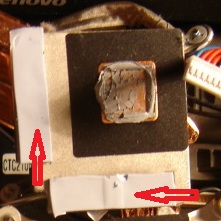
here is the picture from our friend -not me
also my friend says compound was gray but very dry.
this is how your heat sink will look (dry,and we dont like dry)
![[IMG]](images/storyImages/DSC04997.jpg)
![[IMG]](images/storyImages/DSC05011.jpg)
We like it wet-wet-wet (not really more like guns n roses)
DO NOT DO IT if you dont know what you are doing.
didnt make pictures of how I placed cooling pads back and reversed them so they would have better contact (and they do temps drop 11c) in Fur mark I,m hitting 70 now instead of about 75-80c
NOTE I have used
non corrosive
non-conductive
non-curing
non-bleeding
COMPOUND
if I didnt have it I wouldnt do such extencive ~~spreading -
NICE! How long did it take you to disassemble, apply thermal compound, and reassemble?
-
@ Tyrell,
Nice work, but...
( please don't be upset with what I'm about to say)
Two very dangerous things were done here:
1) This is way too much paste, the excess might (and most likely will) bleed and create a lot of mess on the chipset/mobo. You're lucky that MX-3 is non-conductive, otherwise you could easily brick the system. It can still happen because we don't really know the exact level of their "non-conductiveness".
2) Never apply paste on GPU memory chips! This is the easiest way to ruin the card. Those are too sensitive even for a non-bleeding and non-conductive paste. You should use high quality thermal pads only!
Advice:
If it's not too late, try cleaning everything and reapply the paste on the CPU and the GPU core only, using the grain method or spreading and creating a very thin layer of paste.
Order the bergquist thermal pads (0.5-2mm thick, just to make sure you cover the possible gaps) for the memory chips. BTW, when you replaced the paste did you see some pads on the mem chips or were they pasted?
The whole operation might have voided your warranty if you ever need to send the system to Lenovo for a mobo replacement.
Don't hesitate to ask if you have any questions.
Good Luck! -
I have to agree here. You always want to use as little paste as possible. The ideal situation is that you use no paste, but physics works against you here as there are microscopic irregularities in the heatsink and chip. The paste is only meant to fill in those spaces to allow better microscopic contact across all surfaces. You should have only a razor thin layer on top of ONLY the chip, and not the surrounding packaging or pins.
I do, however, admire your enthusiasm. -
From the attached pic you can clearly see the GPU memory thermal pads (white stripes). So, clean the paste of the chips and place the stock pads back. Again, paste is only good for the crystal/core of the card.
Attached Files:
-
-
What they said. Your best conductor is
1) Copper
2) Thermal paste
3) Air (between the copper and cpu).
The point of the thermal paste is simply to get rid of the air. Anything else is worse for performance. Only a super thin layer should be applied. -
I'm following up my own quetion. I was using Fedora 12, since 13 was not out when I got the machine. I decided to give Fedora 13 a try tonight, a low and behold, right out of the box the touchscreen works.
Also, several people have reported screeching sounds. When I replaced the 6250 WLAN/Wimax card with a 6300 when I put the system back together I had a horrible screeching sound. I took it back apart and powered it up while disassembled to see where it might be coming from. I never identified the source, but by lighly pushing on the connectors for the WLAN antenna it stopped. I reassembled and haven't heard it again. Is it possible not having the attenna wires well connected might cause the noise? Or is it that something else is just close to the WLAN card that is really the source of the sound? -
its shouldnt be "nice work" if you think it isnt, since I,ve done this with multitude of laptops. it should be instead
THANKS FOR SHOWING US AFTERALL THE ISIDEs THAT YOUD NEVER
TOUCH AND ONLY THEORITIZE ABOUT
its not single core and you need to be sure its all over the place since underkill here will be fatal
you guys talking about this I think http://www.youtube.com/watch?v=EyXLu1Ms-q4&feature=related
ouhhh steam out im calm.... I'm calm.... non need to ban me lol
it takes about 20 minutes to do this. -
You seem to be talking all over the place here, but whatever point you're trying to make you're just off-base. Whatever you mean about liquid vs. solid, all thermal pastes are liquid. OEMs use pads which are really just a quick way to apply a liquid from the factory, and frankly those things suck.
It's trivially easy to apply a thin coating of the paste to chips, and you do not need to be a robot spraying 2 atoms worth of paste as you seem to be implying. You put a drop of paste in the middle of the chip and spread it out using a razor blade. Very easy.
Also, just because you've done it on many laptops doesn't mean it's the correct way. "Bricking" isn't the only possible outcome, and while your method may not cause obvious harm, if you are showing people how to do something it should be the right way.
I have done this on many laptops, desktops, and even on a self-built water-cooled desktop. A thin layer is the correct way. If you don't believe us go to any web site for paste manufacturers, like Arctic Sliver, and they will say the same thing. -
^^^ Yep,
Tyrell, no need for the outbursts. We've done this before many times and say what we say not to poke but to help you and others to properly do it.
I shall repeat,
You should never apply thermal paste on the GPU memory chips or combine paste+thermal pads on those! If you wish to improve the cooling - replace the stock pads with the highest quality ones.
With the amount of paste you applied to the CPU/GPU core, pressure will squeeze most of it to the chipset/motherboard! Just open the system again and have a look.
BTW, that video is very good, that's the correct way of doing it. But you applied 10x more paste, 9/10 of which is gonna get to the mobo circuits and if not brick the system, greatly increase the chances of failure later on. -
WHOA!!!! MY EYES DO NOT BELIEVE..... I see FHD AVAILABLE on Lenovo's site!!!!!!
Lenovo W510 Owner's Thread
Discussion in 'Lenovo' started by ZoinksS2k, Jan 22, 2010.