 Problems? See this thread at archive.org.
Well you arent going to find anything else for cheaper. There is the Intel 40GB. Currently with Office 2010 and some other programs installed, I am only taking 25GB up on my SSD. After tweaking and my initial install, I was only around 18GB, so it is possible to do on a 32GB or 40GB.
-
-
Folks, any insight would be appreciated: Here are my points on the Y470 I am looking at buying (trying to decide on the model).
1. I want the Y470 with the 2430 and Blu-ray, but the only way to get Blu-ray is with the 2670Q.
2. My concern with the 2670 is it consumes about 29% more power, runs hotter and drains battery quicker.
3. How well does the Blu-ray perform on the Y470?
4. Is the display good? Very important to me.
Again, if the Y470 had a 2430 and Blu-ray combo, I would not be debating. I am a gamer, but want to balance playability with portability (battery life). I gave my son my first gen M11X, since wanted more power and bigger display, plus the Blu-ray. But NOT pay out the wazoo for an M14X. Yikes!
Thanks! -
I got a Y570 with the i5 and Blu-ray...maybe just not possible with the Y470.
-
Ironic! The bigger laptop has the option, but the smaller does not.
How well does the Blu ray perform? -
I mean it plays Bluray fine lol. Smooth playback and all hooked up to a 1080p TV.
-
Just grabbed the deal on the intel 320 80gb for $80 after $50 Rebate a FIVE YEAR WARRANTY
Internal Solid State Drives (SSD): Intel 320 Series 2.5" 80GB SATA II MLC $80 after $50 Rebate, OCZ Agility 3 2.5" 90GB SATA III $85 After $20 Rebate + Free shipping - Newegg Deals, Coupons and Promos -
nvm figured it out
-
Awesome deal on that SSD, but that will mean you cannot use your hdd.
But after tweaking and having photoshop, office 2010, and BF3 on my SSD I still have 16GB free. -
Shoot, because its not msata, right? I think i will cancel and get this http://www.newegg.com/Product/Produ...ction-_-cables-_-na-_-na&Item=N82E16820227780
How big is your ssd? -
Agh, package was already shipped, I can live with 80gb, I did just fine with 120gb on my old laptop without even cleaning up much
-
i'm getting 95 degrees on cpu/gpu playing skyrim on lowest settings on my 23'' monitor
 is this normal? and is there any way i can bring the temps down? fans are on highest and i have notebook cooling pad.
-
Has anyone tried the Realtek RT5397 (3x3 MiMO) ? This maybe a noob question, but last I ripped open a WIFI card, I saw 2 cables for ... 2x2 MIMO ? Is there any point to getting this 3x3 card or would you have t o somehow add in a 3rd wire for the 3rd antenna?
Alternatively, I'm just looking for the fastest recommended WIFI card for the Y470. Any suggestion / comment appreciated!
Thanks!
-
Just a heads up for those that are experience
HIGH TEMPERATURES
Called the tech hotline at midnight and got Marge in Singapore. She said it's normal for the computer to be hot while playing games and didn't seem to know much about the issue.
So, seeing that Lenovo wouldn't look at it, I took the case apart after seeing 95*C on the i7-2630qm CPU!!! (mind you this was stress-testing). It was seeing 90*C while playing some games. Funny the GPU was always cool at 55*C.
Upon Inspection...
The fan and radiator was clean...so I decided to take the plunge and tear the bracing off to get to the CPU and heatsink (what warranty?).
The CPU was SMOTHERED in grease. No wonder it wasn't cooling properly at high load.
Anyway, I cleaned the CPU and heatsink off with the ArctiClean kit and applied some Arctic Cooling MX-3 grease left-over from last year. I used the "line" method with a 1mm streak of grease about 80% of the length of the interface of the CPU. I wasn't sure how much compression the heatsink would have on the CPU interface but it looks like this is enough grease to make a decent thermal transfer between the two pieces.
Factory Grease Job: 95C
Alligatorman Grease Job: 82C
Tested with Prime95 running 8 threads in "blend" test with HWmonitor. Fan was in "Efficient Thermal Dissipation" mode and power setting was "High Performance" in both tests.
Cheers
Nate
PS I'm running Prime95 as I type this. -
I'm trying to update the video drivers, but I see on Lenovo's site that the version numbers are like this: 8.17.12.6844. These are completely different from the version numbers on nvidia's site. So, what version is this? And is it ok to download driver from nvidia or laptopvideo2go?
-
Hi Everyone,
Just ordered my y470 (i5 version) and I've got a few quick questions for the group...
What are the best mods (hardware and software) to apply to the y470?
I figure I need to redo the thermal paste on the cpu (like alligatorman) and I need to get a msata ssd drive, but are there any others I've missed?
Anyone try undervolting it? or are there better batteries? (I take really long flights for work). Is there any good screen protector that can cut down on the glare? (they need to make matte screens an option).
Thanks in advance and I can't wait till the 17th to get my hands on it.
MXD -
Couple points:
1. For heat issues, the on site service is nice, since making sure the cpu is not being choked by grease would be something for them to consider. I say this on behalf of the less tech types.
2. If Lenovo offered the 2430 with Blu-ray, I would have already ordered. Seems ironic they are pushing the considerably hotter running quad in a 14" laptop, but no 2430 option. Probably due to profit margins, but still. I still have not ordered, since want Blu-ray, but do not want the heat and battery hit from a quad chipset.
The 2430 seems a perfect chip for this size device. Powerful chip that is better on battery and heat, compared to the quad chips. -
what if it's the gpu that heats up?? my gpu goes to 95ish on skyrim on lowest settings and 90ish with starcraft2 on lowest settings. I have this hooked up to a 23'' monitor.
-
The GPU uses a thermal pad.
What are the temps at idle?
My GPU idles at 37.
Maybe you should call Lenovo. -
I update my Y470 Nvidia driver, at the Nvidia update site. NVIDIA Driver Downloads - Automatically Detect NVIDIA Products
The current version is 8.17.12.8562 (285.62).
I've had no problems with this version.
I don't mod my laptop, so I'll defer this question, to someone else, who does. But, before you "mod it up", or delete any, what you consider "bloatware", create your factory recovery discs, right out of the box. I know I'll get flack on this, but it's much easier to do a restore if you create the image with all the original software, and drivers. You can always create another restore backup, after you are satisfied with the changes you made.
I only wanted to comment on your second statement, "I figure I need to redo the thermal paste on the CPU..." Please do your own tests. Don't assume your machine is "crippled" right at the get go. There are many do-dads for monitoring your temps, and GPU performance. Use them before you start tearing your system apart. I use the LTT (Lenovo ThinkVantage Toolbox), and the HWMonitor stress tests for performance, and temperature monitoring. You can download the LTT at Lenovo's support site. Just don't install the "Power and Performance" monitor, after you install the toolbox, unless you want to replace the Lenovo Energy Management software. I'm not sure how well these 2 power systems work with one another. You will have an option to ignore the warning given by the Power and Performance part of the LTT, after you install the main programs.
IMHO the main problem with some, not all, laptops is their portability. We buy them so we can use them anywhere we want to. In your living room, at your local cafe, or even at the beach. The manufacturers don't stress test their machines at the beach. They test them in a controlled environment. I'm not saying that's bad, it's just the way it is. Perhaps if they gave them some "real world" testing, they would be more able to prevent, and solve some of these performance issues. Still, I would not want to use my laptop exclusively at some of the greasy spoons around my area. Imagine how "greasy" the CPU would become!
Cheers
DragonRider -
can you please make a video or a detailed guide on how to apply paste to this laptop...i will like to try in the future when my warranty runs out...I am a noob btw
-
oooh yeaaa, I just joined the club baby and i'm lovin' it!
My clevo still works, but is pretty much a home desktop for internet use...
When school started up, I built a desktop that cost me a little over 1k, as you can see, but i still needed a laptop for studying, bringing my powerpoints to class, gaming while away from home, etc.
As soon as i got the Y470, i reformatted it onto a phoenix pro SSD I had from my desktop and BOOM; quadcore SSD laptop. BEST part, i got the sale a few weeks ago where it was only 750! Think starts up in less than 10 seconds, shuts down faster... pretty prime build quality as well. -
Lenovo Y480 looking mad sexy, GT 650m I believe
-
So I ordered my y470 on monday. I forked over the extra 70 or 80 dollars for blu-ray just because the ship date said 1/14 instead of more than 4 weeks(i really needed this thing yesterday). Anyway I check today, 1/13 and now it says est. ship date 1/19.. What the hell? Seems to be standard Lenovo bs. Should I be expecting further delays?
-
Bad news guys, I'm selling my Y570 and getting an Aspire 7750G. It's not that I had any problems with the laptop or anything, in fact it's the best 15.6" laptop I've ever owned to date.
However, the other fact is it does not satisfy my needs as a desktop replacement laptop and thus I needed to get something bigger.
I was looking into getting a DV7 but the configuration availability in Canada is next to none plus the one's that are available are overpriced and so I settled for the Aspire 7750G i5-2420M with HD-6850M model.
The 7750G is a very basic laptop both aesthetically and features wise but the performance (i5-2530M with HD-6850M) and most importantly the screen size should make it easier for me to work on.
I will be missing the the keyboard, touch panel, speakers (I can remedy this with a Logitech Z305) and overall look and feel of the Y570.
Most importantly, I'll be missing this Lenovo Y470/Y570 community support thread (Acer 7750G thread does not exist). It's been really fun and great helping others and getting help in return when needed on this thread. -
Traitor! lol No really, i hate to see you go Nemix. You were great with adding new drivers, bios, and just overall useful information. Thanks for all the great contributions throughout the threalines, and enjoy your new Acer!
-
I ordered a y570 on 1/1/12. Said ship 1/5, a few days later that changed on order status page to 1/11, then on 1/9 the date changed to 1/31. I called on 1/9 to find out what the heck was going on and was told that floods in Thailand were causing a hard drive shortage. I complained that i wouldn't of ordered if I knew it would take so long and also the sales page still was saying y570's would ship on 1/13. She finally said she could put a high priority on my order. I said thanks, my status keep saying 1/31 but then it shipped to me on 1/11 and I got it yesterday. Great so far by the way! Hope this helps anyone ordering.
-
I upgraded to Windows 7 Ultimate on my Y470. I want to turn on BitLocker but I am not sure if BIOS is TPM compatible. Anyone tried doing this?
Also, I need to use a smart card reader to log in to my work machine. Looks like Y470 does not come with a PCMCIA interface? I think I missed this detail when ordering the laptop. So, my only other option is USB smart card reader? -
@ Ideapad1
Thanks for the warm farewell, I'll still be around in NBRF mostly in the "Hardware Components and Aftermarket Upgrades" threads as the Acer threads are next non existence for my laptop.
See you around my friend.
-
Later man! You selling on here?
-
No probably try locally first, I like to deal with people first hand plus I don't have to pack it up for delivery.
Edit:
My last useful information for this thread. For anyone looking to upgrade their memory to 8GB or just want faster ram, I can confirm that Corsair's Vengeance DDR3-1600/1866 works as advertised on the Y470/Y570 and can be found for cheaper than Kingston's HyperX DDR3-1600/1866 plus they have faster timings.
http://www.newegg.ca/Product/Product.aspx?Item=N82E16820233242
http://www.newegg.ca/Product/Product.aspx?Item=N82E16820233243
Link to the thread:
http://forum.notebookreview.com/har...orsair-vengeance-cpu-z-jedec-screenshots.html -
Start your own Asus owners thread!
Before you go, I'm still on factory default what are somethings I NEED to update? -
What's the factory default model you have and how much you willing to spend on upgrades?
I can make some suggestions from there... -
Just got it 2 weeks ago, the lowest i5. Bought the intel 320 89gb
-
I just took out the old card and put the new one in.
I read in another thread that the bios already recognizes the 6205, i think the ones it doesn't recognize are the 6300 and 6250, most likely because they have bluetooth integrated into it too.
I got mine from Canada Computers | Computers, Computer Parts, Laptops, Hard Drives, PC Hardware & Accessories Sales, and no problems so far.
PS. Do I really have to change the network settings? Since the N1000 is also a Wireless-N card anyway right? -
Is the Intel 320 80GB installed?
Do you have a caddy?
How much ram do you have?
What's the default hard drive size and spinning speed that came with your laptop? -
Well this sucks. Trying to remove the panel and all the screws are doing this weird thing where I try to unscrew them, they make a click noise and then reset. Anyone know anything about this?
-
The screws do not come out all the way. They have little lock washers on them to prevent them from falling out, just loosen them all up and the panel will come off. It may take a little force as it snaps on a bit.
-
You're a savor
doing factory restore now
-
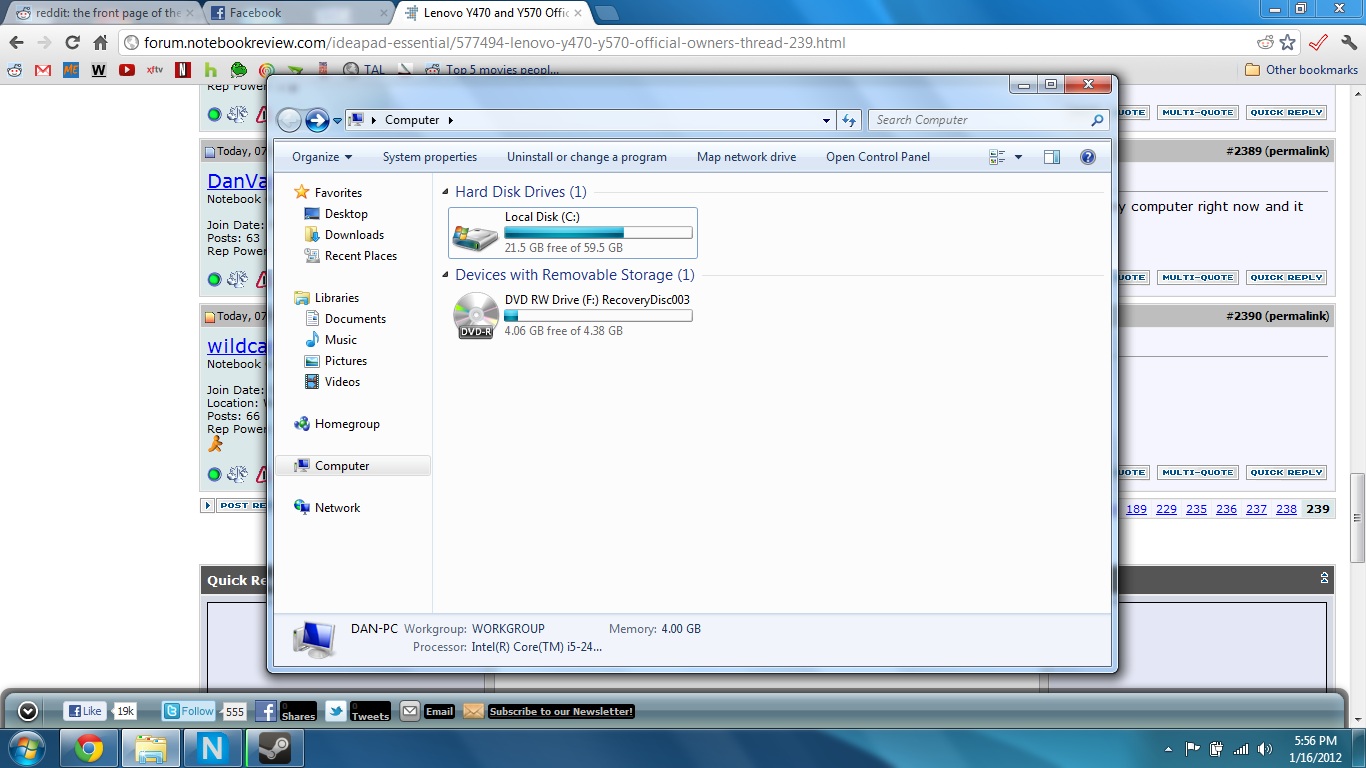
OK weird, on the instalation it said my hd is 74gb which is pretty standard for a 80gb hd but I'm looking at my computer right now and it says my hd is 60gb? With 30gb being the factory restore, what's going on?
-
Wait so you can only use 60GB? Or you have only 30GB available because of restore?
-
Here is what it looks like, fresh install. All ive installed are a few essentials (winrar gimp etc, 7gb total)
-
It's an 80gb HD, on win7 install it said 74gb not 60
-
Type partition in the Windows 7 search and run that program. It will show you how the HDD is partitioned. I bet you that there was a recovery partition that was created. Most likely 15GB which would be about right.
-
TBH I dont need a recovery partition I have these disks, can I just delete it?
-
Im assuming its safe to delete
How to delete OEM Partition | Jared Heinrichs -
Absolutely. That is there really for Lenovo's One Key Recovery. Get rid of it.
-
Awesome thank you so much wildcard
-
1 second..
-
Awesome got it sweet
-
Hi Folks, sorry for the repost in case this got lost. Has anyone tried bitlocker on their Y470? Thanks!
Lenovo Y470 and Y570 Official Owners Thread
Discussion in 'Lenovo' started by nightspearx, May 10, 2011.


