Problems? See this thread at archive.org.
I made this DIY cooler for my y570.
trust me guys, on this thing it never heat!
The huge fan is only to reduce the temperature when it gets too hot because it is too powerful and it makes too much noise.
But when I use every fan on this thing, the temperature go down 10 degrees.

Photo Album - Imgur
Photo Album - Imgur
![[IMG]](images/storyImages/2Alkbh.jpg)
-
How are you powering the fans? Desktop PSU?
-
It runs on 12V as these fans are 12vDC fan.
whole thing consume about 2-3 AMP when the big fan is working.
The fan in the center consume 1.6 AMP on 12 VDC = 19,2 WATTS.
This thing is NOT portable, you can but it is : Ugly, Big, need a 110V plug.
BUT, Nothing is comparable to this, no laptop-fan-cooler can beat this, it is just too powerful.
Basically, all you need is a 12vDC Converter with more than 1 AMP. (<1AMP is ok if you have small fan)
You can check all of your Converter at home and look at the output line, should be 12V.
Input is 110v.
** Sorry for the bad english syntax and sentence structure. -
If you guys want to make one and need more explanation about current and stuff just ask me.
Whole thing cost me 3$...
and it works way better than everything else. -
You guys overeclocking? I have a 470 with a 550 in it and have no sense of need to augment the cooling. I run Saints Row 3, BF3 and other games.
Seems best to just have a desktop than go through the trouble. Interesting, none the less!
-
I never need to cool my y470 either. It seems most of these graphical issues/cooling discussions are centered on the y570.
-
Lenovo Z570 has had a successful i7-2630QM 2.0 [email protected] DIY eGPU implemented via the wifi mPCIe slot
Lenovo Y470/Y570/Z570 owners might be interested to know a fellow owner has successfully attached a GTX560Ti DIY eGPU via the mPCIe wifi slot to his Z570.
3dmark06 result is 17896
3dmark11 result is 3751
See details at http://forum.notebookreview.com/8333313-post8587.html and http://forum.notebookreview.com/8342495-post8663.html . -
Anyone figure out how to dual boot Windows7 and Windows8? I am trying to extend the System Reserved partition, but am unable to do so. I believe RapidDrive is interfering somehow.
If anyone was able to do this please let me know how. -
I have noticed the 570 heat trend issue too, but wonder if linked to people overclocking.
BTW, was surprised Lenovo has not made more of a push to place these models in channels like Best Buy, but apparently a margin issue. If Lenovo sold the 470 and 570 through these type of retail channels, the prices would be considerably higher due to the middle man involved. Then again, Best Buy makes their money on warranties, so maybe that is not the answer. Shame consumers are duped into paying more for less features, since most retail consumers are not aware of the 470 and 570.
None the less, good luck finding a 14", 2670QM, 550 level gpu, 8GB, Bluray, great speakers, great cooling system, bluetooth, eSata, mSata and three year on site with accident for $1,050 delivered price from anywhere else but Lenovo.
That combination along with cost does not appear to exist anywhere else. -
I assume people are playing Battlefield 3, and Star Wars: The Old Republic.
Will the Y470 i3 version run these (mainly SWTOR), or should I opt for the i5/i7? (Will have 8gb ram in whichever I get) -
Suggest getting the 2670qm, if you are a gamer and the 8gb.
-
I had to use a third party disk partitioning tool to create a new extended partition after shrinking the partition where my C: drive was located.
However, I'm still trying to figure out how to install the CP on the newly created partition. I told the setup program to install to a flash drive, and now have the CP installed on an SDHC flash card. Unfortunately, there seems to be no way of installing to a new partition other than booting from a dvd or flash drive. If I try to install from the flash drive from within Win 7, it wants to overwrite my Win 7 install even though I told it I wanted to install on another partition. Also, the Y470 does not appear to support booting from an SDHC card, so it looks like i'll need to burn the ISO to dvd instead and try booting and installing the CP that way.
Edit: It worked, Win 8 CP recognized that Win 7 was already installed and created the additional entry in the boot loader, so now I can dual boot. They sure didn't make it easy though. Guess they figure that if you're gonna tinker with a beta product, you should know your way around a computer. Either that or they were just lazy
-
So I will notice a difference with bf3 or swtor with the i3 vs the i7? The i3 is super cheap right now refurbished.
Sorry if this has been asked a hundred times, but I have to use a screenreader due to medical issues, and reading all past posts would take forever, -
Newer games with a lot of AI and physics will benefit from the quad core, but not sure if worth hundreds in price difference (probably not). I got my 2670qm version new and with three year warranty, since expect to replace my three year old desk top with it and wanted Bluray.
If this is a secondary computer for you and the i3 can be got on the cheap, harder decision. IMO, go for the i5 if close in refurb price. Be careful though, since some of the 470's sold as refurb have the 520m GPU. That is less than half as powerful for games as the 550.
Added:
I see your point. I would probably go for this for a refurb:
http://outlet.lenovo.com/laptops/0855xf7.html -
I am interested in running dual 23" monitors off my y470 1920x1080 each. Obviously I can easily run one off the hdmi, I was wondering if anyone had success achieving this with an external video card or something along those lines?
-
You are right, no shop around here can make the same deal. It is just impossible.
-
Thanks Rushmore, ordered the i3 today, Ill post later with how it runs SWTOR etc
-
I am considering this laptop. I have the dm4-3050us right now with i5 2450m, 6gb ram, USB 3.0, 750gb hd, integrated gpu. Got it for $495 after tax and rebate.
I play world of warcraft mostly and have been really wanting a dedicated gpu since I bought the dm4 and I have time left to return it, so my question is, will I really notice a CPU performance loss with the i3? I feel that the i3 might be a more balanced system for my needs, other then gaming on wow, I just open alot of tabs on browsers and do Hulu and netflix.
Thanks, any help would be VERY helpful at this point. I've just like 2-3 days left to return this thing if I decide. Also is refurb something that should concern me? I got my dm4 new, but hp quality isn't up there and I feel like it would fall apart well before this Lenny. -
I went with the refurbished and can't tell that it is not brand new. I am glad I saved money with the refurbished. As far as the cpu, if you mostly play games the major bottleneck will be the gpu. An i3 is more than capable to do the other tasks you mention but would also recommend swinging for atleast an i5 because it will be alot more future proof and stay current longer with next gen software and games.
-
I have an i3 and have never noticed it struggling to do anything. I've run multiple spreadsheets, multiple video feeds, and plenty of games.
-
I went for the y470p for the i7, 8GB and decent graphics card, and I doubt I will have a single game on it.
I wanted it for programming, went for best video card I could find on a 14 inch without spending over $1000, as that is the only part that won't be upgraded, so made sure it would last me at least a few years.
screen size was my biggest decision honestly, I didn't want a large laptop, in fact I actually went to Walmart and compared the size to see which one I'd be comfortable with as I plan to be bringing this with me a lot, and 15.6 inch, seemed a little more than I needed. I was worried about the 1366x768, but after seeing that resolution in person, didn't seem that bad and if I was at home, I can just hook it up to my 23" monitor.
I just can't wait for it to get in and toss in a fast 64GB SSD(I've only used 34GB on my hard drive so far) and see how my compile times are in Visual Studio. I've tried to convince my work to use SSD on our workstations but they require hardware encryption on my hard drives, so this would definately be a nice machine for what I need it for, games.. thats whats my xbox is for..
I just need to get the laptop out of my mind or this will be a very long wait. -
I bought my Y470 in July, wrote a bit in this thread back then, and am just jumping back in now without time to read through everything, so I am curious about this 'heat trend' and if any one else has noticed a rise in average temps over time.
About a month or so ago I noticed a jump in my average running temperatures; previously, running on the 'balanced' profile in Win 7 doing standard web-surfing, office stuff, my CPU stayed under 40 C, and with the fan in 'super silent mode' it pretty much never came on. Now after an hour or so of activity the CPU stays in the 55 C range and the fan is always on.
I got a 'laptop cooler' stand thing, but this only dropped the temperature a few degrees if at all. I'm starting to think now about reapplying thermal grease to the CPU, but find it kind of scary. Anyone have experience with this process?
Oh and I haven't done any overclocking. -
Seems more people with 570s mention heat issues. Though the longest I have played a game like Saints Row 3 is about two hours, I have not felt the need to use a cooling pad. Just a solid flat surface and a clear path on the left.
Added:
I would not have the device in my lap unless in HD3000 mode. -
My temps have been the same since I got it. I play a lot for hours on end and I have never had my fan on anything other than Efficient thermal dissipation. Sure it winds up some times while browsing but I do not mind. During gaming of course it is going all out, but that is a good thing. After a couple hours of BF3, my CPU temps were in mid-upper 80s and GPU was around 73c. I will re apply thermal paste if I need to. Just make sure to keep the exhaust vent clear and when playing games, put that fan on max.
-
I'm getting really stressed, the right hinge on my y570 broke or is in the process of breaking I should say. I brought it to a local company that was listed as a warranty service provider on the Lenovo website but was eventually informed by them that Lenovo wouldn't authorize them to fix it.
-
Need help with the Y570 thermal management
-
Call and speak with Lenovo about it to get why.
I got the three year on site, since did not want to mess with the hassles, but them coming to my house and saying no, or me going to a repair center and them saying no is the same result: "No". That said, mine includes accident, so perhaps it would be.....
How did it get broken? I am not seeing any problem with the 470 as far as potential hinge issues. -
Guess I can't get help here, can I?
-
You should probably state your problem and someone may then be able to answer you.
Sent from my DROIDX using Tapatalk -
What do you mean when you say you need help with thermal managment? That is very vague. Do you have the software installed? Is it not working right? Are you overheating?
-
I was considering the Y470p with the excellent sale going on right now but after looking at a ton of pictures, I get the impression that it's kind of plastic and bulky. Can anyone comment on the feel of the chassis and solidity of the laptop? How does it compare to the Thinkpad line in look, feel, and use? Sadly I don't know anyone that has one so getting my hands on one for a firsthand review isn't possible. I imagine that it is very similar to the Y470, so experiences with that would be helpful as well.
Thanks in advance! -
Others can probably be more descriptive, but I would agree the y470 is mostly plastic and bulky in comparison to modern, sleek laptops. It's not a tank like a Thinkpad, but it's by no means flimsy. I chose function over form with this one and am happy with the decision.
-
Compared to similar spec products with 14" display, the 470 is not bigger.
The 470 is designed as is to accomodate the specs. The cooling system alone takes some space. How is there more bulk compared to other devices like this with a GPU, quad core and dvd/bluray drive? Asus, Dell and Alienware offerings are the same or bigger. Key is the GPU. Easy to make thinner if just using the chipsets HD3000, or a lower powered GPU (like in the HP and Sony series 14").
Seems the perspective is not apples to apples. Of course there are thinner devices with less specs in regards to the GPU and an amazing sound system.
As far as the build, seems no better or worse than other offerings, besides the T series business lappies, which are also Lenovo products.
If you are a gamer, the 470 rocks. If not a gamer, I agree the 470 may be overkill. Still, show me anywhere else I can get a well made 14" display, great sound, 550m gpu, new quad core, bluray and three year accident and warranty for $1,050. Nowhere. Closest margin is $300 higher and no Bluray, weaker sound and gpu.
Added:
If I were not a gamer or did not want bluray, I would have bought an ultrabook. -
I agree - the y470 is designed to accommodate its specs and does it well. The cooling system is fantastic and the ultimate reason I sold my Sony Vaio Z for this laptop. I didn't mean to imply it is unreasonably bulky. It simply isn't 'sleek', if that's what Maelwys is looking for.
-
Can anybody help me with this problem? I'm still being affected by it.
-
Karnovaran and Rushmore: thank you for the feedback. I also didn't mean to imply that the chassis was unnecessarily thick - I was just trying to get a sense of the hands-on feel and heft as compared to something with similar specs that, granted, might cost double what the y470p does. I'm quite willing to pay a little extra to get the power in a sleeker package, especially one that has a more professional exterior look. My job as a traveling strategy consultant requires that my clients don't think I'm using a gaming machine, even though that may be part of its duties.
For reference, I'm replacing a dying Dell m1330. If you're familiar with that machine, it blends brushed aluminum with matte black magnesium to get the ThinkPad look without the austerity. I'm hoping to find something more like that.
Cheers. -
All good and understood!
-
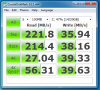
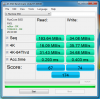
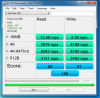
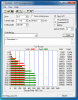
I just wanted to post up some results of my new SSD. I returned the MyDigitalSSD 64GB and exchanged it for a Runcore 30GB T50 (6GB/s). Here are some initial benchmarks. Not the most impressive but way way better than the MyDigitalSSD. System boots and runs extremely fast. Just wanted to point out that before, my WEI with the MyDigitalSSD was 5.9, the same as my HDD. ALSO, since this is SandForce driven, you will note that ATTO shows the "claimed" 500+ speeds. This also confirms that the Y570 does have Sata III.
Attached Files:
-
-
Hi guys, I just purchased a Crucial M4 128GB SSD and installed Windows 7 Ultimate 64bit on it. I have updated everything and I seem to be getting Sata II speeds, I know that this Laptop supports SATA III. Any insight on this? I have enabled AHCI in Bios.
It is showing Sata Transfer Rate : 3 Gb/s under Intel Rapid Storage, not getting the 6 Gb/s SATA III speeds.
EDIT : Fixed it. Turns out the Optical Drive SATA Port is only SATA II. Swapped the HDD and the SSD and now it works great.
-
I don't usually repost like this, but I figure I better get a warning out there. I know I read quite a few before making this purchase, but I thought they were isolated cases. The more issues you see, maybe the more it will stick out. Be warned when thinking about purchasing a Lenovo!
I am another that does not recommend a Lenovo product to anyone. I bought a Y570, did a clean install like I have done with so many of my personal PC's and laptops and a month or two later I developed a problem were my laptop would crash as soon as the video card was used. I did multiple re-installs, re-imaged the machine with Lenovo's image, spent multiple hours on the phones with techs.
I was told to send it in and a box would be sent to me. After a month of waiting and no box I was told a box will not come to me. So I ship it off on my own and a box gets to me a few days later.. At the depot they.. re-image the machine and nothing else. They don't test the video card at all. It blue screens the moment the video card is accessed.
I spend more time on the phone. Lenovo will not send me a working laptop refurbished or not. I have to send this one back. They agree to replace the mobo. This time they send the box quickly at least. I leave a note to be sure to check the video card and please don't just re-image the machine. What do they do? Replace the ram and send it back without testing the video card. It crashes the moment it is accessed.
I spend even more time on the phone arguing with support to escalate my case because they claim I have to send it back to the depot yet again. How can I trust them to do their job properly? I have not had a working laptop for months and months now. I have to drive hours away to ship it off since I live in a rural part of the country.
Finally they escalate my case and now I am told that I have to further trouble shoot this POS laptop to prove it is not a software issue. Apparently Lenovo laptops are not designed to run everyday games or view youtube without crashing. This is something they could have verified TWICE at the depot, but now they require me to waste my time doing this before deciding what to do!
I think it is complete BS that any company would expect their customer to continue wasting their time messing around with this laptop. I just want to send it in and have them send me a refurbished machine that works. Instead they bend me over and it is still not done.
I will never, ever purchase a Lenovo again. I work in IT and have supported thousands of computers and laptops. I have owned a lot of my own personal machines. I have never once ran into customer service that is this appalling. These laptops are obviously cheap for a reason. I wish I could take it back to were I bought it and tell my credit card this was a fraudulent purchase to remove the charge since Lenovo is not upholding their end of the warranty, but I live very far away from where I bought it. -
This is the "owners' thread - i.e. we already own a Lenovo. I think you would feel better posting here: What Notebook Should I Buy?
-
Where do people go to figure out if a laptop they are looking at is creating happy owners or not? These are the absolute most useful threads when searching for a laptop. I absolutely should be posting it in here.
-
Has anyone tried to update the new Intel(R) HD Graphics 3000-driver?
It was released February 2012.
Any issues with the volume-hud? -
I did it through Windows update.
No apparent problems. -
Me too. Windows update installed it. No problems observed.
Edit: I should have added under 8.15.10.2653 there are some new control panel options.
DragonRider -
so the OSD works with the new one?
-
The OSD OF Fn + up/down to increase/decrease brightness does NOT work with the 8.15.10.2653 drivers. You can use the combo to actually change the brightness up/down, but the OSD just sits there, not moving the bars.
DragonRider -
I couldn't be happier after getting this laptop last week in the mail, so I thought I share some of my experiences.
1) I was originally put off by the 4+ weeks of ship time indicated on their website. They must batch a bunch of orders then crank a bunch out so your times my vary. But from the time I order, I got my y470 in under 2 weeks.
2) The price was fantastic compared to anything else out there. I wanted a fairly compact laptop for gaming. The closest thing I was eyeing was the Alienware m11x-r3. It would be less than .5 lbs lighter, with 11" screen, intel i5, 4GB ram, but like $500 more! My Y470 has sandybridge i7, 8GB Ram, Radeon HD 7690 1GB! $799. Great value.
3) Speaking of the Radeon HD 7690... the gaming performance is fantastic. I'm playing Star Wars (swtor) and it runs at max settings super smooth (can't wait for Diablo) Granted, the built in screen rez is only 1366 x 768 (720p like). It's almost overkill.
4) My main problem with the Y470 is the lack of SSD. So I did my research and purchased a 120GB SSD and a 'SATA HDD Hard Disk Drive Caddy Adapter' which lets me substitute the built in DVD-ROM drive (which I never use) so I have a fast SSD drive for Windows 7 for super fast boot times. Yes, I could have gone the msata route, and kept the dvd-rom drive in, but I had the micro 120GB SSD already. Also, micro is much cheaper per GB than msata drives. Also, if you need to use the DVD-ROM drive once in a while, they sell SATA to USB adapter cables for cheap, so just use the DVD-ROM drive externally.
Some other earlier posting suggests booting off the SSD if your laptop didn't come with one from the factory is not possible. Not so. EaseUS is a fantastic free tool I used to clone the 750GB HD that came with the Y470 to the SSD drive. These lifehacker instructions were very helpful.
How to Migrate to a Solid-State Drive Without Reinstalling Windows
The part that will trip y470 owners up is the 'Realign Your SSD' part. In the article it says to use a Windows 7 disc to fix boot problems after the realignment. Well, y470 owners don't get one. So, you could take the slight performance hit and not bother with this step or do what I did and create a 'recover disc' to fix the boot issue.
Create a System Repair Disc in Windows 7 - How-To Geek
Now, this is a task I yet have to do, but will tackle soon. But trust me when I say that the drive will NOT book after realignment!
BTW, from an earlier posting, I read that the internal HD adapter is Sata3 and the one for the DVD-ROM is Sata2, so I'm going to move my SSD drive to the internal HD location and move the 750GB drive to the DVD-ROM (caddy) location. I'll only use the HD for long term data storage anyhow (my music, video, and documents).
*Update*
After swapping the drive locations, boot time went from 30+ seconds to about 25 seconds (as reported by the boot optimizer, vs about 50 seconds from the HD). 5 seconds for the bios screen, and the WIN7 login screen around 18 seconds. By 30 seconds, I'm browsing in Chrome.
Hope this helps someone
-
Very helpful advice, especially the link to the Lifehacker site! Rep added.
The only thing that confused me was the part about the realignment. Looks like you can use the free Gparted live software and don't need a windows 7 disk at all. Or am I missing something? -
Lenovo sells both a 65 watt and a 90 watt power adaptor for this laptop, not sure which one you have.
Lenovo also sells the Y470 with two different battery sizes 48Wh 6-cell and 60 something Wh. However, I've not found the higher capacity battery on their accessories page. You might still be able to find it from a third party vendor.
Lenovo Y470 and Y570 Official Owners Thread
Discussion in 'Lenovo' started by nightspearx, May 10, 2011.