 Problems? See this thread at archive.org.
Hi!
I have a question about keyboard layout. On my old notebook I had navigation keys arranged in this order:
And on my Y470 laptop they are in different order:Code:Home PgUp PgDn End
So, is there any workaround like BIOS mod to change this arrangement?Code:Home End PgUp PgDn
I used one for my Lenovo S10-2 to swap Fn and Ctrl, so maybe it's possible to do the same with navigation keys. Any help would be appreciated. Thanks!
-
im not sure but there are programs that allow you to rebind keys
-
What do you guys use to monitor temps on your laptop?
-
i personally use speedfan with rainmeter, but i dont think thats for everyone
-
Yeah. I managed to swap keys in Linux by using xmodmap
But I'm still looking for the hardware solution.Code:#!/bin/bash xmodmap -e "keycode 115 = Prior" # End => PgUp xmodmap -e "keycode 117 = End" # PgDn => End xmodmap -e "keycode 112 = Next" # End => PgDn
-
HWMonitor.
-
@Syberia: Finally a decent post about of a repasting. Been thinking of repasting my y570 for a while now, but didnt have the urgent need to do so since my coolingpad kept it "afloat".
Going to buy some thermalpaste and repaste this hottie
Thanks for sharing Syberia -
so is it possible for me to remove the dvd drive and replace it with a ssd? i really dont use the dvd drive [coming from a m11x with no drive, and i didnt miss it at all]
-
-
how does that fit with the y570, as the dvd drive's face is angled, or would i just build it up with styrene after hacking the dvd drive up so it looks flush?
-
You take the drive faceplate off your dvd drive and put it on the converter. It will look like you have a dvd drive still, but you really won't.
-
awesome, much thanks
-
Whew, just had a scare. Swapped the stock 4gb with 8gb of RAM, ran the WEI test, and it blue screened. When I restarted the computer, it booted into VGA mode only, and told me I had no supported graphics hardware. This persisted across reboots. Also, the white optimus LED and switch didn't do anything. Great, I screwed my GPU somehow.
...re-seated the RAM and all is well
-
Syberia, I need your help with the some screws I messed up while trying to get to CPU to apply thermal paste on my y470...I have all the screws at the bottom open except for the two small screws on top of the fan...I was trying to open it and some of messed up the two screws...I can't get them out anymore and I was wondering if you had any suggestions.
Here is a video...its from my phone...
https://www.youtube.com/watch?v=C6KBXHeu-AI&feature=youtube_gdata_player -
I'm at work right now so I can't view the video, however if you're talking about the screws that actually attach the fan to the heatsink, I don't think I actually had to remove those. I pulled the fan/heatsink out as one unit.
-
Wondering if anyone could offer some insight into this problem I'm having playing Team Fortress Classic on my Y570 with the 555M.
I was using the 285.62 drivers and I had thought I had played this game on this laptop before with no issues. It's a 15 year old game that uses OpenGL for rendering primarily, but has options for software and direct3d.
I tried playing a few days ago and whenever I got into a heavy firefight, my FPS went from 100 to 15 instantly. Mind you, this is a game that requires a Geforce or Geforce 2 to play and around a 700Mhz computer. I'm on the Y570 with core i7 2670QM @ 2.2 Ghz, Geforce 555M and 8GB RAM. I should be able to run 10 of this game at once.
So, I updated to the latest NVIDIA drivers, nothing. Brought myself back to the 285.62 drivers and it still did the same thing. Tried reinstalling the game, nothing. I went into Call of Duty: Modern Warfare 2 and it runs perfectly. So, it has to be the game. So, I went into it and tried switching from OpenGL to Direct3D at same max resolution. My problems vanished.
What does this tell me? OpenGL is somehow messed up. Can anyone shed some light on this? -
Set the game to run in Direct3d. Those old half-life games run better in Direct3d on modern hardware. My one notebook with an 8800m runs it with opengl terribly.
-
hey when i hit the fn+arrow up/down, it doesnt display the bar with the level of brightness
where can i download that, and whats it called? -
Lenovo Energy Management Software
Drivers and software - IdeaPad Y470 Notebook -
Have you watched the video yet?
-
Hi everyone! I'm a new Y570 i7 owner, I purchased this beast 3 days ago and I love it! I have one issue though, I'm trying to access the BIOS but it asks me for a password. Whats the deal with that? I bought the computer slightly used, could the previous owner be the one who set it up like that? What can I do to access the BIOS?
Thanks! -
Yes, the previous owner prob set up the password. I haven't dealt with BIOS password reset in ages, but I think you might have to open up the laptop to press a reset button in the board, or remove some sort of battery?
-
Pull the battery and the tiny cmos battery...
http://consumerdl.lenovo.com.cn/Use...novo Y470Y570 Hardware Maintenance Manual.pdf -
after that you can go back into the bios and then set up the time/date again as it will lose that info
-
buenoo.
First post.
I've the y570, with the i7 CPU. 8Gb, bla bla bla....
I was experimenting high temps, and ter. Like in GTA 4, every two or five secs it would freeze for a sec. Because of the CPU throttling down.
Stressing the CPU with OCCT, CPU would reach 86 `C in four or five seconds. and 90Ç in 60 secs.
So...
In the past 3 hours, I've been changing the stock thermal compound, and see what happens.
I used the antec formula 7 nano diamond compound.
and applied it to both, the CPU and the GPU.
And results are great.
Now it never go beyond 77, 78 `C. With OCCT.
And can play GTA smoothly.
i had two problems during the procedure. First, im using the Y570 right now, and i've an M2.5 × 8 mm, flat-head, nylokcoated screw in my hand...
the other one was already solved. that it wouldn't boot. Black screen, and two beeps. I searched, and 2 beeps means RAM. I switched the modules and Voilá!
The heatsink is really good, they screw it up with the thermal compound.
Really strange, since its the easily part.
So, for all of you that are experiencing heat issues, i assure you that replacing the thermal compound with a better one, will solve everything.
bueno, eso. Parientee
nos veii. -
Yeah, Lenovo really sucks with their thermal paste application. I posted pictures of the stock paste job a few pages back; short version is it's awful. I went from throttling while gaming on a 35w i3 to hardly ever breaking 80 degrees under the same conditions with a 45w i7.
Sent from my Optimus Slider using Tapatalk -
Hey!
Just like Syberia and diegodiego I have replaced the stock thermal compound.
I used Artic Silver 5, and the whole process took me about 4 hours because i accidently got some thermal compound on my CPU-pins xD.
My temps in gaming now are ~20°C less than before. Went from max temp 92-90°C to 71-69°C. I just started to lol when i saw the new temps, because its a HUGE improvement. In addition my thermal compound needs some time to cure, so i guess my temps will get lower in time.
This video helped me alot Y570 complete disassembly - YouTube
@Syberia and diegodiego: Did you guys also have a "sticker" with a cubic hole in the middle on the gpu? My sticker was so dirty that i cut it off and trashed it. Wondering how you guys dealt with it. -
Sounds like you might have had a thermal pad on your GPU. Without pictures, I can't be sure, but I had a few on what I thought were chipset components but the GPU itself definitely had paste. As long as you put paste back on and it isn't overheating, I wouldn't worry about it.
Sent from my NookColor using Tapatalk 2 -
Hi all.
I'm contemplating getting a refurb y470 from the Lenovo outlet for ~$600. Do you believe this thermal paste re-application is almost a must-do at this point? -
i got a new y570 on april 29th and my temps dont go over 72 playing starcraft 2 on high, so im not sure
ive yet to open it up to look at the paste job -
Nope. I want to keep my 3 year warranty valid, and my Y470 doesn't run hot. Then again, everybody knows that I'm not a gamer, and GPU/FPS scores don't mean squat to me. :laugh:
DragonRider -
Unless you are experiencing CPU or GPU throttling while gaming, or temps exceed 90-95 for extended periods of time, I wouldn't worry about it. I was experiencing throttling and was going to replace the CPU anyways, so I obviously had to repaste, but if you're not having any problems, there's no need to.
-
Anyone picked up Diablo 3 and tried it yet on this? The graphics aren't that stunning and yet it's running kinda sluggish at 1920x1200 resolution and high graphics. What concerns me is that it asks me to get the latest drivers for my Intel Graphics Accelerator when I try starting the game.
-
you shouldnt be running it with the intel card, whitelist it with nvidia optimus
i run it on high for all settings, antialiasing on, and then shadows on medium [thats like 10fps there] -
I think the tone of my post was missed. I meant that it was asking me to update my Intel drivers even though I have Optimus on. I'll try it again, but as long as the white light is on, Optimus is on and the Intel card just goes silent?
-
doesnt the white light mean that you are on optimus, as opposed to intel only?
you can also change your settings to just use the nvidia card, in the nvidia control panel you can change your global settings to nvidia card
thats what i do as im plugged in most of the time
id give you more info, but error code 37 blocks my path -
It is the resolution. This GPU is not meant for much more than our native resolutions. You will have to lower the settings to run that high of a resolution.
-
Okay. Sometimes I forget I get too used to the 24" monitor. What do you run it at?
-
if you have to lower any settings, lower the shadows as they eat your fps
-
Running it at 1440x900, everything high, shadows med, AA on
Just got into the skeleton king area where there were tons of skeletons and 4 pillars I had to destroy. My FPS tanked to 10ish there.
Am I the only one experiencing this or what? -
What is your graphic card driver version? Mine is running with the driver that came with the laptop(268.44). I am using the same settings as you and I get 40-50 FPS during combat.
It maybe a network problem though. Bnet servers are unstable right now and even people with high-end desktops are also lagging/low FPS. -
Where can I get that? I just tried 1280x800 all high, shadows off, AA on, vsync off.
Skeleton king fight is 30 fps.
I feel like I'm missing something here. Even temps are maxing around 95ish. Still hot, though. -
go to nvidia.com and get the drivers for the 555m
that doesnt make any sense, im at 1680 x 1050 and get 60fps and at that 4 pillars area it only dropped to around 45 with 4 players
nvidia did do some driver tweaking for D3
im on the y570, i7/2gb 555m, but you should be on high settings with shadows on medium if you have the same specs as me -
Which driver version are you running?
Checked temps while playing:
![[IMG]](images/storyImages/tempsd3.jpg)
Ingame shot of fps:
![[IMG]](images/storyImages/d3fps.jpg)
And I get 8800 3dmark06, which is about 5-600 points low. >< -
296.10 nvidia, i7 2670, 555m
temps get to around 67oC [60 or so with cooling pad]... you're temps are really high
first, make sure you have those drivers. if that doenst help you could try the 301.2 beta drivers, see if that helps
try setting your global settings to nvidia gpu instead of optimus auto switching, and see if that helps
otherwise...
you might be throttling yourself with temps somehow, are you using throttlestop? or it could be that thermal paste issue lenovos have
its not that intensive of a game, my m11x runs it fine on lowest settings [c2d su7300 @1.6ghz, gf 335m and around same temps] -
What's the best way to clean these out with a can of air?
-
here is my fps at native res
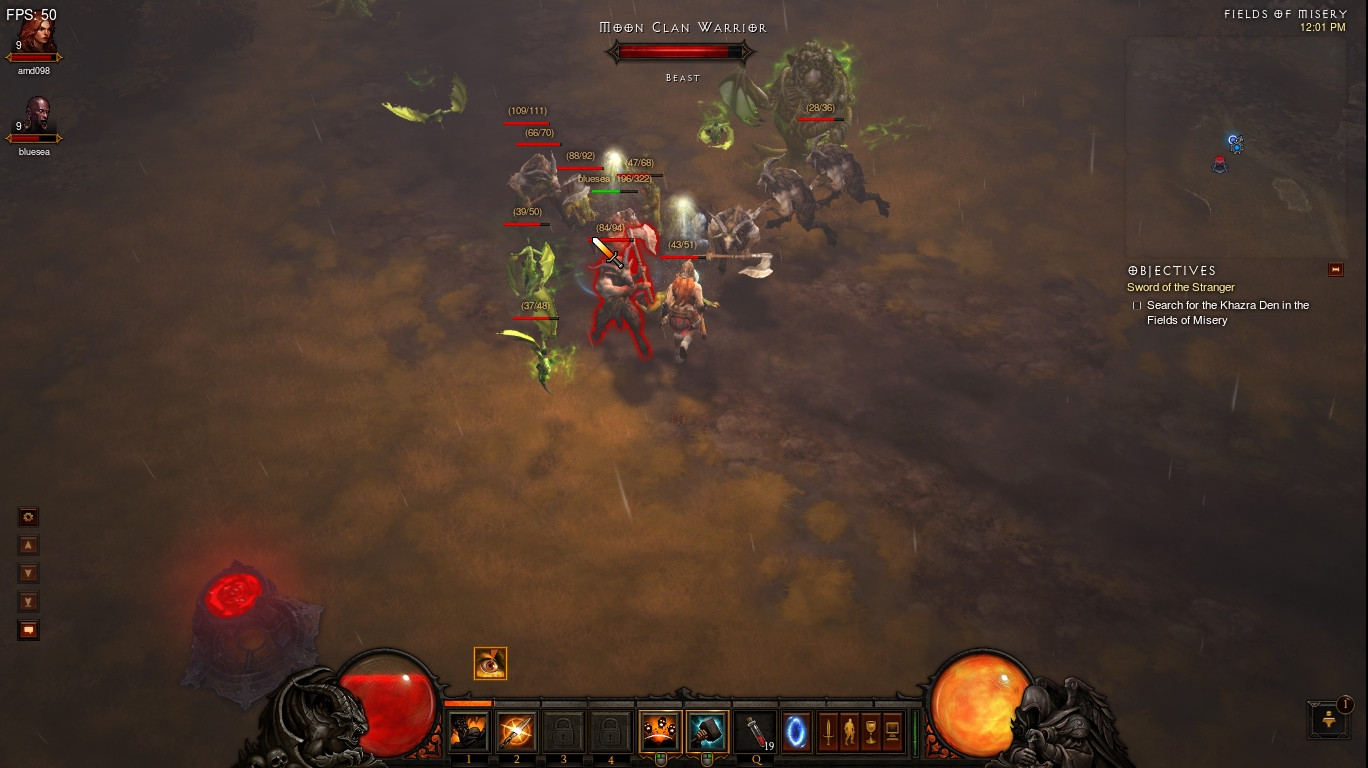
you'd probably want to push the air out of the vents, not back into it, you might need to open up the laptop
i havnt opened up my y570 yet, so im not sure how it looks inside -
what cooling pad do you use (specifics) and how lower are the temps due to the cooling pad? -
Your temps are approaching 100 degrees, which really isn't good. You may want to consider a repaste on the CPU/GPU; with the fan on "normal" and an overclocked GPU, I'm at low 80s after an hour or more of BF3.
-
I opened it up and sprayed it with air. Lots of stuff came out. Wow.
Before temps:
After temps:
![[IMG]](images/storyImages/tempsnew1.jpg)
Ingame with new temps at 1680x1050, max settings, medium shadows, AA on
![[IMG]](images/storyImages/fight.jpg)
Seems more playable, I'd say. FPS did go up, but it's hard to tell yet. I was in a big firefight and for once, I died because I made a stupid decision instead of low fps. Plus I realized the second merc sucked compared to my templar that heals, has good gear, and just got a passive regenerating ability.
Lenovo Y470 and Y570 Official Owners Thread
Discussion in 'Lenovo' started by nightspearx, May 10, 2011.


