Problems? See this thread at archive.org.
templar is better as a meatshield personally
do update your drivers, you'll see a jump in FPS
i use a coolmaster notepal u2, i got it for my m11x, but it works fine with the y570
-
Update them to what? I'm running 296.10 right now.
-
hmm and theres still so much difference between our framerates? thats pretty odd
-
I just played up to the butcherer and beat him. FPS wasn't limiting me much anywhere anymore. That guy is friggin insane. I had to completely change my skill set as wizard to beat him.
-
really, i had a easy time with him
just used diamond skin to absorb hits, and then use twister standing on top of him with liberal use of frost nova
my tag is amd098#1747
one last thing, are you in high performance mode in the lenovo/windows power settings? that could also be a throttle there -
I have it on high perf most of the time since I'm plugged in nearly all the time.
-
One thing i've noticed about the non lenovo drivers is that
1) Program acceleration (ie video encode / decode) went right out the window.
2) I have the odd blue screen due to the Nvidia driver. When I restart, the driver disappears. Then I restart one more time and everything is fine again.
3) My battery life goes way down because even if I set the machine to power saving, the dedicated 550m still ramps up clocks / voltage once in a while. (even though there is no load on the gpu and the machine is not set to performance.
As much as it pains me, I'm sticking to what Lenovo has on their website to avoid the aforementioned problems. -
Wow, I was just about to upgrade my Y570 graphic driver when I saw your post. Thanks! I will stick with 268.44 for now.
-
Yeah...
It kills me not being able to update to anything other than what is on the lenovo website. My temps being on a y470 with a i7 2360qm and the 550m have been atrocious with drivers from the Nvidia website. Using GPU-Z and Afterburner I would notice that the DGPU would stay ramped up and not downclock at all. When it did down clock, it would stay there for maybe 5 seconds and then ramp back up to full frequency and voltage.
With 268.34 idle is 32 on the DGPU. With anything else it's 42.
I'm gonna try the drivers for the Y480 to see if lenovo decided to include the 550m profiles in the driver package as well. The optimus switching system is essentially the same for the y470 and y480, so we'll see I guess. -
Hm, I'm not sure what's going wrong there. I have the same specs as you (Y470 w/550m and 2630qm) and I installed the Intel drivers from Lenovo along with nVidia drivers from nVidia. I've updated and downgraded the nVidia ones numerous times, and never had the problems you're describing.
-
Yeah, I'm using the 296.10 drivers now. No problems here, although someone pointed out that some kind of video option was no longer available (they wanted to use the Intel Graphics for something but the option was greyed out... although it wasn't that important to me).
Then again, the only game I've been playing is Skyrim. -
How did you initially install the drivers? Did you install the drivers from the Lenovo website and then update over that? Or did you uninstall the drivers completely, clean the registry and then install the ones from the Nvidia website?
Also, which drivers from the Nvidia website are you using? Which bios are you using? The unlocked menus version? Or just the straight standard bios from Lenovo? -
I'm going to try the Lenovo drivers. It's just going at 15k/sec, so it's taking a long time.
I've been playing Diablo 3 and just started act 3, and it's pretty much smooth with fps in the 40-50's. If I've played 15 hours of it already, I guess there's nothing too bad anymore. -
The first thing I did was a clean install of Windows. I think I then installed drivers from the Lenovo site (IGP first, then 550m), and then upgraded directly to the most recent from nVidia's site (no registry cleaning in between, I simply used the "clean install" option in the installer). Those produced an ugly yellow tint on all roads in BF3 (common bug according to Google) so I downgraded to 285.something using the same process. Optimus still works and no other issues.
I have not done anything to the BIOS since purchasing the laptop. -
Hi all, I have had my Y570 for a while now and just picked up Diablo 3, it seems many people all over the web are having frame rate issues with this laptop and the graphics card inside.
I have the i5 with 4GB of ram, but this machine should still easily be able to handle low settings >50fps...
I have followed all the advice and still get low frame rates on low settings.
NVIDIA GeForce GT 555M - Notebookcheck.net Tech says this card should be able to get 30fps on ultra settings yet I get 15-20 on low.
The only thing I have yet to do is downgrade to 268.44, are there instructions anywhere on how to do this properly and where I can find the software?
Can anyone confirm that they indeed get decent results playing this game or is everyone with this machine just SOL?
downgraded to 268.44 still same crappy performance.. starts off 50fps eventually drops to 15-20fps... this is no matter what settings i really have on. -
Have you tried the 302.59 drivers?
Drivers | drivers for mobile cards and laptops | laptopvideo2go.com -
is the game whitelisted by optimus? and is your laptop in high performance mode?
ill be dl'ing the new driver today and seeing if it does any better -
whitelisted? I went into NVIDIA settings and have the game forced to use the card and laptop is in high performance.
UPDATE:
Turned off my NVIDIA card and turned on Diablo 3, turned all settings down to low and ran, FPS = steady 20-30. Double checked the NVIDIA card was not running diablo, and it was not.
So my intel chip can run the game at 20-30fps, my GT555m runs it at 15-20 during heated sequences... what gives? Why is my system having so much trouble with the card -
I changed the thermal paste and my temps went down from 95 degrees to around 70 running diablo 3 so i recommend doing it if you're having heat issues like i was. I am also having trouble running diablo 3 with frame rates at around 20.
-
You changed the thermal paste and still fps at 20? I am now using the intel chipset and getting 30fps.. all settings on low but its playable. No idea whats wrong with the Optimum card, its junk. I only grabbed the y570 because I think it could handle diablo3 with decent settings and specs should but it doesnt.
-
frame rates jumps around 20-30. idk its playable and it could be because i have my 570 hooked up to a 23'' monitor. also is it just me or was D3 kind of a letdown? game-play wise.
-
I just took my 570 off my monitor and realized the E key is missing. .
-
I currently have the y470 and was wondering if everything must be disassembled to reapply thermal paste as I want to do this myself but am not too savvy with laptop components.
-
huh??
yes you need to disassemble everything to get to the heatsink. Y570 complete disassembly - YouTube -
thanks for the reply
i managed to apply the thermal paste myself and it did wonders. playing diablo at default settings used to run my gpu at 96C max and now it dropped to 76C max.
for y470 owner's, i also used this manual to help me take apart the laptop.
Lenovo Y470/Y570 Hardware Maintenance Manual -
I bought the Y470 in January, and everything's been working alright except for a few issues. When left idle and plugged in, after 10-15 minutes it would just freeze up and I'm forced to force restart it with the power button. Also, when using some programs (Virtual DJ) the computer randomly freezes for up to a minute. The trackpad almost never works after 5 minutes of turning it on and rarely, the keyboard stops working too. Has anyone else had these problems?
I looked on the Lenovo support forums and saw someone recommend re-installing/upgrading the BIOS and the trackpad drivers, and I have re-installed the trackpad drivers a few times. The problem is, after running dxdiag, my installed BIOS listed, InsydeH2O Version 03.60.4147CN31WW(V2.09), seems to be a more recent version than the one listed on the Lenovo site. Are there any more recent BIOS files? I'm having a tough time finding any. Any help would be greatly appreciated. -
Hi ! Actually i have a similar problem with my Y470 trackpad, stops working randomly after some time. I still have to try a driver re install, i hope it is not an hardware failure since now i am oversea.
The 2.09 is newer than the BIOS in the downloads page and it the same i am mounting, the y470 shipped with it i don't think that Lenovo published a newer one. Some modded BIOS with wifi whitelist float on the internet but i am not eager to flash an unofficial one. -
The trackpad is annoying and overly sensitive. I accidentally zoom in and out a lot. I can't stand it.
What I meant earlier was the E key on my keyboard went missing. No idea where it went. Luckily I found a site to order a new one for the same laptop for a few bucks. No big deal.
Wonder if anyone else had keys on the keyboard pop off. -
Can someone please recommend me a cooling pad for the Y570? These are the 2 options I had in mind so far:
1. Logitech Cooling Pad N200 | Staples®
2. http://www.amazon.com/Cooler-Master...-4WAK-GP/dp/B002MU1ZRS/ref=zg_bs_2243862011_1
Any suggestions/feedback is much appreciated. Thanks! -
i use the coolermaster notepal u2 on mine, works very well
-
Yeah, what he said.
-
Which CoolerMaster Pad is better? Cooler Master Notepal X2 or Notepad U2? -
i like the u2 as you can adjust the fans to where you need them, the u2 was a handmedown from my m11x where id put both fans on the left side vertically
on this i keep them horizonatally, but one right under the exhaust area as it does heat up a bit in D3 -
just wondering, is this compatible with the y570?
Laptop 12.7mm SATA SATA 2ND HARD DISK DRIVE Caddy DV25 | eBay
i got a 60gb ssd for $40 today, so i figured why not put it in the y570 -
Hello,
I bought a refurb y470 last week for $590. I put a mushkin SSD in it, but other than that it's stock. i7 2670, 8gb RAM, and of course an NVIDIA 550m.
I bought this new comp because I couldn't play through inferno diablo on my old i3 laptop with dedicated video. Anyone who has played inferno knows that fps below 30 isn't doable in hardcore mode.
My Problem: I get 50-60 FPS with all high settings for a good 10-30 seconds and then it bombs down to 5-20 fps for a good 10-30 seconds. It seems to alternate between the two ranges at random. It isn't triggered by physx, too many models loading, or intense/multiple animations occurring. It honestly seems completely random. I've done some reading around with google searches and I'm finding that other people are having this same problem, but no one has found a solution.
I have my 550 on by the switch. I have it set on in program settings and in global settings. I have lenovo + windows energy settings on high performance and I am also plugged into the wall. My temperatures are fine while in game. I have tried running at the lowest settings possible in-game. I have tried flashing the bios and installing previous NVIDIA drivers. None of this has changed anything and it's left me very frustrated.
I don't even care about running at high settings. I just want to be able to play D3 without any fps lag....
All thoughts/suggestions are welcome! halp -
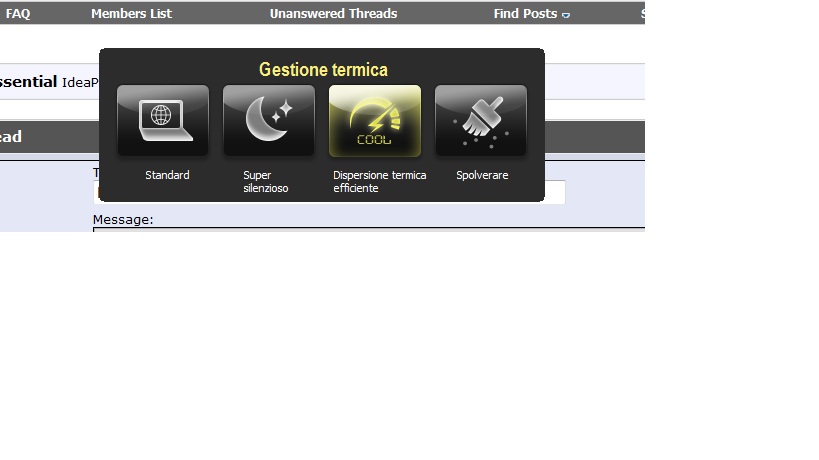
Throttling issue ? Make sure your Fan configuration is on Efficient thermal dissipation , you can cycle between modes with the moon and stars button on the upper right over your keyboard.
If you can't solve with this is becoming clear that Lenovo puts too much thermal paste on the cpu and gpu so this may be a cause.
I have similar problems with my y470 with an i3, like FIFA 12 goes well and then lags when the cpu is throttled, and changing details from low to high doesn't change anythings because the problem is the CPU that is slowed to 800 Mhz and makes everything going slow. -
Thanks so much for the quick response Locke.
So this has to do with the CPU or GPU boost features? They choose when to throttle down and up according to what? Did you solve your problem by doing this? I feel like this computer should be murdering D3.
Thanks -
Try to change your fan speed configuration and see if the issue is still here. I think you should have Lenovo Power management 6.0.2 installed to get this option.
if the cause of your problem is really throttling the problem can be : dust in your fan (it happened to me after 6 months of use) , poor thermal paste distribution on your Cpu and Gpu (check some post back, lenovo puts too much paste that acts as an heat insulator, you should deassembly the notebook completely to fix this). I don't think CPU's Turbo feature may be the problem , because it should not increase the frequency if the temperature is already high.
I kinda managed to solve my problem with the thermal efficient fan mode but i get some throttling sometimes, i think the problem is the thermal paste lenovo applied. By reapply the paste i will lower by some degree my temperatures to avoid throttling, i hope the i7 is not too much for y470 dissipation system.Attached Files:
-
-
check your temps with hw monitor or speedfan right when you get your fps drop
what settings do you have for d3? -
Question.....a few days ago, I said that I realized the E key on my y570 was missing, and while the pin works on the keyboard still to type with it, I'd still like to fix it. I tried ordering a replacement from a site for $7 but it was the wrong model. Is there anywhere to get a replacement? Lenovo says they want me to send in the laptop for 1-2 weeks to fix a key! I'd go crazy.
There has to be another option.
Edit: Never mind. I guess it pays that after my father got me a discount on this for working for Lenovo, he could help on this too. He asked a man he works with if he had spare keyboard parts for this model and he did. So, his coworker gave him a new keyboard to use on my laptop. Yay. -
I havent visited this thread for a while now, because I hadn't had any problems or complaints, I had heat problems which got to the point where I decided to take advice and replace the thermal compound.
After opening up and completely dissasembling my machine, (voiding warranty mind you!) I lift up the heat sink, prepared to see gross amounts of compound, only to find!!!! (wait for it...)
NO THERMAL COMPOUND AT ALL.
There the cpu and graphics chips looked all shiny and clean, I wiped it a few times, and yes, it seems lenovo felt it unnecessary to apply any compound to my machine. I STRONGLY encourage those with heat problems to either open yourself (if you have experience) or have a local computer repair shop do it, because it's really not acceptable, I'll post images later, and let you know how my heat is after putting some A5 on there.
Really ridiculous lenovo...
shot a quick video with my phone
http://www.youtube.com/watch?v=kF6o6hz5OUQ -
I used some TC 1996 since the S5 is still on it's way, immediately dropped temps by 30 C...
![[IMG]](images/storyImages/original.jpg)
![[IMG]](images/storyImages/original4.jpg)
Upon opening it, as you can see, no thermal compound.
Explains the overheating. -
I have similar problem. In Y470 WiFi module is located directly under the trackpad. And when I use wireless connection excessively, WiFi module heats up and trackpad becomes crazy. In Linux I have these messages in system log:
In Windows trackpad just locks up and I never can make it work again until I shutdown laptop completely and start it up again. Sometimes I need to wait until trackpad cools enough.Code:[94113.709137] i8042: Can't write CTR while closing AUX port [94115.488544] input: PS/2 Generic Mouse as /devices/platform/i8042/serio1/input/input21 [94116.564213] input: PS/2 Generic Mouse as /devices/platform/i8042/serio1/input/input22 [94123.901260] input: ImPS/2 Generic Wheel Mouse as /devices/platform/i8042/serio1/input/input23 [94139.624890] input: PS/2 Generic Mouse as /devices/platform/i8042/serio1/input/input24 [94140.363842] psmouse serio1: Mouse at isa0060/serio1/input0 lost synchronization, throwing 1 bytes away. [94140.885666] psmouse serio1: resync failed, issuing reconnect request [94142.345594] i8042: Can't write CTR while closing AUX port [94144.537838] input: PS/2 Generic Mouse as /devices/platform/i8042/serio1/input/input25 [94144.543007] psmouse serio1: Failed to enable mouse on isa0060/serio1 [94147.186024] input: PS/2 Generic Mouse as /devices/platform/i8042/serio1/input/input26 [94147.925750] psmouse serio1: Mouse at isa0060/serio1/input0 lost synchronization, throwing 1 bytes away. [94147.945409] psmouse serio1: resync failed, issuing reconnect request [94155.767242] psmouse serio1: Mouse at isa0060/serio1/input0 lost synchronization, throwing 1 bytes away. [94156.284924] psmouse serio1: resync failed, issuing reconnect request
In Linux I managed it to work by issuing this command:
Code:sudo rmmod psmouse && sudo modprobe psmouse
I think that it's the hardware problem rather than software. In my case I have the same problem with trackpad in different OSes. -
30 Degress is a very good improvment, which CPU do you have ? So we have Lenovo going for too much thermal compound or not at all.
And for the trackpad hardware problem, that could explain why it gets so random, nice find ! -
i5 CPU , I should clarify 30 degrees under load. Idle temp is similar (then again I had my max cpu set to 80% before because of chronic overheating problems), but it doesn't throttle anymore or buildup heat during prolonged use.
If you're having heat problems and are out of warranty already I'd recommend dissasembly to check the heatsink, and to clear out dust buildup. It seems like the folks at lenovo aren't very competent at putting computers together.Then again it's a bit of a pain in the to get to so if you have a warranty see if they'll honour it, and if you're not confident take it to a professional. In any case, if your laptop is not functioning properly due to heat, and you've cleaned out dust from the vents, it's probably because lenovo made a mistake somewhere in putting your machine together.
@ People with the overheating trackpad and keyboard problems, can you feel the air flow from the keyboard near the s key? You should be able to feel air passing through there if you have proper air flow. If not it may simply be build up of dust clogging one of the vents. If yes, is the center bottom vent getting excessively hot even with good air flow? then it's more likely a heat transfer problem. I'm sure you've checked the connections of the devices already, does the problem still occur if you unplug the wifi chip? -
I can feel the air flow and the vents are clean. But the center bottom is hotter than other parts of the cover. Also it doesn't have any holes there:
![[IMG]](images/storyImages/b02vm.jpg)
Yes, I tried that. I unplugged the chip. The center bottom was way cooler than with the chip on board. But after some stressful testing trackpad stopped working again.
So, yeah. It looks like it's the problem with the proper heat transfer. -
just a question, where should i position my cooling fans for the y570? I have a notepal u2 cooling pad, and had the fans vertically on the left side as that was where i'd keep them for my m11x, but im not sure where to put them for the y570
-
My temps out of D3 with it mimized:
![[IMG]](images/storyImages/mytemps-1.jpg)
The max temps are what it reaches at the heavy load in Diablo 3.
Am I at the throttle point in the game? -
looks to me that both of your cpu and geforce got throttled. For reference, my computer reboots itself whenever gpu hits 85' running furmark. 90'c+ is not good. NOT GOOD. I wonder exactly at what point does the throttling begins.
-
As somebody suggested earlier, the stock video driver is . Update to the newest driver and do a "clean" install. Then your switch will work at will. My starcraft 2 with the switch on went from 100 fps to 280 fps.
Lenovo Y470 and Y570 Official Owners Thread
Discussion in 'Lenovo' started by nightspearx, May 10, 2011.